How to opt out of FastBackgroundCheck: step-by-step guide
Being behind major reports like The Mother of All Breaches and RockYou2024, our in-house cybersecurity experts and journalists provide unbiased, real-world testing and in-depth analysis.
We maintain complete transparency by openly sharing our testing methodologies with our audience.
Learn more

People search sites like FastBackgroundCheck are very useful for conducting detailed identity verification processes. Although they have some benefits, these sites pose serious privacy risks. They collect and display a wide range of sensitive personal data, such as your full name, current and past addresses, and active phone numbers. Some even go as far as providing detailed information about your relatives – all without your consent.
This means anyone, from anywhere, can go online and, after just a few clicks, access all your important information. This, in turn, leaves you vulnerable to major problems like identity theft, fraud, unsolicited contact, and even cyberstalking. As such, adopting proper data protection measures is more important than ever.
The first step toward regaining control of your digital privacy is removing your personal information from people search sites. This FastBackgroundCheck opt out process guide takes a close look at how FastBackgroundCheck puts your privacy at risk and how to remove your data from the platform.
How to remove your personal information from people search sites

- Select a reliable data removal service. I recommend Incogni, now 55% OFF
- Create an Incogni account and sign the authorization form, which permits the service to request the removal of your information on your behalf
- Track Incogni’s progress through your dashboard. You can see all the requests sent out and their status



The Cybernews team consists of professional and highly skilled writers and an in-house research team. They’re the core of all our reviews, bringing the performance of each tool closer to you. Additionally, we stick to a transparent testing process, which includes investigating various services, their features, and disclosing our testing methodology with everyone. Discover more about our testing process.
How to manually remove your information from FastBackgroundCheck
Manually opting out of FastBackgroundCheck is a simple process. However, it takes time and requires some patience. Follow these steps to get started:
1. Find the opt-out page on FastBackgroundCheck’s website

To find the opt-out page, visit the FastBackgroundCheck website, scroll to the bottom of the homepage, and click “Do Not Sell My Personal Information.”
Tip: To continue, you will need to complete a CAPTCHA and enter your email address. Consider using a throwaway or masked email to protect your privacy.
2. Search for your information
Enter your name and location to search for your personal information in the FastBackgroundCheck database.

Once you find your data, click on the record to select it for removal.

3. Complete the opt-out process
Submit the opt-out request by clicking “Remove my record.”
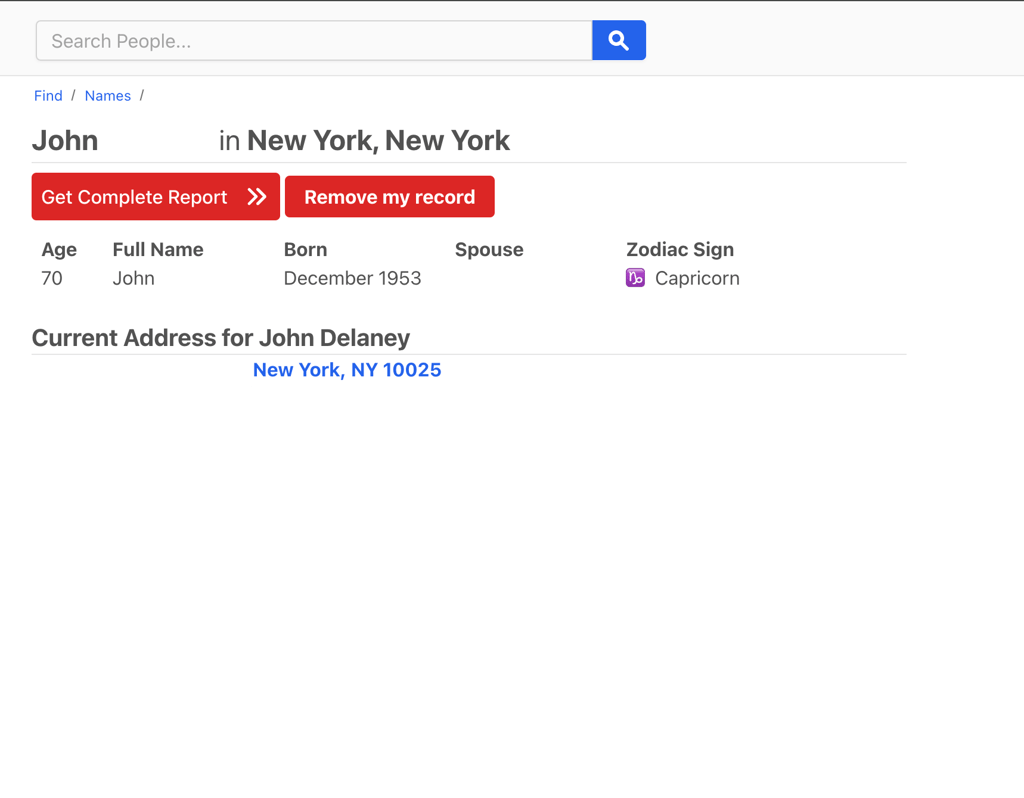
4. Verify your identity
You will be asked to verify your identity via email to complete the request. Open the email and click on the button.
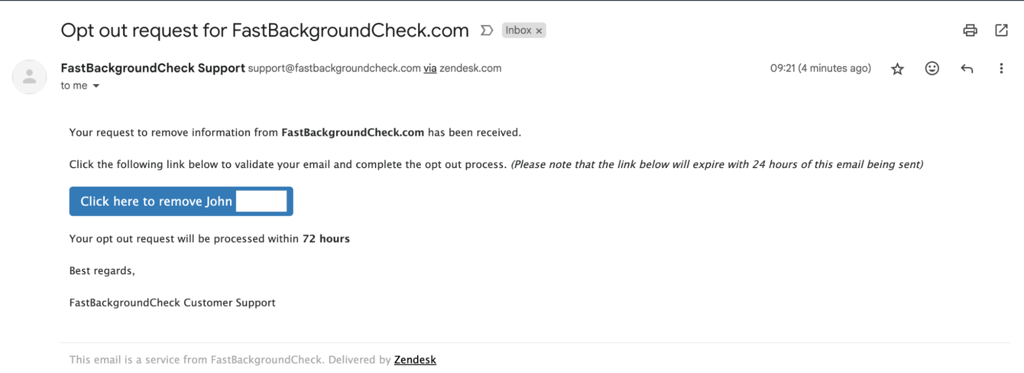
5. Let the platform process your request
You’ll see a notification from FastBackgroundCheck confirming you have successfully submitted an opt-out request. It may take up to 24 hours before the request is processed and your data is removed.
Tip: While the opt-out process is pretty straightforward, you can contact FastBackgroundCheck’s customer service directly if you encounter any issues.
Although this method works, it likely won’t solve your problem for good, as your information may reappear on the platform, meaning you’ll have to submit opt-out requests in the future.
Common problems of manual FastBackgroundCheck opt out & how to fix them
The process of removing your personal data from FastBackgroundCheck is usually seamless. However, sometimes you may run into problems while trying to secure your privacy. Some common problems with the manual FastBackgroundCheck opt out include:
- The opt-out form doesn’t submit or you get error messages when trying to use it
- You get an email confirmation, but your profile is still visible
- Your information gets re-listed after a few weeks or months
- Search results on Google still show your data (cached)
- Your name appears under slight variations (e.g., middle initial or maiden name)
- Profile reappears with updated or merged information from new sources
If you’re currently facing any of these issues, here are some helpful tips on how to resolve them:
- Wait. Some people search sites take as long as 7-14 days to remove listings fully from their databases and cached copies. So if your information is still appearing, wait for 1-2 weeks and then check again.
- Double-check your details. Make sure to enter all possible variations of your name to ensure complete data removal. If you changed names at any point, also search for and remove your former names and their variations.
- Re-check periodically. People search websites try to prevent this, but it is possible for your data to be re-added to the site’s database. If this happens, you may have to repeat the whole data removal process.
One way to spot these re-listings early is to set up a Google Alert for your name. Alternatively, you could consider using a data removal service so you don’t have to keep dealing with this manually.
- Contact support. If you are still unable to completely remove your data from Fastbackgroundcheck, consider reaching out to support for help.
Alternative FastBackgroundCheck opt-out methods
If manually removing your data from FastBackgroundCheck sounds too complicated, or you need stronger measures, there are several other ways to opt out of this people search site.
- Send a direct request: You can contact FastBackgroundCheck via phone, mail, or the contact form on the website and ask to have your data removed. The contact form is the least time-consuming option of the three. To speed up the process, list the information featured on your record (such as name, phone, or address).
- Take the legal route: If your information is being hosted in a way that infringes on your privacy or intellectual property rights, filing a DMCA takedown request can be an effective legal approach. While this is not a universal solution, it is incredibly useful when your data has been obtained and published without consent.
- Use a data removal service: Data removal tools like Incogni can remove your personal information from hundreds of people search sites. This service saves you time and provides comprehensive privacy protection. Incogni also ensures your data isn’t re-added to these sites, sparing you the trouble of having to manually check these sites and opt out repeatedly.
Keep in mind that protecting your privacy is not just about deleting your data from people search sites; it’s also about limiting the information you share online and reducing your digital footprint. Be mindful of the personal details you disclose, as they may end up in the hands of data brokers.
What Is FastBackgroundCheck?
FastBackgroundCheck is an online people search directory that collects the personal information of US residents from public records. You only need to enter a person’s name on FastBackgroundCheck to access personal data about them, such as their address, phone number, email, and information about their relatives. You can also look up a phone number or address and browse FastBackgroundCheck’s database of popular last names.
While this might sound harmless, having your personal data on a platform like FastBackgroundCheck puts you at risk of identity theft, unsolicited marketing, phishing scams, and even online harassment or stalking, among other security threats.
The best way to protect your privacy and make yourself less vulnerable to these threats is to opt out of FastBackgroundCheck. Below, you’ll find detailed explanations of different ways you can remove your data from FastBackgroundCheck and other people search sites.
What kind of information is available on FastBackgroundCheck.com?
FastBackgroundCheck.com aggregates data from multiple public and private sources, allowing it to function as more than just a reverse phone lookup site. Here’s an overview of the kind of personal information FastBackgroundCheck makes public:
- Full name (first name, middle name, and last name)
- Popular aliases
- Age
- Zodiac sign
- Email addresses
- Current and past residential addresses
- Social media profiles
- Court records
- Relatives, neighbors, and associates
- Business affiliations
- Professional licenses
- Assets and financial information
- Photos and videos
Reasons to remove your information from FastBackgroundCheck
There are numerous reasons to opt out of FastBackgroundCheck, especially if you prioritize privacy. Having your data on this site exposes you to various threats, including the following:
- Identity theft and fraud: With your personal information online, you’re a target for phishing scams. Fraudsters can even trick you into revealing sensitive data that they can use to impersonate you and access your accounts.
- Stalking and harassment: The exposure of your personal information can pose a major security risk and allows stalkers to intrude into your life. This is especially true for individuals who have been targeted by stalkers or are more vulnerable to such threats.
- Unsolicited marketing and scams: Data brokers sell your information to third parties, resulting in annoying targeted ads. It also increases your chances of falling victim to scams.
Who else is selling your personal information?
FastBackgroundCheck isn’t the only platform that collects and sells personal information. There are many other people search sites out there, and Cybernews has guides explaining how to opt out of each one:
- Opt out of Whitepages
- Opt out of CoreLogic
- Opt out of Intelius
- Opt out of Radaris
- Opt out of CheckPeople
- Opt out of PeopleFinders
- Opt out of BeenVerified
- Opt out of Spokeo
- Opt out of USPhoneBook
Each platform has its own opt-out process. I recommend using a data removal tool like Incogni to remove your data from information broker sites and ensure your data doesn’t reappear on these platforms.
Conclusion
Taking control of your online presence is crucial to safeguard your privacy and protect yourself from online threats like identity theft and harassment.
While limiting your digital footprint is a great first step, you also need to remove your personal information from platforms like FastBackgroundCheck. You can manually opt out of these sites, but it can be a time-consuming process. A data removal service like Incogni is a convenient solution; it automates the opt-out process and keeps track of your data, ensuring it isn’t readded to data broker sites.
FAQ
Why is my information on FastBackgroundCheck?
FastBackgroundCheck collects data from various public sources, like social media and court records. It then makes this information available on its website for anyone to search.
Is FastBackgroundCheck legal?
Yes, FastBackgroundCheck operates legally. However, it’s your right to request to have your personal data removed from this site. In some cases, you can even take the legal route by filing a DMCA removal request.
Where does FastBackgroundCheck get its data?
FastBackgroundCheck gathers data from various public records and third-party sources, including social media, court records, phone directories, and other public documents.
How soon will FastBackgroundCheck remove my data after I submit an opt-out request?
After you submit an opt-out request, FastBackgroundCheck usually removes your information within 24 hours. If your data is still on the platform after this time, consider contacting FastBackgroundCheck’s support team.