How to opt out of BeenVerified in 2026: a detailed guide
Being behind major reports like The Mother of All Breaches and RockYou2024, our in-house cybersecurity experts and journalists provide unbiased, real-world testing and in-depth analysis.
We maintain complete transparency by openly sharing our testing methodologies with our audience.
Learn more

It may have been an online shopping spree, your occasional Facebook updates, or literally anything else. Even if you think you’re keeping a low online presence, there’s no guarantee your personal information won’t end up in data brokers’ hands – and on platforms like BeenVerified that lets over 16 million monthly viewers access this data. As a result, anyone (including scammers) will be able to look up your full name, home address, contact numbers, and other sensitive information.
This opens the door for multiple possible threats, including phishing, identity theft, doxxing or even, in extreme scenarios, stalking. That’s also why it’s worth opting out of data brokers like BeenVerified.
In this article, I’ll explain what BeenVerified is exactly, how you can opt out of it, why you should consider doing it, what happens after removing your info and which other data broker platforms you should keep in mind.

How to opt out of BeenVerified: quick steps
- Go to BeenVerified’s official website.
- At the bottom of the page, under Help, select “Do Not Sell or Share My Personal Information.”
- Search for your name and select the records you want removed.
- Fill out the necessary information in the form.
- Click on “Send Verification Email.”
- Find the confirmation email and click “Verify Opt-Out.”
What is BeenVerified?
BeenVerified is a people search website that allows its users to look up and buy others’ personal data for a monthly fee. It collects data from public sources (such as social media or governmental databases) to compile detailed profiles that can include your name, phone number, address, employment history, criminal record, marital status, relatives and more.
Additionally, BeenVerified lets users look up a person by their name, phone number, email, address or vehicle number – meaning, they’ll be able to access your profile even if they have a small fraction of data.
Although all of the information BeenVerified collects can technically be found in open access, it still creates a pathway to real threats when gathered in an easily-searchable online profile, and makes you a potential target for malicious actors. Frauds might use your details for various purposes, from phishing schemes to identity theft or, potentially, even more complex fraud. In especially severe cases, you may face doxxing or stalking.
Last but not least, marketers sometimes create their client databases by using platforms like BeenVerified, which may result in you receiving unwanted spam calls and promotional emails.
That’s why, if you want to protect yourself from scammers and spam, it’s worth opting out of BeenVerified. Learn even more about how to remove your digital footprint here.
How to opt out of BeenVerified: detailed step-by-step instructions
There are two ways to opt out of BeenVerified: automatically or manually. Below, I’ll guide you through both.
How to opt out of BeenVerified automatically
I recommend using the automatic method of opting out of BeenVerified. To proceed, you only need to subscribe to a personal data removal service. These tools simplify the removal process and can automatically wipe your data from over 420+ (3,420 with custom removals) data broker sites.
For the step-by-step guide below, I use Incogni as an example, as it’s our highest-ranking personal data removal tool. I especially like how it repeatedly scans broker sites in case your information gets added back. Incogni also periodically resends opt-out requests to ensure your privacy remains intact.
Here’s how to use Incogni to automatically delete your information from people search sites:
-
Visit the Incogni website, click “Get Started,” and choose a suitable plan.
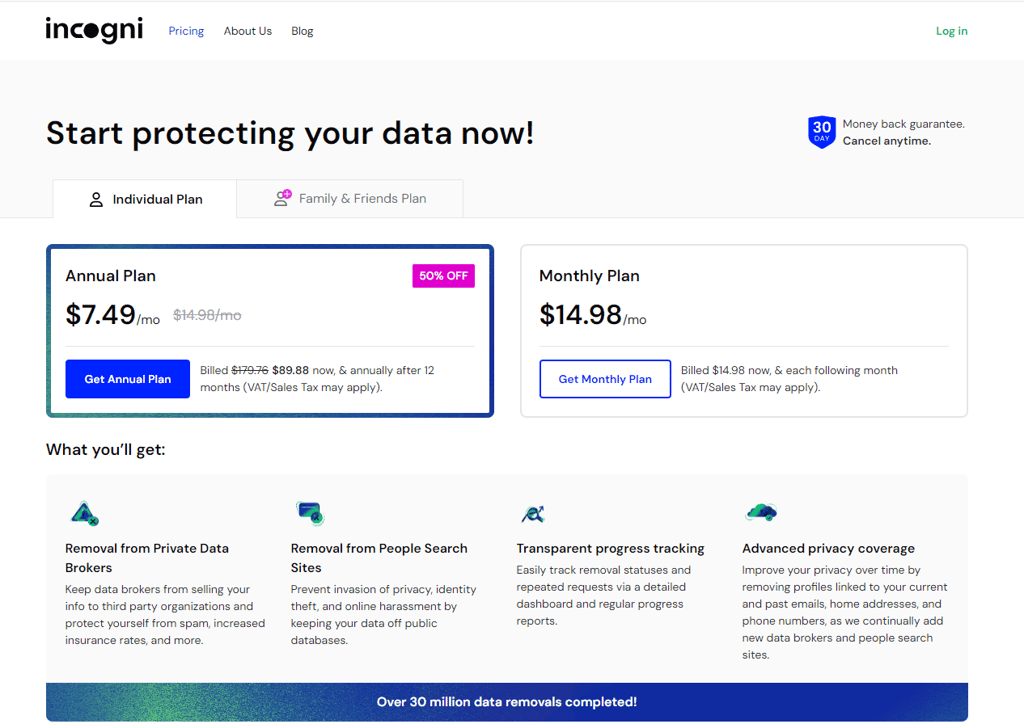
- Once you’ve selected a plan, you need to fill out some details, such as your email, country, and ZIP code. Then, click “Proceed to Payment,” enter your billing details, and click “Subscribe Now.”
- You’ll receive the verification email. Click on “Verify your email address” to complete the process.
-
To begin your journey, create an Incogni account. You’ll need to provide your name, phone number, and date of birth.

-
Then, you’ll need to read and sign the Power of Attorney form. Make sure to double-check your details before signing.

- Incogni will automatically scan broker databases to find any records that match your data. When a match is found, Incogni will send an opt-out request.
-
The Incogni dashboard shows the number of data brokers Incogni has contacted and the number of brokers who have deleted your data.
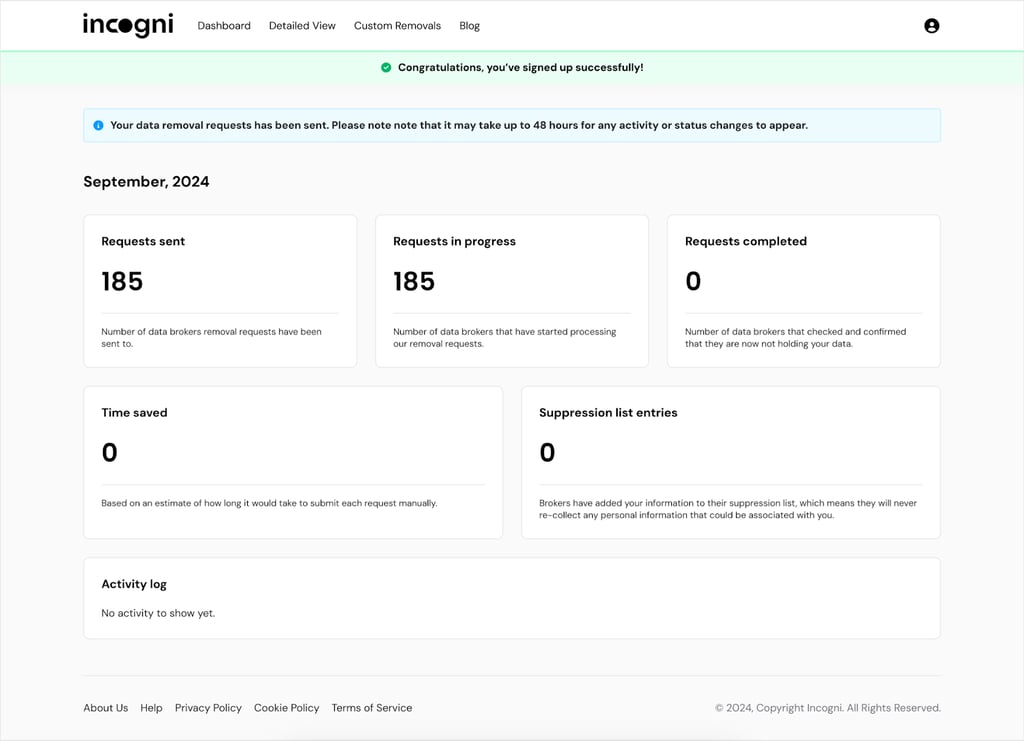
Timeline for automatic data removal with Incogni
Data removal requests can take time to process. Privacy laws like GDPR, PIPEDA, and CCPA prescribe a set timeframe for data removal, but not all brokers comply with this deadline. What’s more, some data brokers relist your information after some time. As such, not even Incogni can say how long it will take to completely remove your data from broker databases.
That said, when testing Incogni, our research team found that the initial scan takes about 48 hours, after which removal requests follow immediately. The process first repeats after 10 days and then regularly every 90 days.
| Difficulty level: | Low |
| Initial scan: | 48 hours |
| Recurring scans: | First repeats after 10 days, then every 90 days |
How to opt out of BeenVerified manually
You can also manually opt-out of BeenVerified. Though it takes a more hands-on approach, the whole process only takes 10 to 20 minutes. Here’s what you’ll need to do:
-
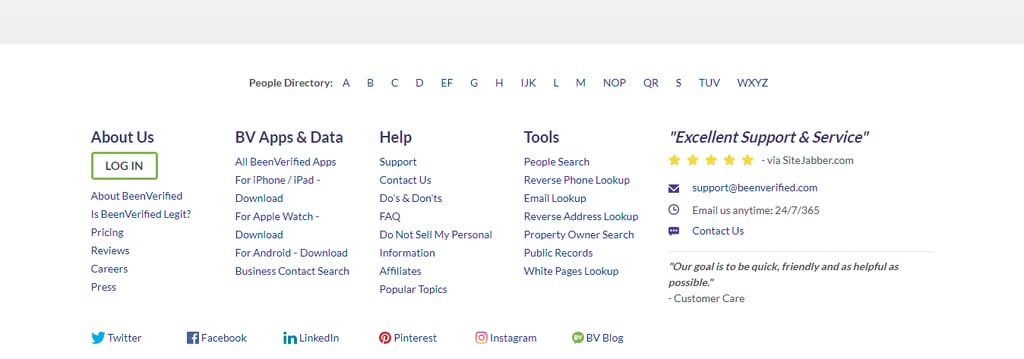
Go to BeenVerified’s official website. At the bottom of the page, under Help, select “Do Not Sell or Share My Personal Information.”
-
Search for your name and select the records you want BeenVerified to delete.

- Fill out the necessary information in the opt-out form, such as your name, email address, and the information they want to remove.
-
On the next page, enter your email address, tick the CAPTCHA box, and click the green “Send Verification Email” button to receive an opt-out request.

-
Check your email for a confirmation message. The message will ask you to verify your request to opt out. Just click the green “Verify Opt-Out” button.

- BeenVerified typically needs 24 to 72 hours to process your request. After this timeframe, you can check if your data has been removed. Open BeenVerified, and search for your name. If the opt-out process was successful, then there shouldn’t be any results tied to your name.
Timeline for manual data removal from BeenVerified
| Difficulty level: | Low |
| Manual submission time: | 10 to 20 minutes |
| Processing time: | 24 to 72 hours |
| Requirements: | None |
Alternative BeenVerified opt-out methods
Besides using Incogni or BeenVerified’s website, you can also contact BeenVerified’s support team directly. Below are various alternative methods.
Call BeenVerified and speak with customer support
A phone call is the best option if you prefer to speak with a human and have them guide you through the process. Here are the steps you should follow:
- Call BeenVerified at 1-844-823-2869 and wait for the automated menu.
- Select the option closest to “Privacy Rights or Requests.”
- When prompted, choose to speak with a customer service representative.
- Once connected with customer support, inform them that you want to “opt out of BeenVerified” and provide the necessary information for them to process your request.
- Ask the representative when you can expect to have your request processed. I also recommend asking for written confirmation of the request you submitted, to be sent to your email address.
To check if your request was successful, you can open the BeenVerified website and search for your name. If no results turn up, then you’re good to go.
Mail or email BeenVerified with your opt-out request
Sending mail to BeenVerified provides the benefit of having written evidence of your requests and their responses. Here’s a guide on how to email them:
- Draft your removal request. Clearly state that you want BeenVerified to remove all your records, and write that you want them to begin the opt-out process immediately. I also recommend asking them to notify you once the process is complete.
- Send your letter by email to [email protected] or by snail mail to MSC - 149098, PO Box 105168 Atlanta, GA 30348.
The above steps should also generally work with other data brokers. However, there are over 420+ (3,420 with custom removals) data broker sites online, and you’ll need to contact each one manually. For users who would rather automate this process, I highly recommend using Incogni.
What happens after I opt out of BeenVerified?
Once you have requested data removal and opted out of BeenVerified, your profile will be hidden from public searches, with users no longer able to purchase your data or look it up via the site even if they already have your name, phone number or email.
However, this solution is only temporary, as BeenVerified can still create another profile of you – with newly surfaced information or the one they haven’t previously used. While there’s no set timeline, your data might end up on the platform again within just 3-4 months.
To ensure peace of mind, it’s crucial to monitor BeenVerified and other people search sites for your information’s re-appearance regularly.
Reasons to remove your information from BeenVerified
As data breaches become rampant, privacy and data security concerns grow. Here are the various risks of keeping your information on data broker sites:
- Harassment and doxxing. It becomes easier to send you offensive messages, bombard you with marketing calls, or expose your personal information when your name, address, and contact details are publicly available.
- Identity theft. Criminals can use data from broker sites to pose as you or your loved ones. They can then use your identity to open new bank accounts or credit cards.
- Phishing and scams. The most effective scam or phishing emails usually utilize your personal details. For instance, a scammer posing as PayPal may include your full name and address in order to look more official.
- Employment or housing discrimination. Potential employers or landlords can run background checks on you using data broker sites. Inaccurate or outdated information about your work and rental history can damage future opportunities.
- Loss of anonymity. Online anonymity is extremely valuable for whistleblowers, activists, victims of abuse, and anyone who just wants to keep a low profile. Data broker sites make this impossible unless you request for your data to be removed.
Why removing your data from BeenVerified is only a temporary fix
Data removal is a continuous battle. Broker sites can relist your information, even after a data removal request, as they refresh their database with new records. And when you consider that there are over 210 broker sites online, monitoring your data privacy becomes a monumental task.
While the data removal process itself may be easy, having to keep track of sites like Whitepages, Spokeo, TruthFinder, Intelius, and PeopleFinders will eat up much of your time.
If you want to go about it manually, I recommend setting up a spreadsheet containing data brokers, their contact information, and a recurring schedule for removal requests. You can also bulk send data removal request emails to these services instead of individually emailing each one.
However, the best way to stay on top of your data privacy is still to use a data removal service. Incogni regularly scans data broker databases and sends removal requests on your behalf. Think of it as a personal assistant whose only job is to make sure your personal details stay off data broker sites.
How to prevent your data from falling into brokers’ databases
We know that data brokers will try to relist your personal data in their databases. Is it possible to prevent this from happening in the first place?
While there’s no foolproof method of stopping these platforms, there are steps you can take to prevent them from finding your data:
- Don’t post your personal information publicly. Refrain from posting your personal details on social media, as data broker sites can see your public posts.
- Disable location sharing. If you’re not actively using a GPS app, turn off the location on your phone to prevent apps and services from tracking your movements.
- Configure your social media settings. Social media sites provide privacy settings that let you limit who can see or interact with your posts. Make sure to set your accounts to “private” if possible, and toggle off location sharing.
- Avoid signing up for marketing emails. Many users willingly give companies their email addresses, not knowing that this information can be shared between different businesses depending on their privacy terms.
- Delete old accounts. It’s good practice to remove inactive accounts even on websites you don’t use anymore, as these accounts may still contain your private information.
- Remove your information from Google search results. Make a quick Google search of your name. Did any of your information pop up? If so, it’s a good idea to remove your personal data from Google search results.
- Subscribe to data breach notifications. Services like Surfshark VPN – Incogni’s parent company – will instantly alert you if your data gets caught in a data breach.
- Mask your information. Consider using fake information when signing up for websites that don’t need to know your real name or email address. Some examples are social media sites like Reddit and X (formerly Twitter), online video games, and messaging platforms like Discord. You can use the Surfshark Alternative ID feature to generate personal information on the fly when signing up for a website.
Conclusion
BeenVerified raises significant privacy concerns, as it makes private data available to anyone, including hackers and malicious actors.
Luckily, it’s easy to opt out of BeenVerified. You can delete your data from people search sites manually or by using a data removal service like Incogni. Incogni automates the process of scanning data broker databases and sending them data removal requests. With Incogni, you can sit back and let it do the work of contacting 420+ (3,420 with custom removals) brokers for you.
Feel free to share your experiences with sites like BeenVerified or ask questions in the comments section. We’re here to help!
Other people search sites you should opt out of
Opting out of BeenVerified is a solid first step for taking your personal data off the internet (at least for the time being) but with hundreds of data brokers operating worldwide, it might simply not be enough.
Check out our detailed guides on removing your info from other popular people search sites to protect your data further:
FAQ
Is there a free version of BeenVerified?
No, there’s no free version of BeenVerified. However, it has a 7-day free trial.
Is BeenVerified legit?
Yes, BeenVerified is a legitimate background check service.
Is BeenVerified free?
No, BeenVerified isn’t free. You need to choose a 1-month or 3-month subscription to access its service. Both plans allow you to run up to 100 reports within a month.
How to remove info from BeenVerified?
You can remove information from people search sites like BeenVerified automatically using a data removal tool such as Incogni. You can also manually contact these sites and ask them to delete your data.
Can you use BeenVerified without paying?
No, you can’t use BeenVerified without paying.
What data is removed from BeenVerified when I opt out?
When you opt out of BeenVerified, the following data gets removed: your full name, age, current and past addresses, email addresses, phone numbers, photos, family members, roommates, traffic and criminal records, court proceedings, litigation history, bankruptcy proceedings, education history, employer history, business associations, and social media profiles.
What’s the best way to remove my data from BeenVerified?
The best way to remove your data from BeenVerified is to use Incogni, a secure and affordable data removal service. Incogni scans data broker websites and then sends data removal requests on your behalf.
Why does my data keep reappearing on BeenVerified after I opt out?
Your data may reappear on BeenVerified because the site regularly refreshes its database with new records from public sources and third-party brokers. Even if you’ve opted out, your information can resurface when it’s re-collected from these sources.
How long does it take to remove my data from BeenVerified?
Getting your data removed from BeenVerified can take 24 to 72 hours.
How can I tell if my data has been deleted from BeenVerified?
You can go on the BeenVerified website and search for your name in its database. If no results appear, then your data has been successfully removed.