How to opt out of CheckPeople


 Follow us
People search websites can be useful for employers checking their potential hires or sellers looking up buyer profiles. However, platforms like CheckPeople make your home address, court records, and even info on family and relatives readily available within just one click.
CheckPeople compiles public records, including everything from names and addresses to property details, court filings, and even information about your family. They even make it simpler for data thieves to find all the info with just a simple look at your on-site profile.
Most people don’t realize that sites like CheckPeople make it frighteningly easy for stalkers, scammers, or identity thieves to dig into your private life. That’s why I’ve made this guide together with my team of experts at Cybernews to show you how to keep your online presence safe. We’ll explain a bit more on the site’s background, as well as walk you through the opt-out process one step at a time.
| Platform | CheckPeople |
| Removal difficulty | Moderate |
| Manual submission | Up to 15 minutes |
| Removal requirements | Email, CAPTCHA |
What is CheckPeople?
CheckPeople is a people search website that collects large amounts of personal information on United States residents.
It scrapes this information from various public sources and puts it all in one place for practically anyone to access. Sites like this often use automated algorithms to search deep and wide for information.
CheckPeople displays various personal information, including past and current addresses, phone numbers, social media profiles, criminal records, mugshots, and even data such as bankruptcy filings, asset lists, family member information, and marital status.
The fact that this data is available publicly opens the door to mass-scale identity theft, scams, or simply unwanted attention from strangers and stalkers. For instance, hackers and scammers can piece together information from CheckPeople to steal your identity, access your financial accounts, or commit fraud in your name.
If what you've read so far has you anxious, you need to opt out of CheckPeople and other people search sites, and we’ll explain how to do so.
How to opt out of CheckPeople
There are two primary ways to opt out of CheckPeople: manually or automatically. Below, we’ll provide step-by-step instructions for each method and highlight its pros and cons.
How to remove your data automatically
You can opt out of CheckPeople and other data broker sites automatically using a data removal service like Incogni or DeleteMe. These tools simplify the process and ensure your data is removed from the databases of several data brokers at once. I’d recommend Incogni as the absolute best pick overall, but here’s a detailed overview of the key contenders:
- Incogni: Incogni is my top pick for repetitive, automated removals from data broker sites. It runs automatic scans of the CheckPeople database, looking for your information. If it detects any traces of your records being exposed, it begins sending automated removal requests.
- DeleteMe: With a tool like DeleteMe, you can get a detailed security report on your information within the first few days of using the service. It runs regular scans every 3 months, and its neat privacy reports help you actively reduce your digital footprint.
- PrivacyBee: Ultimately, I would recommend PrivacyBee to those in need of dark web monitoring or additional tools for proactive protection, suitable for both business owners and individuals.
Here are step-by-step instructions on how to remove your personal information from CheckPeople and similar sites automatically using Incogni:
-
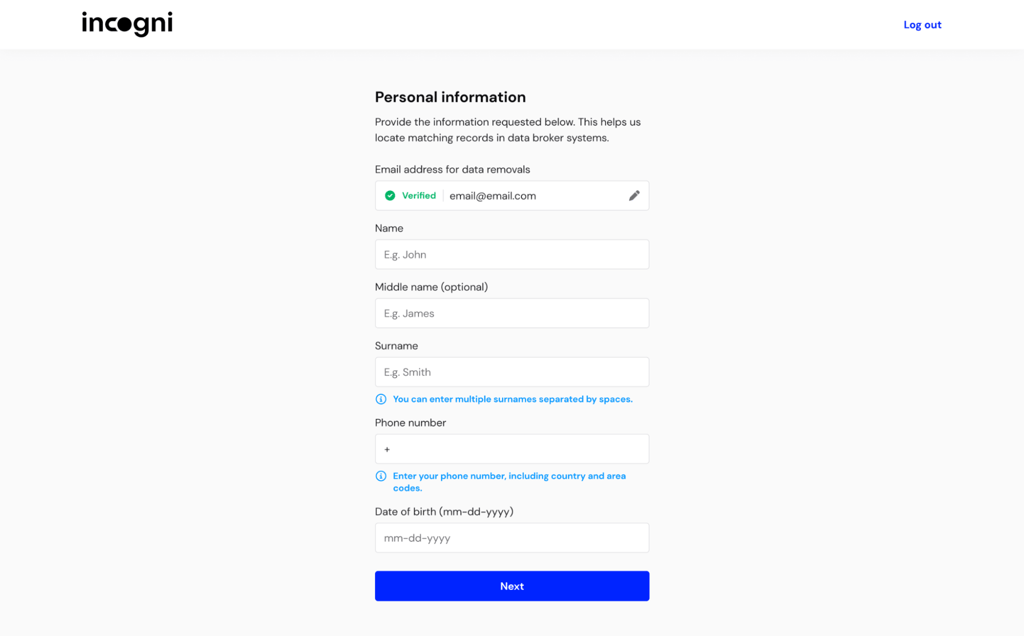
Visit Incogni's website and create an account. You’ll need to provide basic information, like your name, email address, and location. The company will use this info to find online records data brokers like CheckPeople have collected about you.
-
Once you’ve signed up, you'll need to grant Incogni the legal right to act on your behalf. This involves signing an online authorization form giving Incogni permission to contact data brokers and request the removal of your personal information.
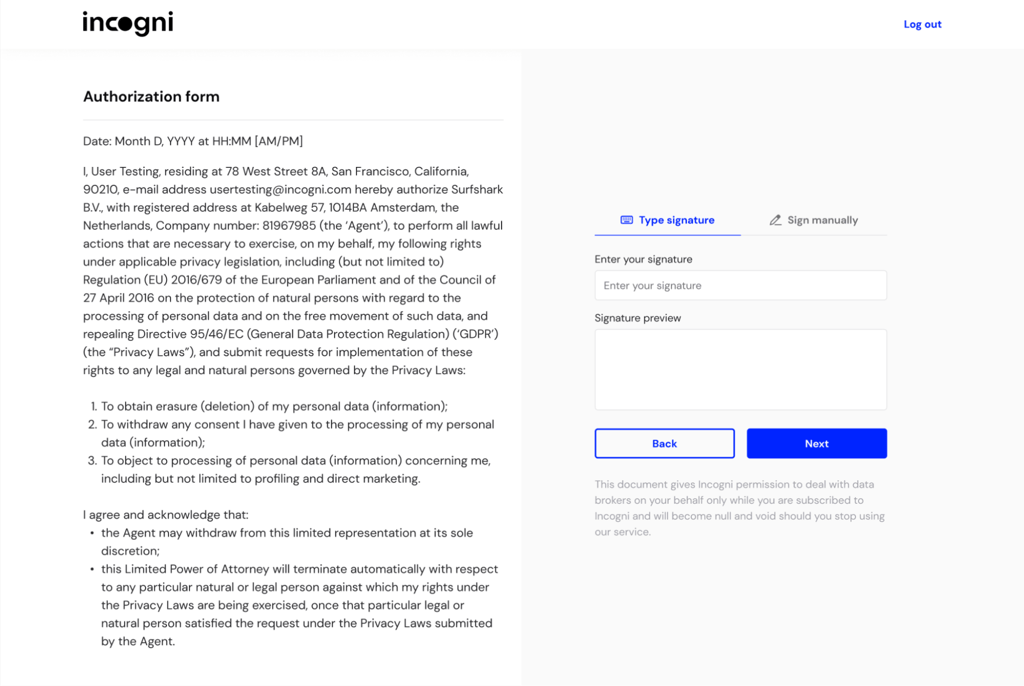
- After you sign the authorization form, Incogni will contact CheckPeople and other data brokers with opt-out requests on your behalf.
-
You can monitor which data brokers have received removal requests and which have deleted your data on the Incogni dashboard.
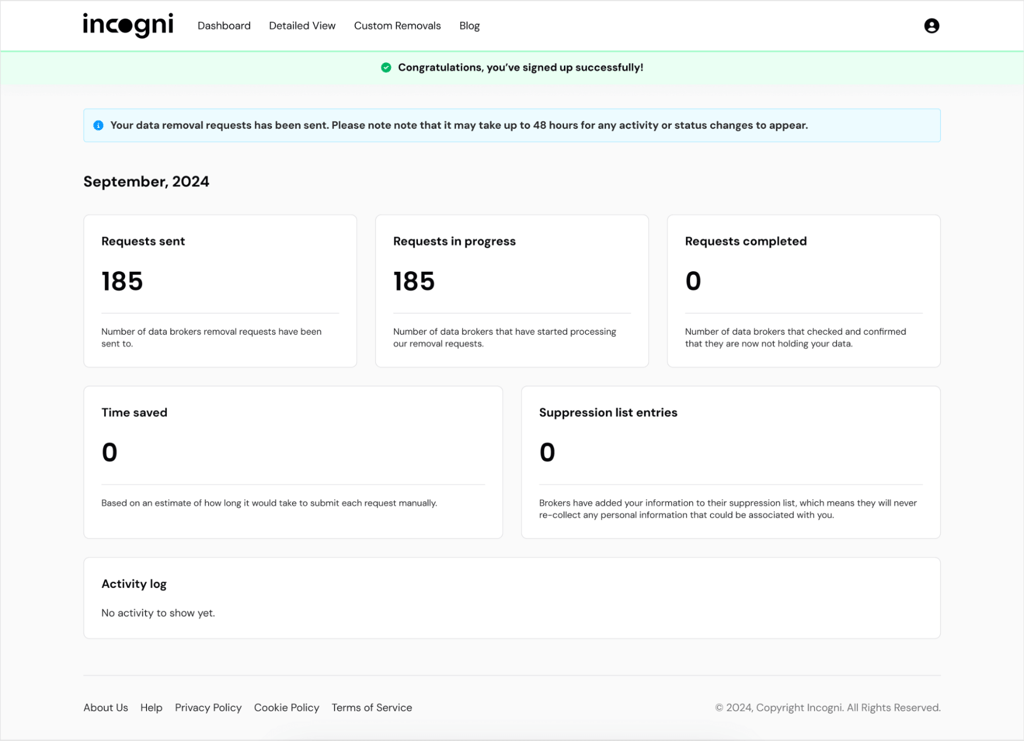
Incogni doesn't stop at one-time data removal; it continues to monitor for instances of your personal information appearing online and send out data removal requests.
How to remove your data manually
Do you believe in the expression: "If you want something done right, do it yourself?" In that case, you might want to manually opt out of CheckPeople. This is a more time-consuming process and requires your full attention, as opposed to the automatic method.
However, the benefit of opting out manually is that the process is free and completely under your control.
Step-by-step instructions on how to opt out of CheckPeople manually:
-
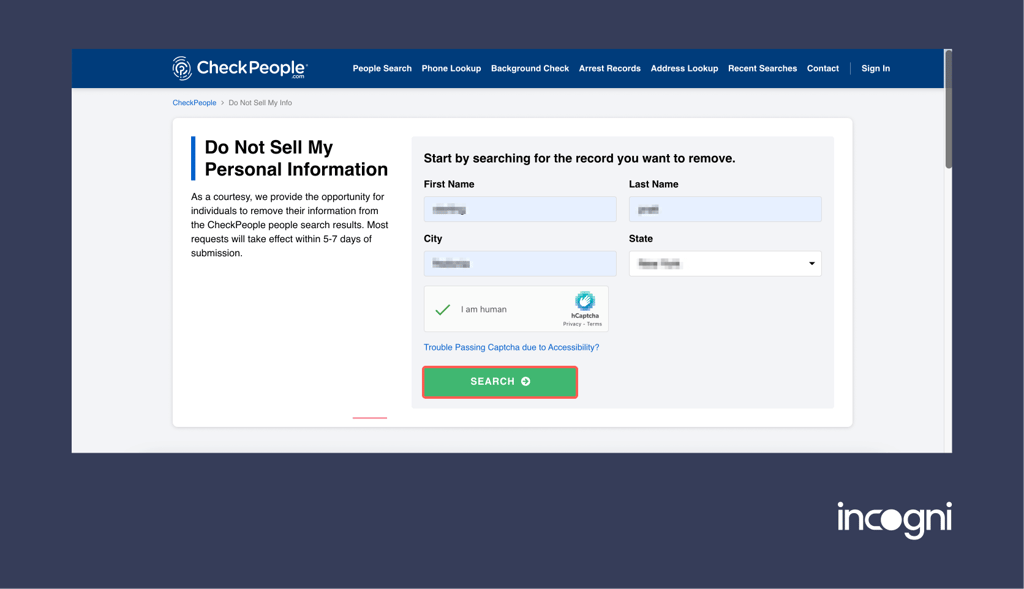
Go to CheckPeople's opt-out page.
-
Enter your name and address and complete the CAPTCHA to begin a search for your records.
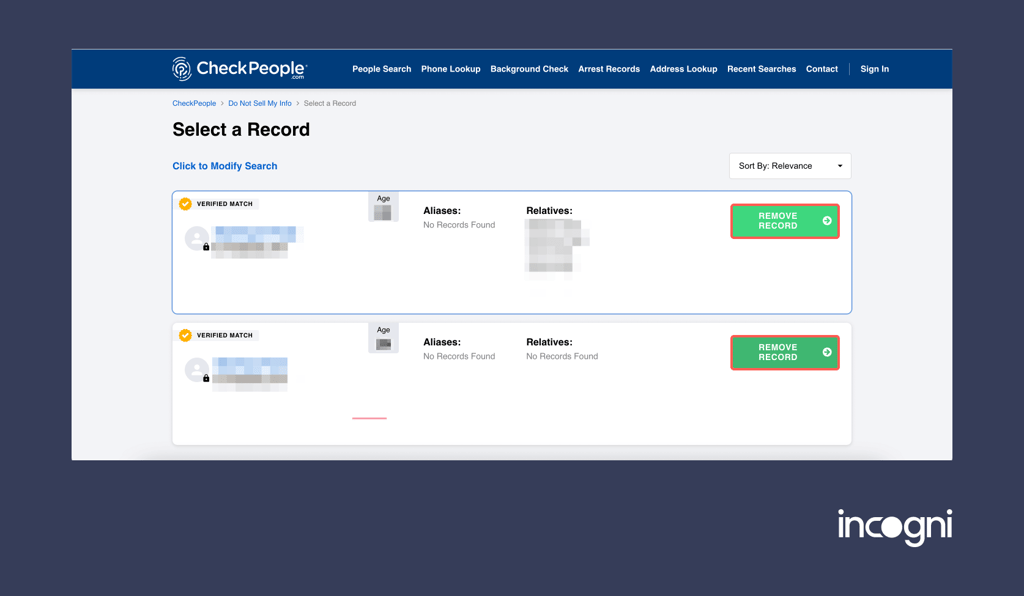
- Once you find the listing you want, click "Remove Record."
-
Enter your details again, complete the CAPTCHA, and submit your final request. We recommend using an anonymous email address for added privacy.
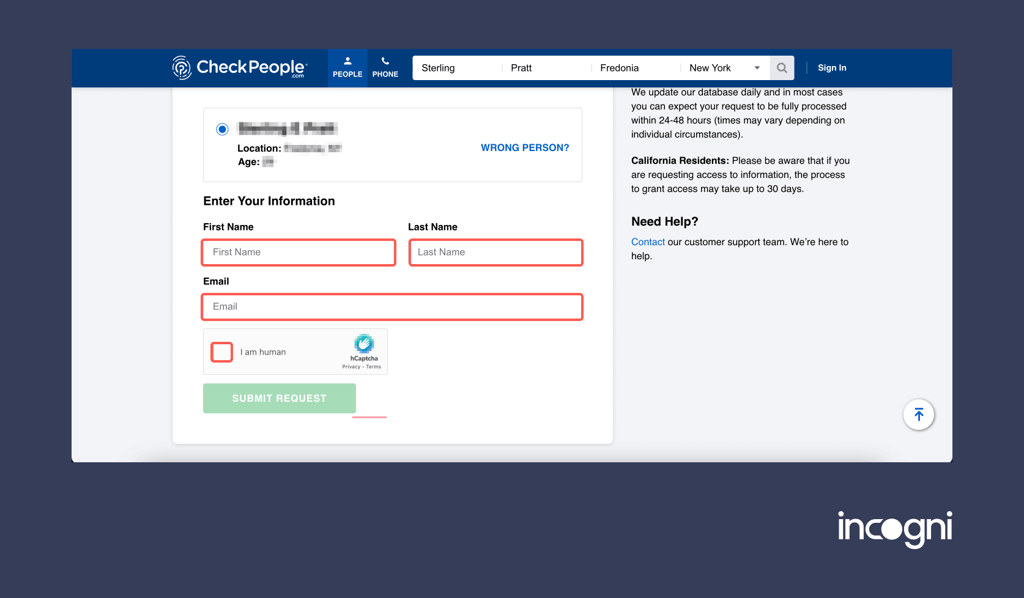
-
Click on "Confirm Request."
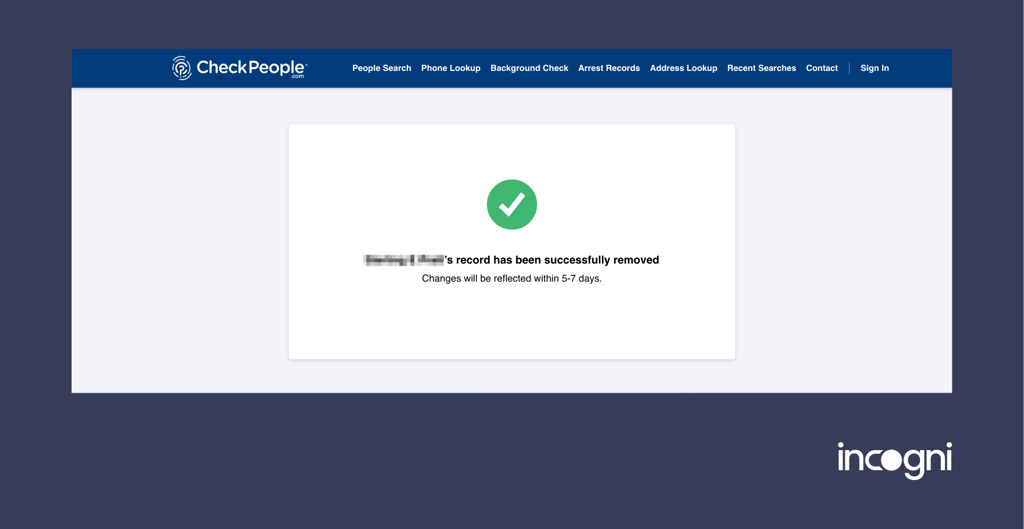
- Click the confirmation link in your email, confirm, and your record should be removed within 5-7 days.
The information you submit must match the details about you; otherwise, your request might not be processed correctly.
Also, ensure you click on the confirmation link you receive. Otherwise, the process will not go through. Check your spam folder, as CheckPeople emails may end up there and slip past you.
Remember, your data may reappear on CheckPeople due to updates from new public records or scraped data. So, you might need to repeat the opt-out process. This is why data removal services are more convenient.
Important limitations
It’s relatively straightforward for platforms like CheckPeople to collect sensitive personal information off the internet today. And manual removals from data broker platforms are tricky, as you can never be certain that your information has been removed permanently.
In fact, certain loopholes in the site’s disclaimers confirm this. For instance, a vague statement confirming that once removed information won’t re-surface again on the platform is your only guarantee.
Plus, there’s nothing to say that CheckPeople wouldn’t have previously sold your information to a third-party website. There’s also a chance of certain profiles being recreated if you change your legal name or simply move to another state.
Such changes might trigger the database to collect “new” information and create your new profile. Naturally, your best line of protection is to run regular checks, and tools like Incogni and DeleteMe make that task much simpler with automated scans and removal requests.
Alternative CheckPeople opt-out methods
Are the automatic and manual CheckPeople opt-out methods not to your liking? Don't worry — try these fast and easy alternative methods.
You can contact CheckPeople directly and speak to a customer support representative via phone or email. Though slower, this method is as personal as it gets.
CheckPeople opt-out via phone
Call CheckPeople at (800) 267-2122 to chat with a customer support rep. Provide your full name, date of birth, current and past addresses, and the exact URL address of the record you want removed.
CheckPeople opt-out via email
Send an email to [email protected] with all of the information stated above. Your subject could be "Opt-Out Request." In the body of your email, be clear about what you are requesting, followed by your personal details. Here’s an example of an email removal template you can use:
- Subject: Opt-out request for (your full legal name here)
- Lead: You can start with “To whom it may concern”, and continue by stating your full name. You can proceed with a generic removal plea, such as “This email is to kindly ask you to delete my information from CheckPeople and other websites and/or services that you operate.”
- Your information: Proceed by providing your full information, including your full name, date of birth, and past and current addresses. I’d also advise you to share the link to your profile on the site, just in case.
- Conclusion: Simply express kind regards in your name, or write that you’re hoping to see your information removed from the platform ASAP.
Reasons to remove your personal information from CheckPeople
Removing your info from people search websites is crucial for maintaining your online safety. While that’s the main premise, there are several key reasons I’d point out:
- Search volume: During my research, I discovered that over 2 million people use CheckPeople to search for personal information about others each month.
- Type of exposed information: Using CheckPeople makes it easier for someone to look up your full name, list of past and present addresses, and even family members and associates. The biggest red flag is that all such information can be found entirely for free, making your personal details widely available to data stalkers.
- Exposure on Google: As of the time of writing this guide, I estimate that over 1 million CheckPeople profiles have already been indexed by Google. That further boosts the visibility of your exposed details for virtually anyone on the web.
Furthermore, you can identify several patterns emerging from the demographic groups of CheckPeople users. Here’s an overview of that through the lens of the latest information:
| Demographic Group | Percentage |
| Male | 38.60% |
| Female | 61.40% |
| 18-24 years old | 5.95% |
| 25-34 years old | 12.70% |
| 35-44 years old | 17.73% |
| 45-54 years old | 21.95% |
| 55-64 years old | 23.57% |
| 65+ years old | 18.08% |
Opting out of sites like CheckPeople is even more critical for people who have been victims of identity theft or data breaches.
Remember that any data left on CheckPeople about you makes you susceptible to scams, fraud, or unwanted attention. By choosing to remove this data, you are taking control of your "digital footprint" and reducing the possibility of identity theft, financial fraud, or cyberstalking.
Other guides you might be interested in:
Conclusion
Opting out of CheckPeople is important if you're concerned about your online privacy and security. Whether you use a data removal service or opt out manually, you’ll reduce your "digital breadcrumb" trail and stop sites like CheckPeople from spreading your personal information.
For ongoing protection, we recommend using data removal services like Incogni to create a solid perimeter of online safety and privacy around you.
FAQ
Is CheckPeople a trusted site?
Yes, CheckPeople is a trusted people search website, but it raises privacy and security concerns as it makes sensitive personal data accessible to anyone.
How to remove yourself from CheckPeople?
You can remove your data from CheckPeople automatically using data removal services like Incogni or manually by calling or emailing the company directly.
Is CheckPeople legal?
Yes, CheckPeople is legal and operates within the law. However, collecting data from public records and making it available to online users raises concerns about user safety and privacy. Thankfully, privacy laws like the California Consumer Privacy Act (CCPA) generally allow you to request the removal of your personal data from such sites.
Is CheckPeople easy to cancel?
If you're using CheckPeople's service and want to cancel, call its customer support team at (800) 267-2122. The cancellation process isn't too difficult. To avoid additional charges, ensure you cancel 3 three days before your next billing cycle.
How long does it take to complete the CheckPeople opt-out process?
Most users report that this takes about 5-7 business days when you submit a request manually. However, with data removal services, it takes 24-48 hours, but this isn't guaranteed.
Will my information stay off CheckPeople permanently?
While CheckPeople confirms that, once removed, your information will remain off the platform permanently, there are some exceptions. For instance, it’s still possible for the site to share your previously acquired information with third-party platforms.
Does opting out of CheckPeople remove my info from the internet entirely?
No, your information might still be exposed to other people on search platforms even after you remove it from CheckPeople. That’s why I recommend using automated removal tools like Incogni, which also scans other, similar databases.
Can I remove my family’s information from CheckPeople?
Yes, you can remove your family member’s information from CheckPeople by sending a removal request in their name. The process works the same as removing your own details, and you can start at the opt-out page.