Tech YouTuber visited by the FBI over KVMs: tiny devices become a security headache
IP-KVM (keyboard, video, and mouse over IP) devices are cheap and abundant, and hackers are finding it easier than ever to gain complete remote control of servers without raising alarms.

Image by Cybernews.

 Follow us
IP-KVM (keyboard, video, and mouse over IP) devices are cheap and abundant, and hackers are finding it easier than ever to gain complete remote control of servers without raising alarms.
Multiple security advisories have already warned about North Korean hackers abusing KVMs, and it seems that the situation is getting worse.
Popular tech YouTuber Jeff Geerling recently shared that he was visited by FBI agents asking questions about these devices, suggesting the FBI is specifically concerned about ultra-compact IP-KVMs like the NanoKVM.
KVMs can discreetly provide complete remote access to computers, including the BIOS. They’re tiny devices that plug into a server and emulate a keyboard and mouse, and are capable of streaming video of the screen to a remote operator, effectively letting administrators manage a server as if they were sitting in front of it. Some devices can even physically press buttons.
The problem is that KVM tools often have weaker security than the systems they control, according to a recent advisory by runZero.




“These Linux-based, open-source-powered KVMs provide full remote control over PCs and servers, including power management, virtual storage, serial access, and even mouse-jiggling. They’re inexpensive compared to enterprise KVMs and increasingly common in home labs and small businesses,” the report reads.
A crown jewel for hackers
KVMs offer attackers a path to bypass monitoring and safeguards. Hackers can pose as legitimate contractors and exploit brief access to endpoints to leave such a device. They can compromise already-present devices used by legitimate users. Firms should also be concerned that “one of their employees is dialing in from Pyongyang through an in-country laptop farm.”
Last year, Google warned admins to monitor and restrict the use of IP-based KVM devices, which are frequently utilized by North Korean (DPRK) IT workers to maintain persistent remote access to corporate devices. Fake IT workers used these devices to control a laptop farm, hide their true locations, and deceive companies into thinking they’re hiring US-located workers.
However, the main fear now is that hackers can also compromise these devices used by legitimate users. Despite the relative newness of KVM devices, runZero has already found hundreds of them publicly exposed on the IoT search engine Shodan.
The exposed IP‑KVM devices listen on well-known ports and can be targeted using brute force or potential vulnerabilities.
“It doesn’t matter how hardened your server is if the attached KVM can reboot to a recovery disk, exfiltrate data, and drop a backdoor. A weak KVM offers attackers easy access into an otherwise secure system,” the runZero researchers said.

They also shared an example from last year of a US DoD workstation exposed to the internet without authentication via a TinyPilot IP KVM in its default configuration.
“These next-generation IP KVMs are relatively easy to find – once you know what to look for – but they’re still rare in corporate settings. That said, JetKVM is gaining traction fast. If its current growth continues, it may soon rival traditional enterprise options,” the report reads.
The most popular IP‑KVMs currently include TinyPilot, PiKVM, JetKVM, and NanoKVM devices. These all rely on open-source OSes and repositories, which makes it easy to analyze for potential issues.
The runZero researchers analyzed the products and found that some default installations require no passwords and have no authentication for free versions. Some devices use potentially exposed web panels, and unauthorized users can poke to check if two-factor authentication is enabled.
The increasingly popular and incredibly cheap Sispeed NanoKVM product received an F rating due to multiple open security issues, including weak password handling, command injection flaws, insecure update mechanisms, device ID leakage, or a lack of a formal vulnerability disclosure process.
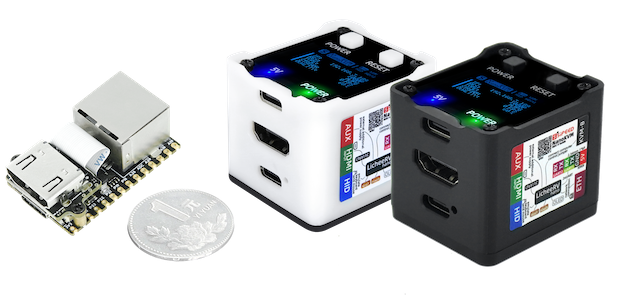
The Lite version of this KVM device starts at $25, and the maxxed-out Pro still costs less than $100.
How to detect such a device?
It is very hard to detect the KVM device from the system it controls. Researchers scan for open ports, exposed web services, and other fingerprints to detect them. They also monitor traffic and look for specific vendors’ MAC addresses in the network.
However, runZero shared a list of fingerprints these devices leave on the host directly.
“Many KVMs present to the host as a HDMI display, which in turn supports something called an EDID (Extended Display Identification Data). While editable, these values often default to useful identifiers for KVM products. Changes are usually done for compatibility reasons, not evasion, and it's common to see KVMs return EDID codes assigned to oddly outdated monitors – like old Toshiba LCDs,” the researchers said.
They also suggest reviewing logs for any USB-connected devices. All six analyzed KVM devices rely on the Linux USB Gadget API to emulate USB hubs, keyboards, mice, and network adapters. Tools like SIEM or XDR can flag these patterns.
For those considering deploying KVMs, the researchers recommend choosing devices with strong protections already in place and avoiding NanoKVM. Users should use strong passwords and protect them behind firewall rules and a VPN, and watch out for unauthorized suspicious signs, such as mouse jiggling, keeping the screen awake.