PHP2Shell: one breach, multiple accounts at risk

A security problem at an old online shop that you’ve used once years ago might seem unrelated to your current online presence. However, if those accounts share credentials, such as a password, a breach at that service could give attackers login details to try elsewhere. The recent PHP2Shell vulnerabilities are a stark reminder to check for those connections, including on websites you rarely use.
While the PHP2Shell news doesn’t mean you need to reset every password, it’s a good opportunity to do a checkup, starting with any accounts linked to your important accounts. In this article, I’ll explain what PHP2Shell is, how it could affect regular users, and what you can do to reduce the risks.

Why is PHP2Shell still important
PHP2Shell is the name given to two serious security flaws in PHP (a programming language many websites use to run their services). These flaws allow attackers to run malicious code without requiring an account or password on a service that hasn’t yet patched them.
More than a week after those updates became available, Censys’s PHP2Shell tracker still flags approximately 28.8 million services as potentially vulnerable as of November 5th.
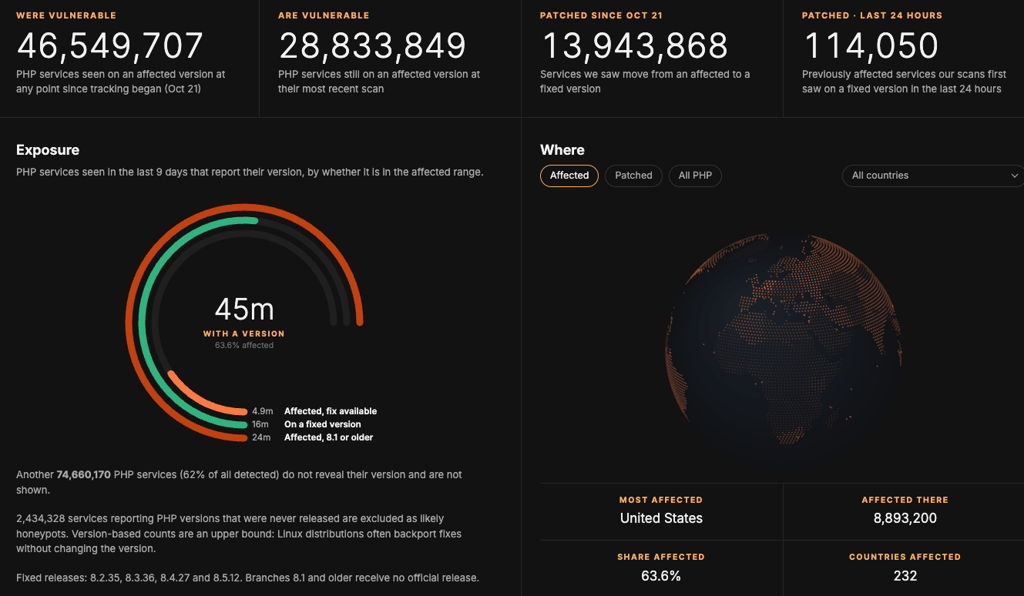
Note: Censys counts potentially vulnerable services, not individual websites or confirmed breaches.
While the patch needs to be implemented by the services' developers, for regular users, overall privacy can be jeopardized in the event of a breach.
How can one breach affect other accounts?
Besides gaining access to the overall information of the breached website, if attackers get hold of important credentials, such as a password, they could try them on other accounts where you've used the same ones, a practice known as credential stuffing.
Thankfully, most modern websites follow strict security standards and implement sophisticated techniques to protect your privacy, even in the event of a breach. For example, password hashing stores a scrambled version of each password, making the original much harder to recover.
However, an older website – such as a long-forgotten forum – can have severely outdated security and might even store important credentials, such as passwords, in a way that makes them easy to recover, or even leave them in plain readable text.
How can you stop one password from exposing several accounts?
Using a different password for each account reduces the risk of attackers using a single stolen login to access other services. Of course, remembering them all can be difficult, which is where a password manager can help you maintain good password management habits.
Typical password managers generate and save passwords for you. Some encrypt them in a way that even the providers themselves can’t see the saved credentials, while the top password managers, such as NordPass, actively identify weak, reused, and even scan databases for breached credentials, giving you that edge in a case of a breach.
What should you do after a breach notice?
Before changing anything, find out which service and what exactly got breached. A leaked email address and a stolen password may require different responses, so start with the notice and work from there.
- Check that the notice is genuine. Of course, an email telling you to reset your password could itself be a phishing attempt. If you’re unsure, contact support through the official contacts.
- Change the password on every account where you used it. For example, if a shop exposes a password you also use for email, change both to different passwords. Start with your email, because someone accessing your inbox could use password-reset emails to get into other accounts. Change each password through the website’s settings, then save the replacement in your password manager.
- Enable two-factor authentication where available. Always use 2FA, which adds another step when you sign in, such as a code from an authenticator app or a physical encryption key. This makes a stolen password much less useful on its own. Start with your email, banking, and other important accounts.
- Look for changes you didn’t make. Check recent sign-ins, orders, and recovery details. For email, also check for unfamiliar forwarding rules that could send your messages to someone else.
- Consider identity theft protection recovery support. An identity protection service such as Coveron can help you monitor exposed personal details and, depending on the plan, even monitor suspicious credit activity. Subscribers can also receive help from a recovery specialist if a covered incident results in identity theft.
Keep an eye on the provider’s updates, too. Its investigation may reveal more after the first announcement. If you spot unauthorized transactions, contact your bank immediately.