Hackers are hijacking TikTok business accounts to steal credentials in real time
Hackers are hijacking TikTok business accounts using phishing kits that bypass 2FA and steal credentials in real time. Researchers say Google logins make the attacks even more dangerous.
image by IB Photography | Shutterstock

 Follow us
TikTok for Business accounts are falling victim to a new phishing scam that automatically bypasses 2FA to steal login credentials in real time, according to new research from Push Security published on Thursday.
Update - April 1st: TikTok told Cybernews that the phishing domains identified in the report “have been officially taken down and are no longer active.”
- A new phishing campaign is targeting TikTok business users with fake login pages built to capture credentials as they type.
- The attack targets businesses that log in using Google – potentially exposing multiple accounts at once.
- Researchers say the phishing infrastructure was spun up in seconds, suggesting a coordinated campaign.
Known as adversary-in-the-middle (AiTM), the attacks are being carried out using sophisticated phishing kits that replicate core SSO platforms such as Google and Microsoft.
The phish – which follows previously documented Google malvertising campaigns and recruiter phishing scams using fake calendar invites – is said to use a multi-step attack chain that ultimately leads victims to a fraudulent login page powered by the AiTM phishing kit.





The malicious tool can intercept passwords and session cookies, allowing attackers to hijack accounts even when multi-factor authentication is enabled, Push Security said.
"There have been similar campaigns targeting Facebook business credentials, LinkedIn corporate accounts, and more,” says Max Gannon, Cyber Intelligence Team Manager at Cofense.
Gannon says for business account owners – regardless of the platform – “it is important to be just as, if not more, vigilant than average users because not only can they be the victim of more targeted campaigns, they also have a lot more to lose.”






Fake TikTok pages hide a more dangerous attack
Unlike traditional phishing attacks that simply steal passwords, AiTM phishing kits sit between the victim and the real website, capturing login credentials and session tokens as the victim inputs their login details in real time.
Once inside a TikTok business account, attackers could potentially access advertising accounts, messaging tools, brand content, and payment information associated with that business's marketing campaigns.
According to researchers, victims are first sent a phishing link that silently redirects them to a legitimate Google storage page before loading a fake site designed to look like a legitimate TikTok or Google-themed login page.
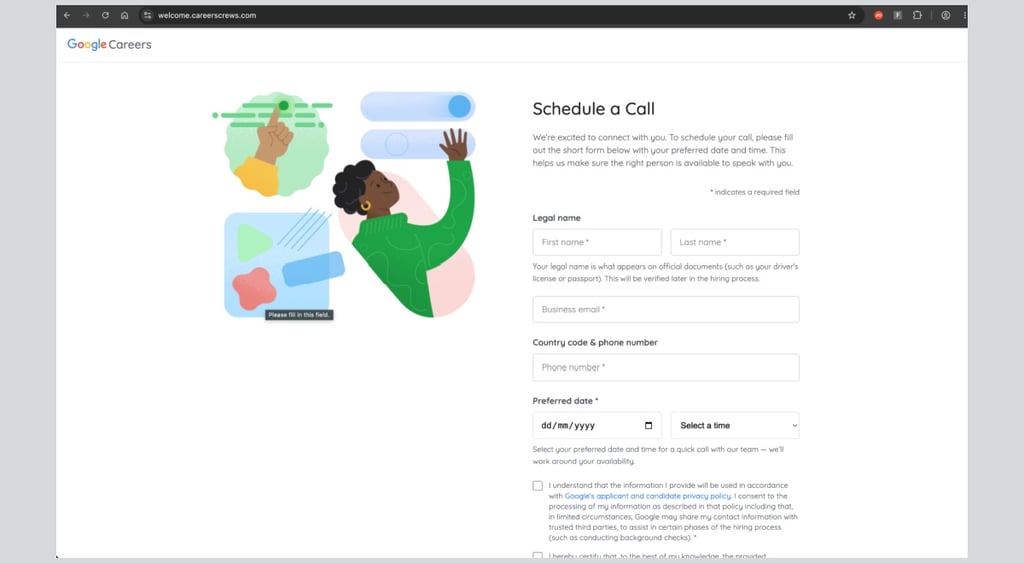
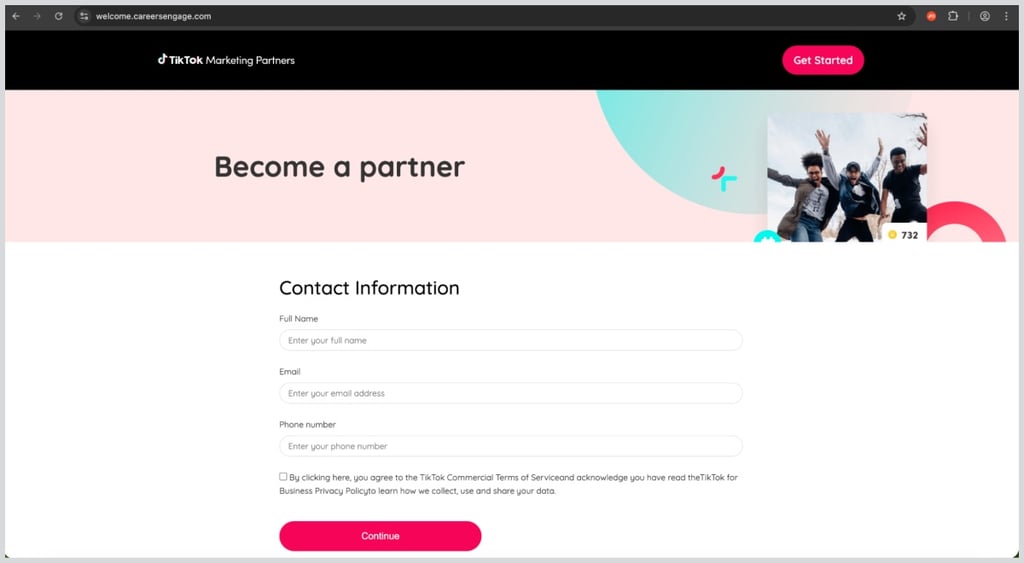
Victims are tricked into clicking a malicious link that takes them to one of two page styles.
- A TikTok for Business cloned page
- A Google careers “Schedule a call” cloned page
Push Security also notes that before the fake login page appears, the site runs a “Cloudflare Turnstile” check – a bot detection tool that prevents security bots from analyzing the page, essentially making the phishing page harder to detect.
Victims are then prompted to provide basic information before being shown the malicious login page, which then captures the user's credentials and authentication tokens in real time via the reverse-proxy phishing kit.
Additionally, as seen below, a fake TikTok log in page is shown with the traditional “Log in with TikTok” button replaced with a “Log in with Google" button.

Phishing domains registered within seconds
Push researchers say they “identified a cluster of newly registered phishing pages” – all registered on March 24th and “within a 9-second window.”
The eleven initially observed phishing pages are said to follow a common naming convention, using various iterations of “welcome.careers[.]com.”
The pages were also discovered to be hosted behind Cloudflare using the same Hong Kong-based ICANN-accredited domain name registrar and web services provider – Nicenic International Group – which Push Security says is commonly abused by bad actors for bulk phishing domain registrations.
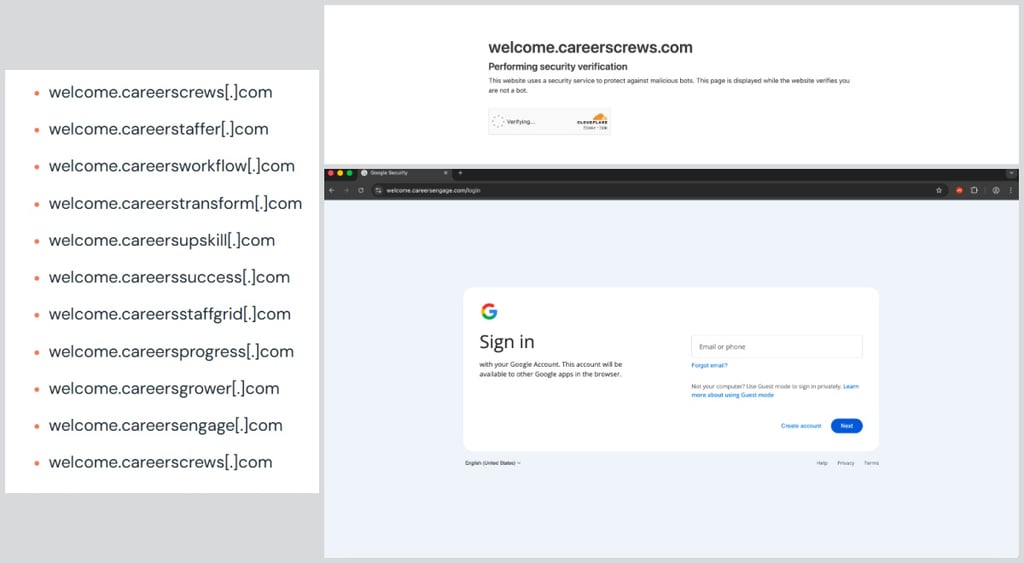
TikTok told Cybernews the phishing domains identified by researchers have since been taken offline.
Furthermore, the research shows the fake TikTok login page includes input validation that requires a business email address, suggesting the campaign is specifically targeting TikTok for Business accounts.
“TikTok seems a weird choice at first glance. But it makes more sense when we consider that TikTok has been historically abused to distribute malicious links and social engineering instructions,“ says Push Security threat researcher Dan Green.
What makes users even more susceptible to the latest AiTM attacks is that many TikTok for Business users often opt to log in to their accounts directly with Google, he explains.
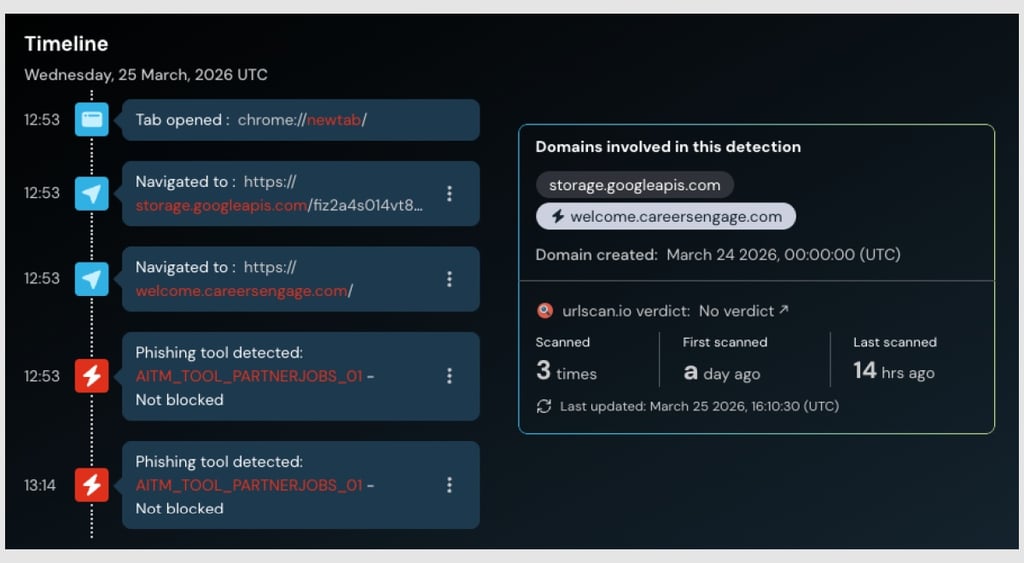
This means that anyone using the direct Google login option “will effectively have both accounts used to distribute ads compromised in one go, as well as accessing any further apps accessible via SSO for data theft and extortion,” Green warns.
What users should watch for
Push Security says TikTok business account holders should be especially cautious of login links sent via email and should access TikTok directly through the official website instead of clicking links.
The research also says users should remember that a phishing scam's indicators of compromise (IoC) are often short-lived because “attackers can quickly spin up and rotate the sites used in the attack chain, often dynamically serving different URLs to site visitors.”

Check if your data was exposed
Find out if your email and related personal information have appeared in known data breaches.
Additionally, TikTok warns that the company will never ask for passwords, verification codes, or sensitive information via messages or third-party websites, and users should be cautious of links that ask them to log in or verify their accounts.
Unlock more exclusive Cybernews content on YouTube.