How to watch Celebrity Family Feud season 13 for free
Our in-house cybersecurity experts and journalists, renowned for major reports like The Mother of All Breaches, conduct transparent, unbiased VPN testing and in-depth analysis.
With 750+ articles crafted based on real-world research, we empower readers to make informed purchasing decisions through first-hand expertise.
Learn more

Celebrity Family Feud Season 13 premieres July 9th, 2026 on ABC in the United States, with Steve Harvey returning as host for another season of hilarious celebrity matchups. Australian viewers can stream the show for free on 7Plus, while international fans can access it using a VPN. The season kicks off with AFC Champions facing off against NFC Champions, followed by weekly episodes featuring celebrity teams including Sheila E., En Vogue, Lisa Lisa, Taylor Dayne, and more. New episodes air every Thursday and stream next-day on Hulu in the US.
Where to watch Celebrity Family Feud
| Country | Streaming Service | Price | Notes |
| Australia | 7Plus | Free with ads | On-demand streaming, account required |
| United States | ABC / Hulu | Free (ABC) / $9.99/month (Hulu with ads) | Thursdays 8/7c on ABC, next-day on Hulu |
| United Kingdom | VPN required | Varies by VPN | Access via VPN to US Hulu or AU 7Plus |
| Canada | VPN required | Varies by VPN | Access via VPN to US Hulu or AU 7Plus |
| Global | VPN required | Varies by VPN | Connect to Australian or US servers |
Best VPNs to watch Celebrity Family Feud
These VPNs have been tested for streaming performance and reliably unblock geo-restricted services like 7Plus and Hulu. They offer fast speeds, stable connections, and broad server coverage, making them ideal for watching Celebrity Family Feud from anywhere in the world.
- NordVPN – best overall for streaming. NordVPN starts at $3.49/month, with servers in both Australia and the United States. The NordLynx protocol delivers approximately 86 percent speed retention in our tests, ensuring smooth HD streaming without buffering. Smart DNS support allows you to unblock 7Plus and Hulu on devices that don't support native VPN apps, such as smart TVs and game consoles. Apps are available for Windows, Mac, iOS, Android, Linux, and Fire TV. Read our full NordVPN review for details.
- Surfshark – best budget option. Surfshark starts at $2.49/month and offers unlimited simultaneous connections, making it perfect for households with multiple devices. You can easily connect to Australian or US servers to access Celebrity Family Feud. The WireGuard protocol maintains approximately 82 percent of baseline speeds in our tests, which is more than enough for HD streaming on 7Plus or Hulu. Surfshark works on all major platforms and offers excellent value for money. See our Surfshark review for the full breakdown.
- Proton VPN – best for privacy-focused users. Proton VPN starts at $2.99/month and is based in Switzerland, operating under some of the world's strictest privacy laws. Proton VPN offers a free plan with limited server access, making it a good option if you want to test VPN streaming before committing to a paid subscription. Streaming performance is solid and reliable for live TV and on-demand content. Our Proton VPN review covers the technical details.
How to watch Celebrity Family Feud on 7Plus in Australia
7Plus is Australia's free streaming platform offering on-demand access to Celebrity Family Feud. The service is completely free and ad-supported, making it an excellent option for Australian viewers.
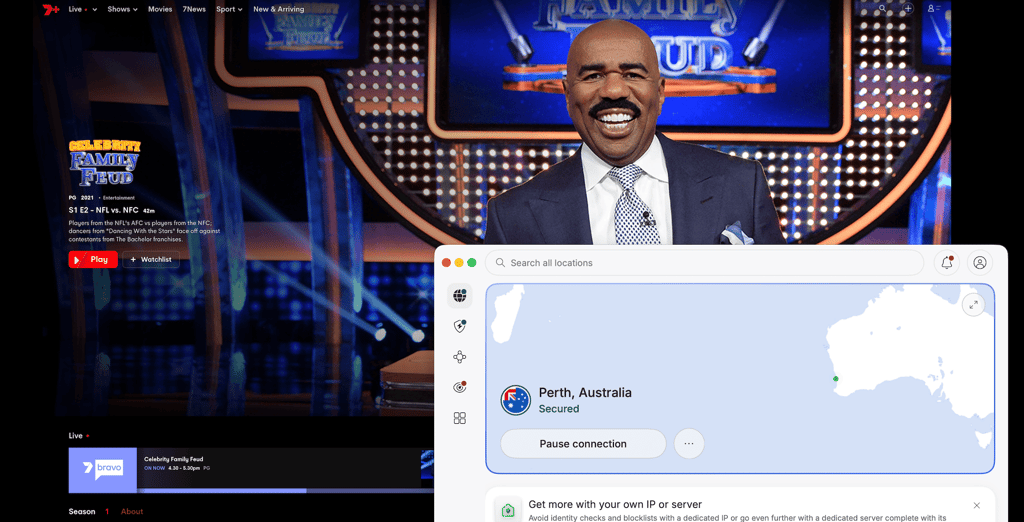
You can watch on the 7Plus website at 7plus.com.au or download the 7Plus app for iOS, Android, smart TVs, and streaming devices. A free account is required to stream content. Episodes are available on-demand, allowing you to catch up on any episodes you missed. The platform works seamlessly across devices, so you can start watching on your phone and continue on your TV.
How to watch Celebrity Family Feud from abroad with a VPN
7Plus and Hulu are geo-restricted to their respective countries, meaning international viewers cannot access them without changing their virtual location. A VPN allows you to bypass these restrictions by connecting to a server in Australia or the United States, making it appear as though you're browsing from that country.
This is particularly useful for travelers, expats, or international fans who want to watch Celebrity Family Feud when it's not available in their region. Here's how to access the show from anywhere in the world using a VPN.
- Choose a VPN service. Select a reliable VPN with fast servers in Australia or the United States. NordVPN is our top recommendation for streaming, offering thousands of servers across 224 locations, including Australia and the US, with the NordLynx protocol delivering approximately 86 percent of baseline speeds in our tests. Smart DNS support makes it easy to unblock geo-restricted content on any device. Read our full NordVPN review for details.
- Install the VPN app. Download and install the VPN app on your device. NordVPN supports Windows, Mac, iOS, Android, smart TVs, and more. The installation process takes just a few minutes.
- Connect to a server. Open the VPN app and connect to a server in Australia (for 7Plus access) or the United States (for Hulu access). The VPN will change your IP address to make it appear as though you're browsing from that country.
- Visit 7Plus or Hulu. Navigate to 7plus.com.au or hulu.com in your browser. If using 7Plus, create a free account if you don't already have one. For Hulu, you'll need a paid subscription starting at $9.99/month.
- Start streaming Celebrity Family Feud. Search for Celebrity Family Feud and start watching. Episodes are available on-demand, so you can binge previous seasons or catch up on new episodes as they air.
How to watch Celebrity Family Feud in the US, UK, and Canada
How to watch in the United States
Celebrity Family Feud Season 13 airs on ABC every Thursday at 8:00 PM ET / 7:00 PM CT. The show is available for free over-the-air if you have an antenna, or you can stream it live on the ABC website or ABC app with a cable login.
For on-demand viewing, Hulu offers next-day streaming of Celebrity Family Feud episodes. A Hulu subscription starts at $9.99/month with ads or $18.99/month for the ad-free plan. Episodes are typically available the day after they air on ABC. Hulu is accessible via web browser, iOS, Android, smart TVs, Roku, Fire TV, and game consoles.
The season premiere on July 9th, 2026 features AFC Champions vs NFC Champions, with Steve Harvey hosting the celebrity football matchup.
How to watch in the United Kingdom
Celebrity Family Feud is not currently broadcast on UK television networks. UK viewers can access the show by using a VPN to connect to either Hulu in the United States or 7Plus in Australia.
For Hulu access, connect your VPN to a US server and subscribe to Hulu starting at $9.99/month. For 7Plus access, connect to an Australian server and create a free 7Plus account. Both options require a reliable VPN service such as NordVPN, Surfshark, or Proton VPN.
How to watch in Canada
Celebrity Family Feud does not have a confirmed Canadian broadcaster for Season 13. Canadian viewers can watch by using a VPN to access Hulu (US) or 7Plus (Australia).
Connect your VPN to a US server for Hulu access (subscription required, $9.99/month) or an Australian server for free 7Plus streaming. Make sure to choose a VPN with strong unblocking capabilities and fast speeds for smooth HD streaming. See our recommendations below for the best VPNs for streaming.
FAQ
Where can I watch Celebrity Family Feud Season 13?
You can watch Celebrity Family Feud Season 13 on ABC in the United States (Thursdays at 8/7c) or stream it on Hulu the next day. Australian viewers can watch for free on 7Plus. International viewers in the UK, Canada, and other countries can use a VPN to access either Hulu or 7Plus by connecting to US or Australian servers. See the where-to-watch table above for full details.
What time does Celebrity Family Feud air?
Celebrity Family Feud Season 13 premieres on July 9th, 2026 and airs every Thursday at 8:00 PM ET / 7:00 PM CT / 5:00 PM PT on ABC in the United States. Episodes are available on Hulu the following day. Australian viewers can stream episodes on-demand via 7Plus. Check your local listings or use a VPN to watch at your convenience.
Who is hosting Celebrity Family Feud in 2026?
Steve Harvey is returning as host for Celebrity Family Feud Season 13. Harvey has been hosting the celebrity version of the show since it returned to ABC in 2015, bringing his signature humor and quick wit to every episode. He also hosts the regular syndicated version of Family Feud.
How can I watch Celebrity Family Feud from outside Australia with my 7Plus account?
If you're traveling abroad or living outside Australia, you can still access your 7Plus account using a VPN. 7Plus is geo-restricted to Australian IP addresses, so when you log in from another country, the service will block you. A VPN solves this by connecting you to an Australian server, making it appear as though you're browsing from Australia. Connect to an Australian server using one of the best VPNs for streaming, then log in to 7Plus as usual. This works for travelers, expats, and anyone temporarily outside Australia who wants to keep watching their favorite shows.
Is Celebrity Family Feud available for free?
Yes, Celebrity Family Feud is available for free in Australia on 7Plus (with ads) and in the United States on ABC (over-the-air broadcast or with a cable login). For on-demand streaming in the US, you'll need a Hulu subscription starting at $9.99/month. International viewers can use a VPN to access the free 7Plus stream from anywhere in the world.
How many episodes are in Celebrity Family Feud Season 13?
Celebrity Family Feud Season 13 consists of 10 episodes, airing weekly on Thursdays from July 9th, 2026 through early September. Each episode features two celebrity matchups, with teams competing for charity. The season kicks off with AFC Champions vs NFC Champions, followed by musical legends Sheila E., En Vogue, Lisa Lisa, and Taylor Dayne in subsequent weeks.
Who are the celebrity contestants in Season 13?
Season 13 features a mix of sports stars, musicians, and media personalities. The premiere episode on July 9th showcases AFC Champions vs NFC Champions, a battle of NFL football legends. Episode 2 (July 16th) features Sheila E. vs En Vogue and Lisa Lisa vs Taylor Dayne, bringing iconic music artists to the Feud stage. Episode 3 (July 23rd) includes Dave Portnoy and Barstool Sports vs Cooper Flagg and Team USA Women's Hockey vs Team USA Men's Hockey. More celebrity teams will be announced as the season progresses.
Can I watch Celebrity Family Feud on mobile or smart TV?
Yes, Celebrity Family Feud is available on mobile devices and smart TVs. In Australia, download the 7Plus app for iOS or Android phones and tablets, or access it on smart TVs through the built-in 7Plus app. In the United States, use the ABC app or Hulu app on mobile devices, smart TVs (Samsung, LG, Roku, Fire TV), and streaming sticks. If your device doesn't support VPN apps, use Smart DNS or connect your VPN at the router level to unblock geo-restricted content on all devices.
When do new episodes come to 7Plus?
New episodes of Celebrity Family Feud are available on 7Plus on-demand, typically shortly after they air in the United States. The exact timing may vary, but episodes are usually available within 24-48 hours of the US broadcast. Check the 7Plus website or app for the latest episode availability. Australian viewers can watch at their convenience without waiting for a weekly broadcast schedule.
Is Celebrity Family Feud on Netflix or other streaming services?
No, Celebrity Family Feud Season 13 is not available on Netflix. The show streams exclusively on Hulu in the United States and 7Plus in Australia. Older seasons may be available on other platforms, but the current season is limited to these two services. International viewers can use a VPN to access either platform from anywhere in the world.