Where to watch the World Cup for free – all WC 2026 free streams by country
Our in-house cybersecurity experts and journalists, renowned for major reports like The Mother of All Breaches, conduct transparent, unbiased VPN testing and in-depth analysis.
With 750+ articles crafted based on real-world research, we empower readers to make informed purchasing decisions through first-hand expertise.
Learn more

The 2026 FIFA World Cup is down to its final two, with defending champions Argentina set to face Spain in the final on Sunday, July 19. Spain secured its place with a controlled 2-0 semifinal win over France, while Argentina came from behind to beat England 2-1 after late goals from Enzo Fernández and Lautaro Martínez. Argentina is now one victory away from becoming the first nation since Brazil in 1962 to retain the men’s World Cup.
England and France will meet in the third-place playoff on Saturday, July 18, before attention shifts to the final at New York New Jersey Stadium. Viewers in countries such as the UK and Australia can watch the remaining matches through free official broadcasters, while coverage elsewhere may be split between free-to-air channels and paid platforms. Most streaming services remain geo-restricted outside their licensed regions.
I've rounded up the best official free World Cup streaming options by country, including TV Azteca in Mexico, CazéTV on YouTube in Brazil, and BBC iPlayer and ITVX in the UK. If you're traveling abroad, you can still access these official streams with a VPN.
Where to stream the World Cup for free
Several countries provide free World Cup coverage through their national broadcasters. If you want English commentary, Australia and the UK are perfect options, as they offer full access to all matches.
Since these streams are region-locked, you will need a VPN for streaming to access them if you’re located abroad. Here are the most popular international networks broadcasting the World Cup for free:
| Country | Free service | Why it stands out | Commentary language |
| Australia | SBS and SBS On Demand | Shows all matches for free | English |
| Belgium | RTBF Auvio and VRT MAX | Full free coverage | French and Dutch |
| Brazil | CazéTV via YouTube | All matches are free on YouTube | Portuguese |
| Netherlands | NOS | Full free coverage | Dutch |
| Poland | TVP Sport | Full free coverage | Polish |
| Switzerland | Play SRF, Play RSI, and Play RTS | Full free coverage | German, Italian, and French |
| Türkiye | TRT World and tabii | Full free coverage | Turkish |
| The UK | BBC iPlayer and ITVX | Full tournament shared between BBC and ITV | English |
How to use a VPN to watch the World Cup 2026 for free

- Choose a reliable VPN – I recommend NordVPN, now with 75% OFF
- Download the VPN and create an account
- Connect to a server in the UK or Australia for a free English broadcast
- Go to the broadcaster’s website and start streaming the matches
World Cup 2026 – live tournament updates
Platforms like BBC iPlayer, ITVX, and SBS On Demand require you to create a free account. During registration, you will be asked for a local postal code. Simply Google and use any random, valid postal code from that specific country (e.g., a London postcode for the UK) to complete your registration.
Can I watch the World Cup for free on YouTube?
Some official World Cup streams are available on YouTube, but it’s limited to specific regions. For example, Brazil’s CazéTV will stream matches for free because it holds the rights to broadcast directly on YouTube. Portugal's LiveModeTV is another example of an official broadcaster on YouTube.
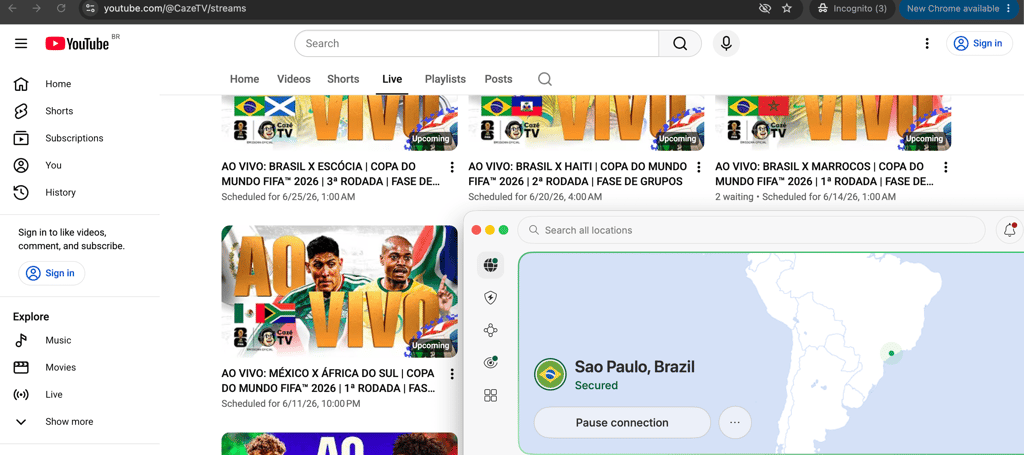
However, YouTube availability doesn’t mean the stream is globally accessible. Broadcast rights still apply, even when the platform is YouTube – these streams are geo-blocked to their specific countries. To watch these free YouTube broadcasts, you still must be connected to a VPN server in a country where the official network has the rights to stream on YouTube.
What to do if the World Cup stream isn’t working with a VPN
You’ve connected to a VPN, but free streaming still isn’t working? If the platform blocks access, fails to load, or shows a location error, try the following:
- Switch to another VPN server in the same country. Streaming platforms may block known VPN IP addresses, so switching to a different server in the same country can provide a new IP address that bypasses the block.
- Clear cookies and cache. Your browser stores location data from previous sessions, and clearing your cookies and cache removes these old location identifiers so the site only sees your new VPN location.
- Use private or incognito mode. Similar to clearing your cookies, opening an incognito window ensures your browser is free of saved location trackers.
- Try the broadcaster’s website instead of the app. Mobile and TV apps often have stricter location checks, sometimes requiring GPS data. Accessing the broadcaster’s website via a browser may help to avoid app-level GPS tracking.
- Check whether the match is actually included in the free package. Not every free broadcaster shows every single game. So, check the local network's schedule to confirm they have the rights to the specific match you want to watch.
- Disable GPS and location permissions on mobile. If you must use a mobile app, go into your phone's settings and revoke the app's permission to read your GPS location. This way, you’ll force it to rely only on your VPN's IP address.
- Check for DNS or WebRTC leaks. Sometimes your real location leaks outside the encrypted VPN tunnel. You can use a free online DNS leak test to check if your IP address is actually hidden.
- Update the VPN app. Streaming platforms constantly update their blocking methods, while VPN providers release app updates to counter this. So, ensure you’re running the latest version of your VPN.
- Try another browser or device. Some background processes or specific browser settings may cause conflicts. Switching from Chrome to Firefox, or moving from a phone to a laptop, can solve the issue.
- Create the streaming account before connecting to a VPN. Some platforms flag accounts created from foreign IP addresses. If possible, register for your free streaming account before traveling or connecting to a VPN.
How to watch the World Cup for free on different devices
The easiest and most reliable way to access free, geo-restricted streams is to use a web browser on a computer with a VPN on. However, different devices handle VPNs and streaming apps differently.
Windows and Mac
- Best method: open a broadcaster website in a browser
- VPN difficulty: easy
- What this means: this is the easiest option for users who want to access a geo-restricted free stream. You simply install a VPN app, connect to the broadcaster’s country, and open the stream in a browser. It’s also the best fallback if a streaming app is unavailable on your TV.
iPhone and iPad
- Best method: use a broadcaster app, mobile browser, or YouTube
- VPN difficulty: easy
- What this means: this is a good option for mobile viewing, but you may need to create a free account first. Some apps may not appear if your Apple ID region doesn’t match the broadcaster’s country, making the mobile browser version an easier alternative while traveling.
Android phones and tablets
- Best method: use a broadcaster app, mobile browser, or YouTube
- VPN difficulty: easy
- What this means: Android users can usually install a VPN app and stream on the same device. This makes it one of the simpler options for accessing free streams abroad. However, some broadcaster apps may still check your account region, app-store availability, or location permissions.
Fire TV, Android TV, and Google TV
- Best method: use native broadcaster apps or YouTube
- VPN difficulty: easy to moderate
- What this means: these are strong TV options for big-screen viewing because many VPN apps can be installed directly onto the device. If the specific broadcaster app is available in the store, you can connect the VPN, open the app, and stream without needing a complex router setup.
Apple TV
- Best method: use broadcaster apps, YouTube, or AirPlay
- VPN difficulty: moderate
- What this means: Apple TV works well if the broadcaster app is available and the device supports your VPN app. If the app is missing or VPN setup is difficult, you can AirPlay the stream from an iPhone, iPad, or Mac instead.
Smart TVs (Samsung, LG, Hisense, and others)
- Best method: use native apps, YouTube, casting, or HDMI
- VPN difficulty: moderate to hard
- What this means: first, check if the broadcaster app is available on your specific TV model. Non-Android Smart TVs usually don’t support native VPN apps. If the app is missing or you can’t install a VPN, you may need to cast from another device, use AirPlay, or physically connect a laptop with an HDMI cable.
Chromecast
- Best method: cast from a phone, tablet, or computer
- VPN difficulty: moderate
- What this means: standard Chromecasts don’t support VPN apps. If you connect a VPN on your phone and use the app's Cast button, it’ll likely fail because the Chromecast connects directly to your Wi-Fi. To bypass geoblocks on a standard Chromecast, you must either mirror your entire screen from the phone or set up a VPN on your Wi-Fi router. In this case, Chromecast with Google TV is much easier because you can download both the VPN and streaming apps directly on the device.
Roku
- Best method: use supported apps, YouTube, casting, or HDMI
- VPN difficulty: hard
- What this means: Roku isn’t ideal for accessing geo-restricted streams because it doesn’t support native VPN apps. You may still watch if the app is available in the Roku Channel Store in your specific region. The easiest option here is to play the stream on your laptop with a VPN on and connect it to the TV via an HDMI cable.
PlayStation and Xbox
- Best method: use YouTube or supported streaming apps
- VPN difficulty: limited
- What this means: consoles are mainly useful for YouTube-based streams such as CazéTV, if they’re available in your country. You should not rely on consoles for regional broadcaster apps unless the app is explicitly confirmed to work on that console. Using a VPN here also requires router-level configuration.
FAQ
Can I watch the World Cup quarter-finals for free on YouTube?
Yes, but only in specific countries where an official broadcaster holds the rights to stream on YouTube, such as CazéTV in Brazil. These streams are geo-restricted to those regions.
Can I watch the World Cup for free in the US?
Yes, if you use a VPN and connect to a location where it’s available for free, for example, on SBS on Demand in Australia. The thing is, most matches in the US require a paid subscription via Fox or Telemundo, and only a very limited selection is broadcast on free, over-the-air television.
Which country has the best free World Cup stream?
The UK streams the World Cup on BBC iPlayer and ITVX, while Australia offers it on SBS On Demand. They’re the best option because they stream all matches for free with English commentary.
Do I need a VPN to watch free World Cup streams abroad?
Yes, free official broadcasts are georestricted to their respective countries. You need a VPN to bypass these location blocks if you’re traveling or living abroad.
Is it legal to watch free World Cup streams with a VPN?
Yes, using a VPN is legal in most countries. However, using it to bypass geographic restrictions may violate the terms of service of the specific streaming platform.