Unverified Android apps are about to stop working: Google releases “advanced flow” to keep them going
Android is adding significant friction for users to sideload an unverified app. The new “advanced flow” includes multiple steps and requires more than 24 hours to complete.

Image by Cybernews.

 Follow us
Android is adding significant friction for users to sideload an unverified app. The new “advanced flow” includes multiple steps and requires more than 24 hours to complete.
Starting in September, sideloaded Android apps from unverified developers will stop working, first in Brazil, Indonesia, Singapore, and Thailand, and other countries later on.
Developers who want to keep their apps running must register with Google, which requires paying a $25 fee, providing government ID and other personal information.
Another option is limited distribution accounts, that are free, require no ID, but only allow students and hobbyists to share their apps with up to 20 devices.
Google previously promised a workaround for “experienced users” to sideload unverified apps and it has now taken shape.












The tech giant has unveiled a new “advanced flow” to install apps from unverified developers.
1. Enable developer mode in system settings.
The very first step requires multiple actions that are likely unfamiliar to most users. They need to go to Settings, select “About Phone” or “About Tablet”, and find the software “Build Number” entry.
Depending on the device, it may be nested under “Android Version” or “Software Information.”
Then the user needs to tap “Build number” seven times in quick succession. An on-screen countdown indicates how many more taps are still needed.
“Once you’ve tapped it enough times, you’ll see a confirmation message,” Google’s guide explains.

The developer mode unlocks additional “Developer Options” in the Settings. There, users will be required to “Allow Unverified Packages.”
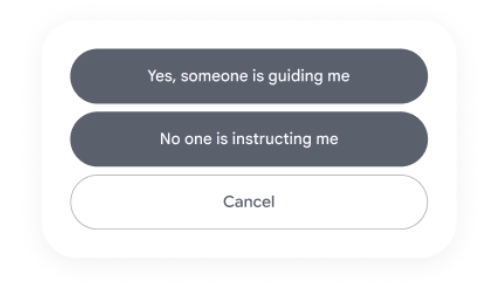
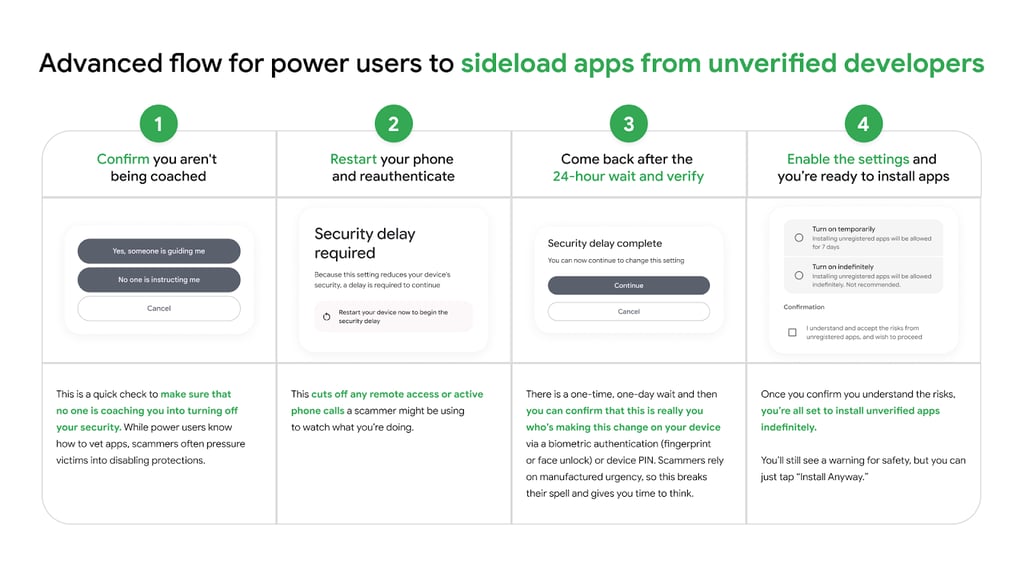
2. Confirm you aren’t being coached
The device will display a prompt requiring users to confirm that no one is coaching them into turning off the device security.
“While power users know how to vet apps, scammers often pressure victims into disabling protections,” Google explains.
3. Reboot, reauthenticate, and wait
The Android device will alert users that they need to restart the device to begin a 24-hour security delay.
“Because this setting reduces your device’s security, a delay is required to continue,” the prompt reads.
The reasoning behind the mandatory restart is that it will cut off any remote access to the device or an active potential scammer call.
4. Verify after the waiting period
After the waiting period is complete, the user can come back to the unverified packages menu in the settings and select “Continue.”
“You can confirm that this is really you who’s making this change with our biometric authentication (fingerprint or face unlock) or device PIN. Scammers rely on manufactured urgency, so this breaks their spell and gives you time to think,” Google explains the step.
The one-day waiting period is one-time and will not be required for any subsequent unverified apps.
The users will be prompted whether they want to install unregistered apps temporarily, for seven days, or indefinitely – not a recommended option. A checkbox will alert users that they understand and accept the risks before proceeding.
5. Install the app
Once all the steps are complete, users are all set to install apps from unverified developers.
Before the installation of each unvetted app, the users will still see a warning that the app is from an unverified developer, giving the option to “Install Anyway.”
Google fighting scammers
The tech giant explains that the one-time process is tailored for power users and was designed to prevent scam and coercion. Fraudsters are using high pressure tactics, convincing users to bypass security warnings and install malicious software.
“They stay on the phone with victims, coaching them to bypass security warnings and disable security settings before the victim has a chance to think or seek help,” Google said in a blog post.
Google hopes that this approach balances "openness and choice with safety.”
“We know a ‘one size fits all’ approach doesn’t work for our diverse ecosystem. We want to ensure that identity verification isn't a barrier to entry, so we’re providing different paths to fit your specific needs.”
The limited distribution accounts and advanced flow for users will be available in August before the new developer verification requirements take effect.
Unlock more exclusive Cybernews content on YouTube.