Gemini in Google Maps: what it is, how it works, and why it matters
Being behind major reports like The Mother of All Breaches and RockYou2024, our in-house cybersecurity experts and journalists provide unbiased, real-world testing and in-depth analysis.
We maintain complete transparency by openly sharing our testing methodologies with our audience.
Learn more
Google has introduced Gemini in Google Maps, transforming the app from a simple navigation tool into an AI travel assistant. Instead of just giving you directions, Google Maps now relies on Gemini, Google’s AI assistant, to help you plan trips, discover new places, and perform basic tasks, all while keeping your eyes on the road. This is possible because Gemini enables a hands-free experience by letting you speak to the AI directly instead of making you dig through the map to find what you need.
In this Gemini in Google Maps review, I summarize my findings on Gemini in Google Maps and explain where it shines and where it struggles. Read on to learn more.
What is Gemini in Google Maps?
To understand what Gemini is in Google Maps, we need to first understand what Gemini itself is. Gemini is a generative AI chatbot created by Google. It’s often referred to as Google’s AI assistant, but it is not to be confused with Google Assistant, which is more focused on quick, simple commands, like setting reminders or starting navigation.
Gemini, on the other hand, is designed to handle more complex requests, such as finding places based on your requests, planning stops along your route, or comparing places based on specific needs. Simply put, it’s less about issuing commands and more about having a conversation that helps you make better travel decisions. All in all, the goal of integrating Gemini into Google Maps is to make navigation safer and more helpful.
How Gemini works inside Google Maps
Gemini makes interacting with Google Maps easier and safer. All you have to do is say “Hey Google” and give instructions or ask questions. Gemini will process your request and answer you with relevant suggestions. You can also type if you’re not on the road.
Gemini delivers context-aware answers by using the data already in Google Maps. It considers your current location, destination, selected route, and nearby points of interest to provide relevant suggestions. For example, you can ask for restaurants with outdoor seating along your route, and Gemini will provide tailored recommendations based on your request. If you like a recommendation, just say “Ok, let’s go there,” and Gemini will add a stop to your route.
Gemini navigation features explained
What I like the most about Gemini in Google Maps is how interactive it is. The app is no longer just a set of directions on your phone – integrated Gemini listens, adapts, and helps you make decisions while on the move.
You can also ask questions while navigating, like “Where can I stop for coffee?” or “Is there parking near my destination?” Gemini understands that you are following directions and responds without stopping your route. What’s more is that its suggestions are route-aware, meaning they are tied to where you are going, not just where you are. This makes its recommendations relevant and timely instead of generic.
Gemini in Google Maps: landmark recognition and visual understanding
Gemini improves navigation by adding visual awareness to Google Maps. It does so by analyzing over 250 million places in Google Maps and cross-referencing them to Street View images. This allows Gemini to identify landmarks in your area to make navigation easier and smoother, helping you orient yourself in unfamiliar areas and reducing the chances of missing your turn.
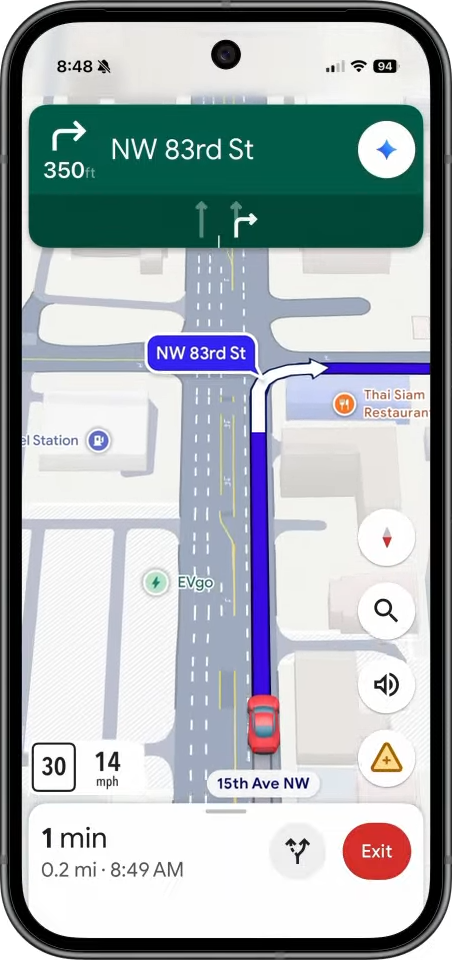
So, instead of saying turn left at 500ft, it now says turn left at the next gas station. Or, turn left at McDonald’s. This way, there’s less room for confusion on your part.
Gemini in Google Maps: real-time traffic awareness
One of the biggest upgrades to Google Maps with Gemini is real-time traffic awareness. Instead of just showing traffic on your map, Gemini interprets live conditions, including accidents, construction zones, lane closures, and other slowdowns, providing you with valuable information about what’s actually happening on the road.
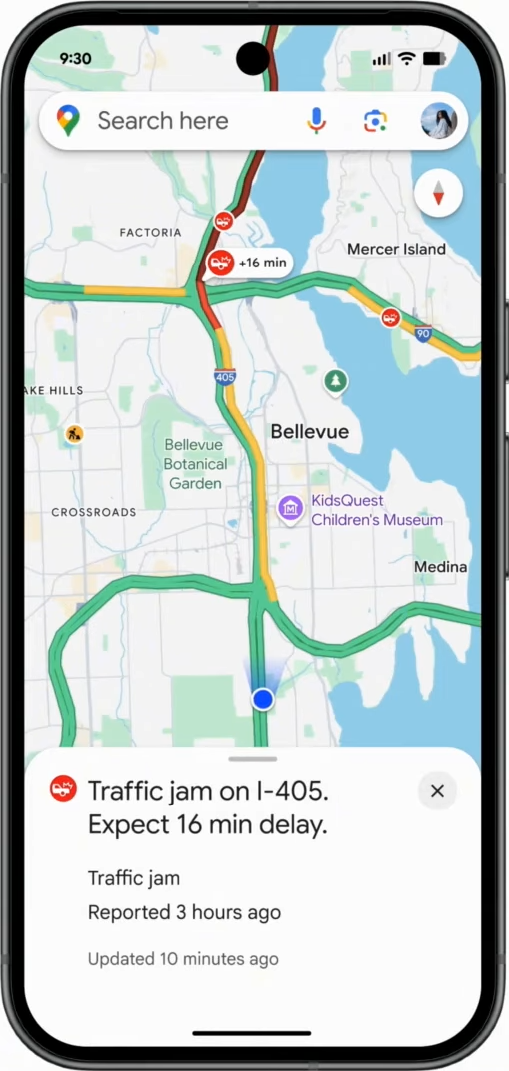
It can explain why a delay exists, such as a road accident or ongoing road work. This makes it easier to understand whether traffic is temporary or something you should plan around.
Unlike traditional Google Maps, which would just adjust your arrival time or suggest alternative routes, Gemini adds context. It explains what caused the delay, how it may evolve, and what you should do next. As conditions change, Gemini can proactively suggest a faster route, recommend delaying your departure, or point you to a nearby stop if traffic is building.
Gemini in Google Maps: hands-free and voice-based use
The best part about Gemini’s integration into Google Maps is that it makes it fully hands-free, and it feels super natural too. Once voice is enabled, you’ll hardly need to touch your phone at all – it’s both safer and easier, especially while actively driving. You can interact with Gemini entirely through voice, which makes all the difference when you can’t take your eyes off the road.
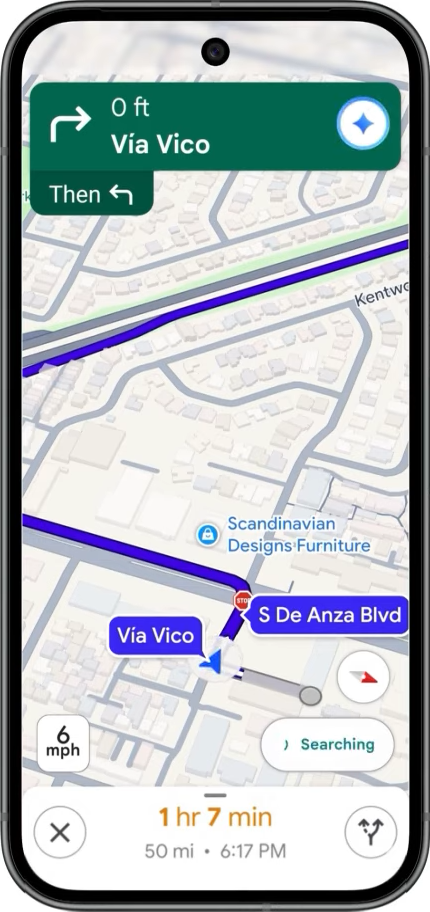
What impressed me most was how Gemini can handle follow-up questions naturally, so conversations flow instead of resetting after every request. For example, you can ask “Any coffee shops along the way?” and “What about parking?” and get the information you need all while continuing along your route with no interruptions.
You can report traffic disruptions as usual but with your voice. Simply say something like “There’s a car crash” or “Looks like a lot of traffic ahead,” and Gemini will take care of it.
This voice-first approach noticeably reduces navigation friction. I like that it keeps my eyes on the road and my hands where they should be, providing safer navigation with fewer distractions.
This also greatly improves accessibility for anyone who relies on voice interactions. People with limited mobility or visual impairments can interact with Gemini by simply speaking, making navigation and trip planning easier and more inclusive.
Gemini in Google Maps: user interface
Gemini seamlessly integrates into Google Maps, which is unsurprising, considering that both apps are part of Google. To get started, you have to install the Gemini app on your phone and update Google Maps to the latest version. The layout of Google Maps stays the same, so there's nothing new to get used to, which I appreciate. However, you have to dig through the settings to set it all up.
You actually don’t see Gemini when you open Google Maps. It only appears once you start your route – a Gemini logo on the top right corner. You can either tap it to start chatting or, if you have enabled Go Hands Free with “Hey Google” voice command in your settings, you can simply say “Hey, Google” and just use your voice to ask questions.
During navigation, directions, traffic, and route information stay front and center, while Gemini quietly works in the background. I, along with many early reviewers, like how smooth the integration feels. It’s unintrusive and doesn’t distract you from the task at hand.
Real-world use cases for Gemini in Google Maps
The main goal of the Gemini integration is to make things easier when navigating. Here’s a list of real-life scenarios of how Gemini can improve your trip:
- Finding stops along your route. Need a coffee, gas, or a quick bite? Gemini can suggest convenient options along your route, saving you time and helping you plan breaks without detours.
- Managing tasks on the go. You can ask Gemini to update your grocery list or add an event to your calendar.
- Helping with the daily commute. Gemini provides real-time traffic updates, proactively suggests faster routes, and helps you get to work or school with less stress.
- Exploring new cities. Visiting a new area? Ask Gemini to point out tourist attractions, trending cafes, and popular restaurants, making it easy to discover the best spots without research.
- Going on road trips. Plan stops, optimize routes, and get proactive traffic alerts so your long drives are smoother and more enjoyable.
- Providing more accessibility for neurodivergent users. Hands-free and voice-driven interaction and context-aware guidance make navigation safer and easier for people with mobility, visual, or cognitive challenges.
- Planning business travel. Gemini helps you stay on schedule by suggesting the most efficient routes between meetings, taking into account traffic, and recommending quick nearby stops for breaks.
Gemini in Google Maps: limitations and considerations
Gemini in Google Maps is still a new integration, so you can expect bugs and glitches. As with all AI-powered tools, it’s important to keep in mind that AI can hallucinate and may direct you to places that don’t align with your request or even exist. Its AI responses are helpful but not perfect – recommendations and directions can be inaccurate, especially in rural and less-mapped areas.
Lastly, interacting with Gemini involves sharing location and other data with Google, which collects a lot of data and may sell it to advertisers. Make sure to check your data privacy and account settings to enhance privacy.
Gemini in Google Maps vs traditional Google Assistant
Both Gemini and Google Assistant are designed to help you get things done, but their capabilities differ a lot. The best choice depends on your needs. Here’s a quick comparison of Gemini and Google Assistant in Google Maps:
| Feature | Gemini in Google Maps | Google Assistant |
| Conversational depth | Handles multi-step queries, basic and complex tasks through natural conversations | Designed for short, direct commands |
| Context awareness | Uses live map data, location, routes, and surroundings | Limited context, mostly command focused |
| Navigation intelligence | Can reason about routes, stops, landmarks, parking, and timing | Finds the best route and starts navigation but offers minimal insight |
| Hands-free usability | Optimized for ongoing, spoken interaction during trips | Works well for single voice commands |
| Discovery vs command-based interaction | Strong at discovery and exploration | Strong at command execution |
To sum up, Gemini is better for planning trips, exploring, and discovering new places, while Google Assistant is ideal for quick actions. However, with the rise of AI, people are now expecting more from assistants than just following commands. They want explanations and suggestions based on their specific needs. Gemini can meet these needs.
Gemini in Google Maps availability: who can use it
Depending on where you’re located, you may already have the new update with Gemini in Google Maps. Currently, the conversational AI features powered by Gemini are only available in the United States on both Android and iOS devices. The best part is everything works inside the standard Google Maps app, so you don’t need a separate app or a Gemini Advanced subscription to use it.
If you’re in the US but don’t have access to Gemini in Google Maps, make sure you have the latest version of Google Maps installed. Other regions are expected to get the update soon, but no official date has been set yet.
What Gemini in Google Maps means for the future of navigation
Many say that AI tools are the future, while others are still sceptical about how useful they are, especially considering the environmental implications of AI. Gemini’s integration into Google Maps is still very new, but it shows the potential of AI to make navigation smarter, easier, and safer.
And Google isn’t the only one that sees the potential. Other platforms are exploring similar features like conversational reporting and AI-powered search. But Google has an advantage. Within Google’s ecosystem, Gemini could link with Calendar, Gmail, or Lens, not just to plan trips, but also to handle basic and complex tasks for you while you’re on the road, creating a more seamless travel experience.
Over time, Gemini in Google Maps and similar, AI-driven navigation tools could make driving safer, exploration smarter, and traveling stress-free.
How we test
Final thoughts
Gemini is the newest upgrade to Google Maps. It transforms a traditional map we’re all used to into an AI-powered traveling assistant. Instead of setting up a route yourself and just following directions, you can now ask Gemini to do all of it for you. This also includes finding convenient stops along your route and relevant information based on your queries as well as notifying you about slowdowns and adjusting your route accordingly.
All in all, it seems that maps are heading towards a more interactive experience, shifting from static directions to AI-driven guidance that takes into account your current location, destination, and other preferences. We can expect more navigation apps to follow in the footsteps of Gemini in Google Maps.
FAQ
What is Gemini in Google Maps?
Gemini in Google Maps is Google’s generative AI embedded directly in Google Maps. It lets you interact with Google Maps by simply speaking to it, providing hands-free assistance while using the app.
Is Gemini replacing Google Assistant in Maps?
No, Gemini is not replacing Google Assistant. While Google Assistant shines at quick and simple commands, Gemini is better at handling more complex requests and offering conversational travel guidance within Maps.
Does Gemini in Google Maps work offline?
No, Gemini needs an internet connection to process your queries and provide relevant directions and answers.
Is Gemini in Google Maps free?
Yes, Gemini in Google Maps is free. If you have a premium Gemini subscription, you may get access to more advanced features.
When will Gemini in Google Maps roll out globally?
Gemini in Google Maps was launched in the US in early November 2025. Google announced that it will roll out the upgrade globally within the next couple of weeks, but as of January 2026, most features are still only available in the US.