Kore.ai review – is it only for enterprises?
Being behind major reports like The Mother of All Breaches and RockYou2024, our in-house cybersecurity experts and journalists provide unbiased, real-world testing and in-depth analysis.
We maintain complete transparency by openly sharing our testing methodologies with our audience.
Learn more

Kore.ai is an AI platform that lets large enterprises build, deploy, and manage AI-powered agents across voice and messaging channels for both customer-facing and internal workflows. Based on my hands-on research, Kore.ai is:
- Best for Forbes Global 2000 enterprises and large companies in regulated industries with dedicated IT teams and significant automation budgets.
- Not the right choice for small businesses and solo users that need clear pricing, fast implementation, and an easy, no-code agent builder.
I tested and analyzed the platform’s features, pricing model, and public user feedback across G2, Gartner Peer Insights, and independent reviews. In this Kore.ai review, you’ll find how to use the platform, its features, cost estimates, common user patterns, and alternatives.
Quick overview of Kore AI
| Best for: | Contact centers and enterprise CX teams who want to replace legacy IVR systems or scale omnichannel support automation at high volume |
| Key features: | Drag-and-drop visual builder for dialogue flows, a single dashboard for all communication channels, built-in agentic RAG, and enterprise-grade governance tools with guardrails and audit trails |
| Free version: | ✅ Yes, a full free trial is available upon the call with sales |
| Starting price: | Custom |

Kore.ai strengths and pain points
What is Kore.ai?
Kore.ai is a platform for building AI agents for customer and employee support and automating business processes. It calls its AI agents iIntelligent vVirtual aAssistants (IVAs) and its end-to-end software suite, the XO Platform. Working in 120+ languages, the platform also functions across all communication channels, including voice and messaging.
Generally, Kore.ai divides its primary use cases into two main categories:
- AI for service, e.g., chatbots, voice bots, contact center AI, etc.
- AI for work, e.g., HR bots, IT helpdesk automation, chatbots for data analysis, agents for content creation, etc.
Kore.ai agents are powered by its proprietary generative AI layer for enterprises, GALE. It includes multiple leading LLMs, and you can choose which one to assign to each agent. Moreover, it uses agentic RAG to adapt search parameters based on user intent rather than retrieving information in a linear, rigid way.
Correctly set up and maintained, Kore.ai can replace legacy IVR systems, fragmented chatbot tools across different channels, manual Tier 1 support, and disconnected employee knowledge portals.
Who gets value from Kore.ai, and who should look elsewhere
Kore.ai is targeted at a very specific audience – large, established businesses. Based on my research, it’ll be a good fit for:
- Global Fortune 500 and Global 2000 enterprises in industries with complex compliance and high interaction volumes, thanks to Kore.ai’s tenant isolation, real-time PII tokenization, and audit trails. Moreover, it holds SOC 2 Type II, ISO 27001, PCI-DSS, and HIPAA certifications.
- Contact center operations running 10,000+ sessions monthly because Kore.ai’s 15-minute billing session model delivers strong ROI only at a large scale.
- IT and CX teams with dedicated implementation resources and a 6–12-month deployment runway, as integrating the platform with custom enterprise backends, like an SAP instance or a proprietary core banking system, requires serious engineering.
- Organizations that need on-premises or hybrid deployments to comply with strict GDPR data residency and air gapping requirements.
- Teams replacing legacy IVR or fragmented multi-channel chatbot stacks, since Kore.ai natively supports 30+ voice and digital channels with speech-to-text and text-to-speech add-ons.
Consequently, it’s not the right fit for:
- Small businesses or startups, because Kore.ai doesn’t have transparent public pricing, and you can’t just sign up and deploy an agent within an hour, like in Relevance AI.
- Teams that need to go live in days, as Kore.ai takes months to set up.
- Non-technical buyers who expect a low-code, describe-and-deploy experience offered by tools like Lindy.ai because Kore.ai requires manual, deterministic setup of dialogue flows.
Kore.ai platform capabilities
I reviewed Kore.ai's features, focusing on what matters most for enterprise CX and operations teams. Below is my experience with the platform.
XO Platform: bot builder and dialogue design
Kore.ai’s XO Platform includes a visual, drag-and-drop dialogue builder that let me map end-to-end conversation flows. Here, I could also design how the bot handles user intents, entity extraction, context management, conditional logic, and external API calls.
To put it lightly, all that wasn’t easy. Working with the XO Platform requires learning: there’s no AI to assist you, all API keys must be in place before it even lets you start building, and the separation of solutions (automation, contact center, search, agent, and quality) is simply confusing. It’s obviously an enterprise-grade platform that requires a technical IT team and specialized conversation designers.
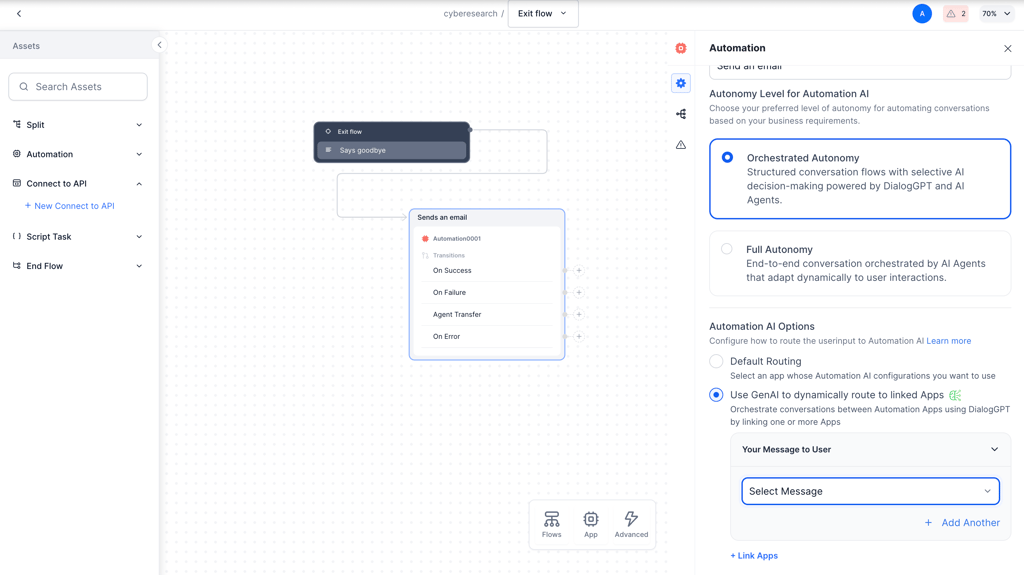
While I didn't have to write raw scripts to connect basic blocks, the volume of configuration menus and complex node settings was overwhelming. That’s why you’ll need a technical specialist to figure out and maintain Kore.ai.
Omnichannel deployment
Kore.ai offers 30+ communication channels, including popular messengers such as WhatsApp, Telegram, Slack, and Teams. In my experience, the best thing is that conversation flows and analytics across all text and voice channels are handled on one dashboard.
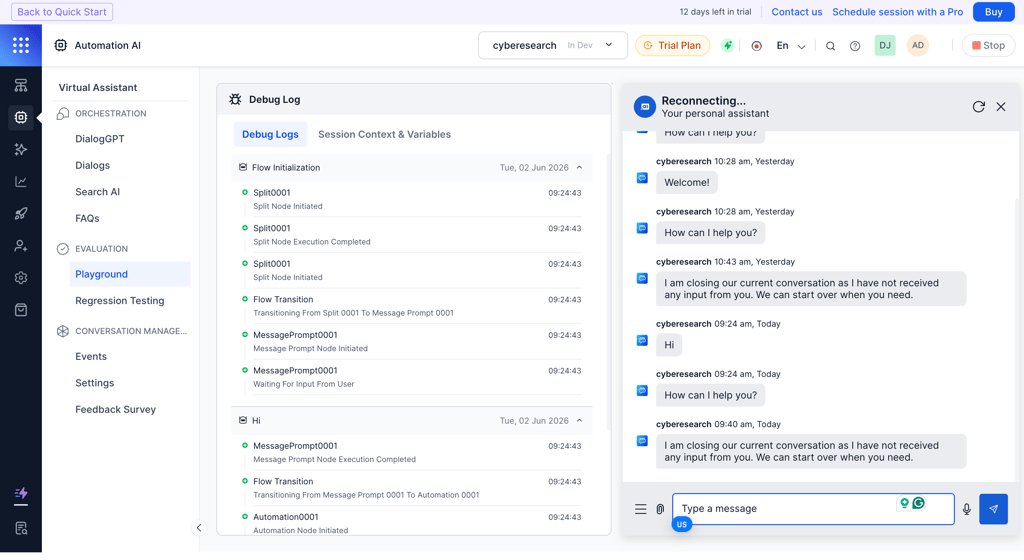
While you don’t have to rebuild conversation flows for every new channel, there are many things to adjust manually. For example, you have to configure domain-specific entity hints so the speech-to-text tool actually understands your company's acronyms or complex product names.
I also found that achieving a natural (and ROI-promoting) conversational flow in voice channels requires very heavy configuration. For one, you need to manage latency by enabling text-to-speech streaming – it allows the bot to start talking while the LLM is generating the rest of the answer. Then, you need to adjust the pause timer so that the AI agent doesn’t cut a user off because they took a long breath.
Agent AI and Contact Center AI
As a part of the Agent AI solution, Kore.ai’s AI agents suggest replies and next best actions and provide internal knowledge-based answers during a live call or chat. They can also handle a variety of standard post-call tasks, like automatically generating interaction summaries and updating the CRM.
I liked the Agentic Copilot the most, which works alongside a human worker. Basically, it automatically drafts a reply and gives you a brief window to override, edit, or cancel the text. It helps human workers handle multiple conversations at once, intervening only when needed.
As for the Contact Center AI, it actually handles both telephony and digital routing. What’s great is that it keeps context regardless of the communication channel. So, when a customer is routed to a human agent, the agent sees a full history of the self-service bot interaction, along with a CRM snapshot and a live sentiment analysis graph.
Search AI and knowledge retrieval
Search AI transforms any uploaded document into conversational answers. While this feature is pretty common in AI platforms, I liked Kore.ai’s number of native connectors. I could download SharePoint folders, Confluence pages, ServiceNow tickets, and Google Drives, and the platform automatically categorized all the data.
Thanks to agentic RAG, before answering, Kore.ai analyzes the user's intent, applies internal business rules, and decides whether it needs to query an external API or look up a specific PDF to generate the right answer.
Search AI itself is smart, but only if you feed it correct data. Inconsistent or incorrectly tagged documents will cause Al to generate confusing answers.
GALE: GenAI model orchestration
GALE here is responsible for all LLM-based mechanisms while maintaining strict governance, security, and compliance controls. In my test, I was able to route different tasks to different LLMs based on cost and capability. Also, I plugged in my own API keys for OpenAI, Azure, Anthropic, or Google Gemini.
What Kore.ai is really known for is its XO GPT, its proprietary, pre-fine-tuned models built specifically for conversational AI tasks like intent resolution, conversation summarization, and query rephrasing. Because they’re smaller (up to 10B parameters) and hosted on the platform itself, they run very quickly for voice-based interaction.
Since Kore.ai is made for enterprise safety, it was quite easy to set up automated guardrails and real-time data anonymization. So, before any prompt reaches a third-party LLM, it goes through GALE’s internal safety net.
Implementation and onboarding reality
As I said above, Kore.ai isn’t simple to install. The implementation is a capital-intensive IT project that usually follows these steps:
Step 1: sales consultation and scoping. Every setup starts with a call with the Kore.ai sales team. There, you define the minimum viable volume of automations required to make its pricing model work.
Step 2: custom solution architecture. You need to decide on your custom Kore.ai architecture, including use cases, conversational dialogue nodes, and data ingestion points, e.g., documents and databases.
Once contract terms are finalized with Kore.ai, your internal IT team can handle the entire implementation process itself. However, you can also pay for help: Kore.ai offers its own professional services team and partners with certified third-party companies that manage the setup for you.
Step 3: platform configuration. You have to set up the XO Platform, define entity extraction, i.e., how AI extracts and identifies specific details based on your business processes, and establish intent training, i.e., how AI understands user goals. Then, you connect Kore.ai to the needed communication channels.
Step 4: backend integration. Connect the AI to core enterprise systems, such as Salesforce, ServiceNow, or proprietary databases, via APIs.
Step 5: testing and knowledge ingestion. Connect your agents to your internal documentation so they can answer questions using company-specific context. Then, set guardrails and test the tool internally and on a target audience before full deployment.
Step 6: go-live and monitoring. Activate the agents and monitor them on the unified dashboard for latency, intent failures, and human hand-off rates.
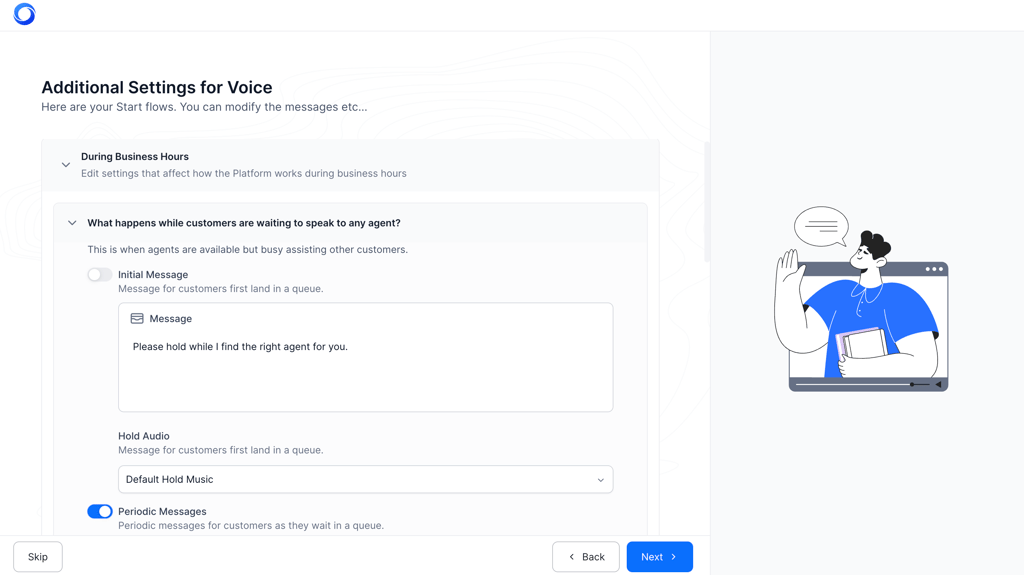
On average, it may take around 6 months to set up a complex omnichannel platform with legacy phone systems and custom SAP integrations. A basic internal IT helpdesk bot may take less, around 2 months.
Throughout my research, I found a few friction points that other users and I found challenging at the start, and I want to share them with you:
- Documentation gaps. While the basic setup is well documented, navigating the documentation for custom API integration scenarios can be frustrating.
- High barrier to entry. There’s no free, open testing environment for all platform features or a pre-recorded demo. You have to talk to sales before trying out the full platform.
- Clunky version management. Managing versions for complex, cloud-hosted dialogue flows is difficult. Interface updates can break existing flows, and there’s no simple undo button for restoring a previous version.
Kore.ai AI plans and credit costs
Unfortunately, Kore.ai doesn’t have a public pricing page. To learn the platform cost, you need to contact sales. From what I’ve learned from the developer documentation and third-party analysis, here are the approximate cost estimates:
| Kore.ai component | Pricing model and approximate starting cost |
| Initial implementation | $1,000–$10,000 |
| Automation AI and Search AI | Charges per 15-minute activity session (~$0.20/session) |
| Contact Center AI and Agent AI | Per seat (named or concurrent) |
| Support from Kore.ai | From ~$1,000/month |
| Add-ons and integrations | Varies by channel and volume |
For example, 10,000 sessions ($2,000), standard support from the Kore.ai team ($1,000), and various add-ons will cost you a minimum of $3,000–$5,000/month. Some organizations report unexpectedly high costs when scaling up, especially for voice channels and advanced features. Generally, the session-based model can get expensive at high volume without careful forecasting and established budget caps.
Overall, Kore.ai isn’t affordable for small businesses with a low volume of automated interactions. Also, the lack of pricing transparency makes it a risky and unpredictable investment for smaller budgets.
What enterprise users actually say
After analyzing hundreds of opinions across G2, Gartner Peer Insights, LinkedIn, and third-party review sites, I found that enterprises believe Kore.ai’s omnichannel breadth and depth of customization are unmatched in their businesses. People also appreciate its advanced natural language understanding and multilingual capabilities. For companies in highly regulated industries like banking and healthcare, Kore.ai’s strict compliance and security features are usually the main reason they choose it.
Of course, there are complaints as well. First comes the steep learning curve, and despite the visual builder, it requires highly technical skills. Developers often comment that while basic tutorials are helpful, the documentation for complex, custom API integrations is rather poor and slows down setup.
The interface may also feel slow when working with large flows, and as I noted before, there’s no simple rollback button, which makes managing updates stressful. So, Kore.ai isn’t a tool that a marketing team can implement on their own – if you don’t have dedicated IT developers to deal with all that, you should look at other options.
Kore.ai vs competitors
Kore.ai’s main focus is on the communication infrastructure with omnichannel support and wide language coverage. While it’s useful across a wide range of use cases, its competitors are highly specialized: Moveworks AI focuses solely on internal employee support, and Sierra AI targets customer support only. Vellum AI, on the other hand, functions as a developer framework for creating custom, autonomous AI agents with persistent memory rather than an enterprise contact center.
Here’s a full comparison table of Kore.ai’s main alternatives:
| Tool | Best for | Technical barrier | Voice AI | Pricing | Key difference from Kore.ai |
| Moveworks AI | Internal employee support | Medium – relies on pre-built API connectors to systems like ServiceNow and Workday | No – optimized for text-based enterprise messengers like Slack and MS Teams | Custom – usually subscription-based | Focuses almost exclusively on internal employee resolution, without the need to build flows manually |
| Sierra AI | B2C customer service | Medium – focuses on defining guardrails and instructions rather than rigid flowchart building | Yes – has Sierra Voice, an autonomous conversational voice agent | Custom – usually outcome-based | Relies on autonomous AI agents’ decisions instead of manual engineering of dialogue flows |
| Vellum AI | Building, testing, and deploying custom LLM apps and agents | Very technical – it’s a developer workspace for prompt engineering, model routing, and testing | No – it’s an LLM orchestration and evaluation layer | Monthly subscription with usage-based API costs | Used for building AI agents and apps, unlike Kore.ai's communication-focused infrastructure |
Overall, Kore.ai is the best as a conversational AI enterprise stack. That said, you need to be ready for higher costs, implementation time, and a steep learning curve.
Verdict: is Kore.ai AI worth using?
Yes, Kore.ai is the most complete enterprise AI platform for automating client and employee support. However, it’ll only work for you if you have the budget, the IT resources, and the time. Here are a few more reasons to go for Kore.ai:
- Deepest omnichannel coverage (30+ channels) with enterprise-grade governance and compliance in a single platform
- Multilingual support across 120+ languages
- The on-premises deployment option is rare in the segment and critical for regulated industries
And here are the reasons why you should look for something else:
- No public pricing and a minimum of ~$3,000–$5,000/month make it too expensive for most businesses
- An implementation time of up to 6 months is a big disadvantage when speed matters
- There are lighter and faster alternatives that cover most mid-market needs at a lower cost and less complexity
FAQ
Is Kore.ai suitable for small businesses?
No, Kore.ai isn’t suitable for small businesses, as it lacks transparent pricing and requires a significant upfront investment and dedicated IT resources.
Does Kore.ai have a free plan or free trial?
Yes, Kore.ai has a free trial, but only for certain platform features. To access the full-on trial, you need to contact sales first.
How long does a typical Kore.ai implementation take?
On average, implementation takes from 3 to 6 months due to the heavy architectural requirements and complex API integrations.
How does Kore.ai handle data privacy and compliance?
Kore.ai holds GDPR, HIPAA, and SOC 2 Type II certifications and guarantees that your data isn’t used to train its AI models.
What are the best alternatives to Kore.ai?
You can try nexos.ai to build AI agents without a complex setup or coding. Then, Moveworks AI is perfect for internal employee support, while Sierra AI excels at consumer-facing customer service.