Best VPNs for Safari in 2026
Our in-house cybersecurity experts and journalists, renowned for major reports like The Mother of All Breaches, conduct transparent, unbiased VPN testing and in-depth analysis.
With 750+ articles crafted based on real-world research, we empower readers to make informed purchasing decisions through first-hand expertise.
Learn more
If you’re looking for the best VPN for Safari in 2026, NordVPN is my top pick, combining consistently fast speeds, strong security, and an app that’s easy to use across macOS and iOS.
One thing worth knowing before you dive in: Safari doesn’t support browser extensions the way, for example, Chrome or Firefox do. This is because Apple keeps network traffic under the operating system’s control rather than allowing individual browsers to handle it. While that improves your Apple devices’ security, it also means you’ll need to set up a dedicated VPN app on your Mac or iPhone. Once installed and running, the VPN automatically covers your Safari, along with everything else on your device.
Below, I share my top VPN picks for Safari, what to look for when choosing one, and how to get everything set up.
Best Safari VPNs – full list
Here's a quick overview of the best VPNs I tested for Safari. Each one made this list for a different reason, so use the table below to compare pricing, server networks, and best use cases before jumping into the full breakdowns.
| VPN | Best for | Platforms | Servers/countries | Starting price |
| 1. NordVPN | Overall best VPN for Safari in 2026 | Windows, macOS, Linux, Android, iOS | Thousands of servers in 224 locations | $3.49/month |
| 2. Surfshark | Budget-friendly VPN with unlimited devices | Windows, macOS, Linux, Android, iOS | 4,500+ servers in 100 countries | $2.49/month |
| 3. Proton VPN | Privacy-focused VPN with a free version | Windows, macOS, Linux, Android, iOS | 20,500+ servers in 148 countries | $2.99/month |
| 4. IPVanish | Most affordable Safari VPN on this list | Windows, macOS, Android, iOS | 3,400+ servers in 150 locations | $2.49/month |
| 5. ExpressVPN | Best for ease of use | Windows, macOS, Linux, Android, iOS | Undisclosed number of servers in 113 countries | $3.49/month |
1. NordVPN – overall best VPN for Safari in 2026

| Rating: | |
| Based in: | Panama |
| macOS/iOS supported versions: | macOS 12 or newer and iOS 16.0 or newer |
| Servers/locations: | Thousands of servers in 224 locations |
| Simultaneous connections: | 10 |
| Current deal: | Get 75% OFF NordVPN + 3 months free |
NordVPN is my top VPN pick for Safari in 2026, and it’s the one I keep coming back to after having tested it on every major platform. First of all, NordVPN checks every box for me security-wise: AES-256 and post-quantum encryption, RAM-only servers, and a no-logs policy that has now been through 6 independent audits by Deloitte, PwC, and Cure53. Being based in Panama, outside of the Fourteen Eyes alliance, adds another layer of legal protection for privacy-concerned users like myself.
For NordVPN speed tests, I used a baseline connection of 940Mbps download and connected from Vilnius, Lithuania, to servers in 10 countries across 5 continents. Since results vary widely by distance and location (even within the same country), I'm highlighting the results from three different ranges – nearby, mid-distance, and far – so you can get a fuller picture.
- Berlin, Germany (close-range server): 863Mbps (92% of baseline)
- New York, USA (mid-range server): 799Mbps (85% of baseline)
- Singapore (long-range server): 728Mbps (77% of baseline)
In practice, even at the farthest distance, it was still fast enough that I never noticed the VPN was even on: Safari loaded heavy pages like news sites with embedded videos instantly, a 4K Netflix stream never buffered, and a video call over Safari had no lag – I even switched servers mid-call to test it. NordLynx, NordVPN’s own protocol built on WireGuard, is what makes this level of speed possible without compromising on privacy.
The app itself is a big part of why I recommend NordVPN. It looks modern, gets updated regularly with genuinely useful features (like the recently added built-in protection against scams, phishing, and malware), and remains easy to navigate, even with everything packed into it. On macOS specifically, I’d skip the App Store version and download directly from NordVPN’s website – the App Store drops a few features I actually use, like the app-level kill switch. Once installed, it runs in the background and automatically covers Safari.
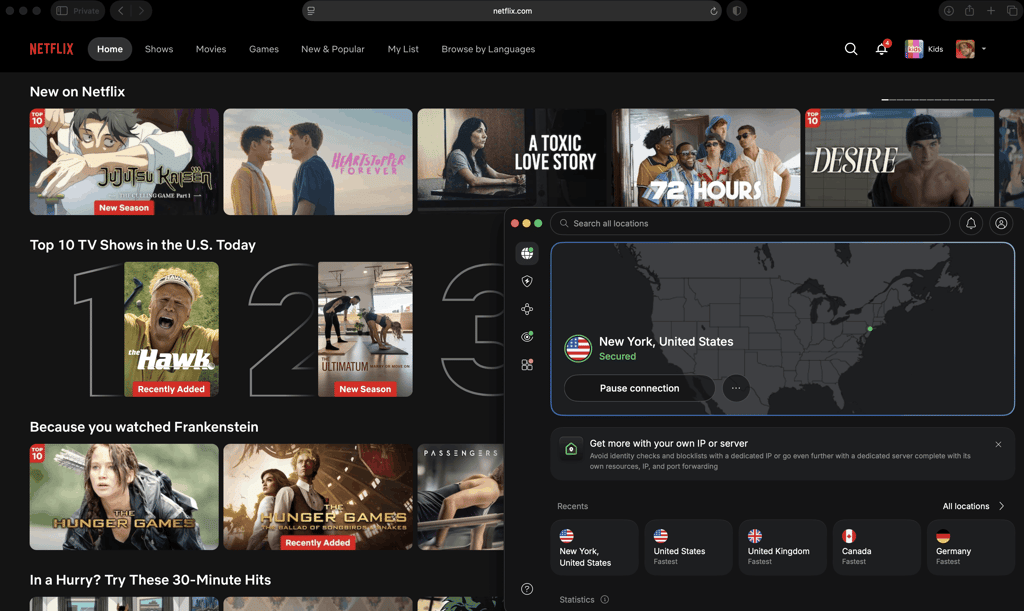
The NordVPN iOS app is just as clean, though it doesn't support split tunneling – a feature Apple limits to domain/website-level exclusions on iOS rather than full per-app routing for any provider. NordVPN also doesn't offer split tunneling on macOS, unlike Surfshark and IPVanish, which do support it there. Split tunneling lets you choose which traffic goes through the VPN and which connects normally. In practice, it’s rarely a deal-breaker since most users leave everything running through the VPN anyway. However, if you need to exclude any specific apps from the VPN (e.g., a local printer or a banking app that flags VPN use), you will need split tunneling on your Apple devices.
NordVPN’s pricing starts at $3.49/month, but the higher price is easier to justify once you look at what’s actually included. Dark Web Monitor keeps an eye on whether your email or personal details show up in a breach, covering up to 5 email addresses on the standard plan. Upgrade to a higher tier, and Dark Web Monitor Pro expands that to 8 emails, plus monitoring for your phone number, credit card, and national ID or Social Security number – something I haven’t seen bundled this well by any other provider on this list. And if you do decide to upgrade, you also get NordVPN’s next-gen antivirus, formerly known as Threat Protection Pro. It blocks malicious sites, trackers, and malware downloads directly in Safari, so you can drop a separate ad blocker entirely.
You also get 10 simultaneous connections, enough to cover your Mac, iPhone, iPad, and a few extra devices under the same plan. NordVPN’s free trial is only 3 days long, though, so I’d lean on its 30-day money-back guarantee if you want to test it thoroughly, not just with Safari.
2. Surfshark – affordable Safari VPN with unlimited device support

| Rating: | |
| Based in: | Netherlands |
| macOS/iOS supported versions: | macOS 12 or newer and iOS 16.1 or newer |
| Servers/locations: | 4,500+ servers in 100 countries |
| Simultaneous connections: | Unlimited |
| Current deal: | Now up to 87% OFF Surfshark + 3 months FREE |
Surfshark is the best Safari VPN for its price-to-value ratio, offering a perfect balance for budget-conscious users. With a Surfshark subscription starting at $2.49/month, it’s cheaper than NordVPN or ExpressVPN by a full dollar while still offering unlimited simultaneous connections, so you can forget about counting devices.
Running the same speed tests on Surfshark, the numbers held up close behind NordVPN:
- Berlin, Germany: 829Mbps (88% of baseline)
- New York, USA: 778Mbps (83% of baseline)
- Singapore: 686Mbps (78% of baseline)
With WireGuard, I didn’t notice any real slowdown for everyday Safari browsing, even on the Singapore server – HD streaming, and video calls without any noticeable lag. Surfshark also has its own proprietary protocol, Dausos, which tested fastest for torrenting despite a lower overall retention of 74% (vs 83% on average on WireGuard). However, it fluctuated more than WireGuard (from 12MB/s to 30MB/s) in my tests. For this reason, I’d stick with WireGuard as the default for your daily Safari use and only switch to Dausos if you're torrenting.
Surfshark is expanding into an all-in-one cybersecurity suite rather than just a VPN, and that shows in the app. CleanWeb blocks ads, trackers, and malicious sites right in Safari – I noticed it reduces YouTube ads and flags phishing pages during testing. Alternative ID is a nice touch for Safari users, too: it generates a full fake identity, including a name, address, birth date, and masked email, so you’re not handing over real details for sign-ups. There's also an Alternative Phone Number add-on if you want a fake number to go with it.
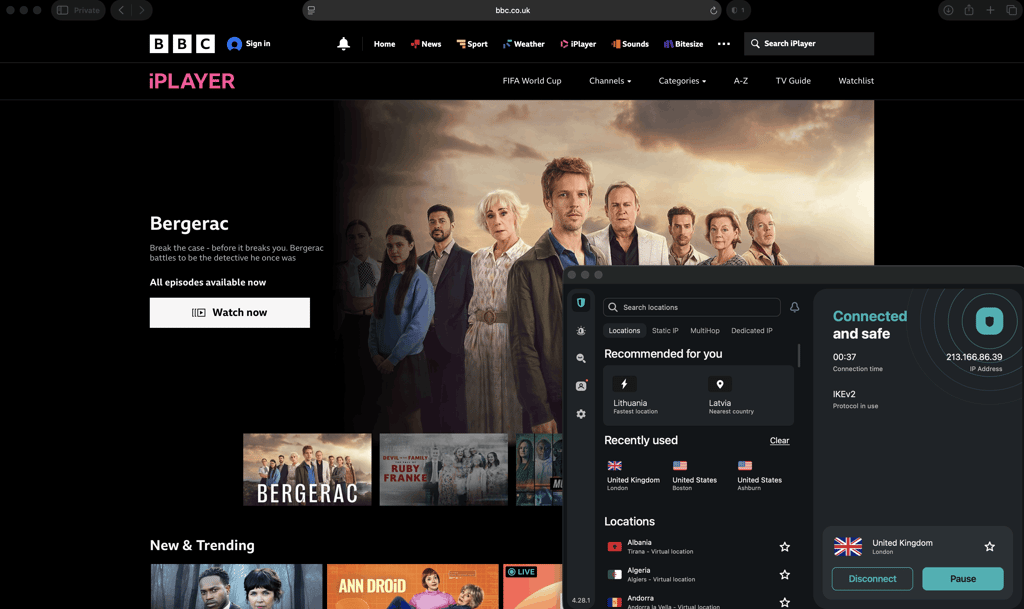
On macOS and iOS, the app is clean and easy to navigate, with a straightforward layout that makes connecting and switching servers easy, even for first-time users. When compared to NordVPN, Surfshark has an upper hand – its split tunneling, called Bypasser, works on macOS, letting you route specific apps outside the VPN.
3. Proton VPN – freemium, privacy-focused VPN for Safari

| Rating: | |
| Based in: | Switzerland |
| macOS/iOS supported versions: | macOS 10.14 or newer and iOS 17.0 or newer |
| Servers/locations: | 20,500+ servers in 148 countries |
| Simultaneous connections: | 10 |
| Current deal: | Get up to 70% OFF Proton VPN |
Proton VPN is the most privacy-focused VPN for Safari as of 2026, and if you’re looking for a genuinely trustworthy free version, it’s your best choice. Built by the team behind Proton Mail and based in Switzerland, Proton VPN is fully open source, meaning its code not only has been independently audited but it can be inspected by anyone – a level of transparency that’s rare among premium VPNs.
Where Proton VPN differs from NordVPN and Surfshark is its server architecture. Instead of RAM-only servers, Proton VPN uses traditional hard drives with full-disk encryption, storing configuration files and certificates on the exit server to block man-in-the-middle attacks at that level. It's a different approach to the same goal, though RAM-only has become the more common standard among the other providers on my list.
In my tests, Proton VPN speed results were just a little behind NordVPN and Surfshark:
- Berlin, Germany: 858Mbps (91% of baseline)
- New York, USA: 770Mbps (82% of baseline)
- Singapore: 695Mbps (74% of baseline)
In practice, Safari still loaded quickly and streaming stayed smooth, though I noticed slightly longer load times on Singapore servers than with NordVPN's NordLynx.
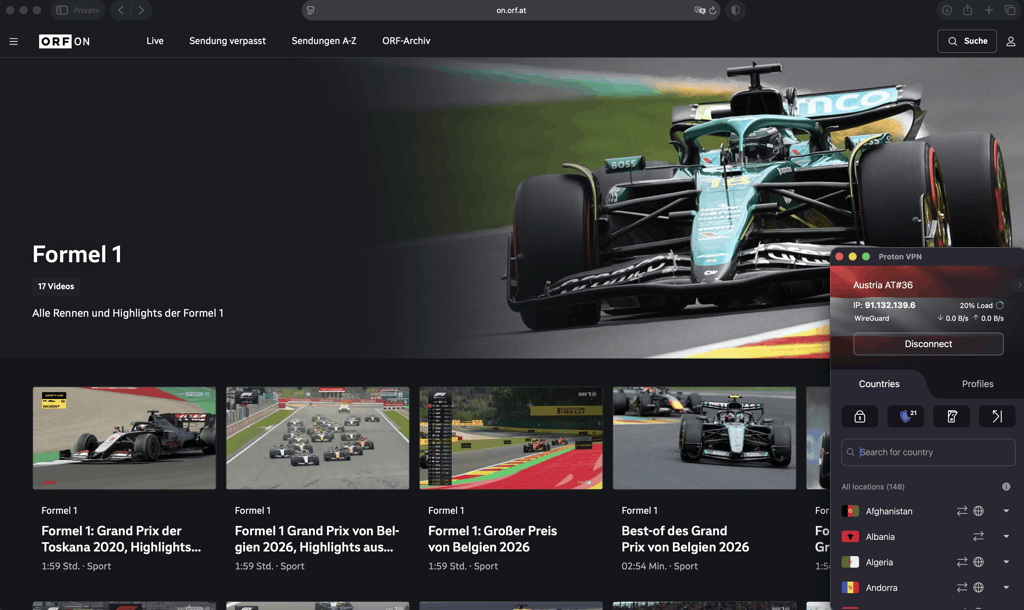
Proton VPN's standout feature for privacy-conscious Safari users is Secure Core, which routes your traffic through an extra Proton-owned server in a privacy-friendly country before it exits to the internet. It’s especially useful if you're on public Wi-Fi and want an added buffer between your device and the open web. However, there is a speed trade-off compared to Proton VPN’s standard connection, which makes sense given the extra hop. How much you'll feel it really depends on your baseline internet speed, though. On my 940Mbps connection, the drop was very slight, but if you're on a more typical 100Mbps home connection, that same percentage loss will be much more noticeable.
NetShield handles ad and tracker blocking directly in Safari, working similarly to Surfshark's CleanWeb. I found it caught phishing attempts just as reliably in my testing, though its interface feels a bit more basic and less customizable by comparison.
On macOS and iOS, the app is clean and easy to use, supporting up to 10 simultaneous connections – the same limit as NordVPN, though well short of Surfshark’s and IPVanish’s unlimited devices. The macOS app is functional and stable – I didn't experience a single unexpected drop during testing, and when I forced one, the kill switch cut my connection instantly as it’s supposed to. There’s one limitation worth flagging, though: while split tunneling is available on macOS, it's still labeled experimental, meaning some excluded apps might occasionally leak your real IP address.
Proton VPN pricing starts at $2.99/month on the 2-year plan. If you just want to try it first, Proton VPN's free plan is the only one on this list worth using long-term rather than just as a trial. Just note that, while it offers unlimited data and no ads, it supports only 1 device and 10 server locations. There’s also no control over which server you connect to – Proton VPN assigns one randomly, and if you want to switch, you're stuck waiting through a cooldown period (45 seconds for your first change, then 10 minutes for each one after that).
4. IPVanish – best budget-friendly VPN for Safari

| Rating: | |
| Based in: | The United States |
| macOS/iOS supported versions: | macOS 13 or newer and iOS 14.0 or newer |
| Servers/locations: | 3,400+ servers in 150 locations |
| Simultaneous connections: | Unlimited |
| Current deal: | Now up to 83% OFF IPVanish |
At $2.49/month and with unlimited simultaneous connections, IPVanish is the most affordable Safari VPN on my list. It undercuts even Surfshark on price while matching its support for multiple devices.
Speed is where IPVanish falls behind NordVPN and all other providers I chose for Safari. Here are the in-house test results:
- Berlin, Germany: 857Mbps (91% of baseline)
- New York, USA: 676Mbps (72% of baseline)
- Singapore: 611Mbps (65% of baseline)
IPVanish held its own on the nearby German server, but the drop-off got steeper the farther I connected – noticeably more than NordVPN, Surfshark, or Proton VPN. While this was still enough for everyday Safari browsing and HD streaming on Tubi without much issue, I did notice occasional buffering when jumping into 4K on Netflix. Video calls experienced minor stuttering a few times during longer sessions as well. If speed is your top priority, I'd lean toward NordVPN or Surfshark instead. However, if you're mainly browsing and streaming in HD rather than 4K, IPVanish's speeds are still perfectly workable.
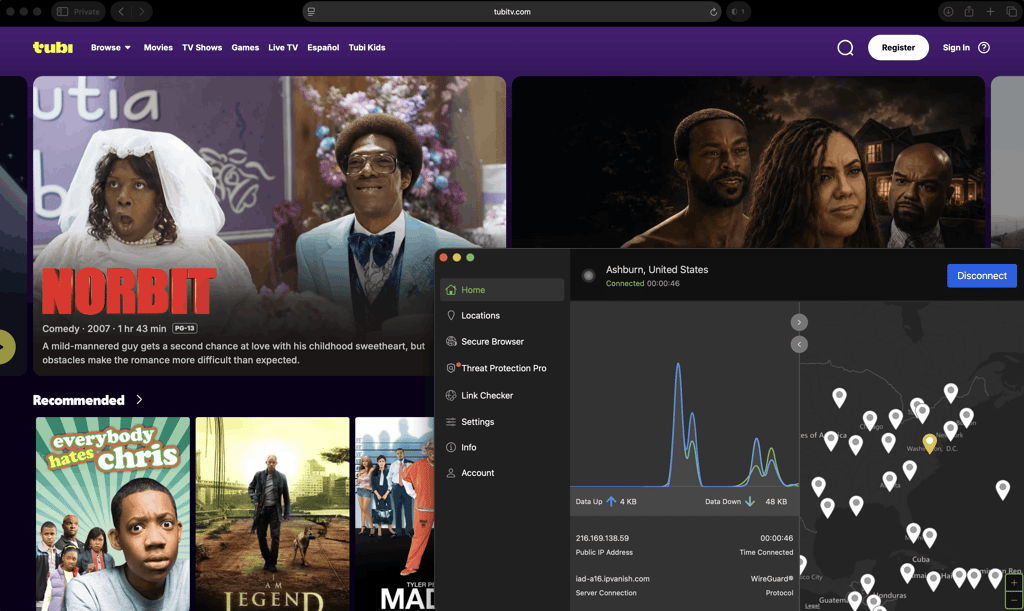
What made IPVanish earn its place back on my list is the features you don't usually see at this cost. Domain-based split tunneling works on both macOS and iOS, which is rare – ExpressVPN is the only other provider on this list that offers it on both desktop and mobile. IPVanish is also mid-rollout on RAM-only servers, with iOS and macOS already covered and the rest of its network expected to transition by 2027. Threat Protection Pro handles ad and malware blocking in Safari, similar to what NordVPN and Surfshark offer, but you’ll need to upgrade to the Advanced plan to get it.
Since you’re looking for a VPN solution that will make your browser safer, consider also IPVanish’s own Secure Browser feature. It isn’t running in Safari itself but opens an entirely separate, cloud-hosted browser session, making it a disposable browser essentially. The page loads on IPVanish's servers, not your device, so if you click a malicious link or land on an infected site, nothing actually touches your Mac or iPhone. It's a step beyond what Private Browsing in Safari can do, since even IPVanish itself can't see which sites you visited once the session ends. I'd reach for it specifically when clicking unfamiliar links (from emails, ads, or search results I'm not sure about) rather than for everyday browsing, since it runs as its own app and functions more like a supplement to your Safari browsing.
In terms of privacy, IPVanish's no-logs policy has been independently audited, though it's worth noting that the company is based in the US, which puts it inside the Five Eyes alliance – a step down from Proton VPN's Swiss base or NordVPN's Panama jurisdiction if that's a priority for you.
The IPVanish macOS and iOS apps are clean and simple to set up, though I noticed the interface loads a bit slower than I’m used to with NordVPN and Surfshark – the server map, for instance, can take a couple of seconds to populate.
5. ExpressVPN – beginner-friendly VPN for Safari

| Rating: | |
| Based in: | The British Virgin Islands |
| macOS/iOS supported versions: | macOS 11 or newer and iOS 15.0 or newer |
| Servers/locations: | Undisclosed number of servers in 113 countries |
| Simultaneous connections: | Up to 14 |
| Current deal: | Now up to 80% OFF ExpressVPN + 4 months FREE |
From installation to server switching, ExpressVPN is designed to require zero configuration and is one of the easiest VPNs to set up and use with Safari. It's also the only provider on my list with real history in Safari specifically: ExpressVPN once offered a dedicated VPN extension for Safari, years before Apple's Safari 12 update forced it to drop browser-level integration in favor of full device apps.
ExpressVPN’s Mac and iOS apps are very simple: they open to a large connect button, automatically suggest an optimal server, and leave advanced settings out of the way. If you've ever given up trying to set up a VPN for a parent or a less technical family member, this is the one I'd install for them: with just the connect button and no settings menu to get lost in, it’s as straightforward as it can possibly be.
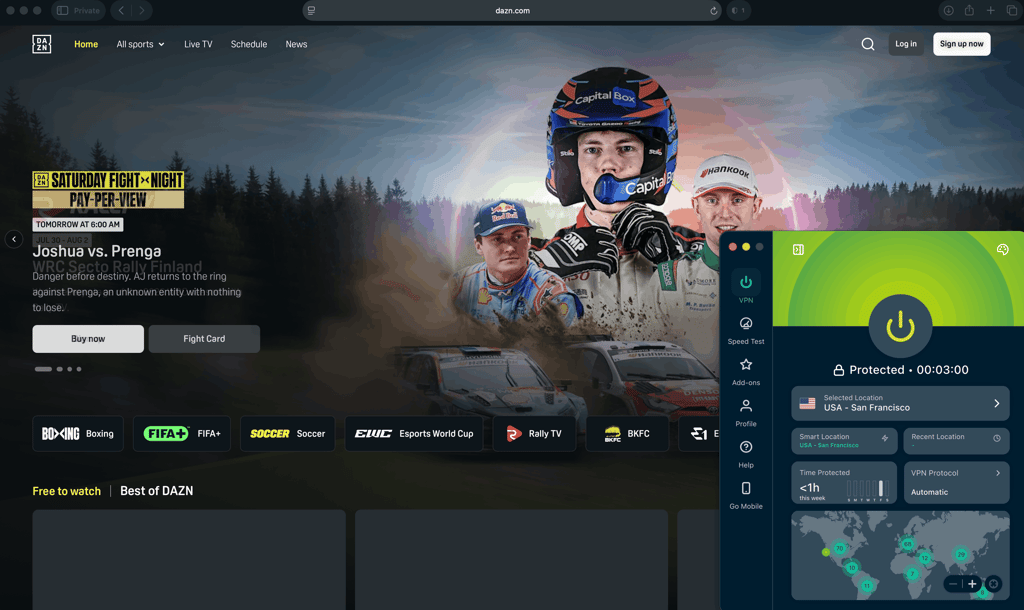
In my ExpressVPN speed tests, its proprietary Lightway protocol held up like this:
- Berlin, Germany: 838Mbps (89% of baseline)
- New York, USA: 740Mbps (79% of baseline)
- Singapore: 711Mbps (76% of baseline)
I streamed a Formula 1 replay in 4K on a UK server without a single stutter, and even FaceTime – one of the more bandwidth-demanding calling apps – held up with no lag, no matter what server I was on. Moreover, ExpressVPN’s Lightway core code is open-source, which is rare among premium VPNs, and has been independently audited by Cure53.
ExpressVPN is overall one of the most audited providers out there, with 27 independent security audits to date. It’s also based in the British Virgin Islands, outside any surveillance alliance. A kill switch is available across macOS and iOS, and split tunneling is supported on both platforms, too. Note that on iOS, it shows as Manage Excluded Websites, letting you choose which websites should route through the VPN servers and which should use your regular connection.
ExpressVPN’s pricing starts at $3.49/month, putting it on the more expensive side, next to NordVPN. One thing to watch out for when comparing plans: the cheapest tier only includes Lite Protection, which blocks ads and malicious sites. Upgrading gets you Advanced Protection, which adds tracker and adult-site blocking on top. Consider this if content filtering matters to you, since it's not automatically included at every price point. Simultaneous connections scale with your plan, too: 10 on the cheapest tier, up to 12 or 14 on higher ones.
Can you use a free VPN for Safari?
Yes, you can use a free VPN for Safari, but with some serious caveats. Overall, I wouldn’t recommend most free VPNs even for casual browsing. This is because running servers costs money, and if a provider isn't charging you for the service, it's usually recouping that cost somewhere else. That often means logging and selling your browsing data to advertisers, which undermines the privacy a VPN is supposed to give you in the first place. Also, note that some free VPNs can go further, injecting their own ads into the pages you visit or throttling your speed and capping your data, forcing you to upgrade.
Proton VPN is the one real exception and the only free Mac VPN I’m comfortable recommending. Its free tier runs on the same no-logs policy, encryption, and open-source code as its paid plans. But even here, there are some trade-offs: slightly slower speeds during peak hours and a smaller pool of server locations that can only be selected at random.
As such, I recommend testing a premium VPN with a free trial first, instead of committing to a permanently free plan. This way, you get to try out the full feature set risk-free, without any of the privacy compromises.
How to choose a Safari VPN
Since Safari doesn’t support VPN browser extensions, you need to consider more criteria when choosing a reliable service provider – you’re looking for something that runs well at the device level, not just a browser add-on. Here’s what to check:
- Apple-native protocol support. Look for a VPN that supports protocols built for Apple’s ecosystem, such as WireGuard, IKEv2, or IPsec. Check the provider’s app settings or specs page for its protocol options – if it only offers proprietary or older protocols like PPTP, that’s a red flag for both speed and security.
- Strong encryption. The VPN should use AES encryption with a 256-bit key, the current industry standard. This is usually listed on the provider’s security or trust center pages. If you cannot find this information explicitly stated anywhere, I’d take it as a warning sign rather than assuming the best.
- No-logs policy, backed by independent audits. Don’t take the provider’s no-logs claims at face value. Search for its most recent third-party audit report and check the date – an audit from 2019 will tell you much less about the provider’s current practices than the one from this or last year. It’s also worth checking the provider’s legal jurisdiction, as providers outside of the Five/Nine/Fourteen Eyes alliances tend to face fewer formal obligations to share user data with foreign governments.
- Kill switch. Some providers only offer it for desktop and not mobile, so if you plan to use the VPN on your iPhone, check the mobile app’s feature list separately.
- Device limits. Consider how many devices with Safari you’d actually need to cover (your iPhone, laptop, iPad, plus those of family members), then check the provider’s supported simultaneous connections to see if it covers them. 10 device connections are more than enough for one person, but if you want to cover the whole household, it makes more sense to look for a provider with unlimited device support than to pay for a second subscription.
- Speed. This is one of the few things you cannot fully evaluate before buying, as it depends on your location, the exact server you connect to, and network conditions at the time. I encourage you to check our in-house speed tests on the fastest VPNs for a realistic baseline. Most providers also offer free trials and refund windows, which you can use to run your own test: connect, then compare your speed with the VPN on vs off.
- Wide server network. If you need a specific location for work access or streaming, check whether the provider has servers in that exact country, not just nearby coverage. Overall, the more servers and countries a provider’s network includes, the more room you get to switch if one server is slow or blocked.
- Price. For many VPN providers, annual and 2-year plans usually run 50–70% cheaper than monthly subscriptions, so compare these first. Also check the money-back guarantee duration (usually 30 days) and conditions, as these can vary between providers (e.g., excluding certain payment methods or requiring direct contact with support for a refund rather than just canceling the subscription).
How to set up a VPN on Safari (Mac and iPhone)
You already know that Safari doesn’t support VPN browser extensions – extensions in Safari overall have much more limited access to browser traffic than those in other browsers. Apple’s limitations improve security, as it’s harder this way for malicious extensions to intercept your traffic or spy on your browsing activity. This limitation works out in your favor, though – since the VPN has to run at the device level instead of as a browser extension, it protects your entire device, not just what you do in Safari.
If you’re using a VPN app, you only need to install it and connect to a server – this already covers Safari and everything else on your Apple device. However, if you have raw VPN credentials from a VPN provider, you’ll need to set it up manually – common for remote work access, testing and development environments, or older macOS/iOS versions. Below, I explain how to enter them directly into your Mac’s or iPhone’s system.
Set up a VPN on Mac
Here’s how you install a VPN for Mac manually:
- Head to the Apple menu and select System Settings
- Click VPN in the sidebar
- Click Add VPN Configuration and select the type of VPN connection you want to set up
- In the Display Name field, enter a name for your new VPN connection
- If you don't need a custom configuration, choose Default Configuration
- Enter the server address, account name, password, and authentication method
- Click Create, then connect to the VPN
Some VPNs are available in both Apple’s App Store and as a direct download from the provider’s website – and these aren’t identical. App Store versions are sandboxed, which means they have a limited set of approved system resources. This protects your Mac from rogue resources, but it also restricts what a VPN can actually do (e.g., no custom DNS settings or the app-level kill switch). For the full feature set, I recommend downloading a VPN directly from the provider’s website instead.
Set up a VPN on iOS
The steps below demonstrate how to manually add a VPN to your iPhone or iPad:
- Open Settings
- Tap General > VPN and Device Management > VPN > Add VPN Configuration > Type
- Choose a protocol: IKEv2, IPSec, or L2TP
- Enter the Description, Server, and Remote ID
- Under Authentication, enter your username and password
- Tap Done
Do you really need a VPN for Safari?
The short answer is: yes. However, Safari and a virtual private network protect you from different things, and one doesn’t replace the other. Safari has quietly gotten better at protecting your privacy over the last few years, so it’s a fair question.
Safari’s built-in privacy features like Intelligent Tracking Prevention (ITP) do some real work:
- Cross-site tracking cookies. Safari blocks many of the cookies that follow you from site to site to build a profile of your browsing habits.
- Browser fingerprinting. Safari makes it harder for advertisers to identify your device based on its unique characteristics (e.g., screen size, fonts, plugins).
However, these features are aimed squarely at advertisers and trackers to stop companies from building a picture of who you are as you move around the web. They don’t hide your browsing activity from your internet service provider or network, though – and this is where the gaps show up:
- Your ISP or network can still track your activities. Safari doesn’t hide your browsing from your internet provider, your employer, your school, or whoever runs the public Wi-Fi network you’re on. They may not see the exact page content, thanks to HTTPS, but they can see which sites you visit.
- Public Wi-FI isn’t fully covered. While HTTPS does encrypt most site content, it doesn’t hide your activity from the network itself the way a VPN’s encrypted tunnel does – and how strong that tunnel is depends on your VPN protocol.
- Fingerprinting is reduced only to some extent. Safari cuts down on fingerprinting by adding noise and standardizing some browser-exposed data, but it doesn’t eliminate fingerprinting altogether. Some signals (e.g., installed fonts, WebGL characteristics, and device or hardware-related attributes) can still be combined into a useful fingerprint, and advanced trackers might still be able to work around bits of Safari’s protections.
- Your location stays the same. Safari won’t make it look like you’re browsing from another country – that’s specifically what a VPN does by routing your connection through a server elsewhere.
- Some tracking links can slip through. Depending on your Safari version and browsing mode, certain tracking parameters can still follow you during normal browsing.
Speaking of browsing modes, there’s a common misconception worth clarifying here: Safari’s Private Browsing mode doesn’t give you the same protection as a VPN. It only stops the browser from saving your history and site data locally on your device. It does nothing to hide your IP address or browsing activity from your network, and it won’t change your apparent location either.
So, if you only care about blocking ad trackers, I’d say Safari’s built-in tools already do a decent job. However, if you want to hide your activity from your ISP, protect yourself on public Wi-Fi, or access content restricted to another region, you do need a VPN with Safari.
iCloud Private Relay vs VPN
If Safari is your default browser, you’ve probably already seen the option for iCloud Private Relay and wondered whether it’s basically a built-in VPN. It’s not quite.
Private Relay is built around one core idea: no single company should be able to see both who you are and which websites you visit. But instead of routing your traffic through a single server like most regular VPN connections do, Apple splits the job between two separate relays. While this sounds conceptually similar to double VPN, it isn’t in practice. The process goes like this:
- Your Apple device encrypts your request. Before any traffic leaves your iPhone, iPad, or Mac, the website information is encrypted.
- Apple’s relay receives it first. Apple can see your real IP address (so it can assign you a temporary one), but it cannot see which website you’re visiting – that part stays encrypted.
- A second relay connects you to the website. This relay, operated by a third-party partner like Cloudflare or Akamai, can see which site you’re visiting, but it only sees your temporary IP address, not your real one.
As a result, your identity and your browsing activity are never visible to the same party at the same time.
Here’s a quick overview of iCloud Private Relay vs VPN, so you can see where they overlap and where a VPN brings additional functionality.
| Functionality | iCloud Private Relay | VPN |
| Hides your IP address in Safari | ✅ Yes | ✅ Yes |
| Encrypts Safari browsing | ✅ Yes | ✅ Yes |
| Bypasses network-level blocks | ✅ Yes | ✅ Yes |
| Lets you choose a specific server location | ❌ No | ✅ Yes |
| Has split tunneling | ❌ No | ✅ Yes, but depends on the provider |
| Has a kill switch | ❌ No | ✅ Yes (most paid VPNs) |
| Works for streaming/geo-unblocking | ❌ No | ✅ Yes |
| Works on other operating systems | ❌ No | ✅ Yes |
| Works without a subscription | ❌ No, requires paid iCould+ plan | Depends on the provider |
| Traffic coverage | Only the Safari browser | Entire device |
As you can see from the table, Private Relay and a VPN aren’t really competing for the same job. Private Relay is a lighter, Safari-only layer of privacy, while a VPN is a broader, more flexible tool. So, when do you use which?
- Use iCloud Private Relay if you mostly use Safari and just want protection from trackers and your ISP, with no additional installation required.
- Use a VPN if you need to protect other browsers and apps (banking, messaging, torrenting), want the ability to choose a specific country for streaming or work access, or you also want to cover devices that don’t support Safari at all (Windows, Android, Linux).
- Use both if you already have iCloud+. You can keep Private Relay on for everyday Safari browsing, and switch to a VPN when you need whole-device protection or want to change your apparent location. Note that when the VPN is active, Private Relay automatically turns off, so only the VPN protects your connection at that point – they don’t stack.
Why is Safari not working with VPN?
If Safari won’t load with a VPN enabled, it’s rarely a Safari-specific issue – most likely, it’s one of these common VPN connection problems:
- iCloud Private Relay is still on. Normally, Private Relay should turn off once you connect to a VPN, but you can still double-check first to make sure they’re not conflicting.
- Cached data or cookies. Safari may be holding onto cookies or cached pages from before you connected, which can cause errors or mismatched location data. Clear your cache or try Private Browsing.
- VPN app is outdated. An outdated app may not be compatible with the latest macOS or iOS update, so check for updates in the App Store or a provider’s website.
- Your network might be actively blocking the VPN. Some ISPs, workplaces, schools, and even countries block VPN traffic outright. If that’s the case, you’ll need a provider with obfuscation or stealth server options built to get around this.
- Kill switch is on. If your VPN’s kill switch was activated after the connection dropped, it may keep blocking all the traffic, including Safari, until you manually reconnect.
- DNS settings not reset. If you recently disconnected from a VPN, leftover custom DNS settings can stop Safari from resolving sites properly. Reset your network's DNS settings to automatic.
If none of these fixes help, try restarting your iPhone or Mac and reconnecting to a VPN – this typically resolves most connectivity issues.
Final verdict
Safari's built-in privacy tools are solid, but they only go so far – they won't hide your browsing from your ISP, protect you on public Wi-Fi, or change your location. That's where a VPN comes in.
After testing several reliable options, NordVPN is my top pick for Safari in 2026. It combines fast, consistent speeds with NordLynx, strong security backed by independent audits, and an app that's genuinely easy to use across macOS and iOS.
FAQ
Does Safari have a VPN?
No, Safari doesn't have a built-in VPN. It has privacy features like Intelligent Tracking Prevention and reduced fingerprinting, but these don't hide your IP address, encrypt your traffic from your ISP, or let you change your location – you'll need a separate VPN app for that.
Is iCloud Private Relay the same as a VPN?
No, Private Relay only protects Safari traffic on Apple devices, doesn't let you pick a specific server location, and requires an iCloud+ subscription. A VPN protects your entire device, works across platforms, and lets you choose where you appear to be browsing from.
Does Safari's Private Browsing mode protect me like a VPN does?
No, Private Browsing only stops Safari from saving your history and site data locally on your device. It doesn't hide your IP address or activity from your network, and it won't change your apparent location – a VPN is still needed for that.
Which VPN is best for Safari?
NordVPN is my top pick for Safari in 2026, based on hands-on testing of speed, security, and how well its macOS and iOS apps handle Safari-specific use.
Can I use a free VPN with Safari?
You can, but most free VPNs come with real trade-offs, like data logging or capped speeds. Proton VPN's free tier is the one exception worth using, but in general, I recommend testing a premium VPN through its free trial instead.
Will a VPN slow down Safari?
Some speed loss is normal with any VPN, since your traffic is being encrypted and rerouted. The best providers keep this minimal, though. For example, NordVPN retained 84% of my baseline speed in testing, which was fast enough that I never noticed the VPN was on.
Can I install a VPN extension for Safari?
No, Apple no longer allows VPN browser extensions in Safari. Instead, you need to install a VPN app on your Mac or iOS device, which will automatically protect Safari and everything else on it.
Is it safe to use a VPN on a Mac or iPhone?
Yes, as long as you choose a reputable provider with strong encryption, a no-logs policy backed by independent audits, and a clear jurisdiction. Avoid free VPNs with vague privacy policies, as they are most likely to log or sell your data.