AdLock review 2026
Our trusted in-house research experts conduct independent, unbiased testing of ad blockers, combining internal and external evaluation data and tools for comprehensive reviews.
We maintain full transparency by sharing our methodologies and technical insights, empowering readers to make informed, independent decisions.
Learn more
AdLock is a freemium ad blocker that promises to eliminate ads and trackers across browsers and apps, tackling pop-up ads, banners, autoplay video ads, trackers, cryptocurrency mining ads, and other online threats.
However, AdLock still falls short in some areas. It struggles with certain interstitial ads, doesn’t fully prevent browser fingerprinting, and some advanced filters require a paid plan. User feedback also highlights occasional performance hiccups and mixed customer support experiences.
While AdLock is a solid choice for basic ad blocking, there are alternative, much more reliable ad blockers that deliver better value and more consistent results. My top suggestion for all your ad blocking needs is Surfshark VPN’s CleanWeb feature.

Together with the Cybernews research team, I evaluated AdLock by testing its ad and tracker blocking capabilities, feature set, app and extension usability, and overall value for money. Read on for our full AdLock review and see how it measures up in 2026.
| Surfshark Adblock | Adlock | |
| ⭐ Rating: | ||
| 🥇 Overall rank: | #1 out of #13 | #6 out of #13 |
| 💵 Price: | From $2.49/month | From $1.05/month |
| ✂️ Free version: | No (free trial only) | Yes |
| 🛑 Blocks trackers: | Yes | Yes |
| 🍿 Blocks YouTube ads: | - | - |
| 🖥️ Compatibility: | Windows, macOS, Linux, Android, iOS, FireTV, Android TV | Windows, macOS, Android, iOS |
| 🌐 Supported browsers: | Chrome, Firefox, Edge | Chrome, Firefox, Edge, Safari, Opera, Yandex, Brave, Vivaldi |
| 🔥 Coupons: | Surfshark CleanWeb coupon 85% OFF | AdLock coupon 70% OFF! |

How we tested and rated AdLock
We put AdLock through a rigorous, standardized ad blocker testing process to measure its real-world ad-blocking capabilities and overall value and ensure a fair and comprehensive evaluation. Our research team independently tests each ad blocker using various tools, devices, and scenarios to simulate everyday use and advanced threats.
Our assessment involves a combination of hands-on experience and third-party testing platforms to help us verify how well AdLock blocks different types of ads, trackers, and fingerprinting attempts across popular websites, streaming services, and social media platforms. After testing, we reached a final verdict based on the following factors:
- Ad-blocking effectiveness (30%). We test how well the software blocks various ads and trackers, including banners, pop-ups, video ads, and social media ads.
- Features (20%). We consider the range of included tools, such as DNS blocking, privacy options, customization, and advanced filters.
- Compatibility (15%). We check support for different operating systems, browsers, and device types.
- Ease of use (15%). We evaluate user experience, the setup process, and how intuitive the apps and extensions are.
- Price-to-value ratio (10%). We analyze whether the features and performance justify the cost, including the availability of a free version.
- Privacy and security (10%). We evaluate protection against trackers, fingerprinting, and malicious ads, as well as adherence to privacy standards.
Our testing is regularly updated to reflect the latest software changes and ad-blocking trends, ensuring our reviews remain accurate and relevant.
Our verdict on AdLock
AdLock delivers great ad-blocking results, successfully blocking most ads, including YouTube ads. It also offers useful features like DNS blocking, customizable filters, and anti-tracking tools. Its apps and extensions are easy to use and available across major platforms, with a free version for basic needs.
However, some advanced filters and social media ad blocking require a paid plan, and the free browser extension is limited in compatibility. AdLock also falls short in blocking some interstitial ads and doesn’t fully prevent browser fingerprinting.
While it’s a good option for straightforward ad blocking, there are more comprehensive alternatives, like Surfshark CleanWeb, that offer better value and broader protection for most users.




The Cybernews in-house research team and expert writers work together to regularly and thoroughly test ad blockers. We use a variety of testing methods to ensure our recommendations are fact-checked and relevant. Find out how we test and evaluate ad blockers.
AdLock performed well on ad blocker tests
We tested AdLock’s capabilities, relying on tools such as AdBlock Tester, Cover Your Tracks, and Can You Block It, and found it reliably blocks pop-ups, banners, autoplay video ads, crypto-mining ads, and trackers.
Based on our in-house tests, it can also block analytics tools, error monitoring, pop-under ads, native banner ads, push notification requests, direct link ads, and tracking ads. Because AdLock works on the whole system level (not only on the browsers), it can block ads on external platforms or applications like YouTube, Skype, KMPlayer, uTorrent, games, and others.
Additionally, with the Safebrowsing feature enabled, AdLock checks and notifies you about potentially harmful links before you click them.
Overall, AdLock is a powerful ad blocker that can ensure that you’ll enjoy browsing online without fearing malicious ads or being bothered by annoying pop-ups or in-video advertisements.
AdLock test results
As mentioned above, to fully test AdLock's capabilities, we challenged this ad blocker with several third-party testing tools and tried its capabilities with our in-house tests. Our testing only supported the results we got from the third-party tools. It also showed that AdLock can very successfully block all YouTube ads.
We tested the tool on a Windows computer and Chrome and Firefox browsers. Here are the results we got by testing AdLock:
-
On AdBlock Tester, the AdLock software blocked all provided ads and got the maximum score of 100/100. The ads include contextual advertising, analytics tools, banners, and error monitoring.

- On the Can You Block It extreme test, AdLock also managed to block every threat as well. This includes pop-under ads, interstitial ads (ads that pop up before the page loads), push notification requests, in-page push ads (ads that pop up within the web page), video ads, banner ads, native banner ads (sneaky ads that are formatted to make it seem like it is content published by the website owner) and even direct link ads.
-
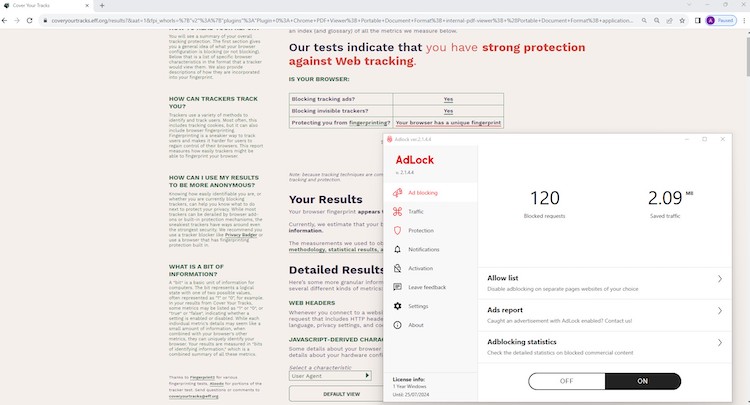
The Cover Your Tracks test showed strong protection against web tracking, and the AdLock software was able to block both the tracking ads and invisible trackers.
AdLock adheres to best privacy assurance practices
To evaluate AdLock’s safety, together with the Cybernews research team, I thoroughly reviewed its privacy policy and examined its track record for transparency and user data protection. We also considered independent expert opinions and user feedback to ensure there are no red flags regarding privacy or security practices.
AdLock is a safe ad blocker. It’s based in Slovakia, which doesn’t belong to any intelligence alliance and is, therefore, more privacy-friendly. The provider also has a research and development department in Ukraine. Based on its transparent Privacy Policy, the only information AdLocker collects is for development purposes, and the data is not sold to third parties.
This premium and reliable ad blocker comes with the underlying importance of users' safety and privacy. AdLocker offers many features to block malicious ads, trackers, and other online threats. It also has a good reputation for its ability to make the browsing experience safer and smoother.
AdLock cost and payment options
AdLock has both free and premium plans, and all paid subscriptions include a 30-day money-back guarantee.
| AdLock free | 1-month plan | 1-year plan | 5-year | |
| Compatibility | Browser (Chrome and Safari) only | Windows, macOS, Android, iOS, Chrome, Firefox, Safari, and Edge browsers | Windows, macOS, Android, iOS, Chrome, Firefox, Safari, and Edge browsers | Windows, macOS, Android, iOS, Chrome, Firefox, Safari, and Edge browsers |
| Number of devices supported | Unlimited | 5 devices | 5 devices | 5 devices |
| Blocks ads in browser | ✅ (Only Safari and Chrome) | ✅ | ✅ | ✅ |
| Blocks in-app ads | ❌ | ✅ | ✅ | ✅ |
| Blocks YouTube ads | ✅ | ✅ | ✅ | ✅ |
| Blocks social media ads | ❌ | ✅ | ✅ | ✅ |
| Blocks all types of ads | ❌ | ✅ | ✅ | ✅ |
| Price | $0.00 | $3.50/month | $2.80/month | $1.05/month |
AdLock’s free subscription is only available for browsers (Chrome and Safari only), and offers more limited use than paid subscriptions. It still blocks most ads and can even block YouTube video ads.
On the other hand, the paid subscriptions are fully fleshed out. The premium AdLock version blocks browser and in-app ads and is compatible with Chrome, Firefox, Safari, and Edge browsers. There are also dedicated apps for Windows, macOS, Android, and iOS devices.
All AdLock Premium plans now allow you to cover up to 5 devices with a single subscription, but the best deal comes with the 5-year plan, costing only $1.05/month. Alternatively, you can pick the plans that require less commitment: a 1-month plan for $3.50/month or a 1-year plan that costs $2.80/month.
If you intend to purchase AdLock, this provider only accepts payments via Visa, Mastercard, and PayPal.
Ad blocker pricing comparison
While AdLock is affordable and provides free ad-blocking extensions, some alternatives deliver noticeably better performance for only a slightly higher price. Here’s a quick comparison between AdLock and other recommended ad blockers.
| Rating | Price | |
| NordVPN next-gen antivirus | from $3.09/month | |
| Total Adblock | from $1.59/month | |
| Surfshark CleanWeb | from $2.49/month | |
| AdLock | from $1.05/month |
How to use AdLock?
Installing AdLock on your device is very easy, but I’ve put together a quick step-by-step guide to help you get started. Follow these instructions to activate AdLock and shield your device from intrusive ads, harmful links, and trackers.
Here’s how to do it:
Step 1: visit the official AdLock website
First, I visited the official AdLock website to access the latest version of the software.

Step 2: purchase a subscription
Next, I chose and purchased the subscription plan most suitable for my needs.

Step 3: download AdLock
After purchasing, I downloaded the AdLock installer file onto my device. To avoid security risks, ensure you also download from the official site.
Step 4: temporarily disable antivirus
Some antivirus programs may interfere with the installation. To ensure a smooth setup process, I temporarily disabled my antivirus software.
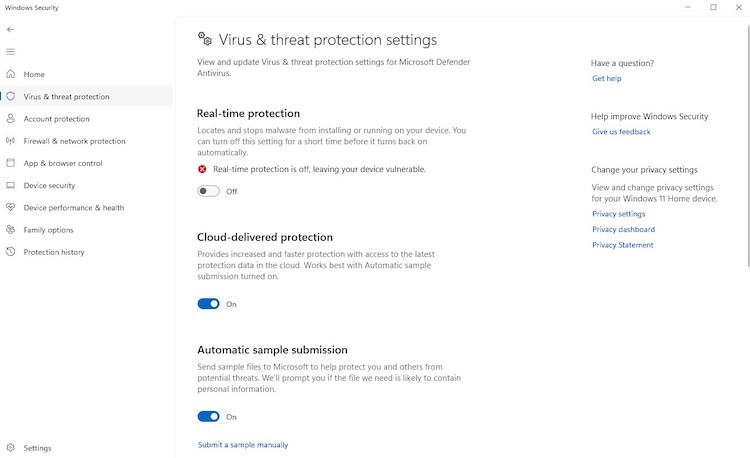
Step 5: install the application
Then, I ran the downloaded installer file. When you get the dialogue box requesting to allow the app to make changes to your PC, make sure you also click Yes and proceed with the installation.

Step 6: add AdLock to antivirus exclusions
On the last installation step, I left the check box near the Add AdLock to exclusion marked to prevent local antivirus software from blocking it in the future.

Step 7: activate your license
I opened the AdLock program, and on the left, I selected the Activation section where I needed to input my License Key, which I received in my email, and clicked Submit.

Step 8: turn on ad blocking
Finally, all that was left was to find the large black button at the bottom of the app and toggle it on to activate ad blocking. This enabled AdLock’s protection across my device.

Step 9: enjoy ad-free browsing
I started browsing and enjoyed a cleaner, safer, and ad-free online experience.
AdLock is very easy to use on all platforms
To evaluate AdLock’s compatibility, I installed the app on Windows, macOS, Android, and iOS devices and tested the browser extensions. I explored the user interface on each platform and checked for consistency to see if key features – like ad and tracker blocking, DNS filtering, and customizable filters – were available across devices. Our in-house testing also included switching between devices and browsers to see how seamless the experience was and whether any features were missing or limited depending on the platform.
Overall, AdLock offers solid cross-platform support. You can download the dedicated app for all major OSs or opt for the browser extension if you use Chrome, Firefox, Safari, or Edge. The user experience is straightforward and familiar across devices, and most core features are available on all platforms, making AdLock a versatile choice for ad blocking, whether you’re on desktop or mobile.
| Version | Use |
| Desktop versions | Windows and macOS, user-friendly, intuitive, and customizable |
| Mobile versions | Android and iOS, well-designed, user-friendly, and include all features |
| Browser versions | Chrome, Firefox, Safari, and Edge browsers, beginner-friendly and intuitive |
The tool is intuitive, easy to use, and beginner-friendly. For more experienced users, there’s the option to customize the settings, which can be a bit overwhelming for beginners.
Desktop app
The Windows and macOS apps are essentially the same and come with the same features. The only issue is that AdLock is unavailable on the App Store and must be downloaded from the official website.

You can find all the features and settings on the main window. The app is easy to navigate and manage. Although going further and deeper into all the functionalities present in the application can feel overwhelming, it does not take a lot of time to get comfortable with it.
Tech-savvy users who usually prefer it can go for a dark theme.

One downside of the application I encountered is that the local anti-malware tool can detect the AdLock installation file and the application itself as a false-positive threat to the system, and a user needs to take additional steps to work around it.
Mobile app
The mobile apps mirror the desktop versions, including all the same features and settings. There’s also no difference between Android and iOS versions, so you’ll get a reliable and efficient ad blocking tool no matter the device.

The main app window shows a summary of blocked ads and the settings you can customize. While testing this app, I noted how easy it was to navigate it, since all the features are grouped based on their functionality and can be accessed from the main window.
However, one of the main drawbacks I found is that AdLock isn’t available to download from the Google Play Store. Instead, I had to download the .apk file from the official website.
Browser extension
AdLock browser extensions are available for Chrome, Firefox, Safari, and Edge and are slightly less powerful and capable than the desktop or mobile versions of this app.
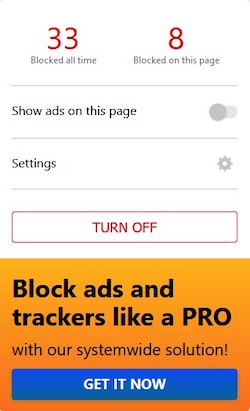
The browser extension works only inside the system and can only block the ads present on the browser you’re using. You can get the free browser extension with limited features or purchase the premium version with most of the features also available in the app versions.
AdLock features
AdLock offers a vast list of features that protect your device and data from online threats. Overall, AdLock can block all kinds of ads, like pop-ups, banners, autoplay video ads, trackers, and cryptocurrency mining ads.
Advertising filters
AdLock also uses HTTPS and DNS filtering to block ads. This allows you to filter which ads you wish to block and which are still allowed.

The Advertising filters are based on EasyList technology, a primary filter list that blocks most ads, including images, objects, and others. The filters include:
- Annoyances filters – blocks callback forms, notifications, and online chats
- General filter (English) – a general list of blocking rules by EasyList
- Counters and analytics filter – blocks based on the EasyList rules
- Social media widgets filter – blocks social media ads and trackers
- Filters based on particular languages – lists of ad blocking rules for websites popular among users who speak particular languages
Anti-tracking feature
AdLock ad blocker offers an Anti-tracking feature that blocks trackers. This feature also helps you hide your online presence, browsing activity, and personal data from advertisers.

Filtering
Filtering options for system applications allow you to adjust ad blocking based on your needs. This tool allows:
- Turning off filtering – allows ads for the application of choice
- Enabling filtering – for apps that need internet access and show too many ads
- Blocking – blocks access to the internet for apps that use it only to show ads
DNS blocking
The DNS blocking feature allows you to choose which domain filtering mode you want to use.

You can choose from:
- Standard – a basic filter that involves blocking DNS requests
- Smart – blocks requests to denied domains after a quick DNS lookup
- Off – disables filtering
Statistics
AdLock offers detailed statistics that are grouped into different categories. Those categories include:
- Ad blocking – statistics on blocked commercial content
- Protection – reports on blocked trackers, suspicious requests, and intrusion attempts
- Network – list of data on all network events, including blocking, filtering, allowing domains, content, and requests

This way, you’ll get all the necessary information about what features were caught, what threats were evaded, and other useful information.
Additional features
There are a few extra features available when you purchase an AdLock ad blocker. These features further enhance your protection online:
- Allow list – allows users to disable ad blocking on separate websites
- Safebrowsing – is based on Google’s Safe Browsing service and protects from malicious links that can potentially contain phishing sites or unwanted/malicious software
Great 24/7 troubleshooting options
| AdLock | |
| 24/7 live chat | ❌ |
| ✅ | |
| Phone number | ✅ |
| Ticketing system | ✅ |
| Knowledge base | ✅ |
| FAQ | ✅ |
AdLock provides round-the-clock customer support for both free and premium users. You can browse its detailed FAQ and knowledge base for quick answers or reach out directly via email, phone, or the in-app feedback system – just provide your email so the support team can follow up with a solution.
While there’s no live chat option, you won’t need to wait for too long to get answers or help. AdLock offers speedy email responses and professional and knowledgeable agent support.
I tested their email support to ask questions about the product and my subscription. The responses were quick and informative, and the agents provided additional information.
So, if you ever encounter any issues with your AdLock ad blocker, you can be certain that the customer support agents will be more than capable of helping and supporting you.
Best alternatives to AdLock
AdLock is a reasonable choice if you’re looking for a free or budget-friendly ad blocker, but its performance is mixed compared to the competition. While it blocks most standard ads and trackers and earns high marks on some tests, it struggles with certain ad types and doesn’t fully protect against browser fingerprinting. Therefore, I recommend considering alternative services that consistently deliver stronger results and broader protection for just a bit more, often with risk-free money-back guarantees – making them a better investment for most users.
Surfshark CleanWeb
Consider Surfshark CleanWeb if you need a robust ad-blocking service for every device you own. One Surfshark subscription supports unlimited device connections, allowing you to reap ad-blocking benefits without any limitations. Moreover, the service includes a secure and ultra-fast VPN at no extra cost.
Surfshark CleanWeb offers both apps and browser extensions for customer ad-blocking needs. The two versions vary in their included features. I recommend the CleanWeb 2.0 extension, which showed excellent results during tests and allows whitelisting websites for making exceptions.
Read More: Surfshark CleanWeb review
NordVPN next-gen antivirus
NordVPN next-gen antivirus (formerly Threat Protection Pro) is the undisputed best all-in-one cybersecurity solution every netizen must have. The package includes the best VPN on the market alongside next-gen antivirus, which effectively blocks ads and malware. You can even expand your benefit package to include a password manager and secure cloud storage service.
You can enjoy NordVPN next-gen antivirus on all desktop and mobile operating systems without missing essential features. In addition to ad blocking, the feature removes tracking parameters from URLs, blocks malicious websites, and scans downloaded files for malware.
Read More: NordVPN next-gen antivirus review
Total Adblock
As the name suggests, Total Adblock is focused purely on blocking ads and other online nuisances like trackers and excessive notifications. Potential customers can start with the stripped-down free version to see how it works. However, I recommend the premium version, which guarantees excellent advertisement removal.
Total Adblock is available as a browser extension for Chrome and Edge or as a mobile app for both Android and iOS. You can also combine the service with TotalAV and TotalVPN to cover all your cybersecurity needs.
Read More: Total Adblock review
Is AdLock any good and worth getting?
AdLock is a budget-friendly and secure choice for blocking ads across browsers and apps, including YouTube. It’s safe to use, doesn’t collect sensitive user data, and offers useful customization and filtering options.
However, its ad-blocking performance doesn’t quite match top-tier competitors like Surfshark CleanWeb, and it lacks extra features such as VPN protection and password management. With more effective and feature-rich options available, AdLock is ultimately outshone by better alternatives on the market.
FAQ
Does AdLock really work?
Yes, AdLock does work – the tests we’ve run confirm this. You can use this ad blocker to successfully prevent malicious ads, in-video ads, banners, trackers, and other online threats from targeting your device and sensitive data.
What is the difference between Total Adblock and AdLock?
Total Adblock and AdLock are two different ad blockers available for purchase. Total Adblock was created by TotalAV (a top-rated antivirus provider), while AdLock is a completely separate product.
Is AdLock free to use?
There’s a free AdLock browser extension, which offers a slightly more limited version of the AdLock ad blocker. To get all features available, you can get an app version of this ad blocker, which blocks ads on the DNS level. Subscription prices start at $1.05/month.
How much does it cost to get AdLock?
AdLock subscription prices start at $1.05/month with a 5-year plan. A limited browser extension version is available and is completely free to use.