Best VPN for streaming World Cup 2026: June 30th
Our in-house cybersecurity experts and journalists, renowned for major reports like The Mother of All Breaches, conduct transparent, unbiased VPN testing and in-depth analysis.
With 750+ articles crafted based on real-world research, we empower readers to make informed purchasing decisions through first-hand expertise.
Learn more

The 2026 FIFA World Cup has reached the knockout stage, and today, June 30th, brings three Round of 32 matches: Ivory Coast vs Norway, France vs Sweden, and Mexico vs Ecuador. Every match from here is single elimination, so a buffering stream at the wrong moment could mean missing the goal that ends someone's tournament. All 104 matches are being broadcast across the globe, but which games you can actually watch depends entirely on where you are and the broadcasting agreements in your country. If you are traveling during the tournament, or your usual broadcaster is not showing the match you want, geo-restrictions will cut you off from the streams you need.
A VPN fixes this by changing your IP address to make it appear you are in a different country. That means your usual streaming accounts keep working abroad, and you can access streams from countries that are broadcasting matches for free. But live sports streaming is unforgiving: a slow or unstable VPN means buffering and lag at the worst possible moment during a match.
I tested 20+ VPN providers specifically for World Cup streaming in June 2026, comparing each one on streaming performance, speeds, server locations, and device support. Below are my top 5 picks that actually hold up during live matches.
If you want to stream all World Cup matches for free with English commentary, the best options are Split, BBC iPlayer, and ITVX in the UK, and SBS on demand in Australia.
Upcoming World Cup 2026 matches on June 30th
The FIFA World Cup 2026 has reached the knockout stage, with three Round of 32 matches today, June 30th. Ivory Coast face Norway in Arlington, France take on Sweden in New Jersey, and Mexico host Ecuador in Mexico City in a winner-take-all clash for the co-hosts. A reliable VPN makes sure geo-restrictions do not stand between you and any of these matches, wherever you are watching from.
| Game | Venue | Date & Time (ET) |
| Ivory Coast vs Norway | MetLife Stadium, New Jersey | June 30th, 1:00 PM |
| France vs Sweden | Lincoln Financial Field, Philadelphia | June 30th, 5:00 PM |
| Mexico vs Ecuador | AT&T Stadium, Arlington, Texas | June 30th, 9:00 PM |
Top 5 best VPNs for streaming World Cup
- NordVPN – best overall VPN for World Cup 2026 with the fastest speeds
- Surfshark – VPN for watching the World Cup on multiple devices
- Proton VPN – VPN for privacy-conscious football fans
- ExpressVPN – fast VPN for streaming live sports
- CyberGhost – VPN with dedicated streaming servers
What makes a VPN good for streaming the World Cup?
To find the best VPN to stream the World Cup 2026, the Cybernews research team tested over 41 VPN providers. Unlike regular browsing, streaming live sports has different requirements for a high quality VPN. Here are the most important features that a good World Cup VPN should have.
- Fast speeds and low buffering. Live sports need stable and fast connections for HD or 4K streaming. Plus, delays and buffering tend to be worse during live matches than on-demand shows. This means that the best VPNs are the ones with fastest proprietary or WireGuard protocols. We tested each VPN’s speed separately and while streaming, ensuring that only the fastest providers are on this list.
- Servers in key countries. The World Cup is popular all over the world, but some countries have especially passionate fans, such as the UK, Australia, Brazil, Belgium, Netherlands, Poland, Switzerland, Türkiye, and the US. We made sure that all VPNs offer servers in these locations.
- Streaming reliability. The World Cup will be broadcasted by a number of broadcasters worldwide, but not all of them are available everywhere. We tested the VPNs to ensure they work with platforms like BBC iPlayer, ITVX, SBS On Demand, YouTube, FOX-related services, and other regional broadcasters.
- Device support. You want a VPN service to be compatible with multiple devices in case you want to stream the World Cup on your phone, tablet, or a smart TV. The VPNs on this list support desktop, mobile, Fire TV, Android TV, Apple TV, and routers.
- Smart DNS or router support. Some smart TVs are not compatible with VPN apps, such as Roku. That’s why a good quality VPN should offer Smart DNS or router support for maximum compatibility.
- Leak protection and quick server switching. A high quality VPN should ensure proper DNS leak protection, since a leak can reveal your real location and cause geo-restrictions. And in case a streaming service blocks a VPN server, you should be able to quickly switch to a different one with minimal downtime.
Best VPNs for streaming World Cup 2026 – detailed list
We tested these VPNs with a variety of free streaming services and broadcasters that will stream the World Cup in 2026. They all offer excellent device and platform compatibility, unblock numerous streaming services, and offer the best speeds on the market.
1. NordVPN – best overall VPN for World Cup 2026

| Cybernews rating: | |
| Starting price: | |
| Supported devices: | |
| Best deal: |
NordVPN provides exceptional streaming performance for the upcoming World Cup. Football fans can seamlessly access official broadcast platforms to watch the matches. In our test, it bypassed regional restrictions with ease.
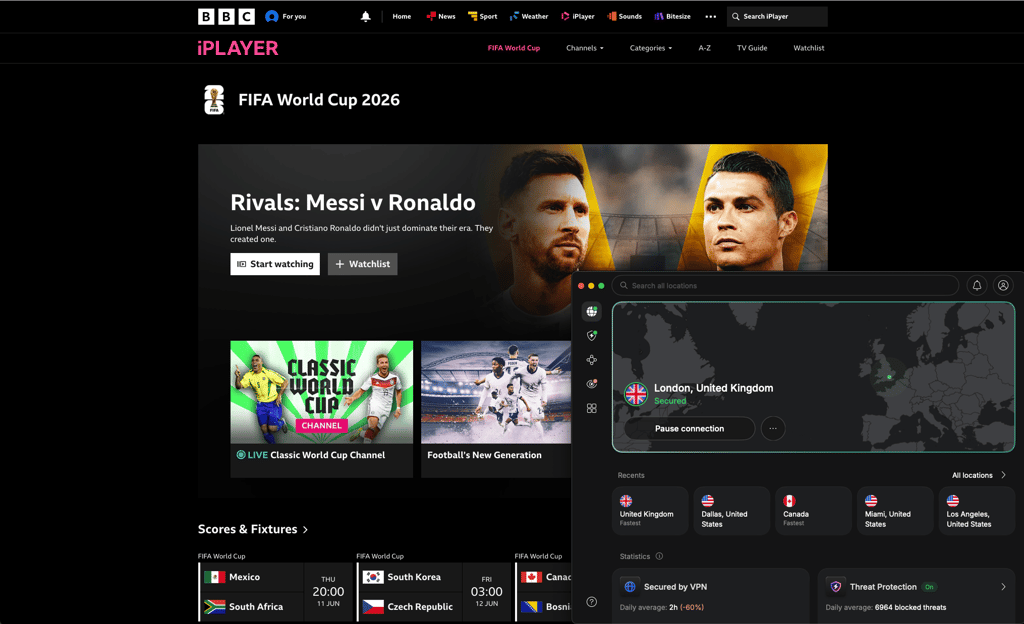
NordVPN covers over 224 locations across all continents, including North America and Europe. You can have access to thousands of reliable servers that guarantee both local coverage and international streams. Our tests showed high speeds with almost zero buffering during live sports broadcasts.
The NordVPN app is compatible with mobile and desktop devices and all major operating systems. The SmartPlay feature is a Smart DNS for configuring the VPN on smart TVs and gaming consoles. Plus, the router support allows using your entire home network for viewing parties.
NordVPN is also very easy to use and takes just a few clicks to connect. However, the map interface can feel cluttered on mobile screens. It might make it harder to switch locations quickly in case you need to.
Pricing starts at $3.49/month, with a 30-day money-back guarantee. For the best price, choose a longer subscription.
2. Surfshark – VPN for watching the World Cup on multiple devices

| Cybernews rating: | |
| Starting price: | |
| Supported devices: | |
| Best deal: |
Surfshark is a budget-friendly VPN that delivers great streaming capabilities for the 2026 World Cup. You can watch the games on an unlimited number of devices simultaneously. In our tests, Surfshark unlocked regional broadcasters easily all over the world.
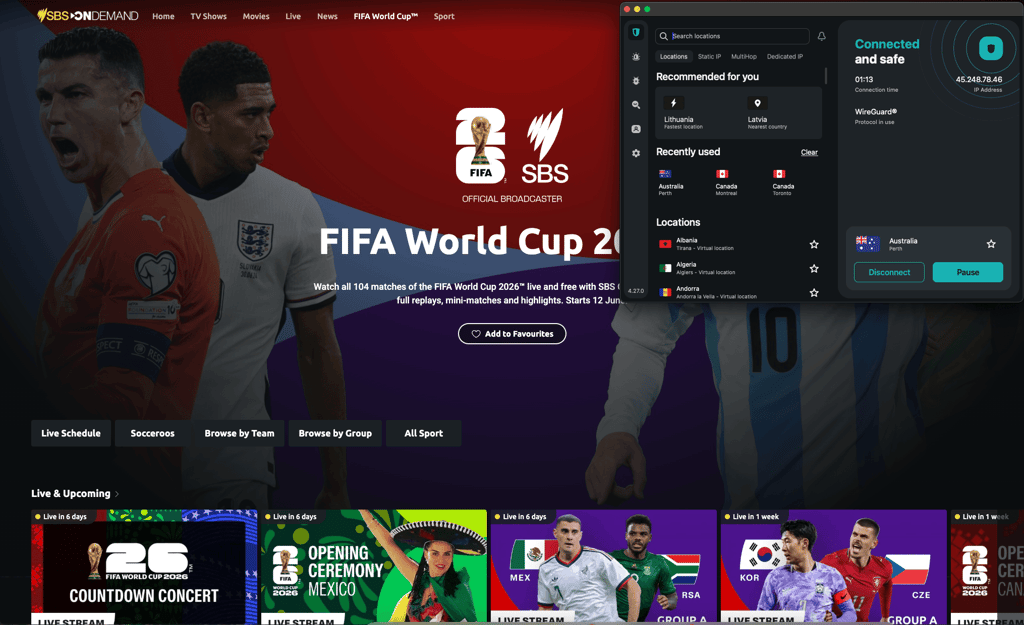
The network includes massive x server coverage worldwide, including thousands of servers in Europe and the US. Football fans will easily find optimal connections to keep up with their favorite national teams. Our testing showed consistently high streaming speeds in multiple tested locations, and when streaming, the buffering and delay were minimal. However, we did experience occasional slow connection times when connecting to a new server location.
Surfshark offers dedicated applications for all mobile and desktop devices and operating systems, plus Apple TV. It includes a Smart DNS option to help you stream the games on smart TVs. You can also configure Surfshark directly on your router to cover every device in your home.
The price starts at just $2.49/month, with a 7 free trial and a 30-day money-back guarantee. You can try Surfshark risk-free, and for the best deal, I recommend going with the long-term subscription.
3. Proton VPN – VPN for privacy-conscious football fans

| Cybernews rating: | |
| Starting price: | |
| Supported devices: | |
| Best deal: |
Proton VPN is a privacy-focused VPN, also great for bypassing geo-restrictions of the 2026 World Cup broadcasters. In our tests, Proton VPN consistently unblocked platforms that broadcast international soccer tournaments.
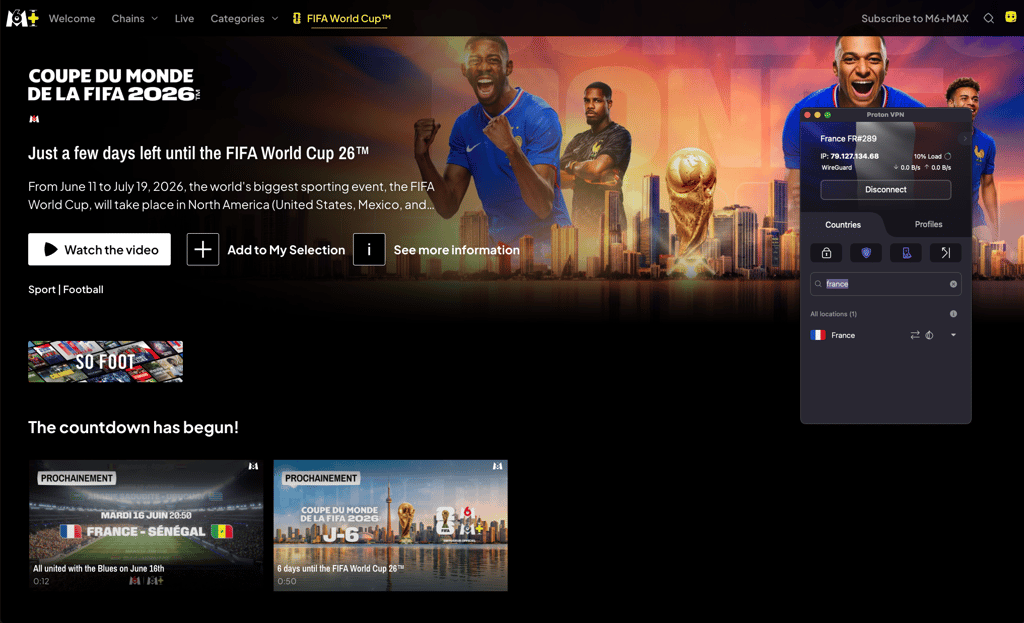
ProtonVPN offers a wide server network worldwide – over 20,300 servers in 148 locations. This means that you can easily connect to watch matches through trusted international broadcasters. Plus, I really liked the VPN Accelerator technology for faster speed and better streaming quality. The feature effectively lowers the chances of buffering at critical moments.
Device compatibility includes all mobile and desktop devices, as well as smart TVs. Proton VPN also has router support. However, it currently lacks a standalone Smart DNS feature, so for incompatible smart TVs, you’ll need to configure the VPN on a router.
Proton VPN offers a limited free version with no option to manually choose a server. On the other hand, you can choose the servers freely with the paid plans, which start at $2.99/month, and include a 30-day money-back guarantee
4. ExpressVPN – fast VPN for streaming live sports

| Cybernews rating: | |
| Starting price: | |
| Supported devices: | |
| Best deal: |
ExpressVPN is one of the fastest VPNs for live sports events, including the 2026 World Cup. In our tests, it loaded the streams fast and easily unblocked the majority of local and international broadcasters.
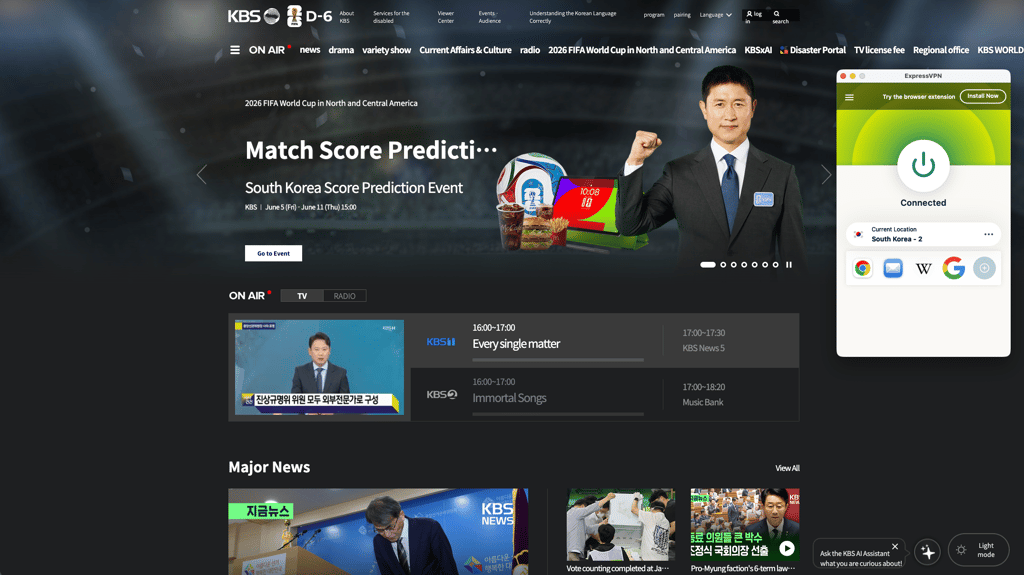
The ExpressVPN server network spans across 105 countries. For speed, the proprietary Lightway protocol delivers excellent performance and ensures a high-definition stream at all times. I saw basically no buffering during testing.
ExpressVPN is also really easy to set up – it takes just minutes to get it working on mobile and desktop devices. The MediaStreamer Smart DNS feature ensures that you can use the app on Apple TV or gaming consoles. Plus, direct router firmware makes securing your home setup surprisingly straightforward. However, in terms of other features, ExpressVPN doesn’t have as much to offer as, for example, NordVPN.
ExpressVPN pricing starts at $2.49/month. You can subscribe for 1 month, 1 year or 2 years.
5. CyberGhost – VPN with dedicated streaming servers

| Cybernews rating: | |
| Starting price: | |
| Supported devices: | |
| Best deal: |
CyberGhost's main advantage is its focus on streaming. It provides specialized servers for streaming, which makes it a great option for broadcasting the 2026 World Cup.
The CyberGhost server network is massive, including over 9,800 servers in 100 countries. Plus, our testing showed excellent speeds on the streaming-specialized servers.
CyberGhost supports mobile and desktop devices as well as smart TVs. It includes Smart DNS for devices without native apps, and also offers router support. However, in terms of setting up, the desktop application can feel somewhat hard to navigate.
Pricing is budget-friendly, starting at $1.59/month. You can also get a 30-day money-back guarantee to try CyberGhost for free.
World Cup 2026 streaming services we tested
World Cup streaming availability depends on the country. Some broadcasters might stream only certain games, and not all of them work with a VPN. Below are some of the most popular broadcasters that we tested with VPNs:
| Country | Streaming service / broadcaster | Tested with VPN? | Free? | Expected coverage |
| United Kingdom | BBC iPlayer / ITVX | ✅ Yes | ✅ Yes | All matches shared between BBC and ITV |
| Australia | SBS On Demand | ✅ Yes | ✅ Yes | All matches |
| United States | Fox Sports / Peacock | ❌ No | ❌ No | US World Cup coverage |
| Canada | CTV / TSN | CTV ✅ yes / TSN ❌ no | CTV ✅ yes / TSN ❌ no | TSN: all matches; CTV: around half |
| Brazil | CazéTV via YouTube / Globo / SBT | ✅ Yes | ✅ Yes | CazéTV: all matches on YouTube; Globo: around half; SBT: 32 matches including Brazil matches |
| Argentina | TV Pública / Telefe | ✅ Yes | ✅ Yes | Argentina national team matches and selected coverage |
| Mexico | TV Azteca | ✅ Yes | ✅ Yes | 32 matches, including Mexico matches |
| Germany | ARD / ZDF | ✅ Yes | ✅ Yes | Around 30 matches each, including Germany matches and final-stage coverage |
| France | M6 | ✅ Yes | ✅ Yes | 54 matches, including France matches, semifinals, and final |
| Netherlands | NOS | ✅ Yes | ✅ Yes | All matches |
| Switzerland | SRF / RSI / RTS via Play SRF, Play RSI, Play RTS | ✅ Yes | ✅ Yes | All matches |
| Türkiye | TRT | ✅ Yes | ✅ Yes | All matches |
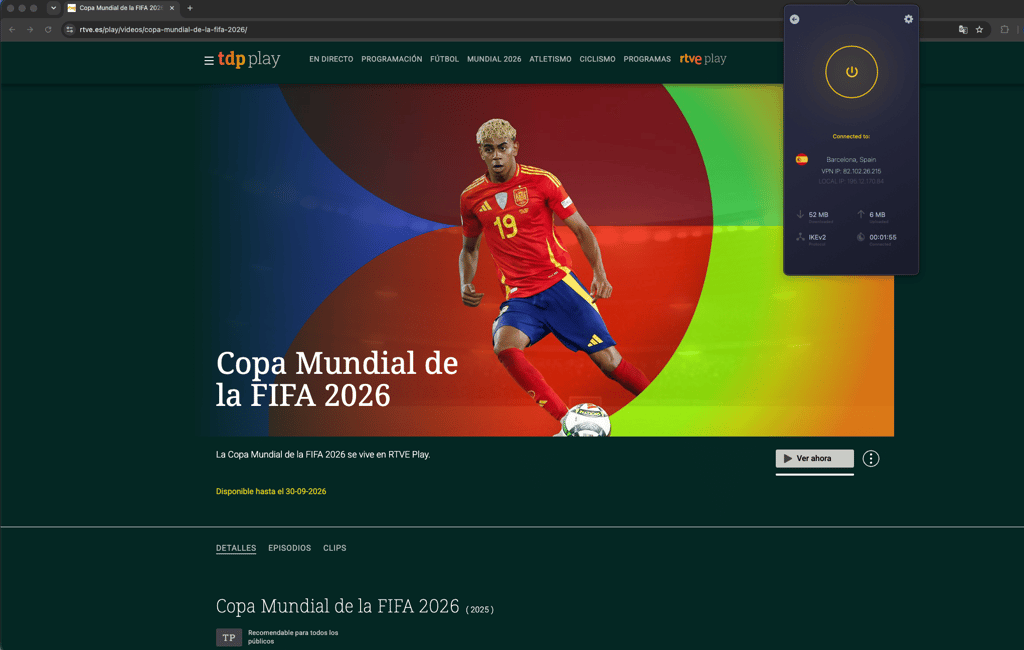
| Spain | RTVE / DAZN | ✅ Yes | RTVE ✅ yes / DAZN ❌ no | RTVE: one match per day, including Spain matches; DAZN: additional paid coverage |
| Italy | RAI / DAZN | ✅ Yes | RAI ✅ yes / DAZN ❌ no | RAI: 35 matches; DAZN: all matches |
| Japan | DAZN | ✅ Yes | Partial | All matches, with Japan matches free |
| South Korea | KBS / JTBC | ✅ Yes | KBS ✅ yes / JTBC ❌ no | KBS expected to show Korea matches for free |
Can you use a free VPN to stream World Cup 2026?
Free VPNs are usually not recommended for live World Cup streaming. They often have limited server locations, which means no reliable access to some locations or even broadcasters. Plus, they tend to be slow – the connection speed might not allow HD or 4K streaming. Most free VPNs also have data limits, which are quite low and might not be enough to stream the full match. Plus, due to narrow server coverage, streaming platforms tend to block VPNs more easily.
Overall, a paid VPN is a better option for a live event as big as the World Cup. At least then you can choose a reliable server, protocol, and not worry about exceeding data limits. But if you really wish to try a free VPN, Proton VPN can be a somewhat reliable option. However, it will select your server and location randomly, which might not be the one you need. A paid Proton VPN version is still better and more convenient.
What to do if your World Cup stream does not work with a VPN
Is your World Cup stream not working with a VPN? Did it get blocked or is it buffering too much? Here are some things you could try:
- Switch to another server in the same location or country.
- Clear cookies and cache from your browser or phone.
- Use incognito or private mode if you’re streaming on a browser.
- If you’re using an app, try streaming via the browser.
- Disable GPS or location permissions on mobile. They could be leaking your exact location, causing the streaming service to block you.
- Change the VPN protocol.
- Update the VPN app. Sometimes new settings and updates can improve the streaming experience.
- Check for DNS or IP leaks. Use an online checker for this, and turn on DNS and IP leak prevention on your VPN.
- If nothing is helping, contact the VPN provider’s support for a working server.
- Confirm the VPN or streaming service account and/or subscription is valid. Update your payment information if necessary.
- Check with your streaming provider whether the stream is live-only or on-demand only.
- Check if the app requires a local app store region. Some apps are only available if your login region or payment matches the country of the broadcaster.
Final Verdict
The 2026 FIFA World Cup is well underway, and having the right VPN is the difference between watching every match smoothly and missing key moments to buffering and geo-blocks. After testing 40+ providers specifically for live World Cup streaming in June 2026, NordVPN remains my top overall pick and Surfshark the best option for households streaming on multiple devices at once. Any of my top 5 picks will give you a stable, buffer-free connection for the rest of the tournament no matter where you are. If you run into streaming issues, clearing your cache or switching to a different server usually fixes it within seconds.