A top-quality VPN service is a versatile tool that can help you in various situations. Firstly, it improves your online anonymity by changing your IP address and encrypting your web traffic. Secondly, you can use it to change your location and bypass geographical restrictions, which has become a popular use case after the UK’s Online Safety Act came into effect. Similarly, you can use a VPN to unblock foreign movies, TV shows, and other content that’s unavailable in your area.
We at Cybernews have been testing VPNs and other online security products for more than five years. We applied this expertise to find the top ten VPNs for daily use in the UK and elsewhere worldwide. All the following VPNs have been tested thoroughly to ensure they offer a well-rounded package in terms of features, security, usability, and more.
Top 5 best VPNs to use in the UK
- NordVPN – best overall VPN in terms of effectiveness and value
- Surfshark VPN – budget-friendly VPN to protect unlimited devices
- Proton VPN – privacy-oriented VPN with a massive server network
- CyberGhost – affordable VPN for streaming
- ExpressVPN – well-rounded VPN for online security
The best VPNs for the UK – detailed list
We spent months testing VPNs to measure their performance, security, usability, and more. After thorough testing, I have listed the top ten VPNs that demonstrated the best results in areas that define high-quality providers. Read about the details below.
1. NordVPN – best VPN overall

| Rating: | |
| Server network: | 9,500+ servers in 149 countries |
| Simultaneous connections: | 10 |
| Streaming services unblocked: | Netflix, Hulu, BBC iPlayer, Disney+, and more |
| Current deal: | Get 75% OFF NordVPN + 3 months free |
NordVPN showed the best overall results during our various tests, which makes it my number one VPN recommendation for everyone. It’s fast, secure, reliable, full of features, and reasonably priced.
Why we picked NordVPN
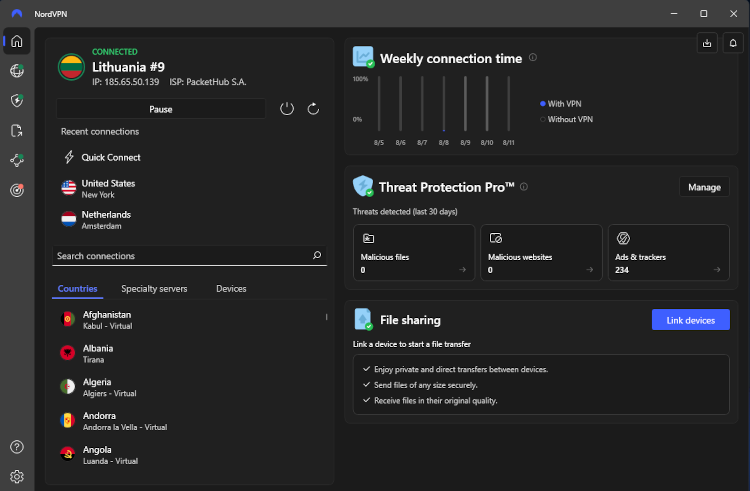
Features. NordVPN offers an incredible array of standard and unique features that make it more versatile than many other VPN services. For example, I’m impressed with its Meshnet feature, which allows you to remotely connect to other devices that have NordVPN installed. That way, you can create your own LAN networks or share personal files securely. There’s also Threat Protection Pro to improve your online experience by blocking ads, trackers, and malware.
Privacy and security. Unlike many other VPNs, NordVPN offers two kill switches for better protection. One shuts off your internet connection if the VPN connection drops, while the other exits specified apps to ensure your actual IP address remains hidden. This adds extra customizability and security in specific situations.
Streaming. NordVPN offers 9,500+ servers across 149 countries, allowing it to easily unblock content from around the world. The service was very effective during my streaming tests. It quickly unblocked foreign libraries on services like Netflix and HBO Max on the first try.
Connection speed. NordVPN runs on an in-house VPN tunneling protocol called NordLynx, which is a modified version of the open-source WireGuard. It showed an average download speed retention rate of 82% in our latest NordVPN speed tests, while the upload speed retention was at 52%.
User experience. The service’s impressive feature variety can make it appear overwhelming at first. Luckily, NordVPN’s apps are designed to be intuitive, and each feature has a separate menu for configuring it. For example, you can connect to a VPN server using its interactive world map interface.
Pricing. NordVPN offers multiple subscription tiers, the cheapest of which starts at only £2.59. You can get a taste of this service using its 3-day free trial. Alternatively, there’s the industry-standard 30-day money-back guarantee.
Who it’s for
NordVPN is for those who want the most effective and versatile VPN for any situation. It isn’t the cheapest option, but it’s not expensive either, although that depends on which subscription plan you choose. In my experience, NordVPN works well in any situation where a VPN is applicable, making it the most well-rounded VPN you can buy.
2. Surfshark – affordable VPN for multiple devices

| Rating: | |
| Server network: | 4,500+ servers in 100 countries |
| Simultaneous connections: | Unlimited |
| Streaming services unblocked: | Netflix, Disney+, Amazon Prime Video, Hulu, and more |
| Current deal: | Now up to 85% OFF Surfshark + 3 months FREE |
Surfshark is the top choice if you need an affordable VPN to protect an unlimited number of devices. It’s cheaper than NordVPN and offers similar performance in key areas, although it has fewer servers and unique features.
Why we picked Surfshark
Features. Surfshark’s most interesting unique feature is Alternative ID. This tool creates substitute personal information that you can use to keep your actual details hidden. To be precise, it creates an email address, name, and physical address that you can use when creating online accounts or filling out forms. I also appreciate that the Surfshark app includes a private search engine to prevent tracking.
Privacy and security. Surfshark includes a kill switch, an ad blocker, and traffic obfuscation to protect you daily while browsing the web. You can go a step further and enable Rotating IP to have your IP address change periodically for added anonymity.
Streaming. This VPN comes with a fleet of 4,500+ servers in 100 countries. The country variety is more than enough for unblocking foreign content, while the overall server numbers are underwhelming compared to services like NordVPN and Proton VPN. Still, they worked well for me when unblocking foreign movies and TV shows on platforms like HBO Max.
Connection speed. Surfshark’s fastest VPN tunneling protocol is WireGuard, which performed very well during our latest tests. Its average download speed retention rate was 93%, while with uploads it was 64%. You’ll find a detailed breakdown of these tests in our Surfshark review.
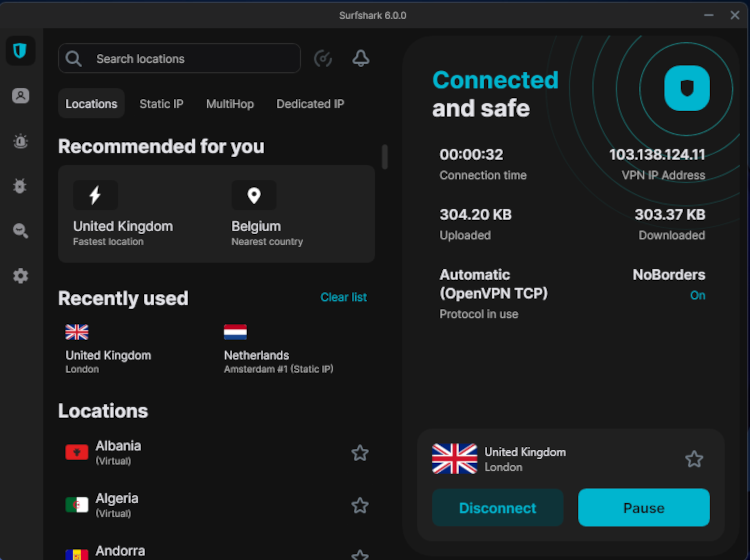
User experience. Surfshark offers a minimalistic app interface to keep things simple. It’s intuitive and gets the job done, although I think some people will find the lack of a world map interface a bit disappointing. Either way, each feature has its own settings menu for easy configuration.
Pricing. Like NordVPN, Surfshark has multiple subscription tiers with different features included. The cheapest Starter plan costs only $2.49, which is quite a bargain for such a powerful VPN. There’s a 7-day free trial for mobile devices if you want to test the service beforehand. Alternatively, you can use the 30-day money-back guarantee.
Who it’s for
This VPN is for those who need an effective VPN but are on a tight budget. It’s similar to NordVPN in many areas and even supports unlimited device connections, while NordVPN permits only 10 despite costing more. One drawback is that Surfshark has fewer servers, but in my experience, that didn’t lead to any performance issues.
3. Proton VPN – powerful VPN with an unlimited free tier

| Rating: | |
| Server network: | 20,400+ servers in 148 countries |
| Simultaneous connections: | 10 |
| Streaming services unblocked: | Netflix, BBC iPlayer, YouTube, HBO Max, Disney+ |
| Current deal: | Get up to 70% OFF Proton VPN |
Proton VPN is a trustworthy VPN from Switzerland that offers an unlimited free tier, which is a rare combination. That means you can use it when you can’t afford a paid service, although you’ll have to contend with significantly fewer features. For now, I’ll overview its premium offering.
Why we picked Proton VPN
Features. Proton VPN has a few interesting features that make it appealing. For starters, there’s the NetShield ad blocker for blocking ads, trackers, and malware. You can also enable split tunneling to select which apps need the VPN tunnel. Crucially, this is one of the few top-tier VPNs that includes port forwarding for improved torrenting performance.
Privacy and security. Unlike other VPNs, Proton VPN has made its apps open-source to showcase its reliability. Naturally, the service comes with many other perks to boost your security, such as a kill switch, DNS leak protection, and traffic obfuscation.
Streaming. Proton VPN offers one of the most impressive server networks I’ve ever seen, which makes it very suitable for streaming. It comes with 20,400+ servers in 148 countries, which also includes servers optimized specifically for streaming. They worked well in my tests at unblocking different movies and TV shows from abroad.
Connection speed. Like Surfshark, Proton VPN has WireGuard as its fastest tunneling protocol. It delivered excellent speeds during our latest tests. Both the download and the upload speed retention rate were 85%. You can learn more about its performance in our extensive Proton VPN review.
User experience. Proton VPN’s apps are straightforward, smooth, and intuitive. The home screen shows an interactive world map for choosing a server. Meanwhile, other features are docked in the top left for easy access without obstructing the view.

Pricing. Proton VPN is a bit pricier than many other VPNs, starting at £2.83. Just like NordVPN and Surfshark, Proton VPN offers multiple subscription tiers with bonus features. Additionally, there’s a free version that you can use for as long as you like. The downside of that is there’s no free trial to test the provider’s premium features. However, you can do that with the 30-day money-back guarantee.
Who it’s for
On the one hand, Proton VPN is the top choice for those who need a reliable free VPN. It won’t work at unblocking streaming content, but it will keep you safe and anonymous online. Conversely, the paid tier is ideal for those needing a trustworthy and feature-rich VPN with an incredible server network.
4. CyberGhost – fast VPN suitable for streaming

| Rating: | |
| Server network: | Undisclosed number of servers in 100 countries |
| Simultaneous connections: | 7 |
| Streaming services unblocked: | Netflix, Hulu, BBC iPlayer, Disney+ |
| Current deal: | Get 88% OFF CyberGhost + 2 months FREE |
CyberGhost is a well-rounded, affordable VPN with excellent fundamentals that will serve you well in any situation. This budget-friendly VPN doesn’t offer much in terms of exceptional features, but otherwise, it’s pretty great.
Why we picked CyberGhost
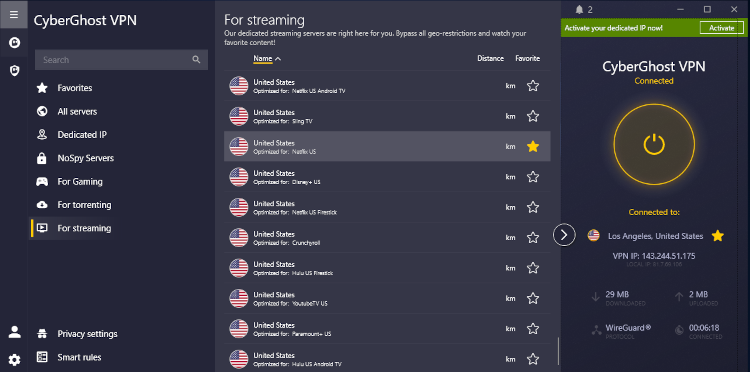
Features. CyberGhost stands out with its selection of specialized server categories for various tasks. For example, you’ll find options optimized for gaming, streaming, and torrenting. There are also NoSpy servers, which are owned and operated by the provider for added reliability.
Privacy and security. Like any worthwhile VPN, CyberGhost includes a kill switch, DNS leak protection, and an ad blocker to protect you from common cyberthreats. The service is based in Romania and offers an audited no-logs policy to ensure customer anonymity.
Streaming. CyberGhost offers an undisclosed number of servers across 100 countries, making it difficult to determine what its overall capabilities are. On the other hand, it offers special streaming servers optimized for specific streaming platforms, which gives it an edge over the competition. They worked relatively well during my tests, although there were occasional hiccups.
Connection speed. CyberGhost is another VPN that uses WireGuard as its fastest protocol. With it, the provider demonstrated a download speed retention rate of around 85%, while the upload speed retention was only 56%. You can learn more about the results in our CyberGhost review.
User experience. CyberGhost’s lack of features allows it to make an uncluttered interface that’s pretty easy to use. Like with Surfshark, there’s no map interface for choosing a server location, but at least the location selection menu takes up a significant chunk of the app for increased usability. Overall, everything is clear and easy to use.
Pricing. CyberGhost starts at $1.59 and only offers one subscription tier, which eliminates the difficulty of choosing a plan. However, you can add extra perks like a dedicated IP on top of your purchase. There’s a variety of free trial options depending on your device. Lastly, CyberGhost offers a lengthy 45-day money-back guarantee with its annual and two-year plans.
Who it’s for
I recommend CyberGhost for those who want a cheap and simple VPN for basic tasks. It offers excellent fundamental features to ensure secure and speedy connections, while the specialized servers make it easier to accomplish specific tasks. It doesn’t have anything particularly exciting regarding features, but then you should consider NordVPN or Surfshark if you want cutting-edge tools.
5. ExpressVPN – security-focused VPN with excellent performance

| Rating: | |
| Server network: | Undisclosed number of servers in 105 countries |
| Simultaneous connections: | 14 |
| Streaming services unblocked: | Netflix, Hulu, BBC iPlayer, Disney+, and more |
| Current deal: | Now up to 80% OFF ExpressVPN + 4 months FREE |
ExpressVPN is a famous VPN that’s well-regarded for its speed and overall effectiveness. It offers a wide range of unique features for improving your security and overall online experience.
Why we picked ExpressVPN
Features. ExpressVPN comes with a few features that aren’t normally available with VPNs. For example, I was surprised that the Keys password manager is available with the cheapest plan, while NordVPN adds NordPass with its pricier subscription tiers. You even get data removal services, although this perk is only available when choosing the longest two-year subscription.
Privacy and security. The service includes a kill switch, DNS leak protection, and an ad blocker as standard features. There’s also the Threat Manager tool that blocks trackers and malicious websites. Plus, the provider’s Trust Center page mentions all of the independent audits that ExpressVPN has conducted on its various technologies. There are more than 20 audits in total, covering its no-logs policy, tunneling protocols, security features, and more.
Streaming. Like CyberGhost, ExpressVPN doesn’t disclose its exact number of servers, making it hard to know how prepared it is for bypassing geographical restrictions. However, that didn’t stop it from working brilliantly during ExpressVPN evaluations. It easily worked with Netflix, Hulu, and Amazon Prime Video on the first try.
Connection speed. Unlike many other VPNs on the market, ExpressVPN uses a proprietary tunneling protocol, Lightway, which isn’t based on WireGuard but built from scratch. During our tests, the service led to a download speed retention rate of 87%, while upload speed retention was 71%.
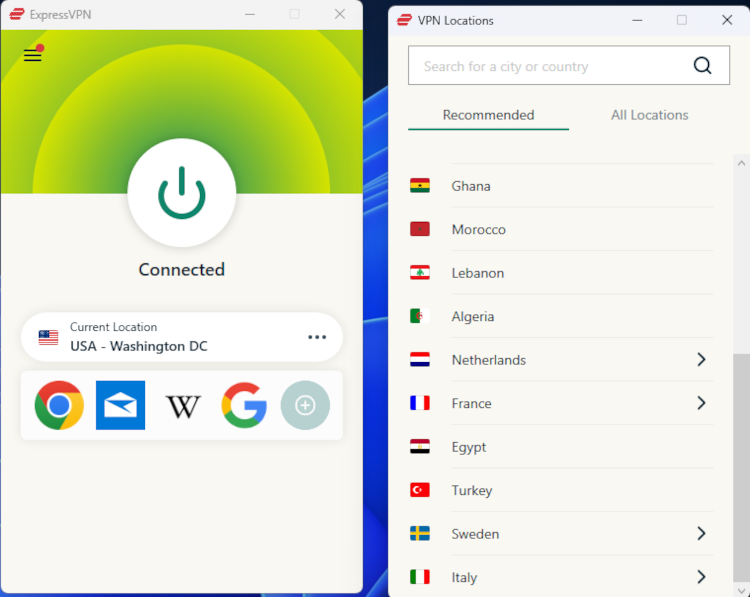
User experience. The ExpressVPN app interface is extremely minimalistic, showing only the most essential details on the home page. On the one hand, I like this approach since most of the time you just need to enable the VPN connection and nothing else. Conversely, it can feel underwhelming. I guess style doesn’t matter since ExpressVPN definitely has substance.
I also set up ExpressVPN on my router, and it worked well. However, keep in mind that as of March 31st, 2026, the ExpressVPN app is no longer supported on routers, except for its own Aircove routers. This means that you have to set it up on your router manually.
Pricing. ExpressVPN isn't pricier than other VPNs on this list, starting at $2.49. However, it doesn't offer a free trial or a money-back guarantee.
Who it’s for
ExpressVPN is definitely for the security-focused buyers who need a reliable VPN with a few extra benefits. Its numerous audits and excellent technical features make it very suitable for security enthusiasts. I especially like that it includes a password manager at no extra cost, which makes its protection package more well-rounded.
6. IPVanish – well-rounded VPN to protect unlimited devices

| Rating: | |
| Server network: | 3,400+ servers in 112 locations |
| Simultaneous connections: | Unlimited |
| Streaming services unblocked: | Netflix, BBC iPlayer, YouTube, Disney+, Hulu, and more |
| Current deal: | Now up to 83% OFF IPVanish |
IPVanish is very similar to Surfshark in that it supports unlimited device connections and has excellent security fundamentals. However, it’s lower on this list due to its smaller server coverage and fewer features.
Why we picked IPVanish
Features. IPVanish doesn’t have any particularly interesting features to set itself apart. Instead, it has similarities to some of the top VPNs overall, such as NordVPN and Surfshark. For example, it has a less customizable Threat Protection tool to block ads, trackers, and malware. There’s also an adjustable Double Hop server category if you want to route your connection through multiple servers.
Privacy and security. The IPVanish app comes with a kill switch, leak protection, and split tunneling to enhance your safety on a daily basis. There’s also a Link Checker, allowing you to scan a URL before visiting it to see whether it’s dangerous or not. Moreover, the settings menu includes a wide range of customization options, allowing you to adjust the VPN tunnel to your needs. I was surprised to see that IPVanish allows you to customize your connection ports.
Streaming. IPVanish has 3,400+ servers in 112 countries, which is below Surfshark and NordVPN in terms of overall numbers. The country variety is excellent, though, meaning you’ll have no shortage of options regarding foreign content. In my experience, IPVanish worked reasonably well with most streaming platforms, although I had to switch servers a few times before I found one that worked.
Connection speed. IPVanish uses the WireGuard tunneling protocol, just like Surfshark, Proton VPN, and CyberGhost. It performed quite well during in-house IPVanish performance testing, garnering an average download speed retention rate of around 88%. Meanwhile, the upload speed retention rate was 51%.
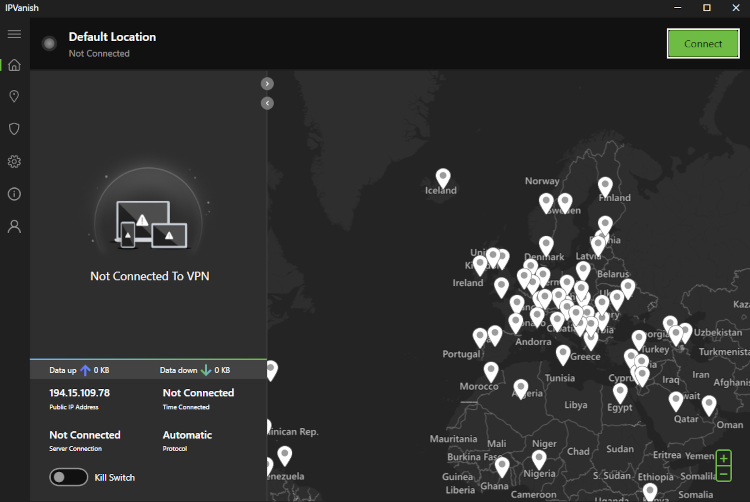
User experience. The IPVanish app is simple and intuitive. I especially like that you can customize it to better suit your needs. For example, the home page shows a world map screen and a connection details screen, but you can adjust how much of the screen they occupy. Other features and settings are easily accessible in the left-hand menu.
Pricing. The service is pretty affordable, starting at $2.19, similarly to Surfshark and CyberGhost. It has two subscription tiers, while others like NordVPN and Surfshark have at least three. Once again, there’s a 7-day free trial for Android and iOS users, or the 30-day money-back guarantee option.
Who it’s for
IPVanish is best-suited for those who need a simple, customizable, and affordable VPN for daily use. It doesn’t offer any complicated features that could confuse you, while all the standard features are pretty effective. You’ll have fast connections, no issues with ads or trackers, and you can install IPVanish on unlimited devices.
7. Norton VPN – straightforward VPN for online protection

| Rating: | |
| Server network: | 2,000+ servers in 65 countries |
| Simultaneous connections: | 10 |
| Streaming services unblocked: | BBC iPlayer, HBO Max |
| Current deal: | Now up to 54% OFF Norton VPN |
Norton VPN is a simple service from a well-established antivirus company. It has all the essentials to keep you secure online, but I find it a bit too simplistic for my tastes.
Why we picked Norton VPN
Features. Norton VPN doesn’t offer any unique features that would catch my eye. Basically, the service’s main appeal is the antivirus app, which isn’t a common feature among VPNs. Surfshark is a rare exception, although it began as a VPN and added antivirus capabilities later, while with Norton, it’s the opposite. However, in both cases, you have to pay extra to unlock the antivirus.
Privacy and security. The Norton VPN app includes a kill switch, split tunneling, and an ad blocker to improve your daily online activities. Although the service is based in the US, it has at least conducted an independent audit by VerSprite to show that it doesn’t collect too much user data. Still, I would like it if Norton VPN was also more transparent about its server network infrastructure. After all, many other VPNs proudly proclaim that they use RAM-only servers.
Streaming. Norton VPN offers around 2,000 servers in only 65 countries, meaning it offers one of the smallest server fleets compared to other providers on the market. Only TotalVPN has a smaller network. Naturally, this had an impact on its streaming performance, which was rather inconsistent when I tested Norton VPN. The service occasionally worked with Netflix and YouTube, while others like Hulu and Disney+ didn’t budge.
Connection speed. The Norton VPN app on Windows doesn’t make it immediately clear what VPN tunneling protocol is in use. Apparently, the provider’s website claims the app automatically chose the most suitable option. So, we’re unsure which protocol was enabled for our tests, but Norton VPN showed a download speed retention rate of 81% and an upload speed retention rate of 56%.
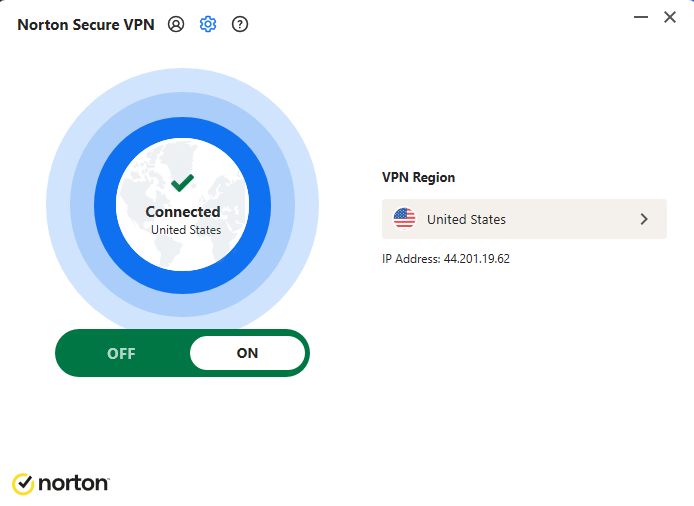
User experience. You can use Norton VPN as a separate app or as part of the antivirus software. I used the standalone VPN app, and it was quite underwhelming. Enabling the VPN is easy enough, but there’s not much else to customize or enable. So, overall, the app is easy to use because there’s nothing to do with it.
Pricing. Norton VPN starts at $3.33, which is similar to NordVPN, although I think the difference in quality between these two VPNs is very different. There are multiple subscription tier options if you want bonus features, such as the famous antivirus solution. Like many other providers, Norton VPN offers a 7-day free trial and a lengthy 60-day money-back guarantee.
Who it’s for
Go with Norton VPN if you want a simple-to-use VPN that isn’t bogged down by excessive features. You can get a top-tier antivirus service if you opt for a pricier subscription tier, and then the VPN will be a nice addition to its feature set.
8. PureVPN – secure VPN with flexible pricing

| Rating: | |
| Server network: | 6,000+ servers in 65 countries |
| Simultaneous connections: | 10 |
| Streaming services unblocked: | Netflix, BBC iPlayer, YouTube |
| Current deal: | Now 83% OFF PureVPN + 3 FREE months |
PureVPN is a privacy-oriented VPN with excellent starting prices and well-rounded performance. However, it offers multiple subscription tiers and optional add-ons, allowing you to build an all-in-one cybersecurity solution for unrivaled protection.
Why we picked PureVPN
Features. PureVPN’s starting plan doesn’t include a lot of features – just the basics for a safe online experience. But, if you’re willing to pay extra, you can get a password manager, data monitoring, and data removal services. On top of that, you can optionally unlock port forwarding, which is a fairly rare feature, although Proton VPN includes it with its base tier.
Privacy and security. PureVPN is based in the British Virgin Islands, which is excellent news for its overall reliability. It also boasts an always-on audit, meaning the service can be audited at any time without prior notice. There are also other audits of its no-logs policy that confirm that PureVPN has user privacy in mind.
Streaming. PureVPN offers a solid fleet of 6,000+ servers in 65 countries. The server numbers are greater than Surfshark’s and IPVanish’s, but the country variety is a bit underwhelming. That means you’ll have no trouble unblocking bonus content on services like Netflix and Hulu, but access to more exotic libraries might be limited. Personally, I didn’t encounter this issue when testing PureVPN.
Connection speed. As expected, PureVPN uses WireGuard as its fastest tunneling protocol, similar to Surfshark, IPVanish, and CyberGhost. It showed excellent results during our tests, garnering an average download speed retention rate of 88%. Meanwhile, the upload speed retention rate was only 59%.
User experience. The PureVPN app is simple and functional, but not particularly appealing. For example, I don’t like how the home page is trying to scare me that my data is being sold right now. I already subscribed to your service, so please calm down with the attention-grabbing elements. Besides these gripes, the app is easy to use.

Pricing. PureVPN starts at a reasonable $2.15, similar to CyberGhost and IPVanish. However, the starting plan is a bit lacking in features, meaning you’ll be better off with one of the pricier tiers. You can test the service with its 7-day trial, which costs a measly $0.99. Otherwise, you can use the 31-day money-back guarantee.
Who it’s for
PureVPN is suitable for budget-conscious users who want a simple VPN, as well as maximalists who need an all-in-one cybersecurity solution. The service is reliable and delivers solid performance, making it a good option either way.
9. TotalVPN – cheap VPN with antivirus included

| Rating: | |
| Server network: | 1,800+ servers in 90 countries |
| Simultaneous connections: | 8 |
| Streaming services unblocked: | Netflix, Hulu, Amazon Prime Video, YouTube TV, and more |
| Current deal: | Now up to 80% OFF TotalVPN |
TotalVPN is a decent VPN that comes with an excellent antivirus service. It’s quite affordable as well, making it a worthwhile alternative to Norton VPN if you’re looking for a VPN and antivirus package.
Why we picked TotalVPN
Features. Just like Norton VPN, TotalVPN is rather underwhelming when compared to VPN-first services like NordVPN and Surfshark. It doesn’t offer anything groundbreaking that would make its VPN particularly appealing. At least it’s cheaper than Norton VPN and includes its antivirus in the base subscription tier.
Privacy and security. I can’t recommend TotalVPN for online privacy enthusiasts. For starters, the VPN is based in the UK, which is a core member of the Five Eyes alliance. Moreover, it hasn’t conducted any independent audits that would dispel any concerns about logging that potential customers may have.
Streaming. TotalVPN offers only 1,800+ servers in 90 countries, which is the smallest network compared to all other VPNs on this list. However, despite this drawback, the VPN worked surprisingly well during my streaming tests. It wasn’t perfect, but the service did improve compared to previous tests, where it barely unblocked anything.
Connection speed. TotalVPN offers a wide range of tunneling protocols, the fastest of which is WireGuard. With it, we had a download speed retention rate of 84% and an upload speed retention of 53%. You’ll find the results with its other protocols in our extensive TotalVPN review.
User experience. Like with Norton VPN, TotalVPN feels like an addition to the antivirus service rather than a dedicated VPN service. This makes sense since the provider’s antivirus package is much more impressive than its VPN. The overall user experience is pretty solid, and all of the service’s features are clearly laid out.

Pricing. TotalVPN is one of the cheapest VPNs available, starting at only $1.59. However, there’s no free trial, so your only option to test the service is using the 30-day money-back guarantee.
Who it’s for
TotalVPN is suitable for those who need an affordable but powerful antivirus that comes with a decent VPN, too. My tests showed that TotalVPN is pretty fast and can unblock some streaming platforms, but its security and privacy aspects have room for improvement.
10. Bitdefender VPN – reliable VPN from an established antivirus provider

| Rating: | |
| Server network: | 3,000+ servers in 100 countries |
| Simultaneous connections: | 10 |
| Streaming services unblocked: | BBC iPlayer, Netflix, Hulu, Disney+ |
| Current deal: | Get up to 57% OFF Bitdefender VPN |
Bitdefender VPN is similar to Norton VPN and TotalVPN due to its relation to an antivirus product. However, you can purchase it separately and get something that feels like a complete VPN product.
Why we picked Bitdefender VPN
Features. Bitdefender VPN includes a few extras that make it a bit more appealing than Norton VPN and TotalVPN. For example, it offers Double VPN servers, allowing you to route your connection through multiple regions. There’s even a free tier to compete with Proton VPN, although this one comes with an abysmal 200MB daily traffic limit.
Privacy and security. Bitdefender VPN is based in Romania, just like CyberGhost VPN. This gives it some reliability regarding privacy. However, the provider hasn’t conducted any independent audits of its no-logs policy, which is concerning. That makes it difficult to recommend this VPN for privacy enthusiasts.
Streaming. Bitdefender VPN offers 3,000+ servers in 100 countries, which is similar to Surfshark’s fleet. Our latest Bitdefender streaming tests showed a significant improvement regarding content access on platforms like Netflix and Hulu. Previously, Bitdefender VPN delivered mixed results, so I’m happy that it managed to improve in this vital area.
Connection speed. This VPN comes with the WireGuard protocol, allowing it to compete with other VPNs regarding speed. During our Bitdefender VPN tests, it garnered an average download speed retention rate of 67%, while upload speed retention was 50%. These are solid results, but slightly behind many other providers.
User experience. Bitdefender VPN is pretty easy to set up and use. The apps are straightforward and include a world map, but you can’t use it for server selection, which I think defeats the purpose of this map. I also had issues running this app on Windows and had to reinstall it a few times to get it to work. Overall, not a great experience.

Pricing. Bitdefender VPN starts at $2.50, which is on the pricier side compared to top providers like Surfshark and IPVanish. There’s no free trial, so you’ll have to use the 30-day money-back guarantee if you want to test its capabilities.
Who it’s for
Like Norton VPN and TotalVPN, Bitdefender VPN is meant for those who want a VPN with an antivirus background. You can purchase this VPN separately, and it will serve you well, but it might feel underwhelming without the antivirus to back it up.
The best VPN services for 2026 compared
There are many VPN providers that are packed with great features. Here, you’ll find a table that contains all the information you need to know about each provider, including VPN price comparison, rating, server count, and whether they offer a free trial.
| Brand | Ranking | Free trial | Starting price | Money-back guarantee | Logging | Servers | Streaming | Simultaneous connections | Jurisdiction |
|---|---|---|---|---|---|---|---|---|---|
| NordVPN | Yes, 3-day | $2.59/month | 30-day | No logs, third-party audite by PwC | 9,500+ servers in 149 countries | Netflix, Hulu, BBC iPlayer, Disney+, and more | 10 | Panama | |
| Surfshark | Yes, 7-day | $2.49/month | 30-day | No logs, third-party audit by Deloitte | 4,500+ servers in 100 countries | Netflix, Disney+, Amazon Prime Video, Hulu, and more | Unlimited | The Netherlands (part of 9-Eyes) | |
| ProtonVPN | Yes, unlimited | $2.83/month | 30-day | No logs, third-party audit by Securitum | 20,400+ servers in 148 countries | Netflix, BBC iPlayer, YouTube, HBO Max, Disney+ | 10 | Switzerland | |
| CyberGhost | Yes, 1-day on a desktop, 3-day on Android, and 7-day on iOS | $1.59/month | 45-day | No logs, third-party audit by Deloitte | 9,800+ servers in 100 countries | Netflix, Hulu, BBC iPlayer, Disney+ | 7 | Romania | |
| ExpressVPN | ❌ No | $2.49/month | ❌ No | No logs, third-party audit by Cure53 | Undisclosed number of servers in 105 countries | Netflix, Hulu, BBC iPlayer, Disney+, and more | 14 | British Virgin Islands | |
| IPVanish | Yes, 7-day | $2.19/month | 30-day | No logs, third-party audit by Leviathan | 3,400+ servers in 112 countries | Netflix, BBC iPlayer, YouTube, Disney+, Hulu, and more | Unlimited | United States (part of 5-Eyes) | |
| Norton VPN | Yes, 7-day | $3.33/month | 60-day | No logs, not audited | 2,000+ servers in 65 countries | BBC iPlayer, HBO Max | 10 | United States | |
| PureVPN | Yes, 1-day | $2.15/month | 31-day | No logs, audited | 6,000+ servers, 65 countries | Netflix, BBC iPlayer, YouTube | 10 | British Virgin Islands | |
| TotalVPN | Yes, 7-day | $1.59/month | 31-day | No logs, not audited | 1,800+ servers in 90 countries | Netflix, Hulu, Amazon Prime Video, YouTube TV, and more | 8 | United Kingdom | |
| Bitdefender VPN | No | $2.50/month | 30-day | No logs, not audited | 3,000+ servers in 100 countries | BBC iPlayer, Netflix, Hulu, Disney+ | 10 | Romania |
How we selected and tested these VPNs
Our research team and I performed various tests for dozens of VPNs and ranked the best ones based on various factors. Here are all the things we took into consideration when ranking the best VPNs:
- Privacy policy (20%). I read the privacy policies of each VPN provider and only included those that clearly state they don’t log data related to your browsing activities or IP address. Even better if the policy has been independently audited.
- Servers worldwide (25%). We researched how many servers each VPN has around the globe. While some VPNs don’t disclose such information, we looked for wide country coverage.
- Security (20%). If your VPN connection ends up dropping, your VPN should ensure security precautions. Thus, all of the VPNs on my list include a functional and reliable kill switch among other security features.
- Streaming (15%). Some people need a VPN for streaming purposes only. For such a reason, I included VPNs that are also able to bypass geo-restrictions on various streaming platforms. We tested all of these VPNs on different Netflix libraries, Amazon Prime Video, HBO Max, Hulu, Disney+, and other popular streaming services worldwide.
- Speeds (15%). We tested the speeds of each service to find which VPNs offer the most consistent speeds with their various servers.
- Price (5%). As with any long-term subscription, price is a critical factor. This is why we only chose VPNs with optimal price-to-quality ratios.
Is a VPN worth getting?
Yes, a VPN is definitely worth getting because of its usefulness and versatility. Naturally, the details will vary based on your personal needs and preferences. However, I think most people will benefit at least in some way from VPNs since so much of our lives are tied to various online services.
So, let’s review some of the key areas why VPNs are worth having:
- Increased online anonymity. A VPN encrypts your online traffic, masks your home IP address, and hides your geographical whereabouts. These three things significantly increase your privacy when using the internet. Some of the best VPNs also eliminate online trackers, which are another nuisance that undermines your privacy when surfing the web.
- Improved digital security. VPN apps add some extra protection in certain situations. For example, you’ll be less likely to become the victim of data theft on public Wi-Fi networks. Having your IP masked also means you’re less likely to be targeted by DDoS attacks.
- Access to foreign content. Changing your location with a VPN allows you to access content that’s exclusive to other parts of the world. This applies to movies, TV shows, video games, websites, and other types of content.
- Bypassing regional censorship. Some governments impose strict online censorship in their countries to stifle the flow of information. You can use a VPN to access this restricted content, although that comes with some risks if the authorities deem VPNs illegal.
What VPNs can and cannot do?
Although VPNs are extremely useful and versatile, there are some things that even the best VPN services can’t do. That’s why it is vital to have a realistic overview of what VPNs can and can’t do:
- VPNs improve online privacy and security, but don’t protect against cyberthreats like ransomware or phishing. It’s crucial to use antivirus software if you’re concerned about such threats.
- Some VPNs can notify you about data breaches, but they can’t prevent them from happening. Your best chance to mitigate the damage from these is to use a password manager to create strong and unique passwords for your online accounts.
- VPNs add privacy by encrypting traffic and masking location, but that alone doesn’t make you completely anonymous. Advertisers can still track you through browser fingerprinting and online trackers, so be sure to use tracker and ad blockers.
- Some services, like banks, may flag or block VPN use due to potential fraud risks, leading to additional security checks or login restrictions.
What is the best free VPN?
In my opinion, Proton VPN is the best free VPN. It’s secure, trustworthy, and permits unlimited browsing data, which is all you expect from a high-quality free VPN. Naturally, it has some limitations, which is pretty common for free VPNs. After all, the service has a premium tier and therefore reserves the best features for paying customers.
In terms of limitations, Proton VPN’s free version automatically chooses a server location for you, which isn’t ideal if you want a particular IP address. Additionally, the service only includes servers in 5 countries, while the paid version covers around 148.
As expected, the only security feature you get is the kill switch, which is an essential part of staying secure online. You won’t get the NetShield ad blocker, split tunneling, or Secure Core servers. Moreover, the free tier won’t work with P2P, streaming, and other use cases. Connection speeds will be underwhelming as well.
What is the best VPN for streaming?
The best VPN for streaming must focus on server variety, connection speeds, and device compatibility. Let’s discuss why these aspects in particular are crucial for streaming VPNs.
First and foremost, a diverse server network grants you access to more content from different regions. Practically all popular streaming platforms offer different movies and TV shows in different regions due to broadcast restrictions and licensing agreements. Many VPN servers are also vital for bypassing the IP address restrictions that streaming platforms like Netflix might impose on VPN providers. After all, they don’t want VPN users to have access to content that they shouldn’t have.
Then there’s connection speed, which is essential if you want to stream video content in high-definition quality without lag issues. Netflix claims you need at least 15Mbps to watch movies in 4K/UHD content, so pick a VPN that demonstrates excellent speed retention rates in various countries.
Finally, the best VPN for streaming should be compatible with a wide variety of home entertainment devices. Most VPNs work with computers and smartphones, but a high-tier VPN should have apps for popular home entertainment devices, too, such as smart TVs and media boxes.
What is the best VPN for China, Iran, or Russia?
A worthwhile VPN for dealing with strict online censorship needs to be trustworthy and packed with effective tools for dealing with various network restrictions. Keep in mind that no VPN will be 100% in this situation because government agencies are constantly upgrading their online censorship measures. So, it’s best to choose a VPN that offers multiple features for dealing with network restrictions.
The most crucial feature for tackling online censorship is traffic obfuscation. It allows you to mask your VPN connection so that it appears like regular HTTPS traffic to outsiders. That way, you’re less likely to encounter network restrictions while using a VPN.
I also recommend picking VPNs that have features that integrate with the Tor Network. Combining a VPN with Tor gives you immense online anonymity, although connection speeds will slow down significantly. Another tool to look out for is Double VPN.
Crucially, you must pick a VPN that doesn’t log your online activities. That way, it won’t have anything to share with nosy government agencies that try to extract information from your VPN provider. Obviously, reliable VPNs for China shouldn’t cooperate with such data requests anyway.
What is the best VPN for gaming?
A gaming-oriented VPN should focus on security and connection speeds, while other aspects are secondary. Let me explain.
Any VPN will hide your IP address, which might be exposed when playing online games. Additionally, you can use the service to change your virtual location and access region-exclusive games or in-game rewards in certain multiplayer games.
However, not every VPN can ensure speedy connections and low ping, which are key components of having a pleasant gaming experience. That’s why you should only consider VPNs that offer modern tunneling protocols (like WireGuard) and have plenty of server options near your location. That way, you’ll have consistently good connection speed results.
Then there’s the security consideration, although most modern games aren’t prone to DDoS attacks and other vulnerabilities. You should only worry about security if you’re playing the old-school way through LAN, or you’re hosting your own game server. Otherwise, the security front is covered by the game itself.
What is the best VPN for porn?
Adult content enthusiasts will definitely benefit from a VPN and its ability to hide their identity and change their location. Firstly, when a VPN is enabled, your ISP and other potential onlookers won’t know that you’re visiting adult sites like Pornhub. This is excellent if you want your nighttime activities to remain private.
However, what’s much more relevant these days is that VPNs allow you to bypass mandatory age verification checks that many adult websites have. These have exploded in prevalence after the recent Online Safety Act in the UK. Similar laws are likely to take effect in other countries, meaning you’ll need a VPN if you don’t want to share your ID with porn sites. For example, adult site restrictions are already in effect in various US states, such as Texas and Florida.
What is the best VPN for X, Reddit?
Some people might need a VPN for community sites like X and Reddit. For starters, it makes it easier to keep your true identity hidden. To be precise, you’ll be able to mask your IP address and location, thus minimizing the risk of doxxing by other users. Alternatively, you can use a VPN to bypass an IP ban on your account.
Crucially, some countries, such as China and Russia, have banned these services entirely, meaning you need a VPN if you want to access these websites. However, keep in mind that countries that prohibit such sites likely have laws against VPN use, too. After all, they don’t support people’s freedom of speech.
What's the cheapest VPN?
The market is full of VPNs at various price points, meaning most people will find a service that fits in their budget. You can even find a reliable free VPN, although its usefulness will be severely limited.
However, even if you’re on a tight budget, I recommend looking at other aspects beyond the starting price. For example, sometimes the renewal prices of cheap VPNs can escalate dramatically after the first year, which can be an unpleasant surprise. A good example of this is TotalVPN.
Secondly, it’s worth evaluating whether the cheap VPN you’re considering covers the basics that any worthwhile VPN must have. It should at least have a kill switch, a no-logs policy, plenty of servers worldwide, and good connection speeds. Naturally, the service likely won’t excel in any area because of its affordability.
Ultimately, whether a cheap VPN is worth considering depends on your needs and preferences. I understand if someone prefers a more affordable VPN when their needs aren’t high. In contrast, it’s worth getting a pricier VPN if you want the best results in many areas.
Which VPN is the fastest?
The fastest VPN is the one that has servers near your actual location. For example, if you live in the US, then you’ll have the best connections with a VPN service that has many servers in America. Conversely, users in the UK should choose a VPN with more servers across Europe.
Another consideration is the available VPN tunneling protocol options. Nowadays, WireGuard is considered the fastest available option, although some providers, such as NordVPN and ExpressVPN, use proprietary protocols. It also depends how a provider implements the protocol, but that can be difficult to evaluate without conducting some speed tests. Therefore, I suggest grabbing a free trial of a VPN to measure its speeds on your device. That way, you’ll see how it performs in your circumstances.
Conclusion
VPNs are essential tools nowadays because of widespread surveillance, tracking, and various restrictions online. Whether it’s regional blocks or age verification roadblocks, a powerful VPN will help you circumvent any limitations online.
Our tests showed that NordVPN is the best VPN overall regarding speeds, features, and reliability. However, I also recommend Surfshark or CyberGhost if you want something cheaper yet just as effective. Alternatively, go with Proton VPN or ExpressVPN if you don’t mind paying extra for even greater reliability. The market is full of excellent options, meaning you’ll easily find a viable choice if you know what you need.
FAQ
Are VPNs legal?
Yes, VPNs are perfectly legal in most parts of the world. However, it’s worth noting that using a VPN to access region-restricted content usually goes against the terms of service of various streaming sites. That being said, streaming services usually try to block VPNs instead of user accounts.
What is the best VPN to use?
NordVPN was the best choice among the many VPNs we tested. It has over 9,500 servers across 149 countries, and it can unblock geo-restrictions on all our favorite content. It also delivers fast speeds for lag-free streaming, and it’s the most secure VPN we’ve ever used.
Which VPN has the most US servers?
Proton VPN offers around 3500+ servers across 19 cities in the US. The provider has around 20,400+ servers in total, which is one of the largest server networks on the VPN market. That’s why you should pick it if you prioritize server numbers.
Which VPN has the most UK servers?
Proton VPN has over 733 servers in 5 locations in the UK and promises complete privacy on top of excellent speeds. However, it’s hard to compare this number to other providers, as they don’t disclose the exact number of servers they offer.
How much does a VPN cost on average?
VPNs come in various price points and can cost anywhere between $1.50 and $5.00/month. The overall average is $3.00/month, and you can expect to get a high-quality and reliable VPN when paying such a price. Note that these prices apply when picking long-term subscriptions.