How to watch American TV outside US in 2026 with a VPN
Our in-house cybersecurity experts and journalists, renowned for major reports like The Mother of All Breaches, conduct transparent, unbiased VPN testing and in-depth analysis.
With 750+ articles crafted based on real-world research, we empower readers to make informed purchasing decisions through first-hand expertise.
Learn more

If you’re wondering how to watch American TV from abroad, the answer is simple – you’ll need a trustworthy VPN to get past geo-blocks. By giving you a US IP address, a VPN changes your IP address to a US one, which can help bypass geo-blocks, but you'll still need a valid account and a US-accepted payment method.
From consistently brilliant Max originals to ESPN’s unrivaled sports coverage and Netflix US’s massive library, American TV has something for everyone. However, due to licensing agreements, most of this content is restricted to viewers within the US, leaving international audiences locked out.
Luckily, with the right VPN, you can enjoy American TV anywhere. Read on to discover the best VPNs for streaming US shows in 2026, along with step-by-step guides on how to access your favorite channels abroad.
Why do you need a VPN to watch American TV online?
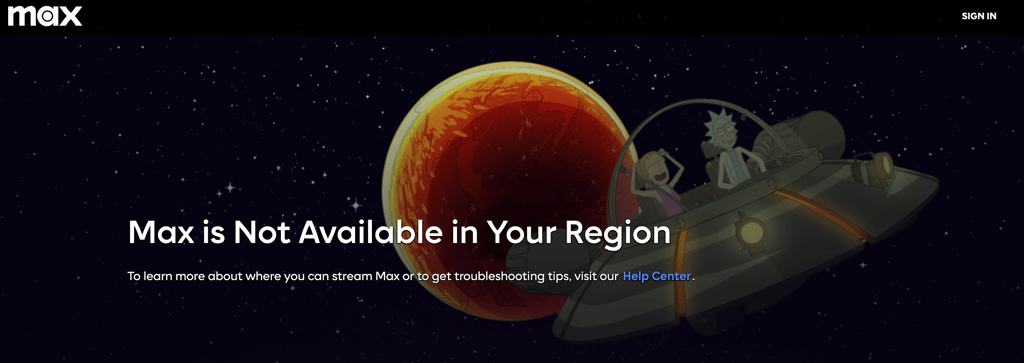
American TV channels and streaming services are usually only available in the US. While you can visit most platforms from anywhere in the world, they check your IP address to determine your location. If you're outside the US, you'll either see a different content library or an error message such as "Max is Not Available in Your Region."
A reliable VPN solves this by routing your connection through a US server and giving you a US IP address. This makes it appear as though you're browsing from the United States, allowing you to access services that are otherwise geo-restricted. Just make sure you choose a reliable VPN that's capable of unblocking streaming platforms consistently.
That said, changing your IP address is only one part of the process. Most US streaming services require additional things that a VPN can't provide.
| What you need to watch US TV | What it requires | Can a VPN help? |
| A US-based connection | A US IP address | ✅ Yes |
| An active subscription | A paid account on the US version of the service | ❌ No, you must sign up and pay separately |
| A US-accepted payment method | A US credit/debit card or gift card for new sign-ups | ❌ No |
| Mobile app access | A US Apple App Store or Google Play account to download the app | ❌ No |
If you already have a valid US account and subscription, a VPN simply changes your virtual location so you can stream while abroad. If you're creating a new account, you'll still need to complete the registration and payment process, as a VPN can't bypass those requirements.
On mobile, some streaming apps also use GPS to verify your location, so a VPN works most reliably in a desktop browser.
You may also not need a VPN if you're already in the US or if the service and the content you want are already available in your country. However, if you're traveling outside the US with an existing American streaming account, a VPN is still useful because it passes the location check.
How to watch American TV outside the US with VPN

- Get a VPN that has plenty of servers in America, such as NordVPN
- Install and set up your VPN on your device
- Log in and connect to a US server
- Head to the American TV channel you want to watch
- Log into your accounts – I highly recommend pre-registering your account before travelling
- You can now watch American TV while abroad
If you're planning to travel abroad, it's best to create your US streaming account and purchase your subscription before you leave the country. This can help you avoid additional regional restrictions during sign-up. Also, keep in mind that using a VPN to access geo-restricted content may violate a streaming service's Terms of Service and could put your account at risk of suspension.
Best VPN to watch US shows 2026
- NordVPN – the ultimate VPN for streaming US TV
- Surfshark – best for watching US TV on all your devices
- Proton VPN – a top-quality all-rounder VPN to watch US shows
Not every VPN can reliably unlock American TV – especially if you’re trying to stream Netflix, Max, or other popular platforms. To get smooth, secure access from US or anywhere else, you’ll need a VPN with the right mix of features. Look for fast US servers, strong security, solid value, and easy-to-use apps across all your devices.
Top streaming services to watch American TV online
America has led the way for trailblazing TV for decades. Channels like Max, AMC, and ABC have set new standards for TV entertainment with shows like The Sopranos, Breaking Bad, Euphoria, WandaVision, and many more, capturing viewers by the millions, glowing reviews from critics, and awards around the world.
Previously, you’d only be able to watch US TV shows in America – or wait till your country screened them. But now that the era of digital streaming has taken over, all the big TV channels have online platforms where you can catch up on their shows from both past and present.
Let’s take a look at the major US TV streaming sites, the top US TV shows they offer, and how much they cost.
| US TV streaming service | Programming highlights | Price per month |
| Max | Euphoria, Succession, The Sopranos, Curb Your Enthusiasm | $10.99 |
| Hulu | Pam and Tommy, Fargo, The Dropout, Nine Perfect Strangers | $9.99 |
| Netflix US | Stranger Things, Ozark, Inventing Anna | $8.99 |
| AMC+ | The Walking Dead, Better Call Saul, Breaking Bad, Mad Men | $7.99 |
| Disney+ | WandaVision, Hawkeye, The Mandalorian | $11.99 |
| ESPN+ | NFL, NHL, NBA, MLB | $12.99 |
As long as you have a VPN installed on your device, you’ll be able to access all this American TV – and more.
All prices were checked June 2026 and are subject to change. Always confirm current pricing on each service's website before subscribing.
How to watch American TV with VPN on your devices
With a reputable VPN, you can watch all sorts of American TV services on all your different devices – PC, laptop, smartphone, and even different streaming devices. Get connected in minutes with our simple instructions.
How to watch American TV on Android or iPhone
- Download a VPN that works well with your chosen device. NordVPN has easy-to-use apps for iOS, Windows, Android, and macOS
- Open your VPN and connect to a US server
- If needed, change your Apple App Store or Google Play region to the US
- Turn off location permission for the App Store (iPhone) or Google Play Store (Android)
- Now visit the American TV service you want to watch, sign in, and start streaming
It's best to download the streaming app and set up your account before leaving the US. If the app still detects your location, try watching in your mobile browser instead, as VPNs are generally more reliable there.
How to stream American TV with VPN on streaming devices
Want to watch American TV on your TV instead? Most popular streaming devices support VPNs, but the setup varies. Some devices let you install a VPN app directly, while others require you to connect through a VPN-enabled router.
- Install a VPN app on your streaming device, or set up the VPN on your router if your device doesn't support VPN apps
- Connect to a US server
- Open the streaming service and sign in
- Start streaming
Note: Fire TV Stick and Android TV/Google TV support VPN apps directly. Roku requires a VPN router, while Apple TV supports VPN apps from compatible providers. If a streaming app still detects your location, try watching on a desktop browser instead, where VPNs are generally more reliable.
For the full review, check out these extensive guides on the VPNs to use with different streaming devices:
- VPNs that work with Roku – these VPNs are ideal for use with Roku
- VPNs to use with Apple TV – see which VPNs work best with Apple TV
- Top VPNs for Firestick – how to use a VPN on Firestick to unblock American TV
- The best VPNs for Kodi – these VPNs will help you unblock US TV content on Kodi
Now that you know it all, you can start binge-watching American TV without any restrictions.
American TV not working even when you use a VPN?
If you find that you’ve connected to a VPN but still can’t access American TV shows, don’t get too frustrated, as there’s likely a quick fix. Problems that arise can include:
- Browser settings have leaked your actual IP address
- You’re not in the correct server location
- The server you’ve chosen has been identified and blocked by content providers
- Your VPN isn’t suitable for bypassing geo-blocks
- Your device settings need to be updated
You can easily fix these issues, so try these simple solutions:
- Update your browser, clear all cookies, and cache
- Try a different server and make sure it’s in a US location
- Update your device’s operating system
- Ask your VPN’s support team for help
- Pick a better VPN
If none of these fixes work, the issue may not be your VPN. Some American streaming services also require a US payment method, ZIP code, or verify your location using your device's GPS. To avoid these hurdles, it's best to create your account and set up the streaming apps before leaving the US whenever possible.
The VPN you use is still an important part of the equation, as only the best VPNs consistently bypass the geo-blocks of major American streaming services. However, a VPN can't bypass account, payment, or device-level location requirements, so setting everything up before you travel gives you the best chance of streaming without issues.

Wrapping up
A VPN is one of the most important tools for watching American TV from abroad, but it's not always a complete solution. Many US streaming services also require an American account, payment method, or use additional location checks, so setting everything up before leaving the US can save you a lot of hassle.
Once that's taken care of, a reliable VPN lets you bypass geo-blocks on platforms like Max, AMC, Hulu, ESPN, and Netflix US, making it much easier to stream your favorite shows while traveling.
Just remember to choose a premium VPN. Free and lower-quality services often struggle to unblock streaming platforms consistently. Fortunately, top-rated providers like NordVPN cost as little as a cup of coffee each month. Besides helping you access American TV, they also encrypt your connection, protect your privacy, and keep your online activity more secure.
FAQ
Is American TV free to watch?
American TV streaming services like Hulu and AMC offer free trials so you can watch plenty of content before making a financial commitment. But you still need a VPN to bypass content blocks, so I recommend installing a premium option, like NordVPN, before you attempt to stream US TV.
How to watch US TV in the UK?
Watching American TV in the UK is easy with a VPN. Just use a reliable VPN to connect to a US server. Then, any US site you visit will see a US IP address and instantly give you full access to all that excellent American TV.
Is it legal to watch US TV shows with VPN?
In most countries, including the UK, Canada, Australia, and most of Europe, using a VPN is legal, and watching geo-restricted content with one is generally not a criminal offense. However, VPNs are restricted or banned in some countries, including China, Russia, North Korea, Iran, Iraq, Turkey, the UAE, and Oman. Also, using a VPN to bypass geo-restrictions may violate a streaming service's Terms of Service, which could result in your account being suspended or terminated. You can find more in-depth info in our guide on VPN legality.
How to watch American TV in Germany?
To watch American TV in Germany, simply connect to a VPN server in the US. This will make it seem like you’re connecting from the US, thus allowing you to watch US TV without any geo-restrictions.
How to watch American TV in Italy?
You can watch American TV in Italy by using a VPN, like NordVPN. Just install the VPN app, connect to a US server, and then access streaming services like Netflix US, Hulu, Max, or ESPN as if you were in the United States.
How to watch American TV in Spain?
To watch American TV in Spain, use a VPN service. My top recommendations are NordVPN, Surfshark, and Proton VPN for this. After installing it, choose a US server and connect. This makes streaming platforms like Netflix US, Hulu, Max, and ESPN available as if you were watching from the US.