How to watch NBC Sports online outside the US in 2026
Our in-house cybersecurity experts and journalists, renowned for major reports like The Mother of All Breaches, conduct transparent, unbiased VPN testing and in-depth analysis.
With 750+ articles crafted based on real-world research, we empower readers to make informed purchasing decisions through first-hand expertise.
Learn more

If you’re wondering how to watch NBC Sports online outside the US, you must have realized that the service is geo-restricted and normally not available to those abroad. Fortunately, you can employ a trusted VPN. The one thing to remember is that you will need a US-recognized payment method to stream NBC Sports with a VPN successfully.
But what does a VPN do? It offers you a selection of servers to connect to, and if you connect to a US-based server, it will look like you yourself are located in the US. Of course, to actually access NBC Sports, you will first need to pay for the subscription and log in, which isn’t something that a VPN can help with.
So, interested in watching Sunday Night Football and the Premier League? I have 3 VPN recommendations for the job and quick guides for streaming NBC without restrictions.
A VPN can assign you a US-based IP address and make it seem like you’re connecting from the US. However, it cannot give you a US-recognized account or a payment method that NBC Sports or Peacock will accept. It also cannot get past the GPS checks many mobile apps use. New Peacock sign-ups generally require a US payment method, so using a VPN is just one part of the puzzle. If you already have a US cable or TV-provider login, sign in with that first – you may not need a VPN at all.
How to watch NBC Sports live with a VPN using Peacock

The most straightforward way to watch NBC Sports live is to subscribe to Peacock Premium ($10.99/month). However, Peacock is not available outside the US. Using a VPN, you can spoof your geo-location, but to pay for the service, you will need a US-based App Store/Google Play account and a US-issued payment method. If you don't have one, a Wise card with a US billing address works. Here are the steps to follow:
- If you don’t have a US App Store/Google Play account, set your store region to US before downloading
- Download and install a VPN with a range of servers in the US
- Connect to a server in the US
- Download the Peacock app and register for a Peacock Premium account
- Turn off location services for the Peacock app on your device
- Open the Peacock app, sign in, and start streaming NBC Sports from outside the US
How to watch NBC Sports live with a VPN using the NBC Sports app
You can also watch NBC Sports live via the NBC Sports app. However, this method requires you to have a US TV provider subscription, which is harder to acquire from outside the US than a Peacock subscription. If you’re travelling outside the US and have a subscription to Comcast Xfinity, DIRECTV, or another TV provider, these are the steps you should follow:
- If you don’t have a US App Store/Google Play account, set your store region to US before downloading the NBC app
- Download and install a VPN with plenty of servers in the US
- Connect to a US-based server
- Download the NBC app and sign in using your US TV provider credentials – note that this option is only viable if you already have an active US cable or satellite subscription
- Turn off location services for the NBC app on your device
- Start streaming NBC Sports content
How to watch NBC Sports live with a VPN using YouTube TV or Sling TV
You can watch NBC Sports live using a YouTube TV or Sling TV subscription. To subscribe to either, you will need to use a valid US ZIP code and use a US-issued payment method. If you don’t have it, you may use a Wise card with a US billing address. Note that NBC Sports is available with the YouTube Sports Plan (from $54.99/month). The Sling Blue plan ($45.99/month) offers access to local NBC broadcasting.
- If you don’t have a US App Store/Google Play account, set your store region to US before downloading
- Download and install a reliable VPN that has US-based servers
- Connect to a server based in the US
- Download the YouTube TV or Sling TV app and register for an account
- Turn off location services for the app on your device
- Open the app and sign in
- Start streaming NBC Sports
Streaming services to watch NBC Sports online without cable
If you’re in the US and have a cable subscription, you can watch NBC Sports live immediately. You can also access live sporting events on NBC Sports regional networks, such as NBC Sports Philadelphia and NBC Sports Bay Area & California, with a TV provider sign-in.
If you’re outside the US or want to watch NBC Sports without cable, you can use streaming services like Peacock or YouTube TV to access the content. The Roku Channel, Pluto TV, and Xumo Play also offer free access to NBC Sports NOW, which presents event highlights, sports talk shows, and some minor live events.
| Streaming service | Price per month |
| Peacock | From $10.99/month (Premium plan) |
| YouTube | From $54.99/month (Sports plan) |
| Sling TV | From $45.99/month (Sling Blue plan offers local NBC broadcasting) |
| The Roku Channel | Free (NBC Sports NOW only) |
| Pluto TV |
Free (NBC Sports NOW only) |
| Xumo Play |
Free (NBC Sports NOW only) |
Bear in mind that NBC Sports will be geo-blocked on these streaming services. So if you’re outside the US, you’ll need to use a reputable VPN to bypass its restrictions. But setting up a reliable VPN isn’t everything you need to do to start streaming NBC Sports. Whether you sign up via Peacock, YouTube TV, or another service with access to NBC Sports, you may be required a US payment card for the subscription.
Why do you need a VPN to watch NBC Sports online?
NBC Sports is a popular channel based in the US that has a vast range of exciting live sports events, from soccer and American football to golf, baseball, and cycling. But due to copyright laws, licensing agreements, and distribution rights, it’s only available to watch in the US.
If you attempt to access NBC Sports online from outside the US, you’ll be blocked by the following error message: “We’re sorry. You are not authorized to access this content from outside of the US and its territories.”
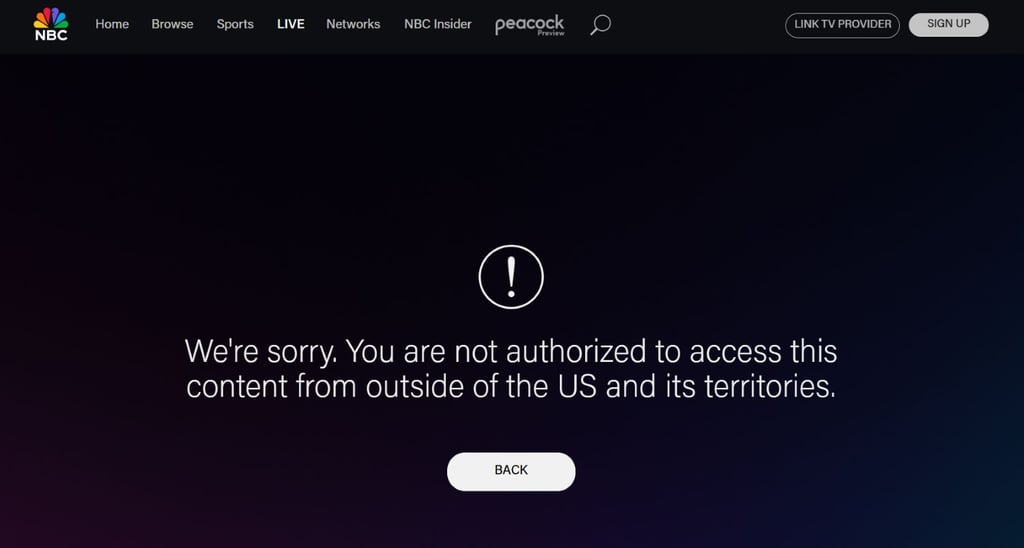
Luckily, there’s a way to unblock NBC Sports. First, you need to select a reputable VPN with a large fleet of US servers, connect to a server in the US, and head over to the NBC Sports website or app. This will allow you to bypass the platform’s location restrictions and continue with the subscription process to watch NBC Sports from outside the US.
But, as you now know, a VPN can only offer a US-based IP address and cannot bypass other requirements to watch NBC Sports live.
| What you need to watch NBC Sports live | What it requires | Can a VPN help? |
| US-based connection | A US-based IP address | ✅ Yes |
| US TV provider/streaming login and active subscription | Subscription to a US cable, satellite, or streaming provider (e.g., Peacock) that offers NBC Sports content | ❌ No |
| Account registration location | A US-based account, sometimes with a US payment method during sign-up | ❌ No |
| App access on a mobile device | A US-based App Store/Google Play account to download the US app | ❌ No |
Of course, not all users will need a VPN at all:
- US cable or a TV provider login users. If you have the US cable or TV provider logins, go straight to the NBC Sports app or website and sign using them. You’ll get the full NBC Sports experience.
- Sky or NOW subscription users. In the UK, Ireland, Germany, Austria, Switzerland, and Italy, some NBC Sports content is available through Peacock, which can be accessed via Sky and NOW subscriptions.
Best VPNs to watch NBC Sports from anywhere
Not all VPNs can unblock NBC Sports from outside the US. I recommend choosing a VPN that can consistently bypass the channel’s region restrictions, has a solid reputation, and comes with a large fleet of US servers.
- NordVPN – best VPN for unblocking NBC Sports from anywhere
- Surfshark – great-value VPN for accessing NBC Sports abroad
- IPVanish – strong NBC Sports VPN with excellent security features
How to watch NBC Sports with a VPN on your device
Regardless of whether you’re using your phone, PC, tablet, smart TV, or streaming stick, you can access NBC Sports from anywhere in the world. You just need a good VPN to bypass the channel’s region restrictions.
And while the process is straightforward, the steps are slightly different, depending on which device you’re using. I’ve put together some simple guides to help you use a VPN to watch NBC Sports from outside the US on the most popular devices:
- Watch NBC Sports on your phone
- Watch NBC Sports on your smart TV
- Watch NBC Sports on Roku
- Watch NBC Sports on Fire TV Stick
- Watch NBC Sports on Kodi devices
Watch NBC Sports on your smartphone (Android, iOS)
If you’re traveling, you might want to stream NBC Sports on your phone. However, keep in mind that accessing the platform with a VPN is easier on desktop browsers. That’s because streaming providers often use GPS and device location data to determine your real location. Here are a few basic steps that might help you watch NBC Sports on your smartphone:
- Switch your phone’s location and App Store/Play Store’s location to the US (note that a VPN cannot change the app store location, only your IP address)
- Download and install a VPN on your phone
- If you use an Apple ID or Google account, create a new one and select the US as your country before downloading
- Download the NBC Sports app from the Apple App Store or Google Play Store, or open your streaming provider’s app that has NBC Sports
- Sign in or set up an account
- Start searching for the sports you want to watch
Note: You can change the App Store region once every 90 days and the Google Play location once a year. Keep in mind that a VPN alone cannot change the app-store region.
Watch NBC Sports on your smart TV
The majority of popular smart TVs, including Samsung, Apple, and LG, don't support VPN apps. Luckily, you can get around this by simply connecting your Wi-Fi router to your VPN instead, so you can use it to watch NBC Sports from anywhere. Here’s how:
- Download a VPN with a strong fleet of US servers
- Connect to a server in the US
- Connect your Wi-Fi router to your VPN network
- Download the NBC app or a streaming service that has the channel on your smart TV, and sign up/register for an account
- Sit back, relax, and enjoy watching all your favorite sports
Watch NBC Sports on Roku
Similar to smart TVs, many popular streaming sticks don’t support VPN apps. And this includes Roku devices. But as with smart TVs, you can get around this issue by connecting your Wi-Fi router to your VPN. Here’s what to do:
- Pick a VPN with plenty of US servers
- Download and install the VPN and connect it to your Wi-Fi router
- Connect to a US server
- Insert your Roku stick into your smart TV via the HDMI port
- Turn your TV on and choose NBC Sports or your chosen streaming service from the Roku home screen
- Grab a drink and enjoy watching all the sports you want
Watch NBC Sports on Fire TV Stick
Unlike many streaming sticks, Amazon Fire TV Stick supports VPN apps, so you can download one directly onto your device by following these simple steps:
- Switch on Unknown sources on your Amazon Fire TV Stick
- Download and install a VPN that can unblock NBC Sports
- After you have installed the software, connect to a server in the US
- Install the NBC Sports app or streaming service on your firestick
- Sign in or create an account and start cheering on your team
Watch NBC Sports on a Kodi device
If you want to watch NBC Sports on a device with the Kodi player, here are the instructions to follow:
- Download and install a VPN on the device that runs Kodi or connect your Wi-Fi router to your VPN
- Connect to a US server
- Open Kodi and use an official add-on that carries NBC Sports content (make sure to avoid unofficial or third-party add-ons that provide unlicensed streams)
- Sign in or register and start streaming
What is NBC Sports Gold?
NBC Sports Gold was an NBC Sports streaming service that ran until 2021, but much of that content was later moved to Peacock. While Peacock is primarily accessible to users in the US, some content is available through regional partners such as Sky (in the UK, Ireland, Germany, Austria, Italy, and Switzerland) and NOW (in the UK and Ireland).
Peacock’s streaming app is available to premium subscribers in the US at no additional charge. Fortunately, if you travel or live outside the US, a VPN can help you access the US version of Peacock.

Notably, in 2016, NBC also launched the NBC Sports app, where you can stream live games at no extra cost if you log in using your cable TV subscription information.
What can you watch on NBC Sports?
From the Ryder Cup and NFL to NASCAR, the Premier League, and even the Olympic games, there are so many events to watch on NBC Sports. Here’s a taste of the sports you can enjoy:
| Sports tournament | Dates |
| NBA | October 2026 – June 2027 |
| NFL (Sunday Night Football) | September 2026 – January 2027 (note that NBC will not air Super Bowl LXI) |
| Premier League | August 2026 – May 2027 |
| NASCAR | August – November 2026 |
| Olympic Games | July 2028 (Summer Olympics), February 2030 (Winter Olympics) |
If you want to keep up with all the latest sports news, be sure to follow NBC Sports on X and Facebook.
Conclusion
You can enjoy a rich variety of sporting events on NBC Sports from pretty much anywhere in the world. Although the service is geo-restricted and is primarily only available to the US audiences, you can use a VPN that changes your IP address to a US one. In short, whether you live in Argentina or Greenland, you can watch NBC Sports as if you were in the US.
When selecting a VPN for the job, look for a service with plenty of US-based servers. This will help you avoid overcrowded servers and other technical difficulties. My top recommendation for watching NBC Sports is NordVPN. With over 3,400 US servers, lighting fast speeds, performance-focused features, and great customer support, it’s a great tool to access NBC Sports from anywhere.
But keep in mind that to watch NBC Sports live events, you will need an active cable license or a subscription to Peacock or another alternative service. To subscribe, you will likely need to pay using a US-recognized payment method (e.g., US-issued payment card).
FAQ
Am I able to watch NBC Sports without a cable subscription?
Yes, you can watch NBC Sports using Peacock. The service’s Premium plan offers access to sports content. To subscribe, you will need to provide a valid US ZIP code and you may be asked to pay using a US-issued payment method.
What’s the best VPN to stream NBC Sports online?
NordVPN is the best VPN for unblocking NBC Sports online from outside the US. It offers over 3,400 high-quality US servers, fast speeds, and unbeatable security features. Surfshark and IPVanish are two other VPNs I can recommend for accessing NBC Sports from anywhere.


