Bitdefender vs Avast: which antivirus is better?
Backed by leading cybersecurity experts and investigative journalists, we deliver independent, real-world antivirus testing and analysis, guaranteeing objective evaluations without undue influence or bias from outside parties.
Our transparent and consistent methodologies ensure objective, up-to-date reviews, empowering readers to make well-informed decisions.
Learn more

Bitdefender and Avast are some of the best-known names in the world of cybersecurity. Both offer excellent anti-malware protection, and both come with thousands of positive reviews and recommendations. Unsurprisingly, users trying to choose between Bitdefender vs Avast are often left confused.
Since both Bitdefender and Avast showcase great independent testing results, both might seem worth consideration. However, malware detection isn’t the only factor to consider. Additional features, pricing, the overall cost-to-value ratio, customer support, and even ease of use all must be evaluated.
To simplify the choice for you, I’ve tested both antiviruses alongside the Cybernews research team. In this Bitdefender vs Avast comparison, I outline the pros and cons of each provider. By the end, you will have all the facts to make an informed decision about which antivirus is best for you.
Bitdefender vs Avast: overview
Bitdefender comes with unique features, offers competitive pricing, excels in customer support, and has a proven malware-detection track record. For these reasons, Bitdefender is considered one of the best antiviruses in 2026, while Avast falls short in a few key areas, including variety in pricing plans and additional features.
| Bitdefender Antivirus | Avast Antivirus | |
| ⭐ Rating: | ||
| 🥇 Overall rank: | #1 out of #30 | #6 out of #30 |
| 🔥 Coupons: | Bitdefender coupon 78% OFF | Avast coupon 60% OFF |
| 💵 Price: | From $12.99/year | From $31.20/year |
| ✂️ Free version: | Yes | Yes |
| 🖥️ Platforms: | Windows, macOS, Android, iOS | Windows, Mac, Linux, Android, iOS |





Our team of researchers thoroughly tests antivirus software following a well-established testing process. In unison, our experts combine in-house and independent testing lab findings with first-hand experience to help you make informed decisions about each product. Learn how we test antivirus software.
Bitdefender vs Avast: which offers better protection?
| Bitdefender | Avast | |
| Protection rate by AV-Comparatives | 99.1% | 100% |
| Protection against zero-day malware by AV-TEST | 100% | 99.4% |
| Real-time protection (in-house test) | 90% | 100% |
| Firewall | Effective | Effective |
| Scanning | Effective, caught 9/10 malware threats | Effective, caught 10/10 malware threats |
To determine whether Bitdefender or Avast provides better protection, I initially compared the results of independent tests. Next, we conducted in-house tests by planting infected files within clean environments and installing the antiviruses separately to test their capabilities.
When it comes to independent lab results, first, I looked at AV-Comparatives results of the most recent Real-World Protection Test. According to this independent lab, Bitdefender has a protection rate of 99.1%, while Avast has a 100% protection rate. The latest AV-TEST results showed that both Bitdefender and Avast can protect against 100% of widespread malware. However, only Bitdefender can protect against 100% of zero-day malware, as Avast’s score in this category is 99.4%. Plus, regarding privacy, Avast raised concerns about tracking and selling user data.
Real-time protection
When I use the term real-time protection, I refer to an antivirus’ ability to detect malicious files as they appear on your device. The purpose of real-time protection is to prevent malware from executing on your operating system in the first place, which is why real-time protection is crucial.
During the Real-World Protection Test by AV-Comparatives, Avast blocked 100% of threats in real-time, but caught 8 false positives. As for Bitdefender, it blocked 99.1% of threats and identified 4 false positives. According to AV-TEST’s results, neither Avast nor Bitdefender showed any false positives.
Malware protection
Avast's capabilities to protect you against malware heavily depend on your subscription version. This is because Avast focuses on frequent background rescans for threats that are already inside. With the paid version, there is a much bigger focus on network protection. So, potentially, the amount of malware that you have to deal with will be significantly lower because most of the junk won't end up on your device. It won't pass the web countermeasures.

To some extent, the same applies to Bitdefender. However, the service has much better network safety tools, even on its most basic version. So, you won't be left with only the antivirus scanner and real-time protection. There are several tools that should help you avoid frequent scans. That saves not only your device's resources but your time as well.
Scanning
During our previous in-house tests, Bitdefender was quite slow during full system scans, but that seems to have been solved now. We tested the antivirus on a Lenovo ThinkStation running Windows 11 with 64GB of RAM. The full system scan took 8 minutes 40 seconds with Bitdefender, which is relatively fast. At least compared to Avast, which took just over 23 minutes to complete a full system scan. On the other hand, Bitdefender caught 9/10 threats, while Avast handled all 10/10.

Firewall protection
Both Bitdefender and Avast have network security toolkits. While Avast’s Network protection interface appears very sleek, the functionality is a little disappointing. You can perform various scans, but not much useful information is presented. For the most part, the service cannot even identify whether some of the unknown devices on the network are malicious or not.
What redeems Avast is that you can customize your firewall's strictness. It's quite easy to go overboard, so make sure you're not messing with the ports your household members are using.
Bitdefender doesn't have anything spectacular when it comes to firewall customization either. Regardless, the whole feature offers detailed information and works in the background. You can just set it up and forget until you get a notification that you're trying to access a suspicious connection. Overall, Bitdefender's firewall is a bit more functional and convenient.

How good are they at finding malware?
While it is important to refer to independent testing when researching antivirus tools, I wanted to perform in-house testing to get a feel for Bitdefender and Avast first-hand. Unsurprisingly, my team’s and my results pretty much match the results of independent AV-TEST and AV-Comparatives tests.
The in-house scan tests were performed with the real-time protection and Windows security features disabled. 10 malware samples were downloaded into the device’s Desktop directory.
During the full-system scan, Avast detected 10/10 threats and 1 false positive. The antivirus didn’t remove the threats automatically and displayed a prompt asking whether the user wants to repair, quarantine, or delete the identified threats. Avast’s quick scan took 40 seconds, but it failed to detect any threats.

I also tested the Avast Web Shield feature, which is meant to block malicious websites and downloads. During the tests, the feature denied access to 10/10 tested malicious URLs.
Bitdefender detected 9/10 threats. Out of these, the antivirus removed 7 automatically, and 2 were moved to quarantine. Bitdefender took 49 seconds during the quick scan and, just like Avast, didn’t detect any threats.

Although it might appear as if Avast moves ahead of Bitdefender in terms of antivirus protection, they are pretty much comparable to one another, and either would protect you against different types of malware. However, I recommend using full system scans for both, as quick scans were proven ineffective during my in-house testing.
Pricing and plans
Both Bitdefender and Avast have free versions. As for premium plans, both providers offer comprehensive solutions at affordable prices. Although Avast offers a better price for Premium Security subscribers ($31.20/year), it only protects one device. An equivalent Bitdefender plan, Antivirus Plus, costs $Bitdefender price/year. Ultimately, both providers fall somewhere in the middle when it comes to antivirus costs. Our top antivirus tools of 2026 are priced as low as $19.00/year (TotalAV) and as high as $34.99/year (ESET NOD32).
What’s good, you can test the premium plans of both Bitdefender and Avast risk-free using 30-day money-back guarantees. Here are the plans compared in terms of pricing:
| Plan | Bitdefender | Avast |
| Free | $0.00 | $0.00 |
| Antivirus Plus/Premium Security | $12.99/year | $31.20/year (1 device) $39.99/year (10 devices) |
| Internet Security | $42.49/year | – |
| Total Security/Ultimate | $19.99/year | $43.99/year |
| Check pricing | Check pricing |

Bitdefender plans
Bitdefender offers a free version and 3 premium plans for individuals seeking to protect 1–5 devices. Here are the plans:
- Bitdefender Free. The free version protects 1 device only. While you get basic Windows protection, the tool will not protect you against ransomware, unauthorized webcam access, or network threats.
- Bitdefender Antivirus Plus. This plan offers relatively comprehensive protection that includes real-time data protection, advanced threat defense, web attack prevention, anti-phishing, ransomware protection, and all other necessities. It comes with Bitdefender VPN (200BM/day per device), scam prevention, data breach detection, and a few other extra benefits. The plan costs $12.99/year, and you can protect 1 device.
- Bitdefender Total Security. If you need additional webcam and microphone protection, parental controls, and a privacy firewall, you should consider upgrading to this plan. It protects up to 3 devices for $19.99/year.
- Bitdefender Premium Security. The top-tier Bitdefender plan adds the anti-theft feature as well as a password manager, unlimited VPN, and ad blocker with anti-tracker. The plan costs $64.99/year for the protection of up to 5 devices.
While the free version might offer basic security features, I recommend opting for at least the Bitdefender Antivirus Plus plan for such key functionalities as real-time and ransomware protection at a budget-friendly price. Moreover, the comprehensive plan comes with a firewall for added security.
Avast plans
Avast also has a free version, but only 2 premium plans. On the other hand, you can protect from 1 to 10 devices. The pricing depends on how many devices you opt to protect. Let’s compare the plans:
- Avast Free. The free version of Avast offers malware and ransomware protection, safe browsing and emailing, data leak alerts, and Wi-Fi network security.
- Premium Security. With this plan, you get comprehensive malware protection, suspicious activity monitoring, an advanced firewall, webcam protection, malicious website detection, and sensitive information safeguards. You can protect up to 10 devices, and the pricing starts at $31.20/year.
- Ultimate. If you also want to take advantage of anti-tracker, automatic driver updates, VPN, tracker blocking, and device tuneup, this is the plan to consider. The pricing starts at $43.99/year, and you can secure up to 10 devices as well.
Avast’s free version is quite decent, with most basic features included. However, if you aim to protect up to 10 devices for a reasonable price, Premium Security is the plan to go for.
Note: If the pricing plans of these antivirus tools look a bit daunting and expensive, check out our Bitdefender coupons and Avast coupons.
Which has better features – Bitdefender or Avast?
Bitdefender and Avast both offer an impressive list of features, even to lower-tier plan subscribers. We compared Bitdefender and Avast in the table below, and while both appear to offer pretty much the same in terms of features, Bitdefender introduces Parental Control, and some of the provider’s features are more advanced.
| Bitdefender | Avast | |
| Wi-Fi protection | ✅ Yes | ✅ Yes |
| Ransomware protection | ✅ Yes | ✅ Yes |
| Safe browsing | ✅ Yes | ✅ Yes |
| Anti-tracker | ✅ Yes | ✅ Yes |
| Webcam/microphone protection | ✅ Yes | ✅ Yes |
| Additional browser | ✅ Yes | ✅ Yes |
| VPN | ✅ Yes | ✅ Yes |
| File shredder | ✅ Yes | ✅ Yes |
| Optimization tool | ✅ Yes | ✅ Yes |
| Anti-theft tools | ✅ Yes | ✅ Yes |
| Anti-fraud tools | ✅ Yes | ✅ Yes |
| Firewall | ✅ Yes | ✅ Yes |
| Parental controls | ✅ Yes | ❌ No |
Overall, Bitdefender and Avast offer all you might need from an antivirus tool. The ultimate choice between the two comes down to which plan you want to subscribe to and what it includes for the price.
Bitdefender features
Bitdefender offers numerous features in the Protection, Privacy, and Utilities categories.

Most importantly, for an antivirus tool, it offers various scan options, including Quick Scan, System Scan, Rescue Environment, and Custom Scan.
With the Advanced Threat Defense feature, Bitdefender handles real-time monitoring of suspicious behavior and blocks zero-day attacks. For additional protection while surfing the web, you have Online Threat Prevention – Web attack prevention, Search Advisor, Encrypted Web Scan, as well as Fraud, Phishing, Network, and Email protection.
It’s all rounded out with a robust firewall, ransomware remediation, and anti-spam features, as well as a VPN.
When it comes to unique features, Bitdefender offers Rescue Environment (removal of stubborn threats), Profiles (personalized protection settings), Password Manager, Parental Control, and Antispam. You will not find these when using Avast.
Avast features
Avast also comes with a decent collection of features in Protection, Privacy, and Performance categories.

Avast’s feature-rich suite is especially beneficial for free version users. Of course, with the free plan, you shouldn’t expect more than the basics, and to get more advanced protection or extra features, you’ll need to upgrade to a premium plan.
With Avast, you get to use Smart, Full, Targeted, Custom, Boot-time, and Network Inspector scans on Windows, macOS, Android, and iOS devices.
You also get to enjoy Email Shield, Ransomware Protection, and Firewall features that can help you protect your email communications, defend the system against file-encrypting threats, and guard the network against cyberattacks. Just like Bitdefender, Avast antivirus also comes with a VPN.
As for unique features, you get a Sandbox (a virtualization tool for testing suspicious apps) and a Software Updater. Compared to Bitdefender’s unique features, this does not leave users impressed, which is why, ultimately, Bitdefender wins in the features category.
Impact on PC performance
When we performed in-house Bitdefender tests, we looked into how the antivirus impacts the system’s performance. During a full system scan, Bitdefender used around 50% of the CPU. Notably, some higher spikes were recorded, but that’s to be expected.
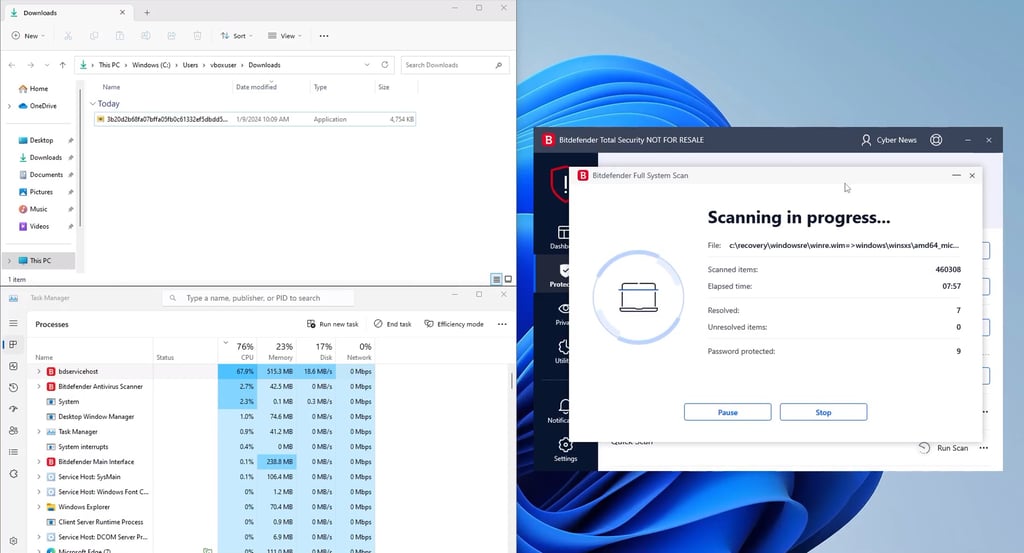
Overall, Bitdefender is considered to be light on resources, and that’s one of the few things it shares with Avast.
Avast antivirus often has a reputation for downloading bloatware during installation. However, our researchers didn’t detect any unnecessary programs. Moreover, it’s easy to reject unwanted programs via a custom installer.
During a full system scan, the average CPU usage was also around 50–60% with Avast, which means it operates similarly to Bitdefender.

Overall, neither Avast nor Bitdefender took up a lot of storage space, and they were relatively light on system resources.
Apps and interface: which is more user-friendly?
Neither Bitdefender nor Avast offers a smooth installation experience. Bitdefender downloads a lot of data files (400MB), and the download process is quite slow. Although Avast is quicker, the installation can be a bit confusing because you have to decide which additional services to install and which ones to reject. Since most users don’t pay attention during this phase, they often find themselves with an excess of unwanted additions.
As for ease of use, both Bitdefender and Avast are quite intuitive. However, Bitdefender is a bit more user-friendly when it comes to the free version. You will not be flooded with as many notifications to upgrade as if you were to use Avast’s free version.
Desktop apps
When it comes to Bitdefender, you have several app options. You can just install the malware scanner or pick the whole suite. This gives you the flexibility to customize your installation a bit. Then, there are also options to install the VPN service separately. In short, Bitdefender offers a lot of options to set up the service on a desktop, allowing you to skip the features or even the full app.
Avast has only one option – its full app that doesn't change even if you upgrade your plan. What upgrading your plan does is just removes the paywall. So, essentially, you do have the required files at the ready, but you're denied access to them because of your subscription plan. From the user's perspective, it makes little sense. It saves Avast a lot of trouble to create and support a separate app, as it’s offering a free service and is looking for ways to cut corners.

Mobile apps
Mobile apps are a tricky area. More often than not, the Android and iOS versions are like night and day. This is because there's little need for antivirus software if you're using an iOS device. Apple keeps a tight grip on its App Store, and there are many restrictions on sideloading your apps if you're not using an unlocked device. So, few antivirus providers invest time to make third-party software solutions to remove malware from a device, making it very hard to find malware.

Consequently, Bitdefender and Avast both have quite lacking iOS versions. Bitdefender app only has browser protection, a VPN, and an account privacy monitor. That's only a few features when compared to its desktop counterpart. The Avast iOS version has a VPN and web protection. There's also an exclusive photo vault in which you can store your photos. However, that's hardly a better suite.
When we turn to Android, the number of features doubles. Bitdefender's app has everything that the iOS version did, plus a malware scanner, anti-theft tools, and an app lock. That's a significant amount of useful features. Avast, on the other hand, has RAM boosting, device tracking prevention called AntiTrack, and protects against malicious websites. Sadly, a malware scanner isn't available.

In short, if you're using an iOS device, there's no point in getting either application. On Android, however, Bitdefender does a much better job and offers more features.
Customer support
All the services that offer free versions have one common flaw – they all lack customer support options. A statement that is very true for Avast and not at all true for Bitdefender.
| Bitdefender | Avast | |
| ✅ Yes | ✅ Yes (with paid plans) | |
| Live chat | ✅ Yes | ✅ Yes (with paid plans) |
| Phone | ✅ Yes | ✅ Yes (with paid plans) |
| Knowledge base | ✅ Yes | ✅ Yes |
The most amazing thing about Bitdefender's customer support is that it's available even if you're a free user. This might not sound like much, but it includes live chat, and you can contact the support via phone or email as well. Suppose it's a minor issue and you prefer solving problems on your own. In that case, you can find FAQ, guides, videos, and other information on its support website.
When it comes to Avast support, if you're on a free version, you are likely to have a harder time getting your issues resolved. Even paid subscribers might struggle communicating and finding answers. Primarily, Avast relies on phone lines and its customer support portal with many FAQ and guides.
Overall, Bitdefender’s support is more accessible to all users due to its availability for free-version users, and it's generally a more welcoming service. When it comes to customer support, this service truly deserves praise.
Video review
Prefer to get your review in video format? Watch this video, where our expert compares Bitdefender and Avast in great detail.

Final verdict
Bitdefender is better than Avast in terms of cost-to-value ratio. Although both Bitdefender and Avast are light on system resources and offer reliable anti-malware protection, Bitdefender simply offers more features to both free and premium plan subscribers. If you want comprehensive protection, choose Bitdefender. If you are looking for a free tool that comes with a limited VPN – consider Avast.
| Category | Bitdefender | Avast |
| Protection | ✅ | ✅ |
| Plans and pricing | ✅ | ❌ |
| Features | ✅ | ❌ |
| PC performance | ✅ | ✅ |
| User interface | ✅ | ❌ |
| Support | ✅ | ❌ |
Bitdefender offers many features, no matter what plan you're using. You can use it in a way that you prefer and get a lot without paying anything. It's worth it even as a paid service, although your mileage may be a bit better on Windows. Those are the reasons why Bitdefender frequently ranks in the #1 antivirus provider spots, whereas Avast is a rare guest there.
Other antivirus software comparisons
McAfee vs. Avast: which antivirus to choose?
Avast vs. AVG: which is better?
Bitdefender vs Malwarebytes: how do these antivirus programs compare?
McAfee vs Bitdefender: see which antivirus is the winner
Bitdefender vs TotalAV: which one is better?