🎓 Best student web hosting 2026 – from $1.00/month
Our in-house experts conduct internal independent, hands-on testing and transparent reviews of web hosting providers by using custom-built tools or utilizing industry-recognized tools and methods to ensure impartial and evidence-based assessments.
Using the same criteria for all services, we share our detailed methodologies and practices to help customers make informed hosting decisions.
Learn more

I still remember being a student and having to build a web app for my web design class. At the time, I was completely clueless about hosting. Picking a provider felt overwhelming — too many options, too many promises, and most of them either too expensive or way too complicated for what I needed. Honestly, I just wanted cheap web hosting for students that is straightforward and won’t eat up my already limited budget.
Fast forward a few years, and I’ve tested dozens of hosting providers firsthand with dedicated support of the Cybernews research team. Over the last two years especially, I’ve compared speed, reliability, and ease of use across different plans. In this list, I’ve rounded up the best web hosts for students that I truly think fit their needs — affordable pricing, special student deals, and dashboards that you can figure out in minutes. If you’re starting out like I once did, these are the ones worth checking out.
Best web hosting for students in 2026
- IONOS – best for the lowest $1.00/month price
- Hostinger – best premium hosting provider for students
- Bluehost – good WordPress hosting
- Wix – free option for testing out website building
- InMotion Hosting – best discount for students
- InterServer – best free web hosting for students
- HostGator – beginner-friendly hosting
- DreamHost – WordPress-focused hosting for students
- SiteGround – best for performance




Our in-house research team and expert writers work hand in hand to regularly test hosting services and provide accurate and fact-checked information. Discover the ins and outs of how we test and evaluate website hosting providers.
Best website hosting for students – a detailed list
To help you select the best web hosting solution for students, together with the Cybernews research team, we tested and compared quality web hosting services. I came up with a top 9 list of web hosting providers for students that excel in terms of affordability, resource availability, feature sets, and performance.
1. IONOS – best web hosting for student budget from $1.00/month

| Cybernews rating: | 4.9 |
| Price: | $1.00/month |
| Money-back guarantee: | ✅ Yes, 30 days |
| Free domain: | ✅ Yes |
| Free SSL: | ✅ Yes |
| Uptime: | 100% |
| Special offer for students: | ❌ No |
IONOS earns my #1 spot because it’s hands down the cheapest way to get started with reliable hosting. With plans starting at just $1.00/month, it’s hard to argue against its value for students who want to keep their expenses low. While its performance under high load is a subject for improvement, the ease of setup, built-in extras, and overall reliability make it a very practical first step for students who just need to get their site online.
With IONOS, you can get affordable hosting for as low as $1.00/month with its perfectly functional Plus plan. It has unlimited websites, redundant storage, and databases, in addition to 1-click installs and a free domain for a year, to name a few benefits. In my opinion, if you’re just building a course blog, portfolio, or a small online project, that’s more than enough resources.
⭐ My experience with IONOS – 4/5
When I first tested IONOS, I was surprised at how quickly I got my blog online. Even as a beginner, the dashboard felt straightforward – almost like following step-by-step instructions instead of digging through manuals. I installed WordPress in less than 5 minutes, which was a relief after how confusing some other providers had been.

Safety and reliability also held up well. IONOS gives you automatic SSL, and knowing my site was secure without extra setup honestly felt reassuring. What I didn’t enjoy as much was support – live chat exists, but I sometimes had to wait longer, as it was too busy with no live agents available. On the positive side, having a free domain and email accounts included right out of the gate saved me extra costs and a headache.
📈 IONOS performance
During our two-week IONOS testing, the provider showed 100% uptime with an average response time of 166.71 ms, which is excellent.
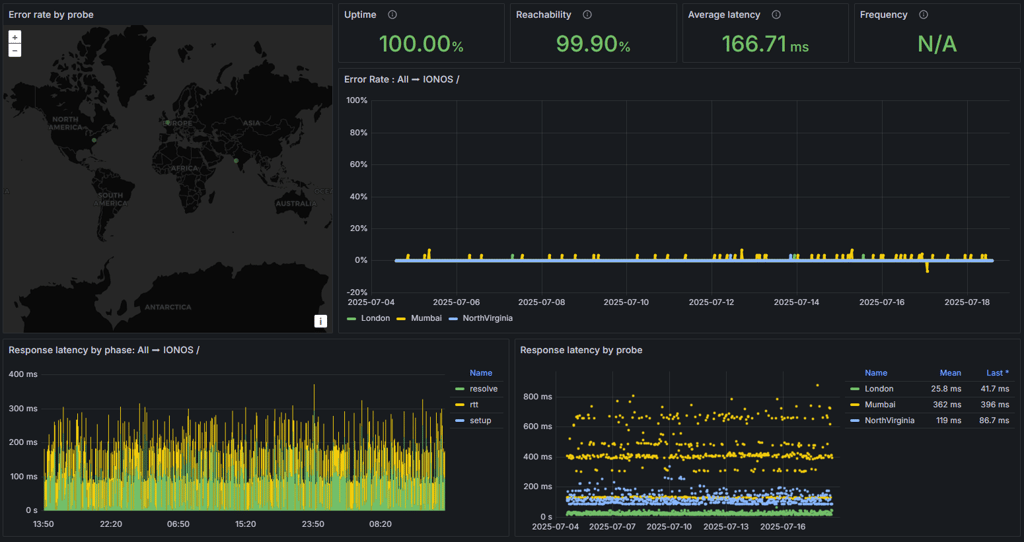
However, stress tests exposed IONOS’ limits: at 20 virtual users – lighter use – the host worked fine and stayed reliable, though it was already starting to feel slower. But once more VUs were using it at the same time, the system struggled. Pages took several seconds to load, and many requests failed, meaning visitors could face delays or errors if the site gets busy.
2. Hostinger – best all-around hosting provider for students

| Cybernews rating: | 4.9 |
| Price: | $2.69/month |
| Money-back guarantee: | ✅ Yes, 30 days |
| Free domain: | ✅ Yes |
| Free SSL: | ✅ Yes (unlimited) |
| Uptime: | 100% |
| Special offer for students: | ✅ Yes, CNHOSTINGER code and a 10% student discount |
Hostinger lands high on my list because it combines affordability with some of the best performance I’ve seen in student-friendly hosting. It starts at just a few dollars a month, but what really impressed me is how consistent and reliable it is compared to others in the same price range. I didn’t put it at the very top spot because there are cheaper hosting providers like IONOS when budget is the only concern. At the same time, I couldn’t rank it lower either — Hostinger hits that sweet spot where speed, features, and ease of use line up perfectly for students who want something that just works out of the box.
In my opinion, the best choice for students would be the Premium plan. For just $2.69/month, you get 25GB of storage and can create up to 25 websites. Plus, you can set up 2 mailboxes per website, and the domain is free for one year.
⭐ My experience with Hostinger - 4.5/5
From my experience, Hostinger really stands out because it feels designed with beginners in mind but is still professional enough to handle bigger projects. The first time I logged into its custom hPanel, I was honestly relieved – it cut through the clutter I’d seen with cPanel and made every action straightforward. Installing WordPress took me just a few clicks, and I didn’t once feel like I had to Google every step, which was a huge confidence boost.
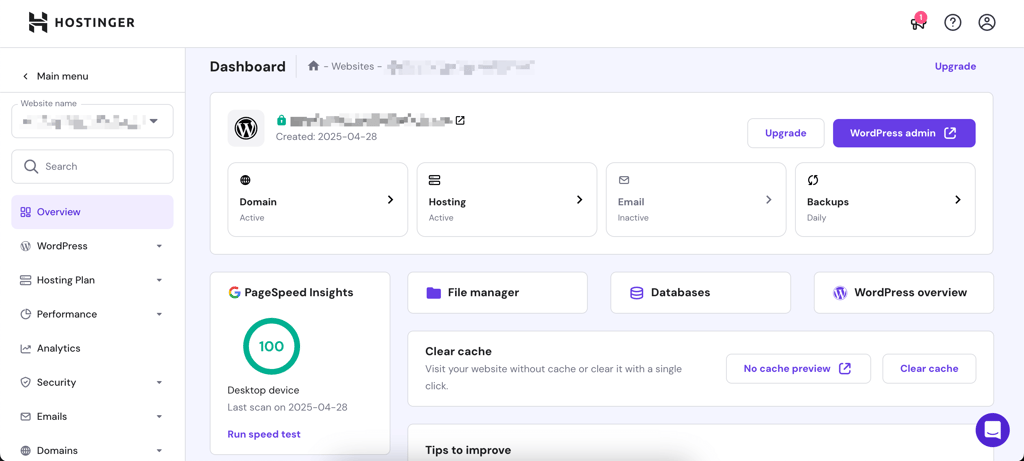
The included SSL, email accounts, and built‑in caching meant I didn’t have to worry about extras – everything was there from the start.
What really surprised me, though, was the support. I reached out to live chat on a random Sunday night and got a reply in under a minute. The only drawback I found was the lack of phone support. However, for day‑to‑day use, live chat and the knowledge base are more than enough.
📈 Hostinger performance
Hostinger delivers an impressive performance. I conducted the tests over 2 weeks. With an uptime of 100% and an average response time of only 32.48ms, this provider proved to be among the fastest ones on the market.
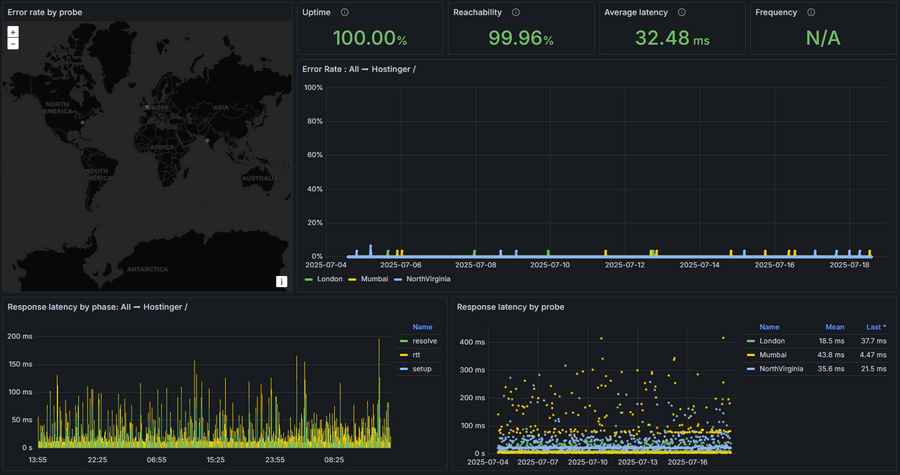
Excellent performance results are due to its LiteSpeed Web Servers with a built-in cache engine. Moreover, the provider has servers on 4 continents, and you’re free to choose one closest to your target audience.
Overall, Hostinger performed beautifully over the 2-week testing period. The uptime was flawless with 0 downtime, and the response time was much better than the industry standard of 600ms.
All in all, Hostinger is the go-to choice for beginners, as its plans remain affordable while covering all of the essentials.
3. Bluehost – best web hosting for WordPress beginners

| Cybernews rating: | 4.4 |
| Price: | $1.99/month |
| Money-back guarantee: | ✅ Yes, 30 days |
| Free domain: | ✅ Yes |
| Free SSL: | ✅ Yes (first year) |
| Uptime: | 100% |
| Special offer for students: | ❌ No |
Bluehost earns its #3 spot on my list because it’s one of the most beginner-friendly ways to start a WordPress site. It’s officially recommended by WordPress, and I found the guided integration to be smooth. This is perfect if you just want to launch a blog or portfolio without getting tangled in the technical side. Plus, the extra features like a free business email and a free domain for a year make it a very solid choice for students.
After thorough Bluehost pricing analysis, I suggest students to opt for the Basic shared hosting plan, as it provides you with all the necessary tools for web hosting for only $1.99/month. A bargain like no other, if you ask me.
⭐ My experience with Bluehost – 4/5
From my experience, Bluehost is a solid choice if you’re looking for an affordable all‑in‑one hosting solution. The entry plan is cheap enough for a student budget, yet it still includes essentials like a free SSL and a domain for the first year. That alone makes it easy to get started without extra costs.
The usability is another strong point. Bluehost combines its own tools with cPanel, which ensures smooth navigation even for someone who uses it for the first time. Installing WordPress, managing domains, or accessing performance settings was quick – I didn’t need to spend time searching for hidden options.
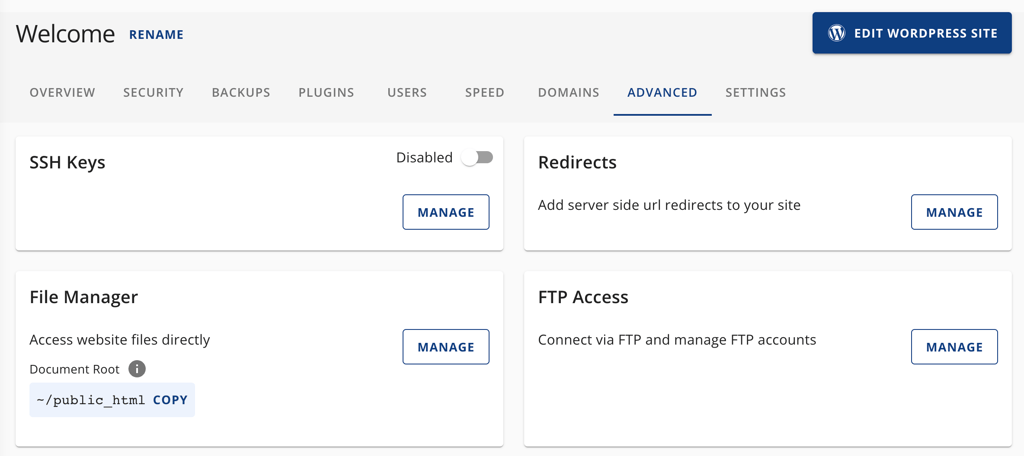
In terms of security, Bluehost covers all the basics automatically. SSL, DDoS protection, and firewalls are included in every plan, so I didn’t have to worry about configuring these myself. Overall, it felt like a beginner‑friendly service that strikes a balance between affordability, ease of use, and solid protection.
📈 Bluehost performance
During 14 days of testing, Bluehost delivered a solid 100% uptime. I’ve experienced very few interruptions but overall had a great experience in real time, which is all I was looking for.
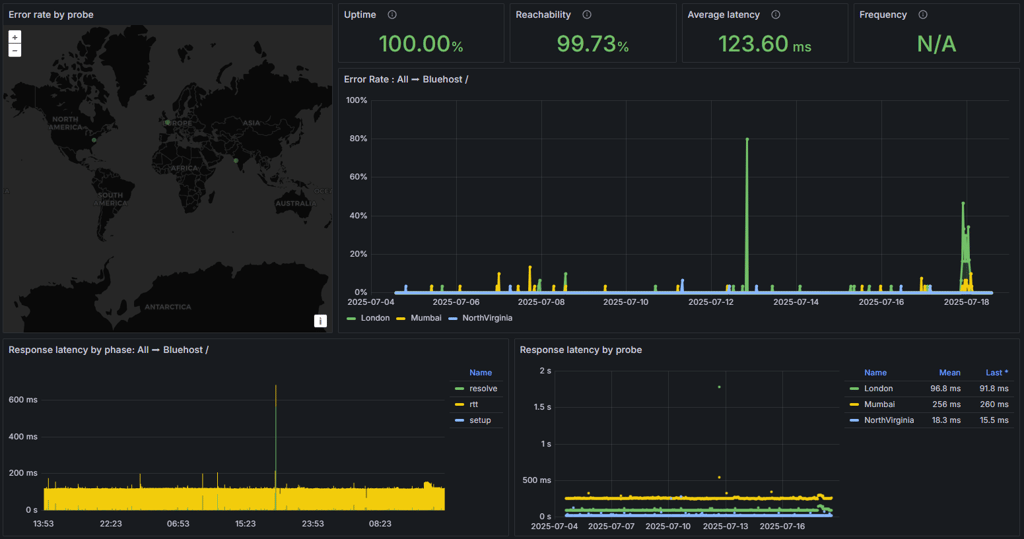
Meanwhile, Bluehost's response time was an average of 123.60ms, which further proves the provider’s reliability and overall performance. Bluehost is one of the best-performing hosting providers and is ideal for those seeking a reliable and fast solution.
The bottom line is that Bluehost is a worthy contender for the title of best web hosting provider for schools and students in general. It offers competitive pricing, a user-friendly interface, and reliable customer support. Most importantly, its performance is outstanding.
4. Wix – free hosting to get started with website building

| Cybernews rating: | 4.2 |
| Price: | $17.00/month |
| Money-back guarantee: | ✅ Yes, 14 days |
| Free domain: | ✅ Yes |
| Free SSL: | ✅ Yes |
| Uptime: | 100% |
| Special offer for students: | ✅ Yes, a 50% discount on yearly premium plans |
I didn’t place it higher because Wix isn’t a traditional hosting provider but rather offers a free supplement to its web building services. This means less flexible resources compared to competitors, and more limitations in terms of scalability and storage. However, Wix’s free plan lets you test out design ideas, build a portfolio, or create a small class project without pulling out your credit card. As a zero‑cost entry point for experimenting, it’s hard to beat.
Wix’s free plan is perfect for students wanting to try out website building without any cost or time limits. It includes access to the full drag-and-drop editor, 500MB storage, and automatic SSL, though your site will show Wix ads and use a Wix subdomain. To remove ads and connect a custom domain, the Light plan from $17.00/month is the best next step.
⭐ My experience with Wix – 4/5
Wix’s hosting is fully managed by its in-house team, which is great because it means you can focus on building your site without worrying about technical issues behind the scenes. This also explains Wix’s pricing, which is significantly higher than average, with subscriptions starting at $17.00/month. Also, there is a generous 50% student discount for Wix’s annual premium plans.
In my experience, Wix is ideal if you want to play around and learn. The dashboard itself is clean and beginner-friendly, with a clear overview of your site’s speed, security, and performance – plus useful tips for improvement.

Security and reliability are also handled in the background – SSL comes enabled automatically, and I didn’t have to think about updates or maintenance since Wix controls it all.
That said, Wix isn’t a traditional hosting service, so the dashboard has some notable limitations. It lacks advanced features and deeper customization options that more conventional hosts offer, which could frustrate users needing more control. For example, once I tried to expand the project, things like connecting a custom domain or adding eCommerce features required a paid plan. Still, for pure learning and experimenting, though, it worked perfectly.
📈 Wix performance
During our in-house Wix testing, the provider performed impressively for a beginner‑focused platform – it achieved 100% uptime with an average response time of just 29.03ms.
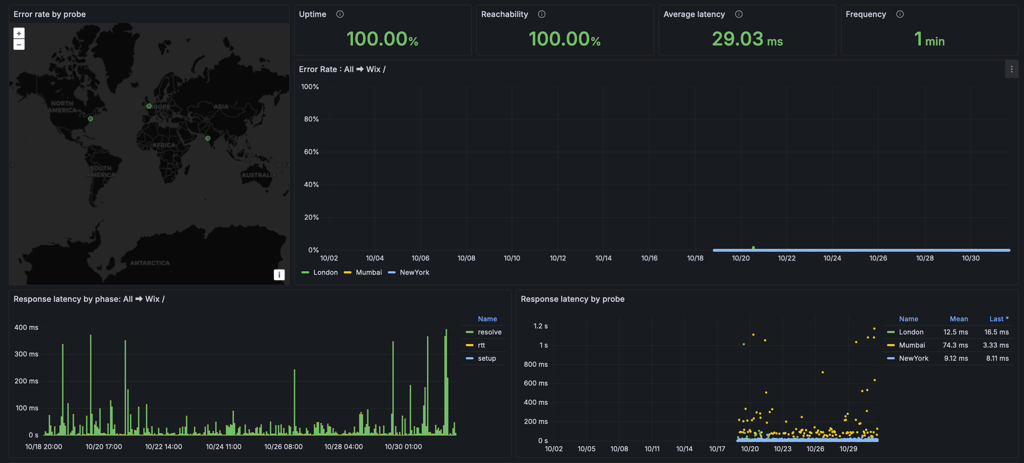
During the stress test with 50 virtual users over 5 minutes, the Wix system stayed fast and reliable. Pages loaded in under a second for almost all requests, showing that Wix can handle traffic without slowing down or failing. This means you can count on Wix to stay responsive and stable without worrying about crashes or long waits.
5. InMotion Hosting – web hosting for students with a great deal

| Cybernews rating: | 4.2 |
| Price: | $2.29/month |
| Money-back guarantee: | ✅ Yes, 90 days |
| Free domain: | ✅ Yes |
| Free SSL: | ✅ Yes |
| Uptime: | 100% |
| Special offer for students: | ✅ Yes, up to 65% |
InMotion Hosting provides affordable services at just $2.29/month. While the previous special 50% discount for students and educators is no longer available on its website, you can still get a big student discount via Student Beans.
It’s a beginner-friendly hosting that combines cPanel with its own AMP dashboard, making site management simple even for newcomers. I ranked it at #5 because of its easy usability and top-notch customer support that includes multiple communication channels.
As a student, the best deal is to sign up for the premium Power plan using your .edu email account. The discount can vary depending on the current offer, but you can save up to 65%.
⭐ My experience with InMotion Hosting – 4/5
InMotion Hosting balances beginner-friendliness with powerful features, which impressed me during this evaluation. The combination of cPanel and its own AMP dashboard made site management straightforward, even if a few menu options felt cluttered at times. Setting up WordPress was pretty easy, and I appreciated the inclusion of unlimited bandwidth and free SSL across plans.

Customer support stood out as reliable and fast – I reached out via live chat several times and got quick, helpful responses.
The main downside, as for me, is that some advanced features like automated backups come at an extra cost, and renewal prices can be higher than entry-level competitors. Still, for students wanting dependable hosting with solid support, InMotion covers all the basics well without overwhelming beginners.
📈 InMotion Hosting performance
InMotion Hosting is a reliable provider. The uptime score settled at 100% over several weeks of monitoring. Meanwhile, the average response time was 87.69ms, which is considered very fast.
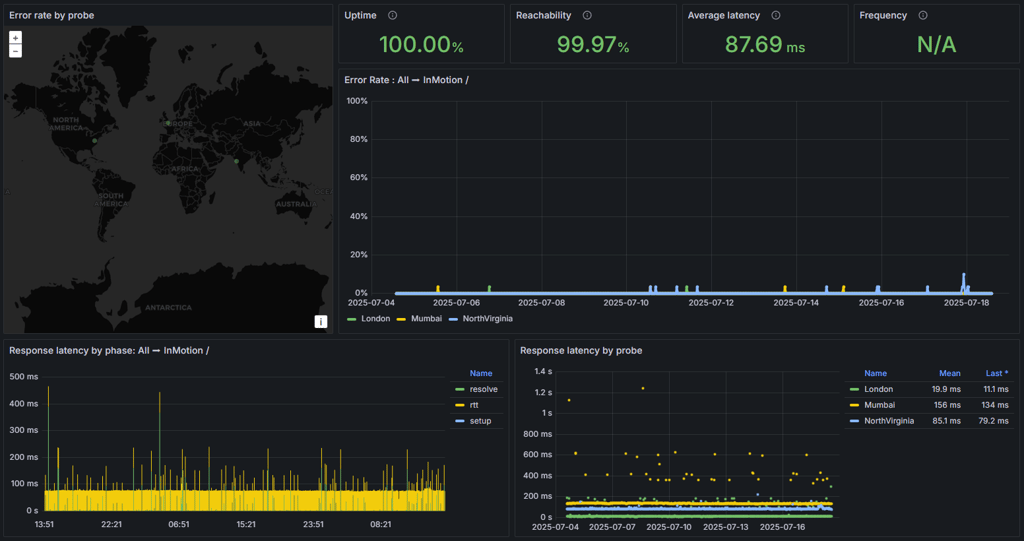
One more thing worth mentioning here is InMotion Hosting’s UltraStack technology. This advanced layered caching system is designed to increase speed so that users can enjoy better-performing websites. The technology, however, doesn’t apply to the entry-level plan.
All in all, InMotion Hosting satisfies the industry-standard uptime and response time.
To sum up, InMotion Hosting is a solid choice for students. It comes with a discount, is easy to use, and the customer support is great.
6. InterServer – best free hosting for students

| Cybernews rating: | 4.0 |
| Price: | $2.50/month |
| Money-back guarantee: | ✅ Yes, 30 days |
| Free domain: | ✅ Yes |
| Free SSL: | ❌ No |
| Uptime: | 100% |
| Special offer for students: | ✅ Yes, a free Standard Web Hosting package for students for the first year |
InterServer ranks highly for students because it combines unlimited resources with a straightforward, industry-standard cPanel interface, making it both powerful and easy to navigate. Its entry-level shared hosting plan offers unlimited websites, storage, bandwidth, and MySQL databases – something rare among budget hosts. I included InterServer in my top list for its balance of generosity in resources, no-price-hike guarantee, and easy usability, despite a slightly outdated interface and US-centric data centers.
As a student, the best thing you can do is to sign up for InterServer’s shared hosting services using your school email address (.edu) and then contact customer support. You’ll get one year of web hosting free of charge.
⭐ My experience with InterServer – 4/5
From my experience, InterServer offers dependable hosting with strong uptime and generous features like unlimited SSD storage and free weekly backups. Still, even though the cPanel is standard and familiar, some parts of the interface feel dated and can be a bit confusing for beginners.
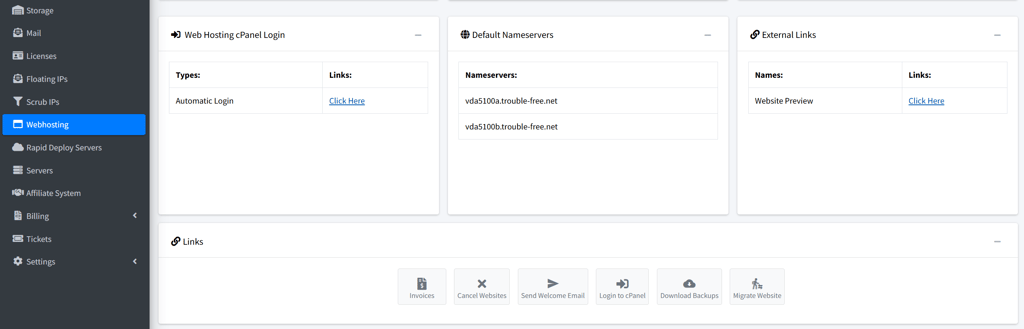
Support is generally responsive and helpful, especially via live chat, though the knowledge base is somewhat scattered, requiring extra time to locate specific help topics. I found performance solid for small to medium sites, and the price-lock guarantee provides welcome budget stability.
Overall, InterServer balances functionality with affordable pricing. It’s a great choice for students wanting a no-frills, flexible hosting option backed by good customer care.
📈 InterServer performance
InterServer proved to be a reliable hosting service. It provided me with a 100% uptime over a 2-week period and an average response time of 97.96ms.
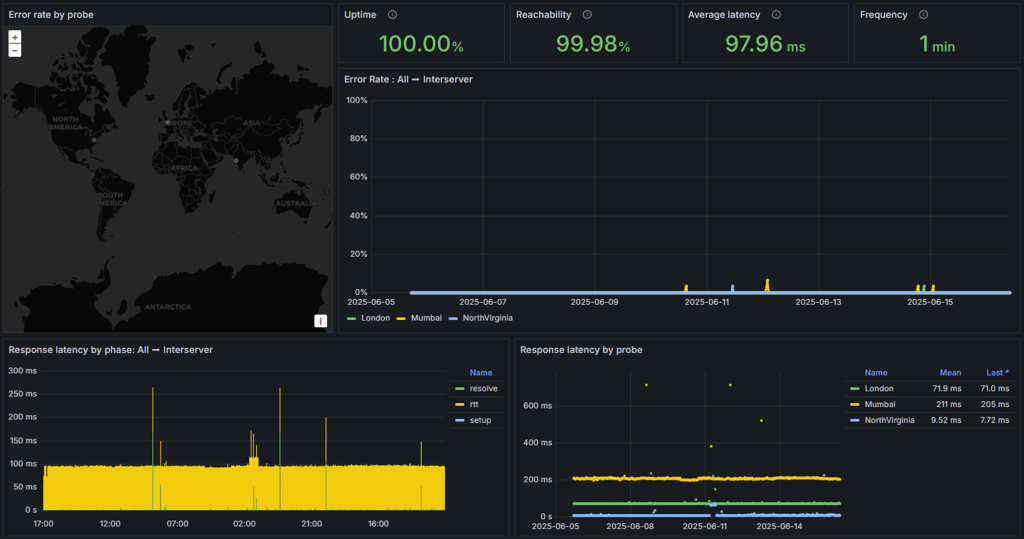
The good news is that InterServer takes pride in using servers only at a 50% capacity. Its purpose is to allocate resources in such a way that clients can grow their websites without suffering from a performance point of view. That and the free global content caching ensure reliable performance. In general, InterServer is a well-performing hosting provider, and its uptime and response time were better than guaranteed.
Overall, InterServer qualifies as a good provider of web hosting for students, mainly because it offers a special discount for this category of users. With generally low prices, reliable performance, and enough resources, I’m sure that you’ll find it suitable for whatever project you want to work on.
7. HostGator – beginner-friendly web hosting for students

| Cybernews rating: | 4.0 |
| Price: | $3.75/month |
| Money-back guarantee: | ✅ Yes, 30 days |
| Free domain: | ✅ Yes |
| Free SSL: | ✅ Yes |
| Uptime: | 100% |
| Special offer for students: | ❌ No |
HostGator earned its spot on my list for its widespread popularity, extremely user-friendly control panel, and strong overall performance — especially for beginners launching their first website. I appreciated how intuitive its setup is, in addition to consistently responsive customer support. Furthermore, the bundled essentials (domain, SSL, and emails) make getting a site online simple.
However, it’s not rated higher since renewal prices can jump, and some speed optimizations lag behind more advanced competitors. Still, HostGator outperforms most of its rivals with proven uptime, fast customer service, and a management dashboard suitable for first-timers.
The best choice for a student is the Baby plan. It’s only 70 cents more than Hatchling, but you can host unlimited websites. I think for $4.50/month, that’s a great deal. However, if you only need one website, Hatchling is only $3.75/month – with all the essentials in one cheap package.
⭐ My experience with HostGator – 4/5
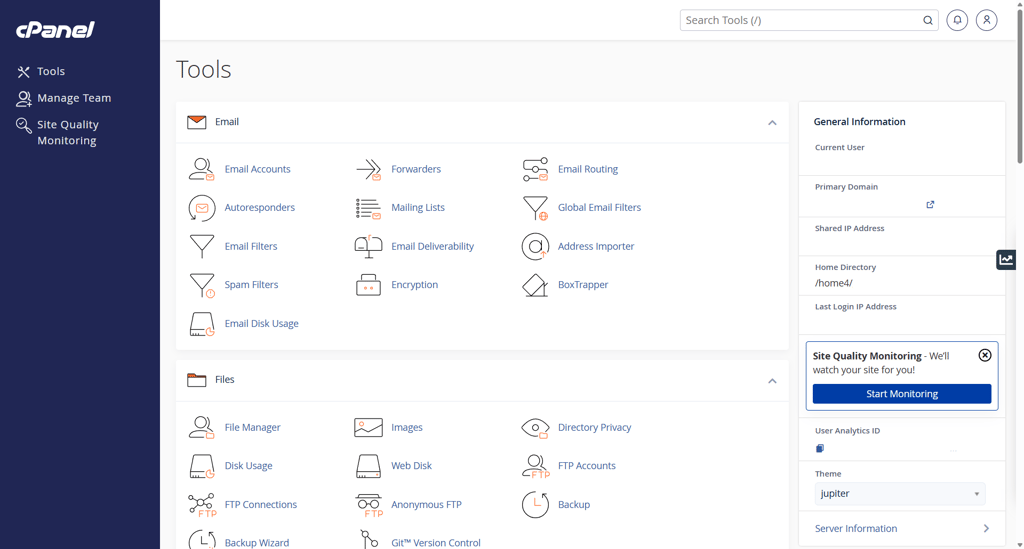
Using HostGator was mostly smooth and straightforward. The setup process was quick, and managing sites using cPanel was intuitive, especially for beginners. Performance-wise, the uptime was excellent, and the host handled traffic surges without visible slowdowns.
I also appreciated the cleaner, more user-friendly dashboard HostGator has recently introduced, consolidating key functions like SSL management and WordPress installs into one interface. While I encountered a bit of lag switching between sections, it still made everyday management easier.
Customer support via live chat was generally fast and helpful for routine questions, while the extensive knowledge base provided clear guidance on common issues. However, some users report inconsistency in support quality depending on the agent, so experiences might vary.
Overall, HostGator balances beginner-friendly tools, good speed, and solid support to make it a reliable option for students starting out.
📈 HostGator performance
With an uptime of 100% and an average response time of 112.04ms, HostGator is one of the industry’s most affordable, yet excellent-performing hosting providers.
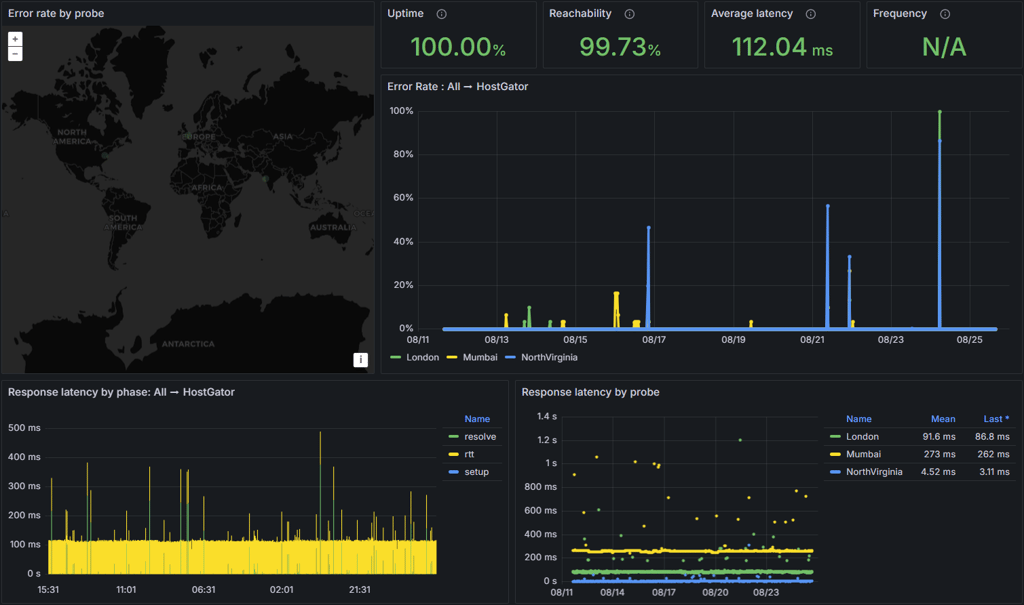
HostGator has an uptime guarantee of 99.9% but exceeded it during our testing. The website experienced no downtime in two weeks. Plus, the response time was constant for the most part.
The main takeaway here is that while HostGator charges little money for its services, it delivers excellent performance. HostGator offers attractive prices for students, with all essentials included. It’s easy to use, and the performance is better than that of more expensive providers.
8. DreamHost – affordable WordPress-oriented hosting for students

| Cybernews rating: | 4.0 |
| Price: | $1.99/month |
| Money-back guarantee: | ✅ Yes, 30 days |
| Free domain: | ✅ Yes |
| Free SSL: | ✅ Yes |
| Uptime: | 100% |
| Special offer for students: | ✅ Yes, occasionally |
DreamHost offers a strong WordPress-centric experience combined with some of the most competitive monthly rates available, making it attractive for students on a budget. Its pre-installed WordPress setup, free automated migration, and premium site builder make launching and managing WP sites straightforward. While there is no permanent student discount, DreamHost often has exclusive, limited-time web promos for students.
Overall, I placed DreamHost only below providers with faster support or more bundled features, making it a balanced yet specialized option.
The best possible deal is the Growth plan. It’s slightly more expensive than the Launch plan. Still, the unlimited websites and free email make it worth the extra dollar or two, depending on the billing term you choose.
⭐ My experience with DreamHost – 4.5/5
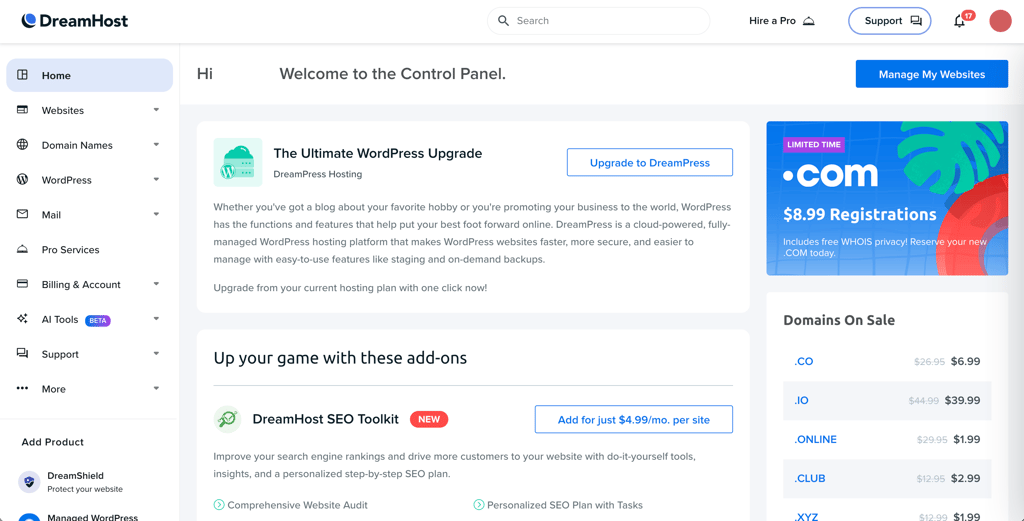
DreamHost’s custom-built management dashboard is a standout feature that makes hosting simple and intuitive, even for beginners. The panel offers a clean, modern interface with tools to easily manage websites, domains, SSL, email, and more – all from one central hub. Helpful features like the built-in Traffic Analysis provide real-time insights on visitors and traffic patterns without any extra setup.
Migrating an existing WordPress site was painless using its free automated migration plugin. I also tried launching a new WP site, and it was a breeze thanks to the one-click WordPress installer and built-in caching. Security tools, including automatic HTTPS and firewall protections, are pre-configured, so I felt confident my sites were safe from day one.
Customer support was available 24/7 through live chat and tickets, with generally helpful and clear responses, though phone support requires an extra fee. Overall, DreamHost blends beginner-friendly controls with powerful WordPress features and top reliability, making it a solid choice for students.
📈 DreamHost performance
DreamHost delivered an uptime of 100% and an average response time of 123.77ms, which is a significant improvement since our previous testing.
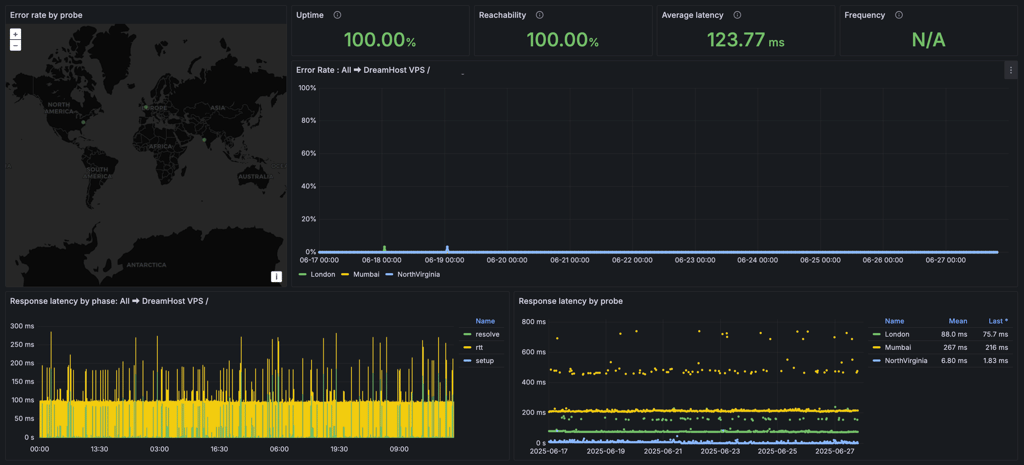
During 2 weeks of DreamHost testing, the results showed no significant ups or downs, meaning the response time was always consistent and in the same range.
What’s important to remember is that DreamHost is an affordable WordPress hosting provider.
9. SiteGround – easy-to-use web hosting for students

| Cybernews rating: | 4.0 |
| Price: | $2.99/month |
| Money-back guarantee: | ✅ Yes, 30 days |
| Free domain: | ✅ Yes |
| Free SSL: | ✅ Yes |
| Uptime: | 100% |
| Special offer for students: | ✅ Yes, 12 months of free hosting for students |
SiteGround stands out with its modern, easy-to-use Site Tools control panel and strong emphasis on security and performance, powered by Google Cloud and LiteSpeed servers. It delivers consistent uptime and good speed, along with robust traffic and error monitoring, making it reliable for students needing a hassle-free hosting experience.
However, I placed SiteGround last on my list due to its much higher renewal pricing compared to other budget-friendly hosts that offer more generous resources or features for similar or lower costs. While its security tools and global server flexibility are top-notch, newer competitors with better cost-to-value ratios slightly outperform it in the current hosting landscape.
To get the best deal, all you need to do is verify your student status. This way, you can get SiteGround’s exceptional offer: 12 months of free hosting through its dedicated student program.
⭐ My experience with SiteGround – 4/5
Using SiteGround was a mostly smooth experience thanks to its proprietary, modern Site Tools control panel. Unlike traditional cPanel, Site Tools is clean, intuitive, and well-organized, making it easy even for beginners to find everything they need – from WordPress installation to SSL and backups. The setup wizard walked me through new site creation without confusion, and I appreciated the ability to pin frequently used tools on the dashboard for quick access.

The help widget embedded within Site Tools made accessing customer support seamless, and I was impressed by its chatbot that swiftly handled common queries. Support agents were generally fast, clear, and helpful, backed by extensive tutorials and documentation for self-service.
That said, the slightly higher price and renewal costs compared to budget hosts may deter some students. Also, while its onboarding is thorough, it could feel a bit lengthy for fast movers. Overall, SiteGround offered a friendly, secure, and reliable hosting experience with few hurdles, making it a worthy, albeit pricier, choice for students looking for quality and ease of use.
📈 SiteGround performance
After 2 weeks of testing, SiteGround gave me an uptime of 100%. I had no interruptions during the test, and response times were consistent within the same efficient range.
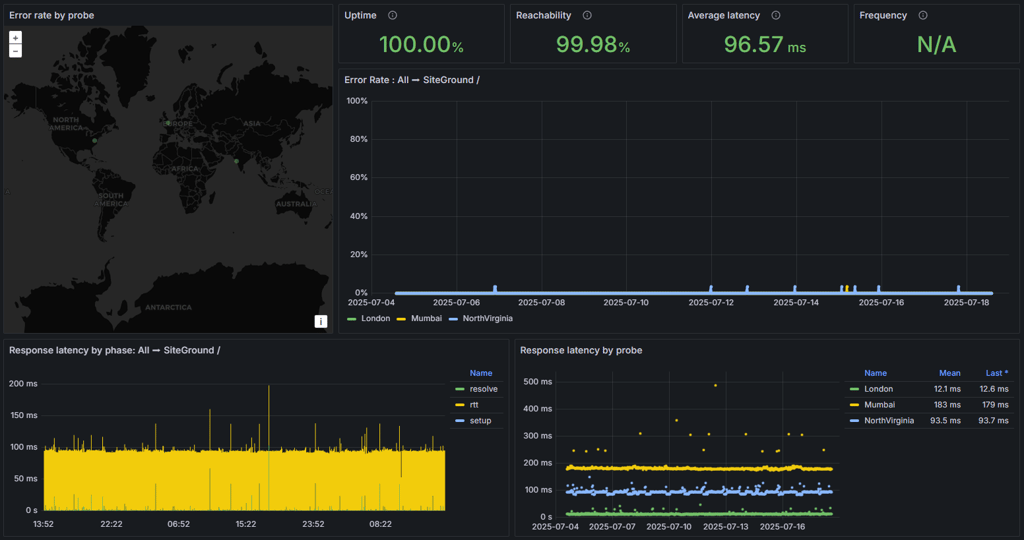
Furthermore, it gave me an average response time of 96.57ms, which is exceptional compared to many other providers.
SiteGround is one of the best web hosting services because of its high uptime guarantee and speed. I also liked that its shared hosting plans include free SSL certificates, email accounts, native CDN, automatic backups, and built-in caching.
Top web hosting for students: tested and ranked
At Cybernews, we must ensure that our reviews are precise and detailed. That's why we rely on our hosting testing methodology and team of experts to find the best providers for the reviews. While searching for the best web hosting providers for students, I reviewed 64 hosting services and selected 9 that met my criteria. Here's how I tested these providers further:
- Free features (40%). I compared the features offered for free by each provider. I ensured all my selected providers included at least a free domain, SSL, and security measures.
- Performance (30%). With the help of our research team, I used tools like Pingdom and GTmetrix. My prime focus was on uptime and average response, which are crucial for the website's functionality.
- Pricing and plans (30%). Sometimes, pricing can be the most important part of the deal. That's why I focused on providers that offer special student discounts or well-priced deals.
I ranked these providers from 1 to 9 based on the number of free features they offer, their performance, and pricing to ensure you get the best recommendations for your hosting needs.
FAQ
How much does web hosting cost for students?
Web hosting for students typically costs between $1.99 and $10.00 per month. However, IONOS’ plans start as low as $1.00/month. Some providers also offer student discounts or free services, but you may need to verify your student status.
Do I need to know coding to use web hosting for a student website?
No, you don't need to know coding to use web hosting for a student website. Many hosting providers, such as Hostinger, offer user-friendly website builders and one-click installations, making it easy to set up and manage your site without any coding experience.
What’s the difference between free and paid web hosting for students?
Free web hosting for students can be unreliable. It often limits its features, has slower speeds, and includes ads. It may also have uptime issues or lack customer support. For a better user experience, I recommend choosing a trustworthy paid hosting instead.
Can I host a website with limited technical skills as a student?
Yes, you can host a website with limited technical skills as a student. Most hosting providers, like IONOS or Hostinger, offer user-friendly interfaces and tools that simplify the process.
How can students host their website for free?
Students who wish to host their website for free can either opt for a free blogging platform, such as WordPress.com, or seek a trustworthy web hosting provider offering a free plan.


