Best free AI website builders in 2026
Our team of experts and researchers rigorously test and evaluate website builders through transparent, in-depth testing procedures and methods using both in-house and industry-approved tools.
Drawing on cybersecurity insights, we provide unbiased, empirical rankings and analysis to help users make informed digital platform choices.
Learn more

AI website builders have changed the game – you can now create a site in minutes just by answering a few questions. But here’s the catch: most of the top tools lock their best features behind a paywall. Still, there are a few solid platforms offering truly free plans that don’t feel like a downgrade.
In this guide, I’ll walk you through the best free AI website builders available right now. You’ll see what each one offers, where they fall short, and which is the right fit based on your goals, whether you’re launching a personal blog, portfolio, or small business site.

6 best free AI website builders in 2026 compared
To make your choice easier, I’ve summarized the key details about each free AI website builder in the comparison table below. You can quickly review key features, strengths, and who each builder is best suited for, so it’s easier to find the right fit for your needs.
| Free AI web builder | Rating | Best for | Coupons | Free version | Pricing |
| Wix | Small businesses, blogs, portfolio sites | Wix coupon 50% OFF | ✅ Yes, limited free plan | From $17.00/month | |
| WordPress.org | Small and large sites that require customization | Get up to 69% OFF Wordpress! | ✅ Yes, limited free plan | Paid plugins, hosting | |
| Webflow | Freelancers, agencies, small businesses needing control | Webflow AI coupon for 22% OFF | ✅ Yes, limited free plan | From $14.00/month | |
| Canva | Beginners building single-page websites | Get Canva website builder, now from 16% OFF | ✅ Yes, limited free plan | From $10.00/month | |
| GoDaddy web builder | Beginners, eCommerce stores, portfolio websites | Get up to 62% OFF GoDaddy website builder | ✅ Yes, 7-day free trial | From $9.99/month | |
| Durable | Beginners, small businesses, entrepreneurs | Start free + save 15% on yearly plans | Yes, limited free plan | From $22.00/month |





Our in-house research team and expert writers work hand in hand to regularly test website builders and provide accurate and fact-checked information. Discover the ins and outs of how we test and evaluate website builders.
Why choose a free AI website builder
If you want to launch a site without the pressure of upfront costs, a free AI website builder is a great place to start. These tools generate full websites using AI – from layouts to text and images – so you don’t need any design or coding skills. It’s a fast, low-risk way to test what’s possible.
In our in-house testing, we found that many free plans or trials still offer core AI features, giving you a solid preview of the platform’s capabilities. They’re especially useful for freelancers, creators, or small businesses exploring online growth.
Whether you’re building a portfolio, a landing page, or a small online store, these builders make it easy to get started quickly. And if the tool matches with your workflow, most offer flexible upgrades as your needs grow – no hard commitment required upfront.
6 best free AI website builders
Together with our research team, I reviewed over 37 AI-powered website builders to find the best free options available. My top picks offer strong AI features, intuitive design tools, and solid free plans or trials, making them ideal for anyone who wants to build a professional-looking website without spending a dime.
1. Wix – best fully free AI website builder in 2026

| Rating: | |
| Free version: | ✅ Yes |
| Paid plans: | From $17.00/month |
| Free AI tools: | Assistant, text creator, image creator/editor, email generator, and more |
Wix is a beginner-friendly website builder with a free version and powerful built-in AI tools. You can create a full site in minutes with AI text, images, and layouts, no coding needed. It’s ideal for small businesses, blogs, and portfolios. The free version shows Wix ads and has limited features, but it’s still a top choice.
Wix is one of the most trusted website builders, and it offers a completely free plan. If you're testing the waters or launching a small project, Wix's free tools, including its growing suite of AI features, make it easy to get started without spending anything upfront.
Here are the freely available Wix AI features:
- AI website builder. To use it, you just need to answer a few questions in a chat-style interface, and Wix will generate a complete, ready-to-edit website in minutes – layout, design, and content included.
- AI text generator. This feature allows you to automatically create website copy, headlines, and descriptions based on your business type and tone preferences.
- AI image creator and editor. Allows users to generate custom images, enhance photos, and remove backgrounds using built-in AI image tools.
- AI section creator. With this feature, you can quickly add full sections – like testimonials, contact forms, or galleries – with AI-generated content and design suggestions.
- AI theme and style assistant. Wix’s AI tools help choose color schemes, fonts, and visual styles that match your brand identity.
My experience with Wix's free AI web builder
I tested Wix’s free AI website builder to see what you can actually do without paying, and I was genuinely surprised by how much was included. The process started with a short chat-style quiz where I answered questions about my business type, preferred features, and visual style. Within a few minutes, Wix generated a full website layout, complete with AI-written content and relevant imagery. It wasn’t just basics – it felt like a real site I could tweak and launch right away.

Editing was easy with the drag-and-drop editor, and I could fine-tune the layout, text, and sections without entering a single line of code. I also tested the AI text and image tools, which were fully accessible on the free plan. For a basic portfolio or a small business homepage, the quality was more than enough.
There was one downside, though. The site uses a Wix-branded domain and displays ads. Also, while the AI features are free, some more advanced customization or marketing tools are paywalled. Still, for anyone wanting to test AI site-building without spending a penny, Wix delivers a surprisingly capable free experience.
2. WordPress – best fully free and open-source AI website builder

| Rating: | |
| Free version: | ✅ Yes |
| Paid plans: | None, requires third-party hosting, which can cost anything depending on the provider |
| Free AI tools: | AI Engine, Tidio, AIOSEO, and more |
WordPress.org is a free, open-source CMS offering unmatched flexibility and control. You can build anything from blogs to complex business sites using thousands of themes and plugins. It requires your own hosting, manual setup, and some technical skill. For users willing to manage the backend, it delivers customization and growth.
WordPress is a powerful website builder that’s completely free to use, but it works a little differently from plug-and-play platforms like Wix. Instead of offering built-in AI tools, WordPress relies on third-party plugins for added functionality, including AI features. That gives you more flexibility, but also more setup options. While WordPress doesn’t offer native AI tools out of the box, these plugins can deliver solid functionality, as long as you’re comfortable setting them up manually.
Here are WordPress.org plugins that you can use to get free AI features:
- AI Engine. This plugin adds AI-generated text and images, as well as chatbot capabilities. Ideal for blog content, product descriptions, or user interactions.
- Tidio AI chatbot. Tidio integrates live chat powered by AI, helping automate customer support or lead capture on your site.
- AISEO. This is a popular SEO plugin with built-in AI content suggestions, meta description generation, and optimization tips.
My experience with WordPress free AI web builder
Setting up a free WordPress site isn’t as simple as logging in and clicking Build, but if you’re comfortable with a bit of manual setup, it gives you far more control. Since WordPress itself is free and open-source, I started by downloading the software and installing it on a free hosting environment I had access to. Unlike Wix, there’s no built-in AI assistant – you’ll need to install plugins separately to get AI features working.
I tested the free versions of AI Engine, Tidio, and AIOSEO, all of which added specific, functional AI elements. AI Engine gave me access to AI-generated content blocks and basic image generation, which was useful for blog writing and placeholder visuals. Tidio took a bit more time to set up, but once configured, its AI chatbot handled basic customer queries on my test site. AIOSEO's AI tools helped me generate meta descriptions and content outlines, which streamlined the SEO setup process.
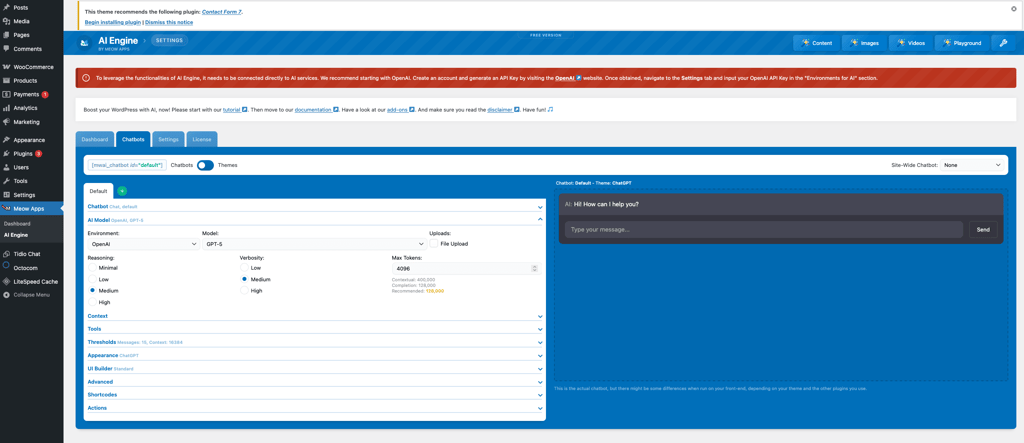
The biggest downside I found is that it takes time to configure everything, and some features in these plugins are locked behind premium upgrades. But if you’re willing to put in the effort, WordPress gives you a flexible, highly customizable AI-powered website entirely for free.
3. Webflow – highly customizable AI web builder

| Rating: | |
| Free version: | ✅ Yes, limited free plan (up to 2 websites) |
| Paid plans: | From $14.00/month |
| Free AI tools: | Website builder, page and image generator, assistant for layouts |
Webflow is a professional visual AI website builder that blends drag-and-drop design with clean HTML, CSS, and JavaScript output. Its free plan includes advanced design tools and helpful AI features for quick site creation. It’s more complex but offers strong creative control for designers, freelancers, and small businesses.
Webflow is a modern freemium website builder that combines creative control with AI-powered convenience. Its free plan is a solid starting point, offering built-in AI tools to streamline the early build process. While there’s a learning curve, it’s a great option for exploring advanced design without upfront cost.
Here are the free AI tools that you can get with Webflow’s free plan:
- AI website builder. It’s very simple to use, as you can start by describing your site and answering a few questions. The AI then builds a starter site that is fully tailored to your needs.
- AI page generator. This tool allows users to quickly create full pages, like About, Blog, or FAQ, using the New page with AI tool, with layout and content included.
- AI image generator. This feature allows you to generate custom images directly inside the editor to match your site's style or theme. You can edit or replace them as needed.
- AI layout assistant. With this feature, you can choose from layout options with help from the AI assistant, which auto-adjusts sections to fit your content and design goals.
My experience with Webflow’s free AI web builder
Getting started with Webflow’s free AI builder was straightforward – I created an account, answered a few basic questions about my site’s purpose, and let the AI do the rest. Within a minute, it generated a fully structured site, complete with placeholder images and text. The starter layout wasn’t perfect, but it gave me a solid base to work from.
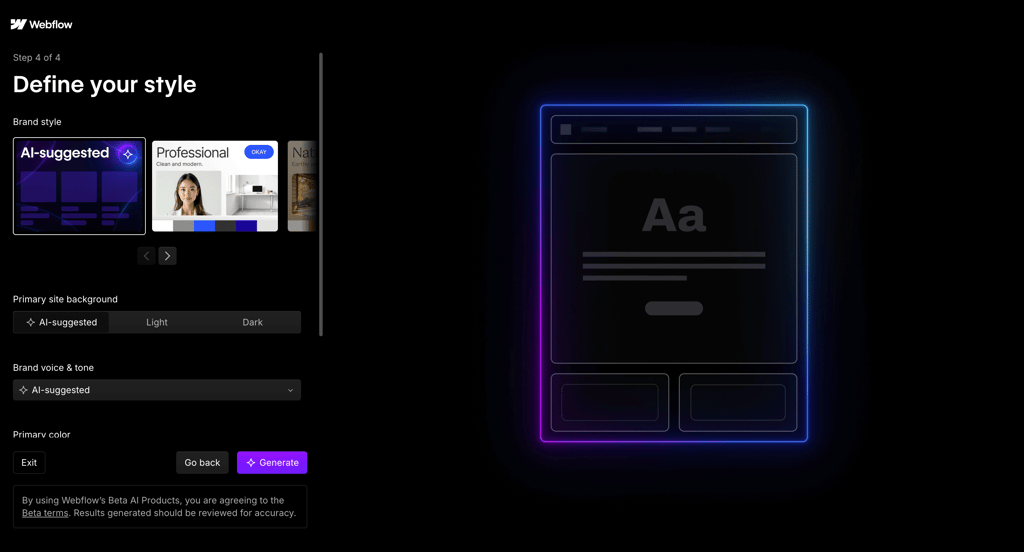
The New page with AI feature was especially useful. I tried generating an About and FAQ page, and both came pre-filled with sections and content suggestions. It saved time and gave me a clear direction, even though I still needed to customize a lot to fit my brand. I also used the AI image tool to generate visuals that matched my site’s theme – not print-quality, but good enough for a clean, modern look.
It took me a while to get used to the editor. It’s more complex than Wix, but the onboarding walkthroughs helped me understand how to adjust layouts, move elements, and apply styling. The real benefit is control. Even on the free plan, I felt like I could fine-tune the site far more than with most drag-and-drop builders. You’re limited to two published sites on the free plan, but that’s plenty to explore what Webflow’s AI tools can do.
4. Canva – great free AI web builder for visually stunning sites
| Rating: | |
| Free version: | ✅ Yes |
| Paid plans: | From $10.00/month |
| Free AI tools: | Image and video generator, and AI writer |
Canva’s free AI website builder is a fast, beginner-friendly tool for simple one-page sites and landing pages. It offers AI tools for generating text, visuals, and short videos, making design quick and intuitive. While it lacks advanced customization and scalability, it works well for personal projects, portfolios, and basic online presence.
Canva’s site builder is built for simplicity – a visual-first platform that’s perfect for creating clean, one-page websites with minimal effort. While it doesn’t offer the same depth and tools like Wix, Canva’s free plan includes several AI features that speed up design and content creation, especially for quick personal projects or portfolios. Also, while Canva’s site builder isn’t as powerful as traditional website building platforms, its AI tools help to create polished, creative sites – all within a very intuitive drag-and-drop interface.
Here are free AI features that you can get with Canva’s free plan:
- AI image and graphics generator. It allows users to generate custom visuals from text prompts using Canva’s built-in AI art tools – ideal for unique headers, illustrations, or backgrounds.
- AI video generator. With this tool, you can create short videos based on prompts, combining visuals, text, and transitions. Useful for blogs and creative portfolios.
- AI writer. To utilize this tool, use text prompts to generate website copy, headings, or descriptions. It’s great for filling in content quickly, especially on basic sites.
My experience with Canva’s free AI web builder
Canva’s free website builder is one of the simplest tools I’ve used – no account setup delays, no steep learning curve. I started by picking a free website template from the available designs. While the library isn’t massive and many of the better templates are paywalled, I still found a clean, modern layout that worked well for a basic portfolio.
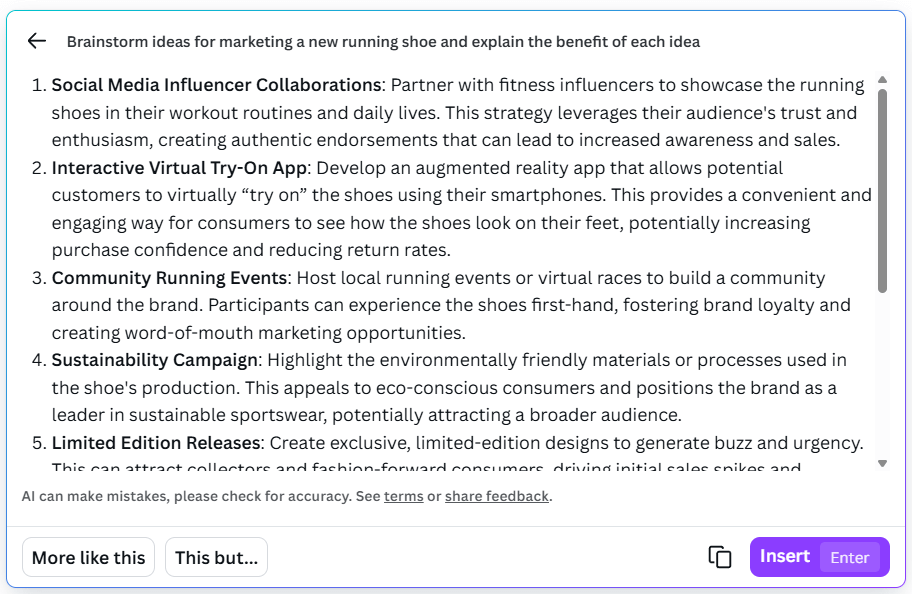
Using the drag-and-drop editor felt instantly familiar. I added buttons, icons, and video elements easily. The standout was the integrated AI tools – I used the AI writer to generate some quick headlines and section copy, which worked surprisingly well for placeholder content. The AI image generator let me create custom visuals on the spot, although results varied based on prompt detail. I also tested the AI video generator, which stitched together a short clip using my text prompts and stock visuals – a handy option for homepage intros.
Publishing is straightforward, but you’ll need to avoid Pro-marked features unless you’re ready to pay. That said, for a simple site or landing page, the free plan gives you full creative control and usable AI support – perfect for quick personal sites without technical skills.
5. GoDaddy – best marketing-oriented free AI web builder

| Rating: | |
| Free version: | ✅ Yes, 7-day free trial |
| Paid plans: | From $9.99/month |
| Free AI tools: | Website builder, Airo suite, image generator, and more |
GoDaddy’s free trial lets you quickly build a small business website using its AI builder and Airo toolkit. After a short quiz, it generates a complete site with editable pages, content, and layout. You also get AI tools for SEO, images, and marketing copy.
GoDaddy’s website builder is designed for speed – ideal if you need to get a site online fast with minimal effort. With a 7-day free trial that doesn’t require a credit card, it’s easy to test out the platform’s AI features and see how far you can go before committing to a paid plan. While it doesn’t offer the same deep customization as Wix, GoDaddy’s AI tools are focused on getting small businesses online quickly, with extra marketing features to help promote your site right from the start.
During those initial 7 days, you can use these GoDaddy’s AI features:
- AI website builder. To use this tool, answer a few simple questions about your business, and GoDaddy’s AI builds a full site, complete with layout, starter pages, and editable copy.
- Airo business toolkit. Bundled with the free trial, Airo includes a business name generator, SEO optimizer (titles, meta descriptions, keyword suggestions), AI image generation, and email marketing copywriting.
- Onboarding and setup. You can start from a pre-designed template or let the AI handle structure and branding. Everything from layout to text and imagery is fully editable after generation.
My experience with GoDaddy’s freemium AI web builder
I started GoDaddy’s 7-day free trial without needing to enter payment details. After creating an account, I chose to build with AI. The process asked a few quick questions: my business type, goals, and how I planned to sell online. Within seconds, GoDaddy generated a full website structure with pages like Home, About, and Contact, pre-filled with content that I could easily replace or edit. I was able to publish the site for free, too.
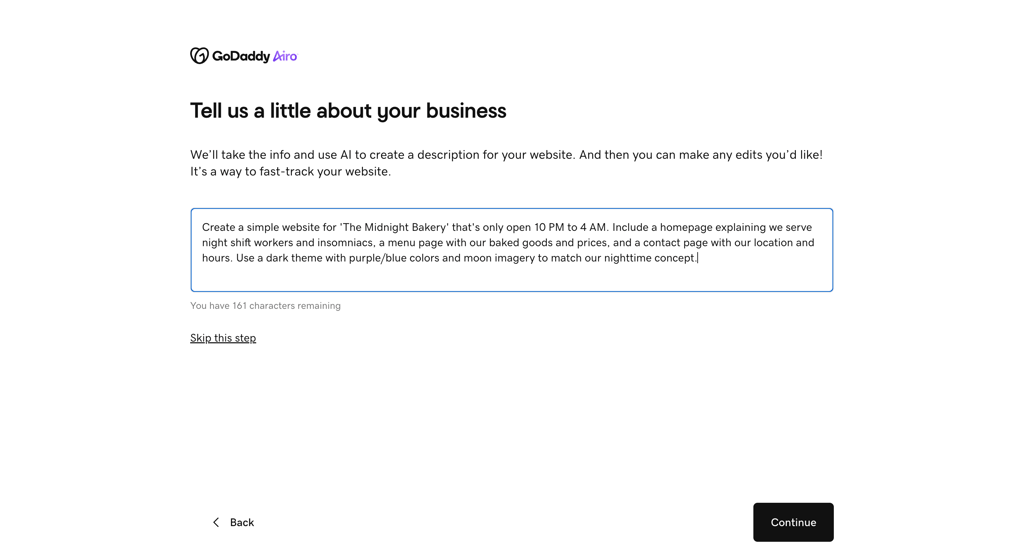
The layout was clean and small business-focused, and while customization options were somewhat limited compared to Wix, it felt streamlined and beginner-friendly. I also tested the Airo toolkit that came with the trial. The business name generator was surprisingly helpful for brainstorming, and the AI SEO suggestions, like optimized page titles and meta descriptions, gave my test site a decent head start on search readiness. I also tried the image generator, which produced decent placeholder visuals that fit the site’s tone.
Overall, GoDaddy’s AI tools appear to be geared toward small businesses that want to launch quickly with minimal setup. You don’t get deep creative control, but for speed and ease of use, especially with marketing features included, it delivers a solid free trial experience.
6. Durable – best user-friendly free AI website builder
| Rating | |
| Free version | Yes |
| Paid plans | From $22.00/month |
| Free AI tools | AI-powered website creation, SEO optimization, marketing tools |
Unlike traditional website builders, Durable’s AI creates a complete SEO-optimised website without having to manually set up your website. It’s perfect for small business owners, entrepreneurs, and solopreneurs who want to build a professional-looking website without any coding or technical knowledge.
Durable’s AI takes care of everything from designing your website to optimizing it for search engines, and it’s a great option for anyone hunting for a speedy, no-fuss solution. The free version includes essential tools for creating a website, with built-in SEO optimization, CRM tools, and AI marketing features.
Here are free AI features that you can get with Durable’s free plan.
- SEO and secure hosting. Your website is automatically optimized for search engines, with secure hosting and unlimited traffic.
- Free subdomain. Publish your website under a subdomain provided by Durable.
- AI images for ads, socials, and logos. Get up to 5 images per month for your marketing needs.
- Client management (CRM). Use basic CRM tools to manage clients and leads.
- Basic help center support. Access basic help center support for any questions you may have.
My experience with Durable’s free AI website builder
Durable’s free AI website builder is one of the most efficient and straightforward tools that I have used. There were no hold-ups in account set-ups, and I was able to get started immediately.
The AI-operated interface was intuitive. I didn’t have to manually add most things because the AI added elements relevant to the content and could automatically fill the pages. The best part was that Durable’s AI had already handled SEO optimization, so I didn’t have to get into meta tags or SEO settings myself.
The website was generated in seconds, went live, and was ready for any edits I needed to make. However, to access deeper customizations or advanced AI tools, I needed a paid plan, but the free version was more than enough for creating a simple, professional-looking website.
Durable’s free plan offers all the basic features you need to build and optimize a site quickly, and it’s a great choice for small businesses or entrepreneurs.
What you can (or can’t) expect from free AI builders
Free AI website builders are a great way to test web design without spending a dime – but they do come with trade-offs compared to premium plans. From my testing, most free plans give you access to core AI tools like automated site generation, AI-written text, and even some image editing or layout suggestions. Builders like Wix let you go from blank canvas to live website in minutes, just by answering a few setup questions.
What you can expect is a decent starting point: a working site with drag-and-drop editing, some design flexibility, and perhaps even hosting included. You’ll usually get to explore the AI workflow fully, which is perfect if you're testing the platform’s potential before upgrading.
However, you can’t expect full freedom. Free versions often include platform branding, limited storage and bandwidth, or no option to connect a custom domain. Some builders also restrict access to advanced SEO tools, marketing integrations, or premium templates until you upgrade.
So, while free AI builders are surprisingly powerful for getting started, they’re best viewed as a sandbox – ideal for portfolios, simple sites, or early-stage projects – with clear paths to upgrade if you need more control or professionalism later on.
Best web builders for different use cases
Different AI website builders excel at different things – some are perfect for quick personal sites, while others offer deeper customization or marketing support. Based on our research team’s and my own hands-on testing, I’ve broken down which platform is best for a specific website. Below is how each builder compares depending on your needs.
- Wix – best option for anyone, as it has very few limitations with its free plan. Besides, it has the largest number of integrated AI tools out of the tested providers, so there are more possibilities to generate a quality website with minimal effort.
- WordPress – best for custom domains, as it doesn’t run ads or impose its own domain to make up for free service. If paired with a free hosting provider, full websites can be created using AI plugins without ever spending a single penny.
- Webflow – best for creating unique websites, as it is highly customizable. Compared to most free services, with the exception of Wix, Webflow’s AI tools can cover nearly every area of your website.
- Canva – best for visually-rich websites, as most of its AI tools are graphics-oriented. While Canva does have a text generator, it lacks marketing and other in-depth features to go far beyond the visual content.
- GoDaddy – best for small business websites, mainly due to its rich variety of free marketing tools. Also, people who create blogs or portfolios might not have the funds to maintain the website, but small businesses can do with just the 7-day free trial to know if the service is worth investing in.
Best free AI web builders FAQ
Are there any completely free AI website builders?
Yes, platforms like Wix and WordPress offer free plans with built-in AI tools for site creation, including content and design generation. However, they may come with tradeoffs, like the lack of a custom domain or showing ads to users.
Which AI website builder is best for beginners?
Wix is one of the best website builders for beginners thanks to its intuitive AI setup, drag-and-drop editor, and helpful design suggestions. Besides, it has a fully free plan to test out the service.
Can I publish a website for free with AI tools?
Yes, you can publish a site for free using AI tools. However, your site will likely have platform branding or use a subdomain.
What are the limitations of free AI website builders?
Free AI builders often include ads, limited storage, no custom domain, and restricted access to advanced SEO or eCommerce features. However, a lot depends on your chosen provider.
Can I use AI to build a website for free?
Yes, you can build a website using AI for free with providers like Wix, WordPress.org, or Webflow. AI tools allow you to create a functional website in minutes, with no need to write any custom code.
Can ChatGPT actually create a website?
Yes, ChatGPT can generate a functional website by writing the full code for you. Simply describe the type of website you want, its features, and its design, and it can produce the HTML, CSS, and JavaScript needed to build it.