How to watch Canadian TV in the USA in 2026
Our in-house cybersecurity experts and journalists, renowned for major reports like The Mother of All Breaches, conduct transparent, unbiased VPN testing and in-depth analysis.
With 750+ articles crafted based on real-world research, we empower readers to make informed purchasing decisions through first-hand expertise.
Learn more

Canadian TV gave us classic TV shows like Kim’s Convenience and Schitt’s Creek. Unfortunately, not all of them are available on US streaming services, and Canadian TV is blocked in the US due to licensing and distribution rights.
However, if you already have an account with a Canadian streaming service or you want to access a free platform, a VPN might help you continue streaming your favorite content abroad by giving you a Canadian IP address.
In this guide, I share instances when you need a VPN to watch Canadian TV and how to do it using different devices.
If you want to watch Canadian TV on a platform that requires a Canadian zip code, local payment method, or other Canadian-specific information a VPN will not solve the access problem. Also, always make sure that using a VPN doesn’t violate the terms of service of the platform you want to access to avoid any unwanted consequences.
What Canadian TV can I watch in the USA?
Not all Canadian TV channels are geo-blocked. Before resorting to a VPN, I would recommend thinking about what kind of Canadian content you’re after, as you might be able to stream it from abroad.
If you’re mainly interested in staying up to date on recent events, channels like CBC, CTV, and Global TV don’t restrict live news streams. Also, some CBC Gem content, such as The National, The Fifth Estate, Here and Now, Land and Sea, and Fit Class are available on YouTube.
It’s also a good idea to check the libraries of the streaming services you’re already subscribed to, as some Canadian series might be available on the US streaming platforms. For example, in the US, Murdoch Mysteries are available on Hulu, Acorn TV, and Hallmark+, while you can find Schitt’s Creek on both Hulu and HBO Max.
Why do you need a VPN to watch Canadian TV in the USA?
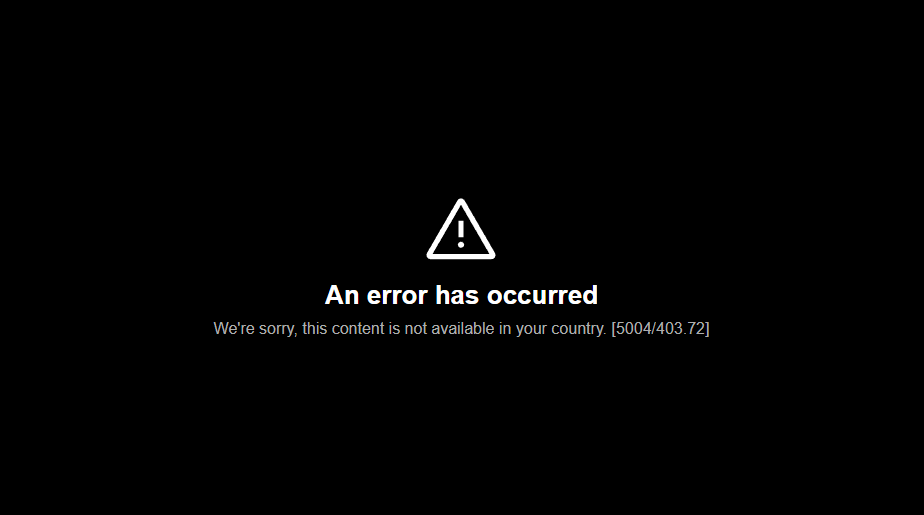
While some Canadian TV is accessible without a VPN the selection is pretty limited, as the majority of movies and shows are available to watch only in Canada. This is due to copyright laws, distribution rights, and licensing agreements. Therefore, if you try to watch TV beyond news, even on channels like CTV, you’ll encounter an error message “An error has occurred. We’re sorry, this content is not available in your country.”
In such cases, a VPN can help you get a Canadian IP address, so that it looks like you’re logging in from within the country. This will make Canadian broadcasters lift geo-restrictions and grant you access. However, it can’t override other requirements, such as an account or subscription with Canadian billing address details or payment method.
| What you need to watch Canadian TV | What it requires | Can a VPN help? |
| Location based in Canada | A Canadian IP address | ✅ Yes |
| Active subscription | A subscription to a Canadian TV platform | ❌ No, if the subscription requires Canadian-specific details |
| Canadian billing address or postal code | Account registration may require a Canadian address, postal code, or billing address to prove your location | ❌ No |
Best VPNs to watch Canadian TV in the USA 2026
When looking for the essential features of a VPN for watching Canadian TV in the US, you should consider a few aspects: reliable connections, high-quality Canadian servers, good speed retention, and extensive privacy and security features. All of this will make your experience far better. Below, I share my top 3 recommendations for watching Canadian TV in the US.
- NordVPN – best all-around VPN to watch Canadian TV in the USA
- Surfshark – best VPN for watching Canadian TV on all devices
- IPVanish – reliable and stable VPN for unblocking Canadian TV
Top streaming services to watch Canadian TV in the USA
I’ve put together a list of top streaming services to access Canadian TV in the USA. Check them out in the table below.
| Streaming platform | Price per month (in CAD) |
| Amazon Prime TV | $11.99/month |
| Netflix Canada | $7.99/month |
| CBC | Free (with ads)/$5.99/month |
| Crave | $11.99/month |
| TSN+ | $29.99/month |
| Sportsnet | $29.99/month |
How to watch Canadian TV in the USA with a VPN on your device
Whether you’re planning to use a Mac or Windows device, the steps for watching Canadian TV with a VPN are similar. However, depending on the streaming service, you might need an active, Canadian-registered account, or a Canadian payment method and billing address. If you’re planning to use a Mac or Windows device, follow these steps:
Watch Canadian TV in the USA on your desktop device
To watch Canadian TV on Android, iPhone, smart TV, Mac, or Windows, simply follow the steps outlined here:
- Download and install a reliable VPN on your device
- Connect your VPN to a Canadian server
- Load up your streaming platform of choice
- Kick back and enjoy
Watch Canadian TV on your smart phone (Android/iOS)
If you want to watch Canadian TV on your smartphone, first, I highly recommend setting up the streaming service app while in Canada. Otherwise, you might need to change your app store’s region, which requires a Canadian payment method and billing address. Other than that, proceed to setting up a VPN on your mobile device as per the instructions below.
For your iOS and Android:
- Download a VPN from the Google Play Store/App Store
- Open the VPN on your device and log in or signup
- Connect to a Canadian server
- Change your app store region (if you've downloaded the app while in Canada, you can skip this step)
- Download the Canadian streaming app of your choice
- Turn off the app store’s location permissions for the streaming app
- Open the app and stream
The Canadian streaming app you want to download may not appear in your App Store or Google Play Store due to region settings. You can change these settings only when moving to a new country or region, as it requires you to provide a local payment method and billing address. Keep in mind that this can be done every 90 days.
Additionally, try turning off your Google Play Store’s/App Store’s location permission, this way the app store can’t read your device’s GPS as a location signal.
For Google Play Store:
- Head to your device’s Settings
- Click Apps
- Locate Play Store
- Click Permissions
- Click Location and choose Don’t allow
For the App Store:
- Open your device’s Settings
- Select Privacy & Security, and click Location Services
- Make sure that Location Services is on
- Scroll down until you find the App Store
- Click App Store and choose Never
Some apps, for example Crave, use your smart phone’s GPS location, so you won’t find them on the Google Play Store or App Store even if you use a VPN and turn off the app store’s location permissions.
Watch Canadian TV in the USA on your smart device
Some streaming devices, such as standard smart TVs or Roku, don’t support VPN apps. What’s more, the app stores on smart devices can use GPS to determine your location, which means that you won’t be able to see the apps for download if you’re outside Canada.
To set up a VPN on your smart device, follow the instructions outlined below:
- Download and install a VPN
- Connect the VPN to your Wi-Fi router following the providers instructions
- Select a server in Canada and insert the streaming device into your TV
- Once your TV is turned on, open the app for your chosen streaming platform
- Sit back and enjoy your favorite Canadian TV show
Keep in mind that the setup process of a VPN might differ depending on your router’s firmware and manufacturer. Also, make sure that your selected VPN provider supports your router. NordVPN provides a full list and router-specific instructions on its page.
You can also check our in-depth guides that will provide you with information on how to use VPNs on different streaming devices:
- VPNs you should use with Roku – Roku VPNs for streaming Canadian TV
- VPNs that are best suited for Apple TV – check the whole list for the best Apple TV VPNs
- Top-notch VPNs for Fire TV Stick – unblock Canadian content with top VPNs
Can’t watch Canadian TV, even though you have a VPN?
There are many potential reasons why your VPN isn’t working. I’ve outlined some here:
- Your VPN is unable to bypass geo-restrictions
- Your real IP address is leaking
- Streaming sites have blocked the servers that your VPN is connected to
- The GPS location of your device and your IP address don’t match
- Cookies on your device expose your actual location
Try any of the following solutions to address these problems:
- Enable the leak protection settings on your VPN
- Load a fresh web browser
- Clear the cookies and cache on your device
- Contact the customer support service for your VPN provider

What can you watch on Canadian TV?
| TV show title | Streaming platform |
| Heartland | CBC Gem, Netflix (select seasons) |
| Anne with an E | Netflix Canada, CBC Gem |
| Kim's Convenience | CBC Gem, Prime Video |
| Murdoch Mysteries | CBC Gem, Netflix Canada |
| Schitt’s Creek | CBC Gem, Netflix Canada, Disney+ |
| Big Brother Canada | GlobalTV, StackTV, Amazon Prime, Fubo TV |
| Slings and Arrows | Acorn TV, Apple TV, Sundance Now |
| Trailer Park Boys | Netflix Canada |
| Orphan Black | CBC Gem, Prime Video, Crave TV, AMC+ |
| Real Housewives of Toronto | Amazon Prime, Hayu, Apple TV |
| Saving Hope | GlobalTV, Apple TV |
| Cracked | Amazon Prime, Apple TV |
| Family Law | Apple TV, Amazon Prime, GlobalTV, StackTV |
| Intelligence | Amazon Prime, Tubi, Plex |
| Missing | Crave, Netflix Canada |
| Nurses | Global TV, StackTV, Amazon Prime |
The bottom line
Watching Canadian TV may seem complicated, but it’s actually really simple. You can watch Canadian news without any restrictions, while the movies and shows may be accessed with a robust VPN, such as NordVPN.
With a Canadian IP address, you can bypass network and regional restrictions imposed by Canadian platforms. However, keep in mind that a VPN can’t override local billing address and payment methods requirements. Also, make sure that using a VPN to watch Canadian TV doesn’t violate the terms of service of the platform you want to use it on.
FAQ
How can I watch Canadian TV for free?
You can watch Canadian TV for free by opting for streaming services that are either entirely free or provide zero-cost trials. These streaming services can be accessed from anywhere in the world for no cost when using VPNs that offer free trials, such as NordVPN, Surfshark, or IPVanish.
Can I get Canadian TV in the US?
Yes, you can get Canadian TV in the US by using a reliable VPN provider such as NordVPN. Check out our NordVPN coupon codes for exclusive deals when signing up.
Where can I watch Canadian TV shows?
Canadian TV shows are available on a wide range of channels and platforms. These include CBC, Canadian Netflix, Amazon Prime, and TSN. Check out our full list of streaming platforms highlighted earlier in this article.
Can I watch CBC in the US?
Yes, you can watch CBC in the US with a capable VPN. If you connect to a Canadian server, CBC will think you’re tuning in from Canada and unblock the content for you.