NordPass vs Bitwarden comparison in 2026

NordPass and Bitwarden are two of the strongest password managers I’ve tested, but they suit slightly different needs. Not to spoil the whole article, but NordPass is my overall winner thanks to its polished apps, strong security features, and easier day-to-day experience, while Bitwarden stands out with open-source transparency, self-hosting, and a particularly generous free plan.
For this NordPass vs Bitwarden comparison, I tested both password managers with the Cybernews research team and compared their security, features, pricing, apps, and customer support. Below, I break down where each provider performs better and which one offers the stronger overall package in 2026.
Bitwarden vs NordPass – at a glance
NordPass consistently ranks among the best password managers, while Bitwarden tends to fall slightly lower. Although NordPass’ basic plan is priced higher, it delivers strong encryption and advanced security features. Here’s a brief comparison to show how these two password managers measure up.
| Category | NordPass | Bitwarden |
| Security | ✅ New-generation XChaCha20 encryption, zero-knowledge architecture, independently audited, SOC certified, MFA, up to 3GB file attachment storage | ✅ Industry-standard AES-256 encryption, zero-knowledge architecture, independently audited, SOC certified, MFA, up to 5GB free storage |
| Features | ✅ Password generator, password health checks, secure password sharing with an unlimited number of users | ✅ Password generator, password health checks, secure password sharing |
| Pricing | ✅ Free plan available, with lower current prices across several paid plans | ❌ Free plan available, cheaper Premium plan, more expensive Families and Business plans |
| Ease of use | ✅ Beginner-friendly interface provides a seamless experience. Supports all major operating systems (Windows, macOS, Linux, Android, and iOS) and web browsers (Chrome, Firefox, Edge, Safari, and Opera) | ❌ While easy to use, its apps don’t have all the features. Supports all major operating systems (Windows, macOS, Linux, Android, and iOS) and supports more web browsers (Chrome, Firefox, Edge, Safari, Opera, Brave, Vivaldi, Tor, and DuckDuckGo) |
| Customer support | ✅ 24/7 live chat and email, but no phone support | ❌ Only email support with long waiting times. No 24/7 live chat or phone support |

Recent Updates
Key differences between NordPass and Bitwarden
NordPass and Bitwarden are two of the best password managers available today, both offering strong encryption, secure password storage, and support across major devices and browsers. However, they take different approaches – NordPass focuses on a polished premium experience and convenience features, while Bitwarden stands out with affordability, transparency, and open-source security.
Choose NordPass if:
- You want a more polished and beginner-friendly experience. NordPass offers one of the cleanest and easiest-to-use interfaces among password managers. Navigation feels simple across desktop, browser extensions, and mobile apps, making it a great choice if you want minimal setup and a smooth day-to-day experience.
- You want advanced security with modern encryption. NordPass uses XChaCha20 encryption, a newer encryption algorithm designed for strong performance and security. Combined with zero-knowledge architecture and independent audits, it delivers excellent protection without adding complexity for users.
- You want extra privacy and security tools. NordPass includes features like Email Masking, password health reports, and data breach monitoring to help reduce exposure of your personal information online and improve account hygiene.
- You want more premium features included out of the box. NordPass combines password management with additional convenience tools and an overall premium feel, making it a strong option for users looking for a more complete password management experience.
For a deeper breakdown of the platform, check out our NordPass review to see how it performed in hands-on security, usability, and feature testing.
Choose Bitwarden if:
- You want the best value for money. Bitwarden remains one of the most affordable password managers while still offering strong security and core features. Its pricing structure makes it especially attractive for budget-conscious users.
- You prefer open-source software. Bitwarden’s source code is publicly available and regularly reviewed by the security community. If transparency and independent verification matter to you, this is one of Bitwarden’s biggest strengths.
- You want a generous free plan. Bitwarden offers one of the strongest free tiers in the password manager market, including unlimited password storage and cross-device access, making it an excellent starting point without immediate subscription costs.
- You want more flexibility and self-hosting options. Bitwarden supports self-hosting, giving advanced users and businesses more control over where their data is stored and managed – something NordPass doesn’t currently offer.
How we tested Bitwarden vs NordPass
Here at Cybernews, we follow a rigorous testing process and always perform our testing and research for full reviews and comparisons. For this comparison, I joined our research team to analyze and review NordPass and Bitwarden. Here’s a quick summary of the main aspects I looked at when comparing the two:
| Category | NordPass | Bitwarden |
| Features | ✅ Password generator, password sharing, passkeys, Email Masking, Data Breach Scanner, Password Health, secure notes, autofill, file attachments, emergency access, MFA, biometric login | ❌ Password generator, password sharing, passkeys, password health reports, secure notes, secure file attachments, emergency access, self-hosting, Bitwarden Send, unlimited device sync, MFA |
| Pricing and plans | ❌ Free version available but more limited; premium plans unlock breach monitoring, Email Masking, and advanced sharing features | ✅ More affordable overall with a generous free plan, unlimited password storage, and lower-cost premium plans |
| Security | ✅ Uses XChaCha20 encryption, zero-knowledge architecture, MFA support, biometric authentication, and independent security audits | ✅ Uses AES-256 encryption, zero-knowledge architecture, open-source architecture, optional self-hosting, and advanced security controls |
| User-friendliness | ✅ Modern, polished interface with smoother navigation and a more beginner-friendly experience | ❌ Clean and functional interface, but slightly more technical and less refined visually |
| Customer support | ✅ Email support, help center, and stronger guided support experience | ❌ Knowledge base, tutorials, community forum, and email support |
| Compatibility | ✅ Compatible with Windows, macOS, Linux, Android, iOS, and major browsers | ✅ Compatible with Windows, macOS, Linux, Android, iOS, web access, and all major browsers |
- Security (25%). As password managers are meant to secure your data, I made sure to check how NordPass and Bitwarden compare in terms of security. I was specifically interested in encryption protocols, privacy policies, and authentication options.
- Features (25%). To compare the two providers, I also took a deep dive into how they function in terms of password importing, autosaving, autofilling, and management.
- Plans (20%). I was particularly interested in comparing the pricing and plans of NordPass and Bitwarden. I checked which provider offers cheaper plans, how many users each plan supports, and what the overall cost-to-value ratio is.
- Ease of use (20%). Of course, no one wants to use a dysfunctional password manager, even if it looks great on paper. So, I tested both providers’ apps (both desktop and mobile) and extensions to see how they work and whether or not they’re user-friendly.
- Customer support (10%). For the final assessment, I attempted to contact the customer support agents of both providers. This was important to assess for new users who might need help setting up and navigating their password managers.
NordPass vs Bitwarden: pricing comparison
Both NordPass and Bitwarden offer competitive pricing and free plans, but they provide value in different ways. Bitwarden has a particularly generous Free plan, while NordPass includes additional security and privacy features and currently costs less across all of the paid plans compared here.
In this pricing comparison, I looked at subscription costs, free plan limitations, and overall value to see which provider gives you more for your money.
| Plan | NordPass | Bitwarden |
| Free | ✅ Yes | ✅ Yes |
| Premium | $1.29/month | $1.65/month |
| Family/Families | $2.32/month | $3.99/month |
| Teams | $1.79/month | $4.00/month |
| Business | $3.59/month | $4.00/month |
| Enterprise | $5.39/month | $6.00/month |
| Try NordPass | Try Bitwarden |
Bitwarden’s Free plan is a bit better than NordPass’s Free plan because it includes unlimited vault items and works across unlimited devices without restricting you to one active session. NordPass Free also syncs across unlimited devices, but you can only stay logged in on one device at a time.
The Premium plan of both providers offers unlimited device support, detects weak passwords, and presents security reports. Additionally, NordPass costs $1.29/month, and Bitwarden cost $1.65/month.
NordPass introduces the Family plan, while Bitwarden’s version is called Families. Both offer pretty much the same features as the Premium plans, but they're available for up to 6 users. NordPass is cheaper with the $2.32/month price tag vs Bitwarden’s $3.99/month cost.
When it comes to business plans, NordPass business users have more options to choose from, including Teams ($1.79/month/user), Business ($3.59/month/user), and Enterprise ($5.39/month/user). Teams covers 10 users, while Business and Enterprise start at 5 users and can scale for larger organizations. Bitwarden business users, on the other hand, are unlimited whether you use Teams ($4.00/month/user) or Enterprise ($6.00/month/user) plans.
If you're wondering how NordPass stacks up against another premium password manager in terms of pricing and features, check out our comprehensive 1Password vs NordPass comparison.
NordPass or Bitwarden: security overview
Security is one of the most important factors when choosing a password manager, and both NordPass and Bitwarden perform strongly in this area. They use zero-knowledge architecture, support multi-factor authentication, and encrypt your credentials before they leave your device. However, NordPass differentiates itself with XChaCha20 encryption, while Bitwarden relies on the widely trusted AES-256 standard and open-source transparency.
| Security measures | NordPass | Bitwarden |
| Encryption protocol | XChaCha20 | AES-256 |
| 2FA and MFA | MFA | MFA |
| Data storage | 3GB of file attachment storage on paid plans | 5GB with Premium |
| Biometric authentication | ✅ Yes | ✅ Yes |
| Zero-knowledge architecture | ✅ Yes | ✅ Yes |
| Independent security audits | SOC 2 Type 2 attestation and independent Cure53 security assessments | SOC 2 Type 2 and SOC 3 certifications in 2024, and multiple independent security assessments, including audits completed in 2025 |
Both NordPass and Bitwarden use zero-knowledge architecture for strong security. NordPass stands out with XChaCha20 encryption, while Bitwarden uses the widely trusted AES-256 standard and provides more file attachment storage with Premium.
Encryption
NordPass is similar to Bitwarden in terms of encryption, but more advanced because it uses the XChaCha20 cipher. Bitwarden, on the other hand, implements AES-256 encryption, which is also considered very strong and reliable. That said, XChaCha20 is more modern and simple, which means that deploying it is easier. And because it doesn’t require hardware like AES-256, it is faster.
By implementing XChaCha20 encryption, NordPass manages to encrypt your vault faster, uses fewer device resources, and ensures top-notch security.
All in all, both NordPass and Bitwarden can ensure that your data is unreadable. Also, both are built on a strict zero-knowledge architecture, meaning that even the companies themselves can’t take a look at what you have in your vault or what your master password is.
Multi-factor security
Both NordPass and Bitwarden support multi-factor authentication, including authenticator apps and hardware keys. In addition, NordPass features an integrated authenticator that leverages biometric, possession, and knowledge-based methods – providing a secure 2FA authentication without the need for third-party apps.
NordPass also supports hardware security keys, including compatible YubiKey models, as well as backup codes. It can also store and use passkeys for passwordless login on supported websites and services. Enabling one of these authentication options adds another layer of protection to your account.
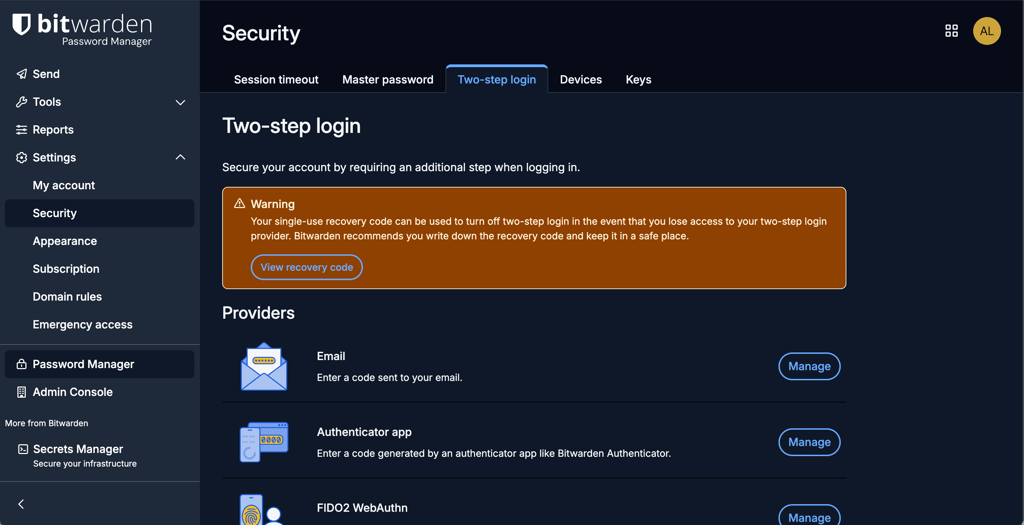
Bitwarden supports a range of 2FA methods to increase your security. You can choose from FIDO2 WebAuthn, an authenticator app, and email. There’s also Duo Push and YubiKey OTP, but it’s available only to Premium users.
Data storage
Bitwarden Premium includes 5GB of encrypted file attachment storage, while NordPass Premium provides 3GB directly inside the password manager. NordPass limits individual attachments to 40MB on desktop and 50MB on mobile. Bitwarden, therefore, offers more total attachment storage, while NordPass lets you store files directly alongside vault items without using a separate cloud storage service.
Privacy policy
In terms of privacy, NordPass is located in Panama, a more privacy-friendly country, compared to Bitwarden’s jurisdiction. However, some information is still collected. It includes personally identifiable information like your email address, payment method, and IP addresses that were used to log in to your vault.
Bitwarden also collects information like your first and last name, email, IP address, and other online identifiers. However, Bitwarden is located in the US, which is a Five Eyes country. This alliance is known for surveillance and monitoring practices that require companies to share data with the government, which makes it less appealing for those concerned about privacy. Thankfully, Bitwarden also supports self-hosting, which gives advanced users and organizations more control over where their encrypted vault data is stored.
Third-party security audits
Both NordPass and Bitwarden have been SOC certified. NordPass gained its SOC 2 Type 2 certificate in 2023, while Bitwarden was SOC 2 Type 2 and SOC 3 certified back in 2020 and verified again in 2024. The SOC 2 certification proves to users that the two password managers are secure, trustworthy, confidential, and private.
Beyond compliance certifications, both providers regularly undergo third-party security testing.
Bitwarden has undergone multiple independent security assessments, with additional audits completed in 2025 covering areas such as its browser extension, desktop and mobile apps, web vault, cryptography, autofill, and network infrastructure.
NordPass has also been independently audited by Cure53, with assessments covering its cryptographic implementation, applications, and browser extensions. More recent evaluations have focused on validating its zero-knowledge architecture and overall platform security. No critical systemic flaws have been publicly reported following these audits.
It’s important to note that audit findings, especially minor or moderate issues, are a normal part of secure software development. What matters more is how quickly and transparently providers address them. In this regard, Bitwarden stands out for publishing detailed audit reports, while NordPass emphasizes certification compliance and controlled audit disclosures.
Overall, both password managers demonstrate strong security maturity through regular audits, industry certifications, and ongoing improvements.

NordPass vs Bitwarden: which offers better features?
Both NordPass and Bitwarden include all core password management features, such as autofill, password generation, secure sharing, and passkey support. However, NordPass puts more emphasis on additional security and privacy tools, while Bitwarden focuses on flexibility, customization, and strong value for money. In this comparison, I looked at their feature sets to see which provider delivers more in everyday use.
| Features | NordPass | Bitwarden |
| Password import | ✅ Yes (from browsers or other password managers) | ✅ Yes (from browsers or other password managers) |
| Password recovery | ✅ Yes | ✅ Yes |
| Password generator | ✅ Yes | ✅ Yes |
| Password sharing | ✅ Yes, with trusted contacts and configurable permissions | ✅ Yes, with up to 6 users on Families and with anyone via Bitwarden Send |
| Email masking | ✅ Yes, in-house email masking service | ✅ Yes, integrated with third-party email masking services |
| Password autosave and autofill | ✅ Yes | ✅ Yes |
| Password health | ✅ Yes | ✅ Yes |
| Passkeys | ✅ Yes | ✅ Yes |
| Emergency access | ✅ Yes | ✅ Yes |
Password importing
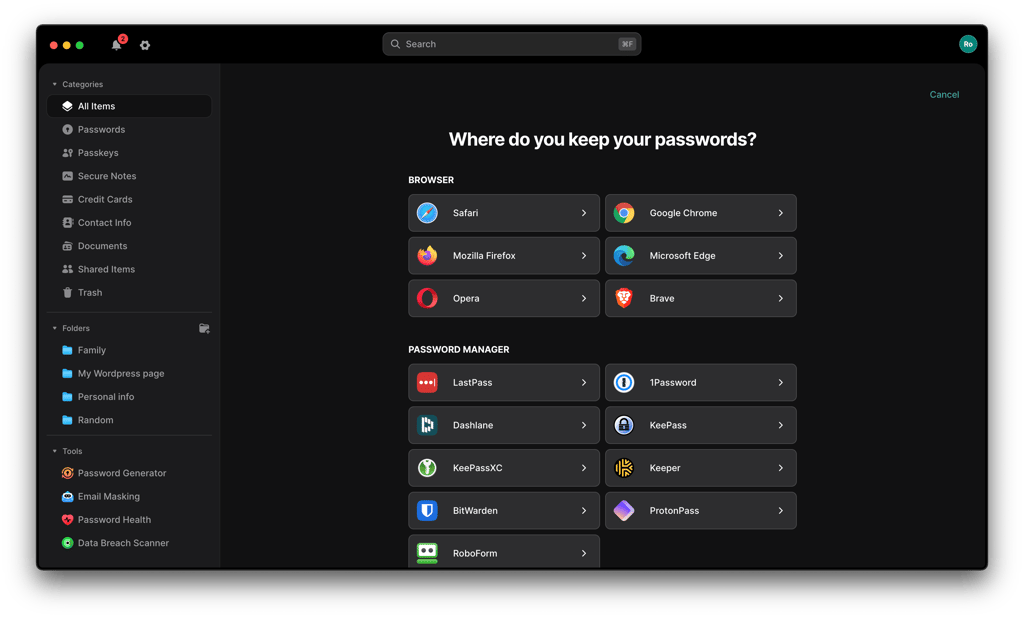
You can easily import passwords to both NordPass and Bitwarden. NordPass allows you to import your passwords directly from your web browser with a few clicks. You can also easily transfer your passwords from other password managers with a spreadsheet. NordPass supports importing CSV, ZIP, JSON, 1PUX, and XML files.
I appreciate that NordPass has clear instructions for password importing, which simplifies the entire process, especially for those less tech-savvy.
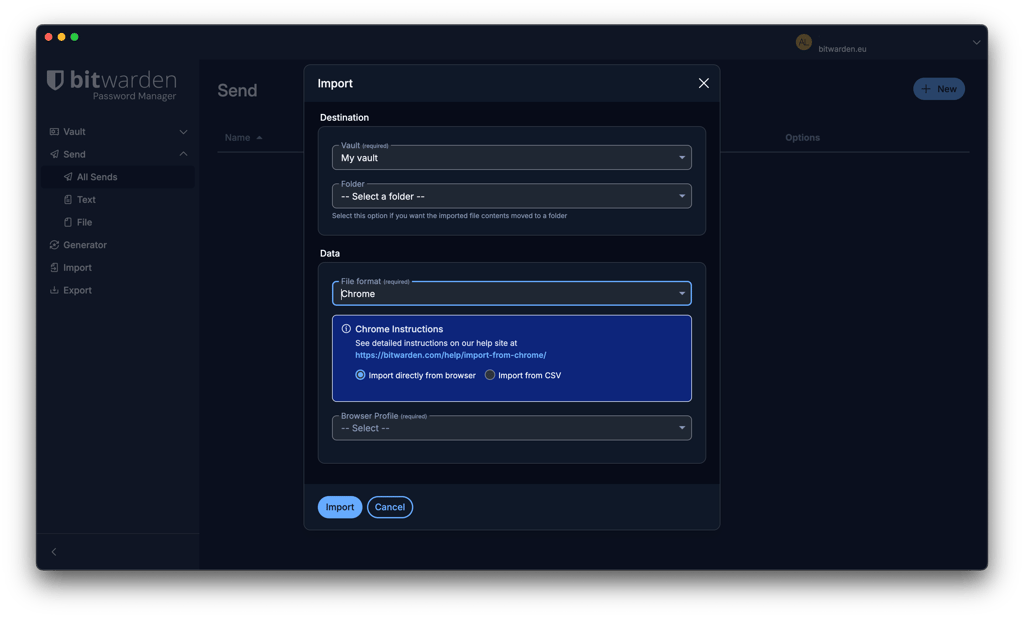
Bitwarden also lets you import passwords from files and other password managers. You can select the source or file format and upload your exported file directly through supported Bitwarden apps.
I still found NordPass a little easier to navigate throughout the process, but the difference is mostly in the interface rather than in the available import options.
Account and password recovery
Both NordPass and Bitwarden provide options for password recovery, but both methods require attention and care.
Once you create your NordPass account, you receive a recovery code that can help you regain access if you forget your master password. It’s still important to save it somewhere safe, although logged-in users can generate a new recovery code if needed.
Bitwarden also offers Emergency Access, while users who enable two-step login receive a recovery code for disabling 2FA if they lose access to their authentication method. Bitwarden cannot directly reset a forgotten master password, although Emergency Access, organization account recovery, or an already logged-in device may provide other recovery options depending on your setup.
Password generator
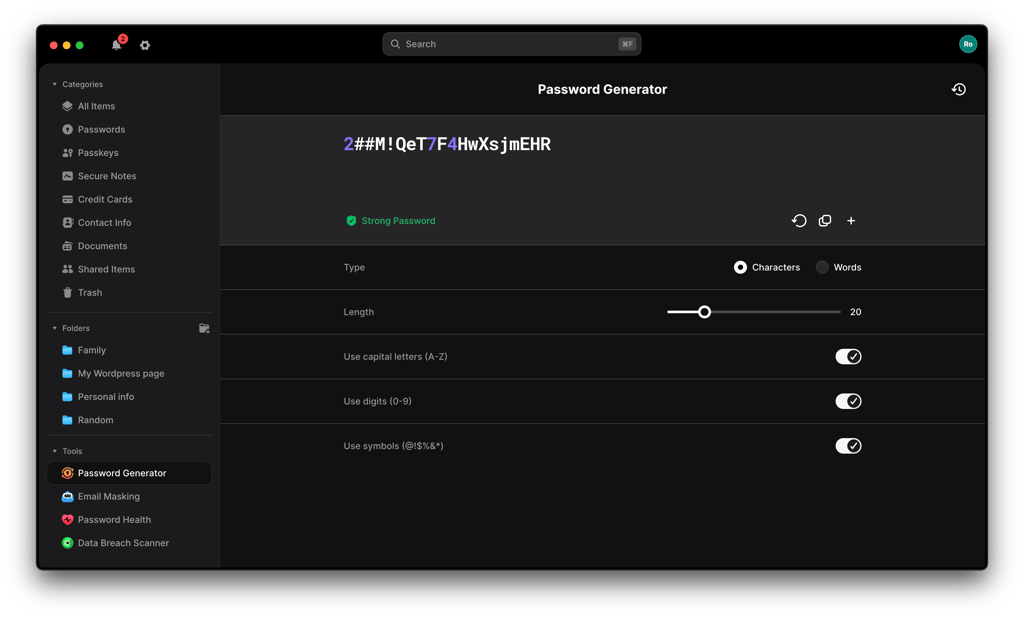
To avoid reusing old passwords or creating weak ones, both NordPass and Bitwarden offer a password generator that guarantees you strong and secure passwords.
Both providers allow you to customize the generated password’s length and include characters and/or symbols. Also, they allow you to generate passwords in phrases instead of a confusing mix of symbols. Those seem easier to remember while ensuring enhanced security.
With NordPass, you can create passwords that are up to 64 characters long.
Bitwarden allows you to create passwords that are up to 128 characters long.
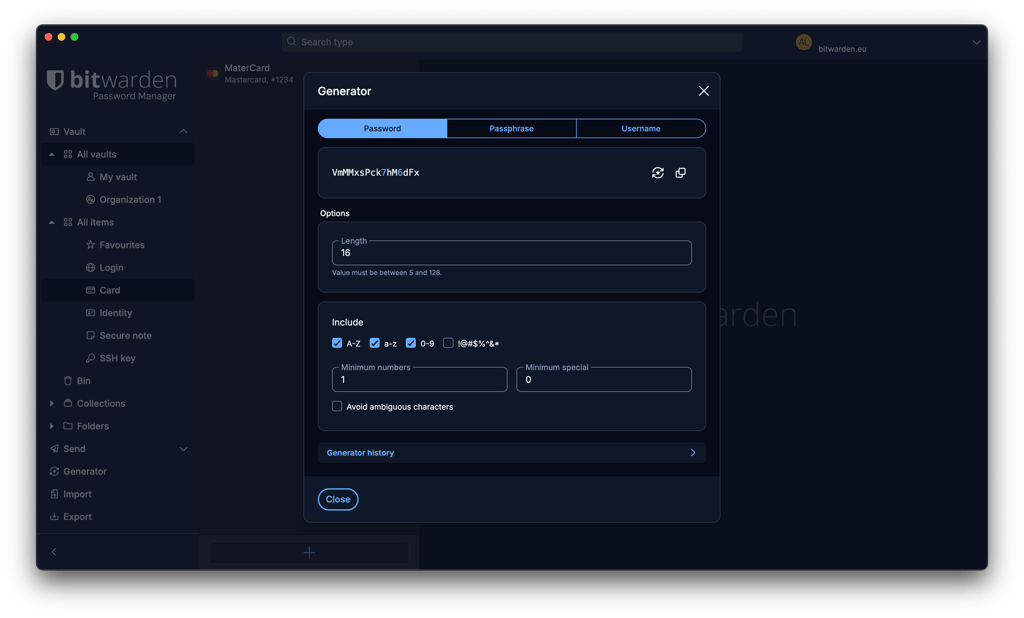
Overall, whether you choose NordPass or Bitwarden, you get to use a highly customizable password generator that can help you create strong and secure passwords.
Password sharing
NordPass and Bitwarden allow you to share passwords, but I prefer NordPass when comparing the two. With NordPass, you can share passwords and other supported items with other NordPass users through trusted contacts. I also appreciate that paid users can modify access permissions and set an expiration date.
Bitwarden has more limitations, as you can only share passwords with only two users, even if you’re a Premium user. If you decide to upgrade your subscription to the Family plan, you can then share items with up to 6 users. However, Bitwarden Send allows you to securely share passwords, notes, and even files by generating an end-to-end encrypted link.
Autofill
In terms of the NordPass autofill feature, I’d say it’s faster and easier to use compared to Bitwarden. As soon as you click on the box to fill in your credentials, you get prompted with already saved passwords or with a suggestion to save new ones.

Recent updates have refined this experience further by introducing an Instant Login feature: after clicking Log in with NordPass, users can access their accounts with a single click. Additionally, a subdomain matching functionality now automatically selects the correct login for websites with multiple subdomains, and expanded website storage eliminates duplicate credentials. Finally, new granular controls let you specify which credential types are used for autosave and autofill on a site-by-site basis.
Bitwarden’s autofill may require more manual interaction depending on setup, while NordPass emphasizes one-click convenience.
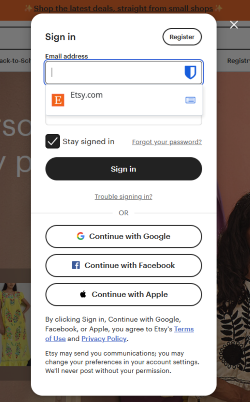
Despite the slow process, Bitwarden offers you a decent autofill that is capable of filling your passwords on popular web browsers. Bitwarden gets additional points for supporting more web browsers than NordPass.
If you're curious about everything NordPass has to offer beyond this comparison, check out our in-depth NordPass review, where we break down its security measures, features, and pricing and compare it to other popular password managers.
Platforms, interface, and ease of use
Both NordPass and Bitwarden support all major operating systems and browsers, making them accessible across desktop and mobile devices. However, the experience differs once you start using them – NordPass focuses on a cleaner, more polished interface, while Bitwarden prioritizes functionality and flexibility. In this section, I compare platform compatibility, interface design, and overall ease of use to see which password manager feels better in everyday use.
| NordPass | Bitwarden | |
| Supported OS | Windows 10 and up, macOS 11 and up, 64-bit Linux systems supporting Snap, Android 9.0 and up, iOS 17.0 and up, ChromeOS (NordPass standalone extension only) | Windows 11, macOS 12 and later, Linux, Android 10.0 and later, iOS 15.0 and later |
| Supported browsers | Chrome, Edge, Firefox, Opera, Safari, Brave, Vivaldi, and other compatible Chromium-based browsers | Chrome, Firefox, Edge, Opera, Safari, Vivaldi, Brave, Tor, DuckDuckGo |
When compared, NordPass is in the lead in terms of supported OS. Unlike Bitwarden, it offers standalone extension support on ChromeOS. On the other hand, Bitwarden is compatible with more browser extensions. Overall, I found NordPass much more enjoyable to use, which is why it’s my winner in terms of ease of use.
Desktop apps
To start using Bitwarden or NordPass on your desktop, all you have to do is navigate to the official providers’ websites and download the apps that are compatible with your OS. Afterward, you create your online accounts, and the password managers are ready to use.
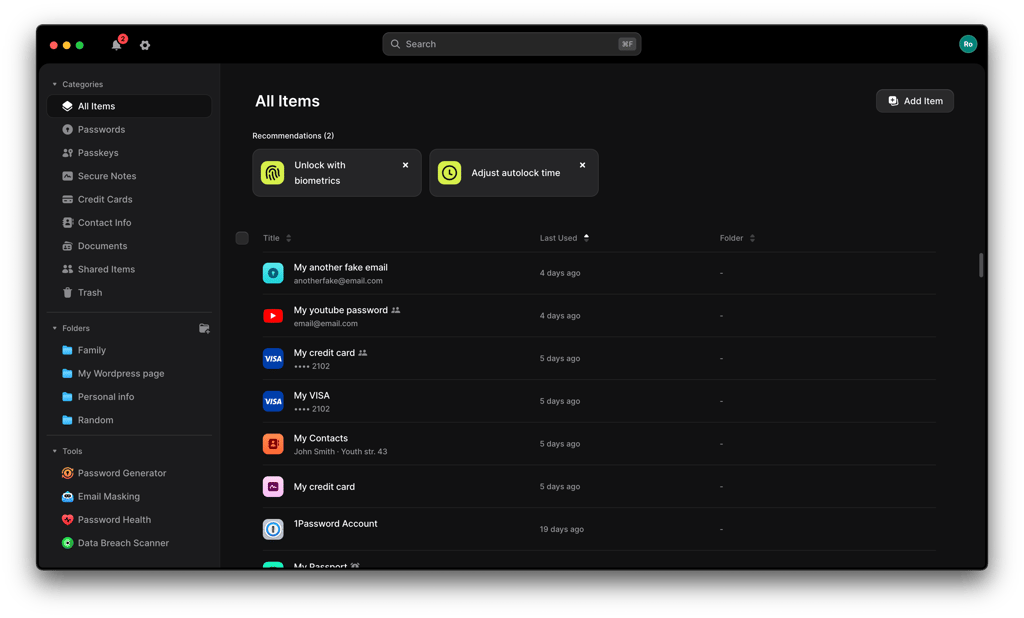
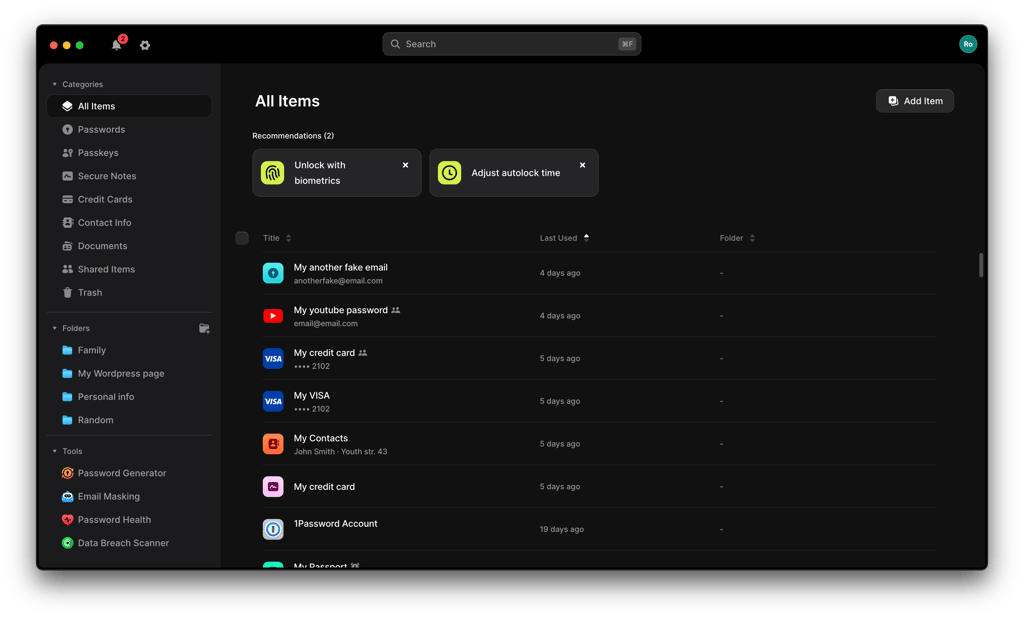
I found the NordPass desktop app very easy to navigate. Even if you’re a first-time user, you should have no trouble figuring out how to save, find, and manage passwords, passkeys, credit card details, or secure notes. Everything is conveniently located in the menu on the left, including the Password Generator, Password Health, and Data Breach Scanner tools.
Bitwarden’s desktop app is similar to the browser extension in that it lets you manage logins, credit cards, identities, and secure notes. However, some account settings, including two-step login setup, are handled in the web app, while imports are available from multiple Bitwarden clients, including the desktop app.
Browser extensions
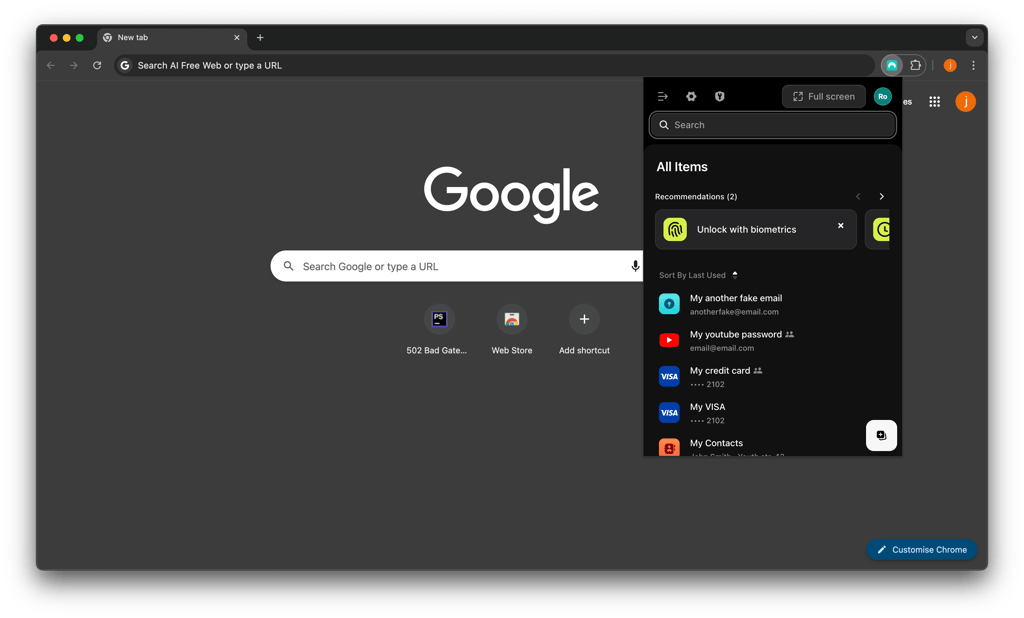
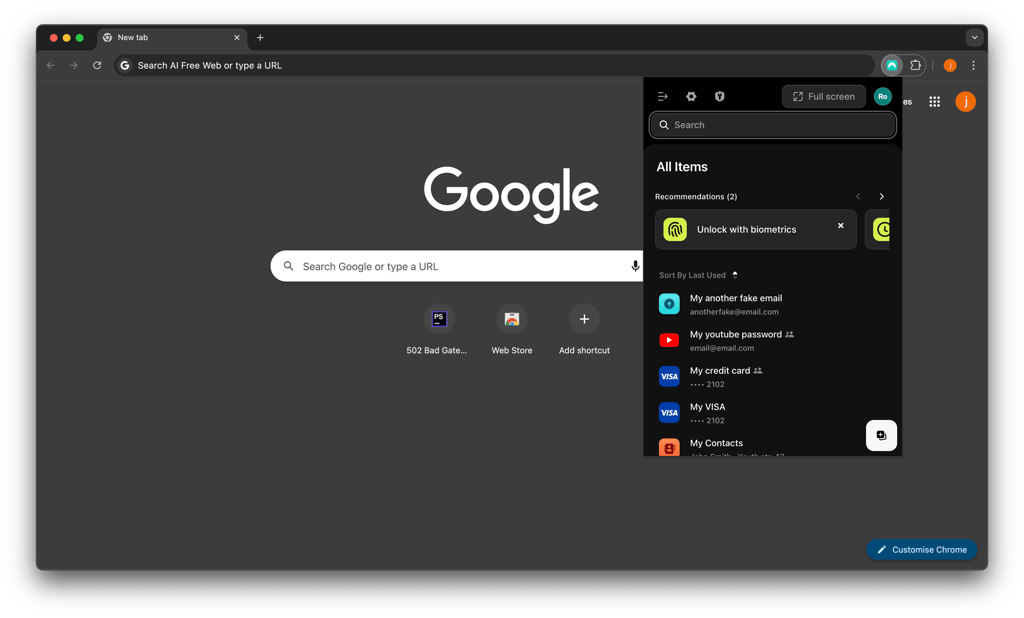
NordPass supports plenty of browsers, most importantly, the popular ones, like Chrome, Edge, Safari, and Firefox. I appreciated that the interface is pretty much the same on all browsers, which makes using it quite seamless, and each extension comes with a full set of features.
Overall, I’d say that NordPass is the most convenient to use in the form of a browser extension.
Similarly, Bitwarden also supports major browsers and some other less popular browsers like Brave, Vivaldi, and Tor. However, I was disappointed that the interface and the experience differ between browsers. If you are an Edge user, don’t get surprised when your Bitwarden extension gets buggy. And Chrome users lose a chance to use a sidebar of the password manager.
Mobile apps
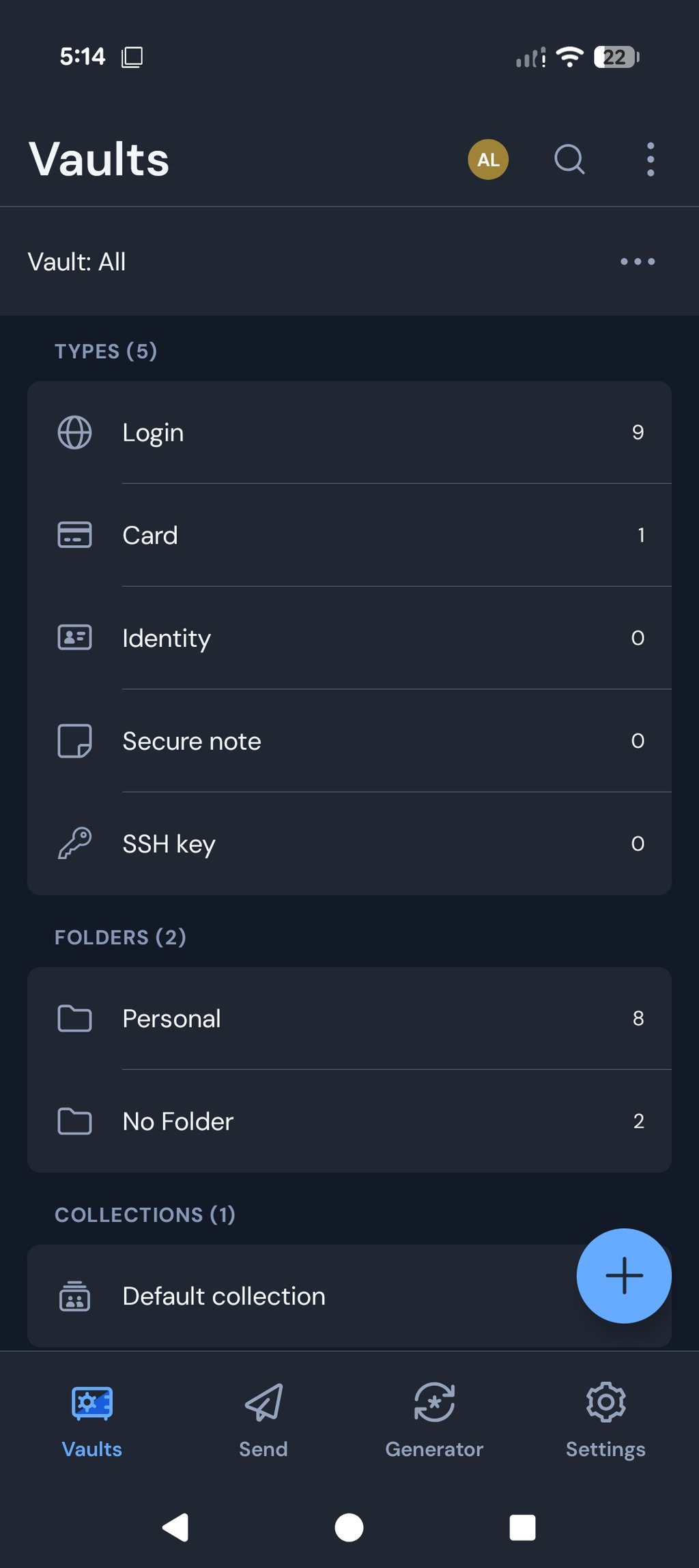
NordPass and Bitwarden support Android and iOS devices, and the apps can be downloaded from the Google Play Store or Apple App Store.
When researching and testing these apps, I found both of them clean and easy to use. So, even if you are new to password managers, you are likely to master either app in no time at all.

Bitwarden surprised me by offering interface customization options – you can customize the interface any way you want. This makes the password manager app not only useful but also highly enjoyable to use.
NordPass vs Bitwarden: customer support
Both NordPass and Bitwarden offer email support, knowledge bases, and self-help resources, but their support experiences differ. NordPass provides more direct and accessible customer assistance, including live chat for all users, making it easier to get quick help when needed. Meanwhile, Bitwarden relies more heavily on documentation, community forums, and ticket-based support, which works well for technical users but may feel less immediate for beginners.
| NordPass | Bitwarden | |
| Email support | ✅ Yes | ✅ Yes |
| 24/7 live chat | ✅ Yes | ❌ No |
| Phone support | ❌ No | ❌ No |
| Knowledge base | ✅ Yes | ✅ Yes |
| Community forum | ❌ No | ✅ Yes |
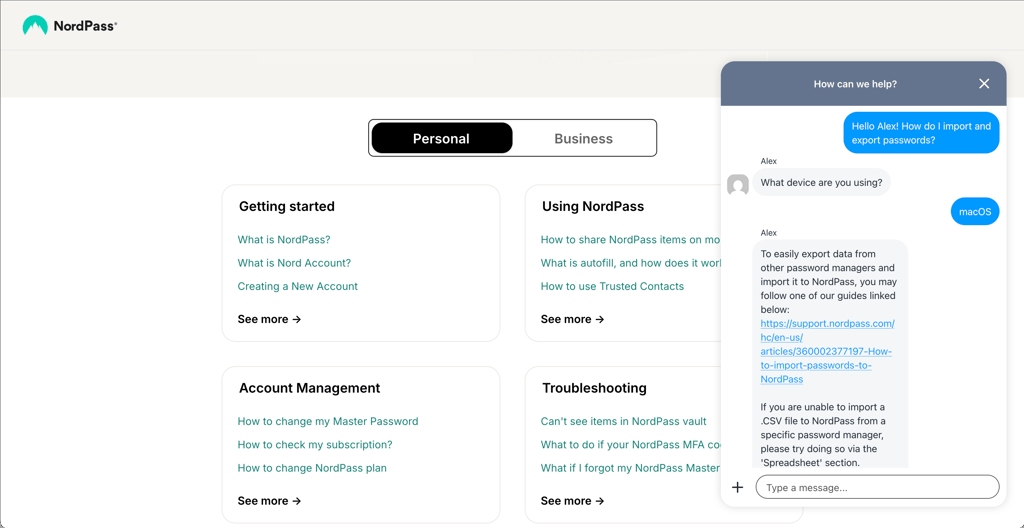
With NordPass, you can get help via a 24/7 live chat and email. When I attempted to contact a live agent, I got my question answered in under a minute. I also found the agent professional and friendly. Best of all, Free plan users can also get immediate assistance.
Unlike NordPass, Bitwarden’s support is better suited for paid users who are eligible for priority support. However, even on a premium plan, the support isn't the best, and that’s because there’s no option to call or chat with support agents. When I contacted Bitwarden’s support, I was only able to do it via email and got a response in 8 hours.
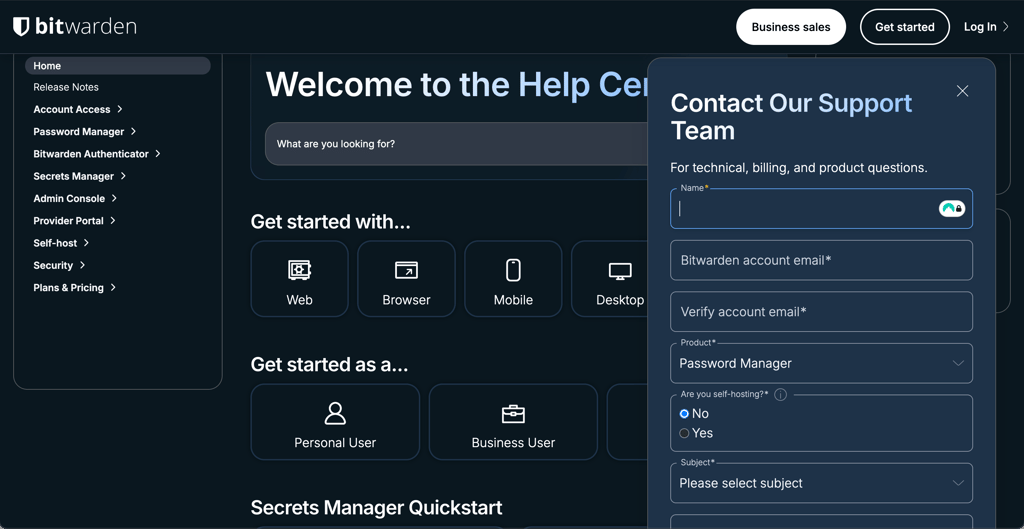
Again, the communication was helpful and professional, but certainly not as fast as compared to NordPass’ live chat.
NordPass vs Bitwarden – final verdict
Overall, both NordPass and Bitwarden deliver exceptional password management with robust security, but NordPass gets my vote. The combination of its intuitive interface, broad platform support, and flawless autofill functionality creates an experience that's approachable for users at any skill level. At the current prices in this comparison, NordPass is actually cheaper across several paid tiers while still offering a richer set of additional security and privacy tools.
Bitwarden remains an excellent choice, especially for users seeking straightforward password management with a particularly generous Free plan. The trade-offs come in the form of a steeper learning curve with its applications and more limited support channels compared to NordPass.
FAQ
Which is better, NordPass or Bitwarden?
Based on our findings, NordPass is better than Bitwarden. With NordPass you receive a password vault that’s encrypted with advanced encryption, the features are well-developed and comfortable to use, and 24/7 live chat customer support is available for every customer.
Can NordPass import passwords from Bitwarden?
Yes, NordPass allows importing passwords from Bitwarden. To do so, you need to organize your items into a CSV file and then attach it to the specific section that is provided in the NordPass application’s Import section.
Has NordPass ever been breached?
No, NordPass has never experienced a data breach, maintaining a strong track record for user security. It also participates in regular third-party audits to verify its security protocols. Additionally, NordPass uses end-to-end encryption, ensuring that your data remains protected and private at all times.