Hotstar not working with a VPN: 7 quick fixes
Our in-house cybersecurity experts and journalists, renowned for major reports like The Mother of All Breaches, conduct transparent, unbiased VPN testing and in-depth analysis.
With 750+ articles crafted based on real-world research, we empower readers to make informed purchasing decisions through first-hand expertise.
Learn more

Hotstar is a highly popular streaming platform in India. It offers an extensive library of Indian TV shows, movies, live sports, and exclusive Disney content. Unfortunately, Hotstar not working with a VPN is a common frustration for users outside India.
Abroad, Hotstar has set in place strict geo-restrictions that block access for outsiders. This is done to keep in line with local content licensing agreements. In some cases, even VPNs cannot resolve the issue as not all of them have enough Indian servers. Or they don’t stand a chance against Hotstar's advanced VPN detection.
I joined our Cybernews researchers to test the top VPNs on the market and find those that reliably unblock Hotstar. I also detail 7 quick troubleshooting steps that should help you restore access to Hotstar from anywhere.
Why Hotstar might not work with a VPN
Hotstar is not available outside India, Singapore, Canada, and the United Kingdom. That means that if you try to connect from a different location, you will discover this message: “Seems like we are not here yet. We’re not available in this location, thank you for your love!”

A VPN with servers in India should, in theory, solve the problem; however, not all VPNs are powerful enough to bypass geo-restrictions. Hotstar implements powerful IP detection mechanisms that block VPN usage. If your VPN is detected, you will encounter an error message: “Looks like you are connecting through a VPN, proxy or ‘unblocker’ service. Please turn off any of these services and try again.”
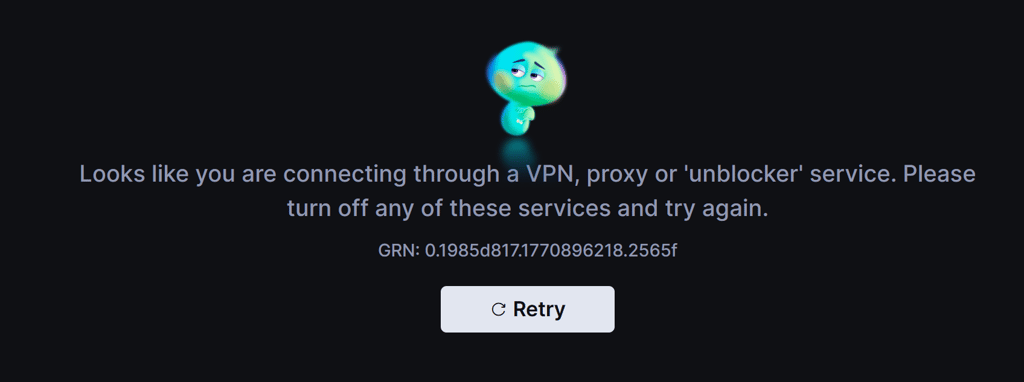
Of course, even if the platform doesn’t detect VPN use, there are other reasons why Indian Hotstar might not work with a VPN:
- No Indian servers. If your VPN does not have servers in India, you will not be able to access Indian Hotstar.
- IP address blacklists. Due to the detection mechanisms that Hotstar implements, many VPN IP addresses are blacklisted. Streaming services often collaborate with GeoIP databases to detect and recognize IP addresses, encompassing those associated with VPNs.
- Other types of IP blocking. If Hotstar detects rapid changes in IP addresses associated with your account sign-ins or observes numerous users connecting through a single IP address, it may consider these activities suspicious and potentially block the related IP addresses.
- Wrong server. By connecting to a server outside of India, you won’t be able to access any of Hotstar’s content.
- Weak unblocking abilities. Not all VPNs are able to bypass geo-blocks. The most probable reason is that your chosen VPN provider comes with insufficient unblocking capabilities.
- Browser cookies. Cache and cookies collect and store information about your actual location. So, if you don’t delete them, they might reveal your location to the platform, which will then restrict your access.
- IP address and DNS leaks. IP addresses and DNS queries include data about your location. Unfortunately, IP address or DNS leaks might occur if your VPN fails. Therefore, Hotstar will be able to detect your VPN usage and prevent you from accessing the platform.
VPNs that work with Hotstar in 2026
Not all VPNs work with Hotstar India, so it can be quite a challenge to find one that does. For this reason, we have reviewed 41 VPNs, tested the top ones on the market, and selected the 3 best VPNs that work with Hotstar India. Our tests were based on different criteria, such as the availability of servers in India, unblocking capabilities, security features, and more. Here are the best VPNs that unblock Hotstar:
- NordVPN – has 9,500+ servers worldwide, including virtual servers in India. These servers ensure user anonymity in spite of government regulations and can successfully unblock Hotstar India and other streaming services.
- Surfshark – with 50 virtual servers in India, Surfshark maintains user privacy and unblocks access to all Indian streaming services, including Indian Disney+ Hotstar.
- ExpressVPN – this highly secure VPN has virtual servers that connect through Singapore and the UK. It protects its users’ privacy while still permitting access to Indian Hotstar’s content library.
Hotstar not working with a VPN: 7 ways to fix it
Now that you are familiar with the reasons why Hotstar is not working with a VPN, it’s time to dive into 7 most common fixes. Using these tips, you should be able to overcome your issue in no time.
1. Switch VPN servers
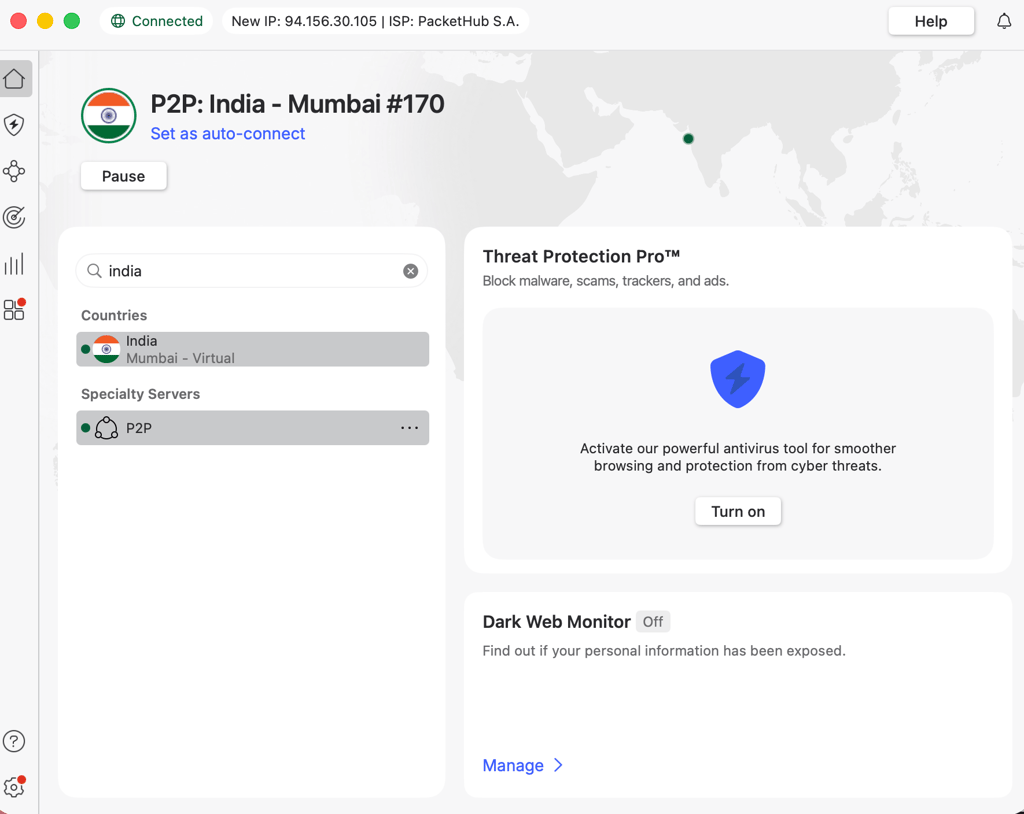
Change the server location on your VPN to one in India if you haven’t already done so. If you have, disconnect and reconnect again to change the IP address, as it might be that the current IP address is blacklisted by Hotstar.
2. Try different VPN protocols
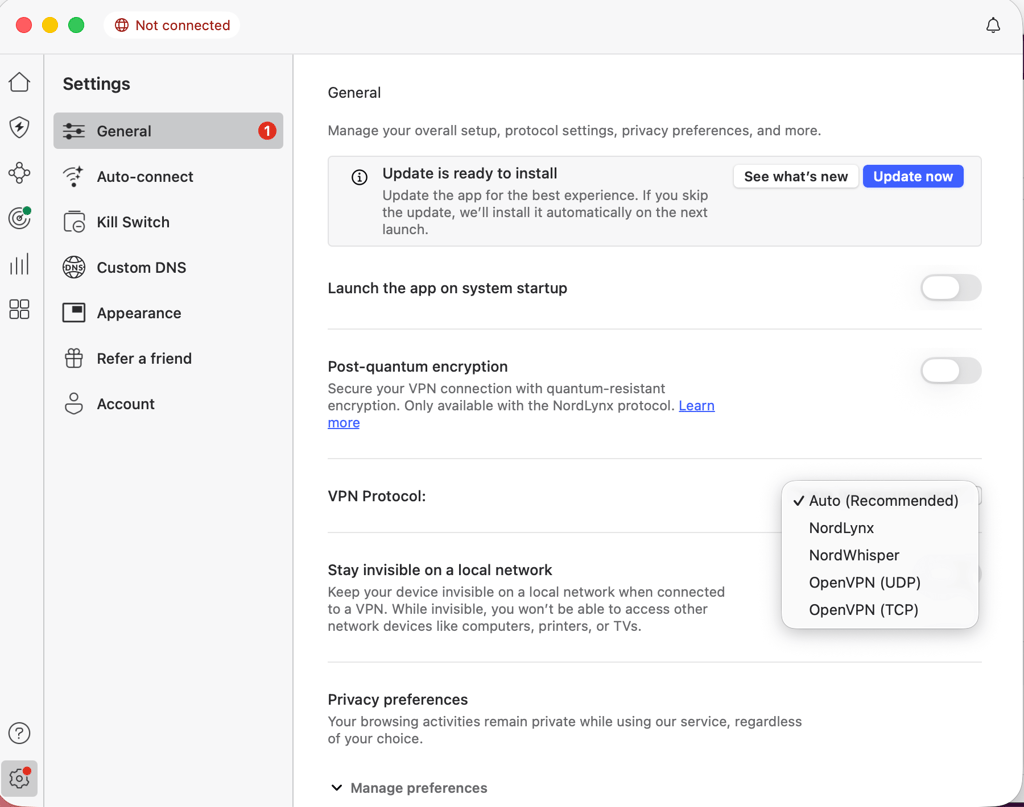
VPN protocols ensure that you have fast data transmission and stable encryption. However, sometimes, the default protocol of your VPN might not be able to unblock Hotstar. Try experimenting with different VPN protocols to see if that works. Here’s an example with NordVPN:
- Open the NordVPN app and go to Settings
- Expand Connections to find all of the available protocols
-
Try different options to see which one helps unblock Indian Hotstar

3. Clear the browser’s cache and cookies
Cookies and cache help you see the content you might be interested in, but they also store data related to your geo-location that can reveal your actual location. You can manually delete your browser’s cookies and cache.
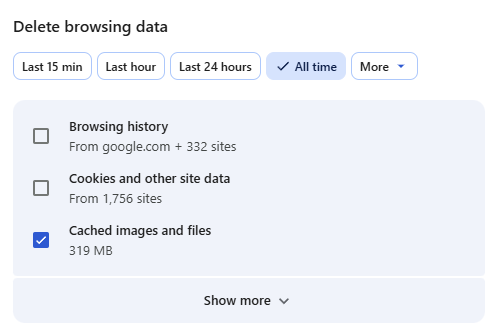
For this demonstration, I’m showing how to clear cookies and cache on Google Chrome, but the process will be similar on popular browsers:
- Open Google Chrome and access the main menu (three vertical dots in the top-right corner)
- Click Delete browsing data…
- Select the preferred time range (I recommend, All time)
- Check appropriate boxes
-
Confirm by clicking Delete from this device

4. Check for IP, DNS, or WebRTC leaks
DNS, IP address, or WebRTC data can potentially prevent your access to Hotstar because it can reveal your actual location. You can check if IP address or DNS leaks occur on websites like ipleak.net or dnsleaktest.com.
To prevent leaks, I recommend you activate your VPN’s kill switch and other leak protection features:
- Go to your VPN settings
- Find the kill switch settings
-
Enable the kill switch and other leak protection features


5. Contact VPN support
If none of these tricks work, you can always reach out to the VPN’s customer support. When I tested NordVPN’s customer support, I received comprehensive live assistance in mere minutes.
The expert team will help you and explain the steps you need to complete to access Hotstar. They can also update you on any ongoing server maintenance.
6. Update VPN software
Using a VPN with outdated software can cause many issues. These include compatibility issues, preventing you from accessing Hotstar. Make sure you use the latest version of your VPN software. Updates may include improvements for bypassing VPN detection measures.
7. Upgrade to a reputable VPN
As you are aware, not all VPNs are capable of unblocking Hotstar India. It is likely that the VPN you are using at the moment is of lower quality and not capable of unblocking Hotstar. This is especially true for free VPN services, as they don’t usually have enough resources to upgrade their servers and IP address pools.
Make sure you use a reliable VPN provider with servers in India and strong unblocking and streaming capabilities. My go-to choice for unblocking Indian Hotstar is NordVPN, as it has virtual servers in India, robust streaming capabilities, and top-notch security features.

Conclusion
If you unsuccessfully tried to watch Indian Hotstar, even with a VPN, the problem could be the VPN itself. After India implemented new regulations that reduced VPN user privacy, many providers left the country. And not all that remained are effective at accessing geo-restricted content.
Disney+ Hotstar is one of the most complex streaming platforms for VPNs to access, so only some providers are capable of unblocking its content libraries in other countries. That’s why it’s important to get a reliable VPN like NordVPN. Its virtual servers in India not only maintain complete no-logs user privacy but can help you access the full Indian Hotstar content library.
Best part is that NordVPN can help you access geo-restricted content on other popular streaming platforms, too.
FAQ
Why is Hotstar not working with a VPN?
Hotstar is not working with a VPN due to the strong detection mechanisms it employs. Also, it may not work if you’ve selected the wrong server, there are IP address or DNS leaks, and due to other reasons. It’s best to use a reliable VPN, like NordVPN, that will easily unblock Hotstar.
How can I make Hotstar not detect VPNs?
For Hotstar to not detect VPNs, use a reliable provider, such as NordVPN, that will hide your actual IP address. Having a VPN with robust security features will help you hide your browsing traffic. Make sure the kill switch is on to prevent any data leaks.
How to bypass Hotstar VPN detection?
To bypass VPN detection, you need to make sure there are no IP address leaks. Choose a VPN with great unblocking abilities, robust security features that will ensure your IP address stays hidden, and a vast server fleet with servers in India. My top choice is NordVPN.


