How to use FaceTime in the UAE in 2026
Our in-house cybersecurity experts and journalists, renowned for major reports like The Mother of All Breaches, conduct transparent, unbiased VPN testing and in-depth analysis.
With 750+ articles crafted based on real-world research, we empower readers to make informed purchasing decisions through first-hand expertise.
Learn more

FaceTime is a go-to video calling app for Apple users worldwide, but in the UAE, using it can be confusing. Local telecom regulations restrict FaceTime on many devices and networks, which often leaves residents and visitors wondering why the app is missing, blocked, or not working as expected. Whether you’re traveling to the UAE, moving there long-term, or already living in the country, understanding how these limitations work is essential.
In this guide, I explain why FaceTime is restricted in the UAE, which devices are affected, and the practical steps on how to use FaceTime in the UAE safely and legally. I also cover common issues, available alternatives, and what to expect when connecting over different networks.
Although VPNs are generally legal in the UAE, accessing TDRA-prohibited VoIP apps using a VPN is considered illegal. Such actions can lead to financial or imprisonment penalties. If you want to use such apps, consult a legal practitioner in the UAE.
How to activate FaceTime in the UAE in 5 steps

- Install a reputable VPN and create an account or log in; I recommend NordVPN, now 75% OFF
- Connect to a country where FaceTime is allowed (for example, the US)
- If you already have an Apple ID, sign out in Settings
- After signing out, create a new Apple ID
- Go to the Apple Store and download the FaceTime app – you’re good to go now
Why is FaceTime not available in the UAE?
FaceTime is not working in Dubai because the United Arab Emirates’ Telecom Regulatory Authority (TRA) restricts access to some parts of the internet. Unfortunately, it includes person-to-person apps, such as FaceTime. Because of this, if you try accessing FaceTime while in Dubai, you’ll bump into the error message.

None of the Apple users in Dubai and the rest of the United Arab Emirates can access FaceTime. If you have purchased an iPhone, MacBook, or iPad, you cannot use FaceTime due to either full or partial restrictions. However, Apple Support says the application will become unblocked if you travel abroad.
Interestingly, in 2021, restrictions on VoIP apps like FaceTime and WhatsApp were suddenly lifted. The occurrence happened around the time of Dubai EXPO 2020, and some VoIP bans, including FaceTime, became available as the event attracted more than 24 million visitors. Unfortunately, bans were soon enforced again, and since then, unapproved VoIP platforms have not worked in the UAE.
How can I install FaceTime on the UAE iPhone?
Due to the UAE's default block on FaceTime, installing the app on an iPhone purchased in the country is impossible. However, users can bypass these restrictions by using a reputable VPN, such as NordVPN, or accessing the app outside the UAE.
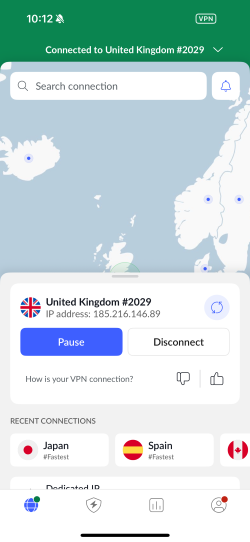
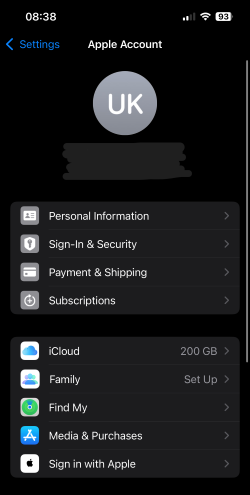
Activating FaceTime on an iPhone in the UAE with the help of a VPN is a relatively straightforward process. You only need to follow five steps:
- Install a reputable VPN and create an account. My top VPN recommendation is NordVPN, now 75% OFF
-
Connect to a server where FaceTime is allowed (like the UK)

-
If you have an Apple ID, go to Settings and sign out

- After signing out, create a new Apple ID
- Once you create a new account, go to the App Store, where FaceTime is available to download
What are good VPNs to bypass FaceTime blocks in Dubai?
The best solution to bypass the FaceTime block in Dubai is to get the best VPN for the UAE. To get the best out of VPN, choose a provider with unbreakable encryption, added security features, and a wide server fleet in countries where FaceTime is available. Here are my top VPN recommendations:
- NordVPN is one of the best VPNs for unblocking FaceTime in Dubai, with a massive 9,500+ server network spanning 149 countries, for $3.49/month. The VPN has an obfuscation feature to mask VPN usage. It also runs on an independently audited no-logs policy, meaning it doesn’t collect any of your online activity logs.
- Surfshark is another excellent VPN for unblocking FaceTime in the UAE. It offers a vast fleet of 4,500+ servers in 100 countries, along with extra security features such as Camouflage mode (obfuscation) to conceal your VPN usage. It’s a privacy-focused VPN also because of its strict no-logs policy, which doesn’t track or keep any of your activity. You can get Surfshark for only $2.49/month.
- IPVanish is one more great VPN option for bypassing the FaceTime block in the UAE. For just $2.19/month, you get access to generous 3,400+ servers in 112 countries, allowing you to change your IP and unblock FaceTime easily. IPVanish also offers a traffic obfuscation feature and runs on an independently audited no-logs policy.
Why did Dubai block FaceTime?
In 2017, the UAE TRA officially blocked the use of FaceTime and other VoIP services like WhatsApp for voice and video calls. The TRA cited regulatory compliance as the reason for the ban.
However, freedomhouse.org suggests that the reasons behind the ban are more complex. One reason could be to promote the UAE's own telecommunications industry, particularly two providers called C'Me and BOTIM. Another reason could be related to privacy and national security concerns, with the UAE wanting to monitor user activity and conversations for surveillance purposes.
The TRA is responsible for implementing the ban, and several VoIP apps, including FaceTime and WhatsApp are affected. The ban has caused frustration for UAE residents who rely on these services to communicate with family and friends abroad, and many have turned to virtual private network (VPN) services to circumvent the ban.
Final thoughts
If you want to unblock FaceTime in the UAE, remember that using a VPN to access VoIP services can have consequences. In fact, users can face fines or even jail time for attempting to unblock apps like FaceTime or WhatsApp. Therefore, if you decide to unblock FaceTime with a VPN, I recommend consulting a legal practitioner in the UAE for further clarification.
However, if you still decide to use a VPN to unblock VoIP services in the UAE, choose a provider with obfuscated servers and a no-logs policy for ultimate privacy and security. My top pick is NordVPN, the best VPN for Dubai and the UAE, offering excellent security, the ability to bypass blocked or censored content, and extra safety features.
FAQ
Why is FaceTime not available in the UAE?
FaceTime is unavailable in the UAE because of government restrictions on VoIP services. However, our tests have shown that reliable VPNs like NordVPN can help you access FaceTime in Dubai and the UAE. Be aware that unblocking VoIP services with a VPN is illegal in the UAE, so you should consider consulting a legal practitioner for more information regarding fines and penalties.
Can we FaceTime from Dubai?
No, you can’t use FaceTime from Dubai because the application is illegal in the United Arab Emirates. If you want to use FaceTime in Dubai, you can access it with the help of a reputable VPN like NordVPN.
Can you install FaceTime on an iPhone bought in Dubai?
No, you can’t install FaceTime on an iPhone bought in Dubai if you stay in the United Arab Emirates. However, the app will appear in your App Store when you go abroad, where FaceTime is legal, or when you use a VPN to unblock it.
Do I need a VPN to FaceTime in Dubai?
Yes, you need a VPN to use FaceTime in Dubai because it helps access the app, which is illegal in the UAE. Beware that using a VPN to unblock VoIP apps like FaceTime is also against the law and can result in a penalty, such as a fine or imprisonment. Hence, I suggest you consult a legal representative in the UAE regarding a VPN to unblock FaceTime in Dubai. And if you go for a VPN, pick a trustworthy VPN, like NordVPN, with strong encryption and a no-logs policy for the job.


