Best ad blockers for Twitch in 2026
Our trusted in-house research experts conduct independent, unbiased testing of ad blockers, combining internal and external evaluation data and tools for comprehensive reviews.
We maintain full transparency by sharing our methodologies and technical insights, empowering readers to make informed, independent decisions.
Learn more

As of October 2026, my pick for the best ad blocker for Twitch is Surfshark CleanWeb. It provides excellent ad-blocking capabilities and effectively blocks malware and trackers for a smoother and safer online experience. Key features include ad customization, faster browsing, safe search, and alerts for breaches and blocked threats – plus, a premium VPN is included.
With more ads coming to Twitch, it is no wonder why the need for a reliable ad blocker also arose. Video ads in the beginning, midrolls, or even loud jump-scaring ads are a nuisance to the viewing experience and can turn the viewers away from the platform.
By investing in a reliable and secure ad blocker for Twitch, you can avoid all of the irritating ads plaguing the platform. In addition, a top-rated ad blocker will also prevent other online threats from targeting your data and device security.
In this article, we recommend the best ad blockers for Twitch – the top solutions are Surfshark CleanWeb, Total Adblock, and NordVPN next-gen antivirus Read to find more ways to help you get rid of Twitch ads and enjoy your hours of stream content ad-free and with no other disruptions.
Top 5 best Twitch ad blockers for 2026
- Surfshark CleanWeb – best ad blocking solution for Twitch for 2026
- Total Adblock – well-performing ad blocker for Twitch
- NordVPN next-gen antivirus – trustworthy ad blocker for Twitch streams
- IPVanish Threat Protection – safe ad blocker with a VPN
- Proton VPN NetShield – customizable ad blocker for Twitch
📢 LIMITED OFFER: 85% OFF Surfshark CleanWeb + 3 months FREE
What to look for in the best ad blocker for Twitch?
Picking the best Twitch ad blocker for yourself can be disorienting. With plenty of providers available, it’s difficult to decide which one offers all of the needed features and protection. Here’s a list of the main criteria to pay the most attention to:
| Types of ads blocked: | In-video, pop-up, banners, etc. |
| Compatibility: | Apps, browser extensions |
| Features: | Whitelisting, filters, tracker blocker |
| Security: | VPN, antivirus |
- Twitch ad blocking. Pick the ad blocker that is able to block video ads and trackers especially. However, in addition, the best Twitch adblocks will work with blocking a variety of malicious ads and other threats online.
- Apps or extensions for your devices. Before blindly picking the most popular ad blocker on the market, you should ensure that it will work with your preferred browser for watching Twitch streams, and is compatible with your device OS.
- Additional features. Blocking ads is not the only feature worth looking at when picking an ad blocker. Getting a high-rated and reliable ad blocker with an included VPN tool or an antivirus will provide additional protection for your data and device security.
- Price. Select the ad blocker based on the value it offers for the money. Just because one is expensive doesn’t mean that it will meet your needs or even has the needed features for you.
The best ad blocker for Twitch – our detailed list
Our list of the top 5 best ad blockers is made of only the tried and tested ad blockers that actually work with blocking Twitch ads. So, continue reading to learn more about each provider to find the one that fits your needs the best.
1. Surfshark CleanWeb – best ad blocker with a VPN for Twitch overall

| Free version: | Yes (Free 7-day trial) |
| Blocks ads: | Video, pop-ups, banners, social media ads, images, notifications, trackers, gifs |
| Customer support: | 24/7 live chat, email, knowledge base, FAQs |
| Current deal: | 85% OFF Surfshark CleanWeb + 3 months FREE |
Surfshark CleanWeb is the best ad blocker to prevent Twitch ads. So, you’ll get to enjoy a seamless streaming experience and protect yourself and your device from malicious online threats.
Blocking Twitch ads. Surfshark CleanWeb blocks ads on DNS level. So, when tested, the Chrome extension successfully blocked ads, video ads, and trackers on Twitch. In addition, this ad blocker can also block pop-ups, banners, cookie consents, trackers, and malware.

Features. With Surfshark CleanWeb ad blocker you’ll get to customize what pages can still show you ads, increase browsing speeds, and use a safe search engine. In addition, you’ll also get a premium VPN to sweeten the deal, there are also alerts for website breaches and summaries about blocked ads, malware, and other threats.
Compatibility. You can use Surfshark CleanWeb ad blocker on a variety of devices and platforms. The original CleanWeb version is available on Windows, macOS, Linux, Android, iOS, and FireTV devices. However, the upgraded CleanWeb 2.0 version is available only on browser extensions for Chrome, Firefox, and Edge.
Price. You can purchase the ad blocker with the Surfshark VPN subscription, which costs as low as $2.49/month for unlimited devices, which is the same price as Total Adblocker, and slightly less expensive than NordVPN next-gen antivirus. You will also get a 7-day free trial and a risk-free 30-day money-back guarantee. Alternatively, you can get the Surfshark One bundle with the ad blocker, VPN, and an antivirus tool for $37.66/year.
For more information on all features included, check out the Surfshark CleanWeb review.
2. Total Adblock – Twitch ad blocker with great performance

| Free version: | Yes (Free 7-day trial) |
| Blocks ads: | Video, pop-ups, banners, social media ads, trackers, notifications, images, gifs |
| Customer support: | Email, knowledge base |
| Current deal: | Get 80% OFF Total Adblock |
Total Adblock is a trustworthy ad blocker to have a seamless Twitch streaming experience. Not only does it block video ads, but also pop-ups,and trackers, and protects from malware threats.
Blocking Twitch ads. Total Adblock browser extensions block ads on the script-blocking level. During our testing, the Chrome extension has successfully blocked in-video ads, other ads, and trackers on Twitch. In addition, it also removes pop-ups, banners, and third-party trackers.
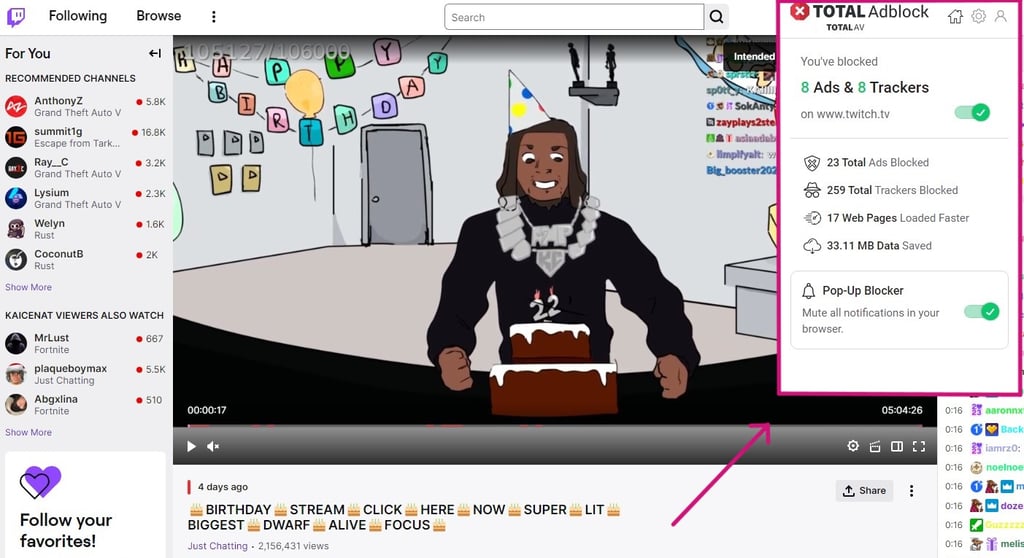
Features. This ad blocker is exceptionally easy to use and navigate. What we liked the most was that it has an Acceptable Ads section for customization purposes, and the user gets to specify which sites can still show ads or pop-ups. We found that it also improves page loading speeds and provides summaries on how many ads have been blocked and how much data has been saved.
Compatibility. Even though this ad blocker only has apps for iOS and Android devices, you can still get the browser extensions of your computers. Total Adblock is available on Chrome, Edge, Safari, Opera, and Firefox browsers.
Price. There is an option to try this ad blocker with a 7-day free trial, however, if you intend to use the premium features, you can purchase it for $1.59/month with a 14-day money-back guarantee. Otherwise, you can get this ad blocker included in the antivirus package with the TotalAV Total Security plan for $49.00/year.
Learn about the full security package in the Total Adblock review.
3. NordVPN next-gen antivirus – trustworthy ad blocker for Twitch streams

| Free version: | Yes (Free 7-day trial) |
| Blocks ads: | Video, pop-ups, banners, social media ads, notifications, images, trackers, gifs |
| Customer support: | 24/7 live chat, email, knowledge base, FAQs |
| Current deal: | Up to 75% OFF + 3 months extra with built-in next-gen antivirus |
NordVPN next-gen antivirus (formerly Threat Protection) is a great tool to block a variety of different ads and protect your device from malware. No matter if they are in-video ads, trackers, or malware, this ad blocker will successfully block them and make your streaming experience speedy and lag-free.
Blocking Twitch ads. NordVPN next-gen antivirus blocks ads on the DNS level. This ad blocker easily blocks in-video ads and trackers for Twitch. In addition, you can be certain that this will also protect you from pop-ups, malicious banners, and malware threats.
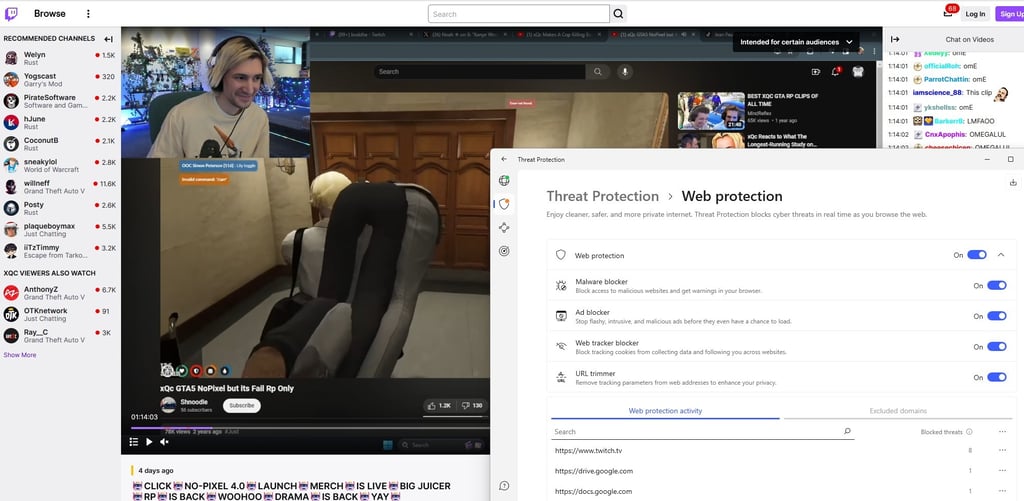
Features. This ad blocker can remove tracking parameters attached to URL links to increase browning privacy. Also, it blocks malware and prevents downloading infected files, and you can customize the protection features. With the ad blocker enabled, you’ll be able to load pages much faster and get a 7-day protection summary of all ads blocked.
Compatibility. Next-gen antivirus is included with NordVPN apps for Windows, macOS, Linux, Android, and iOS devices. If you don’t fancy the system-wide app, we found that the browser extensions for Chrome, Firefox, and Edge are also convenient and easy to use.
Price. You can purchase this ad blocker with a VPN for as low as $3.09/month and get a risk-free 30-day money-back guarantee. It is slightly more expensive than Total Adblock, but you also get a VPN with it. Even better, you can claim NordVPN’s 3-day free trial to test out if this ad blocker is truly the best for blocking Twitch ads.
Learn more about the full feature package in the NordVPN next-gen antivirus review.
4. IPVanish Threat Protection – safe ad blocker with a VPN

| Free version: | Yes (Free 7-day trial) |
| Blocks ads: | Video, banners, social media ads, trackers |
| Customer support: | 24/7 live chat, email, phone line, knowledge base, FAQs |
| Current deal: | Now up to 83% OFF IPVanish |
IPVanish Threat Protection is a safe solution for blocking Twitch ads. It’s effective with video ads and trackers, secures your device from malware, and offers additional VPN perks for users.
Blocking Twitch ads. The built-in Threat Protection ad blocker prevents 3rd party trackers and malware threats. It does not work with Twitch ads since they aren't malicious. However, we successfully got rid of Twitch ads by using IPVanish to connect to a server where Twitch ads are unavailable.
Features. IPVanish Threat Protection shields from various online threats, including trackers, cookies, and blocks malicious websites. However, the ad blocker doesn’t have a whitelisting feature.
Compatibility. Unfortunately for browser extension fans, IPVanish Threat Protection is only available as an app on Windows, macOS, Android, and iOS devices. However, you can use this ad blocker even when disconnected from a VPN.
Price. The Shield ad blocker comes with the IPVanish subscription, which costs $2.49/month. IPVanish also provides unlimited simultaneous connections, which is perfect for tech-savvy users. In addition, there’s also a risk-free 30-day money-back guarantee to safely test the ad blocker for yourself.
Learn about all the features you’ll get with this VPN subscription in the IPVanish review.
5. Proton VPN NetShield – customizable ad blocker for Twitch

| Free version: | No (Only the VPN has a free version) |
| Blocks ads: | Video, banners, social media ads, trackers |
| Customer support: | Email, knowledge base, and FAQs |
| Current deal: | Get up to 70% OFF Proton VPN NetShield |
Proton VPN NetShield ad blocker will prevent irritable ads from ruining the viewing experience of your favorite Twitch streams. In addition, you’ll also get a reliable VPN subscription.
Blocking Twitch ads. Proton VPN’s built-in NetShield ad blocker works on the DNS blocking level and is capable of blocking Twitch video ads. In addition, it can also block trackers and malware threats.
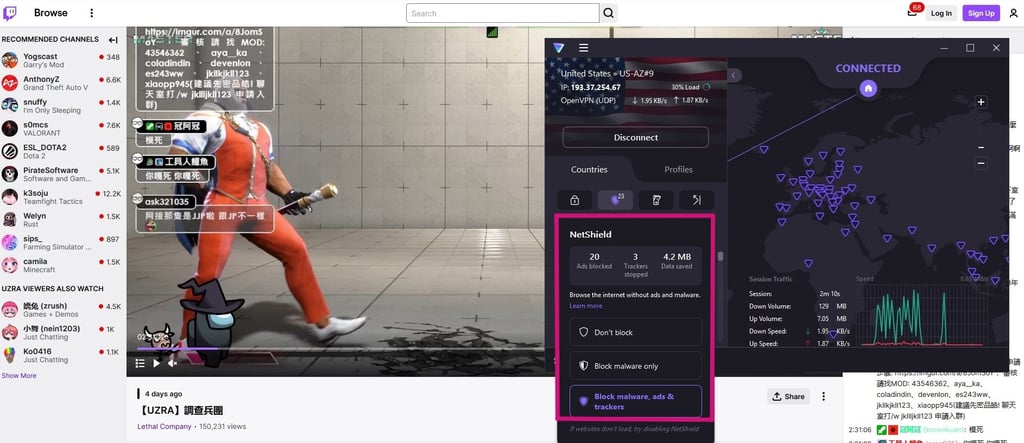
Features. We found it beneficial that there’s a possibility to customize your protection levels from malicious ads – Don’t block, Block malware only, and Block malware, ads, and trackers. More so, with an enabled ad blocker, all the spam that slows your connections will be blocked, and you’ll also get a VPN tool to protect your data online. However, there’s no whitelisting feature.
Compatibility. Proton VPN NetShield is only available in the app and doesn’t support any browsers. You can get the app on Windows, macOS, Linux, Android, and iOS devices. Also, to use the ad blocker you will need to connect through a VPN tunnel.
Price. While the Proton VPN does have a free version, to get the NetShield ad blocker, you’ll need to invest in a paid subscription, which starts at $2.99/month with up to 10 simultaneous connections. Compared to Total Adblock or Surfshark CleanWeb, ProtonVPN is pretty expensive. Nevertheless, you can use the 30-day money-back guarantee.
To learn about the full feature package, head over to our detailed Proton VPN review.
Best Twitch ad blockers compared
Here’s how the best ad blockers for Twitch compare to each other:
| Surfshark CleanWeb | Total Adblock | NordVPN next-gen antivirus | IPVanish Threat Protection | Proton VPN NetShield | |
| Rating | |||||
| Price from: | $2.49/month | $1.59/month | $3.09/month | $2.49/month | $2.99/month |
| Free version | ✅ Yes (7-day free trial) | ✅ Yes (7-day free trial) | ✅ Yes (3-day free trial) | ✅ Yes (7-day free trial) | ❌ No |
| Twitch ad blocking | ✅ Yes | ✅ Yes | ✅ Yes | ✅ Yes | ✅ Yes |
| Passed ad-blocking tests | ✅ Yes | ✅ Yes | ✅ Yes | ✅ Yes | ✅ Yes |
| Blocks ads | Video, pop-ups, banners, social media ads, trackers, notifications, images, gifs | Video, pop-ups, banners, social media ads, trackers, notifications, images, gifs | Video, pop-ups, banners, social media ads, trackers, notifications, images, gifs | Video, banners, social media ads, trackers | Video, banners, social media ads, images, trackers |
| Comes with | VPN | Stand-alone or antivirus | VPN | VPN | VPN + antivirus |
How we selected and tested Twitch ad blockers
To curate the list of the best Twitch adblocks, we made sure to test all possible options. After excluding the free and unreliable ones, we’ve tested these ad blocker’s ability to block malicious ads, trackers, and other threats:
- Twitch ad blocking results. First and foremost, we tested each ad blocker’s abilities with blocking Twitch ads, whether they are mid-rolls, video ads before the stream, or even pop-ups on the side.
- Additional features. The best ad blockers will come with additions like whitelisting,and protection from malware, and include a VPN or an antivirus, so you get the most out of your purchase.
- Supported OS and browsers. When investing in an ad blocker it’s smart to make sure that not only will it work with your preferred device’s OS, but, in addition, will work on your specific workflow.
- Price. Just because an ad blocker is very expensive doesn’t mean it’s that good. However, free ad blockers aren’t recommended as well since they can be infected with malware. Therefore we selected those that bring the best value for the money.
Why block Twitch ads?
Ads make Twitch, a multimillion-dollar company that is owned by Amazon, a lot of money. However, being a nuisance to corporations and spreading your anti-capitalist agenda are not the only reasons to block ads on Twitch.
Here are some of the other reasons, why you should get yourself a reliable Twitch ad blocker:
- Seamless streaming. Ads often interrupt streams and the longer the content is, the more ads you’ll get. An ad blocker can prevent these disruptions and, in turn, make the whole streaming experience seamless, lag and ad-free. So, nothing will distract you from watching several hours of content.
- Stop subscription ads. Twitch offers a paid subscription service and a free one with your Amazon Prime membership. However, a subscription doesn’t mean that you won’t encounter ads on Twitch anymore. So, an ad blocker saves you from the hassle of ads even when you pay Twitch money.
- Avoid loud ads. Twitch has some loud video ads that can jump-scare you and really ruin the experience of watching your favorite streamer. With an ad blocker for Twitch, you can be certain to avoid jumpscare ads and enjoy loud-equals-funny content from the top streamers on the platform.
Twitch purple screen fix
If you’ve ever encountered the daunting purple screen while watching a Twitch stream, that’s simply Twitch’s way of demanding you to stop using an ad blocker because it is interfering with Twitch’s code.

All of this is so the platform can make its money and you can sit through copious amounts of ads, sometimes it may add up to even 8 ads in a row.
However, don’t worry if you see this Twitch purple screen, there are ways to avoid it and still prevent intrusive ads while watching your favorite streamer put themselves through another multiple-day-long subathon.
The easiest way to prevent a purple Twitch screen from appearing is to change your ad blocker. Maybe you were using a free tool or a less reliable one. So, investing in a tested and trusted premium provider can ensure that you will be able to block ads successfully. Our top pick for the best ad blocker is Surfshark Cleanweb.
More so, Twitch usually pushes the most amount of ads for people in the US, UK, Germany, and similar countries. So, if you have a VPN with an ad blocker, just change your connection country to one that gets fewer ads, like Lithuania, Mexico, Panama, Poland, or other similar locations.
You can also try out watching the streams in Incognito mode, which seems to be working pretty well when trying to evade ads and the purple screen. Other popular options include using a Twitch app or alternative sites for streaming.
Lastly, you could also subscribe to your favorite Twitch streamers in exchange for the promise of never seeing ads. However, it’s very likely that you will still see ads. So, an ad blocker is your best bet for watching uninterrupted Twitch streams.
Blocking Twitch ads with a VPN
If you don’t want to use an ad blocker, there’s another way – blocking Twitch ads with a VPN. In some countries, such as Ukraine, Serbia, or Russia, Twitch advertising is not yet available, so you can use a VPN to connect to a server in one of these locations, and get rid of Twitch ads.
We tested this method with NordVPN and Surfshark’s Ukrainian servers. The results were positive – each VPN successfully ‘blocked’ Twitch ads.
Conclusion
The best way to prevent irritable video ads is by getting a reliable and secure ad blocker for Twitch. Not only are the Twitch stream ads annoying, but they may also be malicious, so protecting your data and device is the best way to go.
Our top contender for this is Surfshark CleanWeb. This ad blocker combats video ads, trackers, pop-ups, and other malicious online threats.
Even more, with the Surfshark CleanWeb, you also get a VPN to protect your device from malicious hackers. This ad blocker offers much value for the money and protects your data and device from cyber threats.
More Ad blocker guides from Cybernews
How to bypass adblock detection on any website: block ads on any siteHow to block ads on Chrome in 2026: remove ads from ChromeHow to block ads on YouTube in 2026: enjoy YouTube ad-freeHow to block Twitch ads in 2026: the easiest way to remove ads from TwitchBest ad blockers for games: enjoy gaming ad-free
FAQ
What is the new AdBlock for Twitch?
The best adblock that works on Twitch is Surfshark CleanWeb. Its new technologies can block all kinds of ads appearing on Twitch. You can also customize it to block specific ads and allow others, which is great for supporting Twitch content creators.
How do you stop ads on Twitch?
To stop ads from ruining your Twitch streaming experience, you can get a reliable ad blocker. Our top suggestion is Surfshark CleanWeb. With this ad blocker, you’ll be able to avoid malicious pop-ups, video ads, and many other online threats while streaming or browsing online. This will make the viewing experience much more enjoyable and your connection speeds faster.
What is the Twitch purple screen error and how do I fix it?
The Twitch purple screen error appears while watching streams in your browser, and it means that the ad blocker you’re using is interfering with Twitch’s scripts. There are a couple of ways of ad blocking, like Surfshark CleanWeb, or using the Twitch app for fewer ads.
Can you get rid of all ads on Twitch?
With a top-rated and reliable ad blocker, you should be able to get rid of most, if not all Twitch ads. So you’d get a more enjoyable and seamless streaming experience. We recommend investing in an ad blocker like Surfshark CleanWeb.
What is the best ad blocker for Firefox Twitch?
The best ad blocker for Twitch on Firefox browser is Surfshark CleanWeb. It works on all types of browsers and even offers a browser extension for Firefox. All Twitch ads, including pop-ups, banners, and video ads will be easily blocked with Surfshark Cleanweb.
Is it safe to use an ad blocker on Twitch?
Yes, it is safe to use a good quality and effective ad blocker on Twitch. Our recommended ad blocker for Twitch is Surfshark Cleanweb – it is safe, blocks all kinds of ads, and is easily customizable.
Does Twitch block ad blockers?
No, Twitch does not block ad blockers specifically. However, Twitch will block any “third-party tools” that may be interfering with website code, which is also known as the purple screen error.