How Pokémon GO spoofing works in 2026
Our in-house cybersecurity experts and journalists, renowned for major reports like The Mother of All Breaches, conduct transparent, unbiased VPN testing and in-depth analysis.
With 750+ articles crafted based on real-world research, we empower readers to make informed purchasing decisions through first-hand expertise.
Learn more

Getting stuck in a Pokémon GO dead zone, with only a few Pokémon like Pidgeys and Rattatas – or in a desert of PokéStops and Gyms – can feel like you're missing out. You’re not alone.
Many players are constantly searching for how to spoof their location on Pokémon GO without actually traveling far. That’s all to unlock new territories and Pokémons. The truth is, this quest of Pokémon GO spoofing is much harder and riskier than the game itself.
The main reason is that the developer, Niantic, doesn’t really want its users to spoof their location because it’s building a centimeter-level accuracy positioning system from player data. Since it invests heavily in catching bypassers, there is no safe and guaranteed method that works 100% of the time.
In this article, I introduce different methods that players use to spoof their location on Pokémon GO in 2026. However, I don’t recommend using any of them, as they carry risks and often don’t work reliably.
How Pokémon GO spoofing works on Android

- Choosing a VPN. Due to associated risks, I don’t recommend you to go through these steps yourself. However, if you still decide to do that, make sure to choose a reliable VPN like Surfshark, now 85% OFF
- Getting a GPS spoofing app and enabling mock locations.
- Rooting your device. I don’t endorse rooting your Android device. You need to perform a thorough research on this topic before making any changes to your device. Otherwise, rooting can affect your security features.
- Downloading a mock location module.
- Choosing a VPN server location and turning on the GPS spoofing app.
- Playing Pokémon GO and exploring new areas.
How Pokémon GO spoofing works on iOS

- Jailbreaking your iPhone. Same as for Android, I don’t recommend jailbreaking your device if you don’t have enough knowledge how to do that. This can affect your device’s security features.
- Connecting to a VPN. If you proceed the following steps, I advise you to use a reliable VPN like Surfshark, now 85% OFF.
- Getting a GPS spoofing app.
- Choosing a VPN server location and turning on the GPS spoofing app.
- Playing Pokémon GO and finding new Pokémons.
Explaining GPS spoofing in Pokémon GO
GPS spoofing apps and VPNs are the most common tools for changing your virtual location in Pokémon GO. GPS spoofing helps mask your real location by tricking your device into reporting false GPS coordinates. A VPN can further help by hiding your IP address, making it harder to trace your actual location. Together, these methods can make it appear as though you’re playing from a different region, potentially giving you access to Pokémons that aren't available in your area.
However, simply using GPS spoofing and a VPN is often not enough. In many cases, you also need to root your Android or jailbreak your iOS device – both of which come with significant risks, including voiding warranties and exposing your device to security vulnerabilities.
It's not entirely clear which methods Pokémon GO uses to detect location spoofing, but it's believed the game may verify your location by cross-referencing your device’s GPS coordinates with your IP address. If there's a mismatch or signs of tampering, Niantic may determine that you're cheating. If caught, you risk being banned from playing Pokémon GO.
Risks of rooting/jailbreaking your device
Spoofing your location in Pokémon GO includes a few steps: using a VPN, utilizing a GPS spoofing app, and rooting or jailbreaking your device. While the first two are completely safe, I can’t say the same about rooting or jailbreaking. The risks outweigh the benefits, and the success rate is very small. Here’s what can happen if you root or jailbreak your device:
- Security vulnerabilities. Root access can expose your device to malware and unauthorized apps
- Void warranty. Most manufacturers void warranties after rooting, even if you later unroot and restore factory settings
- Bricking. Improper rooting can render the device unusable
- Loss of OTA updates. Rooted devices often cannot receive official over-the-air updates
- App incompatibility. Some apps, like banking or DRM-protected, refuse to run on rooted devices
- Data loss. Rooting may require factory resets, risking personal data
- Unstable system. Custom modifications can cause crashes or performance issues
Pokémon GO spoofing in 2026
The developer Niantic is against Pokémon GO spoofing because it beats the game's ultimate goal – collecting accurate geo-data to build a geo-location tool as accurately as possible. Plus, it has been banned in some countries due to security concerns (such as surveillance and privacy), legal or regulatory issues, public safety risks (like crowd control or accidents), or cultural and political reasons.
If that wasn't enough, spoofing doesn't work unless you root/jailbreak your phone, which is at high risk to your security and functionality, and even there's a tiny chance it'll work. However, if you're still willing to try it, here are some of the latest tricks and tips that might help.
1. Choosing a VPN for Pokémon GO
If you're trying to minimize the chances of Niantic detecting that you're spoofing your location, using a VPN in combination with a GPS spoofing app can help. A VPN masks your real IP address and can make it appear that your connection originates from the same region as your spoofed GPS location.
Since Niantic likely uses both GPS data and IP-based geolocation to verify user locations, aligning the two through GPS spoofing and a VPN may reduce inconsistencies that could raise red flags. However, this doesn't guarantee safety, as Niantic employs various detection methods beyond just IP and GPS.
2. Choosing a GPS spoofing app
If you're looking for a Pokémon GO location spoofer, choosing the right GPS spoofing app is quite important. Apps like iAnyGo, iPogo, and Spoofer Go are popular choices for enabling a fake GPS in Pokémon GO, each offering smart features for location spoofing. When selecting a Pokémon GO fake GPS app, keep compatibility in mind – it can change with game updates, so check if the app is updated to work with the latest version of Pokémon GO.
Installing a location spoofer for Pokémon GO can be risky. Apple App Store and Google Play Store have restrictions on these apps, so you may need to download them from third-party sites or use unofficial versions. Also, you’ll have to jailbreak or root your device to fully enable spoofing features. It can expose your phone to security risks, void warranties, and make it harder to get official updates.
3. Using a VPN to change location
Pairing a VPN with a GPS spoofing app may help you change your location in Pokémon GO. While the spoofing app fakes your GPS location, the VPN hides your real IP address and replaces it with one from the region you choose.
To get started, open your VPN app, pick the country or city you want to appear in, and connect. Then, open your Pokémon GO location spoofer app to set the same location on your GPS. Just keep in mind that this method doesn't guarantee it will work, as Niantic uses multiple techniques to detect spoofing.
4. Using a GPS spoofing app
A GPS spoofing app can help you change location in Pokémon GO, letting you travel anywhere in the world without leaving your home. These Pokémon GO location spoofers offer various features, allowing you to customize how and where you explore the game. Here are some standard features of Pokémon GO fake GPS apps:
- Basic location spoofing. You can set fake GPS coordinates by choosing any location on the map or entering the coordinates to make your device appear there. You can manually enter latitude and longitude to set an exact spoofed location.
- Teleportation mode. Quickly switch your device's location to another spot. This way, you can explore faraway regions in Pokémon GO.
- Route simulation. This allows you to simulate movement along a path. You can also have speed control, which lets you adjust the movement speed to mimic walking, cycling, or driving.
- Joystick control. Use a virtual joystick to move your location in real-time, letting you explore as if you were actually moving. Change your direction on the map, which is useful for navigating in games like Pokémon GO.
- Anti-ban features (for games like Pokémon GO). You can avoid actions that could flag your account by using timers that remind you to cool down before moving long distances. With safe movement settings, you can automatically adjust speed and routes to mimic natural movement and avoid account issues.
Using a reliable GPS spoofing app gives you more control over your in-game location, making it easier to explore new areas. However, spoofing may still carry the risk of penalties, so use caution and follow safe practices.
Can you get banned for spoofing in Pokémon GO?
Yes, since spoofing goes against Pokémon GO Terms of Service and Trainer Guidelines. Pokémon GO also has a three-strike discipline policy, which includes a warning, then a suspension, and, as a last resort, account termination. Niantic’s policy in detail:
- Strike 1: Warning. Your account may receive a warning message, and Pokémon will stop appearing on the map.
- Strike 2: Suspension. Your account may be suspended for 30 days.
- Strike 3: Termination. Your account will be permanently banned, losing all progress.
If you abuse GPS spoofing on Pokémon Go to gain a competitive advantage, you can get a strike or even a ban. Even using a VPN can’t 100% protect you from that, since Niantic uses a variety of methods to detect players spoofing their locations.
Tips to securely spoof Pokémon GO
Spoofing Pokémon GO can jeopardize your device’s safety and your Pokémon GO account. However, I collected 10 key tips that can help you minimize the risk as much as possible:
- Use reliable tools. Choose a reputable VPN, like Surfshark or NordVPN, to mask your IP and a trusted GPS spoofing app like Fake GPS Location or iPogo. As you may need to root or jailbreak your device, don’t do it if you don’t have enough knowledge.
- Avoid drastic location changes. Stick to realistic travel patterns. To minimize suspicion, make gradual changes or stay within the same region instead of teleporting between distant cities.
- Respect cooldown periods. After an in-game action (catching Pokémon or spinning PokeStops), wait before changing locations. Longer cooldowns are needed for greater distances.
- Limit spoofing activity. Use teleportation sparingly and avoid frequent location changes. This helps keep your activity under the radar.
- Match VPN and GPS locations. Connect your VPN server to the same region as your GPS-spoofed location for consistency.
- Use airplane mode wisely. Before setting your spoofed location, enable airplane mode to disconnect from networks. Then, set the new GPS location and reconnect to Wi-Fi. This can help prevent location drift.
- Don’t overuse spoofing tools. Constantly teleporting or making location changes can be a red flag to Niantic. Use the GPS spoofing app sparingly.
- Spoof in high-traffic areas. High-traffic areas like New York City, Tokyo, or London tend to have a lot of spoofing activity, which makes detection less likely.
- Consider using an account dedicated to spoofing. Use a secondary account for spoofing activities. This can reduce the risk to your main account in case of detection.
- Stay updated with anti-cheat measures. Join Pokémon GO spoofing communities and update your apps to stay aware of anti-cheat measures.
How to spoof Pokémon GO with Surfshark GPS override
Spoofing your Pokémon GO location involves using a GPS spoofing app alongside a VPN to align your IP address with the spoofed location. While various GPS spoofing apps are available, Surfshark VPN stands out with its unique GPS override feature. This feature automatically adjusts your GPS location to match the IP address of the location you're logged into, helping you to change your Pokémon GO location. If you're wondering how to spoof Pokémon GO using Surfshark's GPS override feature, here's how you can do it:
- Download a VPN app that has a GPS spoofing feature. I recommend Surfshark, now 85% OFF
- Connect to a server in your preferred location
-
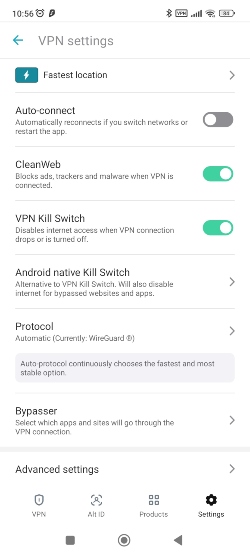
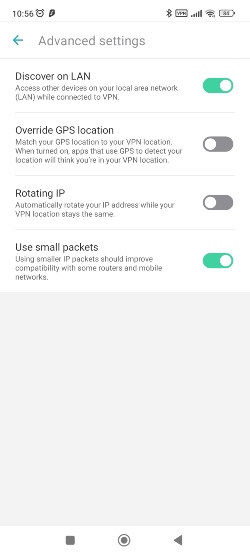
Go to Surfshark’s Settings -> VPN settings -> Advanced settings

-
Toggle on the Override GPS location feature
-
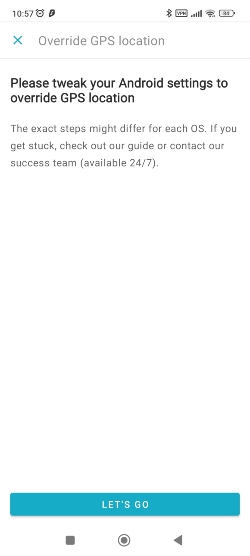
Surfshark will provide further instructions, or you can go to the Settings of your phone
- Click on About phone
- Find the Build number and tap on it 7 times. The message appears informing you that you are now in Developer mode
-
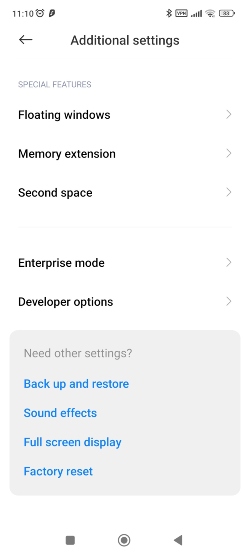
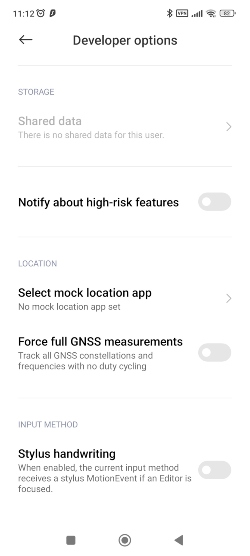
Go to the phone’s Settings -> System -> Advanced -> Developer options
-
Select the mock location app and choose Surfshark
- Open Pokémon GO and check whether your location matches the one you are connected to with the VPN
Wrapping up
Pokémon GO is a popular game, with players eager to hunt for their favorite Pokémon. However, while spoofing your location on Pokémon GO may seem tempting to expand your territories and unlock rare Pokémons, I don’t recommend it.
Pokémon GO is a popular game, with players eager to hunt for their favorite Pokémon. However, while spoofing your location on Pokémon GO may seem tempting to expand your territories and unlock rare Pokémons, I don’t recommend it. Spoofing your location includes a method of using a VPN, a GPS spoofing app, and rooting or jailbreaking your device. The first two techniques are completely safe, but rooting or jailbreaking puts your device at risk. Plus, it’s not guaranteed to work.
However, if you’re aware of the risks and still willing to try, I suggest at least opting for a reliable VPN like Surfshark. It has a vast server network spanning over 4,500 servers across 100 countries. Surfshark not only protects your online privacy but also ensures a seamless gaming experience with its fast servers and reliable connection. Your data is shielded with AES encryption, and features like a kill switch offer added security against any unexpected interruptions.
FAQ
Is it still possible to spoof a Pokémon GO location in 2026?
Some users have reportedly managed to spoof their location in Pokémon GO, but there is no confirmed or consistently reliable method for doing so.
How do you change the GPS location on Pokémon GO?
There's no confirmed method to spoof your location on Pokémon GO in 2026. Some users can change their location by using a VPN, a GPS spoofing app, and rooting or jailbreaking their device all at once. However, I don't suggest that because this method has risks and doesn't work for all users.
What is the best VPN to use for Pokemon GO?
A VPN can't guarantee that it will spoof your location on Pokémon GO. However, if you're still eager to try it to confirm that yourself, I recommend using a reliable VPN like Surfshark or NordVPN.
Can Niantic detect spoofing?
Yes, Niantic can detect spoofing. It has a three-strike discipline policy to warn, suspend, or even terminate user accounts that use spoofing.
Can you spoof on iPhone Pokémon GO?
Yes, but that comes with risks, and I don’t recommend it. To spoof your location on an iPhone, you need to jailbreak the device. This can void your warranty and expose your phone to security vulnerabilities.
Is spoofing on Pokémon GO illegal?
No, but it’s against Pokémon GO's Terms of Service. So, while you won’t get in trouble with authorities, you might still get penalized within the game or even get your account permanently banned.


