PureVPN vs ExpressVPN: which VPN is better?
Our in-house cybersecurity experts and journalists, renowned for major reports like The Mother of All Breaches, conduct transparent, unbiased VPN testing and in-depth analysis.
With 750+ articles crafted based on real-world research, we empower readers to make informed purchasing decisions through first-hand expertise.
Learn more

PureVPN and ExpressVPN are both well-known VPN providers, but they stand out for different reasons. PureVPN is often recognized for its affordability and solid feature set, while ExpressVPN is known for its premium performance, strong security, and consistently fast speeds.
In this PureVPN vs ExpressVPN comparison, I evaluated both services’ security, streaming performance, speeds, server networks, torrenting support, extra features, ease of use, pricing, and customer support to ensure a fair and well-rounded assessment.
Keep reading to see how each provider performs in detail and which one ultimately comes out on top.
PureVPN vs ExpressVPN: overview
ExpressVPN is a reliable VPN known for fast speeds, strong privacy, and consistent streaming performance, while Private Internet Access (PIA) focuses on affordability, customization, and a massive server network. The key difference is simple: ExpressVPN prioritizes speed and ease of use, whereas PIA appeals more to budget-conscious, tech-savvy users who want greater control.
| PureVPN | ExpressVPN | |
| ⭐ Rating: | ||
| 🥇 Overall rank: | #7 out of #41 | #4 out of #41 |
| 🖥️ Servers: | 6,000+ servers in 65 countries | 3,000+ servers in 113 countries |
| 📖 No logs policy: | No logs | No logs |
| 💵 Price: | From $1.99/month | From $2.99/month |
| 🔥 Coupons: | PureVPN coupon 87% OFF | ExpressVPN coupon 80% OFF |
| 🔒 VPN protocols: | OpenVPN, WireGuard, IKEv2 | OpenVPN, WireGuard, Lightway |
| 🍿 Streaming services: | Netflix, BBC iPlayer, YouTube | Netflix, Hulu, BBC iPlayer, Disney+, and more |
| 🖥️ Platforms: | Windows, macOS, Linux, Android, iOS | Windows, macOS, Linux, Android, iOS |
| 📥 Simultaneous connections: | 10 | 14 |
| 💁🏻 Support: | Knowledge base, email, 24/7 live chat | Knowledge base, email, 24/7 live chat |

Recent Updates
Key differences between PureVPN and ExpressVPN
PureVPN and ExpressVPN cater to slightly different users. PureVPN focuses on affordability and solid core features, while ExpressVPN leans toward premium performance, better streaming access, and a more polished overall experience.
Choose PureVPN if:
- You want the best value for money. PureVPN is consistently cheaper across all plans while still offering a reliable feature set, making it ideal for budget-conscious users.
- You prioritize upload speeds and WireGuard performance. In testing, PureVPN’s WireGuard protocol delivered better upload speeds and strong overall performance, which is useful for tasks like file sharing.
- You need more protocol options and flexibility. PureVPN supports a wider range of protocols, including WireGuard and SSTP, giving more control over how your connection is configured.
Explore all the essentials in our comprehensive PureVPN review.
Choose ExpressVPN if:
- You want the best streaming experience. ExpressVPN reliably unblocks more platforms, including Netflix libraries worldwide, Disney+, HBO Max, and Amazon Prime Video.
- You value premium security infrastructure. Features like RAM-only servers and additional encryption options provide a higher level of security.
- You need consistent performance across protocols. ExpressVPN delivers more balanced speeds across OpenVPN, IKEv2, and Lightway.
- You prefer a more polished, feature-rich experience. ExpressVPN offers better split tunneling support, broader device compatibility, and a smoother, more refined app experience.
Our ExpressVPN review breaks down the experience from setup to daily use.




We spare no effort to test the products & their features. All information is gathered by our in-house research team & fact-checked by our team of experts. Discover the ins and outs of our testing procedures.
Speed comparison: PureVPN vs ExpressVPN
Here we compare the average results of both providers from in-house tests using the same baseline speeds, with the main focus oriented at the fastest protocols: WireGuard vs Lightway, and then proceed to shared options – OpenVPN and IKEv2.
After combining the average speeds from 10 locations, we see that ExpressVPN outperformed PureVPN in their comparison of the fastest protocols.
- Baseline: 300Mbps download/ 300Mbps upload
| WireGuard/Lightway | PureVPN | ExpressVPN |
| Download average: | 200Mbps | 203.5Mbps |
| Upload average: | 210Mbps | 146.4Mbps |
Regarding OpenVPN, ExpressVPN shows better speeds for both TCP and UDP protocols. The gap is smaller for uploads, but download speeds are better for this provider.
- Baseline: 300Mbps download/ 300Mbps upload
| OpenVPN (TCP/UDP) | PureVPN | ExpressVPN |
| Download average: | 88Mbps | 138.9Mbps |
| Upload average: | 77.5Mbps | 91Mbps |
For IKEv2, ExpressVPN shows higher download speeds but is slightly behind with uploads. It is a great, lightweight alternative to WireGuard for mobile devices, and ExpressVPN's average download speed for this protocol managed to outperform PureVPN.
- Baseline: 300Mbps download/ 300Mbps upload
| IKEv2 | PureVPN | ExpressVPN |
| Download average: | 167Mbps | 211.2Mbps |
| Upload average: | 12Mbps | 91Mbps |

Netflix and streaming performance
While both providers are solid options for unblocking streaming platforms, ExpressVPN has the edge over PureVPN. In this comparison, it is a more versatile option that also made our list of best VPNs for streaming.
With Netflix as the focal point of this battle, PureVPN only managed to unblock Japan and the US Streaming libraries successfully. On the other hand, ExpressVPN showed strong results and accessed the localized Netflix for all the main countries: the US, the UK, Japan, and more.
| Platform | PureVPN | ExpressVPN |
| Netflix | ✅ Yes (US and Japan only) | ✅ Yes |
| Amazon Prime Video | ❌ No | ✅ Yes |
| YouTube | ✅ Yes | ✅ Yes |
| Disney+ | ❌ No | ✅ Yes |
| BBC iPlayer | ✅ Yes | ✅ Yes |
| HBO Max | ❌ No | ✅ Yes |
As we review PureVPN vs ExpressVPN, there is a similar story when it comes to other streaming platforms. Both VPNs can unlock YouTube and BBC iPlayer, but PureVPN struggled with HBO Max, Disney+, and Amazon Prime Video.
However, for the sites they do unblock, PureVPN and ExpressVPN performed well in delivering streaming movies, TV shows, and videos in full HD. Even more, the similar speeds of PureVPN's WireGuard and ExpressVPN's Lightway protocol make both options fast enough to enjoy your favorite shows without buffering, even in remote locations.
Torrenting
As we compare these VPNs for torrenting, ExpressVPN seems a better choice, with fast speeds and more available locations for P2P communication.
Still, PureVPN is a solid option, but it blocks P2P on servers in countries that forbid file sharing, like the US, UK, Canada, and more. However, with a big server fleet, it remains a solid choice for an occasional download or two.
Plans and pricing
As we observe subscriptions with different terms, saving money and finding the choice with the best price-performance ratio remain as big priorities.
| Plan | PureVPN | ExpressVPN |
| Monthly | $12.95/month | $14.99/month |
| One year | $2.55/month | $4.99/month |
| Two years | $1.99/month | $2.99/month |
| Check PureVPN discounts | Check ExpressVPN discounts |
ExpressVPN more expensive option than PureVPN. The shortest monthly subscription shows the smallest gap between providers. PureVPN may lack some extra features, but its standard suite of tools and lower prices make it a better option than its competitor.
When comparing the cheapest tier, both providers allow 10 simultaneous connections. That said, ExpressVPN allows you to connect up to 14 devices with more expensive plans. PureVPN, on the other hand, has a 10-device limit with all plans.
Servers
| PureVPN | ExpressVPN | |
| Servers | 6,000+ | Undisclosed |
| Countries (total) | 65 | 113 |
| Virtual locations | Yes | Yes |
| Dedicated IPs | Yes | Yes |
As we look at server locations for ExpressVPN and PureVPN, choosing a better provider is no easy feat. ExpressVPN doesn't disclose the exact number of servers it operates, but its servers span across 113 countries. PureVPN’s server fleet has 6,000+ servers, but the global coverage is not as wide, with 65 countries.
Both providers have virtual locations to hide the physical location of their servers. PureVPN also sells dedicated IPs – unique servers that only you can access, for $2.66/month. If you want to get a dedicated IP with ExpressVPN, though, it’ll cost you $3.99/month.
Features overview
| PureVPN | ExpressVPN | |
| Split tunneling | ✅ Yes | ✅ Yes |
| Smart DNS | ✅ Yes | ✅ Yes |
| RAM-only servers | ❌ No | ✅ Yes |
| Stealth VPN | ✅ Yes | ✅ Yes |
| Web filters | ✅ Yes | ✅ Yes |
Additional features greatly enhance the use of a VPN and improve the privacy of your connections. ExpressVPN has more available features, which is not surprising considering its premium price. PureVPN offers a basic suite of VPN tools with some extra options requiring additional payments.
Split tunneling
As we can see, both PureVPN and ExpressVPN have split tunneling solutions to separate connections for better control and only use a VPN where needed.
PureVPN supports split tunneling for its apps on Windows and Android devices. It offers a simple whitelisting option where we can choose which apps will work with a VPN connection. Alas, the lack of support for Mac and iOS devices keeps the feature unavailable for many users, and we hope to see its implementation in future updates.

ExpressVPN’s split tunneling, however, is available on Android, Windows, Linux, and macOS. ExpressVPN’s split tunneling is more flexible than its PureVPN counterpart. In one window, you have three options: all apps use VPN (the default option), do not allow selected apps, or whitelist chosen processes.

Simple and straight to the point, ExpressVPN's split tunneling is versatile and works with your browsers, apps, clients, and other processes.
Obfuscation
Because we may encounter networks that try to identify and block VPN connections, server obfuscation has become a valuable addition to the suite of extra features.
PureVPN provides automated obfuscation to its servers once you log in to the app and start using the service. With these stealth VPN connections, even your internet service provider does not know you are using a VPN.
ExpressVPN does not advertise its obfuscation feature, but this option gets activated if someone tries to take a closer look at your connections. This way, the provider stops third parties and keeps your data safe, essential in regions with unfair internet control.
Smart DNS
Smart DNS is another important feature for the average user. ExpressVPN satisfied the demand with the MediaStreamer tool, which lets you access remote streaming libraries on devices that do not support VPN apps.
PureVPN has also added smart DNS to its feature set, which is widely used by streaming enthusiasts.
While not as secure or private as a VPN, Smart DNS features like MediaStreamer helps you have the best streaming experience. Because many smart TVs and other streaming devices cannot connect via VPN, having this tool is a clear advantage.
PureVPN vs ExpressVPN: which is more secure?
| PureVPN | ExpressVPN | |
| Encryption | AES-256 | AES-256 and ChaCha20/Poly1305 |
| Hash | SHA-512 | SHA-512 |
| RAM servers | No | Yes |
| A member of the Fourteen Eyes Alliance? | No | No |
| No-logs policy | Independently Audited | Independently audited |
| Kill switch | Yes | Yes |
| Ad blocker | Yes | Yes |
| DNS leak protection | Yes | Yes |
PureVPN and ExpressVPN are no pushovers in the security department. Both providers follow the industry encryption standards, and their base location is outside the Fourteen Eyes Alliance.
Infrastructure
ExpressVPN offers premium VPN server technology called TrustedServer security. The service runs on RAM-only servers, which deletes the client’s data after each reboot. For maximum security, the server software gets reinstalled on every startup, keeping the servers safe and consistent.
PureVPN does not have RAM-only servers, which is a solid drawback, as they are safer against physical security threats.
For tunneling options, ExpressVPN supports OpenVPN, IKEv2, L2TP, and its custom Lightway protocol. PureVPN Is better because it offers more: OpenVPN, IKEv2, L2TP/IPSec, SSTP, and most importantly – the WireGuard protocol.
Privacy
PureVPN and ExpressVPN are based in a perfect location for user privacy – the British Virgin Islands, a territory outside major intelligence-sharing alliances. On top of that, each provider has a kill switch – an essential security feature that prevents your privacy exposure when the connection with a VPN server is cut.
For private VPN connections, PureVPN encrypts traffic with the high-regarded AES-256 encryption protocol. ExpressVPN follows the same standards but also adds a lighter ChaCha20/Poly1305 encryption for connections via Lightway protocol.
Our online sessions are never truly private if the VPN provider logs user activity; therefore, ExpressVPN and PureVPN follow independently audited no-logs policies. Not only do our contenders strictly avoid logging user data, but they also invite third parties to prove their hands-off approach.
Last but not least, our pair of providers have the same options for leak protection: DNS, IPv6, and WebRTC. It is clear that both VPNs understand the client’s demand for a private user experience and provide the necessary tools to support online anonymity.
Logging
PureVPN is one of the first VPNs to adopt a no-log, always-on audit policy. With two independent audits concluded by KPMG, one of the four leading accounting organizations, their results have proven the provider’s dedication to the complete privacy of the client.
However, in 2017, PureVPN admitted to helping law enforcement by handing over logs to assist investigators with a cyberstalking case. Since then, independent audits in 2020 and 2021 have shown that the provider remains consistent with its no-log policy.
ExpressVPN also follows a no-logs policy, which was court-proven and independently audited by PwC in 2017. For extra security, its Windows, macOS, and Linux apps were tested for vulnerabilities by F-Secure and Cure53 in 2022.
For top anonymous VPN solutions check our list of Best no-log VPNs.
Platforms, interface, and ease of use
| PureVPN | ExpressVPN | |
| Supported OS | Windows, macOS, Linux, Android, iOS | Windows, macOS, Linux, Android, iOS |
| Other software and devices | Android TV, Fire devices, Kodi | Android TV, Fire devices, routers |
| Browser extensions | Chrome, Firefox | Chrome, Firefox |
| Simultaneous connections | 10 | 14 |
| Usability level | Easy to set up | Easy to set up |
Both providers' apps are easy to use, but PureVPN's low price makes it a clear favorite in this comparison.
However, ExpressVPN stays competitive with the configuration of routers and a SmartDNS feature. Both the desktop and mobile apps for PureVPN are easy to use and do not overload the client with unnecessary information.
Desktop apps
PureVPN and ExpressVPN both have functional desktop apps. While the main focus falls on the Windows version, their macOS alternatives are very similar to the Windows client.
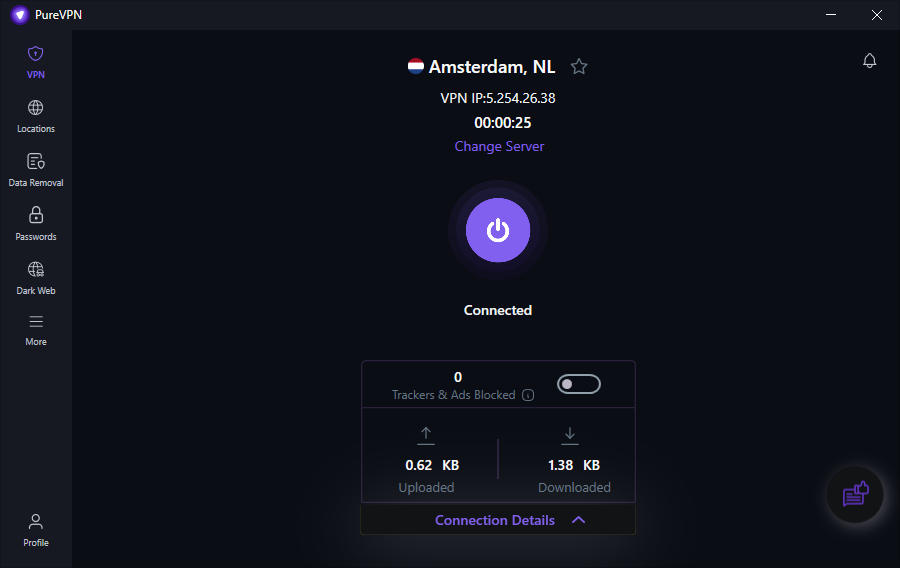
With PureVPN, we get an intuitive app that lays all the relevant information at the center of your app. On the left is a simple sidebar with self-explanatory icons that lead to extra tools and settings to adjust your VPN connection and tunneling protocols. When the link with the server is established, we can see the exact location and IP address, plus monitor used data for downloads and uploads.
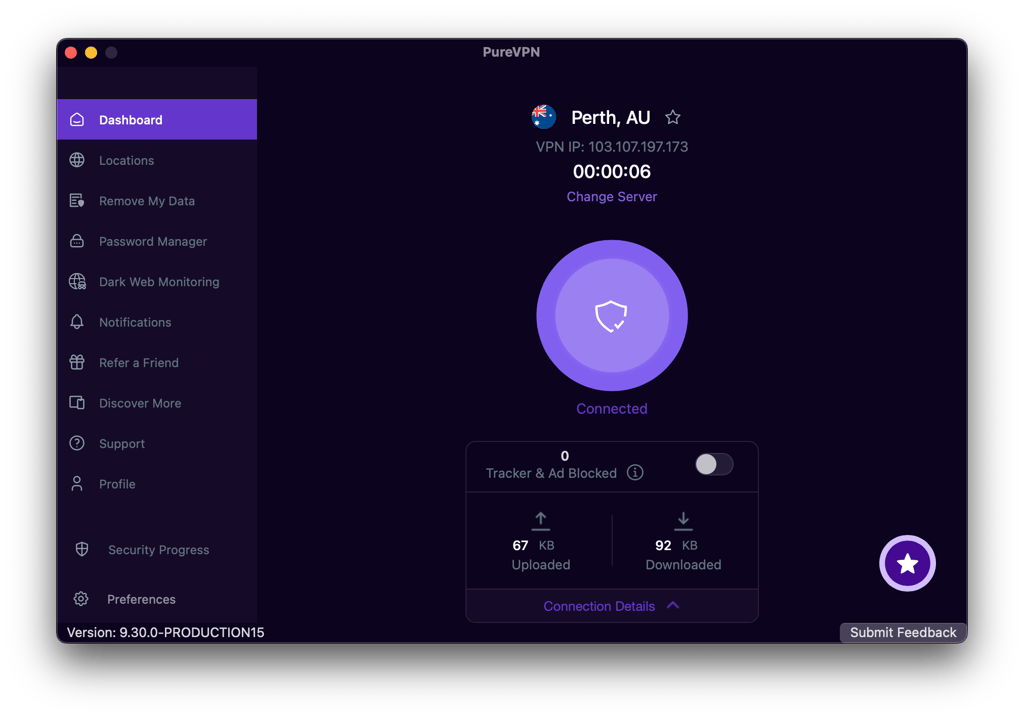
The macOS version is very similar to the Windows app, except it presents less information about your connection. While the slight downgrade is a bit upsetting, we still get a comfortable sidebar to navigate available settings and options.
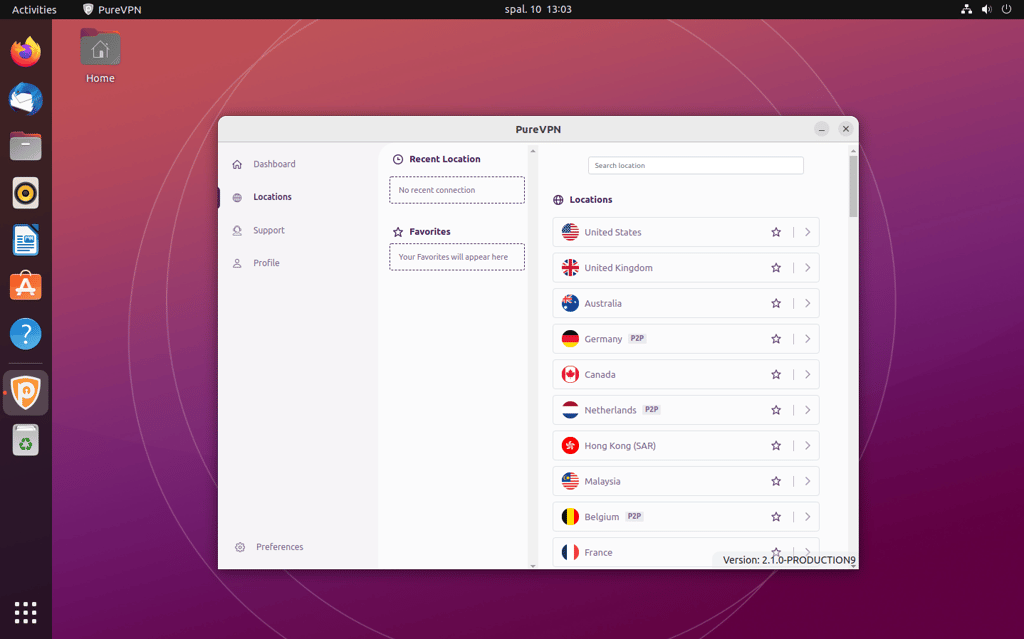
As per usual, Linux applications always make things interesting. First, we have an option for tech-savvy users to control the service through the command line interface. Most VPNs for Linux stop here, but PureVPN also has a graphical user interface for Linux. On it, you can find the basic essential features: a kill switch, auto connection, and support for main protocols – WireGuard and OpenVPN.
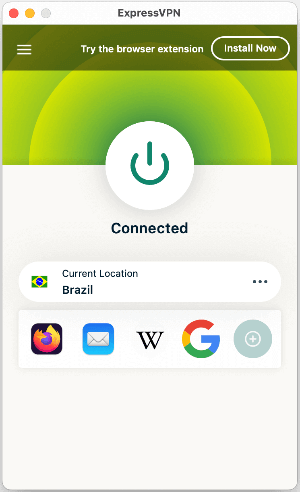
ExpressVPN uses a minimalistic approach with a small but informative interface and near-identical apps for Windows and macOS. While the layout feels a bit clogged, it presents accurate information on the general features, available protocols, and customizable shortcuts for quick connections to previous servers.
ExpressVPN offers apps for major Linux distributions, which let you use its custom Lightway protocol. It even has a GUI for ease of use, making the service more intuitive for inexperienced Linux users.
Mobile apps
PureVPN starts strong with a robust Android app full of valuable and intuitive features. On top of its extensive set of tools, you can choose different server modes and network types for your VPN connections.

For iOS, we lose the split tunneling and options for different server modes. What remains is a basic app with the main tunneling protocols, which is not surprising, as most VPN providers skimp out on apps for Apple products.
ExpressVPN’s Android app is not that much different from the desktop versions. The same design elements are restructured to better fit a mobile screen. With simple and responsive navigation, it is a solid choice for Android devices.
In the iOS version, we lose a kill switch, split tunneling options, and customizable shortcuts. Again, the quality of an iOS app takes a dip, which is not surprising, but for an expensive premium VPN, we expected more.

Customer support
As we look at customer support, we are relieved that both providers have 24/7 live chat options. On top of the crucial method of communication, PureVPN and ExpressVPN also consult clients via email for more detailed questions.
While both providers do not have a support option via phone line, this method is often omitted by VPN providers and replaced with live chat.
But the necessity for direct communication is often avoided with informative tutorials, guides, or articles, and both providers provide an extensive knowledge base to help us take care of frequently encountered problems and questions.
PureVPN vs ExpressVPN – which one wins?
PureVPN stands out with its lower pricing, strong WireGuard performance, and wide range of protocol options, making it a great value choice. ExpressVPN excels in streaming, torrenting, and premium security features.
Overall, PureVPN delivers better overall value with competitive speeds and solid functionality across categories. It’s the winner thanks to its affordability and well-balanced performance.
| Feature | ExpressVPN | PureVPN | Verdict |
| Pricing | PureVPN offers lower prices across all plans while maintaining solid features, making it the better choice for budget-conscious users. | ||
| Speed | ExpressVPN delivers more consistent speeds across protocols, while PureVPN was slower overall. | ||
| Privacy | Both providers offer strong privacy with audited no-logs policies and privacy-friendly jurisdictions. | ||
| Features | ExpressVPN offers a more polished and feature-rich experience, while PureVPN focuses on essential tools with good overall value. | ||
| Streaming | ExpressVPN unblocks more platforms and regions, making it a more reliable choice for streaming. | ||
| Torrenting | ExpressVPN supports P2P on all servers, while PureVPN has some restrictions, giving ExpressVPN the advantage. | ||
| Support | Both providers offer comprehensive support options, including 24/7 live chat, resulting in a tie. |
FAQ
Is PureVPN better than ExpressVPN?
Yes, PureVPN is better than ExpressVPN. It does little things better or well enough to create a much better quality-to-price ratio, whereas its competitor needs to offer more to justify such a high price.
Is ExpressVPN or PureVPN better for gaming?
PureVPN is better than ExpressVPN for gaming. PureVPN uses a WireGuard tunneling protocol that wins the speed comparison and will let you enjoy online games with minimal latency.
Which is better for torrenting: ExpressVPN or PureVPN?
ExpressVPN is a better VPN for torrenting. While it has a smaller fleet of servers, its global coverage of 113 countries and P2P communication support on all servers. However, PureVPN is a more affordable option for torrent downloads.