PureVPN vs IPVanish: which VPN to choose?
Our in-house cybersecurity experts and journalists, renowned for major reports like The Mother of All Breaches, conduct transparent, unbiased VPN testing and in-depth analysis.
With 750+ articles crafted based on real-world research, we empower readers to make informed purchasing decisions through first-hand expertise.
Learn more

PureVPN and IPVanish are two well-known VPNs that offer reliable performance. Each has different strengths: PureVPN is better for streaming and user-friendly apps, while IPVanish excels at security, torrenting, and advanced features. Both are solid options depending on your priorities.
For this PureVPN vs IPVanish comparison, we tested speed, security, privacy, streaming, torrenting, pricing, and usability. Our approach combined real-world testing, such as streaming and torrenting, with speed measurements across different protocols to reflect actual user experience.
Keep reading to see the full comparison and decide which VPN suits your needs. Whether you need a fast connection, strong protection, or access to streaming platforms, this guide will explain how both providers perform in key areas.
PureVPN vs IPVanish: overview
PureVPN and IPVanish both offer reliable VPN services at competitive prices. They take security and privacy seriously while offering features such as split tunneling and support for multiple tunneling protocols. However, IPVanish takes the lead when it comes to simultaneous connections, offering unlimited devices, while PureVPN supports 10 connections at once. PureVPN performed better in streaming, unblocking more platforms like Netflix and BBC iPlayer. When comparing these two VPNs side by side, the choice depends on whether you prioritize features and device support or streaming and app flexibility.
| IPVanish | PureVPN | |
| ⭐ Rating: | ||
| 🥇 Overall rank: | #8 out of #41 | #7 out of #41 |
| 🖥️ Servers: | 3,400+ servers in 112 countries | 6,000+ servers in 65 countries |
| 📖 No logs policy: | No logs | No logs |
| 💵 Price: | From $2.39/month | From $1.99/month |
| 🔥 Coupons: | IPVanish coupon 84% OFF | PureVPN coupon 87% OFF |
| 🔒 VPN protocols: | OpenVPN, WireGuard, IKEv2, IPSec | OpenVPN, WireGuard, IKEv2 |
| 🍿 Streaming services: | Netflix, BBC iPlayer, YouTube, Disney+, Hulu, and more | Netflix, BBC iPlayer, YouTube |
| 🖥️ Platforms: | Windows, macOS, Linux, Android, iOS | Windows, macOS, Linux, Android, iOS |
| 📥 Simultaneous connections: | Unlimited | 10 |
| 💁🏻 Support: | Knowledge base, email, 24/7 live chat | Knowledge base, email, 24/7 live chat |

Recent Updates
PureVPN vs IPVanish: key differences
Choosing the right VPN comes down to what you value most – speed, streaming, features, or device support. Both PureVPN and IPVanish offer solid protection, but each has unique strengths that make them better suited for different users. Here’s a quick guide to help you decide.
Choose PureVPN if:
- You prioritize streaming. PureVPN can unblock Netflix, BBC iPlayer, YouTube, and more, making it the better option for watching geo-restricted content.
- You need cross-platform support. With browser extensions for Chrome, Firefox, and Edge, plus apps for Windows, macOS, Linux, Android, and iOS, PureVPN works well across devices.
- You value simplicity and ease of use. PureVPN’s apps are straightforward, making setup and management easier for beginners or casual users.
For more details on this provider, check out our full PureVPN review.
Choose IPVanish if:
- Security and advanced features matter. IPVanish includes a customizable kill switch, split tunneling, a Stealth VPN, and encrypted cloud storage for added protection.
- You want unlimited device connections. IPVanish lets you protect all your devices on a single plan, which is ideal for families or small teams.
- Torrenting and P2P are a priority. With support on all servers and a free SOCKS5 proxy, IPVanish offers faster and safer P2P activity.
Read our full IPVanish review for a complete breakdown of its features and performance.
Speed, performance, and streaming
I tested PureVPN vs IPVanish for speed, performance, and streaming. Below are the results based on real-world usage.
PureVPN vs IPVanish speed comparison
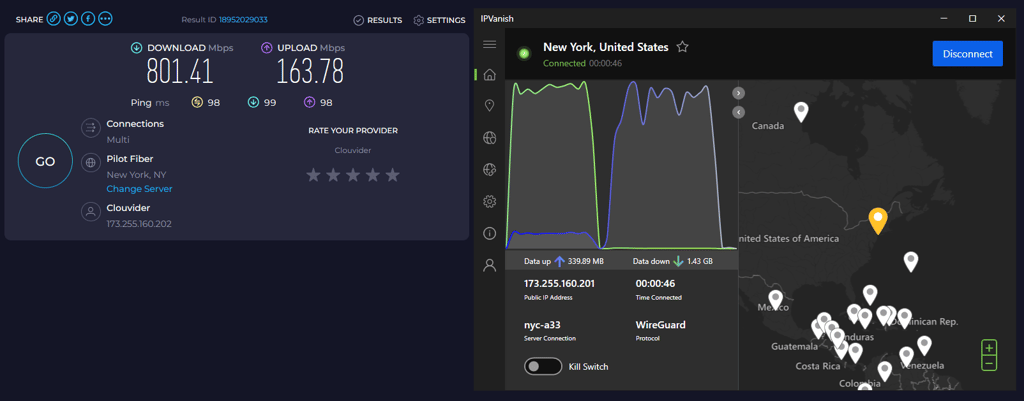
For this comparison, I tested both VPNs using the same server locations to keep results consistent. All tests were done using the WireGuard protocol on a high-speed connection.
IPVanish speed test results
| Server location | Download speed | Upload speed | Ping |
| UK | 846.57Mbps | 481.91Mbps | 39ms |
| US | 801.41Mbps | 163.78Mbps | 98ms |
| Australia | 726.33Mbps | 91.51Mbps | 221ms |
| Japan | 653.68Mbps | 75.95Mbps | 269ms |
PureVPN speed test results
| Server location | Download speed | Upload speed | Ping |
| UK | 645Mbps | 880Mbps | 42ms |
| US | 584Mbps | 831Mbps | 104ms |
| Australia | 361Mbps | 333Mbps | 338ms |
| Japan | 430Mbps | 385Mbps | 236ms |
Note: Speed results vary depending on server distance, your internet service provider, and server load.
IPVanish came out ahead in most locations. It delivered higher download speeds in the UK, the US, Australia, and Japan, while PureVPN lagged behind, especially on distant servers like Australia. However, PureVPN performed better in upload speeds, with much higher results in both the UK and the US.
While these tests used the WireGuard protocol, both VPNs also support other tunneling protocols. IKEv2 is available on both and can offer stable speeds, while OpenVPN provides a more consistent but slower connection, depending on the setup.
Streaming and geo-blocking
Streaming is where PureVPN has the edge over IPVanish. It unblocks Netflix US, BBC iPlayer, YouTube, and more. You can even watch using browser extensions for Chrome, Firefox, and Edge. PureVPN also supports Kodi for streaming.
IPVanish, on the other hand, only unblocks Netflix US and YouTube, though it can be installed on Amazon Fire Stick and other devices.
Torrenting and P2P performance
PureVPN allows torrenting on selected servers, but lacks P2P options in the US, Canada, and the UK. It supports port forwarding for seeding. IPVanish supports P2P on all servers and includes a free SOCKS5 proxy, which helps maximize connection speeds. Both VPNs offer split tunneling, but only on Android devices.
Plans and value
Comparing the prices is a bit tricky because of the way that IPVanish structures its plans. To start, this provider allows you to add SugarSync, which offers 500 GB of encrypted cloud storage.
| Plan | PureVPN | IPVanish |
| Monthly | $12.95 | $14.99 |
| One year | $2.55/month | $3.89/month |
| Two years | $1.99/month | $2.39/month |
| Check Pricing | Check Pricing |
If that still doesn't sound complicated, consider that all prices are for the first billing period (monthly or annual). After that, the costs increase.
IPVanish has a 30-day money-back guarantee, but PureVPN wants to be even more generous, offering 31. PureVPN allows 10 simultaneously connected devices, while IPVanish doesn't have any limits on this - you can use it on as many devices as you like.
The last thing to discuss is the payment options. In the case of PureVPN, you can only pay by credit card or PayPal. The same can be said about IPVanish. In the end, IPVanish has better deals, at least for the first billing period.
If the pricing seems a bit too much, you can always try looking for a discount – see our pages for IPVanish coupon codes and PureVPN coupon codes to see, if there's a deal for you.
Servers
PureVPN has a solid network with 6,000+ servers in 65+ locations. It also offers specialized servers, like obfuscated and quantum-resistant options, with speeds up to 20Gbps. IPVanish provides 3,400+ servers in 112+ locations, backed by a mix of HDD and RAM-only infrastructure for privacy.

Features
Both services are not known for having good features. That's why choosing the winner was difficult, but finally, I settled for IPVanish. Here's why.
Kill switch
This is an essential security feature for every VPN, so winning this duel is a significant step towards winning the security battle.
PureVPN has a regular kill switch that stops your whole connection if you're disconnected from the VPN server. It's enabled by default, which is great for people who aren't into tweaking the settings. Unfortunately, our test with some experimental configurations has shown that it might fail to disconnect you or even leak your real IP address (you can read more about that in the PureVPN Review).

Meanwhile, IPVanish's kill switch worked much better. The only issue I noticed was that the app would sometimes fail to notify me that my VPN connection had faltered (but the kill switch worked as advertised). Besides, IPVanish's kill switch offers some customization options, such as the choice to block LAN traffic, which becomes important when using public Wi-Fi. Recently, IPVanish has also released a separate kill switch app for devices that don't support network kill switches, like Fire TV.
Split tunneling
While this is a nice feature, it suddenly loses its attractiveness when the only supported platforms are Windows and Android. That's because most of the torrenting and streaming are still done with desktop devices, and those are popular options to encrypt or run through the normal traffic.

Split tunneling is nearly identical with each provider. You get a list of apps and an option to add or remove them, so they are either protected or unprotected. A small advantage that IPVanish has is selecting from Recommended, User, and System Apps. That's great for novice users who may not know which ones should stay protected by the VPN at all times.
Exclusive features
Starting with PureVPN, we can see that there's not too much on offer except for port forwarding and the password manager. The port forwarding feature is beneficial to (for example) torrenters who want to make seeding available even when they're behind the router. Additionally, you're also able to set up a gaming server or check CCTV cameras.

Unfortunately, this comes as an extra, while many VPNs give port forwarding for free. The PureVPN price is less than a dollar per month, so it's not like they're squeezing the last penny out of you.
Just like you have to pay for the port forwarding, the password manager is also a paid add-on. However, it allows your to securely store and autofill your passwords, credit cards, documents, and more. You can also generate complex passwords and share your items with the family and the team. The vault is encrypted using market-leading encryption and protected with a master password.
Moving to IPVanish, we find some more options. For starters, you get SugarSync encrypted cloud storage with 500 GB of space. It also costs a bit extra, but the value is totally for it, provided you want to switch from Dropbox, Google Drive, and the like.

Moreover, On Demand lets you customize the rules for turning on the VPN on your iOS device. For instance, you can choose that your home Wi-Fi won't use encryption. However, setting up the opposite for public Wi-Fi is a good idea. There's a possibility to turn on the VPN whenever you load a specific website as well.
IPVanish also offers a free SOCKS5 proxy that hides your IP but doesn't encrypt the traffic. Such an option is great if you want to torrent at the best possible speeds while retaining a level of anonymity. Just don't forget that your ISP can still see the IP, so treat it as protection from everybody else.

Finally, we have a Stealth VPN that is hidden in the Settings under the word Scramble. Ticking the box will enable the XOR patch, which modifies your encrypted traffic, making it harder to detect. Unfortunately, according to user testimony, this feature isn't enough to unblock the internet in China.
Privacy and security
As you probably remember from the earlier sections, IPVanish has more security features. Moreover, its kill switch and split tunneling work better as well. What they do have in common are military-grade encryption and tunneling protocols.
Jurisdiction
IPVanish headquarters are in the US - far from a great location to register a VPN. After all, this country is a founding member of the infamous Five Eyes intelligence sharing alliance. Add the NSA and other intelligence agencies into the mix, and you get a really VPN-unfriendly atmosphere.
In contrast, PureVPN moved from its previous location in Hong Kong to the very privacy-friendly British Virgin Islands. This makes PureVPN a much better option in terms of its jurisdiction.
Logging
IPVanish promises a strict no-logs policy and has undergone independent audits to verify it, though some users remain cautious due to past incidents. Under previous ownership, this VPN has collaborated with the FBI, giving away user data. This included the email address, account status, real IP address, and connection timestamps.
PureVPN has an audited privacy policy which is a strong argument against them doing anything shady. Unfortunately, in 2017 this provider also gave data about a user to the FBI. On a brighter note, now the VPN is boasting an Always-On Audit, which means that it can get a surprise check any day. This might make you feel much more secure.
User experience
| PureVPN | IPVanish | |
| Supported OS | Windows, macOS, Linux, Android, iOS | Windows, macOS, Android, iOS |
| Other software and devices | Android TV, Fire devices, Kodi | Android TV, Fire devices, Apple TV |
| Browser extensions | Chrome, Firefox, Edge | - |
| Simultaneous connections | 10 | Unlimited |
From the table above, it's easy to tell that PureVPN holds the edge in three out of four categories. It adds Linux and Kodi apps, plus a selection of browser extensions. When it comes to simultaneous connections, however, IPVanish has a slightly better deal.
On the other hand, IPVanish loses in the manual configuration area. It supports routers, firewalls, and NAS. In the meantime, PureVPN adds QNAP, Synology, OpenELEC, Raspberry Pi, and Chromebook. While all these platforms are not that popular, being able to pair them with your VPN is still an advantage.
Desktop apps
IPVanish doesn't have a Linux app, so I won't go into much detail as having a client is way better than not having one. PureVPN's version doesn't have a GUI and supports OpenVPN (UDP & TCP) protocol. On the other hand, you can manually configure IPVanish for Linux – it works with Ubuntu, Fedora, Kali Linux, and others.

I liked that both providers have similar Windows and Mac apps, both style-wise and feature-wise. IPVanish's kill switch for Windows has an extra option to block LAN traffic, and the tunneling protocols don't include SSTP, which is worth your attention.
PureVPN's Mac client doesn't show server ping and gives you IKEv2 and L2TP/IPSec. Since the latter protocol is outdated, you are actually left with one choice.
Mobile apps
PureVPN mobile apps are rather minimal when compared to its competitor. However, they still manage to pack quite a few features for both the Android and iOS iterations. You'll get split tunneling, different server modes, and theme selection.

The main difference is available protocols. The Android client gives you WireGuard, IPSec, and IKEv2, while the iOS users get OpenVPN TCP, OpenVPN UDP, and IKEv2. One strange thing from the UX standpoint is using the red color for Connected status.
What about IPVanish? Well, their Android app offers much more than iOS does. Users of the latter devices will miss a kill switch, split tunneling, and obfuscated servers.
Customer support
Good news, Yerevan. Both providers have 24/7 live chat. When this option is available, the need for alternative customer support becomes minimal. However, there are a few points I want to emphasize.
PureVPN provides faster email support. When I contacted IPVanish, I had to wait three days which is a bit too much for the so-called round-the-clock service. In contrast, my question to PureVPN was answered in less than 24 hours.
The knowledge base of PureVPN looks better, but compared to IPVanish, the amount of information available is similar. You can search the contents, check out FAQs or setup guides. There's also a troubleshooting section if you really want to solve things on your own and feel proud of yourself.
Final verdict
PureVPN and IPVanish are both strong VPNs overall, meaning either one is a solid choice. PureVPN stands out for streaming, platform support, and user-friendly apps. IPVanish excels at security, torrenting, and unlimited device connections. Depending on your priorities, either could work well, but the comparison shows clear advantages in certain areas.
| Feature | PureVPN | IPVanish | Verdict |
| Pricing | Both VPNs offer competitive pricing, but IPVanish’s unlimited devices and SugarSync storage give it an edge. | ||
| Speed | IPVanish delivered higher download speeds, while PureVPN had better upload speeds in some regions. | ||
| Privacy | Both providers use strong encryption and claim no-logs policies. | ||
| Features | IPVanish has more advanced features, including a customizable kill switch, Stealth VPN, and free SOCKS5 proxy. | ||
| Streaming | PureVPN unblocks Netflix, BBC iPlayer, YouTube, and Kodi, making it the better option. | ||
| Torrenting | IPVanish supports P2P on all servers and includes a SOCKS5 proxy. | ||
| Support | Both VPNs offer 24/7 live chat and knowledge bases. |
FAQ
Which is better: IPVanish or PureVPN?
Even though both VPN services are pretty good, IPVanish has a slight edge over PureVPN in terms of features, security, price, and torrenting support. However, PureVPN unblocks more streaming platforms.
Is PureVPN a good VPN?
Yes, PureVPN is a good VPN service. It has a huge country list, unblocks lots of streaming platforms including Netflix and BBC iPlayer, collects no logs, and offers the super-fast WireGuard tunneling protocol.
Is IPVanish a strong VPN?
Yes, IPVanish is a strong VPN service. It offers really good speeds suitable for streaming and gaming, has lots of features including a kill switch, split tunneling, and includes encrypted cloud storage.