A2 Hosting review: fast, but not very affordable
Our in-house experts conduct internal independent, hands-on testing and transparent reviews of web hosting providers by using custom-built tools or utilizing industry-recognized tools and methods to ensure impartial and evidence-based assessments.
Using the same criteria for all services, we share our detailed methodologies and practices to help customers make informed hosting decisions.
Learn more

A2 Hosting (now hosting.com) is a web host that offers a range of hosting options, such as shared, reseller, and VPS server solutions, emphasizing speed and performance, especially for those using WordPress. I’ve been reviewing it for over three years, scrutinizing its performance, security, support, and pricing.
In this A2 Hosting review, I share my findings to help you decide if it offers enough value to justify its price and meets your specific web hosting needs.
A2 Hosting review: my verdict
✅ Choose A2 Hosting if you’re looking for a WordPress host with fast speeds and reliable performance.
❌ Avoid A2 Hosting if you’re looking for a more affordable and easy-to-use solution.
| Hostinger | hosting.com | |
| ⭐ Rating: | ||
| 💵 Price: | From $2.69/month | From $1.99/month |
| 📑 Uptime guarantee: | 99.9% | 99.9% |
| 🔥 Coupons: | Hostinger coupon 81% OFF | Hosting.com coupon 86% OFF! |
| Storage space (from): | 20GB SSD | 100GB SSD |
| ✂️ Free domain (first year): | Yes | Yes |
| 🔒 Free SSL certificate: | Yes | Yes |
| ➡️ Site migration: | Free unlimited migrations for WordPress and open-source sites | Free (1 site) and paid option for larger migrations |
| 💾 Automated backups: | Free (weekly) | Yes (Accel, Turbo Velocity, and Turbo Nitro plans) |
| 📧 Email accounts: | Free (first year) | Free (unlimited accounts) |
| 👨💻 24/7 live support: | Yes | Yes |
| 💰 Money-back guarantee: | 30-day | 30-day full refund or 90-day pro-rated refund |
Note: A2 Hosting was rebranded to hosting.com in 2025. Since then, the provider has expanded its global reach with data centers across the US, Europe, Asia, and beyond, introduced a more user-friendly website, and improved its customer panel.
Pros and cons of A2 Hosting




Our in-house research team and expert writers work hand in hand to regularly test hosting services and provide accurate and fact-checked information. Discover the ins and outs of how we test and evaluate website hosting providers.
A2 Hosting pricing
A2 Hosting (now rebranded to hosting.com) prices range from rather affordable to entirely premium – shared hosting starts at $1.99/month and goes up to $8.99/month with 1-year subscriptions. Other options include managed WordPress hosting, VPS, reseller, and dedicated servers.
| Hosting type | Best for | Price range |
| Shared hosting | Small to medium websites | Starts at $1.99-$8.99 a month (rises to $8.99-$17.99 a month on renewal) |
| Hosting for WordPress | Those wanting complete control, tech-savvy users | Starts at $2.99-$6.99 a month (rises to $8.99-$17.99 a month on renewal) |
| Managed hosting for WordPress | Easy-to-use and fast hosting for beginners | Starts at $11.99-$29.99 a month (rises to $27.99-$59.99 a month on renewal) |
| VPS hosting | Advanced option for developers | Unmanaged VPS starts at $4.99-$31.99 a month (rises to $9.99-$60.99 on renewal). Managed VPS starts at $38.00-$60.50 (rises to $75.99-$120.99 upon renewal) |
| Reseller hosting | Selling hosting, managing multiple websites, business expansion | Starts at $22.99-$49.99 a month (rises to $49.99-$115.99 a month upon annual renewal) |
A2 Hosting options cater to a wide range of needs, from small to enterprise-level websites. For example, shared hosting is available for smaller sites, and VPS hosting is available for large-scale enterprises. One downside is that the pricing significantly increases upon renewal, which, unfortunately, is expected, considering this is the main practice of all hosting providers.
A2 offers a 30-day unconditional money-back guarantee for hosting services, with pro-rated refunds for cancellations after this period. Charges like domain registration and third-party fees are non-refundable, and refunds after 120 days are processed via PayPal only. The policy seems fair and provides flexibility, but the non-refundability of certain fees could be a drawback for some users.
Another drawback is that A2 Hosting (now hosting.com) does not currently accept cryptocurrency. However, it does accept standard payment methods such as PayPal, bank transfers, Skrill, UnionPay (via Stripe), major credit cards (Visa, MasterCard, American Express, Discover), and even money orders mailed to its address.
Shared hosting
This type of hosting is where multiple websites reside on a single web server, sharing resources like CPU and memory. It's cost-effective and suitable for smaller websites with lower traffic levels.
For easy website management, all A2’s shared hosting plans come with cPanel. Additionally, each plan comes with free white glove site migration, automatic backups, and a security suite.
Here's a table summarizing the key details of each A2 shared hosting plan:
| Hosting plan | Price (first time, annual payment) | Resources |
| Starter | $1.99/month | 1 website, 15GB storage, LiteSpeed Performance, free domain name |
| Plus | $3.99/month | 2 websites, 30GB storage, LiteSpeed Performance, free domain name |
| Pro | $6.99/month | 10 websites, 50GB storage, LiteSpeed Performance, free domain name |
| Max | $8.99/month | 100 websites, 100GB storage, LiteSpeed Performance, 99 add-on domains |
Managed WordPress hosting
Managed WordPress hosting, as the name suggests, offers a hands-off approach to maintaining your website. This is something I would choose – A2 Hosting handles security, performance, and updates, so you can focus more on content and less on technical details.
Each A2’s managed WordPress hosting plan includes an SSL certificate, daily backups both onsite and offsite, and a complete security suite with performance optimizations. Plans are distinguished by additional WordPress-specific tools and features that enhance functionality and ease of use.
| Hosting plan | Price (first time, annual payment) | Websites | Storage | RAM | Unique features |
| Starter | $11.99/month | 1 | 15GB | 3GB | Jetpack Free, up to 3 staging websites |
| Plus | $18.99/month | 1 | 30GB | 4GB | Jetpack Free, up to 5 staging websites |
| Pro | $24.99/month | 1 | 50GB | 6GB | Jetpack Free, malware scans, up to 10 staging websites |
| Max | $29.99/month | 1 | 100GB | 8GB | Jetpack Free, malware scans up to 20 staging websites |
VPS hosting
VPS hosting is ideal for those outgrowing shared hosting, providing each user with a virtual machine and dedicated resources like hard drive space, memory, and processor power, mimicking a dedicated server's performance.
A2 Hosting offers managed and unmanaged VPS hosting plans. Managed VPS Hosting handles setup, maintenance, and support, ideal for non-technical users. On the other hand, unmanaged VPS requires users to manage everything, suitable for those with technical skills.
Managed VPS hosting
| Plan | Price (first time, annual payment) | RAM | Storage | Bandwidth/month | CPU cores |
| Managed VPS XS to S | From $38.00/month to $43.50/month | 4-8GB | 80-160GB | 1-2TB | 2-4 |
| Managed VPS M to L | From $45.50/month to $60.50/month | 16-32GB | 320-640GB | 4-8TB | 8-16 |
Unmanaged VPS hosting
| Plan | Price (first time, annual payment) | RAM | Storage | Bandwidth/month | CPU cores |
| VPS XS to VPS S | From $4.99/month to $6.99/month | 4-8GB | 80-160GB | 1-2TB | 2-4 |
| VPS M to VPS L | From $11.99/month to $31.99/month | 16-32GB | 320-640GB | 4-8TB | 8-16 |
Reseller hosting
Reseller hosting lets you buy hosting services and then sell them to others. It's like buying in bulk and selling each part individually to your own customers. This is popular among web developers and agencies who want to provide hosting as part of their services.
A2 Hosting offers reseller plans starting at $22.99/month, including tools for managing clients, security features like SSL and DDoS protection, and automated backups.
Hosting management – is it easy to use?
All that A2 Hosting (now hosting.com) uses for hosting management is the standard cPanel. It’s easy to use and functional. The downside is that you’ll need to look at an interface that came from the early 2000s. Quite a downgrade in case you’ve tried something more modern.
To access cPanel, you’ll need to go through the account management panel. This is where you can reach customer support, renew your plan, and add extra services.
A2 Hosting set up
A2 Hosting's setup process is similar across all plans. Here's what I did:
-
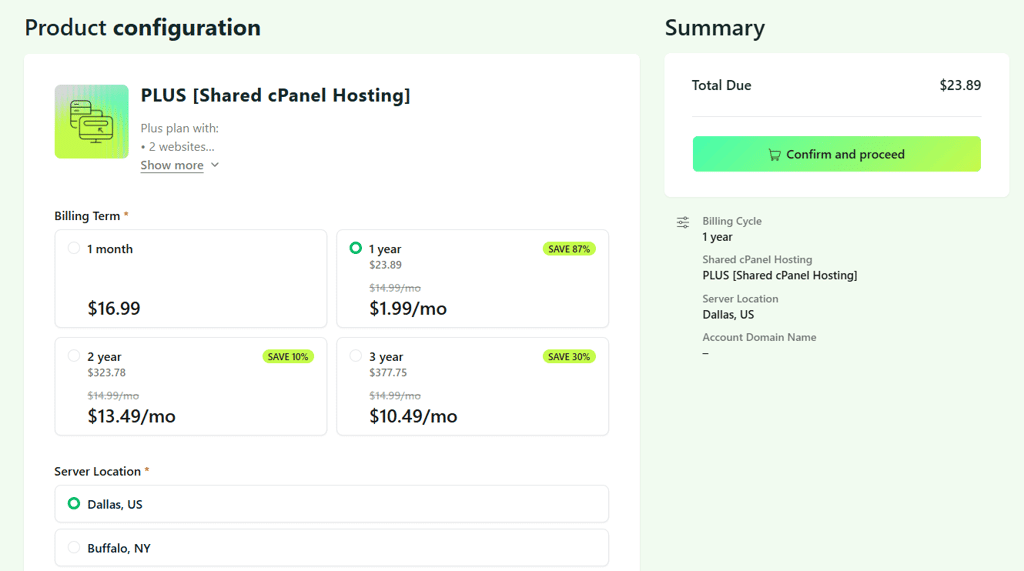
I first chose my hosting plan

-
I then purchased the subscription – I had an option to select a server location and buy it with a domain or register an existing one
-
After I purchased my subscription, I was able to access my A2 Hosting client area

What does A2 Hosting control panel look like?
A2 Hosting (now hosting.com) utilizes the standard version of cPanel, which offers a robust range of functionalities for website development. The provider is one of the few still using cPanel only – others now integrate their custom-built tools. With cPanel, users can easily add domains, install WordPress, set up email accounts, and access more advanced features like file and database management, security settings, and performance optimizations.
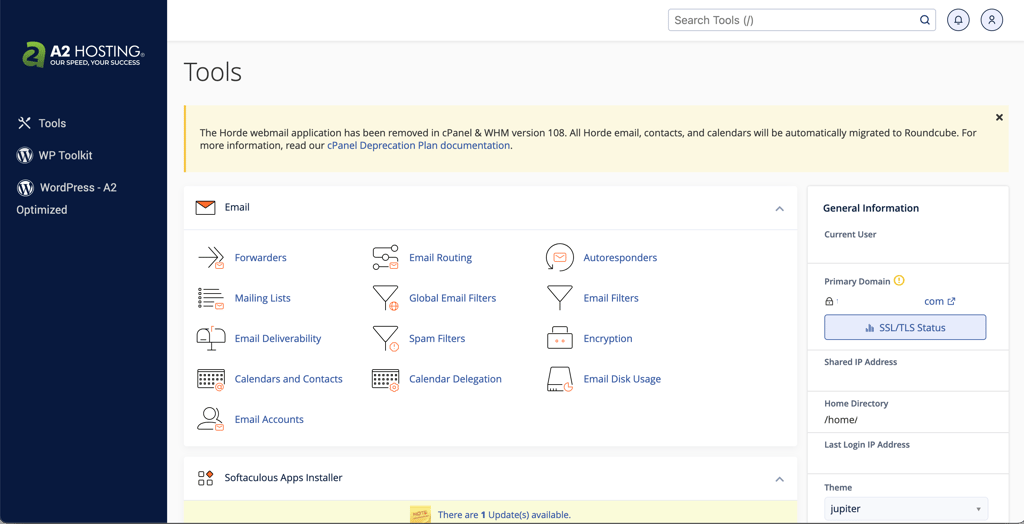
What stood out to me is that cPanel is well organized, with features categorized under domains, email, metrics, and software sections, making navigation straightforward. On the side, users can view their account statistics.
If you bought a domain with another registrar, navigate to DNS settings and look for the name server field. A2 Hosting’s shared plans use ns1.a2hosting.com and ns2.a2hosting.com. It’s enough to use just two of them. So in your registrar, change the name servers to two of the A2 Hosting ones, and you’re done with the first step.
To actually add a domain name, you’ll need to locate the Addon Domains feature in A2 Hosting’s cPanel. It’s under Domains.

In the following form, you just need to add your New Domain Name. The rest will be pre-filled.

As soon as you press the Add Domain button, the system will handle everything else for you.
Note that your domain might need up to 48 hours to propagate, although I’ve noticed that it usually takes no longer than a couple of minutes.
Once that’s done, your domain is ready for WordPress installation.
Installing WordPress with A2 Hosting
Just like anything else, I found WordPress installation with A2 Hosting relatively standard and easy. It’s done through cPanel with the help of Softaculous. However, even that can be easier if you select WordPress to be pre-installed during the checkout process.
In cPanel, navigate to the Softaculous section and select WordPress - A2 Optimized, which includes built-in A2 optimizations like caching.

Of course, you can browse through categories and install another app, but WordPress is the most commonly used content management system for website development.
In any case, to continue, you’ll need to click the Install button in the next window.

Finally, we reach the installation window. Here, you simply need to fill in the required information – select a domain, name your website, create a username, and think of a secure password.

The Quick Install button will pre-fill everything for you, but I find it more secure to do all this on your own.
Finally, just click Install and the rest will be done automatically.
A2 Hosting performance – is A2 Hosting fast?
A2 Hosting (now hosting.com) claims to be “20x faster web hosting.” To test this, I put the provider through a few performance-related tests. All throughout the test period, A2 Hosting demonstrated very reliable uptime, average server response time, and great website loading time. It also managed to pass my stress test on the maximum load.
A2 Hosting uptime and response time
When writing this A2 Hosting (now hosting.com) review, I had been monitoring it for 2 weeks. During this time, it had zero outages, which, in total, resulted in a whopping 100% uptime.
Meanwhile, the average response time came up to 168ms, which I find pretty good.

So what do these numbers mean for you? First of all, A2 Hosting comes with a 99.9% uptime guarantee. What you get, though, is much better. The 99.9% uptime commitment means your website is expected to be down for 2h 11m 29s quarterly. However, A2 Hosting outperforms that.
As for the response time, it remained very stable throughout the monitoring period. This shows that my website did not have to fight for server resources too hard.
Now, let’s look at the website's loading speed.
A2 Hosting speed
My website is hosted in the US data center, so the best results are expected in the US, with the Largest Contentful Paint (LCP) at 939ms. Accordingly, the farther away from the server we go, the longer it takes for the website to load. Test results further support that.
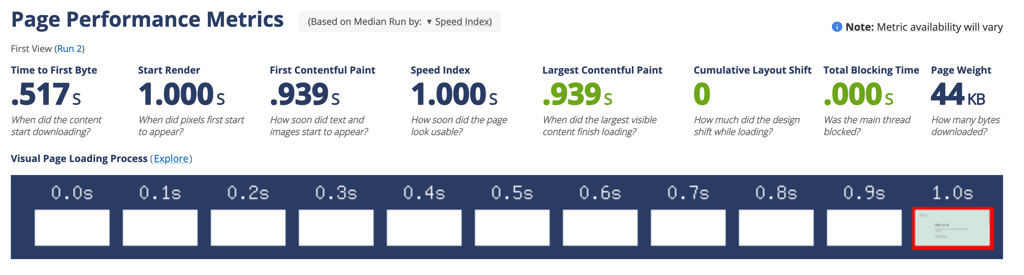
But why does LCP matter and what does it mean? Google considers measures such as LCP when ranking web pages. This means that your site has a better chance of appearing higher on the search results page if the LCP is short. As long as you keep it under 2.5s, you’ll be just fine.
You can tell A2 Hosting fits in this time slot perfectly with the lowest time of 939ms. Even in India, the site manages to load fast enough to fit in. The time could be better, but you won’t see me complaining just yet.
When A2 Hosting rebranded to hosting.com, it expanded its network of data centers and now operates in over 20 locations – US Central (multiple), US East (multiple), Toronto (Canada), Mexico City (Mexico), London (UK), Frankfurt (Germany), Mumbai (India), Singapore (Singapore), and Sydney (Australia). This means you can choose a server that is closest to your target audience. This will reduce latency – your website will have the best chances to load fast.
So far, I've tested an empty website. Now, let’s see how A2 Hosting will handle a fully built one. For that, I installed the Astra theme and chose a Tech Startup template with its demo content.
As expected, the LCP has now increased to 1.3s.

Is it bad? Not at all. It still leaves me quite some wiggle room not to fall into Google’s less favorable list.
However, don't forget who your site is meant for. Site visitors are the ones you should focus on. They may not care about LCP time as much as Google does, though what they care about is how fast the website loads. If the website’s loading time goes from a second to five seconds, the likelihood of visitors leaving the site increases by 90%.
In this case, the fully loaded time is 1.4s, which, in my opinion, is a great result. Overall, A2 Hosting proves to be a very speedy provider.
A2 Hosting stress testing
To check how my website responds to higher traffic, I increased the pressure. Stress testing might be the most important test of them all, showing whether Hosting can handle high traffic.
After initially testing with 50 virtual visitors, I noticed response times nearly reached 5 seconds, which wasn't ideal. To enhance performance, I reduced the load to 25 visitors. Let me just clarify first – that’s still a big number. It’s like having 25 visitors on your website every minute at all times. That would be tens of thousands of monthly visitors. That’s similar to what you’d expect from a popular local blog or a medium-sized business website.
What I didn’t expect was that A2 Hosting performed remarkably well.
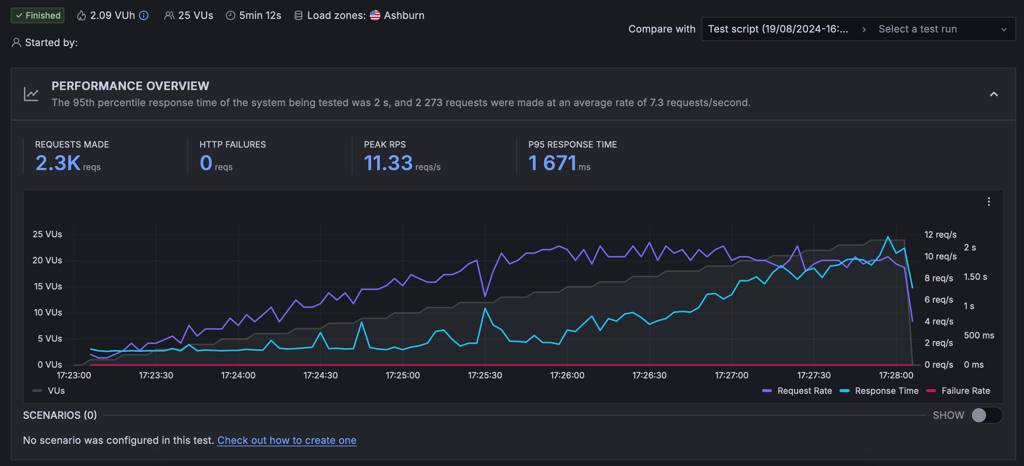
Throughout this intense test, a whopping 2300 requests were handled smoothly, peaking at 16.33 requests per second. And let’s talk speed – our 95th percentile response time was blazing-fast 1671 milliseconds. That's right, even under pressure, the response times were as snappy as ever – I was very impressed.
All in all, A2 Hosting’s performance was great. The website remained live for 100% of the time and demonstrated a speedy loading time of 1.4s. Also, the server had enough power to withstand big traffic, which means A2 Hosting can easily host quite popular websites.
Security – is A2 Hosting secure?
Yes, A2 Hosting (now hosting.com) doesn’t mess around when it comes to keeping your site safe. It has packed its shared hosting plans with some serious protective gear to keep your site safe and sound. Here’s a breakdown of what they offer and why it matters:
- SSL certificates. All shared hosting plans include a free Let’s Encrypt SSL certificate that activates automatically, providing essential encryption for website traffic.
- DDoS protection. A2 uses Imunify360 for advanced DDoS protection, helping defend against traffic floods designed to disrupt site operation.
- Firewalls. Dual layers of firewall protection with Config Server Firewall (CSF) and ModSecurity guard against attacks and filter web traffic for added security.
- Patchman security tool. It scans for vulnerabilities and outdated software, automatically applying patches and quarantining infected files to maintain site integrity.
- Automatic backups. Automatic daily backups are conducted, allowing for easy recovery in case of data loss or website damage. However, it’s not available for the basic plan, and, generally, it's recommended to store backups externally as well.
- Two-factor authentication (2FA). This adds an extra layer of security by requiring a second form of verification beyond just a password, making unauthorized access much more difficult.
Overall, I’m pretty pleased with A2 Hosting’s wide variety of security features. The only drawback is its rather weak backup offering. With that said, A2 Hosting definitely has comprehensive protection compared to other shared hosting providers and takes a well-deserved place on our secure web hosting list.
Will A2 Hosting support help me?
A2 Hosting support is a little bit behind when compared to modern customer support standards. It will help you, but that might take some time. That’s because the main customer support option is the ticketing system, and many phone support and live chat inquiries are redirected to it. Regardless, you’ll be able to reach agents 24/7 or refer to a knowledge base.
For the first part of this support test for my A2 Hosting review, I reached out to sales support on a Sunday evening. Even though it said there would be a 15-minute waiting time, I got connected almost instantly. That’s what I call real 24/7 support. What I didn’t like was that there was no field to enter my question before being connected to an agent. But it might just be a personal preference.

Once I asked which plan was best for me, the agent immediately asked some logical questions about disk space and RAM. I decided to tell them that I didn’t know that and continued to describe my future website.

The agent immediately sent the link to shared hosting plans and gave their recommendations. I was looking for a little bit more information, so I continued asking more questions.
The agent handled it quite well. They answered my questions from their own knowledge and didn’t refer me to numerous knowledge base articles, which I really liked. Plus, the answers were very quick.
On the other hand, the agent did not provide me with much justification for their recommendation, so I had to do that myself. But sales support is usually just one interaction. What’s more important is the technical help.
I decided to ask what I could do to make my website faster, or if A2 Hosting takes care of that for me. I waited around 4 or 5 minutes to get a reply. Not much, even though it said 30 minutes of wait time is expected.

The agent offered to check my website and immediately recommended enabling Cloudflare. However, when I asked for more advice, things went downhill.
The agent had to leave the chat, so they transferred me to another agent. Not only did I have to wait for over 15 minutes to get the first answer from the second agent, but even after that, they did not provide me with any helpful information, just a link to a basic knowledge base article, which was rather frustrating.

This whole interaction tells me that when you talk to a real person, the experience can be hit-or-miss. I had two very pleasant interactions (though not perfect), and one that was just not helpful in any way.
Fortunately, a ticket was not created for me this time, which used to happen every time when contacting A2 Hosting support for technical issues just a year ago. So that’s an improvement.
Apart from the talking-to-real-humans option, A2 Hosting also has a pretty comprehensive knowledge base.

Here, you’ll find lots of articles and guides on various topics. This includes guides on getting started, the provider’s features, and optimization. The articles themselves are well made, and the tutorials are easy to follow.
All things considered, A2 Hosting’s support is a little bit of a mixed bag. You can find some great agents, but sometimes, the wait time gets long, and some people turn out to be less helpful than others.
A2 Hosting review – the final verdict
I can confidently say this host is one of the fastest and most reliable providers available. For an appropriate price, you get a ton of speed-focused features as well as reinforced security.
But contrary to what many A2Hosting (now hosting.com) reviews claim, the provider isn’t perfect. Prices can be deceivingly high. Plus, not all plans offer equally good value.
| Feature | Fast cPanel hosting | |
| Pricing | A2 Hosting is on the expensive side. While prices start quite affordably at $1.99/month for the cheapest hosting package, the real value is with the more expensive plans. | |
| Ease of use | cPanel is A2 Hosting's main website management interface. It’s functional, convenient, and easy to use. One minus, though, is its very old-fashioned-looking design. | |
| Performance | A2 Hosting generally performed well in tests, with servers showing stable operation and no downtime. While the page loading speeds were impressive, it’s important to note that under high-stress conditions, there was some slowdown. Overall, A2 can handle significant traffic effectively. | |
| Security | A2 Hosting is one of the very few providers to offer not only the essentials but also more advanced security features. You get everything: SSLs, DDoS protection, malware scans, dual firewall, and more. | |
| Support | Support can be hit or miss. While available 24/7, tickets are preferred by the company, and live chat inquiries often get redirected to ticketing. However, the majority of live chat agents are knowledgeable and helpful, although you might need to be a little pushy to get the help. |
A2 Hosting FAQ
How good is A2 Hosting?
All in all, A2 Hosting is one of the best available web hosts. It demonstrates an outstanding performance with 99.99% uptime and fast loading speed of 1.4s.
Is A2 Hosting cheap?
While A2 Hosting has some cheap plans, it’s definitely more of a premium option. More affordable plans might look good on paper, but all value hides under the higher-tier plans. If you’re looking for cheap web hosting, Hostinger or Bluehost are way better choices.
Does A2 Hosting provide a free domain name?
Yes, A2 Hosting, now hosting.com, provides a free domain name with all of its plans for the first year. This is valid for all annual plans and includes .com, .net, .org, .us domains.
Who owns A2 Hosting?
World Host Group (WHG), a global provider of hosting and domain services, acquired A2 Hosting in January 2025. Prior to this acquisition, A2 Hosting operated independently and was founded by Bryan Muthig. Following the purchase, A2 Hosting has been rebranded as hosting.com.