BigCommerce vs Squarespace: the definitive (2026) comparison
Our team of experts and researchers rigorously test and evaluate website builders through transparent, in-depth testing procedures and methods using both in-house and industry-approved tools.
Drawing on cybersecurity insights, we provide unbiased, empirical rankings and analysis to help users make informed digital platform choices.
Learn more
The difference between BigCommerce vs Squarespace has traditionally been clear: BigCommerce focused on enterprise-level eCommerce, while Squarespace excelled in design. In 2026, that gap has narrowed.
BigCommerce continues to prioritize high-volume selling and advanced tools, while Squarespace has expanded its eCommerce capabilities, making it a stronger competitor. BigCommerce still suits large retailers with complex operations, whereas Squarespace offers a more user-friendly, design-driven approach with built-in selling features.
With its drag-and-drop editor and lower learning curve, Squarespace is ideal for small businesses and service providers. But which platform is right for you? In this guide, I compare their pricing, features, and overall value.
BigCommerce vs Squarespace 2026: my verdict
BigCommerce and Squarespace both help you launch an online store, but they serve very different kinds of businesses. BigCommerce wins for powerful, scalable eCommerce tools and multi‑channel selling, while Squarespace shines with sleek, designer‑driven templates and a more beginner‑friendly experience.
| Squarespace | BigCommerce | |
| ⭐ Rating: | ||
| 🥇 Overall rank: | #8 out of #37 | #35 out of #37 |
| 💵 Price: | From $16.00/month | From $29.00/month |
| 🪄 Ease of use: | Perfect for beginners | Steep learning curve |
| 🎨 Templates: | 199 | 228 |
| 🏢 Business features: | Solid in-house eCommerce and marketing | Enterprise‑grade eCommerce with multi‑channel selling |
| 👨💻 24/7 live support: | Yes | Yes |
| ✂️ Free domain (first year): | Yes | No |
| 🔒 Free SSL certificate: | Yes | Yes |
| 🔥 Coupons: | Squarespace coupon 36% OFF | Cybernews Website Builder Coupons |





Our in-house research team and expert writers work hand in hand to regularly test website builders and provide accurate and fact-checked information. Discover the ins and outs of how we test and evaluate website builders.
The philosophy: enterprise power vs brand experience
Before we get into the nuances and the comparison of Squarespace vs BigCommerce for a small business, let’s take a moment to explore what sets each apart. At their core, BigCommerce and Squarespace are two fundamentally different platforms for running eCommerce websites.
While BigCommerce is backend-first, Squarespace also provides frontend design capabilities. Similarly, BigCommerce is impressive for APIs and inventory management of hundreds of SKUs, but Squarespace has its merits as an all-in-one platform that is continuously adding new tools ideal for managing the full client journey for service-based professionals.
First and foremost, BigCommerce is made as an open SaaS platform with API customization in mind. It takes headless commerce deployments to another level, powering complex storefronts with overwhelming catalogs. It’s also a decent option for multi-storefront configurations, but operating its infrastructure requires some base development knowledge.
On the other hand, Squarespace focuses on design features, so it packs the frontend customization punch that BigCommerce lacks. That doesn’t mean it feels restrictive in terms of eCommerce features, though; those come pre-integrated in the editor.
It’s a platform where custom templates and creative storefront designs meet the eCommerce capabilities of dropshipping integrations and native inventory management systems.
Besides the obvious technical differences, scalability is worth considering as well. It’s not just about choosing the platform with the most raw features, as this choice can shape your store’s entire future development.
Ease of use and onboarding
BigCommerce has a rather steep learning curve for everyday use and onboarding. The dashboard features it delivers are impressive to say the least, but getting started requires time and some coding knowledge.
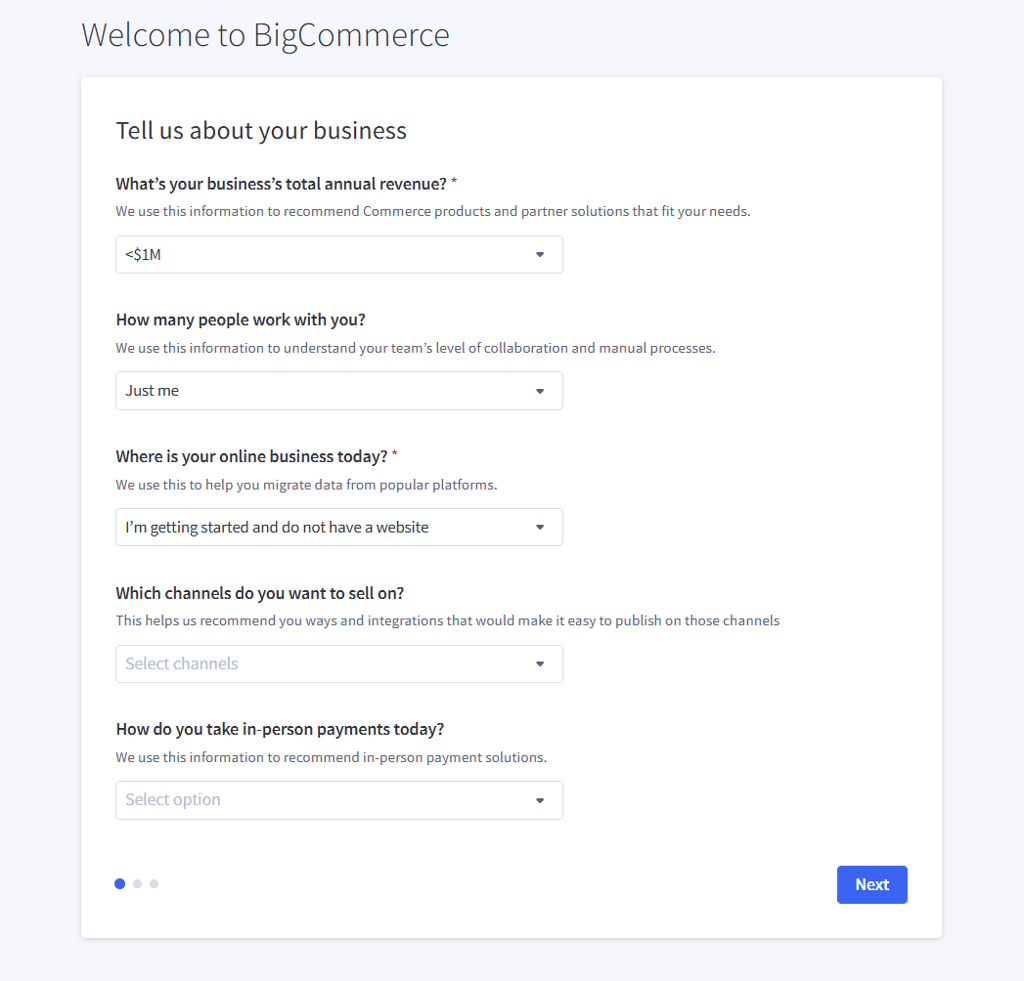
It’s a platform intended for IT teams to operate, so a team of one is likely going to face some struggles even customizing a theme. Such customization requires basic knowledge of the platform’s front-end framework, so it can take a few days to grasp.
With Squarespace, that learning curve simply disappears. Setting up an online store and customizing its theme takes only a few minutes. The Fluid Engine drag-and-drop editor is particularly handy, as it turns the entire dashboard into your canvas, letting you freely paint the layout and arrange content however you see fit.

It requires no coding knowledge, no framework expertise, and no IT support to make an online store look unique yet professional. All you need to do is go through a questionnaire-style setup panel, and your store will be ready for launch by lunchtime.
Design and templates: the storefront battle
Your storefront’s design tells your brand’s story and drives customer loyalty to boost conversion rates. As a backend-first platform, BigCommerce enters this round as an underdog. It features functional and responsive layouts, but not much more, and many themes in the library are paid.

Another thing worth considering is that any customization requires knowledge of the Stencil CLI, the platform’s native command-line tool. Developers can use it to test and change themes in real time without losing storefront visibility, but the required expertise is a major turn-off for first-time users.
You could hire an IT team to handle such customization on your behalf, but that could be quite expensive. The same goes for testing mobile storefront appearance and customization.
This is where Squarespace and its design-first features come into focus. With hundreds of ready-made templates at your fingertips, you can customize your storefront in just a few clicks using the Fluid Engine editor for pixel-level layout control.
Squarespace’s award-winning templates are renowned for their auto-responsive mobile optimization and design, which is something you don’t get with BigCommerce.

Both platforms support custom domains, but the quality design work that Squarespace lets you do from day one does much more to capture customer attention than BigCommerce's rather limited toolkit.
Pricing and transaction fees
The first thing you’ll want to consider when diving into the features is the BigCommerce vs Squarespace pricing comparison. BigCommerce offers three main tiers for small businesses:
- Standard – from $29.00/month, billed annually, with a $50,000 sales cap
- Plus – from $79.00/month, billed annually, with a $180,000 sales cap
- Pro – from $299.00/month, billed annually, with a $400,000 sales cap

The main takeaway here is that BigCommerce forces you to switch to a higher subscription tier when your annual sales cap is reached. There’s also the Custom Plan available with on-demand pricing, giving you some breathing room for sales up to $1M in annual revenue.
The good thing is that there are no transaction fees, but standard payment processing fees of up to 2.9% still apply with services like PayPal and Stripe. There’s also a 15-day free trial.
Squarespace offers a 14-day free trial to help you weigh the plans and choose a suitable option. There are four different Squarespace plans in total, including:
- Basic – from $16.00/month
- Core – from $23.00/month
- Plus – from $39.00/month
- Advanced – from $99.00/month

Credit card rates range from 2.9% with the Basic plan to 2.5% with the Advanced plan. The 2% online store transaction fee applies only to Basic subscriptions, but there are no annual revenue caps. Squarespace offers a clear, predictable subscription pattern, while the costs of running a store on BigCommerce can vary widely, especially as your business scales.
Detailed feature comparison
The best way to approach the BigCommerce vs Squarespace comparison is to check the technical specs first. After balancing the front-end/back-end nuances, onboarding, design elements, and pricing, it’s time to dig into the features to see which one makes the most sense for your online store.
eCommerce features and inventory management
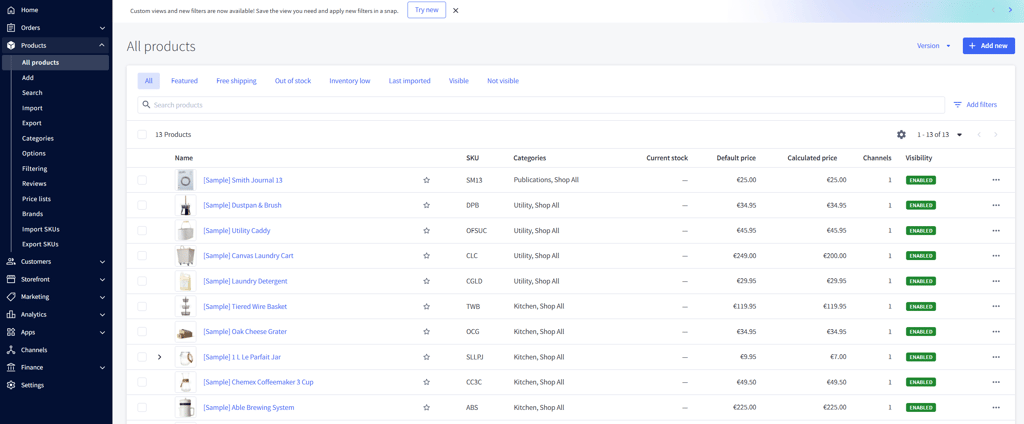
BigCommerce was initially more feature-rich than Squarespace when it comes to eCommerce, and it still excels in many areas, especially for enterprise-level shops.
It supports up to 600 SKU variants per product and is a great tool for complex B2B pricing lists, though those are mainly available on enterprise plans. On top of that, it has a native app store with deep eCommerce integrations, especially for wholesale and dropshipping.
But Squarespace isn’t trailing behind as much as it used to. It can handle the needs of 99% of online stores, especially those selling digital goods and services. For service sellers, new features like branded Pay Links and integrated scheduling directly address the complex needs of client-based businesses.
You get inventory tracking, subscription management, and appointment tracking via integrations like Acuity Scheduling. It also works seamlessly with third-party dropshipping extensions like Spocket and Printful, offering a more polished workflow than BigCommerce.

SEO and content marketing
Content marketing is by no means outdated in 2026. In fact, all AI-related advancements simply reshaped how stores and businesses manage their SEO efforts online. While it’s a good thing that both BigCommerce and Squarespace feature built-in blogging and SEO tools, they’re not exactly comparable.
BigCommerce allows you to run and publish blogs, along with options to insert media elements and manage basic on-page SEO.

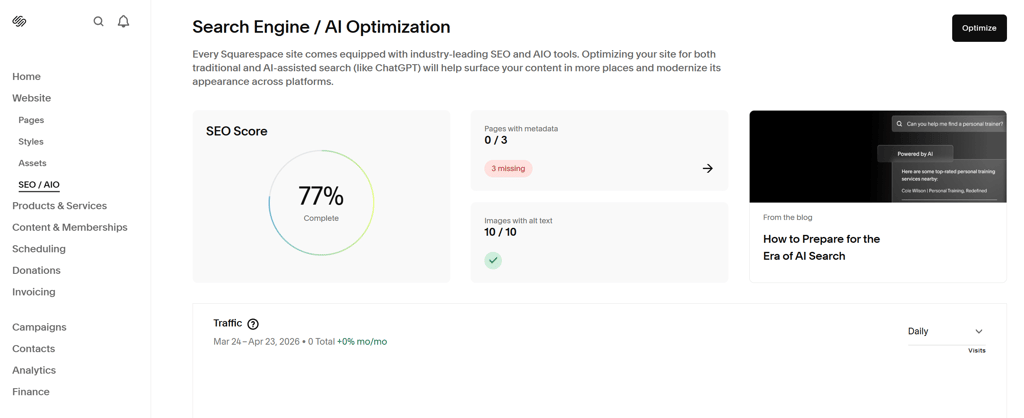
Squarespace is far superior in this regard, with SEO and blogging tools deeply integrated with the eCommerce layer. It allows you to create custom meta tags, heavily edit written content, and customize everything from URL structures to canonical tags and an auto-generated sitemap. The team behind Squarespace understands that content is closely tied to commerce, and it doubles down on that with polished blogging tools and SEO extensions.
Payment gateways and checkout
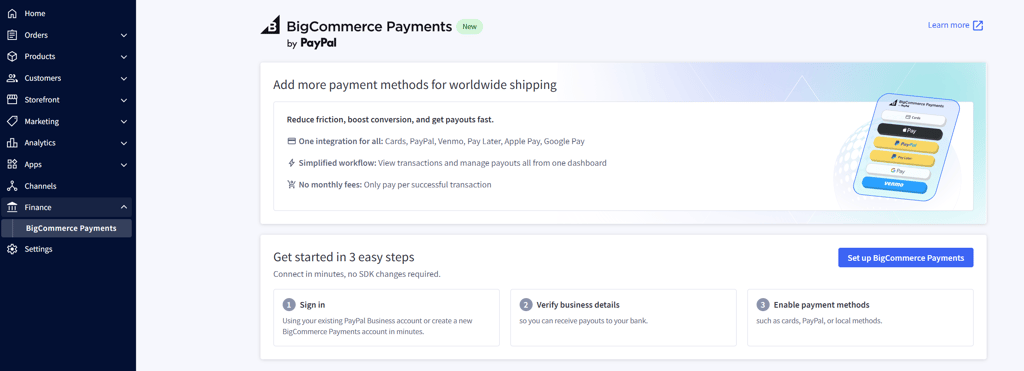
BigCommerce supports over 65 payment gateways, which sounds impressive enough on its own. Even so, there are some setbacks here, mainly related to complex payment systems and a focus on international tax structures.
It’s made for international enterprises and multi-currency selling, which isn’t always necessary for smaller businesses. Plus, it lacks a native POS system and instead uses its open platform to support third-party providers.
Squarespace is a much more convenient option for smaller businesses and one-person teams. It includes new financial tools, like the ability to send branded Pay Links, which streamline payment collection for service providers. It still supports the gateways that most brands actually use, including Apple Pay, Stripe, PayPal, and others. It even features a native Squarespace Payments processor powered by Stripe, along with a built-in POS system for a clean, conversion-optimized checkout.

Marketing and social integration
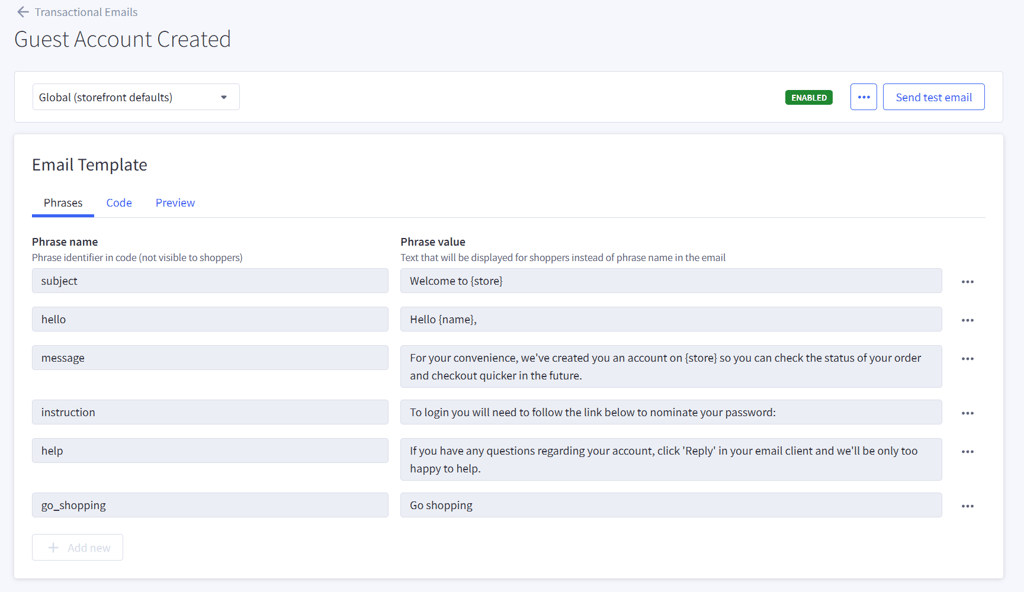
In terms of marketing and social media integration, Squarespace is a clear winner. BigCommerce offers many third-party apps for social commerce and email marketing, but they’re fragmented and require a system of multiple apps to function as a whole. That only adds to your monthly bill, let alone the management overhead.
With Squarespace, you get the best of both worlds: extremely capable marketing integration at a fraction of the cost. You can use the native email campaign system, along with the social media marketing integrations already included in the subscription cost.

The Unfold App goes the extra mile for social media stories, while the entire marketing suite operates as a well-oiled machine to keep your conversions high at minimal running cost.
Scalability and performance
BigCommerce is renowned for its scalability, with room for over 10,000 products in catalog listings and headless API access. This means you can use native commerce functions while working on design and user experience in a different CMS or platform.
Still, Squarespace handles unlimited products across all plans and, with automatic image optimization, meets the need for running a globally distributed content delivery. For a brand doing anywhere between $0 and $5 million in annual sales, it’s more than enough. Plus, it’s easier to manage through native analytics and visual dashboards that BigCommerce lacks.
Support and community
BigCommerce offers several main support channels, including 24/7 live chat, email support, and phone support. It also provides a help center, community forums, and has recently added Commerce Developer Docs sites, giving users both direct assistance and self-serve resources.
Squarespace also offers 24/7 support via email, X, and Facebook, as well as live chat during business hours Monday through Friday. The Help Center is also informative, and the Squarespace Circle community offers an extensive library of useful tutorials and webinars.
The verdict: why Squarespace wins for the modern brand
Here is my verdict of the Squarespace vs BigCommerce comparison:
| Category | Squarespace | BigCommerce |
| Ease of use | ✅ | ❌ |
| Templates | ✅ | ❌ |
| Pricing | ✅ | ❌ |
| Features | ✅ | ❌ |
| Customer support | ✅ | ✅ |
BigCommerce is still a viable option for B2B wholesalers with 50,000+ SKUs. Still, Squarespace makes for a much more convenient (and affordable) alternative for DTC brands, boutiques, digital product sellers, and service providers. The platform is specifically designed to help these businesses manage the full client journey, from discovery to robust financial management, all within one design-first platform.
It offers a design-first and user-friendly approach with no coding experience required and no help from external IT teams. It ultimately comes down to what you’re looking to achieve with your store.
FAQ
What is the main difference between BigCommerce and Squarespace?
The main difference between BigCommerce and Squarespace is that BigCommerce is built for enterprise-level eCommerce and backend flexibility, with API integrations and advanced selling tools, while Squarespace is an all-in-one platform that pairs award-winning design with a capable eCommerce engine. In practice, BigCommerce suits complex operations, and Squarespace is better for simpler, design-led businesses.
Which is cheaper for a small business?
Squarespace is cheaper for small businesses with plans starting from $16.00/month and 0% transaction fees. BigCommerce is more expensive, starting at $29.00/month, but annual revenue caps and automatic tier jumps when the limit is reached are a major turn-off for some.
Can I migrate my store from BigCommerce to Squarespace?
Yes, you can migrate your store from BigCommerce to Squarespace via CSV file exports. You can also use third-party tools to handle items like customer accounts and inventory, but it’s still manageable without developer assistance.
Is Squarespace good enough for a large store?
Yes, Squarespace eCommerce features are more than enough to handle unlimited products and bandwidth on all plans.
Which platform is better for SEO?
The BigCommerce vs Squarespace SEO comparison shows that Squarespace is better in the SEO category, thanks to built-in blogging and on-page SEO controls, giving businesses focused on content-driven traffic an edge.
Does Squarespace take a transaction fee?
No, Squarespace charges no transaction fee on commerce plans, unlike its competitors. There’s a 2% transaction fee on the Basic plan, though an upgrade slashes the rate to 0%.
Can I sell subscriptions on both?
Yes, you can sell subscriptions on both BigCommerce and Squarespace, but BigCommerce does it through third-party integrations, while Squarespace features a native system.
Which has better templates?
Squarespace has far better templates and design customization capabilities than BigCommerce. Its template library is widely regarded as the strongest among website builders, offering a distinctive advantage for those looking to craft professionally designed, aesthetically pleasing websites.
Is BigCommerce harder to use?
Yes, BigCommerce is harder to use because of its steep learning curve. With Squarespace, you’re able to create an online shop and start selling within a day.
Do I need a developer for BigCommerce?
In most cases, yes, you need a developer for BigCommerce, especially for design changes. Squarespace, though, offers standard design customization options available through the editor, with no coding required.