I tested free website builders – 6 best options that actually work in 2026
Our team of experts and researchers rigorously test and evaluate website builders through transparent, in-depth testing procedures and methods using both in-house and industry-approved tools.
Drawing on cybersecurity insights, we provide unbiased, empirical rankings and analysis to help users make informed digital platform choices.
Learn more

Finding a completely free website builder is more difficult than it looks. When I searched online, I saw a lot of options. However, when I clicked, I realized that most plans claiming to be free either don’t allow you to publish your site or lock essential features behind a paywall.
That’s why I decided to test more than 10 website builders by creating a similar simple site with each one. I looked at how easy they were to use, how much design freedom they offered, and if they asked for a credit card just to use the free plan or withdraw from the trial.
In this guide, I’ll show you the top 6 free website builders for 2026 and discuss their features, ease of use, and downsides.
Best free website builders for 2026
- Wix – overall best web builder with flexible design features
- Canva – beginner-friendly builder for quick and intuitive designs
- Webflow – best for control and customization
- WordPress – best for open-source flexibility
- SITE123 – best for quick guided website setup
- Weebly – best for simplicity and structure




Our in-house research team and expert writers work hand in hand to regularly test website builders and provide accurate and fact-checked information. Discover the ins and outs of how we test and evaluate website builders.
My top 6 free website builders for 2026 – detailed overview
Together with the Cybernews research team, I spent two weeks testing free website builders. We built test sites, explored templates, and checked how easy it was to customize layouts and add basic features. After our hands-on testing, these are the 6 free website builders I recommend the most.
One limitation I noticed with all free plans is that they only allow using the provider’s branded subdomain, such as yoursite.wixsite.com. You can’t connect a custom domain, which affects your branding and makes it harder to rank on Google or promote your site professionally.
1. Wix – best overall for creative design freedom

| Rating: | 4.8 |
| Free plan: | Yes |
| Paid plan from: | $17.00/month |
| Templates: | Over 2700 |
| Current deal: | Get Wix with 50% OFF |
Wix is a widely known website builder, especially popular for blogs, portfolios, and small business sites. The free plan lets you use all the templates and design tools, and the AI setup makes it easy to get started, even if you’ve never built a website before.
What you get with Wix’s free plan
Here are the main features included in Wix’s free plan:
- Over 2600 customizable templates
- AI website builder that creates a site design based on your description
- Drag-and-drop editor with a lot of creative control
- Wix subdomain to publish your site live (yoursite.wixsite.com)
- Basic SEO and analytics tools
- Up to 500MB of storage
My experience building a website with Wix’s free plan
When I first signed up, I chose to use the AI builder instead of starting from a template, just to see how far the automation could take me. At first, Wix guided me through a quick setup process via its AI chat. During this, I provided information about the idea and style of my website.
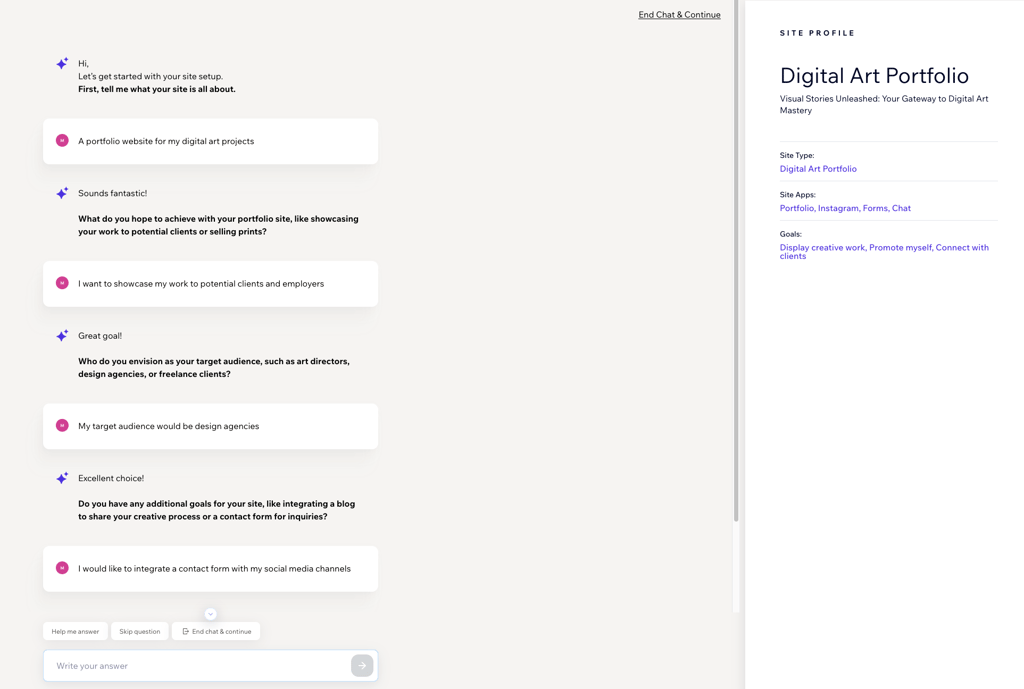
It then generated a design for me within a minute, with relevant sections, example text, and images. The result matched my initial goals almost perfectly, and I only needed to tweak the text and add my own visuals.
Wix’s drag-and-drop editor felt smooth and intuitive, and it gave me total freedom to adjust every element’s placement. I especially liked that I could add extra pages, change the layout, and adjust spacing without it affecting other elements of my website.
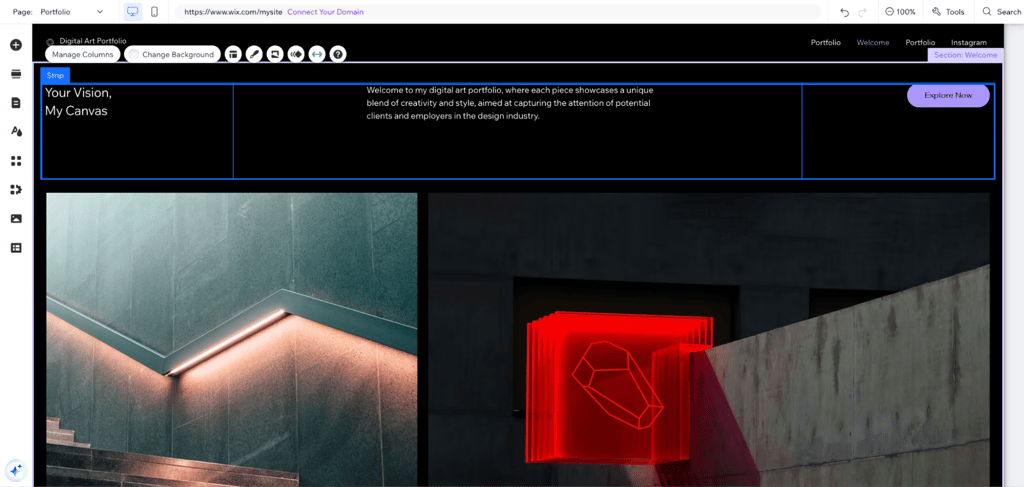
Even with the free plan, Wix didn’t feel overly limited. The main drawbacks were the visible Wix ads and that you’ll have to use the Wixsite subdomain. But if you’re looking for creative freedom and an easy workflow, Wix’s free plan is one of the strongest options I tested.
2. Canva – beginner-friendly website builder for quick and easy design
| Rating: | 4.6 |
| Free plan: | Yes |
| Paid plan from: | From $10.00/month |
| Templates: | Over 3500+ |
| Current deal: | Get Canva website builder, now from 16% OFF |
Canva is a user-friendly design platform that provides website-building tools. Its drag-and-drop interface and extensive library of images, videos, and templates make it perfect for creating visually appealing websites fast.
What you will get with Canva’s free plan
While some premium templates and images are locked, Canva’s free version still provides everything to build, customize, and publish a site quickly. Here’s what you’ll find included:
- Access to a wide selection of free templates, graphics, and stock images
- Drag-and-drop website editor
- Most essential design features, such as text, shapes, and buttons
- Free hosting on a Canva subdomain
- Basic SEO settings
My experience building a website with Canva’s free plan
Using Canva to build my digital art portfolio website was simple and intuitive. I started by choosing a template and then customized it with my own images, colors, and fonts. The drag-and-drop interface made it easy to reposition elements, add sections, and experiment with layouts.
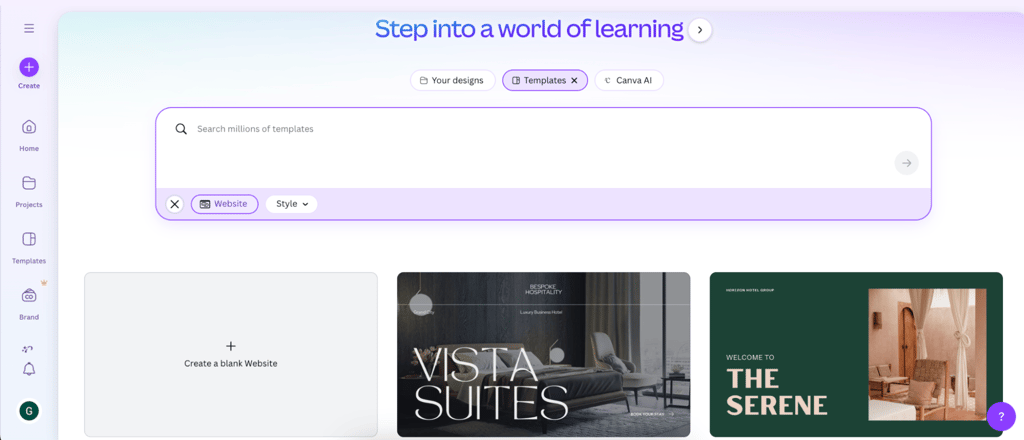
One feature I particularly liked was the extensive library of graphics and icons, which allowed me to fulfill my ideas without needing external design tools. While some premium images and elements were locked behind a paywall, the free options were enough to create a polished, professional-looking site.
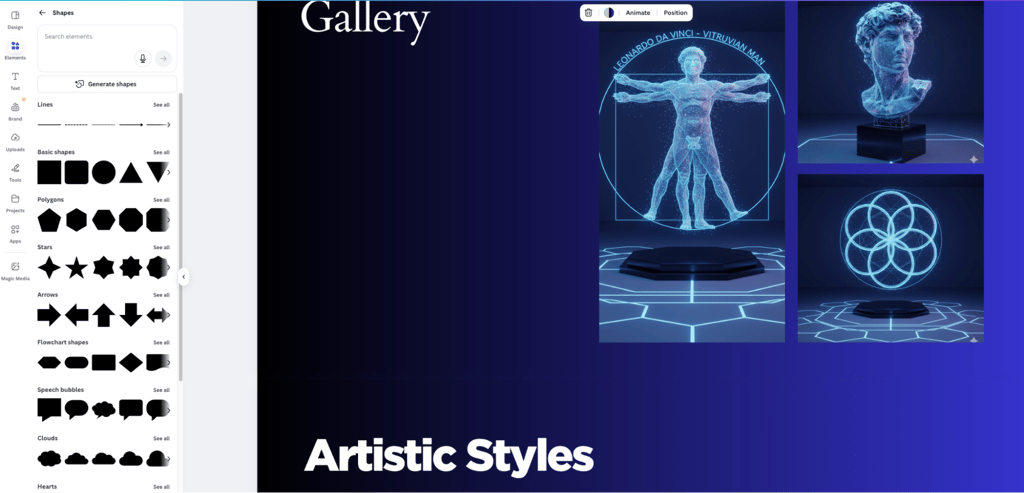
Another highlight was the free AI code generator, Canva Code. I used it to create a small interactive quiz about my art style, and it worked perfectly on my site right away. Adding it was simple, and it made the portfolio feel more engaging and interactive.
The simplicity is both a strength and a limitation. Canva doesn’t offer as much control as Wix or Webflow, but for straightforward sites, it’s fast and beginner-friendly.
3. Webflow – reliable website builder for full design control

| Rating: | 4.5 |
| Free plan: | Yes |
| Paid plan from: | From $14.00/month |
| Templates: | Over 7400 |
| Current deal: | Get Webflow AI tools now 22% cheaper |
Webflow is a responsive website builder, mostly used by advanced users who want to create professional websites without needing to code. Its free version is limited, but it works well for personal projects or small sites.
What you will get with Webflow’s free plan
Webflow’s free plan is considerably generous and doesn’t limit functionality. However, it has low limits, so it’s essential to consider them before starting your project. Here’s what’s included in the free plan:
- Hosting for up to two free websites
- Two website builders
- Basic AI assistance
- Up to 50 CMS items
- Free hosting on a Webflow subdomain
- Automatic code generation
My experience building a website with Webflow’s free plan
I was able to create and publish a fully functional portfolio website using their free plan. The website building process started similarly to Wix, by answering questions about my project to initiate the platform setup.
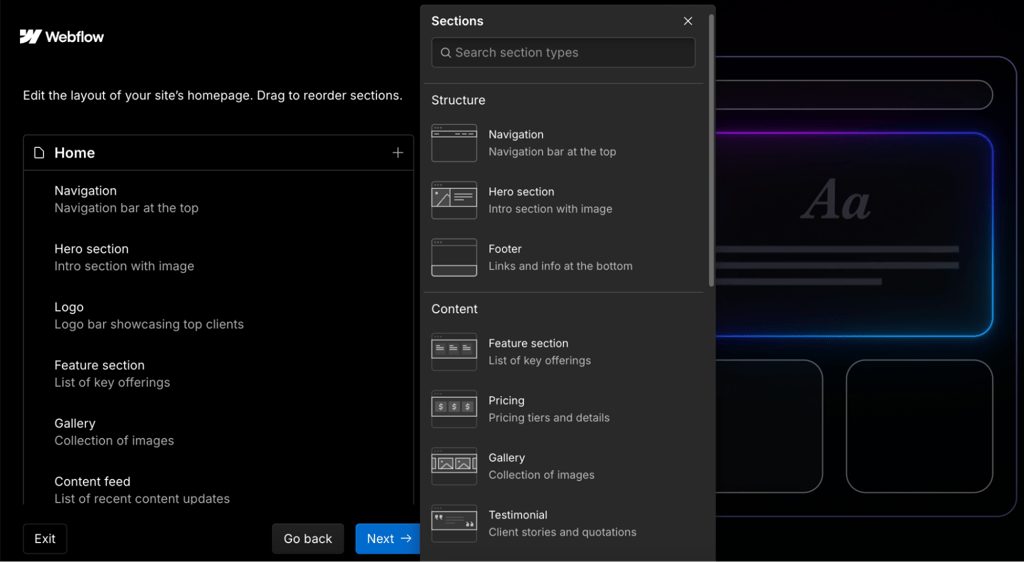
The platform offers the option to build a website using any of its provided templates. I chose to create a website using their AI generator, and it was able to create a modern-looking design with pre-built media.
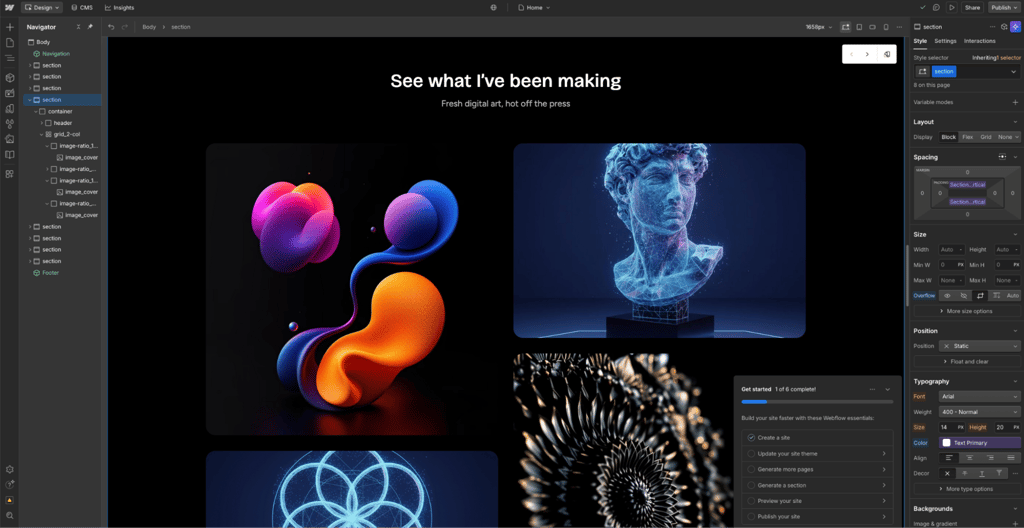
I only needed to add my artwork to the website, and I was able to publish it. The website editing process lacks some user-friendliness. However, it offers a very high level of control, as I was able to edit every component of the page.
4. WordPress – free website builder with open-source customization

| Rating: | 4.3 |
| Free plan: | Yes |
| Paid plan from: | From $2.75/month |
| Templates: | Over 13,000 |
| Current deal: | Get up to 69% OFF Wordpress! |
WordPress is a fully free, open-source CMS and website builder. It’s one of the most popular website builders in the world and is used for millions of websites. You can use it via services like WordPress.com, which includes free hosting on a subdomain, or download the software and host it yourself on any server.
What you will get with WordPress’s free plan
WordPress’s free plan is surprisingly flexible and works well for personal projects, blogs, or small portfolios. Here’s what’s included:
- Free hosting on a WordPress.com subdomain
- Hundreds of free themes and plugins
- Basic customization with the block editor
- Built-in SEO and security features
- Community support through WordPress forums
My experience building a website with WordPress’s free plan
I used Hostinger’s web hosting with WordPress installed to build my portfolio website. WordPress offers over a thousand free templates, so I chose the Ovantis theme, which was minimalistic and ideal for showcasing my digital artwork.

The website building process takes a bit of time to get used to, but WordPress’s block editor makes it straightforward to drag and drop elements. I could customize sections, add media, and structure my pages exactly how I wanted.
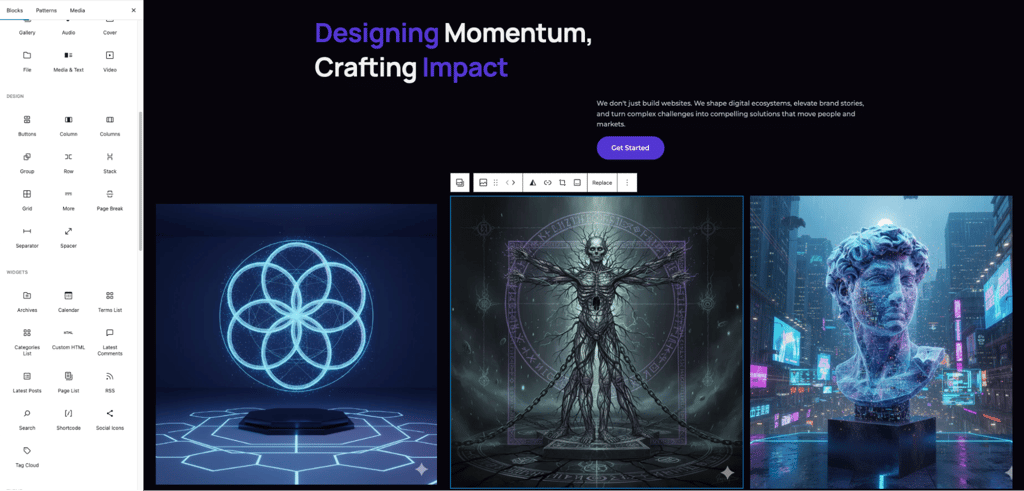
While the learning curve is noticeable, especially compared to simpler drag-and-drop builders, the flexibility and control are unmatched for a free platform.
5. SITE123 – best for creating a website quickly with minimal setup

| Rating: | |
| Free plan: | Yes |
| Paid plan from: | $10.67/month |
| Templates: | Over 160 |
| Current deal: | Get SITE123 now 50% OFF |
SITE123 is a beginner-friendly website builder with a fast setup and simple site creation. It handles much of the structure and design work for you, so you can jump straight to adding your content instead of building every section from scratch.
What you will get with SITE123’s free plan
- Free hosting on a SITE123 subdomain
- Intuitive website editor with no coding required
- Mobile-friendly and responsive website design
- Built-in SEO tools for basic optimization
- Ready-made website structure and content sections
- Access to image galleries and logo options
My experience building a website with SITE123’s free plan
I tested SITE123 while building a portfolio website called “Birds of the World.” The setup was very quick: I answered a few simple questions about the type of website I wanted to create, then the builder generated a description, loaded for a short moment, and produced a complete website.
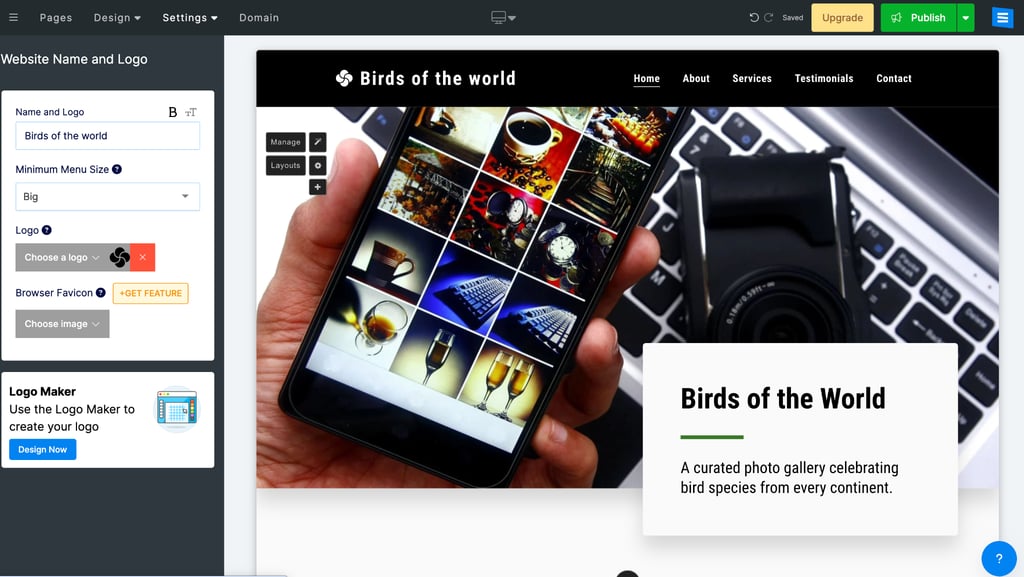
Editing sections and website elements was easy, but I missed having full drag-and-drop functionality. SITE123’s editor is simple and efficient, but it doesn’t offer the same visual freedom as builders like Wix or Webflow.
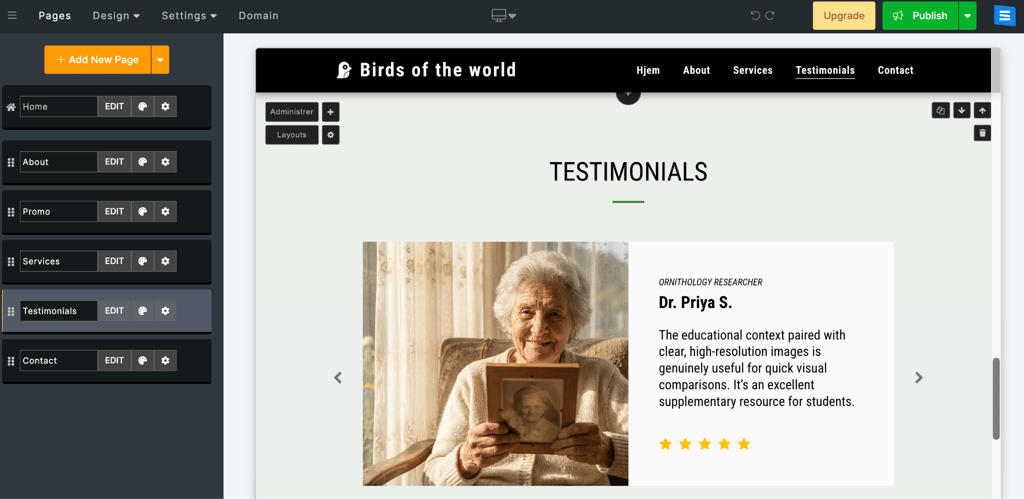
I also tested the language feature, but it seemed limited in the free version. While the website navigation menu changed to the selected language, the main text content did not translate automatically, so I would still need to edit or translate most of the website manually.
6. Weebly – free website builder for simple, structured sites

| Rating: | 4.1 |
| Free plan: | Yes |
| Paid plan from: | From $10.00/month |
| Templates: | Over 65 |
| Current deal: | Get Weebly, now up to 25% OFF |
Weebly focuses on simplicity and structure, and it makes it easy to build a website quickly. Its free plan gives you the essentials to create a functional site without being overwhelming, though it offers less creative freedom than builders like WordPress or Webflow.
What you will get with Weebly’s free plan
- Access to a selection of templates
- Drag-and-drop editor, with limited functionality and rigid layout
- Basic website features like text, images, and forms
- Free hosting on a Weebly subdomain
- Limited storage space
- Basic SEO and analytics tools
My experience building a website with Weebly’s free plan
I used Weebly to build a small digital art portfolio. I selected the “Modus Operandi” template because it was minimalistic and easy to adapt to my content. The setup was quick, and I had no issues adding text, images, and pages.

However, the editing process felt rigid compared to Wix or Canva. The drag-and-drop functionality is limited. Elements click to predefined positions, which made fine-tuning layouts frustrating. Changing templates midway also requires manually moving content, which is time-consuming.

Despite these limits, the free plan was enough to get my portfolio online quickly. For a small, simple website, Weebly works well, especially if you prefer structure over creative freedom.
Free web builders testing and ranking methodology
Before selecting the top 5 free website builders, the Cybernews research team and I refined our ranking criteria and tested 37 website builders to make sure the results were practical and useful. Here are the main aspects we focused on:
- Free plan (30%). We only considered website builders that offer completely free plans. Any builder with hidden fees or limitations that make the free version pointless was excluded.
- Visually appealing templates (25%). Design is crucial for appealing to visitors and making the website easy to navigate. Therefore, we selected builders that offer a wide range of templates at no additional cost. We looked for modern and mobile-friendly templates that cater to a diverse range of websites.
- Free features (25%). Many website builder features are often behind a paywall. However, I looked for providers that integrate basic tools such as SEO, analytics, and email.
- Ease of use (10%). To test these website builders for this lineup, I built similar websites with each. This allowed me to compare the ease of setting up and using these builders. Additionally, I considered whether the free version of a web builder includes AI tools for quick text, image, and logo generation.
- Customization (10%). Even on a free plan, I was looking for some level of creative control. I checked whether you can change fonts, colors, layouts, and add custom elements without paying.
Do free web builders actually work?
Yes, free website builders can work well. You can create fully functional websites that are perfectly fine for small projects, personal portfolios, or even simple business pages. Here are some sites they’re useful for:
- Personal portfolios and resumes. Artists, designers, and freelancers often use free builders since these sites don’t require complex features.
- Event or announcement pages. Free plans work well for sharing event details or sending invites. Some platforms, like Webflow, even include up to 50 form submissions, which can be used for submitting RSVPs and registrations.
- Local service pages. While free plans don’t let you connect a custom domain, they’re still a solid way to get your business online and test how it looks before upgrading.
- Testing and prototyping. Free plans are ideal for experimenting with design ideas, layouts, or the builder itself.
In conclusion, if your website doesn’t need advanced functionality or eCommerce tools, a free builder can definitely get the job done.
What’s the catch with free website builders?
Free website builders are a great way to bring your ideas online, but they come with several limitations that can really affect your site’s performance and growth.
Most free plans display the provider’s branding on your website and don’t allow connecting a custom domain, so your site lives on a branded subdomain like yoursite.wixsite.com. That means you get only basic SEO settings, such as titles and descriptions, so your chances of ranking on Google are low.
You also can’t run paid ad campaigns through platforms like Facebook, Google, or Instagram directly from the free plan, and there’s no access to Google Search Console or analytics tracking to monitor your traffic. Additionally, free plans typically don’t support selling products online. You could link to external stores, but it’s clunky and unintuitive.
Free plans also come with limited storage and bandwidth, which can make it hard to grow your site over time. All in all, they’re a reliable way to publish your idea online and start building an audience without any upfront cost.
FAQ
Do free website builders include hosting?
Yes, free website builders include hosting, and you don’t need to pay separately for it. Your site is stored on the builder’s servers and can be accessed through the provider’s subdomain, for example, yoursite.wixsite.com.
Can I upgrade from a free to a paid plan later?
Yes, you can start with a free plan and upgrade at any time to unlock features like custom domains, additional storage, or advanced tools. Most builders make the switch seamless, with your site experiencing no downtime.
Which free website builder is best for beginners?
Wix and Canva are the easiest website builders for beginners. Wix offers a lot of design flexibility and guidance while you build, while Canva feels like designing a presentation, especially if you’ve used its design tools before.
Can I use a custom email address with a free website?
No, to create a custom email address, you will need to opt for a paid plan that allows connecting a custom subdomain.
Will my website appear on Google if I use a free builder?
Yes, your site will appear on Google, but ranking high may be harder. Free plans often have limited SEO tools and show the builder’s branding, which can affect visibility. However, if you optimize your content and share your site, it will get indexed and found online.