How to start vibe coding – step-by-step guide
Our team of experts and researchers rigorously test and evaluate website builders through transparent, in-depth testing procedures and methods using both in-house and industry-approved tools.
Drawing on cybersecurity insights, we provide unbiased, empirical rankings and analysis to help users make informed digital platform choices.
Learn more

Creating apps used to mean endless nights of learning syntax, flipping frameworks, and spending time on features that may not even work.
Vibe coding has changed that entire process. Instead of writing thousands of lines of code, you can now describe what you want in plain English. Thanks to powerful AI capabilities, prompting for app creation has made the majority of devs’ lives easier.
Championed by tech leaders like Andrej Karpathy, vibe coding is changing the general consensus about programming. It makes app building more accessible, without replacing the human touch.
The term “vibe coding” was introduced around early 2025, and tools such as Base44 exemplified it. Think of it as the difference between explaining your dream home to an architect versus building it brick by brick yourself. You still get to make all the creative decisions. You just don't need to master every technical skill to see your vision come to life.
When you’re ready to try it out, start with a simple prompt like “Build a to-do app that sorts tasks by priority.” Thanks to vibe coding, anyone can turn a brilliant idea into an app.
What is vibe coding?
Vibe coding involves describing your app idea in plain English and letting AI write the code for you. Instead of having to learn multiple programming languages, you focus on explaining what you want your app to do. The AI figures out how to build it.
The approach took shape as tech enthusiasts experimented with advanced AI models like GPT-5 and Claude. Developers realized these models could generate entire applications from natural language descriptions. What began as a novelty quickly became a legitimate development approach.
Here's what the basic flow looks like
- Define your project vision
- Choose and set up your tool
- Craft effective prompts
- Generate and test your prototype
- Deploy your app
Vibe coding isn't just for beginners who can't code. Experienced developers use it to prototype faster and explore ideas without a boilerplate setup.
Say you want a simple weather checker. Your prompt might be: "Build a weather app that shows current temperature and conditions for any city the user enters." The AI generates a working interface, fetches weather data from an API, and displays results.
You just described the outcome. The AI handled everything else.
In essence, you write a prompt describing your app. The AI generates the code. You test what it was built for. If something's off, you refine your prompt or give follow-up instructions. The AI updates the code, and then you repeat until you're satisfied.
Benefits and challenges of vibe coding
Vibe coding offers a compelling advantage. The benefits of vibe coding go beyond just saving time, though that alone is significant.
- Speed to MVP matters more than ever. In traditional development, getting from idea to working prototype takes weeks or months. With vibe coding, you can go from concept to clickable prototype in minutes. That speed lets you test ideas quickly and iterate based on real feedback instead of assumptions.
- Accessibility changes who can build. You don't need a computer science degree to create software anymore. If you can describe your idea clearly, you can build it. Base44 removes traditional coding barriers entirely. Non-technical founders can now build their own MVPs without hiring a development team first.
- Lower costs per product shift the economics. Hiring developers is expensive, and building in-house requires months of runway. Vibe coding platforms like Base44 operate on credit-based models that cost a fraction of traditional development.
- Full-stack automation eliminates integration headaches. Base44 handles all of this automatically. The platform generates your entire stack as a cohesive unit, not disconnected parts you have to wire together yourself.
But challenges exist.
Security gaps can appear. AI models don't always follow security best practices, so you need human review for anything handling sensitive data.
Scaling gets complicated. Vibe coding excels at prototypes and simple apps, while complex enterprise applications still benefit from traditional development approaches.
Fixes exist for most issues. Run thorough tests on everything AI generates. Have someone with security knowledge review sensitive code. Use version control so you can roll back bad generations. Combine vibe coding with traditional development for production apps.
Follow best practices and you'll avoid most pitfalls. Test thoroughly. Start simple. Iterate based on real feedback.




Our in-house research team and expert writers work hand in hand to regularly test website builders and provide accurate and fact-checked information. Discover the ins and outs of how we test and evaluate website builders.
Best tools for vibe coding
Here are the top platforms for vibe coding in 2026. Each tool lets you build fully functional apps through natural-language prompts instead of traditional coding. Whether you’re a beginner testing an idea or a team ready to scale, these platforms make development faster, simpler, and more accessible.
1. Base44 – best vibe coding tool overall

| Starting price: | Free tier + paid plans (Starter $20/mo, Builder $50, Pro $100, Elite $200) |
| Language model: | Claude Sonnet 4.5, Gemini 2.5 Pro, or GPT-5 |
| Free version: | Yes, limited by message/integration credits |
| Top features: | Full-stack app generation from natural language, auto deployment & hosting, zero setup, model comparison, code export (higher tiers) |
Base44 specializes in full-stack app generation from natural language prompts. It's the most beginner-friendly option because it requires zero setup. You describe your app, and Base44 generates everything. The platform uses multiple AI models simultaneously, comparing outputs to select the best result. Automatic hosting means your app goes live instantly. It’s perfect for first-timers who want to see results immediately.
Pricing. Base44’s free tier is perfect for testing ideas, but its real value starts with the paid plans, beginning around $20/month. That small upgrade unlocks faster generation, live hosting, and code export, essentially everything you need to turn a concept into a working app. Higher tiers focus on speed, integrations, and team collaboration for those ready to move from prototype to production.
Ease of use. You don’t need to set up servers or infrastructure. You type a prompt describing your app; Base44 generates structure, UI, logic, and deploys it. It’s designed for non-technical users.
Functionality. It produces full-stack applications (frontend + backend + database) and auto-hosts them. Higher tiers allow custom domains and GitHub integration.
2. Hostinger Horizons – best end-to-end vibe coding tool

| Starting price: | Plans start ~$6.29/month for premium tiers; free basic plan with limited features |
| Language model: | Powered by large language models (not publicly naming which) |
| Free version: | Yes, a free/basic version with limited features |
| Top features: | AI app generation, built-in hosting, domain, SEO tools, integrations (Stripe, Supabase), multilingual support |
Hostinger Horizons combines AI code generation with a robust hosting infrastructure. It excels at both simple prototypes and production-ready applications. Built-in version control, staging environments, and performance monitoring make it suitable for serious projects, making it the best choice if you want room to expand beyond initial prototypes.
Pricing. There’s a free/basic plan with limited capabilities. Premium plans begin around $6.29/month. All plans include hosting by default. You’re not just building apps. You’re launching them with built-in SEO, analytics, and security from day one.
Ease of use. The user interface is chat-first: describe your idea, refine via conversation, and publish with minimal steps. It abstracts away infrastructure concerns.
Functionality. Beyond generating apps, it includes domain, hosting, SSL, SEO, analytics, content editing, integrations, and code export (for paid plans).
3. Glide – best AI web tool for data-based apps

| Starting price: | Free plan available; paid plans from $25/month (Explorer) |
| Language model: | Glide AI (integrated OpenAI-powered features for data tasks) |
| Free version: | Yes, includes basic data connections and app publishing |
| Top features: | Spreadsheet & database integration, AI column generation, automation, responsive UI builder, role-based access controls |
Glide transforms spreadsheets into functional apps. If your project revolves around data, forms, or workflows, Glide can handle it beautifully. Connect a Google Sheet, describe your interface preferences, and Glide generates a responsive app. Perfect for internal tools, inventory systems, or simple CRUD applications.
Pricing. You can start free and pay as you grow, gaining access to features like data syncing, private app sharing, and role-based permissions. It’s a cost-effective way to automate workflows and collaborate without writing a line of code. The paid tiers start at $25/month, which includes 100 personal users and 250 updates.
Ease of use. Glide’s drag-and-drop interface is among the easiest in no-code tools. Connect your data, define actions, and preview a responsive app instantly. No technical setup required.
Functionality. It includes data-driven logic, workflow automation, API connectors, and AI-powered columns for classification and summarization. Apps are fully responsive and can be shared via link or custom domain.
4. Softr – ideal for internal business apps & client portals

| Starting price: | Free / $0 plan; paid plans from $59/month |
| Language model: | Uses no-code logic and offers AI credits for features (not core to building) |
| Free version: | Yes, up to 1 published app, 10 users, 5,000 records, 500 AI credits |
| Top features: | Portal/dashboard builder, Airtable/Sheets/SQL data sources, role-based access, PWA support, API calls |
Softr specializes in building client portals, membership sites, and internal dashboards. It connects to Airtable or Google Sheets as a backend, then generates user interfaces with sophisticated access controls. Great for non-technical teams who need internal tools but lack development resources.
Pricing. Free plan gives you core building blocks and limitations (1 app, 10 users). Paid tiers: Basic $59/mo, Professional $167/mo, Business $323/mo, with each unlocking more apps, users, AI credits, advanced data sources, domain removal, and PWA capabilities.
Ease of use. You don’t deal with backend code, just link your data, choose templates or blocks, set permissions, and publish. The UI is intuitive, making onboarding fast even for non-technical users.
Functionality. Supports user authentication, role-based access, multiple data sources, embedding, API calls, PWA support, data export, and conditional UI logic.
5. Bubble – best AI coding assistant for front-end web apps with deep logic

| Starting price: | Free plan; paid tiers starting ~$32/month to $399/month |
| Language model: | Visual programming + optional AI-assisted UI / logic generation |
| Free version: | Yes, limited functionality and 50,000 workload units |
| Top features: | Visual editor, workflow engine, plugin ecosystem, custom logic, API integration |
Bubble pioneered visual development and recently added AI-powered generation. Use AI to generate your initial interface and logic, then refine through Bubble's visual editor. Best for people who want to understand and modify what's being built.
Pricing. Bubble’s pricing reflects its flexibility; you can build for free, but serious builders usually start with the $32/month Starter plan to unlock live publishing and production performance. Each upgrade adds scalability and workload capacity, making it ideal for creators who want total control of their app without hiring a dev team.
Ease of use. Bubble has a steeper learning curve because it’s powerful, but the visual editor is flexible. AI-assisted tools help speed up layout and logic creation. Non-technical users might take more time to master it, but the payoff is customization.
Functionality. Supports workflows, database operations, API calls, plugin integrations, version control, logic branching, custom expressions, and responsive design. Everything from MVPs to complex SaaS apps is possible.
How to start vibe coding: step-by-step guide
Ready to build your first vibe-coded app? Follow these steps to go from idea to working prototype.
Step 1. Define your project vision
Start by identifying the problem you want to solve. Don't jump straight to features. Think about the pain points first. What frustrates you? What repetitive task could be automated?
Target simple prototypes initially. Good starter projects include habit trackers, expense loggers, or study flashcard apps. Avoid complex ideas like social networks for your first attempt.
Create a basic spec document. Write down four things: your app's purpose in one sentence, who will use it, three to five core features, and how you'll know if it succeeds.
Use AI to help with planning. Base44 can generate a README or Product Requirements Document from a high-level description. Try prompting: "Create a PRD for a personal budget tracker that helps college students monitor spending."

Here's an example progression. Maybe you start with "budget tracker." That’s too vague. You then refine it: "An app where I manually enter purchases and see how much I've spent this month,” which is better. Then, add some detail: "Users should be able to categorize purchases, set monthly budgets by category, and get alerts when approaching limits." Now you're ready to build.
Limit scope aggressively and stick to three to five core features maximum. You can always add more of them after validating that the basic concept works.
Step 2. Choose and set up your tool
Base44 is the ideal starting point for most beginners. Visit the website and sign up for a free account, where registration takes under a minute. No credit card is required for the trial tier.
After logging in, you'll see the dashboard and the textbox for prompts. That's where the magic happens. Base44 doesn't require API keys for basic functionality, and everything works out of the box.
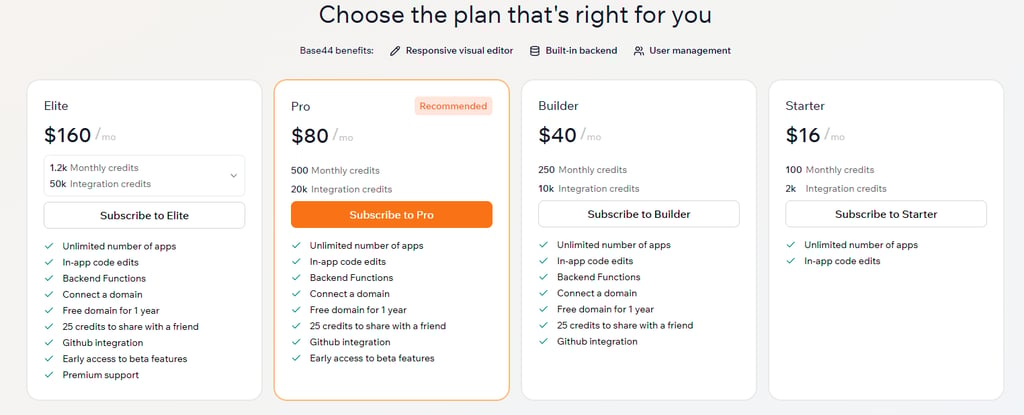
The free tier gives you 50 credits. With simple apps only consuming 5 to 10 credits, you can experiment plenty before hitting limits.
Test the tool immediately with a throwaway prompt. Type: "Create a simple to-do list app." Click generate and watch Base44 build a working app in under a minute. That’ll help confirm everything works and familiarize you with the interface.
Step 3. Craft effective prompts
Good prompts make the difference between mediocre results and impressive ones.
Be specific and clear. Vague prompts like "make a fitness app" will generate a generic output. A better prompt would be: "Create a workout logging app where users can record exercises, sets, reps, and weight. Include a history view showing all past workouts."
List functionality step by step and walk through the user journey. "When users first open the app, they see a login screen. After logging in, they land on a dashboard showing today's workout plan."
Follow Base44's prompting structure. Start with the goal: "Build a recipe organizer." Then add components: "Users should be able to add recipes with ingredients and instructions, search their collection, and mark favorites." Finally, specify details: "Use a card layout for recipes, make it mobile-friendly, and include photo uploads."
Write all this down, as it’ll become your North Star when you start describing your app to the AI.
Clear prompts create better outputs. Vague ideas create generic products.
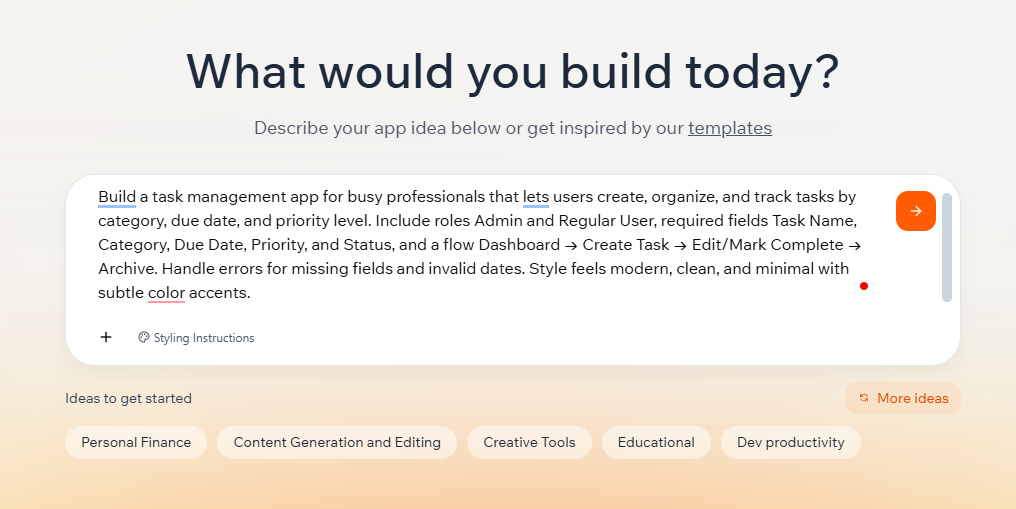
Micro-prompt template:
“Build a [type of app] for [audience] that lets users [main action]. Include roles [list],
required fields [list], and a flow [A → B → C]. Handle errors for [edge cases].
Style feels [mood].”
Add constraints to guide design. Specify qualities like "mobile-first design," "minimal aesthetic," or "dark mode support." These details shape what the AI generates.
Use follow-up prompts for refinement. After generation, you might say: "Make the header sticky so it stays visible when scrolling" or "Change the color scheme to blues and greys."
Step 4. Generate and test your prototype
Enter your crafted prompt into Base44's text box and hit generate. Now, you’ll be able to watch the build process. Base44 shows real-time progress as it creates your app.
Once generation is complete, Base44 will provide a live preview link. Click it to see your app running.
Test the basics thoroughly. Click every button. Fill out every form. Navigate between pages. Does it match your vision? Are core features working correctly?
Add real data and interact naturally. If it's a task manager, create real tasks. That way, you’ll be able to reveal usability issues you wouldn't catch otherwise.

Test on different devices. Base44's preview works on phones, tablets, and desktops. Try all three. Mobile interfaces often need adjustments.
Document problems clearly. Take screenshots of anything that doesn't work right. Note exact steps to reproduce issues.
Share the preview link with a friend, as fresh eyes catch things you'll miss.
Step 5. Deploy your app
Getting your vibe-coded app live is simpler than traditional development.
Base44 handles deployment automatically. Every app you generate already has a public URL, with no separate deployment step. Your preview link is your production link. Share it with anyone, and they can use your app immediately.
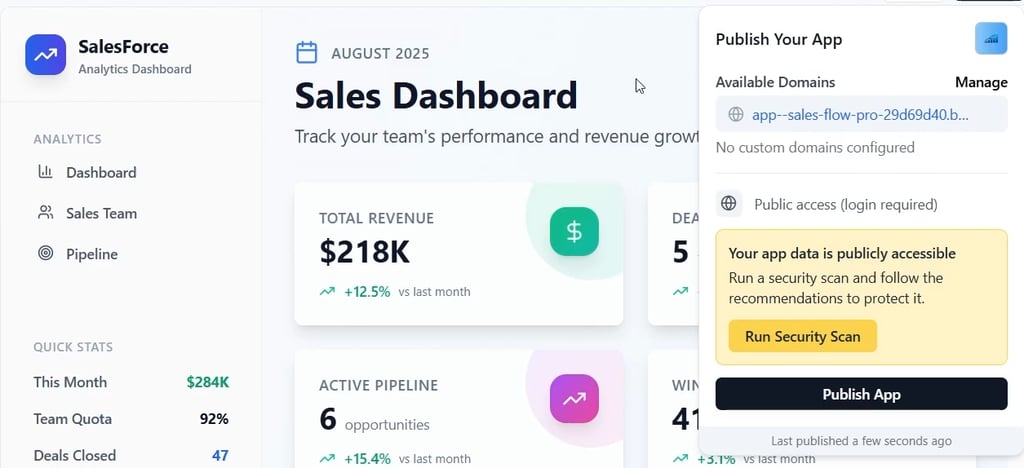
For custom domains, Base44's paid tiers let you connect your own URLs. Buy a domain through any registrar, then follow Base44's documentation to point it to your app.
Monitor performance after launch. Base44's analytics dashboard shows visitor counts, feature usage, and error rates, so keep a close eye on this data.
If needed, update your live app by regenerating sections in Base44, and changes will deploy automatically to your existing URL.
Vibe coding: Best practices
- Plan first. Outline your project vision with AI before generating code. Use Base44's discuss mode to talk through requirements and prevent scope creep.
- Keep it simple. Stick to basic technology stacks for faster builds. Simpler apps have fewer bugs and load faster.
- Be specific. Provide clear documentation and constraints in prompts. The more context you provide, the better the results.
- Chunk tasks. Break builds into small, testable steps. Generate core functionality first, test it thoroughly, then add features one by one.
- Test early. Check functionality after every change, not just at the end. Bugs compound if you keep building on broken foundations.
- Version control. Use GitHub or Base44's built-in versioning to track changes and revert safely. Before making risky changes, save your current working version.
- Iterate freely. Refine through feedback loops and get your app in front of users often, even when it's rough. Their feedback guides improvements better than your assumptions.
- Learn as you go. Ask AI to explain outputs to build skills. When Base44 generates something interesting, prompt: "Explain how the user authentication system works."
Conclusion
Vibe coding transforms how we build software. It removes the years of training traditionally required to create apps. Anyone with a clear idea and decent communication skills can now build functional prototypes in hours instead of months.
Base44, Hostinger Horizons, and others make vibe coding accessible to complete beginners while remaining powerful enough for experienced developers.
Start with a simple project, and define your vision clearly. Choose a platform like Base44 that removes technical barriers. Craft specific prompts that guide AI toward your goal. Test thoroughly and iterate based on real usage.
The limitations are real but manageable. AI makes mistakes, and security requires human oversight. But for prototypes, MVPs, internal tools, and simple apps, vibe coding delivers incredible value at a fraction of traditional costs.
Your first app won't be perfect, and that's okay. The second will be better. By the fifth, you'll wonder how you ever built software any other way.
FAQ
Can anyone do vibe coding?
Yes. You don’t need coding skills or a tech background. If you can describe your idea clearly, you can build it. The AI handles the technical part, while all you need is clear prompts and curiosity.
What skills are needed for vibe coding?
Clear communication matters most. Describe your app’s purpose, users, and actions precisely. Product thinking and testing skills help, but you’ll learn those naturally as you build.
What are the limits of vibe coding?
Vibe coding works best for standard apps. It struggles with complex systems, unique algorithms, or sensitive data. Always review security if your app handles finances or health info.
What’s a good beginner vibe coding app idea?
Try a simple tool like a habit tracker, study timer, or expense logger. These teach you prompting and logic without complexity. Avoid payments or social features at first.
How long to finish my first app?
A basic app can be completed in a few hours. Define the idea, set up Base44, write your prompt, test, and refine. For more advanced builds, expect days, not weeks.