Squarespace vs Shopify 2026: which one to choose?
Our team of experts and researchers rigorously test and evaluate website builders through transparent, in-depth testing procedures and methods using both in-house and industry-approved tools.
Drawing on cybersecurity insights, we provide unbiased, empirical rankings and analysis to help users make informed digital platform choices.
Learn more
Shopify and Squarespace are both great eCommerce tools for different reasons. Shopify is an eCommerce platform that has website-building functionality, while Squarespace is a website builder with eCommerce functionality. These platforms virtually do the same things but in very different ways.
I tested both platforms for a month in September 2025, comparing their pricing, ease of use, templates, marketing features, performance, and customer support.
Continue reading my Squarespace vs Shopify review to find all you need to know and pick the one that best suits your needs.
Shopify vs Squarespace 2026: overview
| Editor's TOP Choice | ||
| Shopify | Squarespace | |
| ⭐ Rating: | ||
| 🥇 Overall rank: | #7 out of #37 | #8 out of #37 |
| 💵 Price: | From $29.00/month | From $16.00/month |
| 🪄 Ease of use: | Foolproof design options | Perfect for beginners |
| 🎨 Templates: | 1050 | 199 |
| 🏢 Business features: | Excellent first-party features, good app market | Solid in-house eCommerce and marketing |
| 👨💻 24/7 live support: | Yes | Yes |
| ✂️ Free domain (first year): | No | Yes |
| 🔒 Free SSL certificate: | Yes | Yes |
| 🔥 Coupons: | Get Shopify deal - 25% OFF | Squarespace coupon 36% OFF |
| Get Shopify |




Our in-house research team and expert writers work hand in hand to regularly test website builders and provide accurate and fact-checked information. Discover the ins and outs of how we test and evaluate website builders.
Pricing: Squarespace is cheaper than Shopify
Squarespace offers 4 premium plans, starting from $16.00/month. Meanwhile, Shopify offers 4 eCommerce plans, but these are more expensive, starting from $29.00/month. what's even better, you can get Squarespace even cheaper with our exclusive Squarespace coupon code CNSQUARESPACE10.
While Squarespace offers cheaper plans compared to Shopify, it’s important to note that it also doesn’t apply transaction or processing fees (except for the Basic plan), whereas Shopify applies transaction fees on all of its plans.
These are the Shopify subscription options:
| Plan | Price | Features |
| Basic | $29.00/month | Provides all the essential elements for creating a new online store and charges a 2.9% + 30¢ card rate. |
| Shopify | $79.00/month | 5 staff accounts, professional reports, international pricing, more shipping options, and a lower (2.6%+30¢) card rate. |
| Advanced | $299.00/month | Third-party calculated shipping rates, up to 15 staff accounts, and an even lower (2.4% + 30¢) card rate. |
| Plus | $2,300.00/month | 40x higher checkout capacity, 24/7 priority support, unlimited staff accounts, highest API rate limits, and customizable checkout. Supports 200 inventory and POS locations, global selling in 50 markets, and wholesale/B2B sales. |
You can learn more about Shopify plans and how they work in the dedicated Shopify pricing review.
Squarespace offers 4 affordable plans, of which 3 do not apply transaction fees:
| Plan | Price | Features |
| Basic | $16.00/month | Free custom domain, unlimited bandwidth and storage, and SSL security 2.9% + 30¢ card rates |
| Core | $23.00/month | Everything above, plus advanced analytics, and 2.9% + 30¢ card rates |
| Plus | $39.00/month | Lowers card rates to 2.7% + 30¢ and adds more eCommerce features like professional email and a lower digital content and membership transaction fee |
| Advanced | $99.00/month | Containing all the features from previous plans, lowers card rates to 2.5$ + 30¢, offers, unlimited video hosting and storage, lowest overall fees |
You can learn more about the subscription plans in our comprehensive Squarespace pricing article.
All Squarespace and Shopify plans are appealing for different reasons, but I find some are better valued than others. For example, if I wanted to go for Shopify, I’d personally choose the Grow plan, as it offers more features than the Basic one, for example, 5 accounts for staff, and shipping insurance. It also isn’t as expensive as the Advanced plan.
With Squarespace, I’d choose the Plus subscription, as it includes a lot of eCommerce features and low card rates (2.7%+30¢).
Comparing both providers’ refund policies, Squarespace is the clear winner here. It offers a 14-day free trial for all annual plans. On the other hand, Shopify includes a 3-day free trial but doesn’t offer any refunds.

Shopify vs Squarespace: ease of use
An important part of any web builder is how easy it is to use. After all, you don’t want to spend a lot of time reading through documentation to set up the basic tools you need. A good tool will allow you to focus on your business, while simplifying building your online presence.
Using Shopify
Right from the get-go, you can start your Shopify free trial. Once I signed up, I was asked where I’d like to sell and if I’m a beginner or already selling online. I was also asked what I wanted to sell first. After the questionnaire, I was directed to the homepage with a guide of all the necessary steps – store customization, adding the first product, placing a test order, and so on.
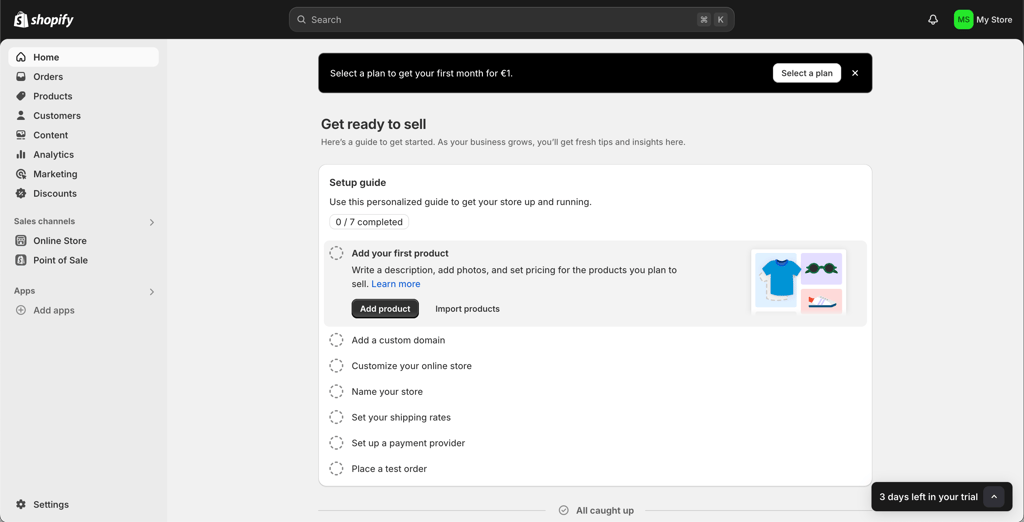
If you specify that you are experienced, you get an option to import your store from other platforms like Amazon, Etsy, and WordPress. The setup guide is also different with different steps. From what I was able to gather, the process is more straightforward, quicker, and less cluttered with steps.
Using Squarespace
With Squarespace, you first get a questionnaire with questions like “What's your site about?” or “What do you want to do with your website?” Once I was done answering, I had a choice between using an existing template or an AI tool.

This is also where you get to name your site, and the platform explains some of the features.
Squarespace vs Shopify editors
After setting up both sites, it was time to test the editors.
Instead of offering options to drag-and-drop elements on the site, Shopify gives you sections. They're premade pieces of your site. However, you can't edit them all that much – but it might be a good feature for beginners who aren’t yet comfortable with extensive site editing.
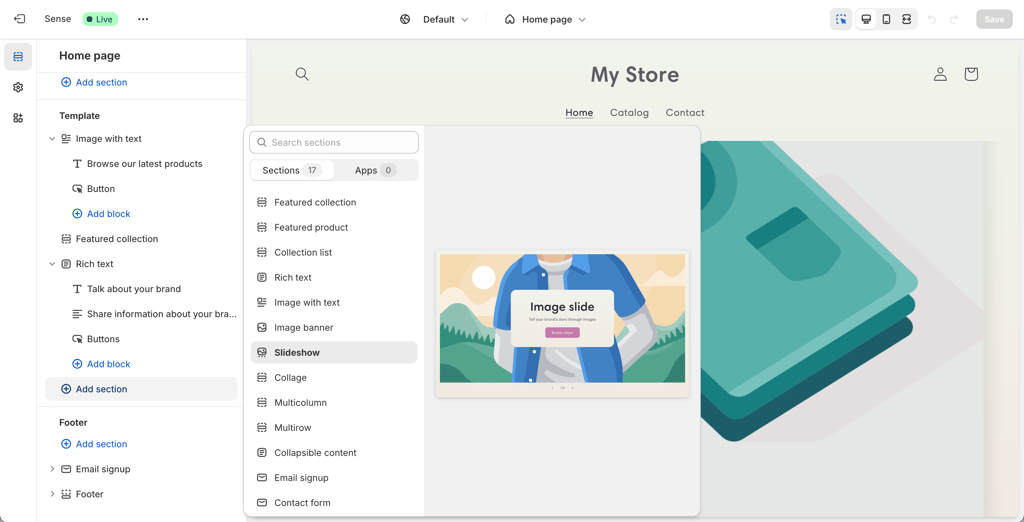
Squarespace uses a drag-and-drop editor, which allows users to have more freedom in editing. However, it might also take time to get used to. Combined with the bigger selection of templates, customizability is definitely in Squarespace’s favor. It also has a bigger selection of templates and more freedom for editing.

I did like working with both platforms, but despite some similarities with Shopify, I found Squarespace more functional.
Templates
Templates are an important part of any eCommerce website builder. They can save time, and make sure your brand is on point. That’s why, I compared both product’s template offers to see which can give your website a better basis.
- Shopify offers 1050+ templates in its shop. However, only 13 of them are free to use, while the remainder are premium themes that cost from $100 to $500.
- Squarespace, meanwhile, offers 199+ templates, 45 of which are eCommerce-focused. The good news is that all of them are free.
- Both services offer beautiful templates for a variety of uses. Shopify focuses on building high-quality sales-optimized websites, which comes at a price. Squarespace, on the other hand, offers more basic free themes.
Shopify’s collection of 1050+ templates is robust and focuses on purchase conversion. The templates are designed to work with your shop automatically, which requires minimal user input for setting up. Plus, I found the customization, however limited, to be more user-friendly than Squarespace. The only downside is the really high price.
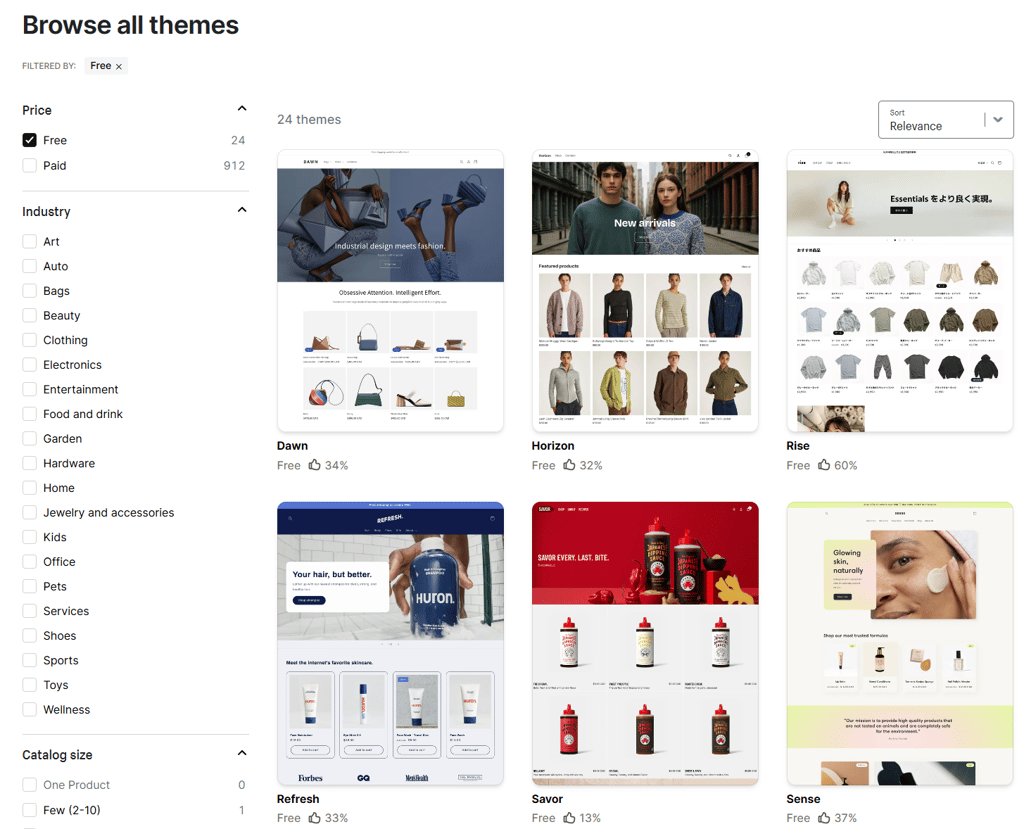
Squarespace, meanwhile, offers 45 eCommerce templates that are far more customizable than Shopify but are also more generic in nature. This means that to properly set up your site for eCommerce and all its functionalities, some expertise is required. The more positive aspect is that Squarespace allows for more creativity. So if your online store occupies a niche, Squarespace can be nicer than Shopify.

All in all, your choice will depend on what you need. Shopify’s more limited design is great if your store is product-focused and does not require too much customization, while Squarespace will be a great choice for certain niches like course-selling or handmade items.
Shopify vs Squarespace: eCommerce features
I decided to look at the eCommerce features offered by Shopify and Squarespace to see which product offers more for businesses looking to sell their products or services online. I particularly looked at what each service offers in terms of order fulfillment, payment processing, and marketing tools to see how they can help your business grow.
| Shopify | Squarespace | Winner | |
| Fulfilling orders | Shopify automates fulfilling orders by taking care of most of the orders for you. This includes sending emails, taking payments, and helping your customers track their orders. | Squarespace offers basic order fulfillment automation, sending you email notifications about each order. However, you’ll have to fill out most of the details yourself, and tracking is only available for af few providers. | Shopify |
| Payments | Shopify offers a native payment processing solution called Shopify Payments and integrations with over 100 other third-party processors, including Stripe, PayPal, and Adyen. | Squarespace’s native payment processing solution is called Squarespace Payments, and it offers a variety of third-party processors such as Stripe and Square. | Shopify |
| Marketing tools | Shopify offers multiple marketing tools, ranging from email, and social media tools to SEO (search engine optimization) marketing integrations. It also offers AI tools to generate effective eCommerce ads. | Squarespace offers email marketing tools, along with basic SEO features, and an option to hire a personal SEO assistant who will optimize your website for you. It also offers Google Analytics. | Shopify |
| Third-party plugins/apps | Shopify offers many official integrations, with over 8000 third-party apps, including integrations and plugins from various providers, such as email marketing solutions Omnisend and Klaviyo. | Squarespace offers 100 integrations and plugins. A far smaller number than Shopify; however, some useful integrations, like TaxJar and Mailchimp, are present. | Shopify |

Performance: Shopify is faster than Squarespace
I tested Shopify and Squarespace to compare their performance. The testing of popular website builders included checking loading speed, stress handling, and server response time for a concise and thorough comparison.
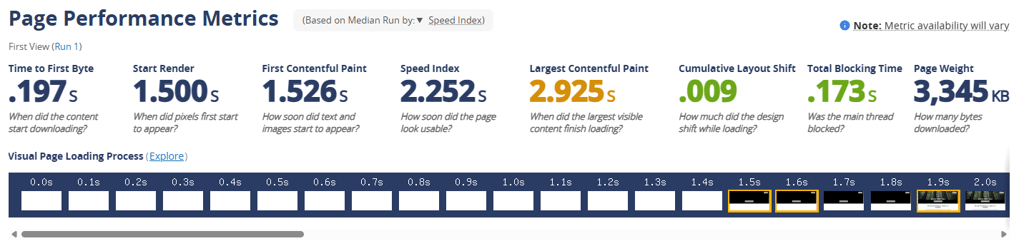
Regarding loading speed, Shopify demonstrated significantly faster loading than Squarespace, with a speed index of 0.9 seconds.
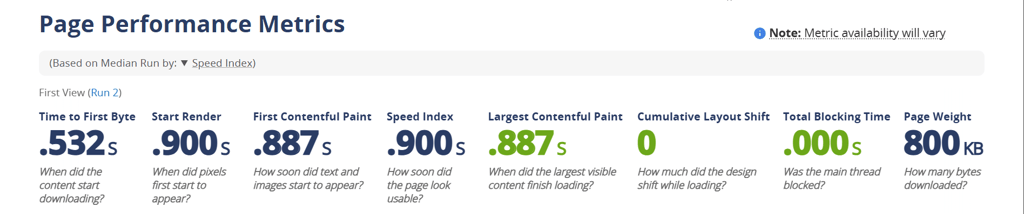
Conversely, Squarespace lagged at 2.252 seconds. Thus, this makes Shopify the better choice for users prioritizing quick load times.
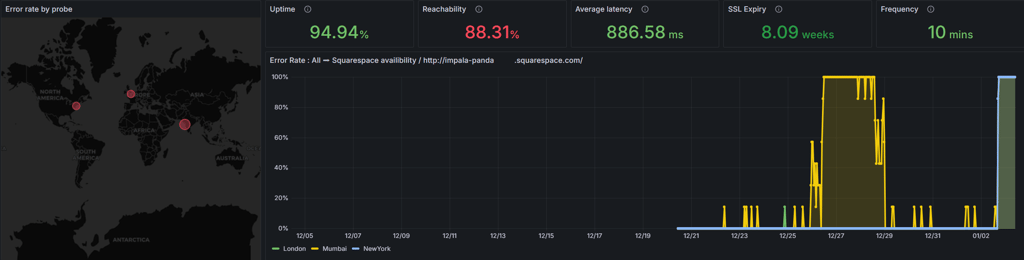
I also evaluated each provider’s uptime and server reachability capabilities, conducting a 14-day test with probes located in Mumbai, New York, and London.
Shopify demonstrated a 100% uptime and an overall reachability of 99.96%. While each Shopify probe encountered an issue once, the results are slightly better than those of Squarespace.

Meanwhile, Squarespace delivered poorer results than Shopify, with 94.94% uptime and a server reachability of 88.31%. However, it’s worth noting that the failures were brief, suggesting issues related to DNS resolution, the network, or servers.
In terms of stress handling, both Squarescape and Shopify performed well. The test involved 20 virtual users over 10 minutes, and neither experienced any failures.
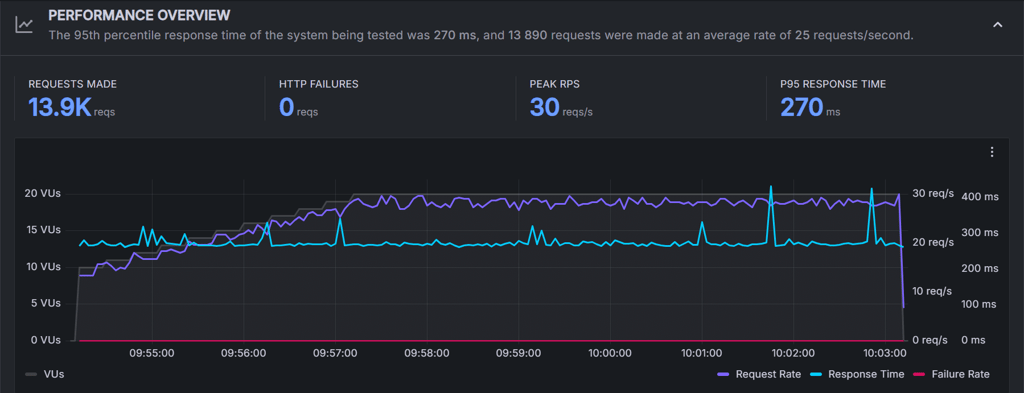
This shows that both Shopify and Squarespace can effectively manage moderate traffic without issues.
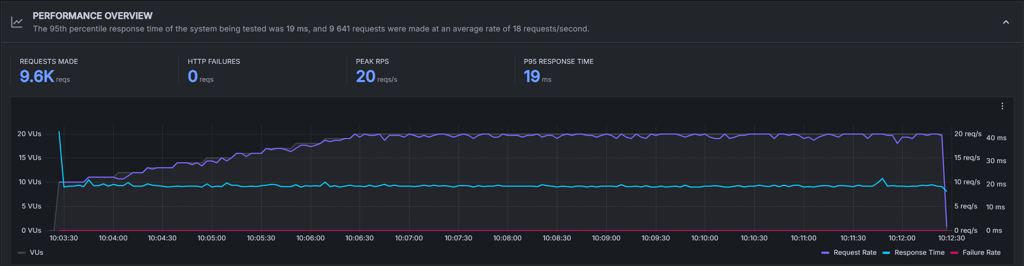
Regarding 95th percentile server response time, Squarespace edged out Shopify, clocking in at an impressive 19ms.
Shopify, while still fast, recorded a slower response time of 270ms. This gives Squarespace an edge in server efficiency and speed under load.
Customer support: Shopify offers better community support
Customer support is crucial for eCommerce platforms, as downtime or trouble will impact your business. That’s why our research team and I checked how well each provider handled customer support. First, we compared the available contact options.
| Shopify | Squarespace | |
| Live chat | ✅ Yes | ✅ Yes |
| Phone support | ❌ No | ❌ No |
| ❌ No | ✅ Yes | |
| Help Center | ✅ Yes | ✅ Yes |
| AI chatbot implementation | ✅ Yes | ❌ No |
| Social media/forums | ✅ Yes | ✅ Yes |
As you can see, both services offer similar support options, although the addition of email in Squarespace’s case is quite helpful for users who don’t have an issue that requires real-time intervention. On the other hand, Shopify quite successfully implements an AI solution in its help center, which I found to be very useful. That said, I also checked how fast each product’s support team responded to my questions and took a look at their help centers.
Shopify
Shopify offers support from a chatbot, but it also allows you to request a customer support agent. Wanting to see what the quality of its support is, I decided to pick the latter. I was put in a queue with a warning that contact can take up to 5 minutes. Luckily, my question was answered after 3 minutes.
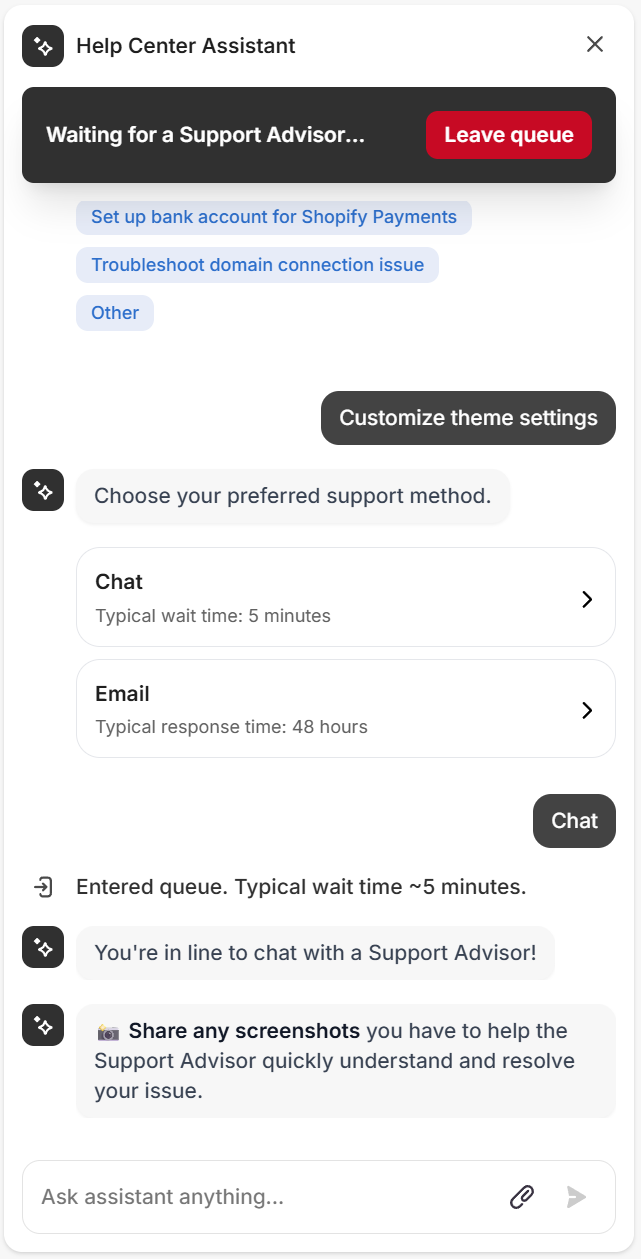
As a last evaluation, I checked out Shopify’s help center and community forums. I saw that the community forum is a pretty active space and well maintained. The public topics cover a lot of issues that one could encounter, which makes the knowledge center a great resource.
Squarespace
In Squarespace’s case, I was put through to an agent and told I’d be waiting up to 4 minutes, with a live queue view. Fortunately, it only took me a minute to get a hold of a helpful agent in just over 3 minutes.
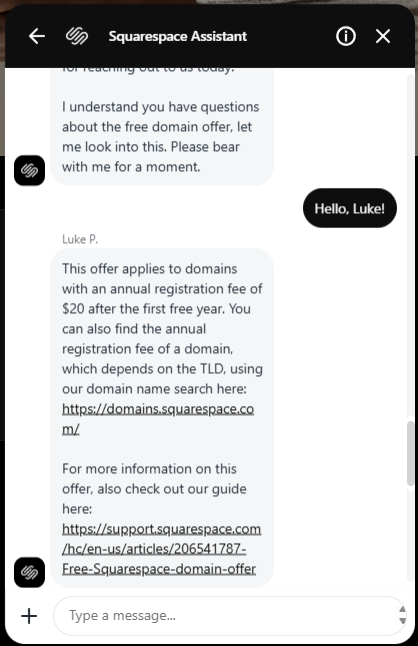
Like Shopify, Squarespace also has a community forum with thousands of topics. However, by stark contrast to Shopify, the forum is not very active, with a public post receiving one answer per month or even less often.
Migration from Squarespace to Shopify
Migrating from Squarespace to Shopify is straightforward and doesn’t require too much technical knowledge. Below are the steps for successfully changing your provider to Shopify.
Migrating content and product data from Squarespace to Shopify
Here’s a short step-by-step guide on how to migrate product data and other content from Squarespace to Shopify:
- You must decide how to migrate your Squarespace store's content and data to Shopify. I recommend exporting the Squarespace store’s content and data to Shopify using a .csv file.
- Log into your Squarespace account, go to the Products & Services panel, select Products, and Export all.
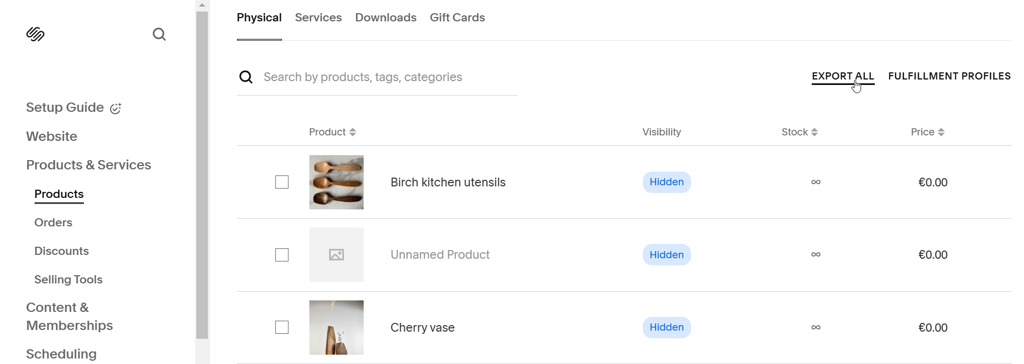
- Edit your .csv file depending on the version of the site you want to create. For instance, in version 7.1, you can import up to 10,000 products. In version 7.0, you can import up to 200 products per store page. Remember that products can have up to 100 variants in both versions.
- Once you have your .csv file, go to your Shopify admin panel, click on Products, and then click Import.
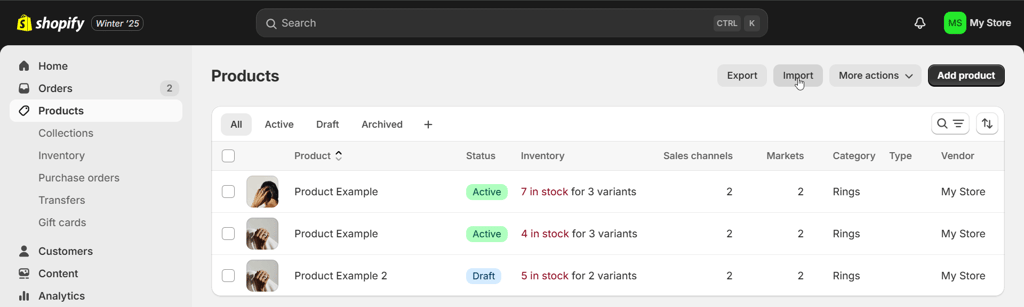
- Click Add file and select your .csv file. Deselect Publish new products to all sales channels and click Upload and continue. Review the import details, and if you’re satisfied, click Import products.
- Finally, verify and organize your products after import.
Migrating customer data from Squarespace to Shopify
Customer data is also important in the migration process. Here’s a short step-by-step guide:
- In your Squarespace admin panel, click Contacts.
- Expand the drop-down list and click Export all contacts, then click Confirm.
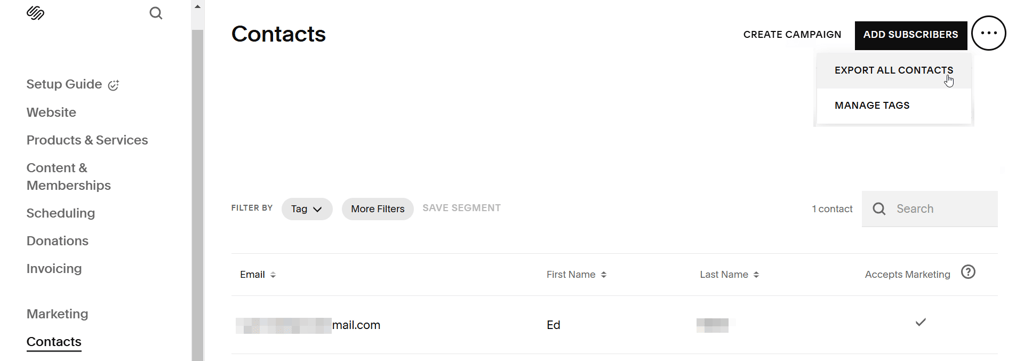
- Name the .csv file and save it to your computer. Download the .csv template offered by Shopify, and then apply it to the data you got from templates.
- Go to your Shopify admin panel, click on Customers, and then select Import. Next, import your customer data .csv file.
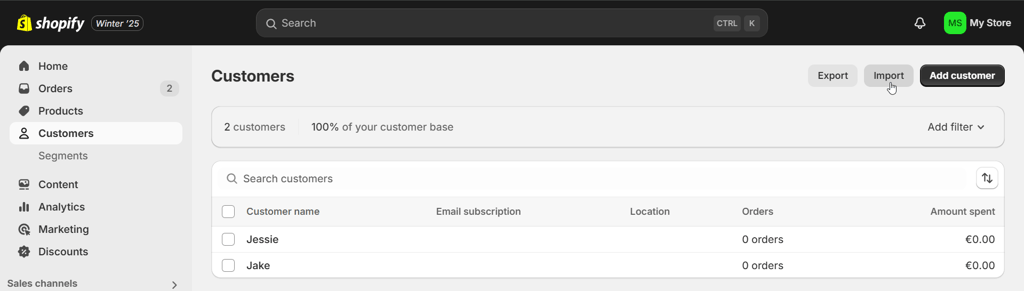
- Finally, review the important details and click on Import customers. Once the data is imported, review the customer import summary, and then click on View all customers.
Migrating order history from Squarespace to Shopify
To migrate order history, follow the guide below:
- In your Squarespace admin panel, go to Selling and then click Orders. Once there, click Download CSV.
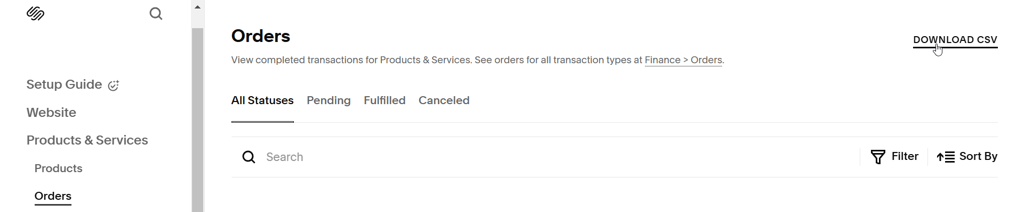
- When provided with options, make sure that only the Fulfilled orders option is selected.
- Then, select All time for the Order date, and leave All products selected. Once you’ve configured the download specifications, click Download and save the .csv file to your computer.
- Finally, import your order history to Shopify using either the EZ Importer or Migration Pro apps, which you can find in the Shopify App Store.
Video comparison
Check out our Shopify vs Squarespace video review of the two contenders compared visually:
Bottom line
Both Squarespace and Shopify have their strengths and weaknesses when it comes to eCommerce. However, Shopify is a clear winner for me. With excellent flexibility, top-tier eCommerce features and automation, as well as multiple third-party plugins, it’s simply a great choice for businesses.
| Feature | Shopify | Squarespace | Verdict |
| Pricing | Shopify Basic and Squarespace Plus plans cost very similarly. For bigger stores, Squarespace’s Advanced plan offers better value. | ||
| Ease of use | Both Shopify and Squarespace are easy to use, offering user-friendly setup and editing options. However, Squarespace offers a little more intuitive builder. | ||
| Performance | Shopify is a faster and more reliable choice for most business needs than Squarespace. It also offers more features and 3rd-party integrations for a smoother eCommerce platform creation. | ||
| Support | Shopify has a better-maintained community support forum and has implemented an AI chatbot in its help center. |
FAQ
Should I switch from Squarespace to Shopify?
Yes, switch to Shopify if you need more options to customize your store. Shopify is excellent for coders but also great for non-coders and provides excellent performance. Migrating from Squarespace to Shopify is relatively easy and requires only a few steps without requiring too much technical knowledge.
Can you use Shopify with Squarespace?
Yes, you can use Shopify with Squarespace by adding a Shopify Buy button to your existing Squarespace website. It's a good way to combine both platforms.
Is Shopify as easy as Squarespace?
Yes, Shopify is very easy to use, making it an ideal option for both beginner and advanced users. Squarespace is also pretty easy to use and navigate, and is well suited for beginner users.
Which is better for small businesses, Shopify or Squarespace?
Shopify is better for small businesses. It offers a wider array of eCommerce options that will help you not only manage your business but also scale in the future.