Wix vs WordPress: thorough comparison for 2026
Our team of experts and researchers rigorously test and evaluate website builders through transparent, in-depth testing procedures and methods using both in-house and industry-approved tools.
Drawing on cybersecurity insights, we provide unbiased, empirical rankings and analysis to help users make informed digital platform choices.
Learn more

-
Choose Wix if you want a super simple web builder with fully managed hosting and a quick eCommerce setup – all for a single, clearly set price.
-
Choose WordPress.org if you want to create highly scalable complex websites. Pick from over 13,000 free themes and get unlimited, if a bit more complex, customization.
Wix is a website building platform that contains everything a person or a business manager needs to create a functional website. Not to be confused with WordPress.com, WordPress.org is open-source software designed for installing on your own web server to create a website. Both are quite different, but also share several similarities.
Our research team and I spent two weeks testing both platforms, analyzing their similarities and differences, creating websites using both Wix and WordPress all to determine which one is ultimately a better website builder in 2026. Keep reading to find how these web builders compare and contrast in categories like price, simplicity of use, templates, and overall features.
Wix vs WordPress.org – overview
Don’t have the time to read which web builder won the Wix vs WordPress showdown? Here’s the final verdict:

Below, you can find a table with an overview of both Wix and WordPress.org.
| Wix | WordPress | |
| ⭐ Rating: | ||
| 🥇 Overall rank: | #2 out of #37 | #18 out of #37 |
| 💵 Price: | From $17.00/month | From $2.75/month |
| 🪄 Ease of use: | Powerful interface, pretty easy to use | A pretty steep learning curve, made easier by plenty of great resources |
| 🎨 Templates: | 2700 | 13,000 |
| 🏢 Business features: | Massive array of various business features | All brought in by the plugins that you use – some of them cost extra |
| 👨💻 24/7 live support: | Yes | Yes |
| ✂️ Free domain (first year): | Yes | Yes |
| 🔒 Free SSL certificate: | Yes | Yes |
| 🔥 Coupons: | Wix coupon 50% OFF | Cybernews Website Builder Coupons |
Wix and WordPress - differences and similarities
Before I dig deeper into how each web builder performs in different categories, here’s a snapshot of Wix vs WordPress.org key differences and similarities:
| Wix vs WordPress similarities | Wix vs WordPress differences |
| Web building on different platforms. Both Wix and WordPress.org permit the creation of websites without coding knowledge. This makes it suitable for beginners and advanced users. | Wix is easier to use. With a highly beginner-friendly and intuitive drag-and-drop editor – including fully integrated features for website building – Wix is easier to use than WordPress.org. WordPress requires more effort to master and set up. It also requires plugins or coding knowledge. |
| Customizable designs. Both provide themes and templates that can be customized to match your branding and style. | WordPress.org is more flexible and customizable. Being completely open-sourced, WordPress offers unlimited customization through plugins, themes, and coding. Meanwhile, Wix has a controlled environment where customization is restricted to the tools and apps available within Wix. |
| eCommerce support. WordPress and Wix support building online stores, including features like product listings, payment gateways, and inventory management. | WordPress.org has more themes than Wix. WordPress has 13,000 free themes, which users can switch without losing content. Meanwhile, Wix has 2700 pre-designed templates, which cannot be replaced without rebuilding the site. |
| SEO features. Both have either built-in tools or plugins/apps to optimize websites for search engines. | Wix and WordPress.org have different eCommerce features. Wix’s built-in eCommerce tools allow quick setup and management – perfect for small-to-medium stores. Meanwhile, WordPress requires WooCommerce and similar plugins, which are perfect for larger and more complex online stores due to their greater flexibility and scalability. |
| Support resources. Both offer help either through tutorials, forums, and customer support (Wix) or community forums (WordPress.org). | Wix, unlike WordPress.org, provides hosting. While WordPress requires separate hosting, still making the user responsible for updates, backups, and security, Wix already has fully managed hosting and automatic updates. |
| Wix, unlike WordPress.org, has integrated SEO. Wix has easy-to-use, built-in SEO tools and provides guidance throughout the setup process. WordPress relies on plugins for advanced SEO functionality, which, while flexible, requires manual configuration. | |
| Wix is paid but includes everything; WordPress.org is free but charges for add-ons. Wix’s subscription-based plans include hosting, templates, and features. WordPress is open-source and free, but hosting, premium themes, plugins, and additional services need to be purchased separately. | |
| WordPress.org is more scalable. Wix is better suited for small-to-medium websites or businesses because scaling is limited to the ecosystem it provides. Meanwhile, WordPress is highly scalable, so it’s better suited for large and complex websites or businesses. |




Our in-house research team and expert writers work hand in hand to regularly test website builders and provide accurate and fact-checked information. Discover the ins and outs of how we test and evaluate website builders.
Wix vs WordPress – video comparison
If you prefer video format or listening to reading, check out our video below.
Pricing – WordPress.org wins
While WordPress.org is free, it needs a hosting provider subscription to function, unlike Wix, which has everything you need for a set subscription. However, if you could pick a cheap hosting provider and use the features they offer to prevent additional apps and plugin purchases, WordPress can have a lower total price than Wix.
Wix pricing
Wix has four premium plans, but it also allows you to create a free account. Creating an account and building a website is completely free of charge, but if you want to connect the site to a domain, remove Wix ads, and get other premium features, you’d need to upgrade to a paid plan. However, this free option is still useful if you want to test the platform, try out your vision, and create a fully functional website without committing to a subscription.
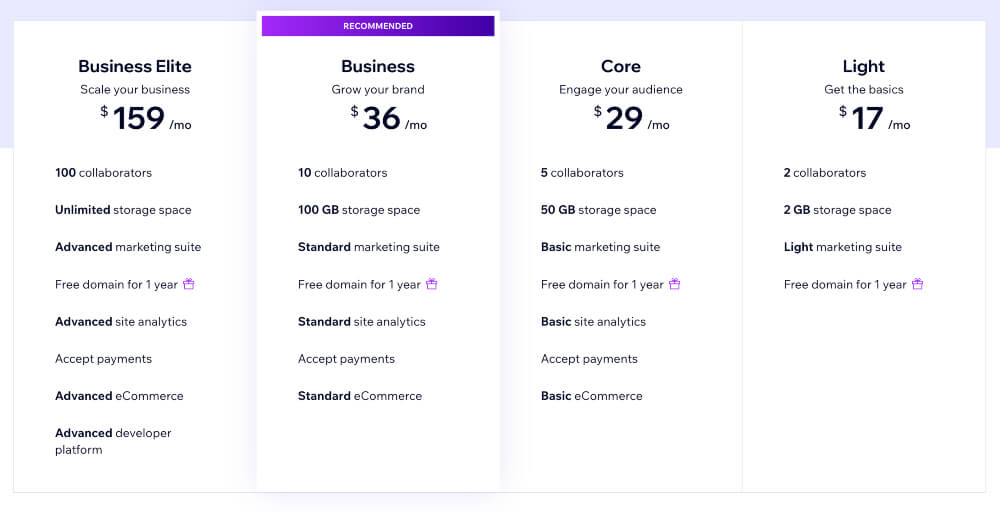
Wix web builder paid plans start from $17.00/month for a single-year subscription. The cheapest Light plan has the least number of features, suitable for light marketing. However, I recommend the Business plan, which is still reasonably priced ($19.50/month for a year) and has a lot of features, including standard eCommerce support. The most expensive plan is Business Elite, which has the most features and supports advanced eCommerce.
Wix does not limit how many free websites you can create. It also does not require you to upgrade to premium. It’s only necessary if you want to access premium features and prevent Wix ads. So, essentially, you can build a full website completely free of charge. If you do subscribe to a paid plan, you’ll have a 14-day money-back guarantee, during which you can claim a refund. Also, at the end of each billing period, you can either cancel your subscription, keep it up as is, or assign it to another website in your account.
Overall, Wix has very reasonable pricing policies. It does not require you to pay anything unless you want your website to reach an audience or become profitable. This allows users to familiarize themselves with the platform and try out different ideas before paying a penny. The cheapest plan is $17.00/month, which offers 2 collaborators, 2GB storage, a free domain for a year, and a light marketing suite. Keep in mind that you can still cancel it either during the money-back guarantee period or at the end of the subscription term.
WordPress pricing
WordPress.org is completely free. However, it needs to be attached to a hosting platform if you want to use it. For example, I found that it pairs well with Hostinger, which has various WordPress-friendly plans and is recommended by WordPress itself.
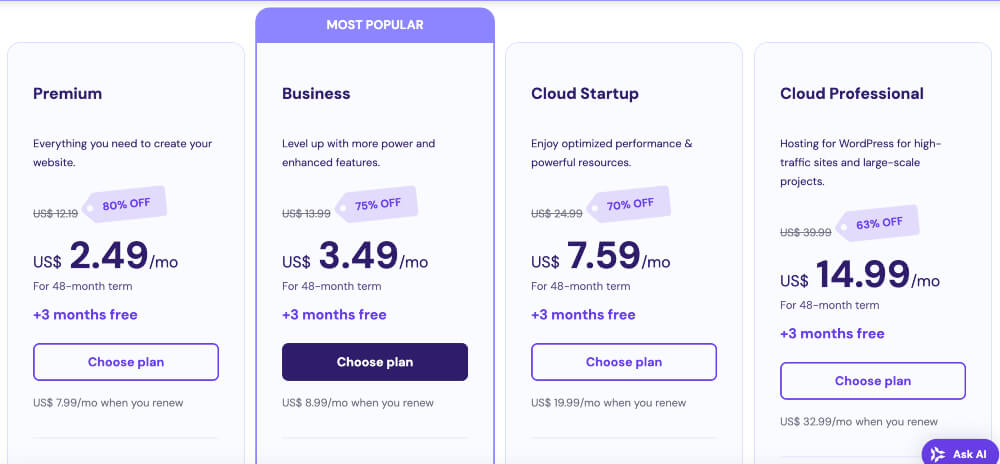
Hostinger is also great for WordPress.org because its WordPress managed hosting plans start at just $2.69/month for a 48-month plan. It has significantly more features than Wix’s cheapest plan too, offering not just a free domain, but free SSL, one-click WordPress set up, vulnerability scanner, AI tools, 100GB SSD storage, and starter WooCommerce.
Hostinger offers a 30-day money-back guarantee for all of its plans, so you can test it out and see if it’s the right fit for you and WordPress. However, because WordPress recommends it, Hostinger can eliminate a lot of the difficult and tech-heavy parts of using WordPress.org for web building.
Overall, WordPress.org being free doesn’t really matter, as you won’t be able to use it without a host. So, the actual price depends on your chosen hosting provider. If it’s Hostinger, it might be cheaper than Wix, but there are also other providers that could be pricier. Moreover, you need to take into account that any additional plugins or apps that you’ll add to your WordPress web builder hosting can cost extra, so the total price could increase.
Ease of use – Wix wins
Overall, Wix is easier to use. Its user-friendly interface, combined with all-in-one management, ensures a smooth experience for beginners and advanced users alike. Those who appreciate simplicity would certainly enjoy using Wix more than WordPress, as it leaves far less room for confusion. Meanwhile, WordPress.org is not as intuitive, and a lot of it depends on variables, such as the chosen hosting provider. Beginners would take more time to adjust to this platform, while users with technical skills might appreciate deeper customization opportunities.
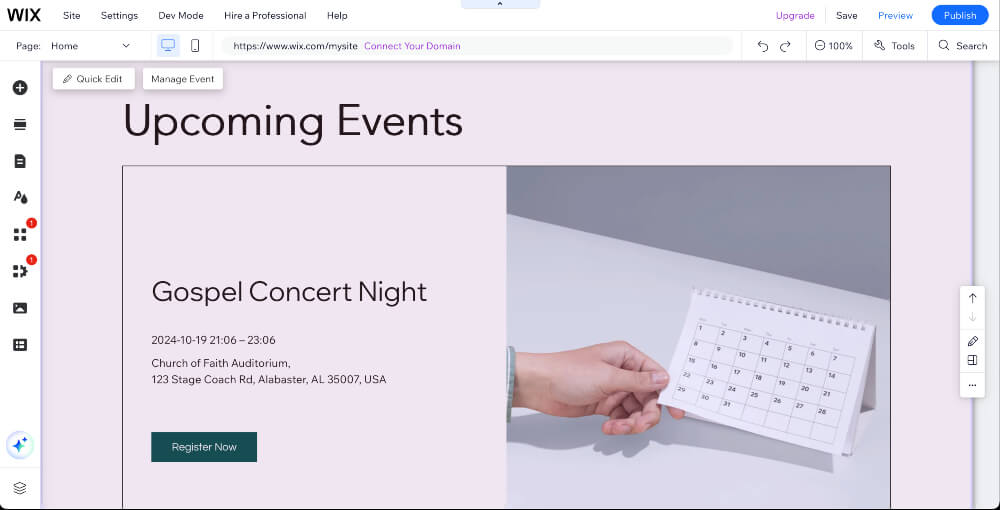
I found creating a website on Wix effortless and beginner-friendly. The platform has everything you need in one place, from hosting to domain registration. Using Wix ADI further simplifies the process, as it can create a full website based on the answers you fill in the questionnaire. There’s also a drag-and-drop editor, which makes customization very fast and suitable for beginners. Overall, Wix's web building seemed refreshingly streamlined and stress-free to me. It took me just a few minutes to go live.
I could find everything I needed very easily. All Wix features and tools are intuitively placed and easy to find. Fonts, image upload, feature adding, and the overall interface makes everything readily accessible for use. So, personally, Wix wins in terms of ease of use. It provides a straightforward platform for anyone to build and manage a website quickly.
I found WordPress.org web building to be more complex. First, I had to select a hosting provider and set it up. I picked Hostinger because it was cheap, and I could install WordPress with just one click. If it didn’t have this function, I would also need to manually install WordPress web builder. Finally, I registered a domain.
After the installation process was complete, I picked a theme, installed plugins, and configured the settings. While the process wasn’t very difficult, it was more time-consuming than with Wix, and some basic understanding of web building was necessary. If I were a complete beginner, it would’ve felt a bit daunting for me, though there are plenty of guides and tutorials available.
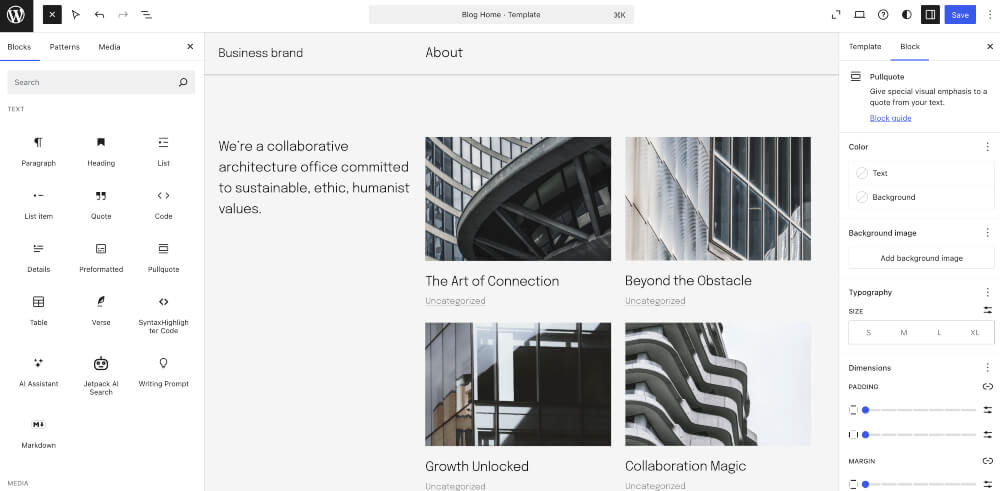
However, I couldn’t always find what I wanted easily. WordPress can feel cluttered, especially for users who have no prior experience with web building. While the block editor improves the content creation process, finding advanced tools or settings sometimes requires navigating through different menus and understanding the platform’s structure. While WordPress offers greater flexibility and is the better choice for complex, scalable projects, Wix’s simplicity and streamlined experience make it the more accessible option for most users.
When I compare Wix vs WordPress.org, Wix seems to be focusing more on simplicity and user-friendliness. The drag-and-drop editor and the fact that Wix fully takes care of hosting, updates, and security make the process far more stress-free, as users can focus solely on creating content and customizing their site.
WordPress is more flexible but requires a deeper understanding of web development. While some plugins and the right hosting provider can make the process more beginner-friendly, the platform still asks you to navigate menus, manage plugins, and occasionally troubleshoot issues. Even though there are more customization options, WordPress.org also requires a steeper learning curve than Wix.
However, both platforms have some similarities, too. Both Wix and WordPress.org are accessible to non-technical users and offer customizable templates or themes. Both provide tools for building visually appealing websites without coding. Also, Wix and WordPress both have extensive resources that can help you along the way. Just like WordPress has plugins, Wix has additional apps that extend their functionality to cover every need.
Templates – Wix wins
While WordPress.org has more templates, Wix wins in this category because it is easier to use, looks professional and more out of the box, as well as includes built-in features for a quick setup. WordPress does take the lead if you need more customization possibilities, increased scalability, and long-term flexibility, but it also requires more technical skills and paid add-ons.
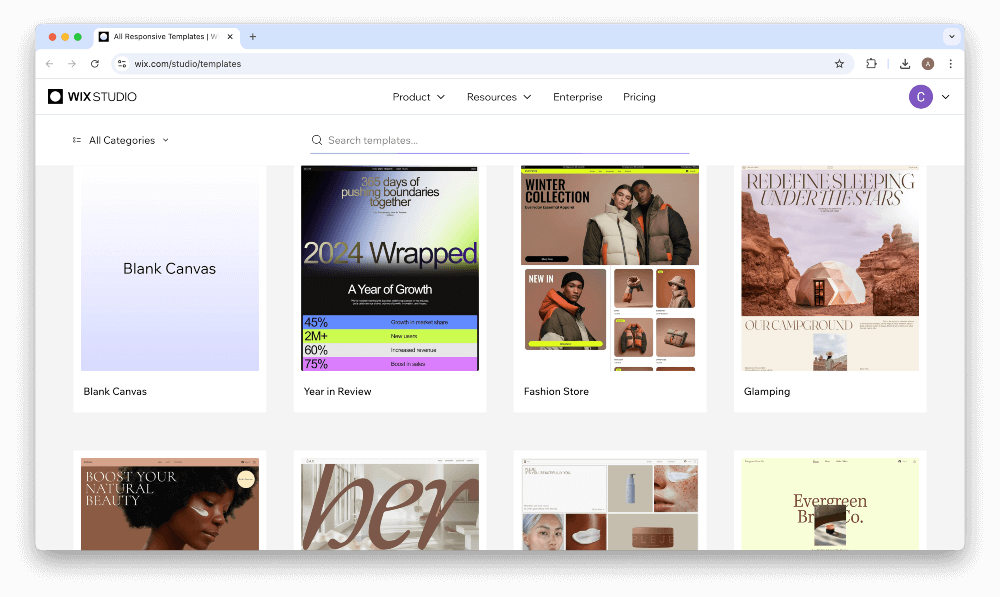
Wix offers over 2700 pre-designed templates, each equipped with sample content, built-in features, and a modern web design aesthetic. All templates are categorized based on industries and purposes, such as business, eCommerce, blogging, or creative portfolios. All templates include all the necessary elements for functionality, such as galleries, forms, and inner pages.
I found Wix templates to be very visually appealing and professionally designed. They were all simple to use, modern, and polished, ready to be launched without much customization. The drag-and-drop feature here was particularly handy, and I imagine complete beginners enjoying the process far more than with WordPress.
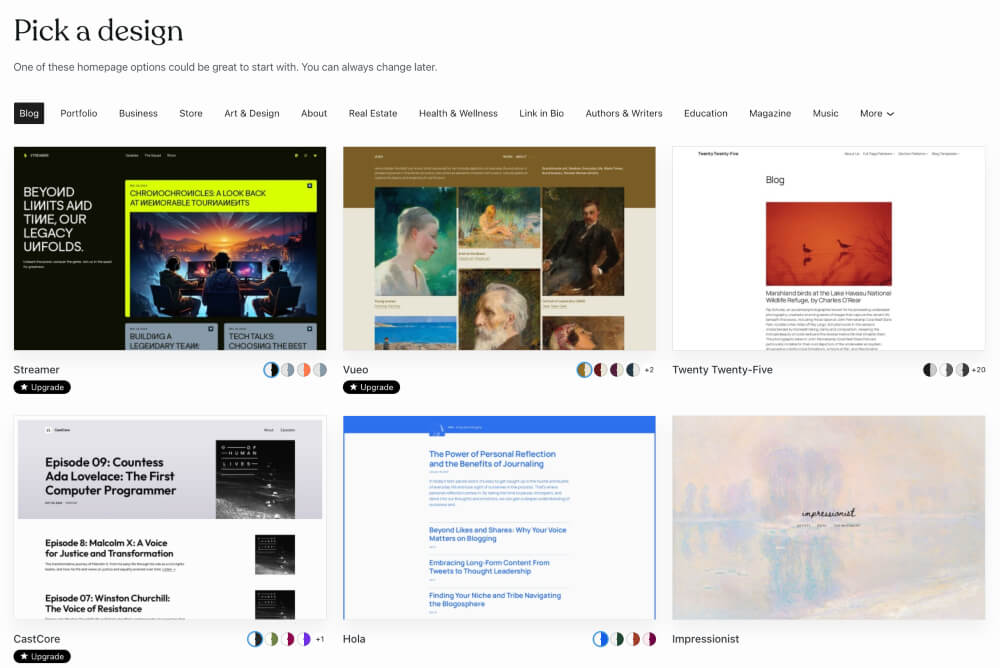
WordPress.org Theme Directory features over 13,000 free themes, with additional ones available for purchase from third-party marketplaces. Just from the number of themes alone, users are guaranteed to find what they like. The themes are highly diverse, mainly catering to simple blogs, corporate websites, and eCommerce stores. There’s everything from minimalist design to complex business membership sites. Because WordPress.org is open-sourced, developers can create more unique themes, increasing the selection.
While I certainly appreciated the flexibility and variety of WordPress.org themes, I needed to put in more effort to achieve the desired result compared to Wix. Many themes needed plugins for additional functionality or custom coding for advanced adjustments, adding to expenses and making the process complex for complete beginners. Even though people with highly specific needs would probably appreciate WordPress templates, those without technical know-how are better off with Wix.
Features – draw (winner depends on a personal preference)
In order to fairly compare Wix vs WordPress, I tested the functionality of their compatible features. Mainly the ones that are relevant to web building: SSL certificates, eCommerce, marketing, and SEO features, app/plugin integration, customization, hosting and maintenance, and AI. It’s really not possible, however, to name a clear winner, as WordPress.org and Wix have a different approach to features and functionality.
Here’s a quick summary of each overviewed feature so you can skip to the relevant ones if you’d like:
- SSL certificates
- eCommerce features
- Marketing features
- SEO features
- App/plugin integration
- Customization
- Hosting and maintenance
- AI features
To summarize, the winner is the one that’s more suited to your needs. While with Wix, everything is very straightforward, WordPress is better for a more hands-on approach.
SSL certificates
Wix makes SSL effortless because it’s already included and activated when you create your site. For WordPress.org, it depends on the chosen hosting provider. Hostinger, for example, makes it very easy with a one-click installation, but others may require a more manual setup.
Wix comes with a free SSL certificate for all websites. You won’t need to install anything extra. This feature is already there and automatically activated. WordPress SSL availability depends on the chosen hosting provider. Some include a free SSL certificate, and others would require a manual setup or third-party purchase.
I would say that Wix is better, because you don’t have to worry about hosting and if it supports SSL certificates.
eCommerce features
Wix eCommerce tools are beginner-friendly and work very well. I found it easy and quick to set up an online store. WordPress.org with WooCommerce is far more flexible but requires more effort, even though that labor goes towards creating a store tailored to your specific needs.
Wix eCommerce tools are available in its business plans. Features include product listings, inventory management, payment gateways, and abandoned cart recovery. I would say it’s best suited for small-to-medium sized online stores.
WordPress eCommerce functionality is added via plugins, mainly WooCommerce. It permits extensive customization options and supports multiple gateways. It’s suitable for all kinds of online stores, but its scalability is also great for large e-shops.
I would say both Wix and WordPress.org are great options, depending on your needs. Those who prefer a more hands-on approach and need space for scalability might prefer WordPress, while those with less experience and a smaller business could pick Wix.
Marketing features
Wix is an all-in-one solution for your basic marketing needs. WordPress, on the other hand, has much greater flexibility, but each feature requires a plugin. That’s a more costly option, as all features together could vastly increase the expenses.
Wix marketing tools are email campaigns, social media integration, SEO guides, and a logo maker. All of it is available in one plan, so you won’t have to download anything extra. The Wix Ascend package takes it a step further by providing advanced tools like live chat, automation, and email marketing analytics.
WordPress.org marketing features depend on plugins, such as Yoast SEO or Mailchimp, for email campaigns. Those are third-party tools, so you would need to pay for some services. However, the flexibility to add only the necessary features can fully cater to specific needs.
Overall, if you want very specific features or to fully customize your marketing strategy, WordPress is a better, if potentially pricey, option. But if you want everything to be included and simple to manage, Wix is a better choice.
SEO features
Wix’s SEO tools are very beginner-friendly and cater to small-to-medium websites. Meanwhile, WordPress plugins like Yoast SEO are capable of offering more advanced options and in-depth customization. It means WordPress is better for larger and content-heavy sites.
Wix SEO tools are built-in and include customizable meta tags, alt text, and structured data markup. Beginners should also appreciate the step-by-step SEO guide. If I didn’t have any experience with SEO or web building, I would definitely pick Wix over WordPress.

WordPress SEO tools are exclusively plugins. That means not just a potentially pricier setup but an opportunity to pick your own tools. Besides Yoast SEO, for example, there’s also Rank Math, which provides features for site optimization.

So, if you want a simpler, all-inclusive approach, Wix is your best bet. But if you want a more scalable option that allows you to pick your own tools, WordPress is better.
App/plugin integration
Wix has everything you need to create a fully functional website, but it also offers apps that could improve in areas where the platform is lacking. For example, the Wix App Market is more controlled and streamlined, with plenty of options for specific features, ensuring everything works well together. WordPress.org, on the other hand, offers greater freedom to pick your add-ons but requires more attention to compatibility and updates.
Apps offered in the Wix App Market are all pre-approved to match the web builder and extend site functionality. They’re tightly integrated and very simple to manage. WordPress Plugin Directory, however, supports thousands of plugins not just its own but third-party as well. So, while it offers limitless possibilities to customize your website, there might also be compatibility issues.
Customization
Wix customization options are sufficient, but restrictive if you want full control over your site. WordPress is an absolute winner here, as it allows you to manage nearly every element on your site, though it also requires a bit more technical knowledge. While Wix customization is limited to the features available on the platform, WordPress offers unlimited customization through themes, plugins, and coding. However, Wix’s drag-and-drop editor allows easy design tweaks.
Hosting and maintenance
Wix does not require a separate subscription to hosting – everything you need is already included. I found its managed approach to hosting and maintenance to be simple and stress-free. Comparatively, WordPress does require a bit more effort, but you can pick any hosting provider you want, potentially ending up with a cheaper plan than Wix can offer.
Because Wix fully manages hosting, all updates are handled automatically, and you don’t have to juggle two accounts or wonder about compatibility. That’s why, due to the lack of its own host, WordPress.org makes you responsible for updates, backups, and security unless you pick a managed hosting provider.
AI features
Wix includes an AI text creator for generating engaging website copy and blog posts. So, that’s even less effort required from you. Additionally, Wix offers SEO Wiz – a step-by-step AI tool for optimizing your site for search engines. Wix AI is also capable of generating unique images, enhancing visuals, and removing backgrounds.
For marketing, Wix AI can automate email campaigns, social media posts, and Google Ads content. AI chatbots are also built-in for business customers. Finally, you can use a built-in AI Code Assistant, which provides suggestions and debugging for simple coding tasks.
WordPress relies on plugins to provide AI tools. Some of the content creation plugins are ChatGPT and Writesonic. SEO AI tools are plugins like Yoast SEO or Rank Math. For image editing, I recommend Smush or Imagify plugins. Businesses, particularly marketing, should install Mailchimp, HubSpot, or OptinMonster. While Wix has its own integrated AI chatbot, for WordPress.org, you’ll need WP-Chatbot or Tidio plugins. Finally, if you’re a developer, plugins like CodeWP will assist with code suggestions and troubleshooting.
Wix is a more simple option, as it integrates AI tools directly into its platform, making them both easy to use, compatible, and accessible for beginners. Meanwhile, WordPress offers more customizable AI features through plugins, but those require additional setup, funds, and technical expertise.
Conclusion
Overall, when it comes to deciding the winner in the Wix vs WordPress showdown, the result depends on personal preference and capabilities. If you don’t mind taking a hands-on approach and are confident in your technical skills and web-building experience, WordPress.org is a better choice. It can also be a cheaper option of the two if you pick an affordable hosting provider and can avoid purchasing a lot of plugins.
However, based on my hands-on experience, I believe the effortlessness and integrated features of Wix make it a far better alternative. If you’re not careful, or don’t have enough experience, WordPress.org can be both pricey and difficult to manage. Meanwhile with Wix, everything is smooth sailing, regardless of your level of experience. With integrated managed hosting, AI, eCommerce, and web-building features, as well as stylish and uncomplicated templates, Wix offers the fastest, most straightforward website-building experience.
And here’s a quick summary how these both providers compare:
| Wix | WordPress | |
| Rating | ||
| Pricing | Free account and website creation, launch and premium features cost from $17.00/month | Free + the subscription cost of a chosen hosting provider + the price of each installed plugin |
| Ease of Use | Incredibly straightforward and beginner-friendly, with integrated features and effortless site creation and management | If paired with the right hosting provider, it can be pretty simple; otherwise, requires technical expertise and hands-on effort |
| Templates | 2700+ included templates, categorized and modern-looking | 13,000+ themes with additional downloadable ones, sorted manually |
| Features | All features are included and range from creative website building to eCommerce management. Possible to download additional, compatible apps | Most features are either provided by the managed host or installed as plugins (might need to pay for each one) |
| AI tools | Fully integrated creative, developer, and business AI tools | Available as plugins-only and might cost extra for each one |
| Website | Wix.com | WordPress.org |
Other Wix Comparisons
Wix versus WordPress: FAQ
Why should I switch from Wix to WordPress?
If you combine WordPress.org with a compatible and advanced managed hosting provider, you can potentially get features similar to those offered by Wix at a lower price. However, you need to have some technical knowledge and experience in web building to know how to take full advantage of WordPress.
What is the downside of Wix?
Wix is not as customizable as WordPress. When you pay for its web building plan, you already get all the features it can offer. So, if you have specific needs or aim for higher scalability and customization, Wix might not be able to offer the kind of freedom that WordPress and its plugins can.
Which is more expensive, Wix or WordPress?
Wix is more expensive than WordPress if we compare the prices of these providers without the additional features. Overall, it all depends on what you pair your WordPress.org web builder with. Wix pricing starts at $17.00/month; meanwhile, WordPress, while itself free, can cost either less or more than Wix, depending on your chosen hosting provider and add-on purchases.
Is WordPress still the best for SEO?
Yes, WordPress is best for SEO because it offers many customizable SEO plugins to create a well-performing and fully personalized website. However, if you’re looking for integrated SEO tools, Wix is a better alternative.