Best website builder for photographers in 2026
Our team of experts and researchers rigorously test and evaluate website builders through transparent, in-depth testing procedures and methods using both in-house and industry-approved tools.
Drawing on cybersecurity insights, we provide unbiased, empirical rankings and analysis to help users make informed digital platform choices.
Learn more

As a photography enthusiast, I decided to share my work online and create a portfolio website. Picking the right photography website builder wasn’t easy – I struggled with finding tools that were both simple to use and showcased my photos beautifully. Many options felt either too complicated or lacked the features I needed to sell my work.
After testing numerous platforms, I’ve narrowed down my top list of the best photography website builders to 6 options I’d happily use myself. These choices combine ease of use, stunning design templates, and useful eCommerce features to help photographers like me create professional portfolios without the hassle. In this article, I’ll share the best platforms for 2026 based on my hands-on experience.
Best photography website builders
- Hostinger Website Builder – photography web builder for beginners
- Shopify – best web builder for selling photography online
- Squarespace – best for stunning photo portfolios
- SITE123 – best for setting up a quick and easy photo site
- IONOS – best website builder for photographers on a budget
- DreamHost Liftoff Website Builder – best for customizable photo websites




Our in-house research team and expert writers work hand in hand to regularly test website builders and provide accurate and fact-checked information. Discover the ins and outs of how we test and evaluate website builders.
Best photography website builders – my detailed list
Together with the Cybernews research team, I analyzed 37 top web builders and selected the top 6 providers best suited for photographers. In the selection process, I considered the templates for photography portfolios, whether the builder offers a drag-and-drop editor, and additional features, such as eCommerce support, SEO, or AI tools.
1. Hostinger Website Builder – best all-in-one builder for beginner photographers

| Rating: | |
| Starting price: | $2.69/month |
| Free domain: | ✅ Yes |
| Free SSL: | ✅ Yes |
| Templates: | 170+ |
| Drag-and-drop editor: | ✅ Yes |
| Special deal: | Get Hostinger Website Builder, 81% OFF + free months |
The Hostinger Website Builder is my top choice for photographers. The platform has made a name for itself by simplifying and accelerating the website creation process, making it a great fit for new users.
Additionally, it includes beautiful picture-centered templates and excellent AI business tools – all at a price several times lower than its closest competitors. Hostinger prices start at just $2.69/month, making it more affordable for those just starting out than Squarespace’s price of $16.00/month and Shopify’s $29.00/month. Besides, you can save even more with Hostinger promo code CNSPECIAL. New users can use Hostinger code CNHOSTFIRST for new subscriptions.
Why is Hostinger the best photography web builder for beginners?
Here are some of the key features that I feel make Hostinger Website Builder one of the best for photography websites:
- Getting started is incredibly simple. The setup took me just a few clicks, and clear step-by-step guidance helps you through the process.
- Hostinger also includes AI website building tools. With just a few prompts, I was able to generate a complete photography website in minutes, then fine-tune the design to match my vision. Its AI-powered text generator also comes in handy when you need inspiration for coming up with captions or any additional content.
- Support is always available. 24/7 live chat, a rich library of articles, and the built-in AI assistant (Kodee) ensure that even complete beginners can finish their site without frustration.
- The price is another big plus. At just $2.69/month, Hostinger is much cheaper than competitors like Squarespace, and the 30-day money-back guarantee means you can try it risk-free.
- eCommerce functionality ensures that Hostinger isn’t just for showcasing photos. You can sell prints, services, or digital downloads directly from your site. You’ll also find photography-focused templates, customizable forms for client requests, and high-resolution galleries (grid, masonry, fullscreen) to present your work at its best.
My experience making a photography website with Hostinger Website Builder – 5/5
During the Hostinger Website Builder testing, I was able to create a visually pleasing photography website in just a couple of minutes. This makes it the fastest option on my list and a favorite of hard workers.
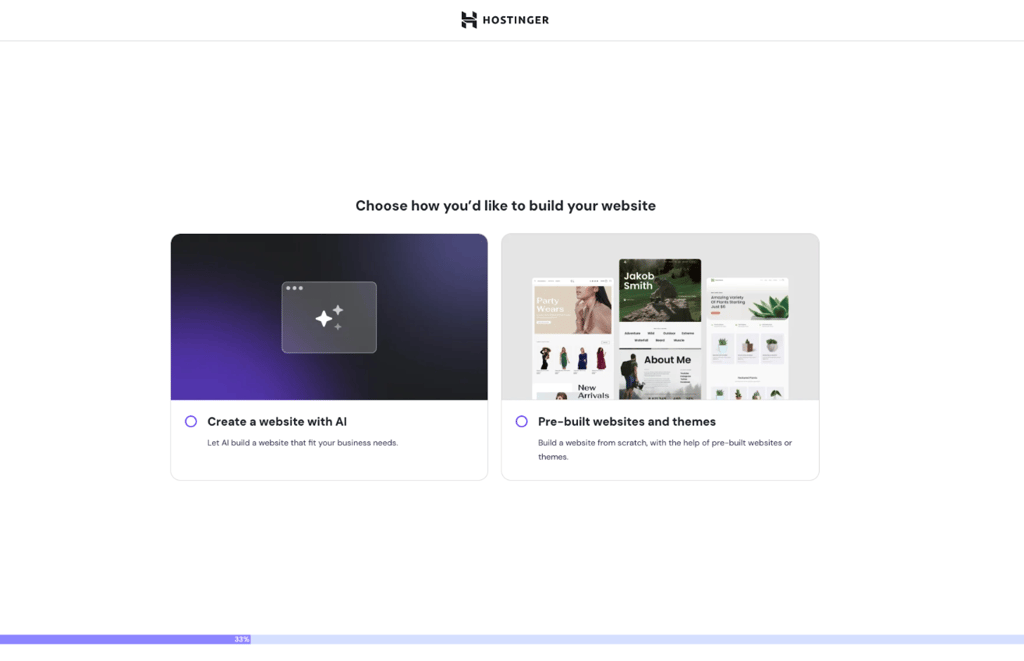
Hostinger Website Builder offers two main ways to create your website: using a template or leveraging the AI builder. While templates remain a straightforward option, the AI builder takes ease and speed to the next level. Most users now opt for the AI builder because it’s faster and more intuitive. It delivers a ready-to-publish website tailored to your needs, all based on a simple description. It’s one of the best AI website builders I have tested. So, whether you prefer customizing a template yourself or letting AI do the heavy lifting, both approaches are designed to get your website up and running in no time.
The template options suit those who know exactly how they want their site to look. Here, all I had to do was choose from 15+ photography-focused templates. They are all visually appealing, modern, and sleek, with a huge focus on images.
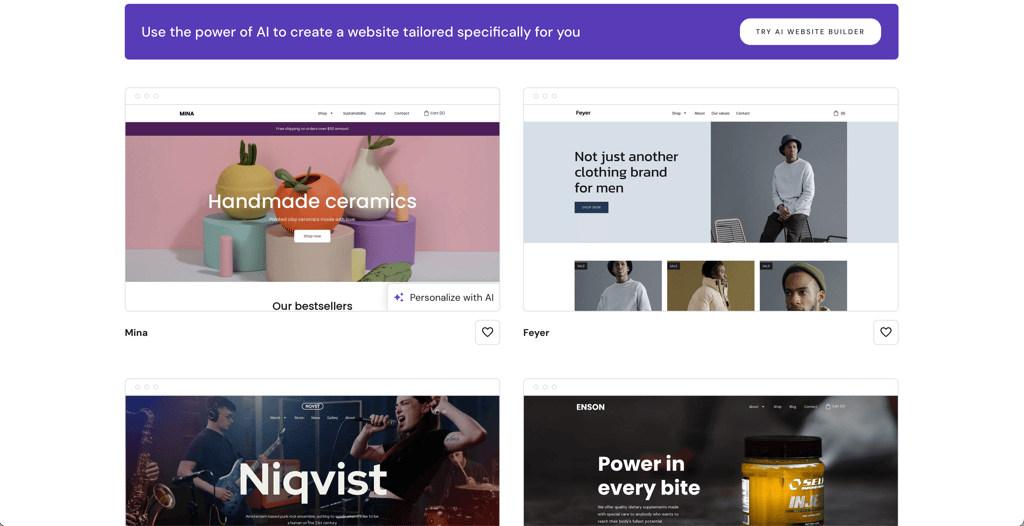
Whether you opt for templates or the AI builder, the process doesn't take too long. The template options took me less than 3 minutes to pick, and part of that was only because I was a bit undecided about some minor stylistic options.
Both solutions also allow for customizations with Hostinger Website Builder's drag-and-drop editor. Hostinger is intuitive and easy to use – it’s also the best in our list of drag-and-drop website builders. The configurations are neatly arranged on your left, so I had ample space to tweak and edit. I could easily add and edit things like texts, layout, design, and elements.

There's also a grid that works as a guideline for the elements. This helped me keep the different elements clean and organized, even when they’re of different sizes. I think this is especially useful for those who are less experienced with design but still want a good-looking home for their photos.
I also want to highlight Hostinger Website Builder's tools and features. The builder offers everything you need if you plan to use your photography site for more than just showcasing your work. It has inventory management, shipping automation, and CRM tools.
But the standout here is the suite of AI-powered features. The AI Image Generator can create unique illustrations tailored for your website, while the AI SEO tools help optimize your site for better search engine visibility. The builder also includes AI generators for blogs and pages, making the creation process incredibly streamlined. Plus, the AI product description generator writes full product descriptions from just a picture. If you need help, Kodee, the AI assistant, provides instant guidance directly within the interface. In fact, it is one of the best AI chatbots I’ve seen to date.
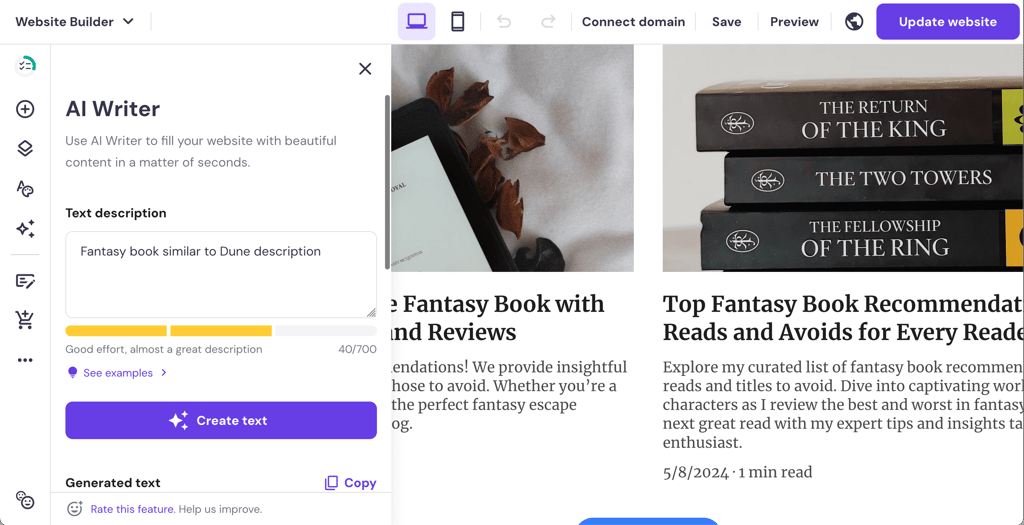
However, not all AI tools are as useful and well functioning as I expected. The content generator and resizer were great, but the heat map seems a little less useful and more like something just for show.

Overall, Hostinger Website Builder impressed me with its swift setup process, excellent editor, and convenient features.
2. Shopify – eCommerce-centered platform for photographers

| Rating: | |
| Starting price: | $29.00/month |
| Free domain: | ✅ Yes |
| Free SSL: | ✅ Yes |
| Templates: | 800+ |
| Drag-and-drop editor: | ✅ Yes |
| Special deal: | Try Shopify free for 3 days + 3 months for $1 |
If you’re a photographer who’s also venturing into entrepreneurship, Shopify is a good fit for you. The platform offers plenty of eCommerce features to help you sell photography online. Plus, Shopify’s ease of use and a massive app store are both certainly attractive as well.
Why is Shopify the best web builder for selling photography online?
Some Shopify features that I thought were great for making a business out of your photography include:
- Excellent eCommerce suite. This includes inventory management, multiple payment gateways, and automated digital delivery that make selling prints and downloads seamless and professional.
- Marketing and SEO features. Built-in tools for email campaigns, discount codes, social media integration, and SEO optimization help photographers drive traffic and improve sales.
- Easy setup for photographers. Shopify’s user-friendly platform and drag-and-drop editor allow you to quickly build attractive online stores without coding skills, focusing on showcasing and selling photos..
- Customizable themes. Numerous Shopify themes are tailored for photography, offering visually appealing layouts that emphasize high-resolution images and elegant galleries to highlight your work.
- Extensive app integrations. Thousands of apps enable photographers to add features like image editing, galleries, customer reviews, or promotions, enhancing functionality without extra development.
My experience with making a photography website with Shopify – 4.5/5
Shopify has all the tools you need to run and grow your photography business, whatever your goals may be. It is one of the best eCommerce website builders, and it will be useful if you’re looking to sell photos online. Shopify sales features include:
- Inventory and order management
- Multiple payment options and accelerated checkouts
- Automatic shipping and tax rates
- Customers’ information management
Additionally, if you want your photography site to attract more traffic, Shopify offers a range of SEO and marketing tools, including social media integration, email marketing campaigns, and analytics.
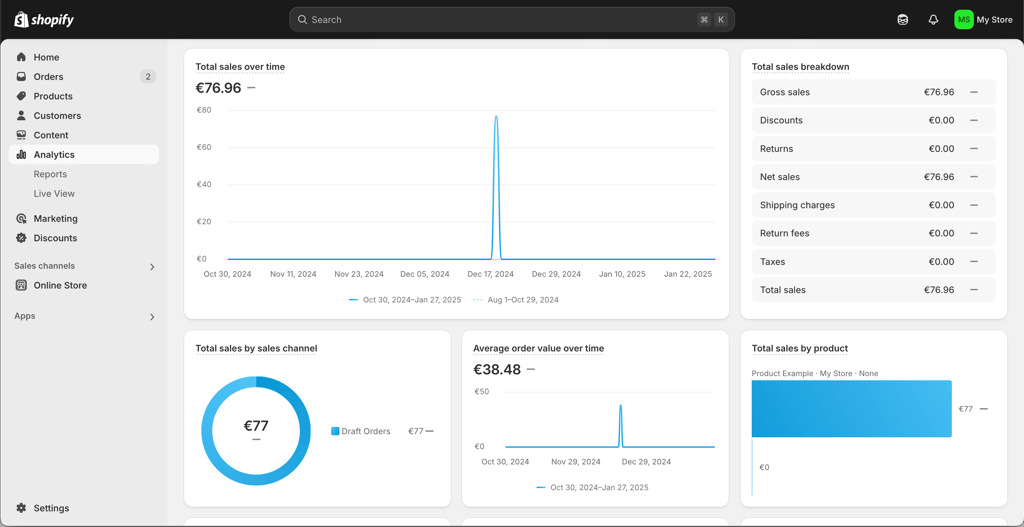
If, for whatever reason, you need even more functionalities, I’d suggest hitting the Shopify App Store. Shopify offers over 12 thousand third-party apps from various categories. There’s everything from marketing and inventory management to reporting and productivity tools. Essentially, there’s everything you need to run your photography site.
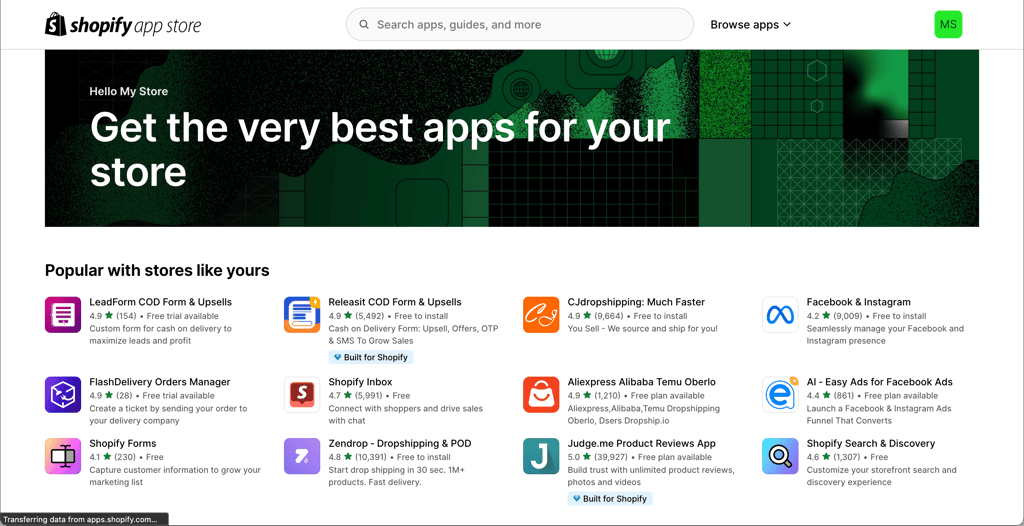
As shown in our in-depth Shopify review, the platform is also easy to use and navigate. Everything is straightforward and intuitive, so there isn’t much of a learning curve. I could edit and change everything on my site, and I even found using the editor to be quite a pleasant experience.
However, there are some drawbacks. If you want to make more advanced changes, you will need coding knowledge. There is also little choice regarding templates, especially if your budget is limited. Shopify has over 800 themes, but only 13 of them are free. Others would cost you between $100.00 and $400.00 each. You can buy cheaper, photography-oriented templates on third-party sites, which makes the options nearly limitless, but it does add to the overall cost. So, if you’re looking for more flexibility and ease of use, Hostinger or Squarespace are better choices in terms of site-building tools, editing, and choice of templates.
3. Squarespace – best templates for visually stunning portfolios

| Rating: | |
| Starting price: | $16.00/month |
| Free domain: | ✅ Yes |
| Free SSL: | ✅ Yes |
| Templates: | 180+ |
| Drag-and-drop editor: | ✅ Yes |
| Special deal: | Get up to 36% OFF Squarespace |
If you’re looking for the most modern, stylish, and professional platform for your photos, Squarespace should be your pick. The builder may have enticed many photographers with its attention to visual design, but it’s also making waves due to its intuitive dashboard and features suited for photographers, such as managing events and bookings.
Why is Squarespace the best for stunning photo portfolios?
Some key features and aspects that make Squarespace one of my favorite website builders for photo portfolios:
- Well-designed photography site templates. It offers a range of visually striking templates, optimized for showcasing photography. This puts your work at the center, making it easy to showcase your photos in the best light.
- Versatile gallery options. You can display high-resolution images in multiple formats – lightbox, full-screen slideshows, and adaptive cropping – that make your work stand out across all devices.
- Well-organized section-based editor suitable for beginners. With nicely designed elements and thought-out placement, your site will be easy to navigate.
- eCommerce and SEO functionalities. These include marketing analytics, email campaigns, and inventory management, turning your photography website into one that’s also good for offering your services online.
- Professional aesthetic. The templates are designed not just for functionality but to emphasize a sleek, modern aesthetic that enhances any photography style.
My experience with making a photography website with Squarespace – 4/5
Squarespace has the most attractive collection of templates I’ve ever seen. Modern, clean, and simply beautiful. These templates are one of the reasons why Squarespace is at the top of our list of best website builders for artists.
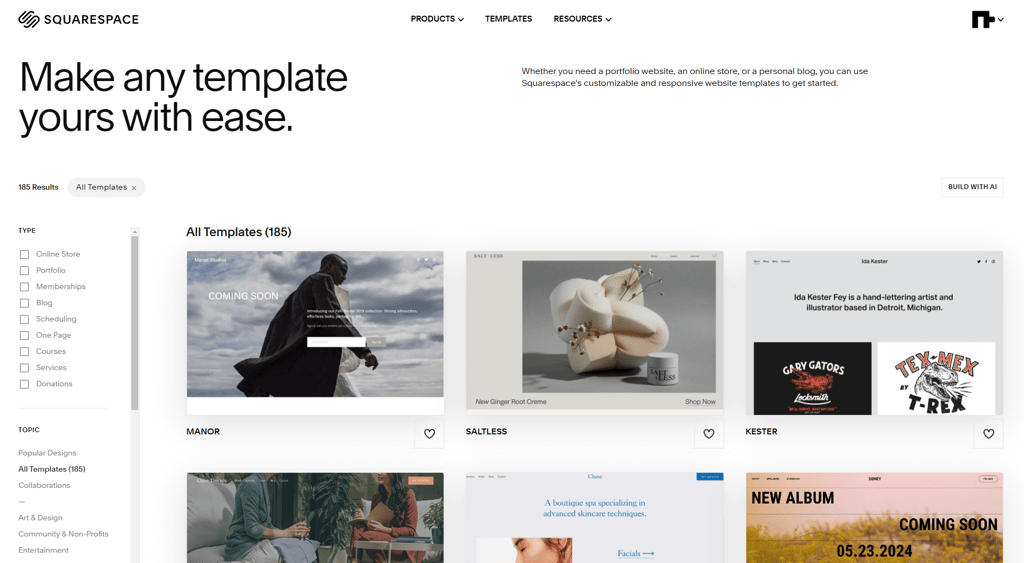
Squarespace has 26 purpose-built photography templates, which makes it a diverse category. I found a suitable template for different photography projects, whether my work focused on architecture, events, landscapes, or people.
On top of that, I must also mention the carefully thought-out templates. Here, your photos are the highlights and at the front and center of everything. The background and design are just to complement, not to distract. I could edit the elements and components with Squarespace’s section-based editor.
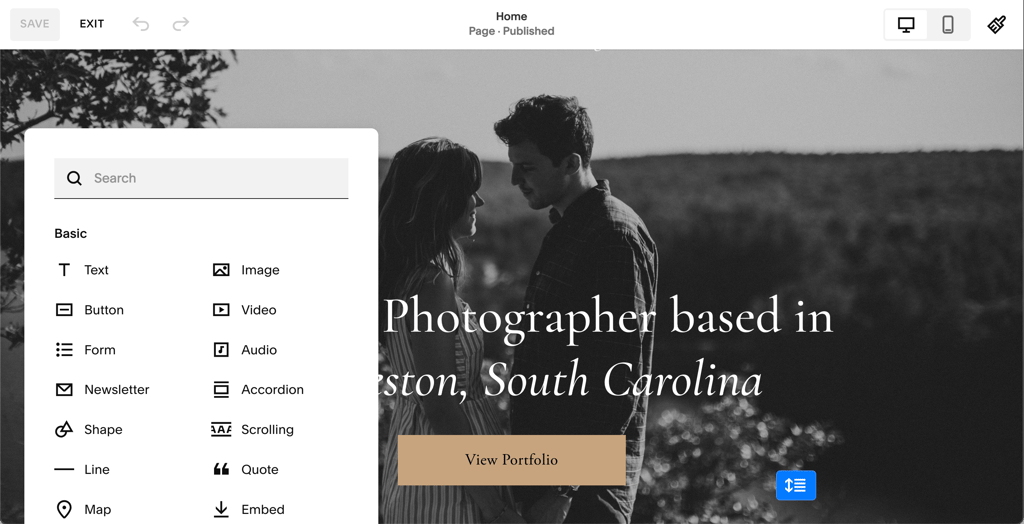
The Squarespace editor is intuitive, clean, and well organized. Things like adding and customizing texts, buttons, fonts, and elements were very simple for me. It’s foolproof, and I don't doubt that even a beginner will find it easy to use the editor. However, if you prefer a lot of freedom in website design, Squarespace’s editor can feel a little limiting. I think that Hostinger's drag-and-drop approach is more flexible.
Squarespace’s interface houses multiple features and tools. That’s everything from design and settings to marketing and analytics.
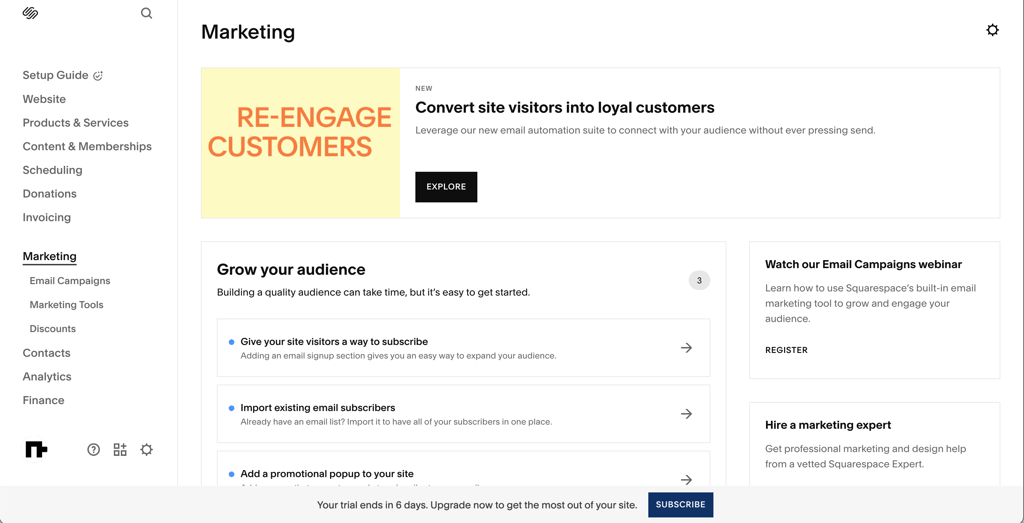
Among the functionalities worth mentioning are:
- Customers, orders, and inventory management
- Payment, shipping, and tax management
- Email campaigns, SEO tools, and social media integration
The interface is straightforward and thoughtfully structured. The interface organization is excellent, and everything makes sense. I could easily zoom in on the functionalities I needed and ignore those I didn’t need.
Plus, you can master the interface in just a short while. I took a few minutes to explore, but that’s about all I need to feel right at home with the interface.
With all of these features and tools readily available to you, you can easily create a one-stop home for your photography business. You can build a photography blog or move in a different direction. You can easily schedule clients, manage bookings, and simplify the hiring process via Squarespace. Plus, you can even incorporate eCommerce by selling your prints and merchandise.
This makes the builder ideal for those looking to streamline their photography business. It’s also great for people looking to create the best photographer websites without spending weeks and months tweaking every single detail. In short, Squarespace has taken care of the work for you.
4. SITE123 – best photography web builder for easy setup

| Rating: | |
| Starting price: | $4.60/month |
| Free domain: | ✅ Yes |
| Free SSL: | ✅ Yes |
| Templates: | 180+ |
| Drag-and-drop editor: | ❌ No |
| Special deal: | Get SITE123 now 50% OFF |
SITE123 is an excellent choice for photographers who want to set up a website quickly and with minimal hassle. It shines as a beginner-friendly option, allowing you to create a photo site with no technical skills needed. The platform also offers a free version that doesn’t require credit card information, providing a good opportunity to test out the templates if you’re just starting out.
SITE123 supports bulk image uploads and allows you to organize your photography work into custom categories, making it easy to showcase a diverse range of projects. For those looking to sell photos, it provides eCommerce features on the paid plan, including automated digital file delivery after purchase.
Why is SITE123 the best for setting up a quick and easy photo site?
Here are some highlights from my experience with SITE123 that ensure a fast and almost effortless setup process:
- Fast setup and simple editing. You can get your photography website online in minutes with beginner-friendly tutorials guiding you step-by-step. SITE123’s editor utilizes pre-built sections, allowing you to easily add your photos and content without requiring design skills.
- Multiple gallery styles to organize photos. You can choose from 8 gallery layouts, including a unique rounded grid. There is also an option to create custom categories so visitors can browse your work by theme or subject effortlessly. They can also see high-resolution images in full-screen viewing for maximum detail.
- Bulk image uploads. SITE123 allows you to upload multiple photos at once, speeding up the process of building your portfolio.
- eCommerce ready. You can sell prints and digital downloads by adding an online store with automated delivery on paid plans.
My experience making a photography website with SITE123 – 3.5/5
SITE123 impressed me with how fast and easy it was to get a photography website up and running. As someone who’s not a web design pro, I appreciated the intuitive setup process guided by clear tutorials that took away all the guesswork. When signing up, I could already select my website category as Photography, which then provided a suitable website structure.
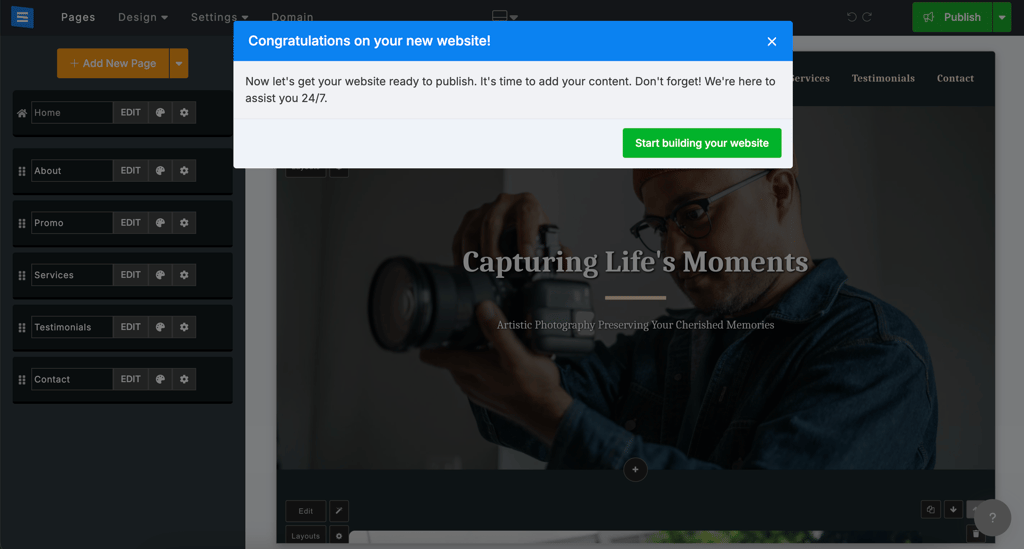
The platform offers a good selection of photography-specific templates that feel modern and professional. These are even SEO-optimized, though they lean toward simple and somewhat generic designs. Even so, they put the emphasis on photos, which is what matters most.

Creating galleries was straightforward, with multiple layout options including a distinctive rounded grid that gave my portfolio a unique look. I found bulk uploading incredibly helpful for adding many images quickly and organizing them into custom categories, which made it easy to keep my work tidy and accessible for visitors.
However, during the SITE123 testing, I found the editing interface to be user-friendly but limited in flexibility. While there’s a drag-and-drop feature, its functionality is limited to predefined blocks and layout options rather than being a completely free-form editor. As such, customization felt somewhat restricted compared to more advanced builders.
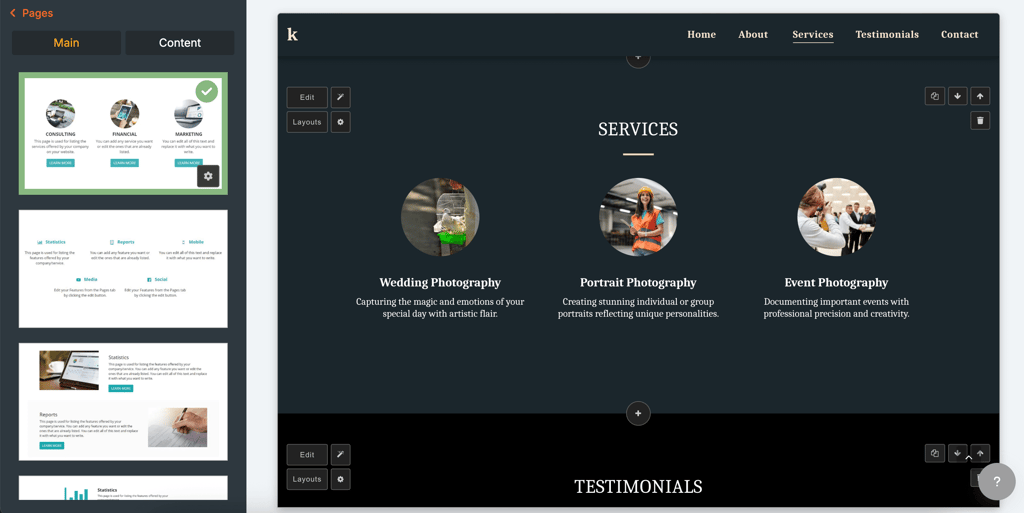
Still, managing galleries, text, and basic site elements was hassle-free. Customer support by live chat was responsive and excellent for troubleshooting.
eCommerce capabilities were solid for selling prints and digital downloads, though only on the paid plan. The automatic digital delivery is a nice touch if you want to monetize your photos. I found SEO features to be basic – but still adequate for getting started.
Overall, SITE123 is ideal for photographers seeking a straightforward, no-frills site that looks professional and functions smoothly without requiring extensive technical expertise. For more custom control or advanced design freedom, other builders may be a better option. But for simplicity and speed, SITE123 is one of the top contenders in 2026.
5. IONOS – affordable builder for photographers

| Rating: | |
| Starting price: | $1.00/month |
| Free domain: | ✅ Yes |
| Free SSL: | ✅ Yes |
| Templates: | 40+ |
| Drag-and-drop editor: | ✅ Yes |
| Special deal: | Get up to 96% OFF IONOS website builder |
IONOS is a good option for those who are just starting their website-building journey and need an easy-to-use and affordable website builder. Also, the provider includes useful features for creating and making your website visible, like an AI web builder and SEO optimization tools.
Why is IONOS the best website builder for photographers on a budget?
Here are some of the features that make IONOS a great, budget-friendly photography website builder:
- AI website builder. IONOS’ AI-powered builder creates a photography-focused website in seconds, helping photographers get started fast without much design experience.
- SEO and analytics tools. A built-in AI SEO text generator helps improve titles and descriptions for better page ranking and discoverability, while SiteAnalytics provides a detailed overview of visitor statistics and how well your page performs.
- Drag-and-drop editor. Its intuitive drag-and-drop editor simplifies site customization, making it accessible for beginners to tailor their photography portfolios.
- Affordable pricing. IONOS offers one of the lowest starting prices among website builders, making it ideal for photographers on a tight budget who want quality without overspending.
- Reliable performance. With unlimited webspace on paid plans and fast, reliable hosting, your photos will load quickly, ensuring a smooth user experience for visitors.
- Value-added features. Free domain for one year, professional email, SSL certificates, and 24/7 customer support add extra value, making it a well-rounded choice for photography websites on a budget.
My experience making a photography website with IONOS – 3.5/5
IONOS is a simple-to-navigate yet capable website builder. Having a choice between creating a website with AI or choosing from readily available templates gave me the freedom to decide how much time and effort I want to dedicate to creating a website.

While I appreciate the efficiency of the AI builder, I checked my options in the template gallery. When exploring IONOS’ template collection, I came across only 2 photography-specific templates. They are neat and structured, making it easy to display your photos.
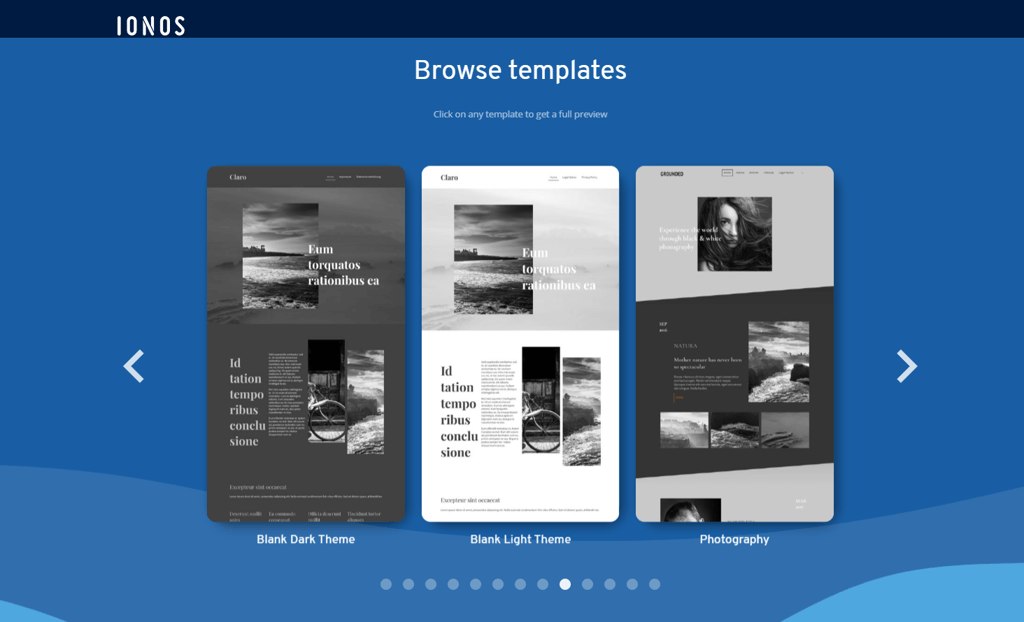
Yet, if you’re like me and want your website to look more personalized, with IONOS, you can adjust your website’s look. I could add sections and adjust the color palette to make the site suit my needs better. However, compared to Hostinger Website Builder and Squarespace, I found the customization capabilities of IONOS to be limiting.
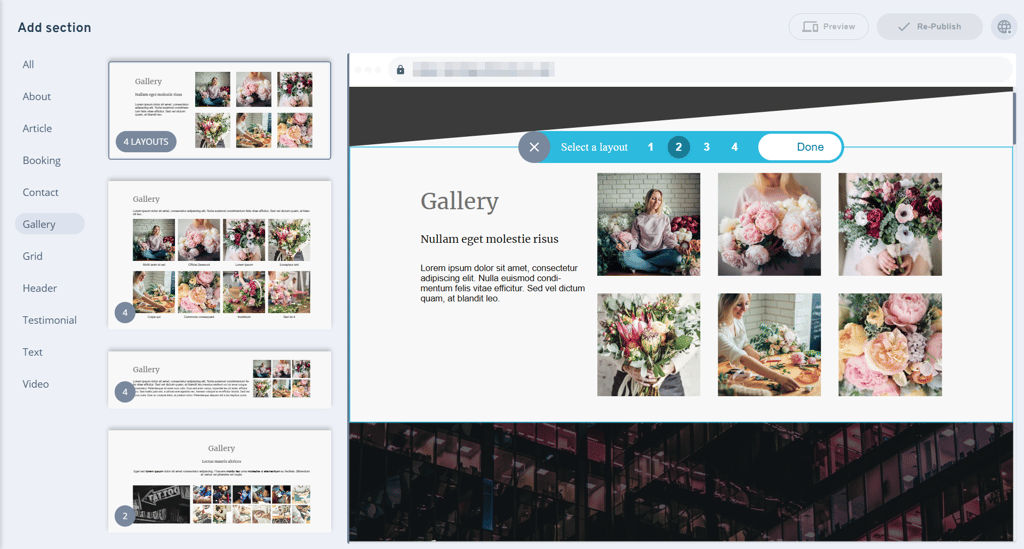
Beyond changing the color palette and adding additional sections, I couldn’t change anything more to make the website’s design personal and unique, which is not necessarily a big drawback. Based on the price and what the IONOS website builder provides for it, the offer is really good.
For $1.00/month, I could use a drag-and-drop editor, an AI website builder, SiteAnalytics, and an AI SEO text generator. It’s a good offer for beginners and those who need a simple website to showcase their work.
6. DreamHost Liftoff Website Builder – best AI web builder for customized photo portfolios

| Rating: | |
| Starting price: | $1.99/month |
| Free domain: | ✅ Yes |
| Free SSL: | ✅ Yes |
| Templates: | Not specified |
| Drag-and-drop editor: | ✅ Yes |
| Special deal: | Get DreamHost Website Builder, now 83% OFF |
DreamHost Liftoff Website Builder is a free AI-powered addition to DreamHost’s WordPress hosting services, designed to help users create fully customized websites quickly and effortlessly. The AI fills your new site with relevant content, copy, and images from extensive online libraries, giving you a polished starting point to showcase your work.
Why is DreamHost Liftoff the best for customizable photo websites?
Here’s what I appreciated the most about DreamHost’s website builder in terms of customization:
- Lightning-fast setup. Liftoff builds a tailored WordPress photography site in less than 60 seconds after you answer a few simple questions. The Site Assistant dashboard and AI chatbot provide contextual help and step-by-step guidance as you build and refine your site.
- Full WordPress power. Since your site is on WordPress, you get unlimited customization with any themes or plugins you choose to evolve your portfolio.
- Extensive template library. While the exact number of templates available for DreamHost's Liftoff site builder is not specified, you get access to hundreds of WordPress-native block patterns and photo-focused page templates optimized for visual storytelling.
- AI content generation. Generate engaging text, headlines, and images automatically to enhance your portfolio’s appeal without extra work.
- Complete ownership and portability. Your website and all its content remain fully yours, with easy migration options if you switch hosting providers later.
- Free with hosting. Liftoff is included at no extra cost with DreamHost’s WordPress hosting plans, making it a cost-effective tool for photographers.
My experience making a photography website with DreamHost Liftoff – 3.5/5
DreamHost Liftoff impressed me with how quickly it helped me launch a polished photography portfolio. The AI-powered setup was incredibly fast and easy. After answering a few simple questions about my photography style and goals, Liftoff built a tailored WordPress website within minutes – a huge time-saver.
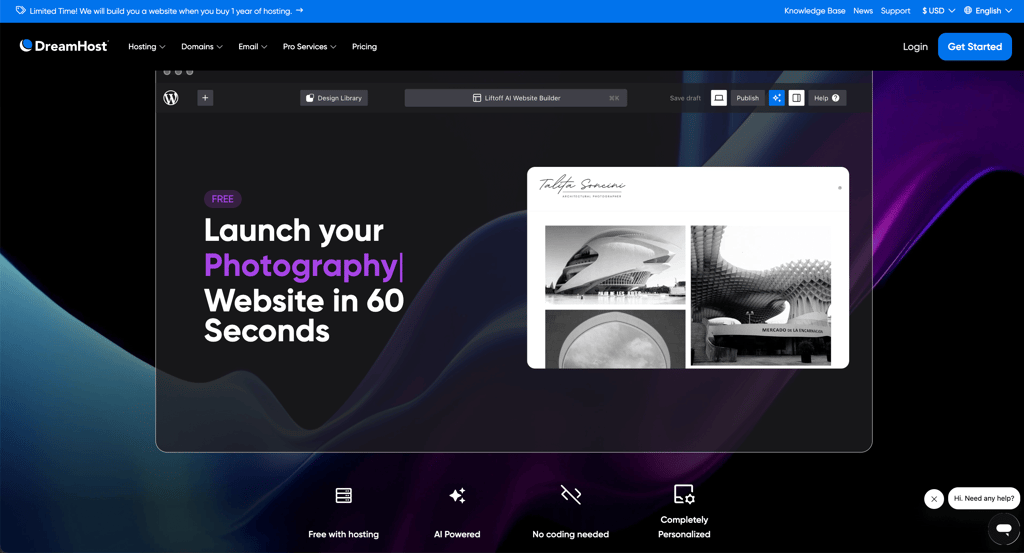
The initial AI-generated content, including professional-looking templates and relevant images, gave my site a strong visual impact right away. I appreciated that Liftoff provides access to the full WordPress ecosystem, meaning I could install plugins, change themes, or add custom code whenever I wanted to refine or expand my portfolio beyond the AI’s setup.
One of the standout features is the built-in AI assistant and chatbot that guide you through editing your site and optimizing content. This contextual help made the process less intimidating, especially for a photographer with limited web design experience.
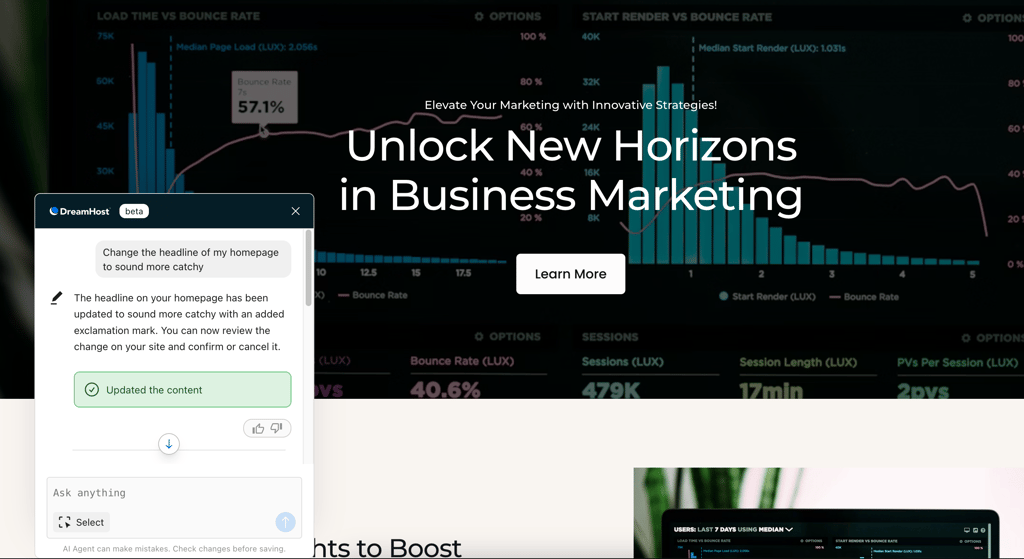
The interface is clean and well organized, though it does require some familiarity with WordPress to fully take advantage of the available customization options.
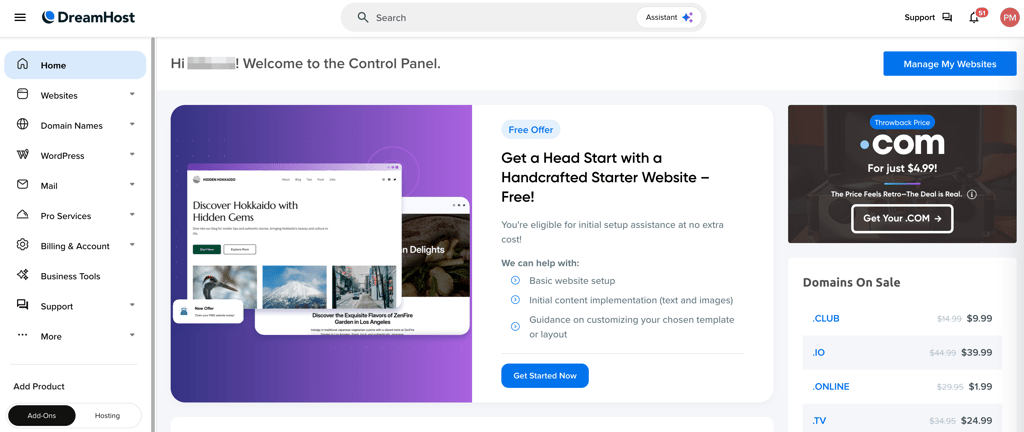
Since Liftoff is included free with DreamHost’s hosting plans, it adds great value and eliminates the need to purchase separate site-building tools. The only drawback is that advanced customization can be a bit steep for beginners, and the AI assistant, while helpful, isn’t as sophisticated as some competitors’ chatbots.
Overall, DreamHost Liftoff is an excellent choice for photographers who want a quick, AI-assisted way to create a fully customizable portfolio with the long-term benefits of WordPress. It balances ease of use with powerful features, making it a smart pick for 2026.
How I ranked photography website builders
Before diving into the detailed ranking process, it’s important to understand that the right website builder for photographers should balance design, functionality, and ease of use. I set out to test the top platforms that cater specifically to the needs of photographers and aimed to find those that help create professional portfolios and support business growth through eCommerce and marketing tools.
Step 1 – initial selection and scope of testing
I started by researching popular and well-reviewed website builders known for their strengths in photography portfolio presentation, ease of use, and selling capabilities. This initial pool included over a dozen providers, selected from expert recommendations, user feedback, market presence, and findings from our in-house research team.
Step 2 – feature overview and list narrowing
Next, I analyzed the core features essential for photographers:
- Mobile-responsive, photography-focused templates
- Gallery options and proofing tools
- eCommerce functionality
Platforms lacking these attributes or with poor usability were removed, trimming the list to six finalists: Hostinger, Shopify, Squarespace, Site123, IONOS, and DreamHost’s Liftoff.
Step 3 – hands-on testing
Over two months (August to September 2025), I signed up for all six providers and built identical photography websites on each. Here are the web builder evaluation criteria I focused on:
- Setup process and ease of use (30%). I tested how accessible and intuitive the builder was for photographers without a technical background.
- Design flexibility and photography templates (25%). I analyzed the quality and customization options of photo-centric templates and gallery layouts.
- Pricing and value (20%). I looked at the overall cost-effectiveness of each provider, considering their features, free plans, and necessary upgrades.
- SEO and marketing tools (15%). I only included platforms that provide the ability to promote the site and reach potential clients.
- Customer support quality (10%). I tried different customer support channels to check the responsiveness and helpfulness of support services during setup and troubleshooting.
I tested standard and photography-oriented plans, excluding advanced developer tools to better reflect typical photographer needs. Tools like SEO analyzers and support chats were used for evaluation.
Step 4 – final ranking from 1 to 6
After scoring and weighting all criteria, I compiled total scores to rank the providers. This method ensured a balanced view reflecting both functional richness and user experience tailored specifically for photographers in 2026. The final list helps photographers in choosing a builder best suited for their artistic and business goals.
How to choose the best website builder for photography
With this expansive list, it might be difficult to point out which specific features you should value. When choosing the best website builder for photography, consider these things:
- List your goals for the photography website
- Make a plan for your website
- Establish your budget
- Find the right platform to build the site with
- Create your website
First up, listing your goals is very important. Even the term photography website doesn't mean the same thing for everyone. You could use your photography website as an online portfolio, showcasing your art, or use it merely as a link to social media or booking sites. Alternatively, you could require custom watermark options, password-protected client galleries, RAW image uploading, or integrations with your photo editing software like Lightroom. Others go all-in on business, looking for search engine optimization and social integrations.
Then, make sure to prioritize those things from most to least important. While we all love a website that does everything, such plans tend to be expensive. Make a full plan of what's non-negotiable and what could remain a nice little bonus.
Also, look at your budget and see how much you want to spend. If you wish to sell online, look not only at the prices of the plans but also at the transaction fees connected to your sales.
You might be interested in looking for a free option, but there are some good reasons not to. Free website builders are usually quite limited, won't let you use a custom domain, have very little storage, and will be full of annoying ads. Instead, opt for something cheaper or get a free trial. Most of the builders on this list have at least a 14-day free trial.
Then, it's all a matter of making the right choice. Go through the list of builders of photographers and choose what's closest to your needs and wants.
FAQ
How much does a photography website cost?
Building a photography website can cost from $1.00/month to $40.00/month if you plan to sell online. Most of the price of your website comes from having eCommerce features implemented.
Is Squarespace good for photographers?
Yes, Squarespace is good for photographers because it offers features that can boost your online presence, allowing you to focus on visual design and offering rich features suited for selling online.
How do I create my own photography website?
To create a photography website, you can use a CMS like WordPress or use a website builder. Overall, website builders offer a hassle-free experience, which helps you launch your website quickly and effortlessly.
Do I need a website for my photography?
Yes, you need a website for your photography business because it makes you appear more professional and trustworthy online. A huge perk of having your own personal website is the ability to showcase your portfolio without compromising the quality of your photos.