Top free no-code website builders for 2026
Our team of experts and researchers rigorously test and evaluate website builders through transparent, in-depth testing procedures and methods using both in-house and industry-approved tools.
Drawing on cybersecurity insights, we provide unbiased, empirical rankings and analysis to help users make informed digital platform choices.
Learn more

Whether you’re building an online store or trying to publish a blog, the moment an idea hits – you usually want to move fast. That’s why free no-code website builders have become such a popular go-to.
However, free doesn’t always mean completely free.
Even with a free plan or a limited trial, you’ll likely run into some restrictions. You might not be able to publish your site, remove branding, or access key features without upgrading.
After testing the best no-code website builders, I’ve put together a list of providers that offer either a fully free plan, a free trial, or a money-back guarantee to help you get the best out of them. I’ll walk you through what you actually get for free, where the limitations are, and which features are locked behind paid plans.
6 best free no-code web builders 2026
- Hostinger Horizons – overall the best free no-code website builder
- Base44 – free no-code web builder for complete beginners
- Wix Harmony – Wix ADI inspired simple no-code website builder
- Bubble – flexible no-code builder with visual workflows and API integrations
- Squarespace Blueprint AI – no-code builder for unique visual websites
- Durable – free no-code web builder to get online fast




Our in-house research team and expert writers work hand in hand to regularly test website builders and provide accurate and fact-checked information. Discover the ins and outs of how we test and evaluate website builders.
Are free no-code website builders actually free?
Yes, many free no-code builders are free, but they can come with specific limitations. In most cases, you’re actually getting access to the platform in one of three ways: a limited free plan, a time-restricted trial, or a money-back guarantee.
A free plan is the closest thing to being truly free. You can build and publish a website without paying. However, free plans usually mean a branded subdomain, visible ads, and limited features like SEO tools or integrations.
Free trials give you full access to the platform, but for a short period of time – typically from a few days to a couple of weeks. This is where you can properly explore templates, AI tools, and advanced features. But once the trial ends, you’ll need to upgrade to keep your site live or even publish it in the first place.
Then there’s the money-back guarantee, which is not technically free. Nevertheless, since you pay upfront, you’ll get to a risk-free full experience for around 14-30 days. This way you can use the builder without restrictions, publish your site, and test everything in real conditions. Then, if it doesn’t meet your needs – just request a refund.
Best free no-code website builders – detailed list
1. Hostinger Horizons – best free no-code builder in 2026

| Rating: | |
| Free plan: | Free trial with 5 free messages |
| Money-back guarantee: | 30 day |
| Pricing: | Paid plans starts from $2.69/month |
| Special deal: | Get Hostinger Website Builder, 81% OFF + free months |
Hostinger Horizons is a reliable AI-driven no-code website builder that offers free trial. It was one of the easiest tools to get started with. I just described the website I wanted, and it generated a clean, usable version in a few minutes.
Why it stands out
Hostinger Horizons stood out for how quickly it turned a simple idea into a working site. Firstly, I used a basic prompt for a local bakery with online ordering and a blog. After a quick follow-up question, the AI generated everything in under 3 minutes.
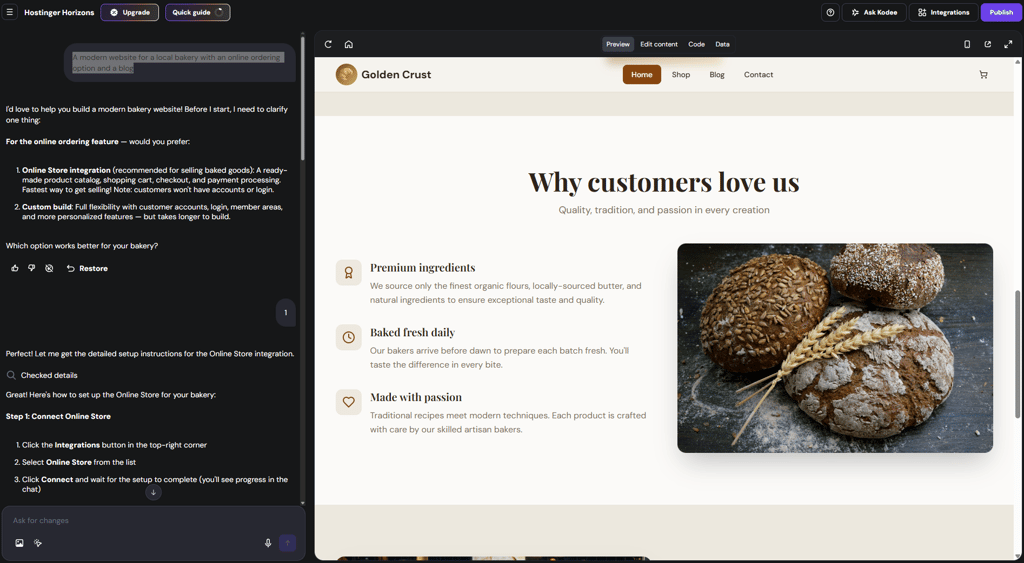
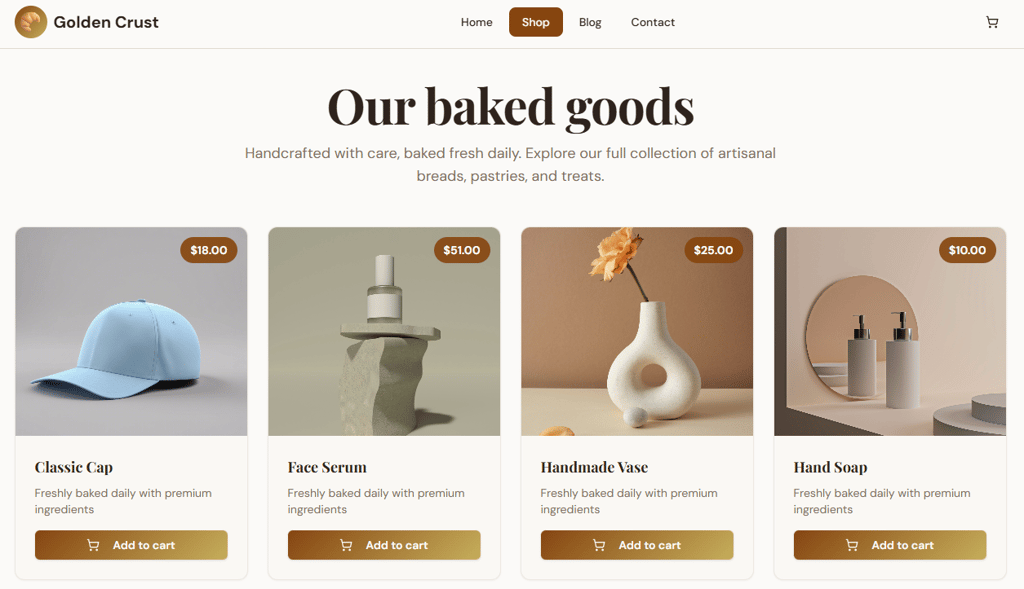
The result included 4 usable pages, and the product page was functional – I could add items to cart and go to checkout.
The design looked clean overall, though the main image didn’t load and the products were oddly unrelated (vases, hats, soap), which shows it’s fast but not always perfectly accurate.
Key features
- Generating pages with text-based AI prompting
- Content editing via prompts or manually
- Adding user accounts, login systems, and basic data storage
- SEO-ready structure and optimization basics
- Basic support and guidance via chat
Free plan limitations
While you can build and test your site with Hostinger Horizons, you won’t be able to publish it without upgrading to a paid plan. Payment features are also restricted, so you can’t fully set up or test real transactions on the free access. On top of that, the number of AI interactions is limited, which can slow things down if you want to iterate more. On the other hand, Hostinger offers a 30-day money-back guarantee, so you can try the full version and its features risk-free.
2. Base44 – strong vibe-coding tool for beginners
| Rating: | |
| Free plan: | Free plan with 25 message credits a month |
| Money-back guarantee: | No |
| Pricing: | Paid plans starts from $16.00/month |
| Special deal: | Get Base44 website builder for FREE |
Base44 is more than a typical no-code builder – it is one of the most popular vibe-coding tools alongside Hostinger Horizons. Instead of dragging elements around, you describe what you want, and it builds the app or website for you, including logic and structure. On the free plan, you’re limited to around 25 messages per month, which essentially means 25 prompts or edits. So every change or improvement you ask for counts toward that limit.
Why it stands out
While testing Base44, it stood out for going beyond simple website generation and delivering a more complete, usable product. I tested it with the same bakery prompt, and while it took longer – around 7 minutes – the results were more relevant.

The products actually matched the theme (bread, pastries), everything loaded properly, and all sections were in place. The site was fully usable, with a working cart and checkout flow.
The main downside was visuals – images looked overly polished and AI-generated, so they’d need replacing. Still, compared to most builders, it felt closer to a ready-to-launch site.
Key features
- AI website generation from text prompts
- Automated database and website logic handling
- Built-in user authentication with login systems, user accounts, and permissions
- Visual editor for adjusting content and design
- Integrations with external tools
Free plan limitations
Base44’s free plan is quite limited once you move beyond basic testing. You only get around 5 AI messages per day and 25 per month, which can run out pretty quickly if you try to build a real project. Unlike Hostinger Horizons, Base44 lets you publish your project, but only on its own domain. However, unlike Hostinger, the free plan doesn’t give you access to backend functions or the ability to edit code.
3. Wix Harmony – vibe-coding with drag-and-drop functionality
| Rating: | |
| Free plan: | Free plan with core features |
| Money-back guarantee: | 14 day |
| Pricing: | Paid plans starts from $11.75/month |
| Special deal: | Get Wix with 50% OFF |
Wix Harmony is an AI-driven website builder inspired by Wix ADI, allowing you to generate a usable site in minutes without any coding. It’s easy to customize, offers thousands of templates, and has one of the best free plans on this list, making it a great fit for both beginners and more experienced creators.
Why it stands out
Wix web builder clearly stands out because, unlike Base44 or Hostinger Horizons, it gives you full control over the layout. You can drag and drop elements however you like, edit content, swap images – everything feels very flexible.
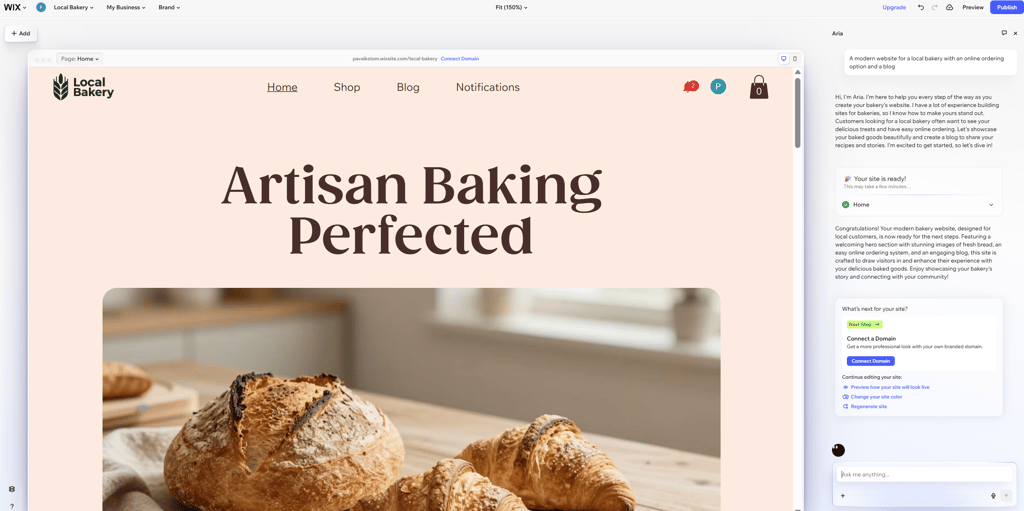
I used the same prompt to generate a website, and this time Wix created all the key pages right away – Home, Shop, Blog – and even added account functionality without asking extra questions. It took around 5 minutes, so it’s not the fastest on this list, but not the worst either. The visuals were also quite solid, and the products actually matched the theme.
The only real downside, depending on your needs, is that you can’t edit the code. So it’s best suited for users with no programming experience who want to launch a website quickly without getting into technical details.
Key features
- Generating full websites from language prompts
- Hybrid editing workflow including text prompts and drag-and-drop functionality
- AI assistant (Aria) for refining design, content, and structure
- Built-in tools for eCommerce and SEO
Free plan limitations
Wix Harmony uses the same free plan structure as Wix. Similar to Base44, you can publish your site, but only on a Wix-branded subdomain, and it will include visible Wix ads. It’s also worth noting that resources are quite limited – around 500MB of storage and low bandwidth. Key features like payment integrations, advanced SEO, analytics, and other business tools are locked behind paid plans.
4. Bubble – developer-friendly no-code web builder

| Rating: | |
| Free plan: | Free plan with 50K workload units per month or 14-day free trial |
| Money-back guarantee: | No |
| Pricing: | Paid plans starts from $59.00/month |
| Special deal: | Get Bubble AI at only $59.00/month |
Bubble is one of the most powerful no-code builders out there, especially if you want to go beyond simple websites. It lets you build fully functional web apps with workflows, databases, and logic. Compared to newer AI-first tools, it’s less instant, but gives you much more control over how everything works under the hood.
Why it stands out
With Bubble no-code AI web app builder, you won’t get a polished visual result right away. Using the same prompt, Bubble took about 10 minutes to generate a basic-looking website, but all the key elements were there and working. What stood out to me is the high level of control – you can drag and drop elements similar to Wix, and the side panels are packed with settings and features to fine-tune the entire page. That said, because of this complexity, it felt less beginner-friendly.
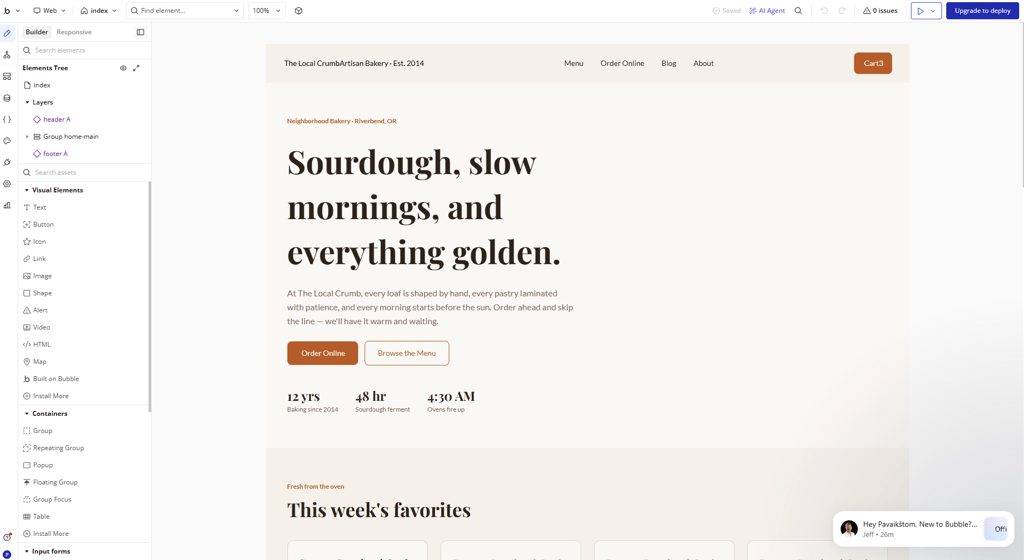
The only thing that confused me was the cart functionality. In the generated version, it didn’t work as smoothly as with the other builders I tested. I couldn’t add products to the cart, while at the same time, a few items were already there and couldn’t be removed. It wasn’t clear what additional setup or integrations were needed, especially since the products were already in place.
Features
- Visual drag-and-drop editor
- Workflow builder to create logic, actions, and web behavior
- Built-in database for storing and managing data
- API connector for integrating external services and tools
- Plugin marketplace
Free plan limitations
You can build and preview your app, but you won’t be able to properly deploy it with a custom domain, and your project will stay on a Bubble-branded subdomain.
On top of that, resources are limited – you get restricted storage, performance, and workload capacity, which can quickly become a bottleneck as your app grows. Advanced features like recurring workflows, better security, collaboration, and full production readiness are also locked behind paid plans.
5. Squarespace Blueprint AI – web builder for visually stunning websites
| Rating: | |
| Free plan: | Free 14-day trial |
| Money-back guarantee: | 14 day |
| Pricing: | Paid plans starts from $16.00/month |
| Special deal: | Get up to 36% OFF Squarespace |
Squarespace Blueprint AI is designed to make website creation feel guided. Instead of just generating a full site instantly, it walks you through a few choices – like style, structure, and goals – and then builds a tailored website based on your input.
Why it stands out
Provider stands out because, unlike other builders, you don’t even need to write a text prompt. Instead, Squarespace asks you a few questions, and based on your answers, the AI decides what kind of site to generate. You can choose which sections you want on the homepage and what pages should be included in the site. The only thing I couldn’t select was a blog – likely because of my earlier choices.
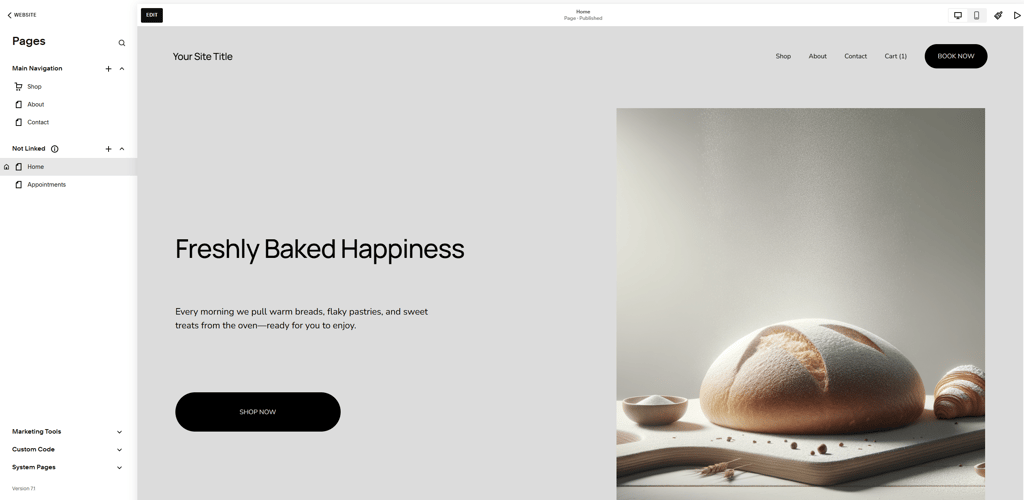
The generated result was actually quite good – clean and minimalist. Similar to Base44, the images looked very AI-generated, but they still matched the theme. Aside from that, the cart functionality worked, and overall the site felt usable. To make it fully ready, you’d just need to adjust the products, images, and content – and you’re good to go.
Features
- Guided AI setup that builds a website based on your answers instead of a prompt
- Personalized website structure with suggested pages and sections
- Curated design recommendations
- Built-in SEO friendly structure and tools for visibility
Free plan limitations
Squarespace doesn’t offer a true free plan – only a 14-day free trial. During this time, you can build and test your site, but you can’t publish it or connect a custom domain. Ecommerce features are also limited, so you can’t fully test payments or checkout. In practice, it’s enough to explore the builder, but not to launch a live website.
6. Durable – fastest no-code web builder

| Rating: | |
| Free plan: | Free plan with 10 messages per month |
| Money-back guarantee: | 30 day |
| Pricing: | Paid plans starts from $12.00/month |
| Special deal: | Try Durable AI website builder |
Durable is one of the fastest AI website builders I’ve tested. You just enter a short description of your business, and it generates a complete website – including copy, images, and structure – in under a minute. It’s clearly built for speed and simplicity, so while you get a usable site instantly, you’ll likely want to tweak the details afterward.
Why it stands out
Durable claims it can build a website in 30 seconds, and it actually delivers on that. It generated a decent-looking version in under a minute. The downside is that it didn’t include a store with products, and there was no working blog either – it ended up being a clean, polished homepage, but not much beyond that.
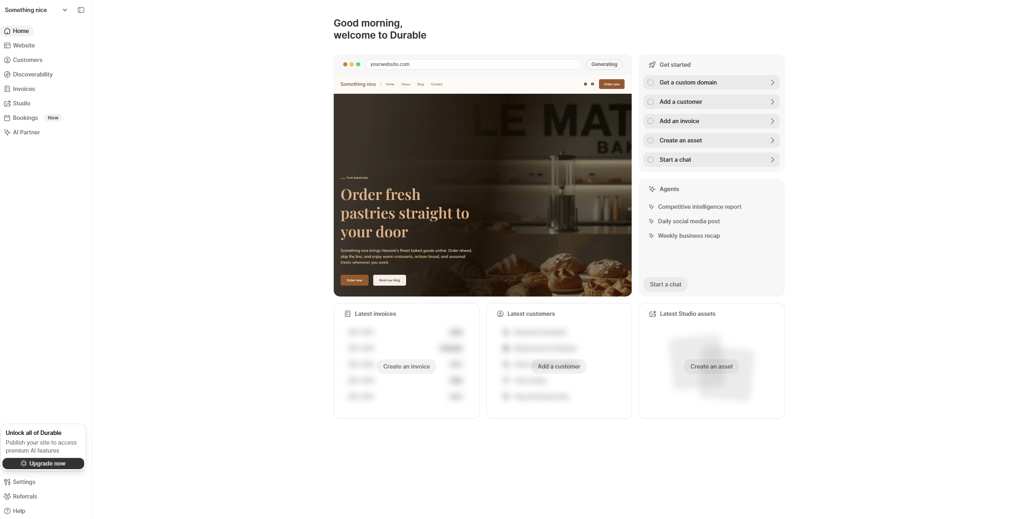
That said, while testing Durable features, I noticed that the visuals looked really good, and the AI-generated images were almost usable right away in my case.
Features
- AI website generation in under 30 seconds with ready-made layout
- Built-in AI copywriting for website text, ads, and basic content creation
- Invoicing and payment tools to run a small business
Free plan limitations
Durable doesn’t offer a full free plan, only a limited free version and trial access. You can generate and test a website, but you won’t be able to properly publish it on a custom domain without upgrading. Features like advanced customization, business tools, and full editing control are also restricted.
How we tested free no-code website builders
Final thoughts
After testing all these builders side by side, one thing became very clear – it’s hard to pick one best option, because it all depends on your expectations.
If your goal is to have an all-in-all tool which is easy to use and fast – Hostinger Horizons is the best no-code web builder for you. It’s great for small projects, but you’ll likely hit limitations once you want something more polished or specific.
On the other end, builders like Bubble or Base44 feel very powerful. They can handle logic, structure, and more complex functionality, but they also take more time to understand and refine. They’re less about instant results and more about building something closer to a real product.
Then there’s the middle ground – Wix Harmony and Squarespace Blueprint AI. These have a balance between AI convenience and manual control. From testing, Wix stood out for flexibility, while Squarespace felt more guided and design-focused.
The “free” aspect also played out exactly as expected – you can test, explore, and even build quite a lot without paying, but sooner or later, limitations appear. Whether it’s publishing, customization, or advanced features, most builders are designed to get you started for free, not to stay free forever.