The best no-code website builders for small businesses in 2026
Our team of experts and researchers rigorously test and evaluate website builders through transparent, in-depth testing procedures and methods using both in-house and industry-approved tools.
Drawing on cybersecurity insights, we provide unbiased, empirical rankings and analysis to help users make informed digital platform choices.
Learn more

Building a business website no longer requires coding. Small business no-code website builders let you create and launch a site using simple editors or prompts. No technical skills needed.
These tools focus on speed and simplicity. You can get online fast and keep costs low. Most include hosting, security, and ready-made templates. Many also offer AI features for layouts and content.
To find the best small business no-code website builders in 2026, I tested each platform myself. I checked ease of use, AI tools, customization, and pricing. I also looked at how fast you can launch a site and how it performs in real use.
The result is a shortlist of 6 builders that are easy to use and deliver solid results for small businesses.
6 best small business no-code website builders in 2026
- Hostinger Horizons – overall the best no-code web builder for small business
- Wix Harmony – ADI-based simple no-code web builder for small businesses
- Base44 – AI-powered no-code builder with free plan
- Bubble – developer-friendly small business no-code web builder
- Durable – fastest no-code web builder for small business
- Squarespace Blueprint AI – user-friendly minimalistic small business builder




Our in-house research team and expert writers work hand in hand to regularly test website builders and provide accurate and fact-checked information. Discover the ins and outs of how we test and evaluate website builders.
What makes the best small business no-code web builder?
The best small business no-code website builders make it easy to launch a professional website without coding skills. They should save time, reduce costs, and include the tools businesses actually need to grow online.
When choosing a reliable website builder, here are the most important things small businesses should look for:
- Easy drag-and-drop or AI-powered website setup
- Free domain and SSL certificate for a secure, professional site
- Built-in payment gateways for selling products or services
- Business email support and contact forms
- Flexible customization without coding
- Mobile-friendly templates
- SEO and marketing tools for visibility
- Scalable features like eCommerce, blogs, and integrations
- Affordable pricing for small business budgets
Best small business no-code website builders 2026 – detailed reviews
1. Hostinger Horizons – best no-code web builder for small business in 2026

| Rating: | |
| Price: | Paid plans start from $2.69/month |
| Free domain: | ✅ Yes (for 1 year) |
| Free SSL: | ✅ Yes |
| Money-back guarantee: | ✅ Yes, 30-day |
| Special deal: | Get Hostinger Website Builder, 81% OFF + free months |
Hostinger Website Builder is a beginner-friendly no-code web builder for small businesses that want to get online quickly. It combines hosting, AI tools, eCommerce features, and website building in one place. This makes it easy to create a professional business website without hiring developers or starting from scratch.
Why Hostinger Horizons stands out for small businesses
Hostinger Horizons is a great website builder which stands out because it makes launching a business website extremely fast and beginner-friendly. During my testing, I described a local bakery website with online ordering and a blog, and the AI generated a working 4-page website in under 3 minutes. The product pages, cart, and checkout flow were already functional, which made the setup process very easy.
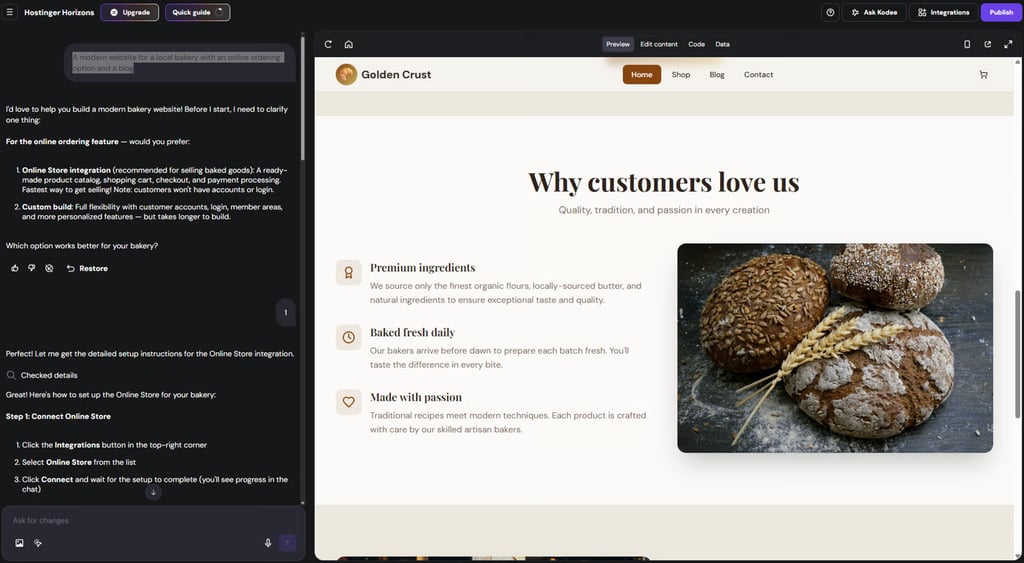
While some generated content (text, images, products) needed adjustments, the platform felt intuitive and flexible – enough for small businesses that want to launch quickly without coding knowledge.
Key features
- AI-powered website generation from text prompts
- Website setup in under 3 minutes during testing
- eCommerce tools with product pages and checkout functionality
- User accounts and login systems
- SEO-ready structure and optimization basics
- Manual and AI-assisted content editing
- Beginner-friendly interface and setup process
- Chat-based support and guidance
Hostinger Horizons is best for beginners and small businesses that want a fast, AI-driven way to create a professional website without coding. For the best experience, I’d recommend the Business plan, since it unlocks publishing, payment integrations, and more AI interactions.
2. Wix Harmony – vibe-coding with drag-and-drop functionality for small businesses
| Rating: | |
| Price: | Paid plans start from $11.75/month |
| Free domain: | ✅ Yes (for 1 year) |
| Free SSL: | ✅ Yes |
| Money-back guarantee: | ✅ Yes, 14-day |
| Special deal: | Get Wix with 50% OFF |
Wix Harmony is another no-code AI website builder built for small businesses and creators who want to launch a polished website without dealing with technical setup. Instead of relying only on AI generation, it also gives you Wix’s flexible drag-and-drop editor, so you can easily adjust layouts, visuals, and content to match your brand.
Why Wix Harmony stands out for small businesses
Wix web builder stands out because it gives you a lot of creative freedom. Unlike Hostinger Horizons or Base44, you can fully customize your generated website using drag-and-drop editing. This makes the platform feel more flexible and beginner-friendly for small businesses.
During my testing, I used the same bakery website prompt with eCommerce and blog functionality. Wix generated the main pages – Home, Shop, and Blog – in around 5 minutes. It also added account functionality automatically without needing additional prompts. The visuals looked polished, and the generated products actually matched the website theme, which made the overall result feel more realistic and usable.
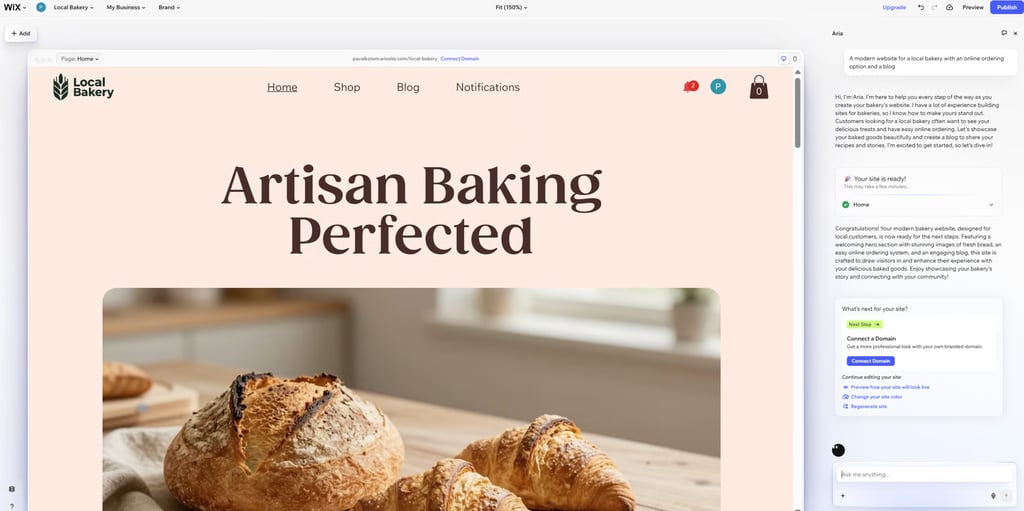
While the builder is very flexible visually, it’s less suitable for advanced users who want full developer-level control, since manual code editing is not available.
Key features
- AI-powered website generation from text prompts
- Hybrid editing with drag-and-drop and AI-assisted customization
- Built-in eCommerce, blogging, and SEO tools
- AI assistant (Aria) for design and content improvements
- User accounts and login functionality
- Mobile-friendly templates and layouts
- Website publishing available on the free plan
- Beginner-friendly interface and setup process
Wix Harmony is best for small businesses and creators who want an easy-to-use AI website builder with more design flexibility. With Wix, I’d recommend a paid Business plan, since it unlocks payment integrations, advanced SEO, and analytics and removes Wix branding.
3. Base44 – great vibe-coding platform to create a website for small business
| Rating: | |
| Price: | Paid plans start from $16.00/month |
| Free domain: | ✅ Yes (for 1 year) |
| Free SSL: | ✅ Yes |
| Money-back guarantee: | ❌ No |
| Special deal: | Get Base44 website builder for FREE |
Base44 is an AI-driven no-code website builder designed for users who want to create more advanced projects without coding knowledge. It focuses on vibe coding – instead of manually building and editing pages, you describe what you want, and the AI generates the structure, logic, and functionality for you.
Why Base44 stands out for small businesses
Base44 stands out because it feels closer to generating a complete product rather than just a simple website. During my Base44 testing, I used the same bakery eCommerce prompt, and while the generation process took around 7 minutes, the results were much more accurate than with some competitors.

The generated products actually matched the bakery theme, all sections loaded properly, and the website included a working cart and checkout flow. Compared to many AI website builders, the final result felt more launch-ready and structured.
The biggest downside was the visuals. Some images looked overly polished and noticeably AI-generated, so they would likely need manual replacement. The free plan is also fairly restrictive, especially if you want to keep iterating on the project frequently.
Key features
- AI-powered website and app generation from text prompts
- Automatic backend, database, and logic generation
- Built-in user accounts, authentication, and permissions
- Visual editor for content and design adjustments
- eCommerce tools with checkout functionality
- Integrations with external tools and services
- Website publishing available on the free plan
- Beginner-friendly prompt-based editing workflow
Base44 is best for small businesses and non-technical users who want AI to handle both website design and functionality. Although Base44's free plan is pretty good, I’d recommend upgrading to a paid plan, as the credits for editing your website can run out
4. Bubble – developer-friendly small business no-code web builder

| Rating: | |
| Price: | Paid plans start from $29.00/month |
| Free domain: | ❌ No |
| Free SSL: | ✅ Yes |
| Money-back guarantee: | ❌ No |
| Special deal: | Get Bubble AI at only $29.00/month |
Bubble is a no-code website and web app builder for users who want more control and customization without coding. It lets you build websites, workflows, databases, and business tools in one platform, making it a strong option for more advanced projects.
Why Bubble stands out for small businesses
Bubble website builder stands out because of its flexibility and advanced customization capabilities. During my testing, I used the same bakery eCommerce prompt, and while the generation process took around 10 minutes, the platform created a functional website structure with all the key sections already in place.
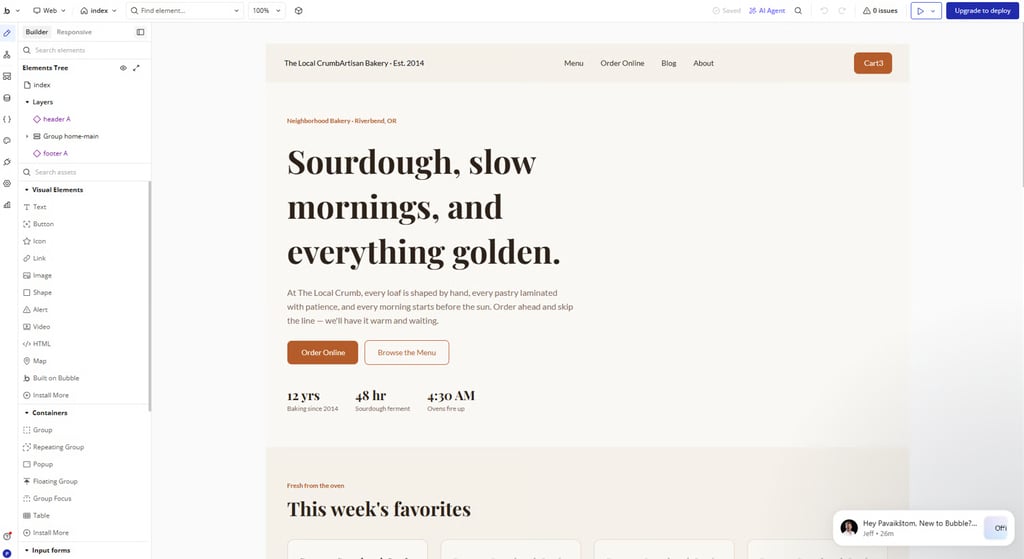
What impressed me most was the amount of control available. Similar to Wix, you can drag and drop elements around the page, but Bubble also includes detailed side panels filled with settings, workflows, and logic controls. This makes it much more customizable than most AI website builders I tested.
At the same time, that flexibility comes with a learning curve. Compared to tools like Hostinger Horizons or Wix Harmony, Bubble felt less beginner-friendly and more technical. I also noticed some issues with the generated cart functionality during testing, since products appeared in the cart automatically and couldn’t be removed without additional setup.
Key features
- AI-assisted website and web app generation
- Visual drag-and-drop editor
- Workflow builder for logic and automation
- Built-in database management
- API integrations and external service connections
- Large plugin and integrations marketplace
- eCommerce and custom functionality support
- Advanced customization and workflow controls
Bubble is best for small businesses, startups, and advanced users who want to build more customizable websites or web apps. If you’re starting a small business, I think the best way is to choose a Bubble Starter plan. It includes website publishing with a custom domain, recurring workflows and automations, and decent monthly workload capacity for smaller projects.
5. Durable – small business website builder to get online fast

| Rating: | |
| Price: | Paid plans start from $12.00/month |
| Free domain: | ✅ Yes (for 1 year) |
| Free SSL: | ✅ Yes |
| Money-back guarantee: | ✅ Yes, 30-day |
| Special deal: | Try Durable AI website builder |
Durable is an AI-powered no-code website builder designed for small businesses that want to launch a website as quickly as possible. Instead of manually building pages, you simply describe your business, and the AI generates a website with text, images, and structure in under a minute.
Why Durable stands out for small businesses
Durable stands out because of its speed and simplicity. During my testing, it generated a polished-looking website in less than a minute, making it one of the fastest AI website builders I tried.
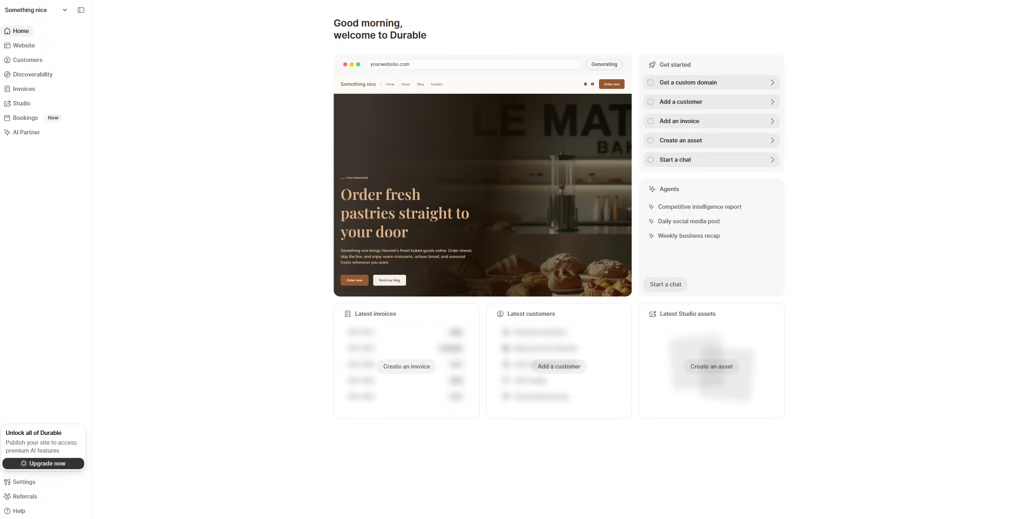
The generated design looked clean, modern, and surprisingly usable right away. I also noticed that the AI-generated visuals looked much better than expected and required fewer edits compared to some competitors.
At the same time, the generated website structure felt very basic. The builder created more of a polished homepage rather than a complete business website. There was no working store setup, and the blog functionality was missing during testing. Compared to tools like Wix or Base44, Durable focuses more on fast website generation than deep customization.
Key features
- AI website generation in under 30 seconds
- AI-generated layouts, text, and visuals
- Built-in AI copywriting tools
- Invoicing and payment features for small businesses
- Beginner-friendly interface and setup process
- Mobile-friendly website layouts
- Hosting and SSL included
- AI-powered business assistant tools
Durable is best for small businesses and freelancers who want the fastest possible way to launch a simple professional website. I’d recommend upgrading to at least the Launch plan. It lets you publish your website and includes useful business features like a CRM system, booking tools, and payment support.
6. Squarespace – simple minimalist no-code small business web builder

| Rating: | |
| Price: | Paid plans start from $16.00/month |
| Free domain: | ✅ Yes (for 1 year) |
| Free SSL: | ✅ Yes |
| Money-back guarantee: | ✅ Yes, 14-day |
| Special deal: | Get up to 36% OFF Squarespace |
Squarespace Blueprint AI is a guided AI website builder designed for small businesses and creators. Instead of relying on text prompts, it asks questions about your goals, style, and website needs and then generates a tailored website based on your answers.
Why Squarespace stands out for small businesses
Squarespace Blueprint AI stands out because it takes a more guided approach to website generation. Unlike most AI website builders I tested, you don’t need to write prompts or describe the website manually. Instead, Squarespace walks you through a series of choices, like website style, homepage sections, and pages you want included.
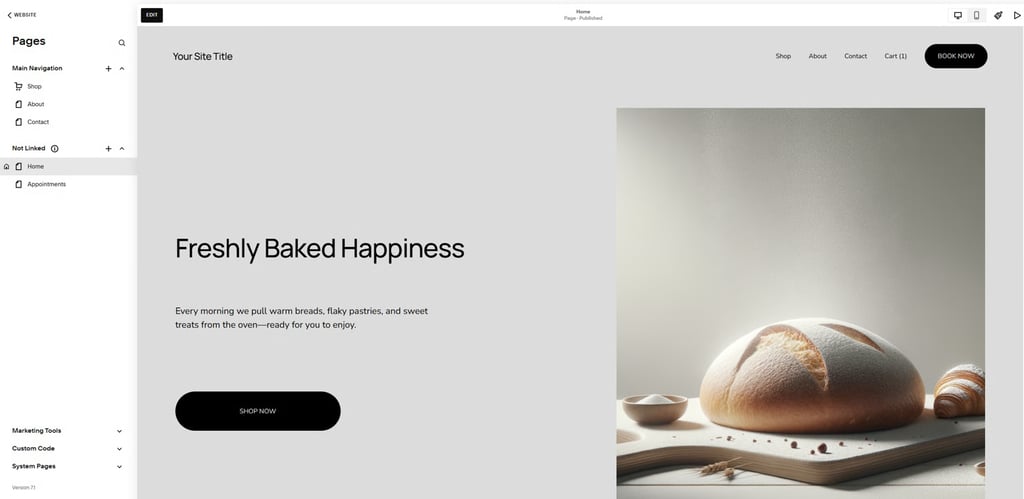
During testing, the generated website looked clean, modern, and minimalist. Similar to Base44, some visuals looked noticeably AI-generated, but they still matched the bakery theme quite well. The eCommerce functionality also worked properly, including cart and checkout features, which made the website feel usable from the start.
At the same time, the generation process gives you less control upfront compared to builders like Wix. Some features, like blog selection, also seemed limited depending on the setup choices you make earlier in the process.
Key features
- Guided AI website generation without text prompts
- Personalized website structure and layouts
- Curated design and style recommendations
- Built-in eCommerce and checkout tools
- SEO-friendly structure and optimization tools
- Fully editable website after generation
- Mobile-friendly templates and layouts
- Beginner-friendly setup experience
Squarespace Blueprint AI is best for small businesses and creators who want a polished, professional-looking website with minimal setup effort. For the best experience, I’d recommend upgrading to a paid plan, since the trial version doesn’t allow publishing, custom domains, or full eCommerce testing.
Final thoughts
Small business no-code website builders have become much more capable in 2026. You no longer need coding knowledge or a developer to launch a professional-looking business website. Most platforms now combine AI generation, hosting, eCommerce, and business tools in one place, making it possible to get online in minutes instead of weeks.
After testing all of these builders with the same small business website scenario, Hostinger Horizons and Wix Harmony stood out the most to me. Hostinger impressed me with how quickly it generated a usable eCommerce website and how beginner-friendly the overall experience felt. Wix, on the other hand, offered much more flexibility due to its drag-and-drop editing, while still keeping the setup process simple and approachable for small businesses.