Best portfolio website builders I’ve tried in 2026
Our team of experts and researchers rigorously test and evaluate website builders through transparent, in-depth testing procedures and methods using both in-house and industry-approved tools.
Drawing on cybersecurity insights, we provide unbiased, empirical rankings and analysis to help users make informed digital platform choices.
Learn more

When I started building my writing portfolio while applying for tech writing jobs, I assumed any website builder would work. After all, I only needed a few pages to showcase articles and projects. But I soon realized that portfolio websites are different.
Most builders are designed for businesses, stores, or marketing pages. When testing portfolio builders, I kept running into the same problems: generic templates that made every portfolio look identical, editors that required too much setup, limited layout flexibility, and tools that became expensive quickly. That said, what matters most for portfolios isn’t features, but presentation.
In this guide, I focus on the portfolio website builders that actually help showcase work professionally. I’m not looking at eCommerce-heavy platforms, only tools that make portfolios simple, flexible, and visually clean.
Best portfolio website builders in 2026 (quick overview)
- Wix – best portfolio website builder in 2026 with robust features
- Hostinger Website Builder – best budget portfolio builder
- Squarespace – best portfolio builder for design-focused creatives
- WordPress.org – best portfolio builder for full control
- Webflow – best portfolio builder for advanced design control
- IONOS – best portfolio builder for simple professional sites
- SITE123 – best beginner portfolio builder
- Elementor – best WordPress portfolio builder
- Carrd – best minimalist portfolio builder
- Google Sites – best free portfolio builder




Our in-house research team and expert writers work hand in hand to regularly test website builders and provide accurate and fact-checked information. Discover the ins and outs of how we test and evaluate website builders.
10 best portfolio web builders in 2026 – in-depth review
To help you choose the right portfolio website builder, I tested and reviewed each platform in detail. Below, you can see what each builder does best, where it falls short, and which creators it’s realistically suited for.
1. Wix – top choice for building and managing portfolio websites in 2026

| Rating: | |
| Pricing: | Free or from $11.75/month |
| Templates: | 200+ portfolio templates |
| Key features: |
|
| Special deal: | Get Wix with 50% OFF |
Wix is the most user-friendly website builder that makes it easy to create a professional website. Plus, no coding is required or any platform setup like others. Its simple drag-and-drop interface and robust design tools let you build everything from a basic blog to a full-featured online store. Using Wix Harmony, its flagship AI website builder, you can chat your way using simple text from creation to production in no time.
Why Wix website builder is great for portfolio website building:
- Specialized templates. 200+ portfolio website templates for professionals in various fields
- Advanced media galleries. Professional galleries with 30+ layouts for images, videos, and 360-degree views
- AI-powered portfolio creator. Upload media and organize it into collections for your online portfolio
- Client-friendly features. Password-protected galleries, contact forms, and built-in booking systems
- Mobile-first design. Automatic mobile optimization with touch-friendly galleries
- SEO and marketing tools. Built-in SEO tools, analytics, and social media integrations included
- Performance optimization. Auto image compression and global CDN for fast loading
My experience creating a portfolio website with Wix
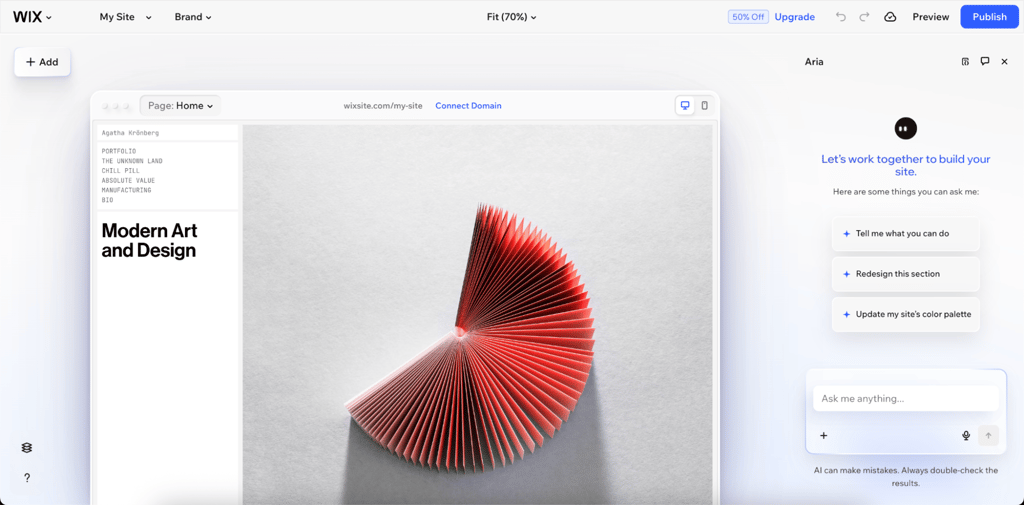
Building my portfolio with Wix was better than I expected. Despite having lots of features, the interface was easy to use and clear from the start. Beside having all the things I need to set up my site, like domain registration, the AI-powered design suggestions also helped me improve my original ideas, refining the site and streamlining the creation process.
What impressed me most was Wix’s huge variety of website templates. I quickly found the perfect starting point for showcasing my work. The drag-and-drop editor made it easy to customize every detail while keeping everything looking polished and professional.
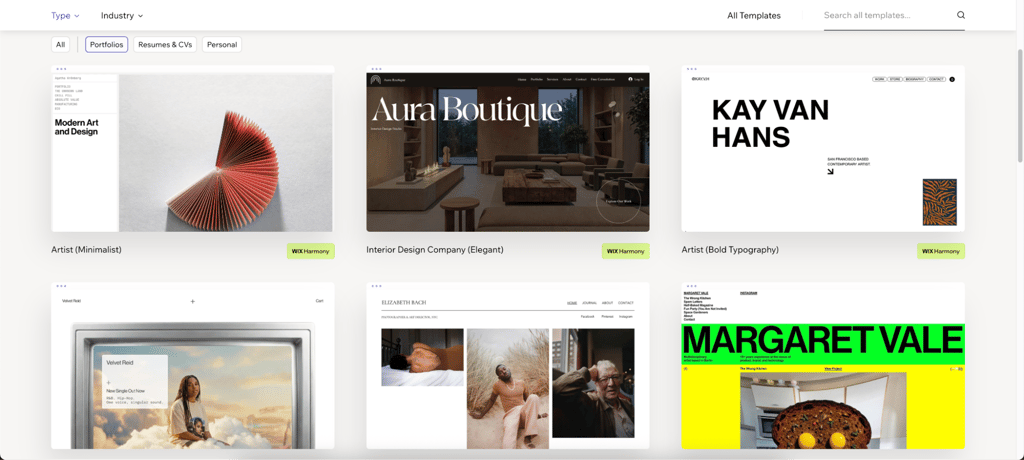
The only disadvantage was when I wanted to switch templates halfway through building my site. Wix doesn’t let you change templates after you’ve started, so I would have had to rebuild everything from scratch or use another template. The good thing is that you can build multiple sites for free and with no time limit. Even so, the finished website looked great on every device.
2. Hostinger Website Builder – an affordable option for portfolio creation

| Rating: | |
| Pricing: | From $2.69/month |
| Templates: | 48 portfolio templates |
| Key features: |
|
| Special deal: | Get Hostinger Website Builder, 81% OFF + free months |
Hostinger Website Builder is a budget-friendly, AI-powered platform that lets beginners easily create simple websites such as portfolios, blogs, or online stores. It includes hosting, domains, and tools in one package, so you can launch your site quickly without any coding.
Why Hostinger Website Builder is great for portfolio website building:
- AI-powered creation. Generates complete portfolio sites in minutes from simple descriptions
- Portfolio templates. 48 responsive templates optimized for showcasing work with drag-and-drop customization.
- Built-in media tools. High-quality galleries, AI image generator, and logo maker included
- Mobile editing. Edit and preview portfolios on any device
- SEO and analytics. AI SEO assistant, heatmaps, and visitor insights
- All-in-one value. Free domain, SSL, hosting, and email from $1.79/month
My experience creating a portfolio website with Hostinger Website Builder
Building my portfolio with Hostinger Website Builder was a breeze. Kodee, the AI assistant, impressed me with sharp, actionable guidance on gallery layouts and SEO fixes. The uncluttered interface made navigation intuitive.
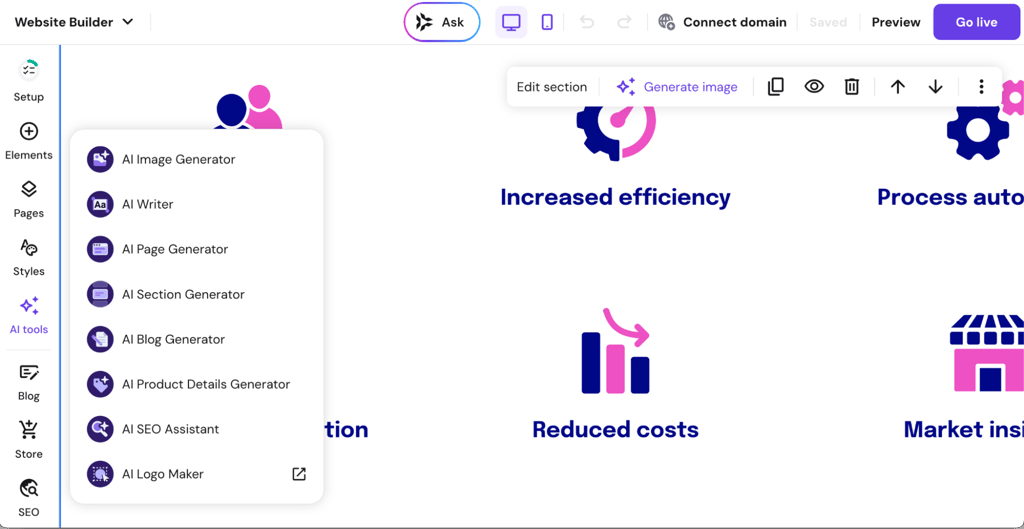
I liked that there were 48 portfolio templates to choose from. Each one was ready for visual content, which saved me time setting things up. The drag-and-drop editor worked well, and I got my photography portfolio online in less than an hour.
The downside came up when I tried to make more advanced changes. In comparison, the Wix website builder offers superior design flexibility and a massive App Market (Wix App Market provides hundreds of professional integrations), making Hostinger’s simplicity feel significantly restrictive for professional or complex projects.
3. Squarespace – ideal platform for designers and creative professionals

| Rating: | |
| Pricing: | From $16.00/month |
| Templates: | 42 portfolio templates |
| Key features: |
|
| Special deal: | Get up to 36% OFF Squarespace |
Squarespace stands out for its stylish templates and useful tools. It’s a good choice for creatives, businesses, and portfolios. With drag-and-drop editing, built-in hosting, and flexible design options, you can build a great-looking, mobile-friendly site without coding.
Why Squarespace is good for portfolio website building:
- Stunning templates. Templates for creatives with bold typography and whitespace for photography/design work
- Portfolio pages. Grids, sliders, carousels, and stacked layouts with captions and high-res media support
- Fluid Engine editor. Drag-and-drop editing with auto-layouts and image optimization
- Built-in SEO and analytics. SEO tools and visitor insights
- Media galleries. High-quality image and video galleries with commerce integration
- All-in-one platform. Unlimited storage, SSL, hosting, email tools
My experience creating a portfolio website with Squarespace
When I built my portfolio on Squarespace, I ended up with a great-looking website without much work. The platform has 42 modern templates that really show off its style. Still, it was hard to make my site look different from the usual Squarespace designs.
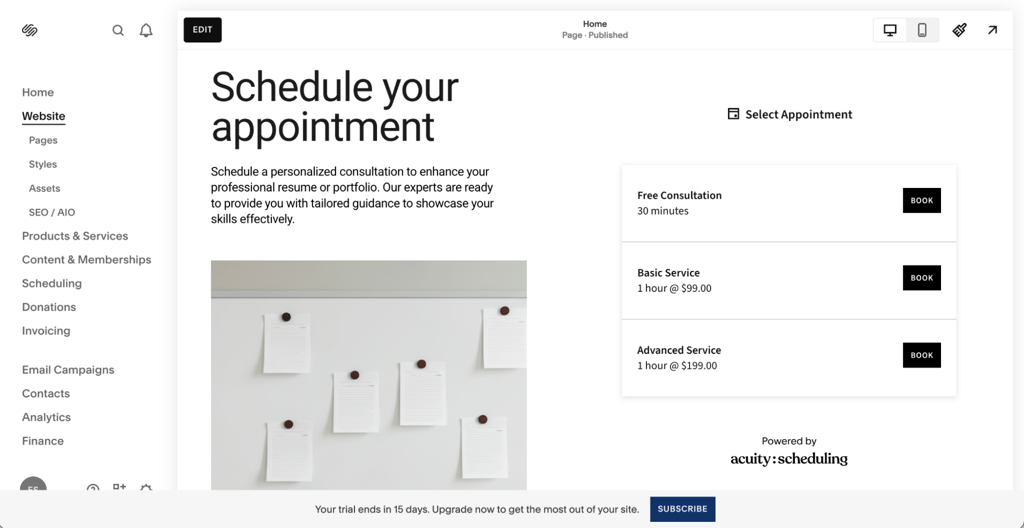
The interface was very easy to use. I could customize my site without any trouble, and the simple design made editing feel smooth and pleasant.
I was a bit disappointed by the AI design features. Rather than creating unique layouts, it worked more like a setup guide. This is helpful for beginners, but it doesn't offer much for those who want to be creative.
What also frustrated me was the lack of third-party integrations. Compared to Wix, which has a big app marketplace, Squarespace felt limited if you want more advanced features.
4. WordPress.org – best option for complete customization freedom

| Rating: | |
| Pricing: | Free or from $2.75/month |
| Templates: | 3823 portfolio themes |
| Key features: |
|
| Special deal: | Get up to 69% OFF Wordpress! |
WordPress.org is a website builder that makes it easy for beginners to create a site. It is fully hosted and uses the familiar WordPress CMS, so you do not need to worry about separate hosting or technical setup.
Why WordPress.org website builder is great for portfolio website building:
- Portfolio templates. Ready-made, responsive themes
- Block editor ease. Drag-and-drop Gutenberg blocks for adding media, sliders, and custom layouts
- Built-in SEO. Automatic optimization, sitemaps, and Jetpack tools
- Mobile responsiveness. All designs adapt seamlessly to phones and tablets
- Integrated hosting. Free SSL, unlimited bandwidth, backups, and performance
My experience creating a portfolio website with WordPress.org
Building my portfolio on WordPress.com gave me a lot of flexibility, but it also took a lot of time. There were 3823 portfolio themes to choose from, so I spent hours looking through them.
At first, I found the Gutenberg block editor frustrating. It was not as easy as the drag-and-drop builders I was used to, and I had to learn how blocks, patterns, and customization worked.
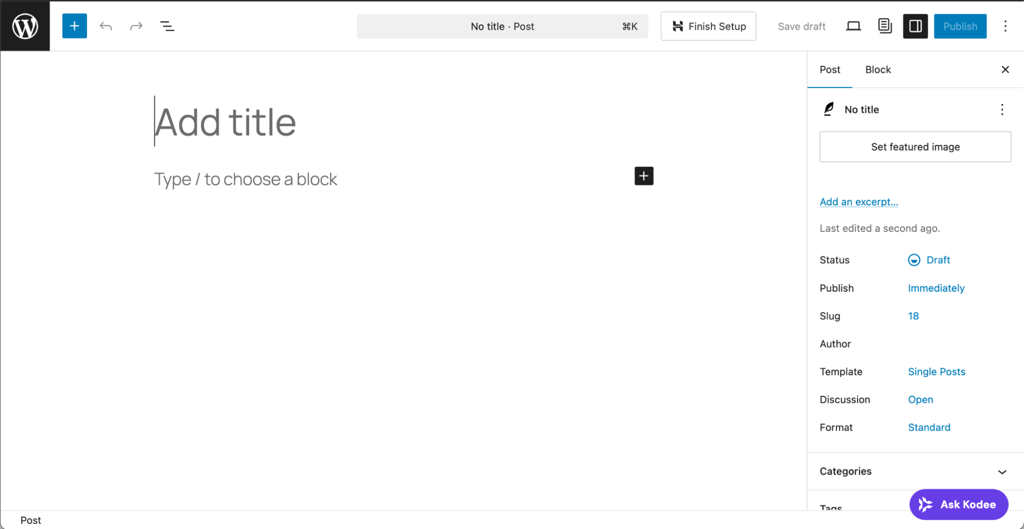
The thing that impressed me most was how much I could customize my site. By using plugins, I added advanced galleries, client proofing systems, and booking calendars, which made my portfolio stand out. Still, it took time to research safe plugins because using the wrong ones can be risky.
5. Webflow – superior choice for sophisticated design capabilities

| Rating: | |
| Pricing: | From $14.00/month |
| Templates: | 6620+ portfolio-focused templates |
| Key features: |
|
| Special deal: | Get Webflow AI tools now 22% cheaper |
Webflow is a website builder that lets you design visually without coding, while still giving you precise control. It’s a great choice for designers who want to build responsive portfolios with advanced animations and CMS tools.
Why Webflow website builder is great for portfolio website building:
- Visual precision. Drag-and-drop canvas with pixel-perfect layouts and custom animations
- Responsive design. Automatic adaptation across devices
- CMS for projects. Built-in collections organize galleries, filters, and dynamic content
- Rich interactions. No-code animations, scroll effects, and hover states
- Customization freedom. Extensive control over typography, spacing, and branding with clean exported code
My experience creating a portfolio website with Webflow
When I started building my portfolio with Webflow, it felt more like learning a professional design tool than using a regular website builder. The interface seemed intimidating at first, and with so many templates, I spent a lot of time just learning the basics before picking one.
Webflow’s main challenge is the steep learning curve, which is a major barrier for non-designers. Unlike the drag-and-drop simplicity of the Wix website builder and its built-in AI-powered design suggestions (Wix Harmony’s AI agent, that provides actionable design guidance), Webflow’s advanced features meant I had to watch several tutorials to understand basics like classes and interactions.
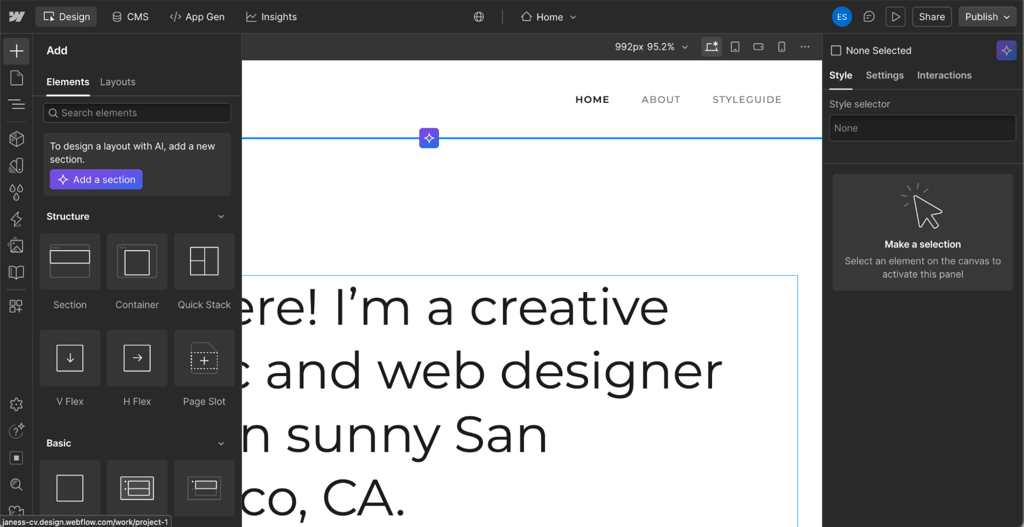
The precision impressed me most. I could design exactly what I wanted, with custom animations, unique layouts, and polished interactions. The responsive design tools made it easy to tweak how my site looked on any device.
6. IONOS – perfect for straightforward professional portfolios

| Rating: | |
| Pricing: | From $1.00/month |
| Templates: | 49 portfolio templates |
| Key features: |
|
| Special deal: | Get up to 96% OFF IONOS website builder |
IONOS Website Builder (MyWebsite Now) is a budget-friendly, easy-to-use platform that helps beginners quickly create websites. It includes hosting, domains, and basic eCommerce features.
Why IONOS Website Builder is great for portfolio website building:
- AI site generation. Creates complete portfolio drafts from industry prompts with galleries and layouts
- Portfolio templates. Professionally designed, responsive templates, no code required
- Media galleries. Automatic image optimization, Unsplash integration, and AI image generators
- Mobile responsiveness. All designs adapt seamlessly to phones and tablets with preview tools included
- Affordable all-in-one. Free domain, SSL, hosting, and SEO for quick launches
My experience creating a portfolio website with Webflow
IONOS worked quickly. The AI setup instantly created 8 designs based on my business details and preferences. And, after testing a few, I picked a layout that fit my photography portfolio.
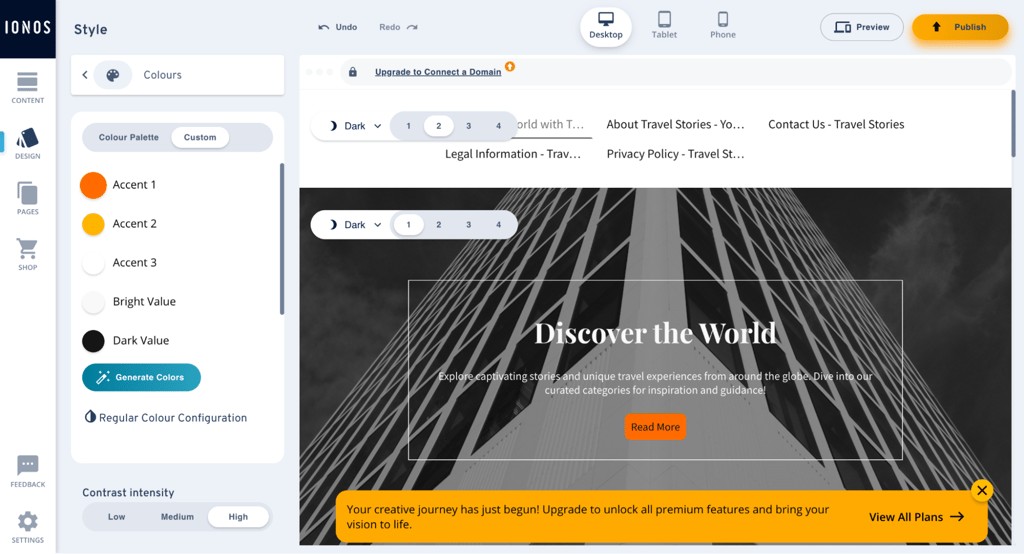
The AI Logo Creator made a simple logo using just my name and the word photography in seconds. However, once I finished setting up, I started to notice the platform’s limitations. For instance, there are only 49 templates, so my portfolio options felt limited. The editor is also basic, which made it hard to build dynamic galleries or more advanced layouts for my work.
The fundamental lack of a robust Content Management System is a dealbreaker. This forces manual, page-by-page updates, which is unsustainable for professionals who need to regularly update their portfolio websites with new projects, unlike platforms built for scale like Wix.
7. SITE123 — easiest platform for portfolio beginners

| Rating: | |
| Pricing: | From $4.60/month |
| Templates: | 75+ portfolio templates |
| Key features: |
|
| Special deal: | Get SITE123 now 50% OFF |
SITE123 is a free website builder designed for beginners. It focuses on speed and simplicity by offering pre-built sections and AI tools. With SITE123, you can quickly create a responsive site, making it a good choice for simple portfolios or small businesses.
Why SITE123 website builder is great for portfolio website building:
- Pre-made portfolio sections. Dedicated templates and blocks for galleries, projects, and testimonials with multiple layouts
- Responsive by default. All designs automatically adapt to mobile and desktop
- AI content help. Generates text and optimizes images
- Free to start. No-cost plan for basic portfolios with easy upgrades for custom domains
My experience creating a portfolio website with SITE123
I was able to build my portfolio with SITE123 quickly and easily. The simple interface let me get a basic site online in less than half an hour, though I did notice some downsides to that speed.
There are only about 75 templates, so the options for portfolios are limited. The designs are functional, but they don’t look as modern as those on Wix or Squarespace. Most seemed a bit old and in need of an update.
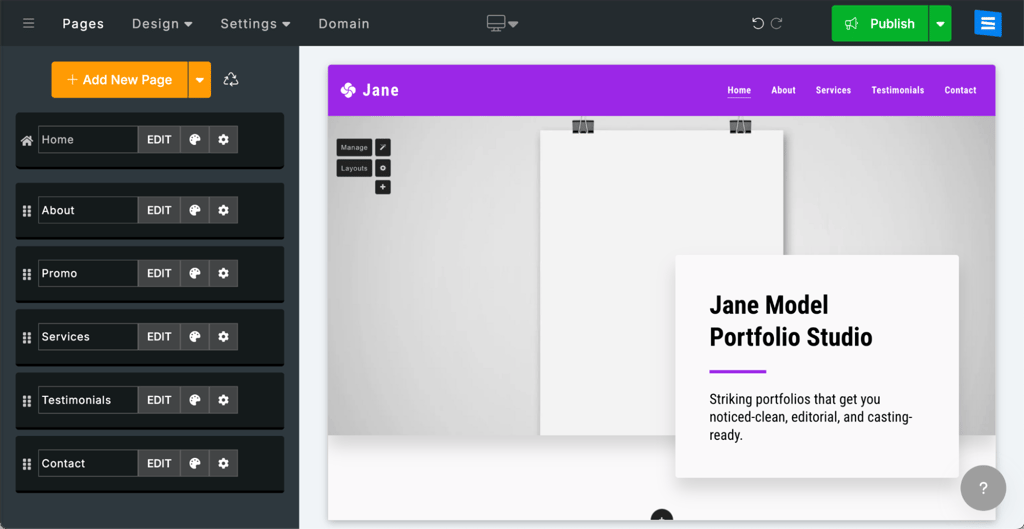
At first, the simplicity was nice, but it got frustrating when I wanted to customize things. I couldn’t change gallery layouts or add animations. What you see is what you get, with no extra features to explore.
If you just need to get a portfolio online fast, SITE123 does the job. But if you want your creative work to stand out, the limited flexibility and outdated designs made my portfolio feel pretty generic.
8. Elementor – premier WordPress-based portfolio solution

| Rating: | |
| Pricing: | From $4.99/month |
| Templates: | 100+ portfolio templates |
| Key features: |
|
| Special deal: | Cybernews website builder coupons |
Elementor is a drag-and-drop page builder for WordPress that turns your site into a visual website builder. With its live editor, you can create portfolios, landing pages, or full websites using a wide range of widgets, templates, and theme-building tools.
Why Elementor website builder is great for portfolio website building:
- Advanced portfolio widgets. Filterable galleries, masonry grids, carousels, and loop builders with categories and hover effects
- Pixel-perfect responsiveness. Live editing across desktop, tablet, and mobile breakpoints
- Template library. Hundreds of creative portfolio templates with Theme Builder
My experience creating a portfolio website with Elementor
Elementor made it easy for me to build a professional portfolio using its drag-and-drop tools. I was able to place elements just where I wanted and create layouts that fit my ideas.
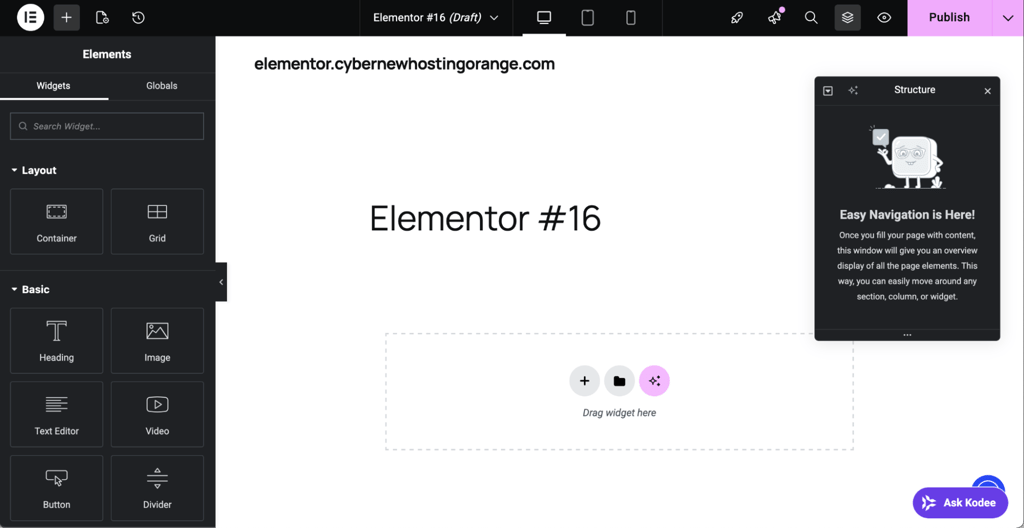
The Elementor Academy gave me clear, useful lessons to learn more advanced features. With more than 100 templates, I found plenty of good options to start my portfolio.
However, I noticed that AI features are only offered with the most expensive plan, which seems old-fashioned since other platforms include them for free. Many people in the WordPress community are also unhappy with Elementor’s switch to credits and bundled services, as they value its open-source background. This change worries many loyal users.
9. Carrd – best option for ultra-simple portfolio designs

| Rating: | |
| Pricing: | From $9.00/year |
| Templates: | 25 portfolio templates |
| Key features: |
|
| Special deal: | Cybernews website builder coupons |
Carrd is a simple, no-code website builder that lets you create one-page sites quickly and easily. It is popular with freelancers, creatives, and small businesses who want professional landing pages, personal profiles, or portfolios without any hassle.
Why Carrd website builder is great for portfolio website building:
- Rapid deployment. Pre-built blocks and templates enable quick assembly of image-focused sections
- Native responsiveness. Designs automatically scale across devices
My experience creating a portfolio website with Carrd
Using Carrd to build my portfolio taught me a lot about keeping things simple. There are only 25 portfolio themes to choose from, but the editing process is so easy and responsive that it makes up for the small selection.
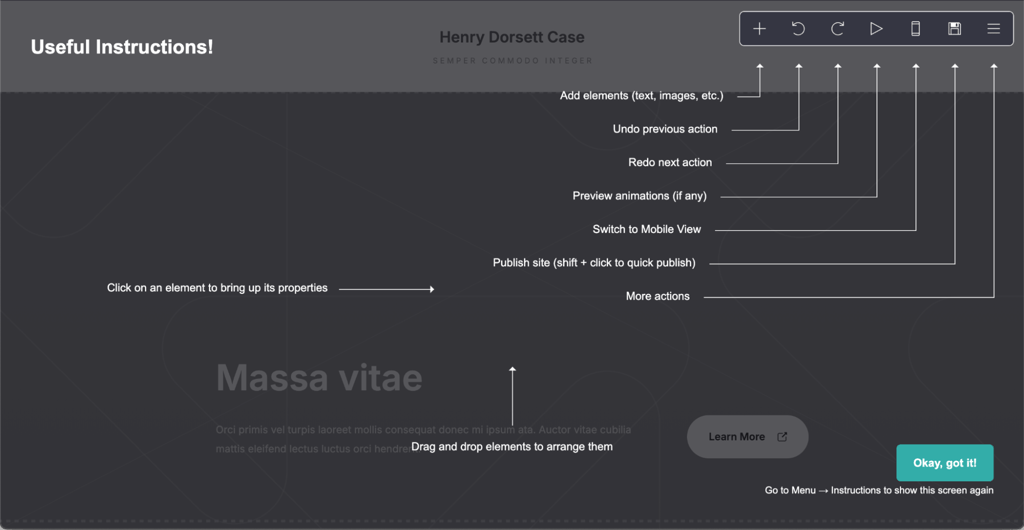
The drag-and-drop tools are straightforward, so I was able to put together a clean, professional site quickly.
At first, I had trouble finding some features, like how to upload pictures, but the simple layout made it easy to figure things out. The main downside is that you can only make a single-page site. If you want more sections or detailed navigation, Carrd probably isn’t the right choice. It works best for a quick, eye-catching landing page, not for a big portfolio.
10. Google Sites – top no-cost portfolio creation platform

| Rating: | |
| Pricing: | Free |
| Templates: | 4+ portfolio templates |
| Key features: |
|
| Special deal: | Cybernews website builder coupons |
Google Sites is a free website builder that does not require any coding. It is part of Google Workspace and makes it easy to quickly create simple, collaborative sites such as portfolios, team pages, or project hubs.
Why Google Sites website builder is great for portfolio website building:
- Completely free. Unlimited sites with hosting, storage via Google Drive, and no subscription fees
- Seamless embeds. Easy insertion of Google Drive images, documents, YouTube videos, and Forms
My experience creating a portfolio website with Google Sites
When you build a portfolio with Google Sites, the result is usually pretty basic, more like a simple PowerPoint than a creative display.
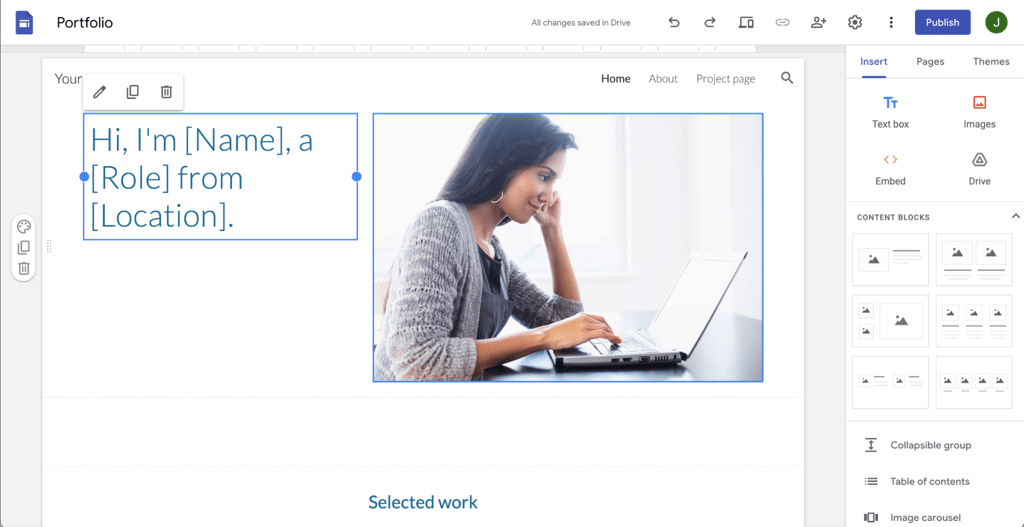
It’s free and works well with Google Drive, but the editing tools aren’t very refined and the drag-and-drop feature can be awkward if you want custom layouts.
Google Sites is only adequate if you don’t want to spend money, but it completely falls short compared to the Wix website builder, which provides a genuinely creative and polished look with industry-leading portfolio website templates, even on its free plan.
Comparison
| Portfolio website builder | Free plan | Design flexibility | Custom domain | Ease of use | Best for |
| Wix | Yes | High | Yes | Very easy | Overall portfolio building |
| Hostinger Website Builder | No | Medium | Yes | Very easy | Budget-friendly portfolios |
| Squarespace | No | Medium | Yes | Easy | Design-focused creatives |
| WordPress.org | Yes | Very high | Yes | Moderate | Full control and customization |
| Webflow | Yes | Very high | Yes | Moderate to hard | Advanced design control |
| IONOS Website Builder | No | Low | Yes | Very easy | Simple professional sites |
| SITE123 | Yes | Low | Yes (paid) | Very easy | Beginners to portfolio website building |
| Elementor | No | High | Yes | Moderate | Advance WordPress-based portfolios |
| Carrd | Yes | Low | Yes (paid) | Very easy | Minimalist portfolios |
| Google Sites | Yes | Very low | Yes (limited) | Very easy | Free basic portfolios |
How I evaluated the best portfolio website builders
Here at Cybernews, we follow a structured testing process to evaluate website builders. Together with the research team, I reviewed 34 platforms and built test portfolio websites with the top 10 options, assessing them based on what actually matters for showcasing creative work:
- Design and presentation (30%). I prioritized builders that offer high-quality portfolio templates, flexible layouts, and strong visual tools like galleries, grids, and media displays.
- Customization and flexibility (25%). Portfolios should stand out, not look identical. I evaluated how much control each builder gives over layout, spacing, typography, and overall design without requiring coding.
- Ease of use (20%). Building a portfolio shouldn’t take weeks. I focused on platforms with intuitive editors, drag-and-drop functionality, AI tools, and ready-made templates that speed up the process.
- Pricing and value (15%). Many creators are just starting out, so affordability matters. I selected builders that offer strong value, including free plans or low-cost options with essential portfolio features.
- Performance and features (10%). I also considered practical tools like mobile optimization, SEO basics, loading speed, and built-in features such as contact forms or client galleries that improve usability.
Portfolio web builders FAQs
What is the best way to build a portfolio website?
The easiest way to build a portfolio site is with a trusted builder like Wix. Choose a simple template, showcase your work with clear images, and keep navigation easy. Focus on visuals over extra features, and include essential pages like About, Projects, and Contact.
How much does it cost to build a portfolio website?
Building a portfolio website can cost nothing or up to $20/month. Free plans exist, but paying $5 to $15 monthly usually gets you a custom domain, no ads, and better design options. This makes your portfolio look more professional.
Can I build a portfolio website for free?
You can build a portfolio website for free with platforms like Wix, Carrd, and Google Sites. Free plans show the platform’s branding and offer fewer features. To look more professional, consider upgrading to a paid plan with your own domain.