The best website templates of 2026: a curated review
Our team of experts and researchers rigorously test and evaluate website builders through transparent, in-depth testing procedures and methods using both in-house and industry-approved tools.
Drawing on cybersecurity insights, we provide unbiased, empirical rankings and analysis to help users make informed digital platform choices.
Learn more

While once having a website set you apart from competitors, now you need a one-of-a-kind page. Luckily, with the best website templates, I believe this is possible. Modern templates aren’t just skins. They are functional systems, pre-loaded with industry-specific tools, such as booking engines, stores, portfolios, and a lot more.
More precisely, a good website template is fast, responsive across all devices, and easy to customize without any tech-savvy skills. That said, to pick the right template for your specific niche, you also need to focus on its customizability and SEO structure.
Below, you’ll find my detailed comparison of some of the best website templates from providers like Wix, Squarespace, WordPress themes from ThemeForest, and Shopify. You’ll also learn some of the biggest pitfalls when making a choice.
Criteria for evaluating top-tier templates
Whether you’re considering free website templates in 2026 or looking for more advanced eCommerce designs, there are some technical features that are non-negotiable in a modern template. Below, you’ll find what to look for when evaluating top-tier templates. Some of the key criteria include:
- Mobile responsiveness. One of the most crucial things you should focus on when choosing a template is the mobile-first design. This means that the template must be flawless on all devices. More precisely, it should adapt to both larger and smaller screens without compromising the quality of the images, fonts, or even loading times.
- Customizability. Another thing is to check whether you can customize the template and, if you can, how much it allows you to make edits. For example, some templates are more rigid, allowing you to make only minor edits. On the contrary, platforms like Wix and its drag-and-drop editor lets you break the grid and drag any elements outside of it. This is perfect for full control.
- Load speed. Keep in mind that a clean, SEO-friendly code is essential for Google Core Web Vitals. This is because the clean code contributes to fast load speeds, directly impacting your ranking on Google search.
- SEO structure. Last but not least, the SEO structure of your chosen web template is crucial. This means that you need to look for a provider that offers correct header hierarchy and schema markup. This enhances the UX/UI of your website, as it improves the ease of navigation and makes the site user-friendly. Thus, it has a direct effect on your website’s SEO score.
Top website template libraries compared
Below, you’ll find a detailed breakdown of the major players when it comes to web templates. You’ll see which platform offers the most professional templates and whether free themes are worth using for a business.
Wix – best website templates for any industry
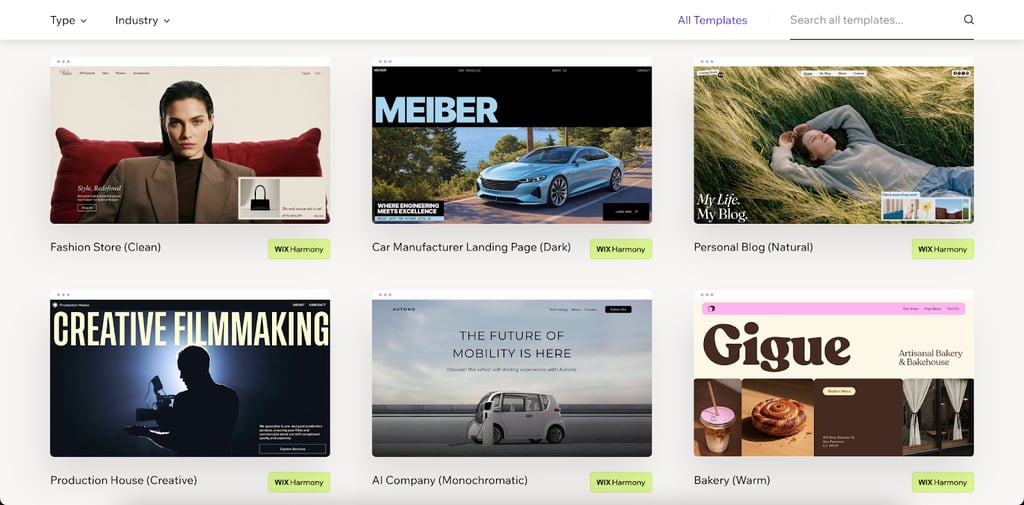
If you’re searching for the most versatile site creation platform, then you should check out the Wix website builder, as it’s the leader for versatility. Wix provides a huge template library size, with more than 2000+ modern and top-performing website templates for any niche, industry or website type; from online stores to business websites or personal websites, portfolios and blogs, Wix provides advanced website templates that would suit any need. On top of that, Wix provides a unique website creation experience through Wix Harmony, with a hybrid AI site creation and the well-known drag-and-drop editor.
Besides state of the art templates and advanced features, Wix also provides an all-in-one site creation and management process through domain registration, top performing cloud hosting, advanced SEO and marketing tools that will streamline your site management process.
In our eyes, Wix is the most ideal website templates provider, that gives you the option to start building any type of website with an advanced experience and using top of the line tools and features. Wix is also completely free, so there are no barriers to starting.
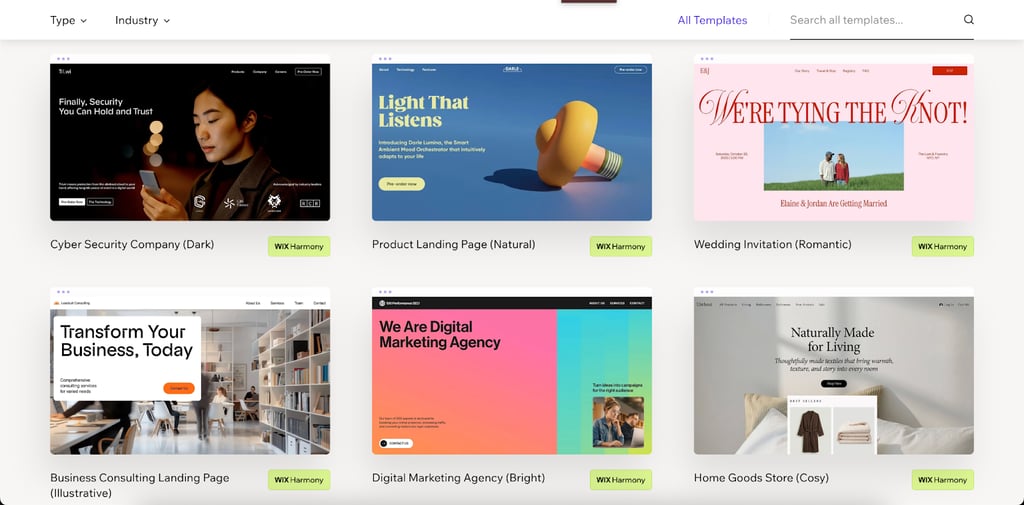
Even if you pick a blank template, you won’t be sorry. That’s because those themes count for total freedom, as they have a responsive design and a customizable layout that doesn’t limit you only to the pre-determined grid.
Wix’s most popular templates range from eCommerce Stores to Company Websites and Personal portfolios, along with many landing page options. Each template has a clean, section-based layout, which is flexible enough to morph into any branded site without major structural changes.
Squarespace
Squarespace also provides decent website templates because of its strong visual reputation. Its templates are great if you’re looking to show off your award-winning photography portfolio. Still, if you’re looking for fully customizable web themes, keep in mind that they can be a bit rigid and challenging if you try to move elements outside their pre-set boxes.
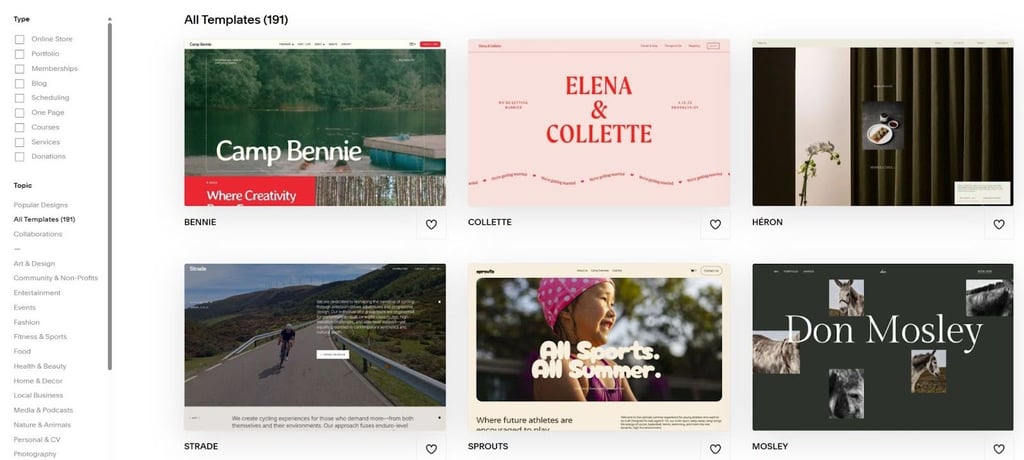
Among their hundreds of themes, the most popular Squarespace template is Paloma. This is among the favorites for podcast hosts and thought leaders, and there are more reasons why. It features bold typography and a minimal card-based layout that prioritizes content over clutter, making it highly effective for personal branding.
WordPress / ThemeForest
WordPress allows you to access over 17,000 pre-designed website themes for multiple business sectors through ThemeForest. This sheer volume, which can often be overwhelming, gives you access to various web design templates – but third-party templates also come with some risks like a heavy codebase that eventually affects performance and user experience.
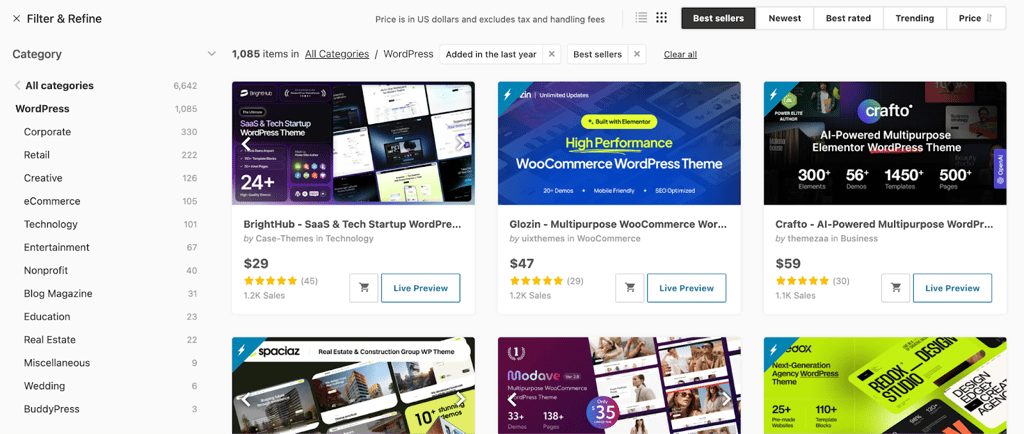
While the variety is endless, the quality control also varies widely. This is one of the biggest risks because bloated themes can hurt SEO and require constant plugin updates and compatibility with your wordpress site. This is not an issue with Wix, that scores the highest in different SEO parameters like Core Web Vitals, performance and accessibility. Still, it doesn’t mean that all themes will compromise your website, you just have to pick the right one – but the process could be costly as each theme is usually priced.
Avada and Divi, for example, are the most popular WordPress (ThemeForest) templates. These are MegaThemes that act as builders themselves. One of the reasons why they are so popular is that they offer hundreds of pre-built websites in one purchase. Therefore, you have infinite options. Yet you should always consider that this may be at the cost of your site’s speed and learning curve to manage those themes.
Shopify
Last but not least, Shopify is one of the best eCommerce website templates. It comes with multiple themes that are conversion-optimized. However, they often look generic unless you pay for premium themes, which can be pretty expensive. In comparison, Wix’s eCommerce templates are free to use, which is much more cost-effective and with included business features rather than expensive Shopify add-ons.
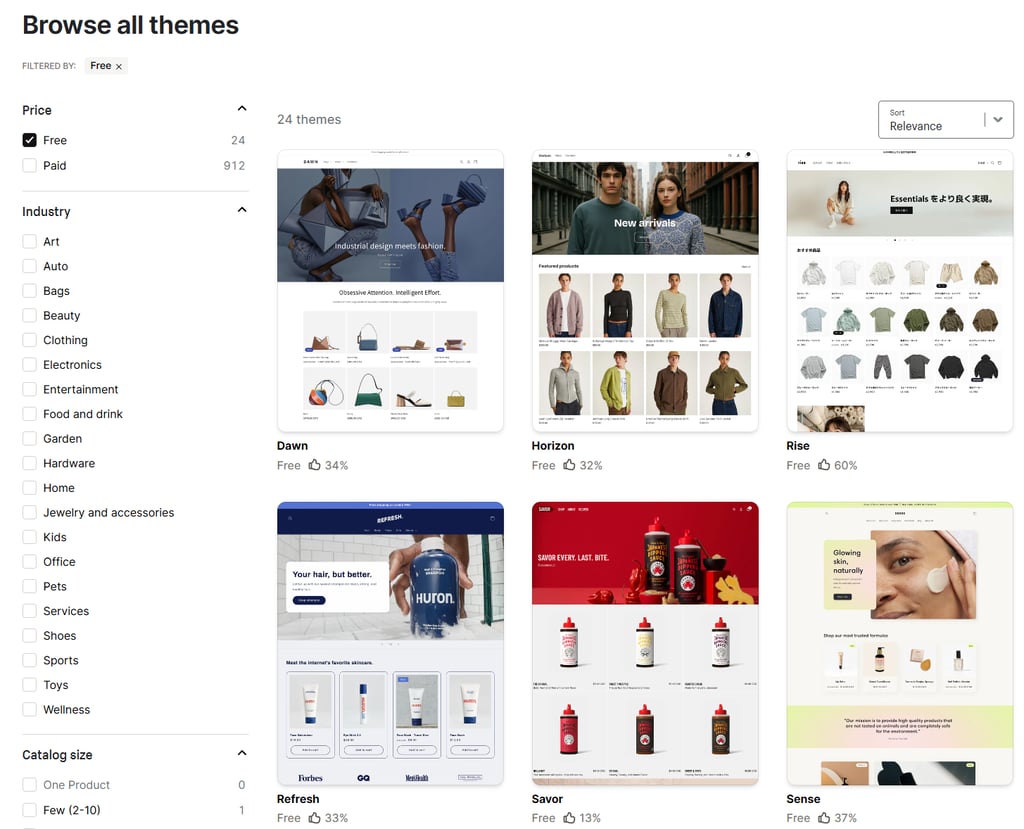
One of the templates that stands out as the most popular is Dawn. This theme is the default OS 2.0 standard. It’s so popular because it’s free and extremely fast and focuses entirely on product visibility with very little distraction, making it the benchmark for starting a store.
Designing beyond the template
Sometimes, just picking the right template isn’t enough. If you want your business to stand out from the competition, you need to make the template look unique to your brand. To achieve this, I recommend applying your specific color palette that will immediately associate customers with your business, using branded fonts and original images, and implementing custom icons.
However, having high-quality assets, such as fonts and images is definitely a must. More precisely, you need to use not only branded but also consistent fonts for all of your headers and body text. This will help you ensure a professional and branded look that will stay in consumers’ minds.
Also, make sure you replace all the generic images with your own brand photos or graphics. They need to align with your aesthetic, and for a more unique or professional touch, you can add elements like stickers, icons, or anything similar.
This is where Wix’s Media Manager and AI tools come in handy. The Media Manager is a centralized hub in the editor that lets you upload, organize, edit, and store images and any other media files. You can create folders to structure media and filter all of the files by type. Plus, you can edit your images (crop, adjust, filter, etc.) directly within the manager.
What’s more, the Wix Media Manager has AI integration using Wixel. Wixel is the AI-powered design platform that lets anyone confidently create visuals online. This means that it helps you generate unique localized content to fill the template so it doesn’t look stock, even if you don’t have ready-to-use photos. All you need is a simple prompt, and your images will be done in no time.
Common pitfalls when choosing a template
With all the available providers on the market, such as Wix, GoDaddy, Squarespace, and many others, it’s hard to make a choice. That’s why I decided to cover the most common pitfalls when choosing a template you should avoid, such as:
- Choosing for looks, not function. Don’t rush to pick a template just for the visuals. For example, a photography template for a text-heavy blog won’t be the right choice, as it won’t perform its function well. Instead, make sure you filter the available themes based on your business niche.
- Ignoring mobile. Always preview the mobile view first. This is one of the most common mistakes that designers make, but considering that most of us access websites via mobile, it’s crucial for the page to have a responsive design. This means that it should load as fast as on desktop devices, have the same layout, and adapt effortlessly to the smaller screen size.
- Over-customization. Lastly, don’t customize the template too much. Although this is ideal for aligning the website to your business aesthetics, breaking the design system can ruin the UX. By adding too many elements, you can easily harm your website’s SEO, as the load times may decrease. Luckily, if you choose Wix, you can benefit from its smart guides that will take you through this process and prevent any unnecessary changes.
FAQ
Are free website templates good for SEO?
Yes, free website templates can be good for SEO. However, this applies only if they are from a reputable builder like Wix that maintains clean code. In this case, you’ll be sure that your website is fully optimized for SEO, which will contribute to great Core Web Vitals and site performance.
Can I switch my template after building the site?
Switching your template after building the site depends on the provider you’re using. This is because each platform has its own approach.
Do I need to know code to customize a template?
No, you don’t need to know code to customize a template. Again, this depends on the website builder. Luckily, Wix sticks to a no-code approach. In fact, you’ll be able to build, design, and customize professional-looking websites by using its intuitive drag-and-drop editor. Also, Wix Harmony and its AI features are a great perk if you want to customize your website by entering simple prompts.
What is the difference between a theme and a template?
While a theme refers to the functionality of the whole website, templates refer to a design, either for the whole website, a specific page or even a section. However, the term “Theme” applies more strictly to WordPress. Other builders can often use the term theme to talk about a blank canvas for editing your website, but it’s common to use the term “website template”.
How much should I pay for a premium template?
How much you should pay for a premium template depends on many factors, mainly your budget. While most of the website builders like Wix offer free templates and without charge, other platforms offer premium ones as well. Some platforms like Wordpress or Shopify offer $300+ themes that may require extra charges for additional features.
Are single-page templates good for business?
Yes, single-page templates can be good for business. Still, this depends on the type of business or website you want to launch. More precisely, these templates are ideal if you want to create a landing page or a portfolio of your photography work, for example. But if you need a more complex page, with sign-up forms, a blog section, and other elements, it’s better to skip single-page templates.
How do I ensure my template is mobile-friendly?
To ensure your template is mobile-friendly, I recommend sticking to major platforms, such as Wix, Squarespace, WordPress, and Shopify. This is because such website builders auto-optimize the site appearance on smaller screens, adapting the images, text, font, and navigation to the mobile interface. If you’re still not sure, look for templates with HTML5 upgrades. More precisely, HTML5 creates layouts that adjust automatically to different screen sizes.
Can I mix and match sections from different templates?
Yes, you can mix and match sections from different templates with some website builders. Wix’s Saved Designs feature allows this. In other words, it lets you save the design of a certain section to your library, which you can later reuse. The best part is that not only can you edit this section later, but you can also apply it to different pages within the same site.