How to find and remove spyware from an iPhone


Just like any other device, iPhones are not immune to malicious activities and cyberthreats, including sophisticated spyware. Spyware is malicious software designed to infiltrate a user's device, collect data, and transmit it to third parties without consent. One notable example of this is Pegasus. Fortunately, there are effective steps you can take to minimize these dangers and remove spyware from your iPhone. Moreover, a reliable antivirus can help you detect spyware and remove it.

In this article, I explore methods for detecting and eliminating spyware, including how to tackle advanced threats like Pegasus. I also discuss strategies to protect your device from future threats and explain how antivirus solutions can help defend against various cyber risks.
How to identify spyware on your device
Since spyware is designed to remain hidden and be monitored without you even knowing, it can be hard to detect. Luckily, you can spot some signs if you know what malfunctions to look for. Here are a few indicators that your phone might have spyware:
- Unusual battery drain. One of the most common signs of spyware is unexpected battery drain. Spyware often runs continuously in the background, consuming more battery power than usual.
- Increased data usage. Spyware frequently transmits data to external servers. If you notice a significant spike in your data usage, it could be due to spyware collecting and sending information.
- Performance issues. A slow or laggy phone can be a result of spyware consuming system resources. If your iPhone is experiencing frequent delays or buffering, it might be affected by spyware running in the background.
- Overheating. If your iPhone feels unusually warm or displays warnings about overheating, it could be because spyware is running processes that heat up the device.
- Unusual behavior. Look for random reboots, strange notifications, or other odd behaviors. While these can happen for various reasons, they may also indicate the presence of spyware.
- Unusual activity in accounts. Although less common, spyware could lead to unauthorized access to your accounts. If you notice any suspicious activity in your accounts, it might be a sign that your device has been compromised.
- Unfamiliar apps. Check for apps on your iPhone that you don’t remember installing. For example, the Cydia app allows for unauthorized software installations and suggests that your device may be jailbroken and more vulnerable to spyware.
How to remove spyware from iPhone: 5 methods
There are a few easy methods to remove spyware from your phone: by using an antivirus, updating your software, eliminating dubious apps and clearing your browsing data, or resetting your iPhone to factory settings. To do that, I prepared easy step-by-step guides below on how to remove spyware from your iPhone.
Method 1: reset iPhone to factory settings
The first thing to do when dealing with spyware is to reset your device to factory settings. With this method, you will wipe your iPhone’s contents entirely, including spyware.
A factory reset means erasing all your data, such as apps, files, and documents on the device, and restoring the software to its original state. Before doing a factory setting reset, I highly recommend backing up your data (only back up data from before the device was infected).
To do the factory reset, follow these steps:
-
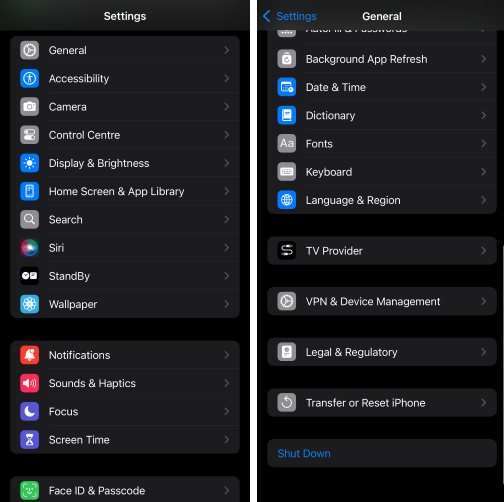
Go to iPhone Settings, select General, and tap the Transfer or Reset iPhone button at the bottom.
-
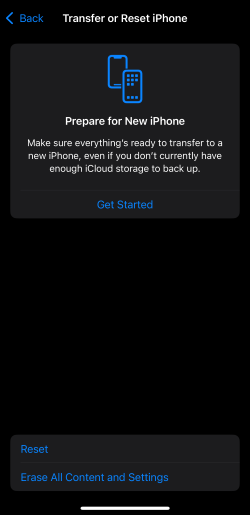
Choose the option to Erase All Content and Settings, enter your passcode, and confirm again to complete the process.
-
Enter your passcode and finish the process by confirming again.
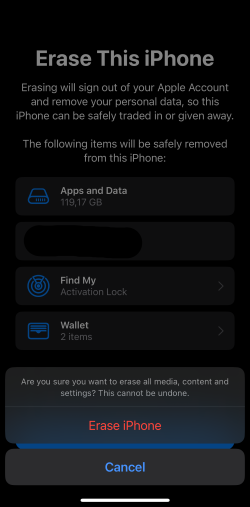
- That’s it. Your iPhone is now wiped clean. Once the device finishes resetting, you’ll need to set it up manually again.
Method 2: use an antivirus
While an antivirus will not remove spyware that has already infected your iPhone, it will help prevent future infections. Just make sure you get quality antivirus software. It will ensure the overall protection of your phone and prevent other kinds of malware attacks, not just spyware.
Here's how to use an antivirus to prevent spyware on your phone:
-
Download and install an antivirus on your iPhone. I recommend TotalAV or any other top antivirus for iPhone.

-
Get an antivirus plan.

- Check for any suspicious apps or take other recommended action.
- That’s it. You’ll be notified about the required steps.
Method 3: update iOS software to the latest version
Updating your iPhone to the latest iOS software after removing spyware will ensure you have the latest fixes and patches. However, this is not a single-use fix – you must keep your device updated constantly. Here’s how to update an iPhone to the latest version:
-
Go to iPhone Settings, select General, and then choose Software Update.

-
Click on Update Now.
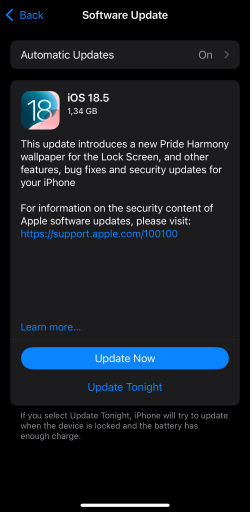
- That’s it. You’ll be notified of the successful update once it's installed and your phone restarts.
Method 4: remove suspicious apps
If you find a suspicious app that you haven’t installed yourself, you can remove it from your device by simply pressing and holding the app icon. You’ll get a red-colored Remove App option. Click on it, confirm again, and the app will be uninstalled.

Method 5: clear browsing data and history
Whatever browser you are using on your iPhone, some spyware can dwell in your browsing data and history. Besides that, your browsing history is being logged and stored unless you’re using Incognito mode. As a result, the bad actor can access all of your data that's been piling up in the browser. Here’s how to clear browsing data and history from your iPhone:
-
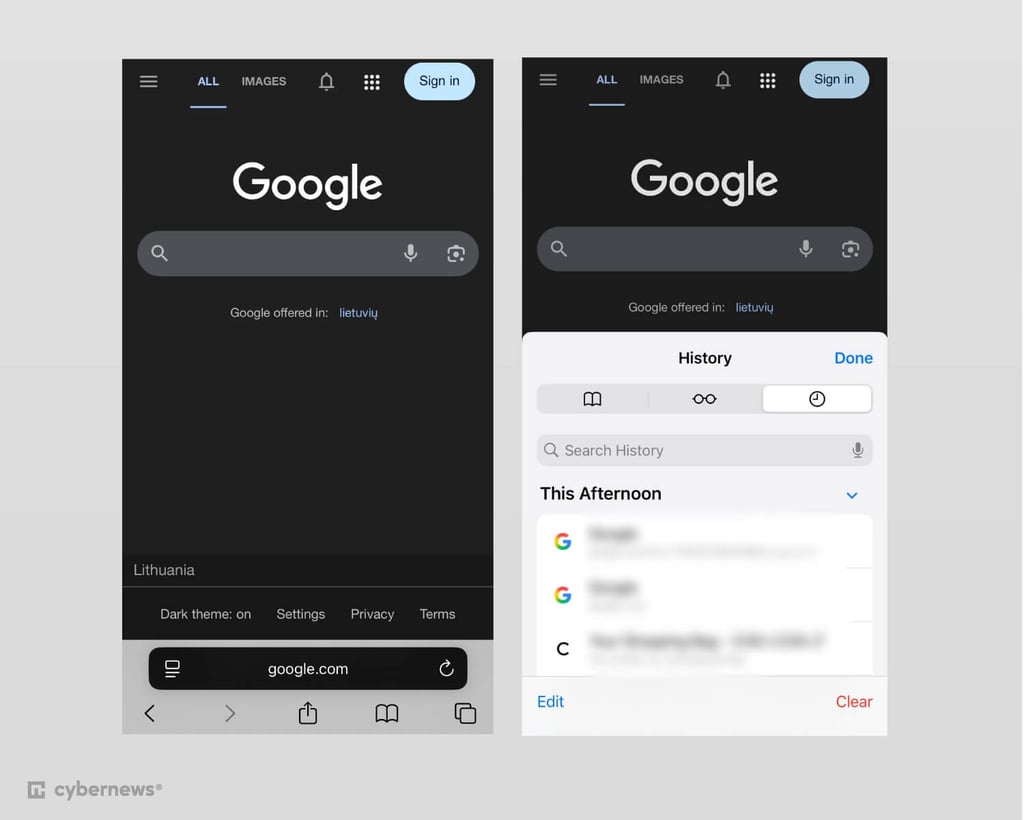
Open the Safari app, tap the book icon at the bottom, and select the Clear option to delete your browsing history and cookies.
-
Choose the time period you want to clear.

time period cleaning history - That’s it. You’re all set.
How does spyware get on your iPhone?
There are different types of spyware and ways it can get on your iPhone or any other device. Here are some of the types of spyware:
- Common spyware. It can be an app that secretly installs itself on your iPhone and is usually controlled remotely by cybercriminals.
- iCloud spyware attacks. A malicious actor can find out your iCloud login credentials and monitor everything you do on your phone. This doesn’t require a cybercriminal to have physical access to your phone. Data extracted from an iCloud backup can include text messages, browsing history, calls, notes, installed apps, contacts, and other data.
Can someone spy on your iPhone without your knowledge?
Technically, yes. Whether it’s a friend, employer, or cybercriminal, there’s a possibility that someone could spy on your iPhone. Despite iOS’s advanced security features, no device is entirely immune to remote access and spying.
One notorious example of such spyware is Pegasus. This sophisticated surveillance tool can exploit vulnerabilities in iOS to gain full access to an iPhone. Pegasus can track your browsing history, GPS location, and app usage, and even record and collect all your keystrokes, potentially revealing sensitive information like passwords, credit card numbers, and the content of your emails and text messages.
Installing spyware on your device can be alarmingly easy. A malicious link sent via email, text, or any communications app can install spyware in under a minute. While iOS is known for its powerful security measures, spyware like Pegasus can still bypass these defenses, making it a serious threat.
Pegasus spyware on iPhone
Pegasus is a powerful and sophisticated spyware tool created by the Israeli firm NSO Group, designed to target smartphones, including iPhones. It’s known for its ability to exploit vulnerabilities in iOS to gain complete access to a device without the user’s knowledge. Once installed, Pegasus can track call logs, read texts and emails, monitor GPS location, and even capture keystrokes, potentially revealing sensitive data like passwords and credit card numbers. It can also activate your phone’s camera and microphone to record conversations and surroundings.
While Pegasus is primarily used by government agencies for high-stakes surveillance of targets like politicians and activists, its stealthy nature has raised serious concerns about privacy and unauthorized monitoring. It can be installed via phishing attacks or even zero-click exploits that don’t require user interaction, making it particularly dangerous.
How to protect your iPhone from spyware
Getting your iPhone infected with spyware can be damaging to your device: having data stolen and your phone crashing down. Nonetheless, it’s important to take every measure to protect the device and prevent any spyware from getting on your phone again.
Here are some ways you can protect your iPhone from spyware:
- Use strong credentials. Protect your iPhone with strong login credentials: set a lock screen passcode, use long and unique passwords, and biometric identification such as Face ID or Touch ID. Ensure that only you can unlock your device.
- Enable multi-authentication. Take an additional security step by enabling two-factor authentication (2FA). Check for any other authentication available on the iPhone’s Security settings.
- Use antivirus software. Install reliable antivirus software, like TotalAV, on your iPhone. It has general threat protection for iPhone and other OSs against online threats and includes advanced cybersecurity suites with other optimization tools.
- Keep an eye out for any suspicious activity. Ensure your iPhone works smoothly and no malicious apps appear without your notice.
- Get a VPN. A VPN might be a good solution to get top-tier protection for your device and data. It encrypts your traffic and lets you browse securely, especially when you’re using a public Wi-Fi network which can make your iPhone vulnerable to spyware infections. A VPN ensures that none of your data can be accessed or compromised. There are multiple VPN and antivirus software bundle options available.
- Avoid public Wi-Fi. If you don’t want to use a VPN, it’s safer to avoid public Wi-Fi altogether. Instead, use mobile data.
- Back up your data. You should periodically create backups of your most precious files to ensure they don’t disappear if you need to factory reset your iPhone. However, you must only create these backups after scanning them, so you don’t back up malware.
Video tutorial
Learn how to easily detect and remove spyware from an iPhone in our video guide.
Conclusion
iPhones and other iOS devices are not immune to spyware. Just as iOS devices can be vulnerable to viruses, they are also susceptible to advanced spyware that can compromise your privacy and security. Pegasus, for example, is known for its ability to exploit iOS vulnerabilities and provide extensive surveillance capabilities to its operators.
Understanding how spyware, including advanced tools like Pegasus, can affect your iPhone is crucial. Recognizing the signs of infection allows you to take action, such as updating your iOS or performing a factory reset, to remove the spyware and secure your device.
To prevent security issues, consider using a reputable antivirus program like TotalAV or Norton, which offer comprehensive protection for iOS and other devices. Additionally, regularly updating your phone, monitoring for suspicious activity, and utilizing security tools such as a VPN and multi-factor authentication can further bolster your defenses.
By staying informed and proactive, you can better safeguard your iPhone and other devices against spyware and other security threats.
FAQ
How do I remove a spy app from my iPhone?
There are several ways to remove a spy app from your iPhone. You can do it by updating your phone software, removing malicious apps, or resetting your iPhone to factory settings, which will wipe your phone completely and reset it to its initial settings.
Will an iPhone reset remove spyware?
Technically, yes. In most cases, resetting your iPhone to factory settings should remove all content from your phone, including spyware. If you had your backup set before spyware infected your iPhone, you won’t lose your data.
Can spyware be installed on an iPhone remotely?
Yes, spyware can be installed on an iPhone remotely without physical access. Advanced spyware like Pegasus is known for exploiting iOS vulnerabilities to install itself via zero-click exploits, where no user interaction is needed. This can happen through malicious links or messages. While physical access also allows for spyware installation, remote methods are increasingly prevalent.
What is the best app to check for spyware and remove it?
TotalAV is one of the best tools for removing spyware on iPhone and Mac devices. It’s designed to guard against the full range of device-specific malware and other cybersecurity threats through website filtering and a VPN.
How to find hidden spy apps on iPhone?
The only way to find hidden spy apps on an iPhone is to go through the full list of apps and delete those you don’t recognize. To prevent such apps from infecting your phone in the future, use effective antivirus software, such as TotalAV.