Norton 360 vs Webroot: which antivirus is better?
Backed by leading cybersecurity experts and investigative journalists, we deliver independent, real-world antivirus testing and analysis, guaranteeing objective evaluations without undue influence or bias from outside parties.
Our transparent and consistent methodologies ensure objective, up-to-date reviews, empowering readers to make well-informed decisions.
Learn more

In this 2026 Norton 360 vs Webroot comparison, I set out to see which antivirus truly comes out on top. Our research team conducted extensive in-house testing to measure real-world protection, speed, and usability. I then compared those findings against the latest independent antivirus lab results.
Norton continues to impress with its robust, multilayered defense, while Webroot stands out for its lightweight, cloud-driven protection. By combining both in-house and independent test results, I uncover which antivirus delivers the best balance of power, performance, and value for your digital security this year.
Norton vs Webroot
While both Norton and Webroot are solid antivirus providers, Norton stood out to me with better malware detection rates, minimal impact on performance, and affordable starter plans. Webroot, on the other hand, lagged behind in all of these aspects. Plus, I think it's too expensive compared to what it offers. So, I wasn't surprised that Norton outranked Webroot in this comparison.
| Norton Antivirus | Webroot Antivirus | |
| ⭐ Rating: | ||
| 🥇 Overall rank: | #2 out of #30 | #18 out of #30 |
| 🔥 Coupons: | Norton coupon 60% OFF | Webroot coupon 50% OFF |
| 💵 Price: | From $29.99/year | From $29.99/year |
| ✂️ Free version: | No | No |
| 🖥️ Platforms: | Windows, macOS, iOS, Android | Windows, macOS, iOS, and Android |





Our team of researchers thoroughly tests antivirus software following a well-established testing process. In unison, our experts combine in-house and independent testing lab findings with first-hand experience to help you make informed decisions about each product. Learn how we test antivirus software.
Norton vs Webroot: which offers better protection?
Whether antivirus software offers sufficient protection is not a matter of opinion – to evaluate correctly, we need data. Thus, we turned to independent testing labs to assess providers' malware detection rates, effectiveness against zero-day threats, false positives, and other criteria. The test results are straightforward: Norton 360 has the edge over Webroot.
Check out our best antivirus software article to see our overall top picks.
| Norton | Webroot | |
| AV-TEST | Top product | Certified |
| AV-Comparatives | Advanced+ | – |
| SE Labs | AAA | AAA |
During the most recent independent AV-TEST, Norton 360 scored a maximum of 6 points in protection, performance, and usability. In the Malware Protection Test September 2025 performed by AV-Comparatives, the provider received an Advanced+ award and scored 3 stars out of 3.

Clearly, Norton's protection is bulletproof. On the other hand, Webroot's not so much. On AV-TEST performed in June 2019, Webroot scored 2 for protection, 5.5 for performance, and 4 for usability. It's important to keep in mind that Webroot's latest tests were performed over 6 years ago, so the results from the current version of Webroot might be different.

Another recent test performed by SE Labs provided some interesting results. Home Endpoint Security Test awarded both Norton 360 and Webroot with the same category AAA ratings.
However, Norton 360’s and Webroot’s performance was different. During the latest SE Labs evaluation, Norton scored 100% with all ratings, while Webroot scored 91% in protection accuracy, 100% in legitimate accuracy, and 97% in total accuracy.
As you can see, Norton 360 continuously demonstrates top-notch protection against threats. While Webroot's protection level is lower than Norton's and can't compare to the best antivirus software on the market.
Malware protection
Norton 360 and Webroot have innovative tools to protect their clients from malware and zero-day threats. Both providers aim to catch these threats before any damage is done, but Norton's and Webroot's reliability differ.
Norton 360 offers AI-based real-time protection. It protects your device from malware before it can infect your system. The best part is that the protection also works in the browser to prevent you from unknowingly visiting malicious sites. From the test we performed, Norton's real-time protection does its job well. It effectively detected and blocked all 10 malicious files we planted on the testing computer.
Webroot's real-time protection is called Realtime Shield. It prevents malware from infiltrating your system by continuously monitoring your device activity. The goal here is to avoid damage to your device. After we planted 10 malicious files on the computer, the result was subpar. Webroot managed to spot only 4 out of 10 viruses.
Scanning
An antivirus suite wouldn't be complete without the scanning option. After all, it’s an effective way to catch malicious files that have found their way into your system. Let's see how Webroot vs Norton 360 scanning matches up.
Norton 360 employs smart, quick, full, and custom scans, as well as Norton Insight, which marks any suspicious files that should be checked with a custom scan. During our test, smart and quick scans lasted under a minute, but didn't find any of the malicious files we planted for testing. While the full scan took around 11 minutes, it was the only type of scan to find all 10 malicious files.
Webroot has simplified its scanning types into two: Deep Scan to check the whole system and Quick Scan for high-risk areas only. Both scans are customizable, allowing you to choose when and what the software scans. After testing how they work, we got solid but not perfect results. Webroot's full scan detected 7 out of 10 viruses we planted.
Firewall protection
Norton 360 sets a bar pretty high when it comes to firewall protection. The provider employs a smart firewall that monitors network traffic on your computer. It effectively keeps your device safe from intruders.
Furthermore, Norton's firewall has a vulnerability assessment. It works by detecting and protecting the weak spot of your system. Whether it's suspicious applications or weak passwords, Norton's firewall prevents intruders from exploiting you.
Webroot, on the other hand, needs to step up its protection. Even though the provider offers a firewall for Windows devices, it could be more effective. During our tests, Windows Defender's Firewall did a better job of detecting and stopping infiltrating malware than Webroot's firewall, which didn't detect a single one.
Features overview
| Norton 360 Deluxe | Webroot Premium | |
| Firewall | ✅ Yes | ✅ Yes |
| Real-time protection | ✅ Yes | ✅ Yes |
| Virus scan | ✅ Yes | ✅ Yes |
| Password manager | ✅ Yes | ✅ Yes |
| VPN | ✅ Yes | ✅ Yes |
| Parental controls | ✅ Yes | ✅ Yes |
| File shredder | ✅ Yes | ✅ Yes |
| AI scam detection | ✅ Yes | ❌ No |
| Webcam protection | ✅ Yes | ✅ Yes |
| Performance optimization tool | ✅ Yes | ✅ Yes |
Norton features
Norton 360 delivers a wide range of features to ensure the highest level of security. However, many of them come with specific plans. We detail each plan in the pricing section below.
Available on all subscription plans, Norton's Cloud Backup ensures you won't lose important documents in case of a ransomware attack. Cloud storage is effortless to set up and use. It also features an automatic backup option and scheduled backups. The cloud storage size depends on the plan you choose and can vary from 2GB to 250GB.

Another great feature of Norton 360 Standard and Deluxe plans is SafeCam protection. If your device gets infected by spyware, cybercriminals may be able to secretly record via your webcam. To prevent this breach of privacy, Norton's SafeCam blocks unauthorized access to your PC's camera. The newest addition available, regardless of the plan you choose, is built-in AI-powered Scam Protection. It protects against SMS and other sophisticated online scams.
The Deluxe version comes with another handy feature – Norton Parental Control. The feature is controlled with a different app called Norton Family. The app offers numerous settings to prevent children using different devices from accessing adult content.
Additionally, the app allows tracking time spent on the device, location, and browsing history. It can also prevent access to adult-themed websites and block certain websites during school hours. With Norton Parental Control, you'll know where your child is and what they are doing online.

While there's a good reason why you want to know what your kids are doing online, there's absolutely no justification for outsiders getting this information. So to protect you and your family, Norton offers a VPN with its Standard, Deluxe, and Select Plus plans. The VPN works with up to 10 devices and has no traffic cap.
Remember that even if you use a VPN and take other precautions, your data may still end up on illegal marketplaces. Norton 360 keeps tabs on your data by performing dark web monitoring to check for leaks. Keep in mind that this feature is not available for all countries. It is available in the US, some European countries, and Australia.
Another standout feature is Norton's password manager. This handy feature comes with all plans and has some of the best features a password manager can offer. You can generate passwords, fill out forms automatically, store credit card data, and check for vulnerable passwords all in one dashboard.
Webroot features
Arguably, the best Webroot feature is Identity Protection. It is designed to protect your personal data, such as accounts and usernames, against keyloggers or spyware. It also blocks potentially dangerous websites before they have a chance to retrieve your data.
Webroot can also optimize your system. It automatically detects and deletes files that take up space but have no purpose. You can easily customize the feature to stay in control of what files it removes. However, this feature only comes with the Premium plan. You can check the full cost and feature list in the pricing section below.
If you want your deleted data to stay deleted without any chance of recovery, Webroot Secure Erase is exactly what you need. Also known as a file shredder, the feature overwrites the content in your deleted files with random data, preventing unauthorized recovery attempts.

Besides VPN, Webroot also has an HTTP proxy to hide your IP address. Keep in mind that the feature allows you to conceal your true identity but does not encrypt traffic. As a result, only your browser's traffic stays anonymous.

Moreover, Webroot offers a password manager. Available with its Essential 3 Devices and Premium plans, the antivirus is powered by the LastPass password manager. With smooth integration, you’ll be able to store and generate passwords and autofill your personal details with ease.
PC performance
We took the Norton 360 vs Webroot PC performance test and got some interesting results. This time, Webroot took the crown.
Norton's less thorough scans, smart and quick, produced less CPU load. Norton’s quick scan ranged from 25% to 30%. Meanwhile, smart scan increased the CPU load to 40%. But the full system scan topped them both. The CPU load during the full system scan was between 70% and 100%.
Now, let's see how Webroot performed. During a full scan, Webroot takes anywhere from 11% to 77% of the CPU. On average, this load was around the 52% mark, much less than Norton's.
It's evident that when it comes to PC performance, Webroot outshines Norton 360.

Pricing
Norton 360 is clearly the best-value provider. When we compare providers’ cheapest plans, we see that Norton delivers useful features for a much cheaper cost than Webroot. The same goes for Norton’s Standard plan – it gives you more features than the equivalent Webroot plan at a similar price. One thing to note: the prices are listed for the first year, and both providers increase their pricing for the second year.
| Plan | Norton | Webroot |
| Free | – | – |
| AntiVirus Plus vs Essentials 1 Device | $29.99/year | $29.99/year |
| Standard vs Essentials 3 Devices | $39.99/year | $34.99/year |
| Deluxe vs Premium | $49.99/year | $64.99/year |
| Select Plus vs Total Protection | $99.99/year | $89.99/year |
| Check Norton discounts | Check Webroot discounts |
Both providers deliver benefits similar to those of their basic plans. Norton 360 offers real-time protection, PC cloud backup (2GB), a firewall, and a password manager for $29.99/month. Meanwhile, Webroot delivers fast scanning, ransomware, and identity protection, real-time anti-phishing protection, a firewall, and network connection monitoring starting at $29.99/year.
The list of features changes noticeably in other plans. For $39.99/year, Norton’s Standard plan additionally provides VPN, SafeCam, and dark web monitoring. Both providers step up their game in their higher-tier plans. Norton gives access to more cloud space (50GB), coverage for up to 5 devices, Privacy Monitor, and Parental Control. These additional features increase the price to $49.99 for the first year and $124.99/year after that.
Suppose you decide to go with Webroot’s Premium plan instead. In that case, you get device cleaning and the elimination of online activity traces for $64.99/year.
While it all comes down to the kind of features you need the most, it’s safe to say that Norton delivers more value than Webroot. However, in the long run, Norton 360 becomes more expensive than Webroot.
Apps and interface: which antivirus is more user-friendly?
The overall look of a user interface is typically a matter of preference and is up for debate. However, the two things that matter the most are user-friendliness and setup. Norton wins in this category as well.
When I tested both providers, I immediately noticed the difference in design. Norton 360 showcases a sleek and modern user interface. Meanwhile, Webroot looks a bit outdated and bulky. However, both providers deliver a user-friendly experience and easy setup. Only the design aspect is keeping us from declaring a draw.
Desktop apps
Norton’s desktop app has an impressive user interface. It is easy to navigate with all the main features in one dashboard window. However, there’s a drawback. You get redirected to a webpage to access additional apps, such as dark web monitoring. Switching between windows is not the most comfortable option and can get slightly annoying.

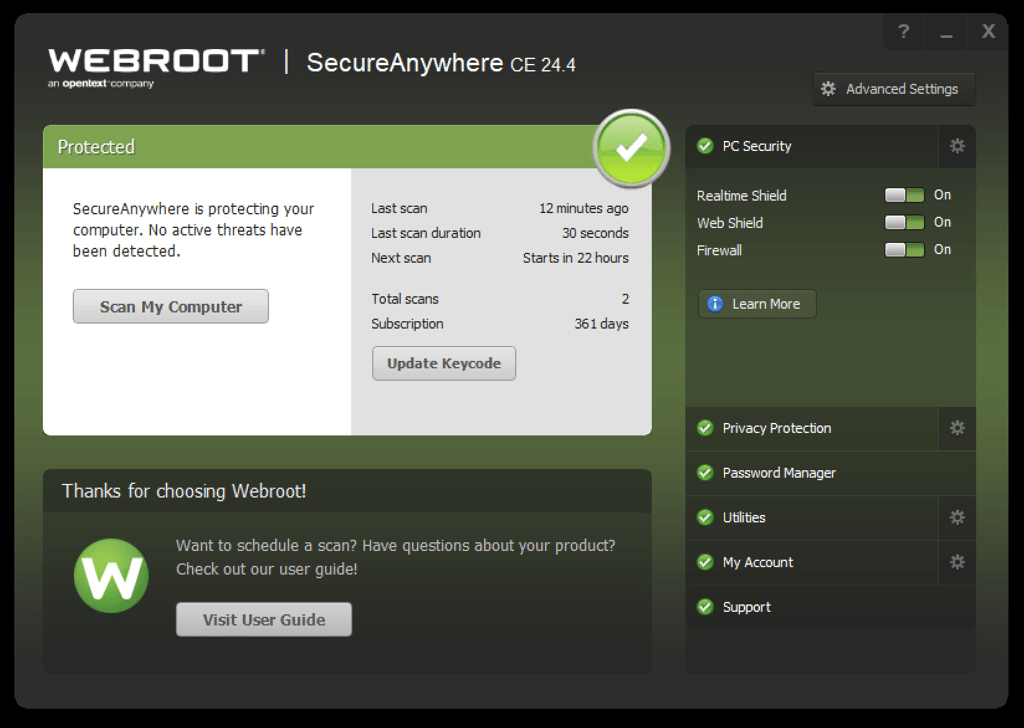
Similarly, Webroot provides easy navigation too. The categories are clearly organized, so you won’t struggle to find a tab for your account, support tab, or any other feature. However, you may not like the look of the user interface. It does feel a bit outdated. Also, if you’re a macOS user, you may experience minor glitches, as we certainly did.
Mobile apps
Both Norton 360 and Webroot come with Android and iOS mobile apps. However, their functionality and effectiveness differ greatly.
Norton offers a powerful app to protect your mobile device. Its UI is sleek and easy to use. The app also has an easy and fast setup. Download the app, log in, and you're ready to use it. The only issue we had with the user experience was that several features come in different apps, such as parental control, VPN, and a password manager.

Speaking of security features, Norton 360 offers good value for money. After you set up the app, its anti-malware feature starts scanning your device automatically, protecting you from the very beginning. Additional security is ensured by Norton's Link Guard, which scans websites for malicious activity.
In comparison, Webroot’s Android app was disappointing. It has very few useful features, so it felt quite limiting.

The Webroot Android app performs only a platform scan, which is subpar. It provides no details about the device's security status or the threats it found. The iOS app turned out to have the same issue.
Customer support
| Norton | Webroot | |
| 24/7 live chat | ✅ Yes | ❌ No |
| ✅ Yes | ✅ Yes | |
| Phone line | ✅ Yes | ✅ Yes |
| Knowledge database | ✅ Yes | ✅ Yes |
| Community support/FAQ | ✅ Yes | ✅ Yes |
Norton 360 offers several ways to reach out, such as 24/7 live chat. Also, you can always work out a solution on your own. But that doesn't mean you'll have to profusely Google for the answer. Instead, try out the knowledge base, as Norton 360 offers an extensive collection of detailed articles to help you out.
Webroot also has an extensive knowledge base and even community support. You'll quickly find guides, tips, and FAQ to help with whatever issue you're having. However, if you prefer hands-on help from a support agent, you can always give them a call or send an email. But don't expect a swift response since there's no 24/7 live chat option.
Once again, Norton 360 wins the competition. By covering all the bases, including a 24/7 live chat option, Norton provides a better customer support experience for its users.
Final verdict
| Norton | Webroot | |
| Protection | ✅ | ❌ |
| Features | ✅ | ❌ |
| PC performance | ❌ | ✅ |
| Pricing | ✅ | ❌ |
| User interface | ✅ | ❌ |
| Support | ✅ | ❌ |
In our 2026 Norton 360 vs Webroot comparison, the results speak for themselves – Norton is the stronger antivirus overall. It excels in protection, value, and usability, backed by perfect lab scores and flawless in‑house test results.
Webroot performs well only in PC performance but falls short in security, features, and support. Norton offers better protection tools, a smoother interface, and helpful 24/7 customer service, all at a superior price‑to‑value ratio.
FAQ
What is the difference between Webroot and Norton?
The most important difference between Webroot and Norton is protection. Unlike Webroot, Norton has a spotless performance when protecting users against malware. Additionally, Norton provides more features at a better price point and a superior user interface.
Is Webroot a good security system?
No, Webroot is a subpar security system. Independent lab testing shows that Webroot does not efficiently detect malware. As a result, AV-TEST scored Webroot’s protection 2 out of 6. Since there are many more secure antivirus software at a better price point, Webroot may not be a good choice for most users.
Do I need Norton if I have Webroot?
No, you shouldn’t use Norton 360 and Webroot at the same time. Running two antivirus programs can cause system conflicts, reduced protection accuracy, and slower performance. However, based on our test results and independent lab data, Norton outperforms Webroot in protection, features, and overall value. It’s best to uninstall Webroot and switch to Norton for stronger, more reliable security.
Do Norton and Webroot do the same thing?
Both Norton and Webroot are antivirus software providers. However, their products are different. Norton 360 delivers a higher level of protection against malware and other threats. The provider also includes features such as a firewall, VPN, and webcam protection. Meanwhile, tests show that Webroot is less secure and provides fewer features.
What does Webroot do?
Webroot is an antivirus software provider. It offers real-time protection, virus scanning, and a firewall. Other features include a password manager, file shredder, and performance optimization tool. What Webroot does exactly depends on the subscription plan you choose.
Who owns Webroot?
Currently, Webroot is owned by OpenText. Webroot’s headquarters reside in Broomfield, Colorado. Webroot Inc. also operates in San Jose, Australia, Austria, Ireland, Japan, India, and the United Kingdom.