Bluehost vs DreamHost: why DreamHost wins + exclusive deal
Our in-house experts conduct internal independent, hands-on testing and transparent reviews of web hosting providers by using custom-built tools or utilizing industry-recognized tools and methods to ensure impartial and evidence-based assessments.
Using the same criteria for all services, we share our detailed methodologies and practices to help customers make informed hosting decisions.
Learn more

DreamHost comes out as the winner in this comparison. It’s cheaper, easier to use, includes stronger built-in security, and delivered better overall performance in my tests. Bluehost still has the edge for WordPress features and customer support, but DreamHost offers the better overall value for most users.
Below, I take a closer look at how Bluehost and DreamHost compare in pricing, ease of use, WordPress features, security, performance, and customer support.
| DreamHost | Bluehost | |
| ⭐ Rating: | ||
| 💵 Price: | From $1.99/month | From $1.99/month |
| 📑 Uptime guarantee: | 100% | 99.9% |
| 🔥 Coupons: | Dreamhost coupon 83% OFF! | Bluehost coupon 78% OFF |
| Storage space (from): | 25GB SSD | 10GB SSD |
| ✂️ Free domain (first year): | Yes | Yes |
| 💾 Automated backups: | Free (daily) | Free automatic weekly backups |
| 💰 Money-back guarantee: | 30 | 30-day |

Key differences
The main differences between Bluehost and DreamHost are in their pricing, control panels, performance, and support options.
| Bluehost | DreamHost | |
| ⚙️ Control panel | Bluehost uses cPanel, with the option to manage essential settings directly from the dashboard. | DreamHost uses its own custom control panel, which is easy to navigate and puts all tools in one place. |
| 📊 Performance | Bluehost showed worse results in the website speed test. However, it handles traffic surges well. | DreamHost outperformed Bluehost in website speed and uptime tests, but didn’t perform as well during heavy traffic spikes. |
| 💵 Price to value | Bluehost is more expensive than DreamHost for most hosting types and includes fewer security features. | DreamHost offers more affordable pricing and provides more resources and features across most plans. |
| 👨💻 Support | Bluehost offers responsive 24/7 live chat and phone support, so you can get help whenever you need it. | DreamHost doesn’t offer phone support, but you can request a paid callback. Its support team was also unavailable during my testing. |
Key similarities
Even with their differences, Bluehost and DreamHost share many of the same extras, hosting types, and WordPress-focused features.
| Bluehost | DreamHost | |
| 🛠️ Additional features | Bluehost includes handy extras like a business email, domain name, and an AI-powered website builder. | DreamHost also offers an AI-powered website builder, a free domain, and business email. |
| 💻 WordPress support | Bluehost offers hosting plans optimized for WordPress. | DreamHost also provides WordPress hosting plans that make setup and management simple. |
| 🌐 Hosting options available | Bluehost offers web hosting, WordPress hosting, WooCommerce hosting, cloud hosting, VPS hosting, and dedicated hosting. | DreamHost offers the same range of options, including web hosting, WordPress hosting, WooCommerce hosting, cloud hosting, VPS hosting, and dedicated hosting. |




Our in-house research team and expert writers work hand in hand to regularly test hosting services and provide accurate and fact-checked information. Discover the ins and outs of how we test and evaluate website hosting providers.
Pricing comparison: DreamHost is cheaper for nearly all hosting needs
Bluehost shared hosting pricing starts at $1.99/month, while DreamHost begins at $1.99/month. Both providers offer similar scalability options, including managed WordPress, VPS hosting, cloud hosting, and dedicated servers.
| Hosting type | Bluehost | DreamHost |
| Web hosting | ✅ Yes, from $1.99/month | ✅ Yes, from $1.99/month |
| WordPress hosting | ✅ Yes, from $1.99/month | ✅ Yes, from $1.99/month |
| WooCommerce hosting | ✅ Yes, from $6.99/month | ✅ Yes, from $1.99/month |
| Cloud hosting | ✅ Yes, from $75.00/month | ✅ Yes, from $4.50/month |
| VPS hosting | ✅ Yes, from $4.69/month | ✅ Yes, from $10.00/month |
| Dedicated hosting | ✅ Yes, from $144.19/month | ✅ Yes, from $165/month |
Both Bluehost and DreamHost have similar plan types, but the main difference is the price. DreamHost is usually the more budget-friendly option across most hosting tiers. The only exception is dedicated and VPS hosting, which Bluehost offers for cheaper and even includes more resources for dedicated servers.
Both providers offer a 30-day money-back guarantee for shared, WordPress, VPS, and dedicated plans. However, Bluehost doesn’t offer refunds for monthly plans, while DreamHost does (except for dedicated hosting).
Control panel and ease of use
The control panel is where you’ll adjust all your website and hosting settings. I tested both platforms to see how easy they are to use, how intuitive they feel, and how quickly I could manage basic settings.
DreamHost’s control panel is more complete
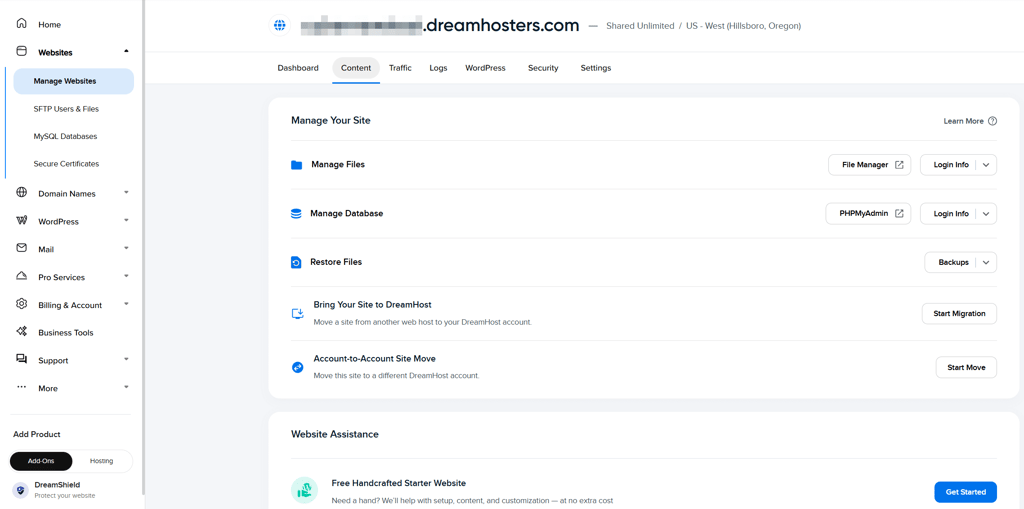
DreamHost uses its own custom control panel, which feels modern and includes all the essential tools. If you’re coming from cPanel, it may take a moment to adjust, but the interface is still intuitive and well-organized. You get access to everything you need, like MySQL databases, SSL management, email tools, the web application firewall, and DNS records. What I liked most is that you can control everything from one interface.
Bluehost’s control panel is ideal for cPanel users
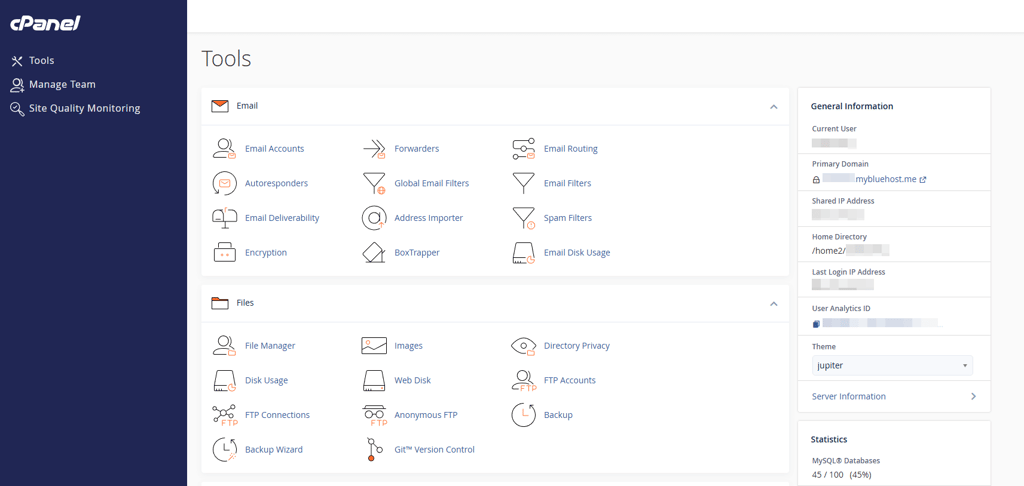
Bluehost uses cPanel, which is the industry standard, so if you’ve hosted a website before, you might’ve already used it. The dashboard is minimalistic and lets you manage websites, domains, email, hosting, security, and billing. However, I found the setup less intuitive because you have to switch between the dashboard and cPanel to manage everything.
WordPress features
Many use WordPress as the CMS for their website. Having a good WordPress host is essential, so I tested and compared what both providers have to offer.
Bluehost offers superb features for WordPress
Bluehost is one of the recommended hosting providers for WordPress, so the features it offers don’t disappoint:
- AI-guided setup. Asks a few questions about your website and provides you with three tailored site designs, making the process of starting a lot easier.
- AI website builder. Generates original templates and adds your logo automatically, so you get a polished look right away.
- Wonderblocks page builder. Lets you build pages with drag and drop blocks, making customization simple even if you’re new to WordPress.
- Built-in essential plugins. Includes JetPack, Akismet, Google Analytics, and OptinMonster with automatic updates, which covers most basics without extra setup.
- Standard hosting resources. Provides RAM, bandwidth, SSL, storage, and CDN, giving you a solid and reliable foundation.
DreamHost includes useful AI tools for WordPress
DreamHost also includes handy features for WordPress, with multiple AI integrations for quicker site generation:
- Free handcrafted WordPress websites. You answer a few questions, choose a style, add requests, and DreamHost’s team builds a custom site for you, which feels incredibly generous and helpful for beginners.
- Liftoff AI website builder. Works similarly to Bluehost’s AI web builder, generating complete website options based on your description, making the setup fast and stress-free.
- AI site generation. In testing, it generated 18 full websites from a single prompt, showcasing the builder's power and efficiency.
- AI chat editing. You can tweak your site through a chat window, and the AI updates the design instantly, which makes editing the site way easier.

Security features
Security plays a huge role in choosing the right web hosting provider, since it protects your site, data, and visitors. To see which host offers better peace of mind, I compared the security features offered by both Bluehost and DreamHost.
Bluehost only includes the basics
Bluehost offers solid security basics, but it does charge extra if you want more robust protection. Here’s what’s included:
- Free Let’s Encrypt SSL certificate. Encrypts data between your site and visitors, keeping information private and boosting trust.
- Weekly backups. Saves a snapshot of your site every week, so you can restore it if something goes wrong.
- Web application firewall. Filters harmful traffic before it reaches your site, adding a strong layer of protection.
- Malware scanning. Checks your site for malicious files and flags issues early, which helps prevent bigger problems.
- DDoS protection. Shields your site from traffic overload attacks, keeping it online and stable even during spikes.
DreamHost offers better security built in
Generally, DreamHost offers more security features with its plan. Here’s what you get with all plans:
- Free Let’s Encrypt SSL certificate. An essential security feature that protects your website and visitors.
- Web application firewall. Blocks harmful traffic before it reaches your site, keeping common attacks at bay.
- 1-click backup restore. Lets you roll your site back to a previous version instantly, which is a lifesaver if you make a mistake or something breaks.
- DDoS protection. Helps keep your site online during traffic floods by filtering out suspicious requests.
- Domain privacy. Hides your personal contact information from the public WHOIS database, reducing spam and protecting your identity.
- Daily automatic backups. Creates fresh backups every day, giving you a reliable safety net if anything goes wrong.
Other essential features
Both hosts offer extra tools that make building and managing your website easier. I compared the usefulness of these features to see which provider gives you more value and convenience during day-to-day use.
Bluehost includes features for beginners
Here are the features that Bluehost includes:
- AI website builder. Lets you build a site fast without paying for templates or starting from scratch, which makes the setup much easier.
- Business email. Gives you a professional email address with a 1-month trial.
- Domain included. Includes a free domain name for the first year.
- 1-click plugin installs. Allows you to add any plugin instantly, making customization quick and beginner-friendly.
DreamHost offers good business tools
Here’s what you also get with DreamHost:
- AI features. Lets you build your site with AI, and also adds extra tools like an AI error log analyzer, AI content generator, and AI business planner for smoother management.
- Business email. Included with all plans and comes with a 3-month trial, which is more than Bluehost offers.
- Free domain. Gives you a free domain name for the first year.
- Analytics. Built-in analytics tools let you track your site’s performance directly from the dashboard without extra plugins.
Bluehost vs DreamHost performance
In this section, I compare Bluehost and DreamHost performance. I ran a series of tests to check website speed, uptime, response time, and how each provider handles heavy traffic. Below, you can read more about everything I discovered.
Server locations
Server locations play a big role in hosting. The further the server is from your visitors, the longer your site will take to load, which affects the overall user experience. For example, if your site is hosted in the US but most visitors are in Australia, load times will be much slower than if you hosted it on an Australian server.
Here’s what each provider offers for server locations:
- Bluehost: US (Virginia and Arizona), Germany (Frankfurt), France (Paris), Brazil (São Paulo), Australia (Sydney)
- DreamHost: US (Ashburn, Virginia, and Hillsboro, Oregon) and the Netherlands
Bluehost provides more server locations, which is a big advantage. If your audience is US-only, this won’t matter much, but for websites with a global audience, it can make a huge difference.
Uptime and response time
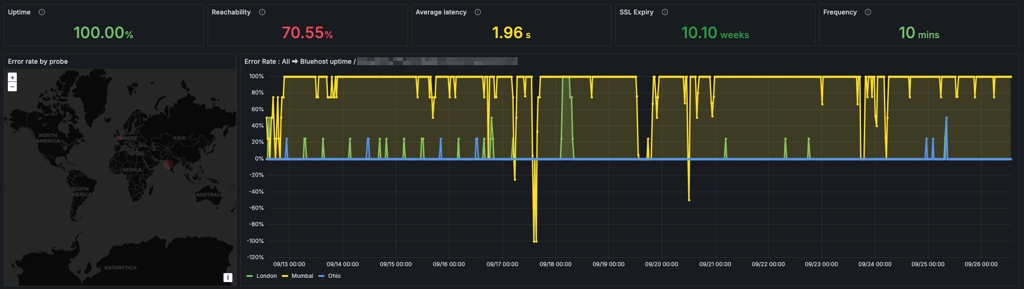
To test uptime, we used the Grafana Synthetics tool and monitored performance over a 2-week period.
Bluehost showed a perfect 100% uptime, even though there was quite a bit of increase in latency at 1.96s and a lower reachability score. At the time of testing, there were some issues with the CDN, which might’ve caused the latency increase.
In comparison, DreamHost showed the same 100% uptime. However, the latency was only 306.23ms, which is significantly lower than Bluehost.
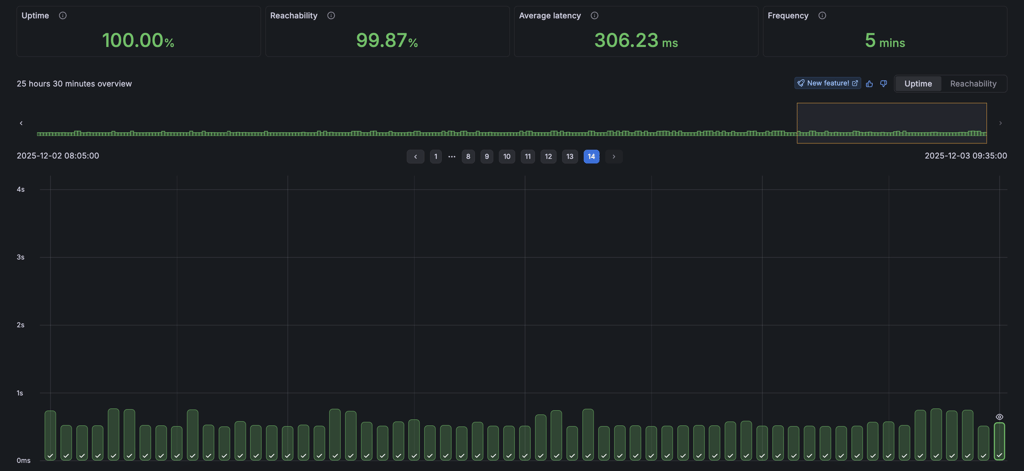
Overall, both providers showed perfect uptime, but Bluehost had some struggles when it comes to latency. This means that while both websites stay available, DreamHost simply feels quicker the moment someone clicks on your site.
Website speed
To measure the website speed with each provider, we used the webpagetest.org tool and noted how each website responded. When comparing these results, I focus on two values:
- Largest Contentful Paint (LCP). It shows how quickly the biggest piece of the website's content is loaded. Up to 2.5s is considered a good result.
- Time to First Byte (TTFB). It shows how quickly the server responds, which helps to identify if a slow page load is because of the hosting provider or the website's content. A good TTFB is under 800ms.
Starting with Bluehost, its LCP was 2.095s. This is still under industry standard, but compared to other hosts I tested, it’s on the slower side. As for TTFB, it was 1.361s, showing that the server takes its time to respond. Overall, the results aren’t bad, but they also don’t show that Bluehost is necessarily a fast host.

As for DreamHost’s results, the LCP was 1.592s, which is considerably faster than Bluehost. As for TTFB, it was 1.087s, which also isn’t ideal, but it still responds faster than Bluehost.

Overall, DreamHost showed faster results than Bluehost. It loaded the website faster and showed a quicker response time.
Stress testing
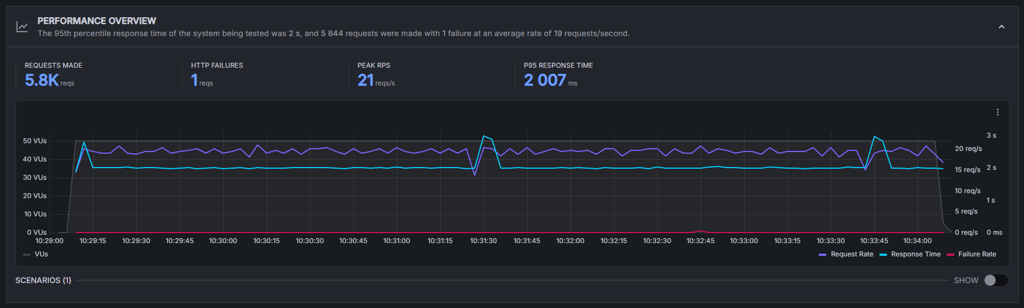
If you’re hosting a website, you can expect an increase in visitors at any time, and it’s crucial that your host can handle that. To test this, we used the Grafana k6 tool. We sent 50 virtual users to the website for around 5 minutes to simulate what happens during a small traffic spike.
With Bluehost, a total of 5800 requests were made. It handled the load with no issues and even maintained a good response time. There was only one HTTP failure, which means the server stayed stable, predictable, and smooth throughout the test.
As for DreamHost, the results weren’t as good. A total of 2900 requests were made, which is half as many as with Bluehost. There were no HTTP failures, but the response time was almost 9 times longer than Bluehost.
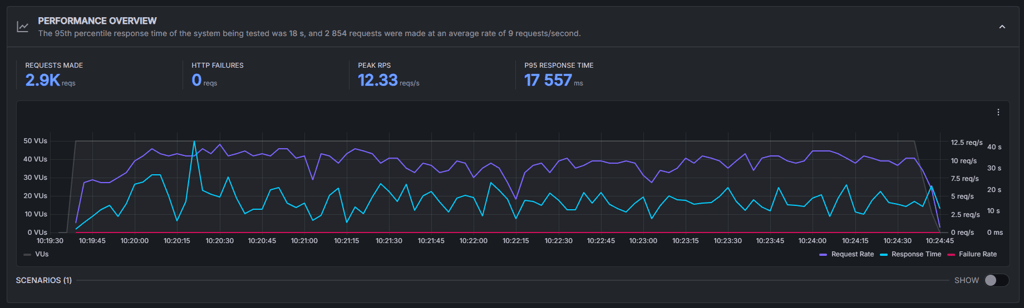
Overall, Bluehost showed better performance under increased load. While DreamHost didn’t fail the test, it was clear that it doesn’t work as well as Bluehost when it comes to traffic surges.
Customer support
Having good support from your hosting provider is crucial. If you’re running a business site or an online store, you’ll want a support team that’s easy to reach and can quickly sort out any issues that might affect your visitors.
| Bluehost | DreamHost | |
| 24/7 live chat | ✅ Yes | ✅ Yes |
| Phone support | ✅ Yes | ❌ No (callback available) |
| Email support | ❌ No | ✅ Yes |
| Guides and tutorials | ✅ Yes | ✅ Yes |
Both hosts offer solid support options, especially 24/7 live chat. In my opinion, this is the most important channel because it gives you quick help when something on your site needs immediate attention.
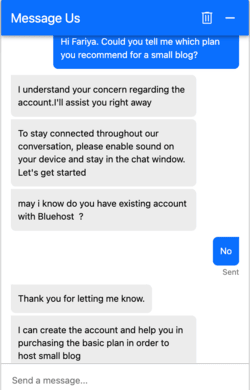
I tried reaching out to both teams myself. With Bluehost, I first had to answer a few bot questions about my issue. I got the initial response from an agent within a few seconds. The agent was proactive and even offered to help me set up an account, so overall I was satisfied with the experience.
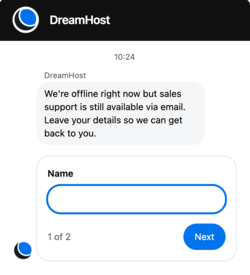
With DreamHost, however, the chat support was offline when I tested it, which made me question whether their live chat is actually available 24/7. The website suggested that I enter my email address and submit a request.
Both hosts offer excellent knowledge bases with tutorials and guides for almost any situation. Bluehost also gives you phone support, which is a nice bonus, while DreamHost offers callback support, although most callback options cost extra.
One difference worth noting is that Bluehost doesn’t offer email support while DreamHost does. I don’t consider this a big advantage for DreamHost since email tends to be slower than chat, but it’s still a useful extra point of contact.
Bluehost vs DreamHost: final recommendation
This Bluehost vs DreamHost comparison turned out to be a close battle, but based on everything I tested, DreamHost came out ahead in most areas. It’s cheaper, easier to use, offers stronger built-in security without extra fees, and outperforms Bluehost in my performance tests. That said, Bluehost still stood out with its WordPress features and excellent customer support.
| Feature | Bluehost | DreamHost | Verdict |
| Pricing | DreamHost offers cheaper pricing, starting at $1.99/month, compared to Bluehost at $1.99/month. | ||
| Ease of use | DreamHost’s control panel is more intuitive than Bluehost's combination of cPanel and its dashboard. | ||
| WordPress features | Bluehost offers all the tools needed for hosting a WordPress website, while DreamHost offers only the basics. | ||
| Security | DreamHost includes more security features with all its plans, while Bluehost often charges extra. | ||
| Features | Both providers offer solid features, but nothing that really stands out. | ||
| Performance | DreamHost showed better uptime and speed test results, while Bluehost outperformed DreamHost in the stress test. | ||
| Support | Bluehost offers excellent support via live chat and phone, while DreamHost's live chat was offline during testing. |
More Bluehost comparisons you might want to read
- Bluehost vs GoDaddy
- Namecheap vs Bluehost
- Bluehost vs HostGator
- WP Engine vs Bluehost
- SiteGround vs Bluehost
- Hostinger vs Bluehost
- Wix vs Bluehost
- Bluehost vs Squarespace
- Bluehost vs WordPress
- InMotion Hosting vs Bluehost
- A2 Hosting (now hosting.com) vs Bluehost
- Bluehost alternatives
More DreamHost comparisons for you to check out
Bluehost vs DreamHost FAQ
Is Bluehost and DreamHost the same company?
While they do indeed look similar, Bluehost and DreamHost are entirely different companies. Bluehost belongs to the EIG corporation and is based in Orem, Utah, while DreamHost is a privately owned company with HQ in Los Angeles, California.
Which of Bluehost and DreamHost is better?
Both Bluehost and DreamHost are good hosting providers so it depends on your needs. Bluehost is better for beginners and offers great website management tools. DreamHost, on the other hand, has better performance and security.
Do Bluehost and DreamHost offer money-back guarantees?
Yes, both Bluehost and DreamHost offer a 30-day money-back guarantee. This gives you a chance to try both services out without any risk and see which one is better for you.