Bluehost vs Squarespace (2026): which website builder is better?
Our team of experts and researchers rigorously test and evaluate website builders through transparent, in-depth testing procedures and methods using both in-house and industry-approved tools.
Drawing on cybersecurity insights, we provide unbiased, empirical rankings and analysis to help users make informed digital platform choices.
Learn more

Choosing between Bluehost and Squarespace isn’t easy because these platforms target very different types of users. For this Bluehost vs Squarespace comparison, our research team and I tested how each web builder performs in real-world areas like ease of use, website templates, pricing, SEO tools, eCommerce features, and customer support.
We concluded that Bluehost gives you more flexibility with hosting options, WordPress compatibility, and its WonderSuite builder, while Squarespace focuses more on an all-in-one experience and polished site design. Below, I look at both platforms in depth to help you understand which option will deliver better value and a smoother website-building experience for your needs.
Bluehost or Squarespace in 2026: my verdict
- Squarespace – best all-in-one website builder for creatives and small businesses
- Bluehost – top-tier web hosting provider for tech-savvy WordPress CMS users
In a direct Bluehost vs Squarespace comparison, Squarespace will almost always come out ahead. That doesn’t mean you’ll go wrong with Bluehost, as it’s still an excellent hosting provider for users looking to build their website with WordPress. But at the end of the day, Squarespace is the better overall solution. Its beginner-friendly, no-code approach and intuitive drag-and-drop website builder pair remarkably well with its wide range of templates and built-in eCommerce tools.




Our in-house research team and expert writers work hand in hand to regularly test website builders and provide accurate and fact-checked information. Discover the ins and outs of how we test and evaluate website builders.
Bluehost vs Squarespace comparison: key differences at a glance
Based on my tests, Squarespace wins this comparison because it delivers a more complete and refined website-building experience. Everything from design customization to eCommerce and site management felt more seamless and cohesive, without the extra setup and maintenance that comes with Bluehost’s WordPress-based approach. While Bluehost offers more flexibility for advanced users, Squarespace made it significantly easier for me to create and manage a polished, professional website with less time and effort.
| Squarespace | Bluehost builder | |
| ⭐ Rating: | ||
| 🥇 Overall rank: | #8 out of #37 | #9 out of #37 |
| 💵 Price: | From $16.00/month | From $2.99/month |
| 🪄 Ease of use: | Perfect for beginners | Incredibly user-friendly |
| 🎨 Templates: | 199 | 300 |
| 🏢 Business features: | Solid in-house eCommerce and marketing | SEO tools, eCommerce functionality, marketing tools |
| 👨💻 24/7 live support: | Yes | Yes |
| ✂️ Free domain (first year): | Yes | Yes |
| 🔒 Free SSL certificate: | Yes | Yes |
| 🔥 Coupons: | Squarespace coupon 36% OFF | Cybernews Website Builder Coupons |

Bluehost vs Squarespace: ease of use and setup
As a hosting-first solution, Bluehost involves a few extra steps you’ll need to go through to get your site up and running. In that sense, Squarespace is a more beginner-friendly platform.
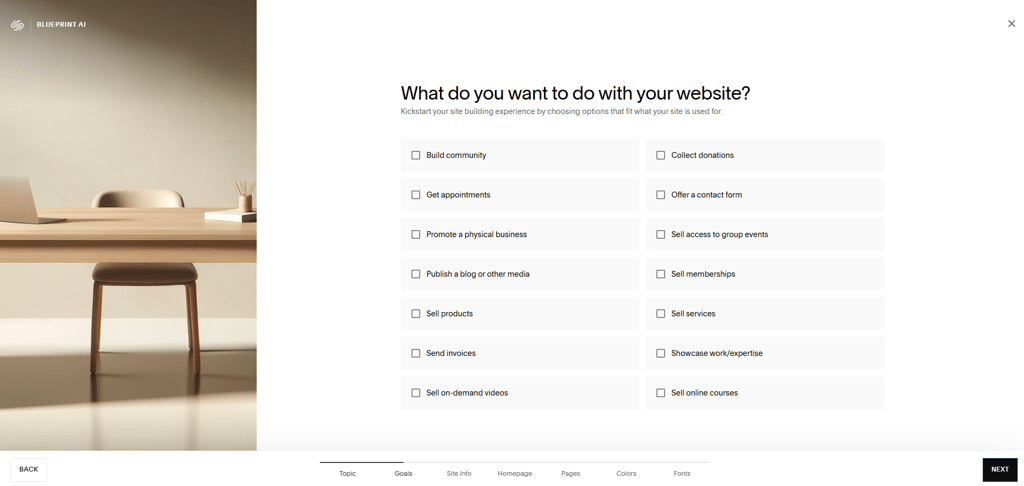
Squarespace is all about being a one-stop shop for launching sites. When I gave it a go, its drag-and-drop builder felt super easy to use, and it really did significantly simplify the entire process.
You’ll first have to choose your site’s category and describe what you want to include on it. From there, it’s all about customizing colors and fonts, after which your site will be ready to go live.
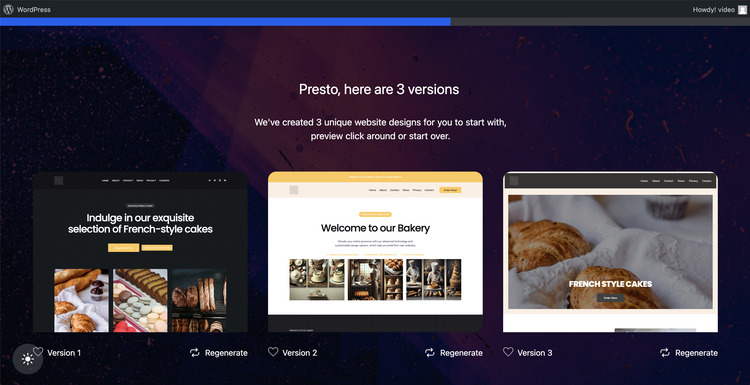
Bluehost can be just as easy to use as Squarespace. Its built-in AI-powered website builder, WonderSuite, essentially mimics Squarespace in every way. It uses the same drag-and-drop format that Squarespace is well known for, and its premade blocks are ready to go as soon as you answer a few questions about your site.
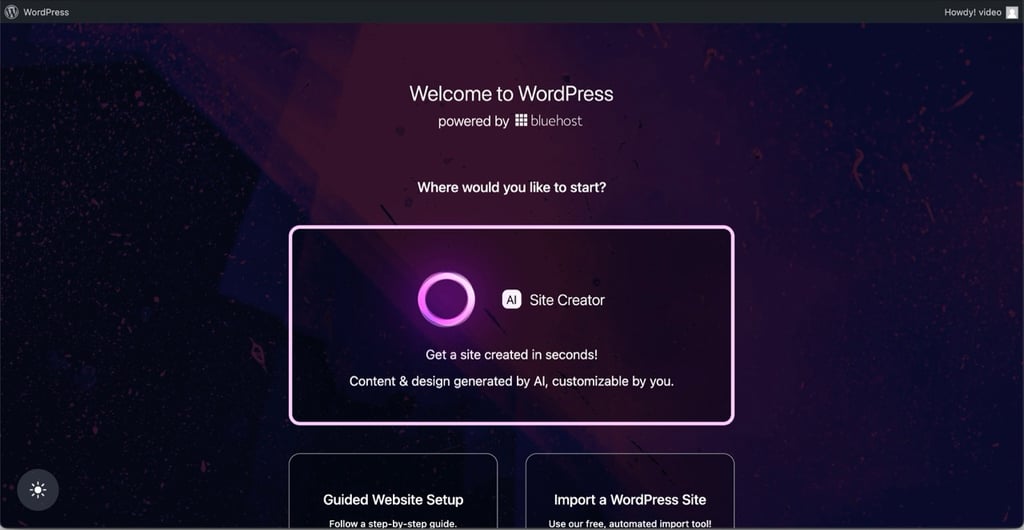
That said, it’s still powered by WordPress, which, by the way, you can also use as your main CMS when you go the Bluehost route. In that sense, Bluehost is a bit more confusing to navigate.
Templates and design flexibility: Bluehost or Squarespace?
When it comes to website customization, both platforms excel. Bluehost’s WonderSuite offers more than 300 themes, and its AI always suggests a few that best match your idea based on your input about the website.
Squarespace’s library, on the other hand, counts almost 200 templates, which is still more than plenty. It also makes it super easy to design a site that perfectly aligns with your exact creative vision, regardless of your niche.
Moreover, Squarespace’s drag-and-drop approach excels in terms of user-friendliness and will have you moving things around with zero coding involved.

Pricing: does Bluehost or Squarespace offer better value?
As Bluehost’s pricing is bound to confuse you, I’ll stick with standard hosting and its 3 plans for simplicity’s sake. Do keep in mind that there’s no free trial here, but there is a 30-day money-back guarantee if you change your mind.
| Plan | Monthly cost (12-month term) | Monthly cost (36-month term) | Features |
| Starter | $3.99 | $2.99 | Free domain (1st year) and Yoast SEO |
| Business | $6.99 | $5.99 | More websites and storage and an anti-malware tool |
| eCommerce Essentials | $8.99 | $6.99 | 100 websites and 100GB of storage |
On the other hand, Squarespace keeps things simple with 4 pricing plans that progressively build on each other in terms of features. There’s also a 14-day free trial here.
| Plan | Monthly cost (12-month term) | Monthly cost (1-month term) | Features |
| Basic | $16.00 | $25.00 | SEO tools, SSL, a drag-and-drop CSS editor, and a free custom domain |
| Core | $23.00 | $48.00 | Adds advanced analytics, Google Workspace email, discounts, shipping labels, commerce API |
| Plus | $39.00 | $82.00 | Adds lower payment processing rates, lower digital content fees, unlimited pay links |
| Advanced | $99.00 | $159.00 | Adds zero digital content fees, lowest credit card payment processing rates |
It’s also worth noting that you don’t get a free custom domain if you go the monthly subscription route.
Bluehost vs Squarespace: eCommerce and business features
If you compare Bluehost vs Squarespace for eCommerce applications specifically, you’ll find that both options make sense.
If you’re planning on launching an online store, Bluehost’s WonderSuite comes with WonderCart, which you’re bound to love for its built-in fulfillment and payment options.
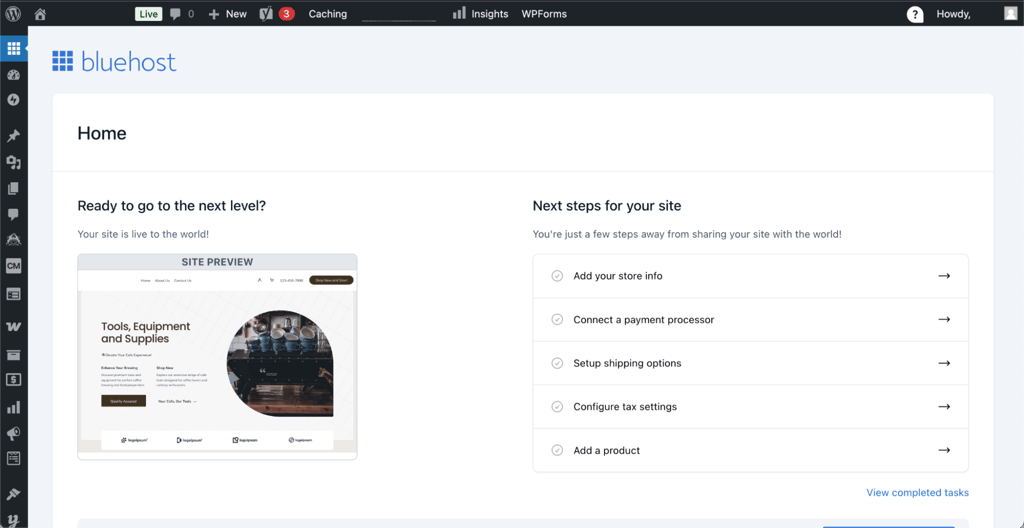
That said, the majority of its eCommerce functionality still stems from its WooCommerce integration. Choosing one of these dedicated WooCommerce plans and installing the plugin gets you dedicated sales and promotions features. That allows you to offer discounts, set up free shipping deals, upsell features, and more.

And if all of this sounds a bit complicated, like it was for me when I first delved into Bluehost, you can speak with a representative and ask for one of its eCommerce Premium hosting packages.
These plans are specifically designed for online stores and come with everything you need to build and manage an eCommerce website. That includes multichannel inventory management, product organization features, one-click checkouts, and much more. Granted, you’ll still need to set it all up, so Bluehost isn’t exactly ideal for non-tech-savvy eCommerce site owners.
On the Squarespace side of things, eCommerce features are also built in. That primarily involves the free professional invoices that match your brand’s style, which you’ll find across all 4 of its tiers.
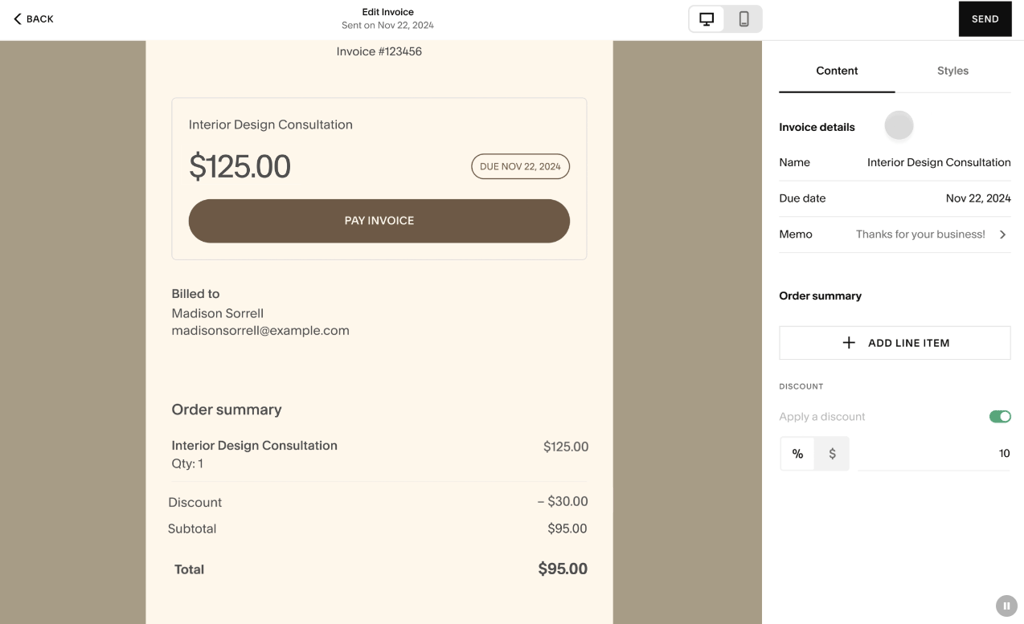
However, anything beyond support for customer accounts will require going with one of the more premium plans. In fact, I’d go as far as to say that Squarespace Core is the bare minimum for eCommerce sites.
This particular tier comes with robust order and inventory management, advanced shipping tools with both pickup and local delivery options, and a wide range of payment method integrations, including PayPal and Stripe.
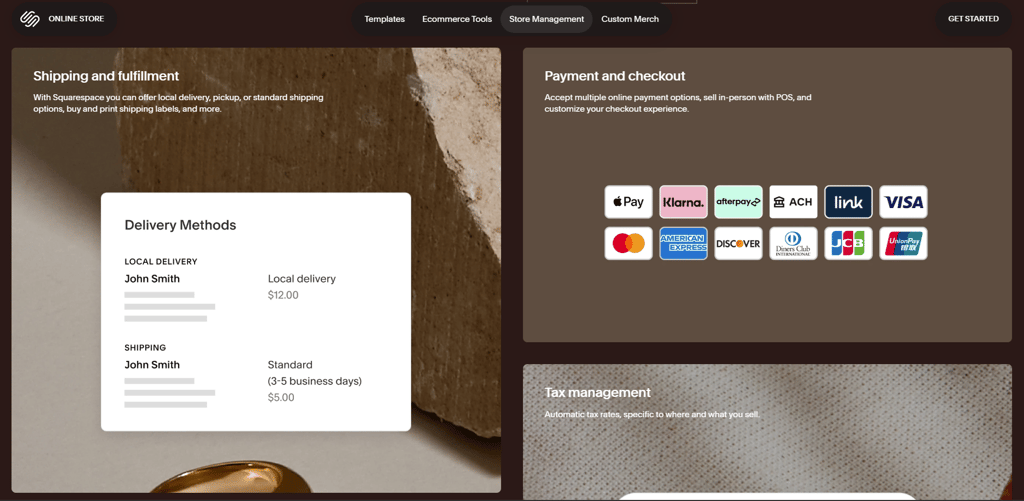
The Plus and Advanced plans provide the best eCommerce functionality. That includes product catalog syncing with Meta’s platforms, limited inventory labels, and a fully fledged eCommerce API that lets you build custom integrations for third-party systems.
Bluehost vs Squarespace: SEO tools and marketing features
Improving your site’s online visibility is one of the best ways to attract more users and boost your sales, and in that sense, SEO is vital. Fortunately, both platforms offer a wide range of tools to help you out, albeit with a few key differences between them.
On the one hand, Bluehost offers tremendous flexibility through both WonderSuite and WordPress:
- Massive ecosystem of plugins. From Yoast SEO, which you get with all Bluehost plans, to Rank Math, AIOSEO, and SEOPress through WordPress, you’ll have access to a wide range of SEO tools.
- On-page SEO control. Taking the Bluehost approach comes with solid SEO recommendations, which can be quite helpful.
- Website speed optimizations. Bluehost also handles the technical side of things rather well through fully optimized hosting.
On the other hand, Squarespace takes the all-in-one platform approach:
- Robust built-in SEO tools. Each Squarespace site post and page has its own SEO field where you can edit metas and URLs. In addition, there’s also a global SEO section.
- Exceptional technical optimization. Even though Squarespace’s sites are a bit heavy in terms of JavaScript and CSS, they’re still quite responsive and fully mobile-optimized.
- Automatic sitemaps. Squarespace automatically generates and submits an XMP sitemap of your website to Google and other search engines.
Bluehost vs Squarespace: customer support and community
If things go south, you’ll want a provider with reliable support, which both platforms have.
Bluehost keeps it simple with:
- Phone and live chat support. Available 24/7, these support channels make it easy to get in touch with Bluehost’s responsive and knowledgeable agents.
- Email support. You can easily contact its different branches depending on what you need help with.
Squarespace takes it up a notch with a broader range of support channels:
- Live chat and email. These channels are available 24/7.
- Dedicated help center. Filled with all kinds of written and video guides.
- Forum. A place where you can get help from the provider’s active community.
- Experts. If that isn’t cutting it for you, you can also hire Squarespace designers and developers directly.
Final thoughts: which is better, Bluehost or Squarespace?
Although they take vastly different approaches to building sites, Squarespace and Bluehost are both excellent in their own way.
Bluehost’s built-in website builder excels in terms of ease of use and template variety but could benefit from integrating more SEO tools and eCommerce features from the start. Then again, Bluehost also lets you choose your CMS, including WordPress and WooCommerce. For users who know what they’re doing, the sheer number of plugins will make it all worthwhile.
That said, Squarespace offers a better out-of-the-box experience. It’s an all-around robust tool with an easy-to-use drag-and-drop editor, built-in hosting and eCommerce features, and almost 200 templates for any type of site. That’s precisely what makes it the better overall website builder.