Mobirise review – web builder for beginners
Our team of experts and researchers rigorously test and evaluate website builders through transparent, in-depth testing procedures and methods using both in-house and industry-approved tools.
Drawing on cybersecurity insights, we provide unbiased, empirical rankings and analysis to help users make informed digital platform choices.
Learn more

Mobirise is a free web design and building application offering over 3.7 themes and templates. Its intuitive drag-and-drop editor makes website creation quick and effortless. However, what truly sets it apart is its offline functionality for Windows and macOS – allowing users to edit sites without an internet connection.
With the launch of Mobirise 5, the platform boasts a revamped engine that doubles performance on larger projects, along with a sleek dark mode that’s gaining popularity. However, while Mobirise is a solid choice, many website builders provide more advanced features and higher-quality designs.
Trying to find out if Mobirise is the right web builder for you? How much does it cost? And how does it compare to other website builders out there? Read our Mobirise review for everything you need to know.

| Hostinger Website Builder | Mobirise | |
| ⭐ Rating: | ||
| 🥇 Overall rank: | #5 out of #37 | #25 out of #37 |
| 💵 Price: | From $2.69/month | From $0.00/month |
| 🪄 Ease of use: | Extremely easy to use | Easy to use |
| 🎨 Templates: | 300 | 4000 |
| 🏢 Business features: | eCommerce functionality, analytic tools, SEO settings | Great for small online businesses |
| 👨💻 24/7 live support: | Yes | No |
| ✂️ Free domain (first year): | Yes | Yes |
| 🔒 Free SSL certificate: | Yes | Yes |
| 🔥 Coupons: | Hostinger Website Builder coupon 81% OFF! | Cybernews Website Builder Coupons |

Mobirise pros and cons




Our in-house research team and expert writers work hand in hand to regularly test website builders and provide accurate and fact-checked information. Discover the ins and outs of how we test and evaluate website builders.
Who should use Mobirise?
Mobirise is a good choice for anyone looking to create their first website. Whether you’re building a personal website to showcase your work or starting a small online business, you’ll be able to use Mobirise to create an attractive website to suit your needs.
| Private sector | Mobirise has a range of ready-made templates ideal for businesses such as law firms and health clinics. |
| Leisure websites | Mobirise can be useful for gyms, photography studios, and even churches. It provides you with an easy way to exhibit photos, making it perfect for photography studios. There are also easy options to showcase facilities and amenities. |
| General use | Mobirise has such a wide variety of templates. So, you can use it to help you create pretty much any website you like. However, it might not be the best solution for blogging as it has no built-in blogging tool. |
How to use Mobirise
Here, I’ll walk you through a simple step-by-step guide on how to use Mobirise:
-
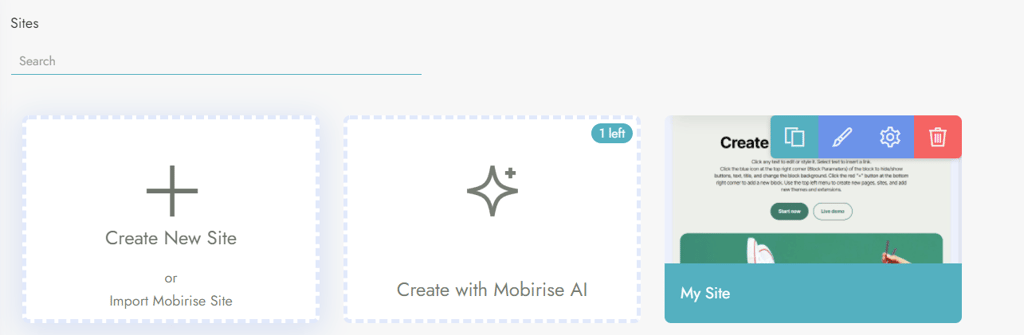
Install and open the application, click the Sites button on the dashboard, and choose to create a site from scratch, or generate it with AI

-
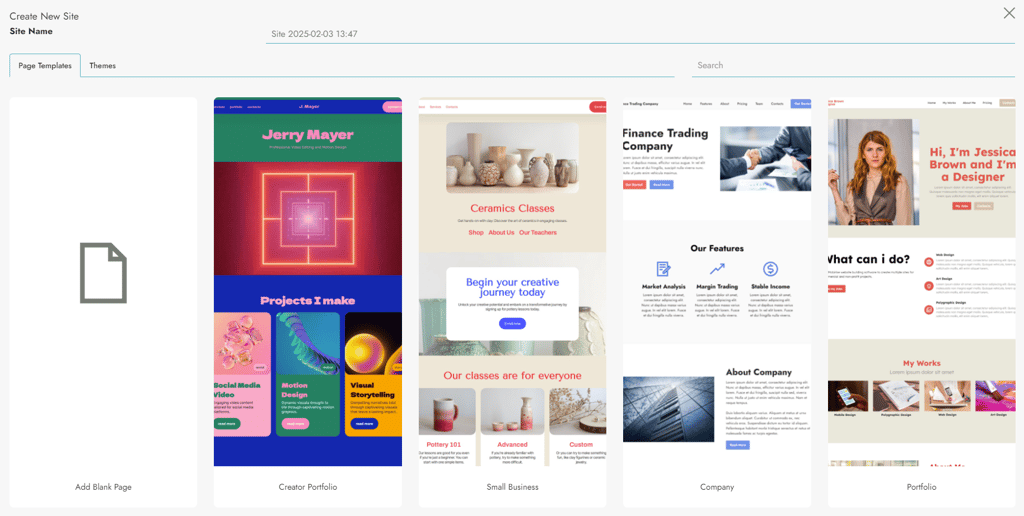
If you choose Create New Site, pick a template for your website or start with a blank page

-
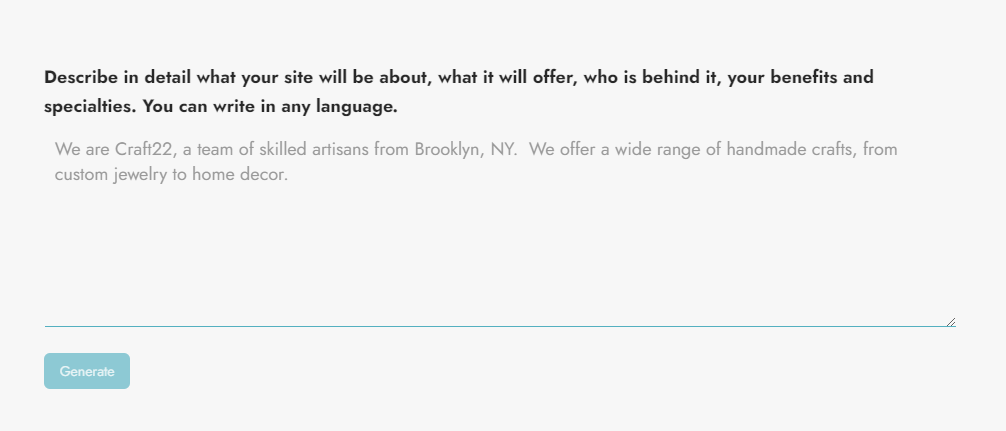
If you continue with the AI option, input a detailed prompt to generate your ideal website

-
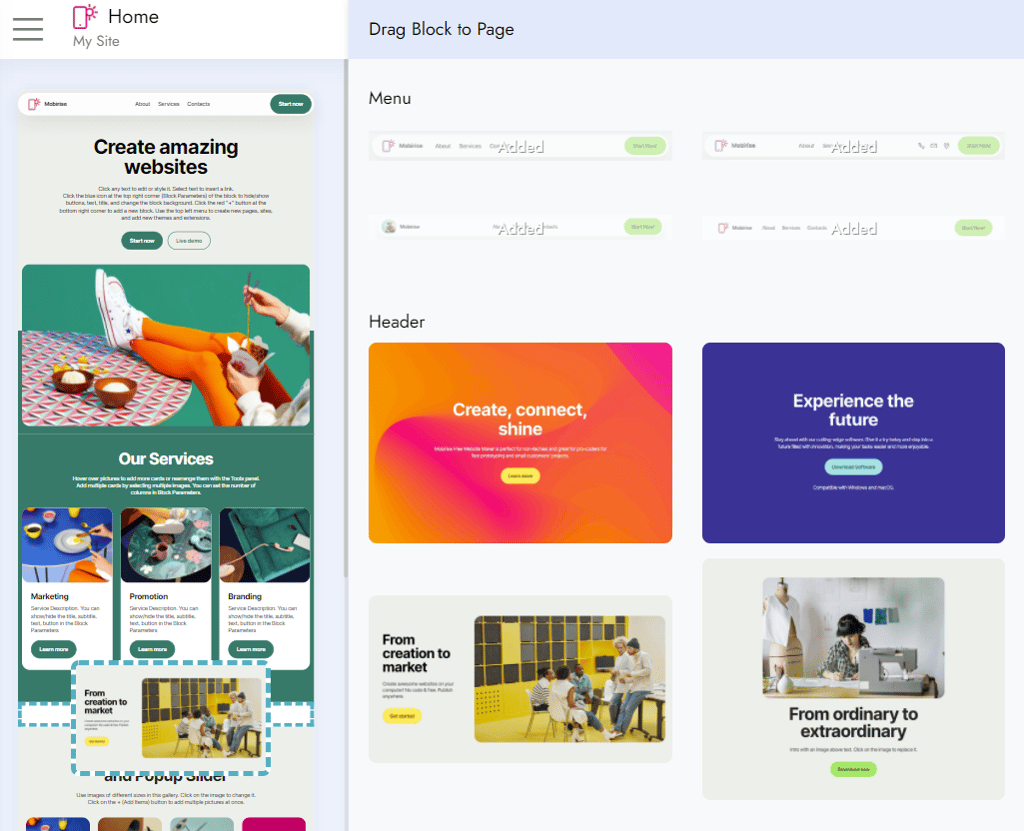
Start designing your website by adding or deleting blocks, buttons, changing the background color or images

- When you’re happy with the result – just publish it
Features
While Mobirise hasn’t got the most extensive feature list around, it’s got all the basics, including a Code Editor, an SEO tool, a PayPal shopping cart, and an AMP tool.
Code Editor
This is a great tool for more advanced users who want to code a website according to their specific requirements. However, if you need this extension, you will have to purchase it for $69.00.
Search engine optimization (SEO) tool
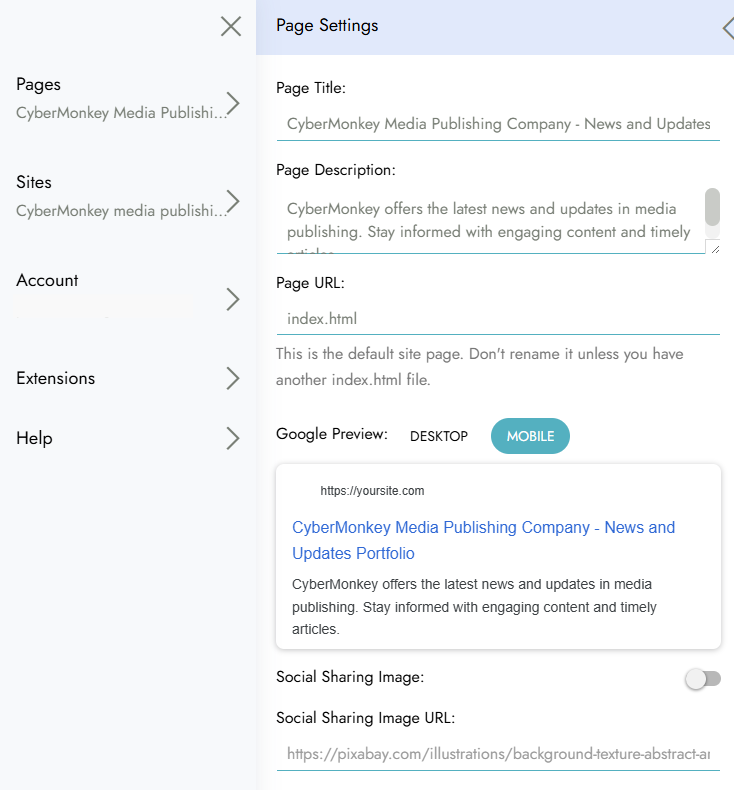
By including an SEO extension with the Code Editor, priced individually at $69.00, you can maximize your site’s potential on Google searches. You can also control what is brought up and how it appears in search engine results. Mobirise’s free version only lets you customize how the page appears on Google.
PayPal shopping cart
Once you’ve purchased the app for $69.00, you can enable four options that will enhance your ability to monetize your business: Buy Now, Add to Cart, Donate and Subscribe.
Accelerated Mobile Pages (AMP)
This will optimize your webpage for mobile browsing by making your site render just as well on smartphones as it does on desktop.
Mobirise themes
Mobirise has a huge range of themes and templates, and new ones are added regularly. However, you have to pay for most of them. The premium themes are sold at $49.00, giving the user a more diverse set of themes than the limited free options.
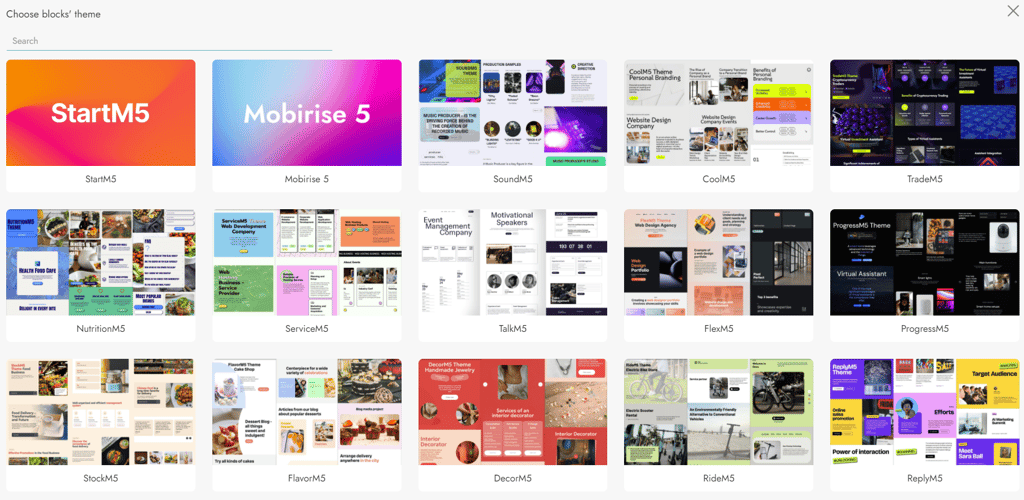
I didn’t like that the desktop app doesn’t allow you to purchase themes directly. At first glance, it’s also unclear which themes are free and which are paid, because the prices are not displayed. There’s always the free option to create with AI, but that’s not the best solution either since it requires detailed prompts, which can be challenging for beginners.
Mobirise extensions and adds-on
Mobirise offers both free and paid extensions that cover everything from social media buttons to PayPal options and customer reviews. Here are some of my favorites.
Mobirise HTML Code Editor
Mobirise is a great drag-and-drop website builder that doesn’t require you to have any knowledge or experience in coding. However, if you have coding expertise, the Code Editor will let you use your skills to improve your site. The Code Editor is available for $69.00, or you can get it with the all-in-one Mobirise Website Builder Kit for $149.00.
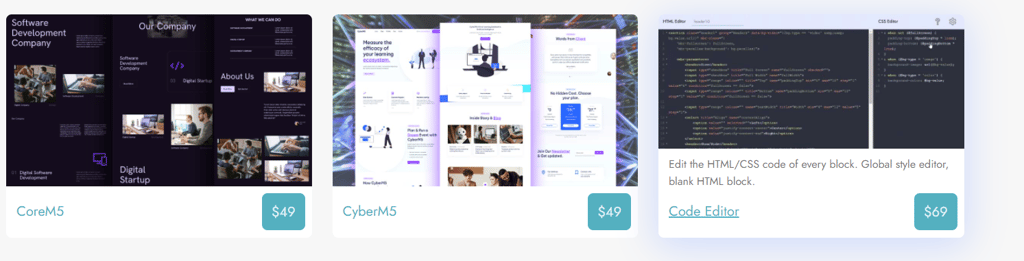
The Code Editor not only gives you more editorial freedom over your webpage, but it also includes the Search Engine Optimization (SEO) extension, which helps Google find and rank your website.
Domain and hosting
Once you’ve built your website, you’ll need a domain and a way of hosting it. Luckily, Mobirise has three options for this:
- You can host for free in an inbuilt .mobirisesite.com subdomain. You will receive an SSL certificate, which secures your webpage by moving it from HTTP to HTTPS.
- Alternatively, you can use a local folder. This option is ideal for those who want to use a different hosting agent. It uploads your webpage to your chosen hosting server exactly as you designed it.
- You can publish your webpage via an FTP (File Transfer Protocol) connection. Simply fill in your FTP server credentials, click Publish and your website will be live.
Customer support
If you encounter trouble with Mobirise, there’s an extensive setup guide and FAQ section that covers everything from getting started to adding user blocks. There’s also a useful tutorial section.
While there is no phone number or live chat option, you can email Mobirise at [email protected]. Additionally, you can reach out via the Mobirise forum, and a member of the support team should respond to your query.
Mobirise pricing
Mobirise is a free app and doesn’t have traditional pricing plans like other web builders. But to get the most out of Mobirise, you will need to pay. You can purchase individual extensions and themes that are usually $49.00, though some extensions, like the Code Editor, will cost a one-off fee of $69.00.
In my opinion, the best option is the Website Builder Kit for $149.00. For this, you get all of Mobirise’s premium themes, templates and website building blocks, as well as tools such as the Code Editor and PayPal shopping cart widget.
Alternatives to Mobirise
Mobirise is one of the most user-friendly web builders on the market. And it’s really reasonably priced too. But there are lots of other web builders out there. So how does Mobirise compare? Let’s find out.
Mobirise vs Hostinger
Mobirise and Hostinger cater to different needs. Mobirise is an offline website builder that gives users full control over their site’s hosting, offering drag-and-drop functionality, Bootstrap-based templates, and AMP support. However, it lacks built-in hosting, real-time collaboration, and a native blogging tool.
In contrast, Hostinger Website Builder is an all-in-one online solution with built-in hosting, free SSL, a free domain for a year, and AI-powered tools. While Hostinger provides a seamless experience with automatic updates and CDN integration, Mobirise offers more flexibility for users who prefer to manage their hosting separately.
In my opinion, Hostinger is better for beginners looking for an easy, all-inclusive solution, while Mobirise suits those wanting more hosting freedom and offline editing.
Mobirise vs Wix
Wix is a more advanced website builder than Mobirise. It’s easy for beginners but also accommodates more expert developers by granting access to receptive customizable designs. Plus, it has more features than Mobirise, including a much better blogging tool.
Mobirise vs WordPress
Wix is a better option for individuals and small businesses than Mobirise, as it requires minimal expertise. While Mobirise is also easy to use, Wix is a lot less complicated, and it has a better free version.
Final thoughts
No matter your skill level, Mobirise will help you build the website of your dreams. Its effortless drag-and-drop style is ideal for beginners. If you’re an experienced web developer, you can customize it with the Code Editor tool.
Mobirise is also very reasonably priced. You can build a basic site without paying a penny. If you want access to more extensions and add-ons, you can either pay for the ones you want individually or sign up for the Website Builder Kit for just $149.00. This gives you access to 4000+ premium themes and every tool that Mobirise has to offer.
While it is disappointing that there isn’t a live chat or phone number, the app's ease of use makes Mobirise a very smart investment for anyone new to web development.
Mobirise FAQs
How much does Mobirise cost?
Mobirise has a basic version that’s free to use. But in order to get the most out of it, you’ll need to pay for some extras. The premium themes usually cost $49.00 but to unlock all 4000+ blocks and over 100 themes and extensions, there is a Website Builders Kit, which is currently available for a very reasonable $149.00.
Can you edit code in Mobirise?
Yes, you can edit code by adding the Code Editor extension. You can buy the extension for $69.00 or get it as part of the Website Builders Kit for $149.00.
Is Mobirise safe?
As an offline web builder, Mobirise doesn’t offer security for your site once it’s published. So if you need to protect your built site, you’ll need to secure it from your hosting provider.
What is the best thing about Mobirise?
The best thing about Mobirise is its offline functionality, which gives users complete control over their website. Unlike most website builders that require an internet connection and lock users into proprietary hosting, Mobirise lets you design and edit your site anytime, anywhere, and then publish it to any hosting provider of your choice.


