Squarespace vs Webflow (2026): which website builder is better?
Our team of experts and researchers rigorously test and evaluate website builders through transparent, in-depth testing procedures and methods using both in-house and industry-approved tools.
Drawing on cybersecurity insights, we provide unbiased, empirical rankings and analysis to help users make informed digital platform choices.
Learn more

Businesses can lose billions of dollars if their websites load slowly. Luckily, creating a website has never been easier, thanks to prominent yet affordable website builders. Among them, a couple of names stand out, and Squarespace and Webflow are definitely worth mentioning.
These two have made a name for themselves among countless other options, and for good reason. That's why I decided to put both options to the test.
In this detailed Squarespace vs Webflow comparison, I’ll present you with the key specs and features of both to help you pick the best one for your website. My team of Cybernews experts and I have also tested their pricing plans, advanced features, and customization potential.
Squarespace vs Webflow 2026: my verdict
- Squarespace – best website builder overall with beginner-friendly templates
- Webflow – great option for website owners looking for advanced AI and customization features
As a result of my extensive research, I’d say that Squarespace is better than Webflow for most users. It’s very intuitive with dozens of templates ready for use, as well as some drag-and-drop customization features.
On the other hand, Webflow tops Squarespace in terms of visuals. It’s perfect for professional designers and other experts looking for the most comprehensive customization package. There's even a native AI option that lowers your learning curve.




Our in-house research team and expert writers work hand in hand to regularly test website builders and provide accurate and fact-checked information. Discover the ins and outs of how we test and evaluate website builders.
Key differences at a glance
| Website builder: | Squarespace | Webflow |
| Rating: | ||
| Price: | From $25.00/month ($16.00/month when billed annually) | From $18.00/month ($14.00/month when billed annually, free plan available) |
| Ease of use: | Beginner-focused and highly intuitive | Suitable for experienced users |
| Templates: | Over 190 website templates | Over 7,000 blog, business, and portfolio templates |
| Business features: | Native eCommerce and marketing features | Business role assignment, CMS features, streamlined workflows |
| 24/7 live support: | ✅ | ❌ (24/7 phone support only for Enterprise customers) |
| Free domain (first year): | ✅ | ❌ (only available via third-party companies) |
| Free SSL certificate: | ✅ | ✅ |

Squarespace vs Webflow: ease of use and setup
To make the right call on Squarespace or Webflow, you first need to consider some key features. The simplicity of both options is surely among the most important factors, as I suppose there will be lots of beginners among you trying to get the gist of it.
In that sense, I’d say that Squarespace takes the pole position with an easy setup process. You can sign up within just a few minutes and have your website already running within 30 minutes or so. You’d just need to fill out a quick registration page and answer a few questions about the type of website you’d like to run.
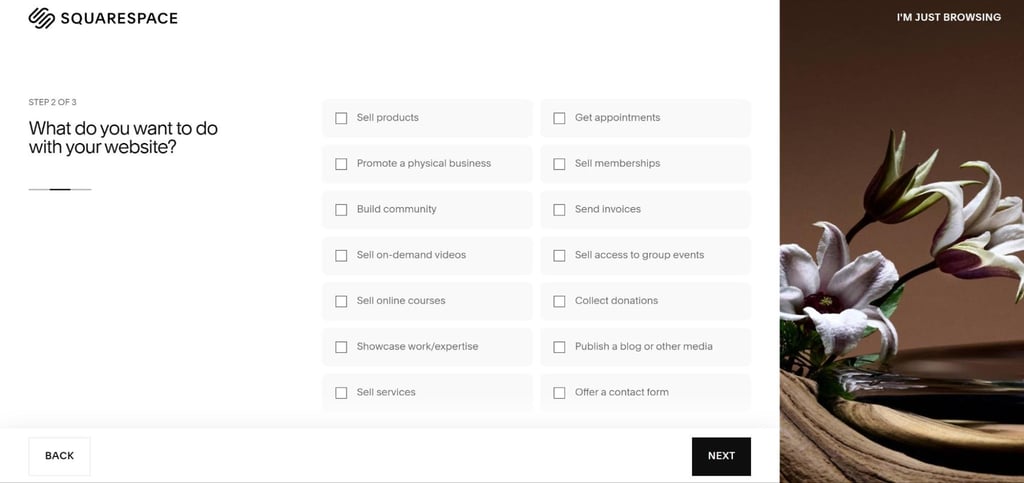
The learning curve isn’t that steep, as you can use all sorts of helpful materials like webinars and readily available step-by-step guides. You’ll also spot the sidebar with customization options, which is perfect for optimizing your site’s layout to your liking.
When it comes to Webflow, things aren’t so simple. Don’t get me wrong here, the onboarding process is super quick, and I just had to create a business email and get things rolling. However, learning how to use the tool is a bit more complex, as it requires some prior knowledge.
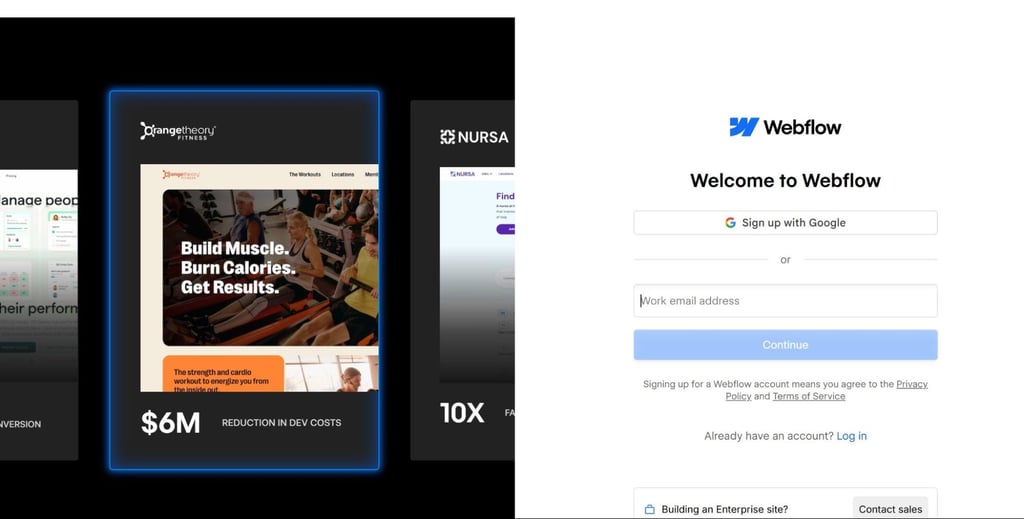
Thankfully, there’s plenty of helpful materials you can use to learn the ropes of it, from marketing reports to webinars and playbooks. There’s also a demo mode, where you can test some Enterprise features for free, so that makes the learning curve a bit more bearable.
Templates and design flexibility: Squarespace or Webflow
I was thrilled to see that both these options feature a decent amount of pre-set templates, but there are some differences. For instance, if we’re talking about the sheer number, Squarespace offers more than 190 ready-to-go templates that you can just sign up for.
These are mainly suitable for small businesses and professionals, but there are some options for artists and designers displaying their portfolios. They are easy to use and customize, and I’d go as far as to say that Squarespace beats Webflow in terms of template quality.

Still, that doesn’t make it an absolute winner. Webflow also has a few good cards up its sleeve with more than 7,000 templates, with 1,000+ of them being free. What’s more, you can create custom ones using the AI builder or copy and customize existing solutions of other users in the Webflow community.
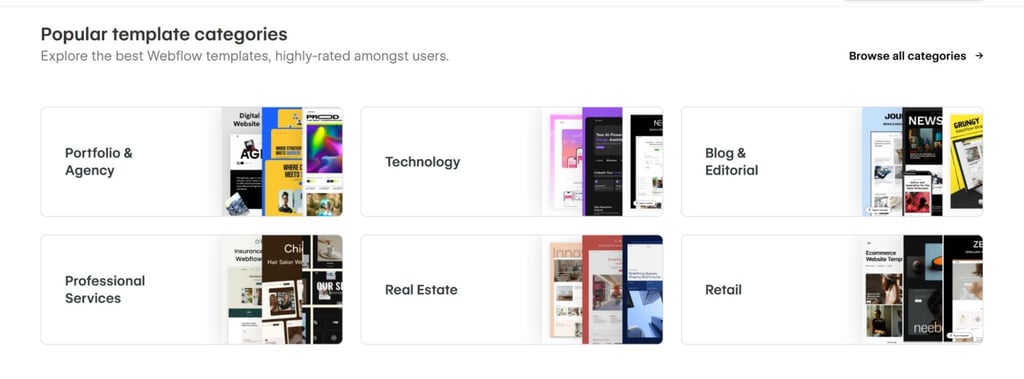
Even though there are dozens of premium options with Webflow, that doesn’t make up for the hundreds that are not on the level of Squarespace templates. Therefore, I’d raise my voice for Squarespace in terms of template quality and Webflow in terms of the massive choice and customization options.

Pricing: which one, Squarespace vs Webflow, offers a better value?
If you’re wondering which is better, Squarespace or Webflow price-wise, it’s all about the perspective. The best way to go about it is by comparing both at a glance, so here’s my overview of the Squarespace subscription plans:
| Plan | Monthly cost | Key features |
| Basic | $25.00/month ($16.00 when billed annually) | Unlimited storage, free SSL encryption |
| Core | $36.00/month ($23.00 when billed annually) | Business email management, $100 credit for Google Ads |
| Plus | $56.00/month ($39.00 when billed annually) | Lower transaction fees on digital content memberships |
| Advanced | $139.00/month ($99.00 when billed annually) | Professional subscription management, cart recovery |
As you can see, the Basic plan starts at $16.00 when billed annually, which is higher than the $14.00/month price that you’d have to pay for Webflow. However, Webflow plans go way beyond, and you can even get a custom Enterprise plan on-demand. Here’s a quick summary:
| Plan | Monthly cost | Key features |
| Basic | $18.00/month ($14.00 when billed annually) | Custom domain, CDN hosting |
| CMS | $29.00/month ($23.00 when billed annually) | Over 1000 templates, 100 pages, dedicated CMS API |
| Business | $49.00/month ($39.00 when billed annually) | Over 100,000 monthly visits, 200 pages, advanced SEO features |
| Enterprise | On demand (depends on the add-ons) | Enterprise-ready scaling, priority support, guaranteed SLA, customer success ratings |
The thing that can significantly affect Webflow subscriptions is the range of add-ons. They can go up to a few hundred of dollars for enterprises looking to optimize conversions with features like audience insights and targeting, as well as advanced AI features.
Squarespace vs Webflow: eCommerce and business features
One of the things that makes the choice between these two builders so tough is the range of eCommerce and business features. Both platforms handle product management and checkout experiences equally well, so it mainly depends on what you need for your site.
Product management
While both platforms offer a great deal of features, Squarespace beats Webflow in terms of product management simplicity. You can start selling unlimited products for just $27/month, which is one of the best deals in the industry.
Furthermore, it allows you to organize your products by categories and tags automatically.
On the other hand, Webflow supports both physical and digital products, and its massive range of templates, coupled with real-world examples of Webflow product management sites, makes it a great customization option.

Checkout experience
When it comes to checkout, I find that Squarespace is a better option than Webflow due to its customizable features. It is automatically optimized for mobile devices with a focus on responsiveness.
Webflow, on the other hand, offers full control over the checkout page, from design edits to mobile optimization. Still, Squarespace ranks higher in terms of simplicity.
Payment options
Squarespace integrates with major payment providers, including Klarna, AfterPay, GPay, PayPal, and others. There are no payment fees, and the tax due is calculated automatically for each transaction.
Webflow works with Stripe, PayPal, and Apple Pay. It charges 2% with the Standard plan, so you’d have to upgrade to Plus or Advanced if you’d like zero-fee transactions.
Overall, I’d say that Squarespace is a better option in terms of payments due to its flexibility.

SEO tools and marketing features
Unlike many other website builders, both Squarespace and Webflow offer SEO features. With Squarespace, there are several simple options, including:
- Automated XML sitemaps
- Custom meta tags
- Customizable alt tags
On top of that, it also provides free redirects for URL changes, and you can easily edit text and alt tags for images. As for Webflow, you can lean on marketing tools a bit more, including the following options:
- Manageable meta titles and descriptions
- Integrated CMS tools for generating blog content
- Custom layouts, structures, and design setups
I was surprised to see that both also come with tools that track SEO and website performance. For instance, Squarespace stands out with built-in analytics available with all plans, whereas Webflow seamlessly integrates with Google’s SEO suite, including Analytics and Google Search Console.
Customer support and community
Customer support was probably the easiest category for me to rank, as Squarespace beats Webflow by a wide margin. It offers around-the-clock support via the following channels:
- Live chat
- Help Desk
Agents usually respond instantly, but it could take up to 24 hours to get a reply with some methods. You can also rely on webinars and guides for quick answers to your pressing questions about the platform.
As for Webflow, you’ll notice that its support options are scarce. There’s no live chat or phone support; you can only reach out via these channels:
- Help Center
One quick note is that these are also limited by the working hours. In some cases, you might even have to wait up to 48 hours for a response.
Final thoughts: which one is better?
Ultimately, Squarespace is a better choice than Webflow overall, but this mostly depends on your needs.
I’d recommend Squarespace to small business owners who want a quick and customizable solution for launching their websites, as well as bloggers and content creators who appreciate fast and easy publishing options. It’s also a good choice for eCommerce store owners, given all the features I’ve laid out above.
Webflow, in contrast, is better suited to creative professionals, such as designers and agencies, who want full control when building unique client websites.