Best website builder for lawyers (updated in October 2025)
Our team of experts and researchers rigorously test and evaluate website builders through transparent, in-depth testing procedures and methods using both in-house and industry-approved tools.
Drawing on cybersecurity insights, we provide unbiased, empirical rankings and analysis to help users make informed digital platform choices.
Learn more

A well-designed website can help any law firm or lawyer attract clients and build a strong online presence. However, many face challenges finding a website builder that meets their specific needs — such as professional, trustworthy templates, easy contact and booking options, data security, and tools for showcasing expertise or client testimonials.
That’s why our research team, after more than five years of testing website builders, explored multiple platforms to find the ones that truly meet the needs of lawyers, attorneys, and law firms. In this article, you’ll find the 4 best website builders for legal professionals, along with practical insights to help you pick the right one for your practice.
4 best website builders for lawyers: ranked
- Hostinger Website Builder – most flexible legal website builder
- Squarespace – premium lawyer website builder
- SITE123 – easiest-to-use attorney website builder, with subscriptions
- GoDaddy website builder – business-oriented web builder for lawyers




Our in-house research team and expert writers work hand in hand to regularly test website builders and provide accurate and fact-checked information. Discover the ins and outs of how we test and evaluate website builders.
What should a lawyer’s website have?
A professional website is essential for lawyers because it establishes trust, reinforces credibility, and converts visitors into clients by presenting competence, clarity, and accessibility at first glance. I reviewed website builders to ensure the core features below can be implemented reliably.
Key elements to prioritise:
- Professional design and structure. A clean, organized layout that emphasizes simplicity, consistency, and clear navigation while reflecting the lawyer’s brand to build trust.
- Attorney profiles and practice areas. Detailed bios, credentials, and clearly defined services to demonstrate expertise and fit.
- Easy contact and booking options. Visible contact methods, online scheduling, and responsive inquiry forms to reduce friction for prospective clients.
- Security and privacy. SSL, data encryption, secure forms, and clear privacy notices to protect client information and comply with ethical obligations.
- Client reviews and legal resources. Verifiable reviews, FAQs, and educational content to support reputation and visibility in search engines (e.g., Google Search).
Best law firm website builders – detailed review
Whether you're a beginner or an advanced user looking to create a law firm site, a good website builder is the fastest and most effective way to get the job done. For that reason, together with the Cybernews research team, I went through the whole process of making a website and examined all provider features that could enhance a law-oriented site. So here are my top 4 best law firm website builders.
1. Hostinger Website Builder

| Rating: | |
| Free domain: | ✅ Yes |
| Free SSL: | ✅ Yes |
| Templates: | 300+ |
| Price: | Starts from $2.69/month |
| Current deal: | Get Hostinger Website Builder, 81% OFF + free months |
Hostinger Website Builder is one of the cheapest website builders for law firms you can find. To make it even cheaper, use Hostinger promo code CNSPECIAL. New users can also grab Hostinger coupon code CNHOSTFIRST. The provider also has professional-looking templates, SEO tools, and booking functionalities. Plus, it’s easy to use. The intuitive drag-and-drop editor helps you build your website in minutes. In fact, it is one of the best drag-and-drop web builders in the market.
Of all the features Hostinger Website Builder brings to the table, here are the tools that will definitely help you build a great lawyer website:
- AI tools – including the Website generator for creating a personalized site and the Writer for producing SEO-friendly content
- Professional contact forms – make contacting you for your clients easy
- Online consultation booking – allows your clients to book their appointments online
- Blogging tools – the best option for marketing and SEO purposes
- Account sharing — lets you grant unlimited staff members access to your website for seamless collaboration
- Sitewide SEO tools – allow you to optimize your site and strengthen your online presence
You can find more features in our Hostinger Website Builder review.
Creating a law firm website with Hostinger Website Builder
Hostinger Website Builder makes the building process very straightforward. Once you create an account, you can let AI build your site or pick from over 300 templates. While there isn’t a specific Law category, you’ll find plenty of lawyer-friendly designs by typing “law” into the search bar.

The drag-and-drop editor is easy to navigate, with all the necessary features conveniently located in the left-hand menu. You can quickly add new pages and elements or even adjust the site’s style. Adding features like a booking system is very simple. Simply drop the booking element onto your page and start filling out your calendar.

A blog is another great addition to boost your SEO. Using niche keywords in your posts helps bring in more traffic. Hostinger Website Builder also provides SEO tools, allowing you to make sitewide changes or tweak things like meta titles and descriptions for better rankings.
Additionally, Hostinger offers a custom domain, professional email, and a wide array of AI tools, including the Website Generator and Writer, which help create personalized, SEO-friendly content. The Heatmap also predicts visitor behavior to optimize layouts.
Moreover, tools such as the logo maker, image generator, and chatbot further support branding and site management. Social media integration and mobile-friendly templates ensure the law firm’s site is both accessible and professional.
Hostinger Website Builder pricing
Hostinger’s Website Builder starts at $2.69/month and includes everything a lawyer needs for a professional online presence. You get a free domain for the first year, secure SSL protection, weekly backups, and two business email accounts.
For the price, it’s an excellent value, especially compared to platforms like Squarespace, which start $16.00/month. Hostinger gives you the essentials to build a fast, secure, and trustworthy law firm website at a fraction of the cost.
2. Squarespace

| Rating: | |
| Free domain: | ✅ Yes |
| Free SSL: | ✅ Yes |
| Templates: | 199+ |
| Price: | Starts from $16.00/month |
| Current deal: | Get up to 36% OFF Squarespace |
Squarespace stands out for its beautifully designed templates that create a striking, professional online presence for your law firm. Its section-based editor is intuitive and easy to use, letting you customize your site with ease. Beyond its visual appeal, Squarespace also offers robust in-house features, minimizing the need for third-party apps.
- Mobile-ready performance. Responsive layouts, CDN delivery, and mobile app management keep your site fast and accessible anywhere.
- AI-assisted tools. Use built-in AI features to refine web copy, draft blog posts, or quickly adjust your site’s design to stay current.
- Professional scheduling. Clients can quickly view your availability and book their appointments.
- Powerful SEO and marketing tools. These tools are a must for a good online presence.
- Contact form. You can add contact information, a form, a map, and hours of operation.
- Blogging tools. The blog is the center of your online identity. Utilize this tool to rank better on search engines.
- Google My Business. You can create and manage online listings for your business's physical location directly from your site.
For more features, read our Squarespace review.
Creating a law firm website with Squarespace
Squarespace uses a streamlined web creation process. After signing up, just click New Website and choose from over 199 templates, or let AI create it for you. Once done, you’ll be directed to the section-based editor, which is super easy to use, even for beginners. Everything you’ll need is in the left-hand menu.
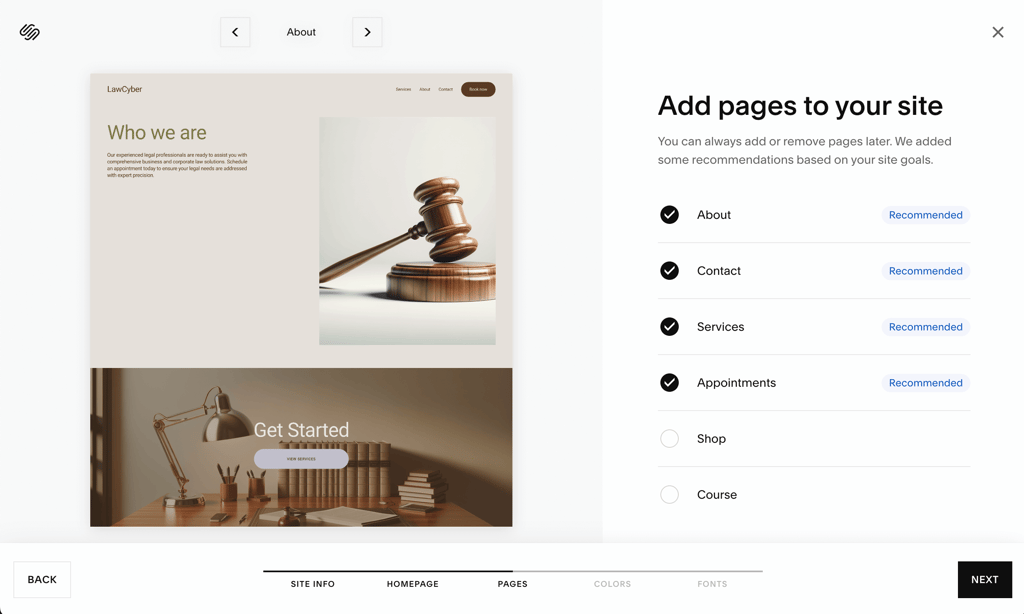
You can add pages and customize elements like button styles, colors, and fonts. While the design flexibility is somewhat limited, it makes creating a clean, professional website quick and straightforward.
SEO and marketing tools are found under the Marketing tab. You can edit meta titles and descriptions, adjust URLs, integrate social media, and even launch an email newsletter. Squarespace has a built-in blog where you can post articles containing relevant keywords for your specific niche. Utilize meta title and description fields for even better results. Additionally, to boost local SEO, you can link your Google My Business account under Location Management in the Marketing menu. This feature makes Squarespace one of the best website builders for SEO.
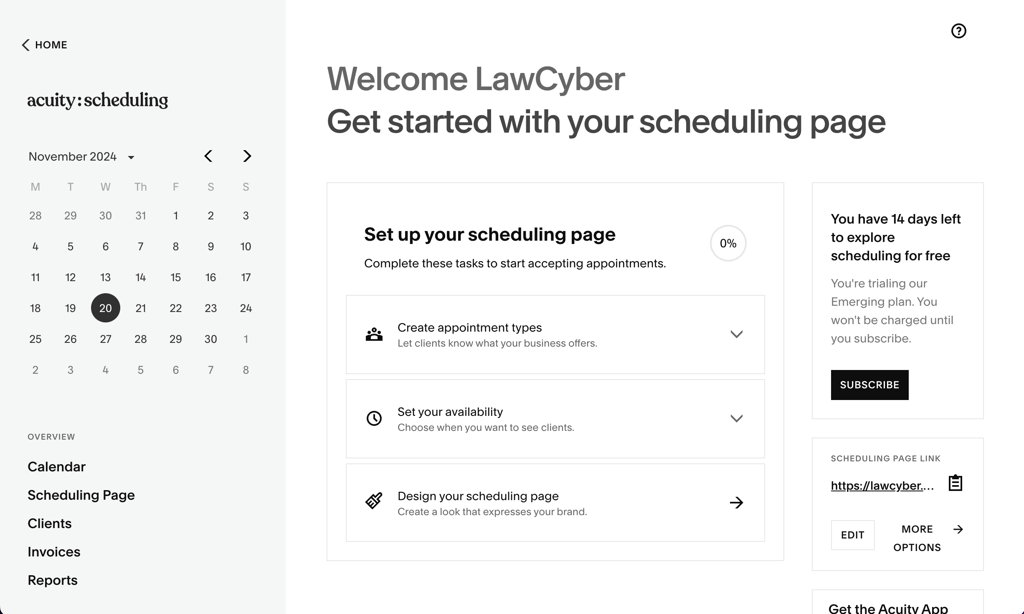
There are numerous third-party add-ons, such as Squarespace Scheduling, which allows visitors to book appointments. You can also add a contact form by clicking Add Section on any page.
As for AI tools, Squarespace does not have as many as Hostinger, but it still has more than SITE123. The available AI tools are Blueprint AI (a personalized website generator), Design Intelligence (themes and layout switcher), Content generator (drafts, copies, and email campaigns), and Name generator (creates business or domain names).
Squarespace pricing
Squarespace Basic plan starts at $16.00/month, giving lawyers a professional, secure website with polished templates, SSL, and basic analytics. The Core plan adds extras like professional email, website analytics, and lower transaction fees.
Squarespace is polished and easy to use, but comes at a higher cost than Hostinger, which starts at $2.69/month. For solo lawyers or small firms, it’s worth noting the price difference when choosing a builder that fits your goals.
3. SITE123

| Rating: | |
| Rating: | ✅ Yes |
| Free SSL: | ✅ Yes |
| Templates: | 160+ |
| Price: | Starts from $10.67/month |
| Current deal: | Get SITE123 now 50% OFF |
SITE123 is a simplistic website builder, but it shouldn’t be underestimated. The best feature of this website builder is that it’s very easy to use and suitable for beginners. Plus, you have a variety of design tools at hand to create a great-looking small law firm website that will bring in new clients.
Even though SITE123 is a simplistic builder, it has several features that I’m sure you’ll find helpful:
- Blog and SEO tools. Get your website to consistently appear high on search engine results and educate your potential clients.
- Automatic SSL encryption. Ensures all client communications through your website are secure, building trust and meeting basic legal privacy expectations.
- Mobile-device-friendly templates. Give your clients the best experience no matter what device they use. In fact, SITE123 is one of the best mobile web builders in general.
- Testimonial sections. Testimonials are more credible than ads. This can build trust between you and your future clients.
- Consultation booking. Let your clients book appointments with you directly from your site.
- Law-focused themes. You can choose between professionally made templates that best suit your lawyer-style website.
Read more in our SITE123 review.
Creating a law firm website with SITE123
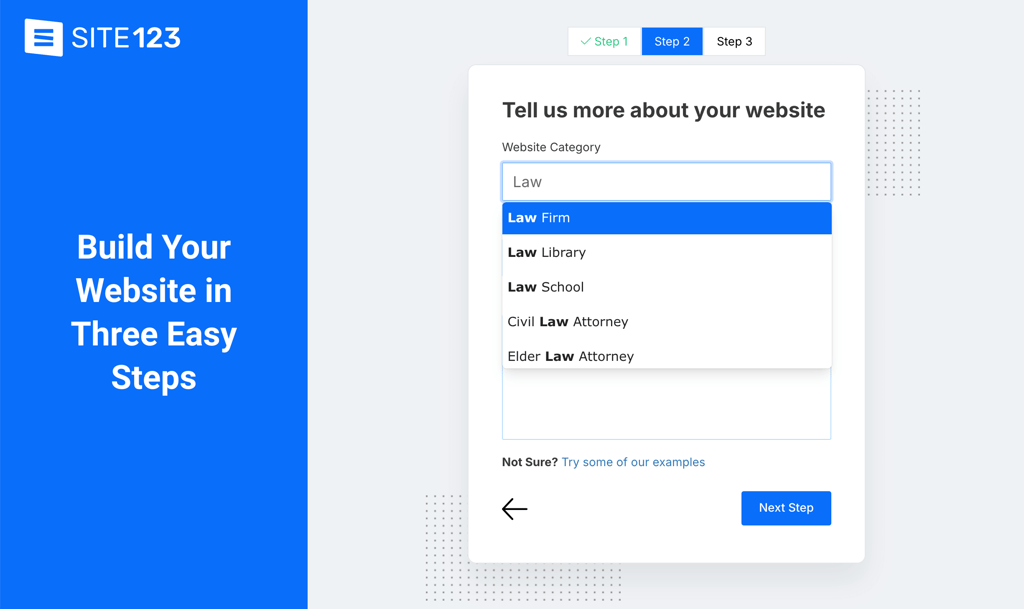
Creating a law firm website with SITE123 is a speedy process. After signing up, just click New Website in the top-right corner of your dashboard and either answer a few basic questions about your site or choose from one of the templates.
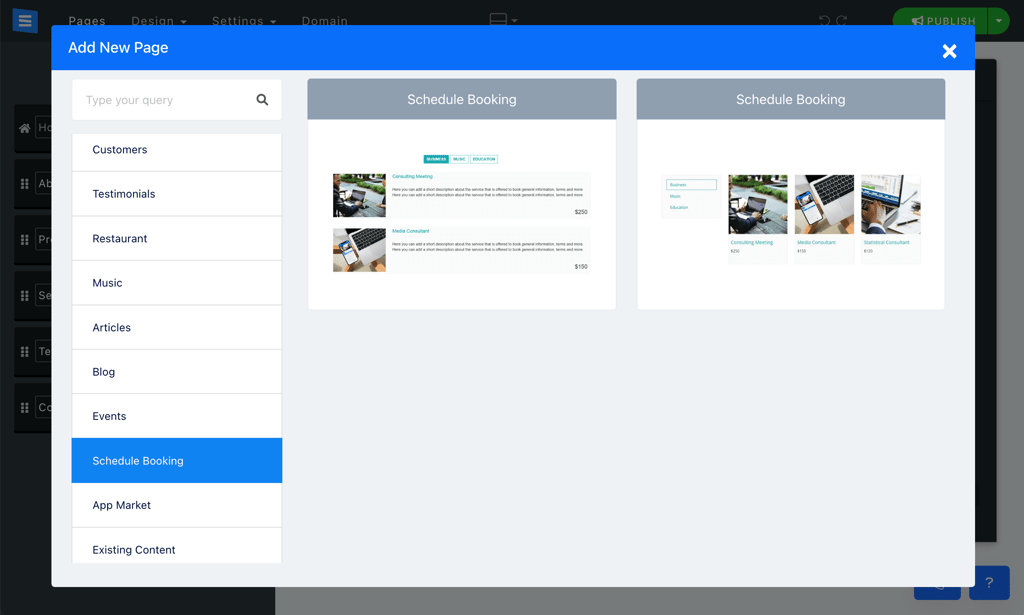
The key features are located in the Pages menu at the top of the editor. You can easily add a Booking page to schedule online consultations and customize your service listings. SITE123 also allows you to create a Testimonials page – an excellent way to build trust through client reviews.
You can even add a blog to share legal insights and boost your online presence. SITE123's SEO Adviser Tool is especially handy, offering guidance on optimizing your content for better search rankings. It audits your site and suggests improvements like adjusting homepage meta tags, sitemap, and favicon (the small icon next to search results).
However, SITE123 does not have as many AI tools as Hostinger, offering only an AI content generator. This feature creates personalized text for various parts of your website.
Overall, we found SITE123 to be a solid choice for building a law firm website. It’s user-friendly, packed with legal-related templates, and offers great tools to help your website succeed.
SITE123 pricing
SITE123’s Premium plan starts at $12.80/month and includes a free domain for a year, 3GB of storage and bandwidth, and the ability to connect your own domain. The entry plan is decent for a professional law firm website, with enough resources for client information, blog posts, and basic contact features. Comparing the prices, Hostinger is a clear winner, as SITE123’s Basic plan is far more expensive.
4. GoDaddy website builder

| Rating: | |
| Free domain: | ✅ Yes |
| Free SSL: | ✅ Yes |
| Templates: | 270+ |
| Price: | Starts from $9.99/month |
| Current deal: | Get up to 62% OFF GoDaddy website builder |
GoDaddy is a business-oriented website builder, but it perfectly suits law firms. You’ll find unique templates for your niche that are adaptive to all devices, and the editor is easy to use. Plus, GoDaddy has an innovative Insight tool that helps you improve your website’s SEO.
Among the many features GoDaddy website builder has to offer, here are the most significant for law firms and lawyer websites:
- Airo AI tools. GoDaddy's expanded AI suite helps generate website content, suggest layouts, optimize SEO, and even manage digital ad campaigns to boost your law firm’s online presence.
- Blogging. Accompanied by SEO tools, it helps to gain new customers and build an authoritative online presence.
- Testimonial page. With this, you can include your customers’ reviews about your work to bring in other clients.
- Contact forms. Your clients can quickly message you right from your website.
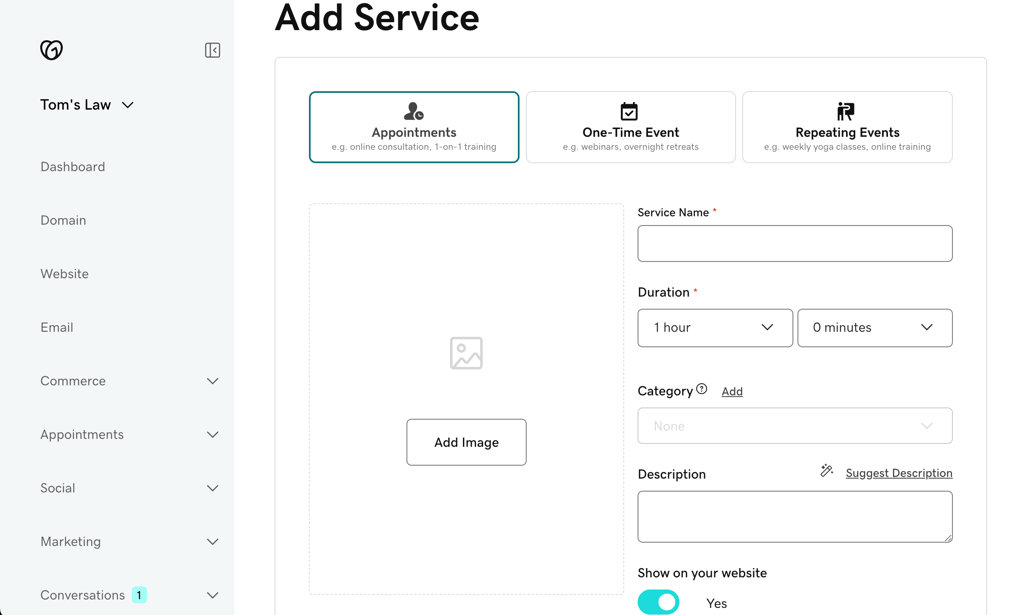
- Online appointments. This feature lets your clients book time with you and reduces the workload related to scheduling and time management.
- Responsive design. This ensures your website looks great no matter what device your clients view it on.
If you want to learn more about other features, check out our GoDaddy website builder review.
Creating a law firm website with GoDaddy website builder
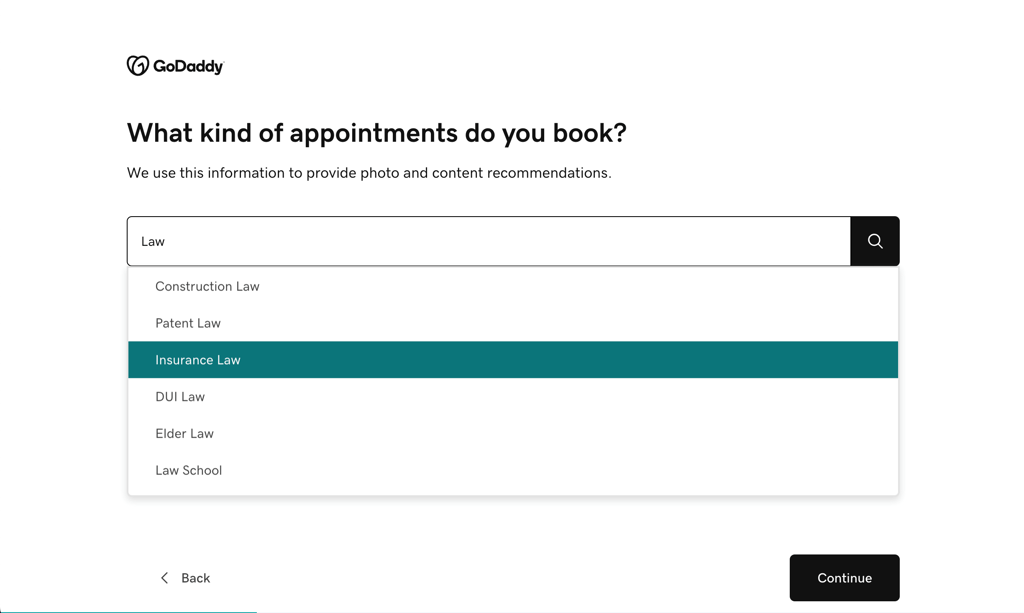
GoDaddy's website builder is business-oriented and works well for any niche, including law firms. Setting up your website is simple – just create an account and choose your website type. GoDaddy even offers law-related categories like family law or insurance law, which helps you get started quickly.
After naming your site, you're directed to the section-based editor. It’s clean and easy to navigate, and everything you need is in the menu on the right. From there, you can add features like a scheduling page to book appointments or a contact form to make it easy for potential clients to reach out.
GoDaddy now also offers an expanded Airo AI suite that handles website creation, content generation, logo and branding design, layout suggestions, SEO optimization, and even automated ad campaign setup through Airo Digital Ads.
GoDaddy website builder pricing
GoDaddy’s Website Builder for lawyers starts at $9.99/month with the Basic plan, which includes a custom domain connection, SEO tools, SSL security, professional email, and marketing features. It’s a solid website builder option for solo practitioners or small law firms wanting a polished online presence. GoDaddy is one of the cheapest website builders on this list, but it’s still not as affordable as Hostinger.
Ranking methodology
To create a list of the best website builders for law firms, the research team and I reviewed 34 providers, narrowing it down to 4 that are particularly well-suited for law-oriented websites. If you’d like to dive into our process, feel free to check out the How we test web builders page for more details.
Here’s what I focused on during testing:
- Features (25%). Whether you are creating a simple portfolio website or planning to sell a product, it’s essential that the web builder offers features such as scheduling, booking forms, and blogging tools. SEO tools were also useful for optimizing your website for better search engine ranking.
- Templates and design (25%). A law firm website should appear polished and trustworthy. I assessed each builder by the quality and flexibility of its law-specific templates, favoring modern, responsive designs that align with the firm’s brand book and maintain clarity across all devices.
- Ease of use (20%). When building a law firm website, having an intuitive, beginner-friendly platform is crucial. I prioritized builders that made all features easy to access and didn’t require any website-building experience or knowledge.
- Security (20%). Security is essential for lawyer websites. I looked for builders that offer SSL certificates, regular updates, and two-factor authentication (2FA) to safeguard the website.
- Pricing (10%). I believe that building a website shouldn’t break the bank. I focused on builders that offer great value, delivering robust features at budget-friendly prices.
I ranked each provider from 1 to 5 based on how well they ranked in each category.
Final thoughts
The website builders reviewed above all offer strong features suited for law firms and should be considered based on your specific needs. However, after extensive testing, we found that Hostinger Website Builder delivers the best overall experience for creating a professional legal website.
Hostinger combines affordability, functionality, and ease of use. It provides high-quality, customizable templates designed for legal services, built-in SEO tools to boost visibility, and convenient booking and contact options for clients. Starting at just $2.24/month, it’s an excellent choice for lawyers who want a polished, secure, and effective online presence without technical hassle.
FAQ
How much does a law firm website cost?
The cost of a law firm website depends on the website builder you choose. It can cost as little as $2.69/month if you choose Hostinger Website Builder. Web builders are the best tools for attorney websites, as doing it yourself can be cheap but very difficult, while hiring an agency can cost up to $100,000.
Why would a law firm not have a website?
There are several reasons why a law firm might not have a website, such as limited resources, resistance to technology, or a limited budget.
How do you write a bio for a law firm website?
When writing a bio for a law firm website, focus on your firm's expertise and practice areas. Include any notable achievements or success stories, if permitted, to showcase your track record.