Cheapest web builders for June 2026 (from $1.00/month)
Our team of experts and researchers rigorously test and evaluate website builders through transparent, in-depth testing procedures and methods using both in-house and industry-approved tools.
Drawing on cybersecurity insights, we provide unbiased, empirical rankings and analysis to help users make informed digital platform choices.
Learn more

Finding a reliable and affordable website builder in 2026 is easier than ever, but not all budget options deliver the features you actually need. Personally, I’ve never paid more than $5.00/month for a website builder, so I know it’s possible to find something affordable that can help build a professional-looking website. Together with the Cybernews research team, I’ve reviewed over 37 popular website builders to find those that truly balance low cost with usability and design tools.
This list includes my top cheapest website builders for 2026 ($1.00–9.99/month) and a few with free trials, so you can launch your site without overspending. And if you’re looking for a completely free option, I will share which free builder is worth using at the end.
6 best cheap website builders 2026: shortlist
- Hostinger Website Builder (from $2.69/month) – best AI-driven website builder with a 14-day free trial (Get Hostinger Website Builder, 81% OFF + free months)
- IONOS (from $1.00/month) – cheapest website builder (Get up to 96% OFF IONOS website builder)
- GoDaddy (free or from $9.99/month) – web builder with a super-fast building experience (Get up to 62% OFF GoDaddy website builder)
- Bluehost (from $2.99/month) – WordPress-powered website builder (visit site)
- Network Solutions (free or from $4.99/month) – web builder for basic online stores (visit site)
- Shopify ($1.00/month for the first 3 months) – web builder for eCommerce with a free 3-day trial (visit site)




Our in-house research team and expert writers work hand in hand to regularly test website builders and provide accurate and fact-checked information. Discover the ins and outs of how we test and evaluate website builders.
-
Many platforms offer free plans or start as low as $1.00/month, with discounts available for long-term subscriptions
-
Budget-friendly plans often include templates, domain integration, and hosting, making them all-in-one solutions for website creation
-
Most options require no coding skills, making them ideal for first-time users and those seeking ease of use
-
Website builders are constantly improving, with more AI tools, modern templates, and built-in features that make creating a site faster
-
All options are great for freelancers, entrepreneurs, and small businesses with tight budgets looking to establish an online presence
What makes a web builder cheap (yet reliable)
When I first started building websites, I thought the cheapest hosting plan was all I needed. The price was great, but a few weeks in, I was hit with slow loading speeds, surprise renewal costs, and support that barely responded. Over time (and a few migrations later), I realized what actually matters when you’re looking for the best budget hosting providers:
- Low introductory prices. Look for affordable plans to get started, ranging between $1.00 and 9.99/month.
- Transparent renewal costs. Make sure there aren’t any hidden fees later.
- Fast website performance. Ensure that LiteSpeed or optimized servers are included, so pages load quickly and smoothly.
- Free essentials included. Look for SSL, domain registration, email, and backups.
- Customer support. Check whether you can get quick assistance when needed.
The best providers combine affordability and reliability, so you can run your site without worrying about downtime or hidden fees.
Best cheap website builder providers June 2026: detailed reviews
Our research team and I reviewed 37 website building services and picked the top 6 cheapest website builders. In this detailed overview, I share the ones I think offer the best mix of affordability and useful features. For a broader perspective on the options available, check out our best website builder list.
1. Hostinger Website Builder – best website builder with integrated AI

| Cybernews rating: | |
| Price: | From $2.69/month |
| Money-back guarantee: | ✅ Yes, 30 days |
| Templates: | 300+ customizable templates |
| Current deal: | Get Hostinger Website Builder, 81% OFF + free months |
Hostinger Website Builder has earned a top spot on my list for its pocket-friendly pricing, an intuitive user interface, and a variety of AI-powered tools. Thanks to features like Kodee AI, AI content generation, AI heat maps, an AI SEO assistant, and easy drag-and-drop editing, it's an excellent choice for those who are new to website building.
Hostinger Website Builder pricing
Hostinger offers 2 website builder plans, with one main difference between them – the Business plan allows creating an online store, while the Premium plan doesn't. I've listed them below in more detail:
- Premium plan starts at $2.69/month, with a renewal price of $10.99/month. It includes a free domain for the first year, 1 mailbox per website, SSL, weekly backups, and an AI-powered website builder. The plan supports 1 website, making it best for personal websites, portfolios, and small blogs.
- Business plan starts at $3.59/month and renews at $16.99/month. It includes all features from the Premium plan, plus 5 mailboxes per website, a free CDN, and priority support. With resources for up to 50 websites, this plan is ideal for small businesses and eCommerce stores.
Use our exclusive Hostinger promo code CNSPECIAL for an extra 10% off. For the best value, choose a longer subscription period to lock in your price. And if the Hostinger website builder isn’t for you, you can take advantage of the 30-day money-back guarantee.
Does Hostinger Website Builder have any hidden fees?
Hostinger Website Builder’s pricing is simple and transparent, with no hidden setup fees or surprise charges on annual or longer-term plans. Optional add-ons, such as extra email hosting or domain renewals after the first year, may add to the total cost, but these are always clearly shown at checkout.
Overall experience with Hostinger – very good ⭐️⭐️⭐️⭐️
My overall experience with Hostinger Website Builder was very positive. I personally found its AI-enhanced web builder features particularly useful – especially the SEO assistant and the AI content generator, which simplified the process of creating optimized content for my site.

I liked how Hostinger’s drag-and-drop editor worked with rapid design adjustments, allowing me to customize layouts easily. It felt intuitive and flexible, which is especially helpful if you don’t have a background in design or coding. I also appreciated that all the essentials, like SSL and backups, were already included, so there weren’t any surprise costs to worry about.
One of the standout improvements I noticed recently was the upgrade to Hostinger’s AI assistant, Kodee. Previously, Kodee mainly guided users and answered questions. Now, it has evolved into a full-fledged virtual admin that can actually perform tasks on your behalf. For example, it can migrate websites, register domains, create blog posts, and even manage WooCommerce products – all through simple commands in the hPanel. This makes running a site faster and less stressful, since Kodee automates many of the repetitive tasks.
Overall, between the reliable performance, easy-to-use editor, and new AI-powered improvements like Kodee, Hostinger offers a website builder that feels modern, efficient, and supportive. It’s a great option for beginners, small business owners, or anyone who wants to save time while still building a professional-looking site.
2. IONOS – basic website builder for beginners

| Cybernews rating: | |
| Price: | From $1.00/month |
| Money-back guarantee: | ✅ Yes, 30 days |
| Templates: | 49+ basic templates |
| Current deal: | Get up to 96% OFF IONOS website builder |
IONOS' main focus on simplicity makes it ideal for those new to web design or those who need a basic site. Although its customization and template options are limited compared to other platforms I reviewed, IONOS includes valuable analytics and competitor tracking features, making it appealing for small businesses with straightforward needs.
IONOS AI Website Builder pricing
Below I've listed IONOS' plans in more detail to help you choose the best one:
- Starter plan begins at just $1.00/month for the first year and renews at $18.00/month. It provides 10GB of storage, up to 10 pages, unlimited traffic, a free domain for one year, and an ad-free setup. This entry-level plan is a solid choice for personal sites or straightforward projects.
- Plus plan is also priced at $1.00/month during the first year, with renewals at $24.00/month. It increases storage to 50GB, supports up to 200 pages, and unlocks AI-driven tools such as the SEO assistant and text generator. This makes it a strong option for bloggers, small business owners, or anyone expanding their online presence.
- Pro plan launches at $17.00/month in the first year and renews at $32.00/month. It delivers unlimited storage and subpages, a 50GB email inbox, and advanced site functionality. Designed for larger websites and professional businesses, this plan offers the scalability and features needed to support more complex projects.
If you choose the 36-month Starter or Plus plan, the first 12 months are free, but you’ll need to pay for the remaining 24 months upfront.
Does IONOS AI Website Builder have any hidden fees?
No, the IONOS AI Website Builder doesn’t have hidden setup fees, and it includes essentials like SSL and a free domain for the first year. The main extra costs come from domain renewals, optional add-ons (like premium SSLs or extra storage), and higher auto-renewal rates. As long as you track renewals and avoid extras, there shouldn’t be surprises.
Overall experience with IONOS AI Website Builder – good ⭐️⭐️⭐️
I found IONOS AI Website Builder easy to use, though its limitations in design and customization became apparent quickly.

I liked IONOS’ AI-assisted setup and analytics tools, which provide a beginner-friendly experience. However, with only 49+ templates and a rigid grid system, creative freedom is limited, making it less suitable for users seeking a highly customizable or visually sophisticated website. That said, for beginners or small businesses wanting something simple, IONOS gets the job done without unnecessary complications.
A recent improvement from IONOS worth noting is the commissioning of an additional data center in Frankfurt, Germany. This isn’t a flashy feature like an AI tool, but it directly impacts performance and reliability. By expanding its infrastructure, IONOS has increased availability, redundancy, and operational security for its hosting services. The new data center also ensures better scalability and improved uptime. In practice, this means websites built on IONOS can benefit from greater stability and faster response times, which is especially important for businesses that can’t afford downtime.
This upgrade reflects IONOS’ commitment to maintaining robust infrastructure, even if the website builder itself feels more basic compared to competitors. While I would like to see improvements in design flexibility and template variety, the backend reliability provided by the new data center gives me confidence in IONOS as a hosting partner. Overall, it’s a reliable option for cost-conscious users who prioritize stability over design freedom.
3. GoDaddy – quick and easy web builder

| Cybernews rating: | |
| Price: | From $9.99/month |
| Money-back guarantee: | ✅ Yes, 30 days |
| Templates: | 270+ professional templates |
| Current deal: | Get up to 62% OFF GoDaddy website builder |
From my experience with GoDaddy Website Builder, the speed and ease of use were standout features. I was able to set up a website in under an hour, thanks to its intuitive drag-and-drop interface and AI-assisted setup. The platform's streamlined design process allowed me to focus on content rather than technical details, making it an excellent choice for those seeking a quick and straightforward website creation experience.
GoDaddy Website Builder pricing
GoDaddy provides some of the more expensive plans on this list. However, its features make it worth considering:
- Basic plan costs $9.99/month when billed annually and renews at a higher rate – $203.88/year ($16.99/month). It includes essentials like SSL, custom domain connection, analytics, 24/7 support, and access to mobile-responsive templates. While resources are limited (such as basic email marketing and social media posting), it’s a solid option for personal websites, portfolios, or small informational projects.
- Premium plan starts from $14.99/month and renews at $359.88/year ($29.99/month). This plan differs from the Basic plan by allowing online booking, payments, and deposits for appointments and events.
- Commerce plan starts from $20.99/month annually and renews at $419.88/year ($34.99/month). It builds on the Premium plan by adding full eCommerce functionality: unlimited product listings, marketplace integrations, payment processing, and advanced store management tools. The Commerce plan is best for online stores and service providers wanting robust sales capabilities.
GoDaddy’s monthly plans cost nearly twice as much as its annual plans, so it’s worth choosing an annual plan and paying upfront to save.
Does GoDaddy Website Builder have any hidden fees?
No, GoDaddy Website Builder doesn’t have hidden setup fees, and essentials like SSL and hosting are included in the plan price. The main extra costs come from domain renewals, premium add-ons, and eCommerce transaction fees.
Overall experience with GoDaddy Website Builder – good ⭐️⭐️⭐️
I found GoDaddy’s Website Builder to be straightforward and beginner-friendly, with plenty of templates and features to work with. Unlike some builders, where too much choice can lead to creative blocks, I didn’t feel overwhelmed. GoDaddy strikes a good balance between offering customization and keeping the process simple, which makes it appealing whether you’re building your first site or refining an existing one.

The onboarding process is brief but effective, helping you shape the initial look and functionality of your website. From there, you’re free to take full control without unnecessary hand-holding. Even if you skip some of the introductory steps, GoDaddy still generates a starting point for you – I tested this by setting up a playful Cat Spa site, and it came preloaded with a matching image and layout. For minimal effort, the result was surprisingly polished, which gave me a strong base to build on.
The editor itself is intuitive, comparable to other major providers, and the interface feels clean and easy to navigate. I particularly appreciated GoDaddy Airo – the company’s AI-powered assistant – which speeds up the process by helping with tasks like design, content generation, and adjustments.
The main drawback is that while you can try GoDaddy for free, the limitations are steep – you’ll need a paid subscription to unlock key features like adding extra pages. Still, for users looking for speed, ease, and helpful AI integration, GoDaddy offers a reliable solution.
4. Bluehost – website builder powered by WordPress CMS

| Cybernews rating: | |
| Price: | From $2.99/month |
| Money-back guarantee: | ✅ Yes, 30 days |
| Templates: | 300+ industry-specific templates |
| Current deal: | Get up to 70% OFF Bluehost website builder! |
Bluehost offers a streamlined process for creating websites, integrating its hosting service seamlessly with WordPress.org. I especially appreciate its AI-powered WonderBlocks plugin, as it takes a lot of the guesswork out of setup and design. This makes it a reliable option for users looking to harness the power of WordPress without overwhelming complexity.
Bluehost Website Builder pricing
- Single Site plan starts at $2.99/month and renews at $8.99/month. It allows hosting 1 website and includes a free domain for one year, SSL, AI-powered site creation tools, and CDN.
- Starter plan starts at $2.99/month and renews at $9.99/month. It includes a free domain for one year, SSL, AI-powered site creation tools, and CDN. With resources for one website and about 10GB of storage, this plan works best for personal blogs or simple business sites that don’t require advanced features.
- Business plan is priced at $5.99/month initially and renews at $11.93/month. It includes all features from other plans while adding domain privacy and a wider range of templates. With expanded storage and the ability to host up to 50 sites, it’s suitable for small businesses or anyone managing several projects who also values extra security.
Bluehost's Starter plan offers the best value, balancing extra security, multiple-site support, and growth potential, while Single Site plan is the cheapest.
Does Bluehost Website Builder have any hidden fees?
No, Bluehost Website Builder doesn’t charge any hidden fees. All essential features, including hosting, SSL, and AI-powered tools like WonderSuite, are included in the plan price. However, there are additional costs to consider, such as domain renewals after the first year, premium plugins or themes, and eCommerce transaction fees if you run an online store.
Overall experience with Bluehost Website Builder – good ⭐️⭐️⭐️
After installing WordPress, which took just about a minute, I was guided through an AI-powered setup to generate templates. The AI presented 3 design options, and I could tweak or regenerate them before settling on a final choice. It felt intuitive and beginner-friendly, especially with pre-installed plugins like WonderBlocks, Yoast SEO, and the Bluehost plugin, which provided an excellent foundation for building my site.

The WordPress Gutenberg block editor is used for all page customization, which gives flexibility but requires more manual adjustments than integrated drag-and-drop builders. While this allows for precise control over layouts, it can feel time-consuming if you’re used to fully visual editors. You can read more about this feature in our in-depth Bluehost review. That said, the platform’s improvements have made the editing experience noticeably smoother.
One significant recent upgrade is Bluehost’s performance boost, including double the processing power on Starter and Business plans and smarter optimization features that automatically enhance site speed. This is particularly beneficial for WooCommerce stores, which now handle more products and visitors without slowing down, and for multiple-site Business plan users who see better performance across all their websites.
WordPress admin areas are more responsive, pages load faster, and high-traffic campaigns run reliably without downtime. These updates transform Bluehost from a solid WordPress host into a faster, more capable platform, helping both beginners and growing businesses build and manage high-performing websites efficiently.
5. Network Solutions – cheap website builder for online stores

| Cybernews rating: | |
| Price: | From $4.99/month |
| Money-back guarantee: | ❌ No official information |
| Templates: | 200 responsive templates |
| Current deal: | Get Network Solutions builder, now 69% OFF |
What I like about Network Solutions is its affordable and user-friendly tools, catering mainly to small online stores or entrepreneurs seeking an easy setup. It features an AI-powered website builder, secure payment options, and SEO controls to improve online visibility. Additionally, I found that it integrates seamlessly with major marketplaces like Amazon and Facebook, broadening potential sales channels for businesses.
Network Solutions Website Builder pricing
- Website plan starts at $4.99/month for the first month and renews at $15.99/month. It includes a free professional email for 3 months, a free SSL certificate for 1 month, logo builder tools, and 1-hour expert design support. This plan is best suited for personal blogs or small business websites that need a simple, professional online presence.
- Website + Marketing plan begins at $3.99/month for the first month and renews at $20.99/month. It includes all features from the Website Plan plus tools for appointment scheduling, social media and email marketing, and integration with Google My Business. This plan is ideal for service-based businesses or professionals wanting to reach a wider audience.
- E-commerce plan is designed for businesses that want to sell products online. It starts at $9.99/month for the first month and renews at $28.99/month. In addition to all the features in the Website + Marketing Plan, it includes a shopping cart, secure checkout, and tools to manage an online store. This plan is fit for online retailers or businesses looking to expand their eCommerce presence.
Professional Email and SSL Certificates are added to your cart automatically. They’re free for a limited time but renew at high rates, so remove them or cancel renewal if you don’t need them.
Does Network Solutions Website Builder have any hidden fees?
No, Network Solutions doesn’t hide any additional fees. However, note that many essential features, like an SSL certificate and a professional email, are only free for a limited time. Then, there are also additional costs, such as domain renewals after the first year, premium plugins or themes, and eCommerce transaction fees if you run an online store – all of this might add up.
Overall experience with Network Solutions Website Builder – good ⭐️⭐️⭐️
My experience with Network Solution Website Builder was positive, and I find it particularly useful for beginners. I liked how the section-based editor simplified the design, making it easy to arrange content quickly.
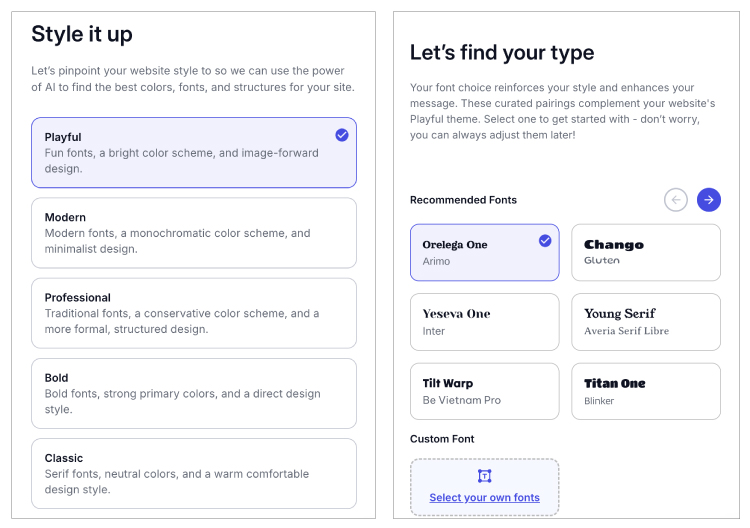
The templates, though basic, were functional and looked professional. However, I found the design options to be limited. More flexibility would benefit users seeking customization. You can read more about its features in our full Network Solutions Website Builder review.
Network Solutions recently got a major makeover, rebranding from Web.com to a name that better reflects its full suite of services. The new identity brings domain registration, website building, and online marketing tools under one roof, making it clearer what the platform offers. According to the company, the rebrand is all about simplifying things for users while reinforcing its mission to help businesses build a strong online presence.
The rebrand highlights Network Solutions’ commitment to helping small businesses and individuals get online with ease. The website builder itself hasn’t changed drastically, but the new name signals a stronger focus on being a reliable, all-in-one platform for creating and managing professional sites. By bringing services under one recognizable brand, Network Solutions keeps things simple and user-friendly, making it a solid choice for beginners who want a no-fuss website-building experience.
6. Shopify – web builder for online shops, 3-day trial included

| Cybernews rating: | |
| Price: | $1.00/month for the first 3 months, then $19.00 |
| Money-back guarantee: | ❌ No, only a 3-day free trial |
| Templates: | 24 free, 1,059 paid |
| Current deal: | Try Shopify free for 3 days + 3 months for $1 |
Shopify ranks last on my list of recommended website builders because of its high pricing. That said, it’s still one of the top eCommerce builder picks. For serious eCommerce operations, it is a robust platform that excels in helping businesses scale. While its plans may be costly, Shopify’s extensive app integrations and exceptional eCommerce features make it a good investment for fast-growing businesses or established brands.
Shopify pricing
- Basic plan is Shopify’s most popular entry point into building a full online store. This plan is priced at $1.00/month for the first 3 months and then $19.00/month. It comes with everything a small business needs to get started: unlimited products, a blog, free SSL, and access to free themes. It also includes shipping discounts and integration with Shopify Payments, which helps simplify checkout. With enough resources to support product catalogs of any size, the Basic plan is best for entrepreneurs or small businesses ready to build a complete storefront.
- Grow plan, at $59.00/month, is designed for businesses that are scaling up. It offers everything in the Basic plan, plus professional reporting, more staff accounts, and greater shipping discounts. The plan also supports multiple inventory locations, which makes it easier to manage operations as a business expands. Thanks to its balance of affordability and advanced tools, this plan is ideal for growing stores that need more flexibility and insights.
- Advanced plan, priced at $289.00/month, gives businesses access to advanced reporting and carrier-calculated shipping. It also includes international selling features like duties and import tax calculations, helping global merchants streamline operations. With lower transaction fees and more staff accounts, the Advanced plan is built for larger businesses that require better logistics, deeper analytics, and stronger international support.
- Plus plan starts at $2,300.00/month and delivers enterprise-level capabilities. It includes everything from the Advanced plan but adds unlimited staff accounts, customizable checkout, automation features, and priority support. This plan is designed for high-volume stores or enterprises that need maximum performance, scalability, and flexibility. Shopify Plus is the best option for businesses running at a global scale and requiring tailored eCommerce solutions.
Using Shopify Payments lets you avoid extra transaction fees, while using a third-party payment gateway will charge additional fees on top of your plan.
Does Shopify have any hidden fees?
Yes, Shopify does have some hidden fees to watch out for. While hosting, SSL, and unlimited products are included, you’ll pay extra if you don’t use Shopify Payments – third-party payment gateways come with additional transaction fees. Other potential costs include premium themes, paid apps, and add-ons, which can significantly increase your monthly bill.
Overall experience with Shopify – good for large eCommerce needs ⭐️⭐️⭐️
My experience with Shopify has been largely positive, thanks to its simple setup process and rich dashboard. The platform makes it easy to get an online store up and running quickly, and the built-in tools cover most of the essentials.
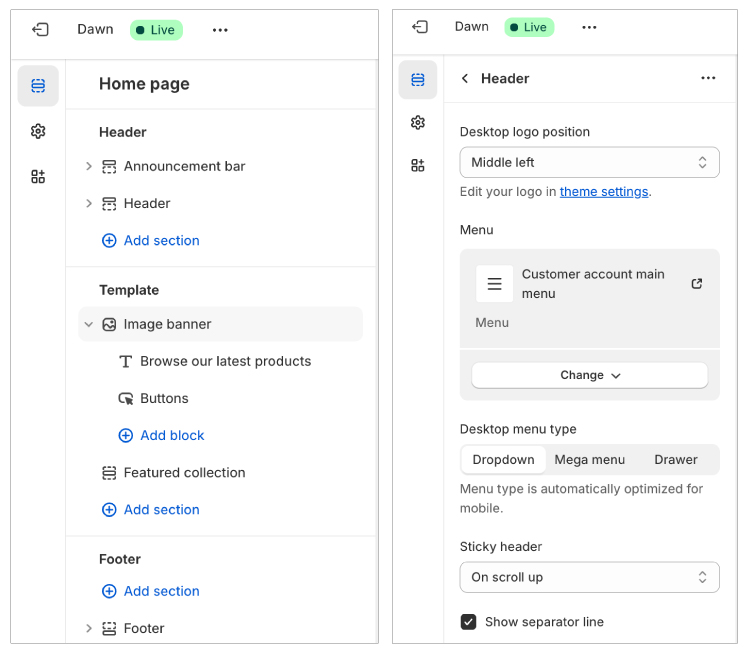
The app store and multiple payment options are a big plus. You can connect Shopify to nearly any tool or service you need, whether it’s for marketing, shipping, or advanced inventory management. That said, the catch is that many of these extras come at an additional cost. Premium templates and third-party apps can quickly increase your monthly spend, which makes Shopify less budget-friendly for small entrepreneurs. Still, if you’re aiming to grow, the scalability makes the higher investment worthwhile.
One of the standout recent updates is multi-store reporting, designed for Shopify Plus users. Before, tracking performance across several stores meant hopping between dashboards – a slow and frustrating process. Now, you can view sales, orders, and other metrics across all your stores in one place. Even better, you can break down performance by region, brand, or currency, making it much easier to get a complete overview of your business.
This upgrade saves time, removes complexity, and gives larger organizations actionable insights at a glance. It’s a clear sign that Shopify is doubling down on making life easier for businesses that are scaling fast.
Comparison of cheap website builders
Here’s how these cheap website-building platforms compare, giving you a snapshot of what each excels in:
| Provider | Price | Renewal price | Free plan | Free domain | Money-back guarantee |
| Hostinger Website Builder | From $2.69/month | From $10.99/month | ❌ No | ✅ Yes | ✅ Yes, 30 days |
| IONOS | From $1.00/month | From $18.00/month | ❌ No | ✅ Yes | ✅ Yes, 30 days |
| GoDaddy | From $9.99/month | From $16.99/month | ✅ Yes | ✅ Yes | ✅ Yes, 30 days |
| Bluehost | From $2.99/month | From $8.99/month | ❌ No | ✅ Yes | ✅ Yes, 30 days |
| Network Solutions | From $4.99/month | From $15.99/month | ✅ Yes | ✅ Yes | ❌ No official information |
| Shopify | $1.00 for the first 3 months, then from $19.00/month | The price stays the same after the renewal | ❌ No | ✅ Yes | ❌ No, only a 3-day free trial |

Free website builders – are they legit?
While free website builders do exist, I’ve found that they can come with some downsides. Some place ads on your website or provide limited features, while others don’t let you connect a custom domain.
I only recommend free website builders for small projects like school projects, personal portfolios, or testing ideas. If you’re building a brand or business site, a paid plan will provide more features and help your site look professional.
One of the best free options is Wix. Its free plan gives you access to a wide variety of modern templates and a drag-and-drop editor, so you can see how the platform works before committing.
Its free plan includes most of Wix’s core features, including design tools and some SEO and app integrations. Free plan users can also publish their site on a Wix subdomain, such as yourname.wixsite.com. The main thing missing is eCommerce, so you won’t be able to accept payments on the free plan.

My advice on how to get the best cheap website builder deals
Website builders can come at a cost, but they are an investment for a more functional and better-looking website. Over the years, I’ve picked up a few tricks to keep the costs low, and they’ve saved me a lot. Here are a few to try:
- Wait for big sales. Black Friday and Cyber Monday are my go-tos. I’ve been able to purchase plans for 70% off during these deals.
- Choose the longest plan. If I’m sure I like the website builder, I always go for the 3 or 4-year option. It almost always provides the cheapest rate.
- Always check for discounts. A quick search for coupons or promo links before checkout has saved me many times. You can also check out our latest website builder coupons.
By using these simple tricks, I have stayed under $5.00/month for most website builders, even those that usually cost way more.
FAQ
Do cheap web builders include web hosting?
Yes, website builders typically include hosting in their plans, so you don’t need to purchase it separately. In fact, I’ve never come across a builder that required an external hosting service – it’s all bundled together with templates and tools. The only differences usually come down to storage, bandwidth, or performance limits depending on the plan you choose.
What are the limitations of cheap web builders?
It depends on the type of website you’re building. For simple blogs, personal sites, small business pages, or even eCommerce stores with fewer than 100 products, most cheap web builders will handle things just fine. The main limitations show up when you need more – some budget builders offer lower resources, which can make them unsuitable for larger websites, heavy traffic, or advanced features like detailed analytics and complex eCommerce integrations.
Can I upgrade my cheap web builder plan as my website grows?
Yes, you can upgrade your website builder plan as your website grows. Most website builders offer flexible upgrade paths with various pricing tiers to accommodate your expanding needs.
What is the cheapest platform to build a website?
IONOS offers one of the most affordable website builder plans, starting at $1.00/month. It includes unlimited websites and storage, databases, enhanced resources, a free domain, professional email, SSL, daily backups, and 24/7 support, making it an exceptional budget-friendly choice. The resources and features you get depend on the plan you pick.