Wix SEO review for 2026: is it good or bad for SEO?
Our team of experts and researchers rigorously test and evaluate website builders through transparent, in-depth testing procedures and methods using both in-house and industry-approved tools.
Drawing on cybersecurity insights, we provide unbiased, empirical rankings and analysis to help users make informed digital platform choices.
Learn more

A lot of people whom I recommended Wix to usually have one pressing question: Is Wix actually good for SEO? Can a Wix site rank on Google in 2026? The reason they ask this is that Wix historically didn’t have a very good reputation regarding SEO. But things may have changed – and in this article, I want to see if they have.
For the sake of convenience, I will discuss those Wix SEO features that I personally deem important and have found to be useful for me. I tested and reviewed these features myself, and here, I present my genuine thoughts and insights.
Wix for SEO: the verdict
Short on time or don’t want to read everything? Here’s my summary and verdict for Wix SEO features in 2026:
✅Good things: Wix SEO tools are a good starting point for beginners. They are relatively easy to use and can help rank your Wix site – provided you have an actual SEO strategy.
❌Things to consider: Some advanced website owners will find Wix SEO tools to be limiting and not enough for larger sites. More advanced tools are required to fulfill complex SEO goals and strategies.
Wix SEO pros and cons 2026 edition




Our in-house research team and expert writers work hand in hand to regularly test website builders and provide accurate and fact-checked information. Discover the ins and outs of how we test and evaluate website builders.
What SEO tools does Wix offer?
Wix offers quite a lot of tools for SEO optimization. In the table below, I list features that I think are the most important for a website builder when optimizing a site for SEO.
| Feature | Notes |
| Custom meta titles and descriptions | Easy to find and use, includes AI tools |
| Custom URL | Easy to find and use |
| Structured data | Advanced feature, not fully integrated, requires tools external to Wix |
| XML sitemap | Automatically generated and submitted to Google |
| Robots.txt | Requires a bit of web development knowledge and experience; it could be confusing for beginners |
| URL structure control | Advanced feature, had issues with accessing it, similar to custom URLs |
| 301 redirects | Created automatically when the URL slug is updated, easy to edit |
| Google Search Console integration | Easy to find and use, requires a meta tag from Google first |
| Image alt text | Confusing to find but really easy to use; no AI tools, which would be useful |
| Page speed control | Analytics feature for page load speed metrics |
I tested all Wix SEO tools: my review
Like any good website builder or hosting provider, Wix includes a lot of SEO tools for site optimization to help with ranking. I personally tried and reviewed Wix SEO features. Below, I discuss each of them and offer my genuine insights, experience, and recommendations.
Custom meta titles and descriptions
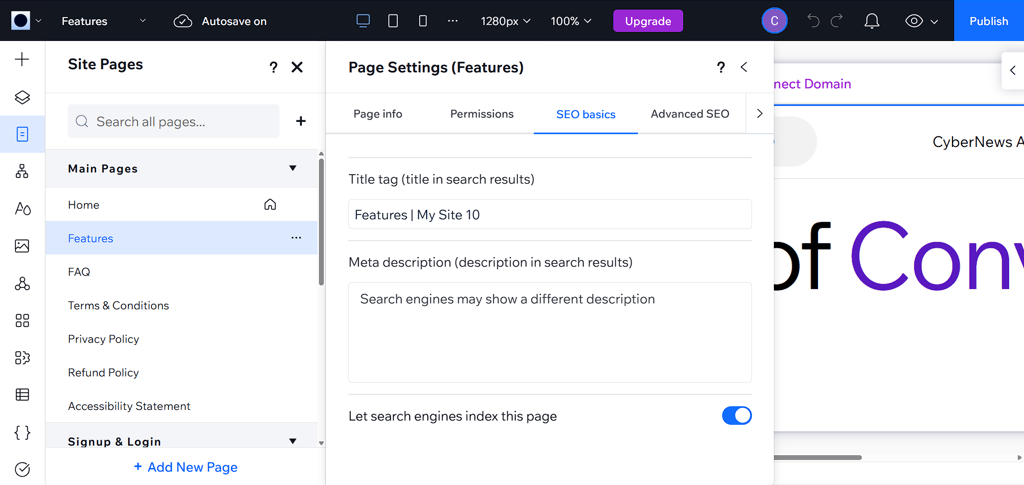
The meta title and description section was easy to find in the SEO basics sections for each page of my website. In the SEO basics section, I could only edit the meta titles and descriptions manually. Wix offers AI tools for meta descriptions and titles, but I could only access them through the SEO Tools section via the Dashboard instead of the page editor. The placement doesn’t really make sense, in my opinion. Plus, it was strange and inconvenient that these AI tools only showed up on macOS, and not Windows.
Custom URL
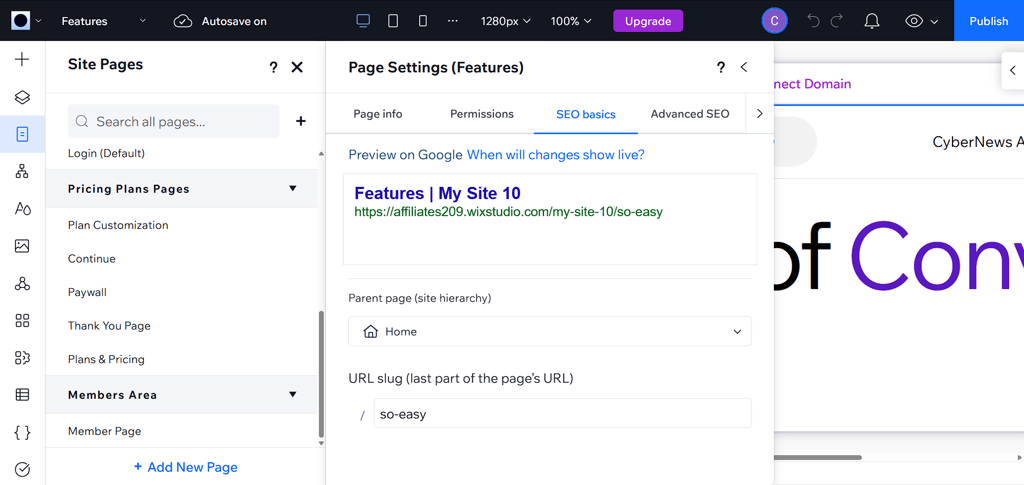
Like with meta titles and descriptions, I found the URL customization feature in the SEO basics section for each page. It is not a complicated feature and only requires you to enter the URL yourself. There are no AI tools for it, but I don’t think it’s necessary anyway.
Structured data
Structured data markup is an advanced aspect of SEO. It is essentially information about your site in a standardized format that search engines can read.
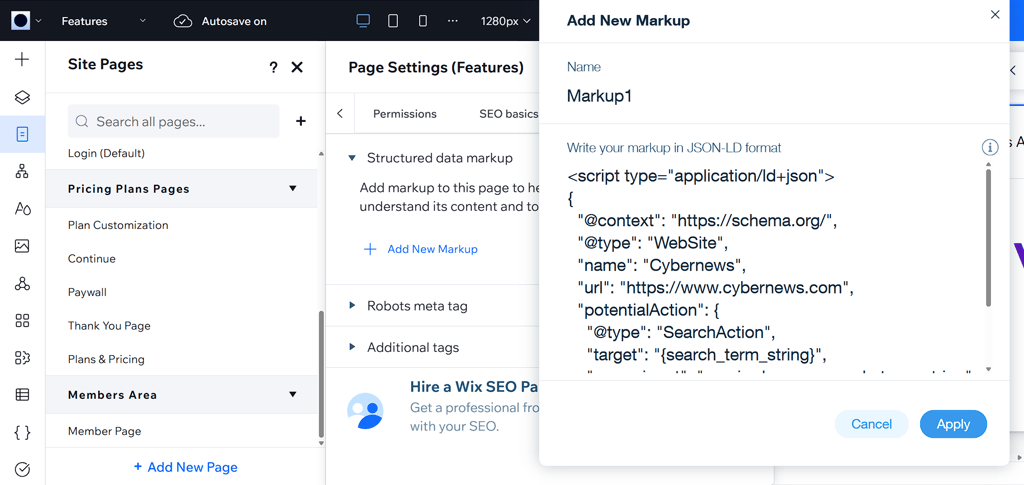
Wix doesn’t have a fully integrated structured data markup feature. I actually had to create the markup for some pages using external tools. Only then could I add the markup to my Wix site pages. It is a relatively complicated process, so not very easy to understand and execute for beginners. Plus, there are no AI tools for creating structured data markups, and I think having an AI solution would be really beneficial.
The good news is that Wix does actually have structured data markup presets for some of the pages by default. You can customize these markups using external tools.
XML sitemap
An XML sitemap is a file listing your website’s essential pages. It is an essential feature if you want Google to be able to find your site and crawl and index all of its pages. It also helps search engines to understand how your website is structured.
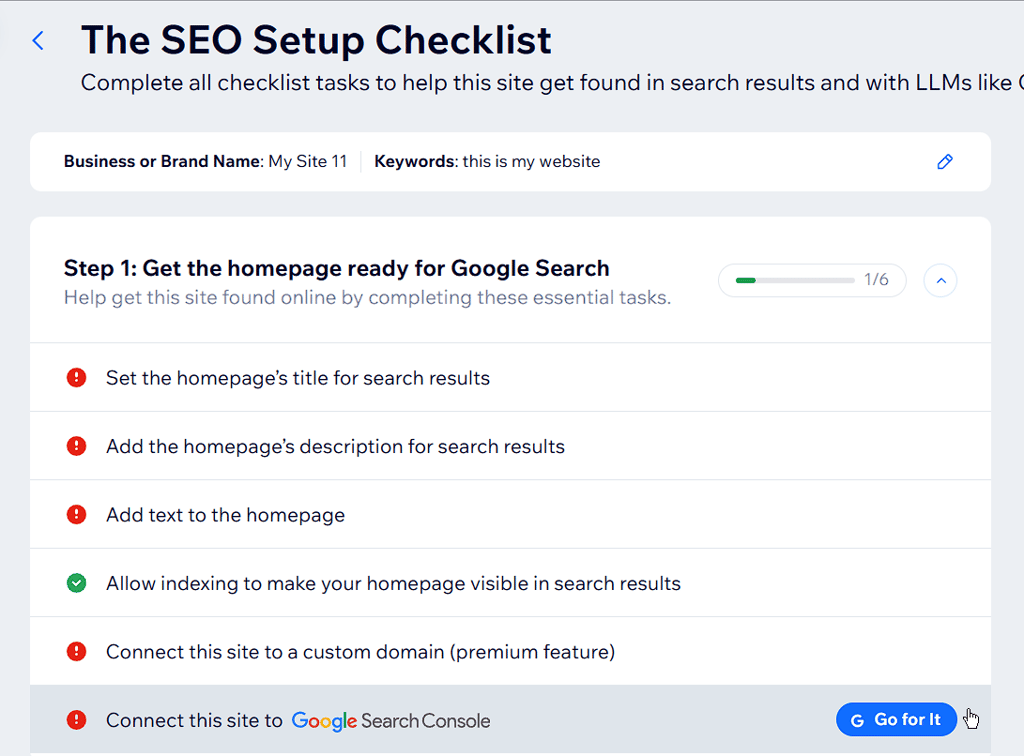
The good news is that Wix generates an XML sitemap automatically. When going through the Wix SEO Setup Checklist, I also had to connect my site to Google Search Console. After that was done, Wix automatically submitted the XML sitemap to Google, which was really helpful.
Robots.txt
Robots.txt is a file for search engines that tells them which pages and files of your website they can crawl and index, and which ones they should leave alone.
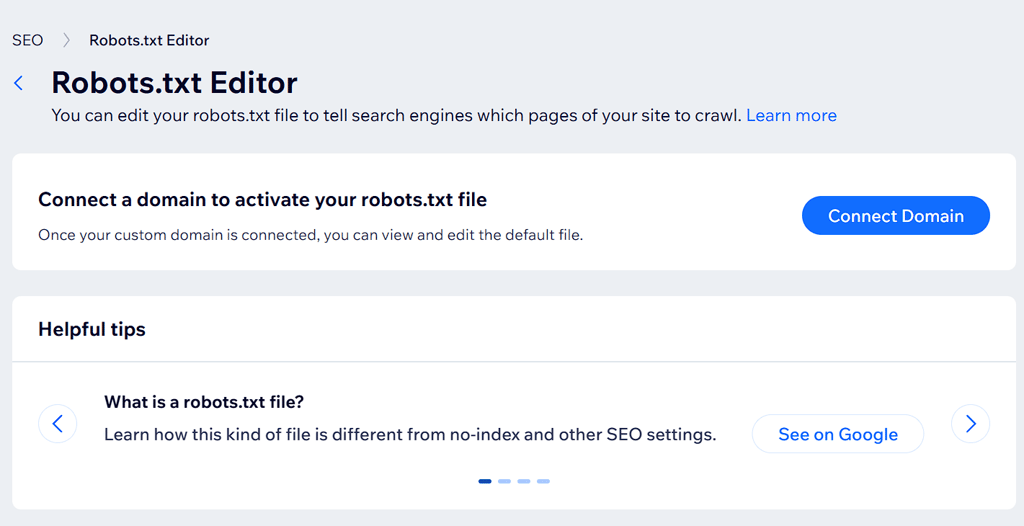
To find the robots.txt file editor on Wix, I had to consult a guide. However, after that, it went pretty well. The only thing that confused me was that you can edit the files both in Wix Studio and outside of it. Perhaps for web developers who actually know what they are doing, this makes sense. However, I feel like this could be very confusing for beginners.
URL structure control
This feature is similar to custom URLs – it just has more layers to it. It is a pretty advanced aspect of SEO, and I recommend tinkering with it only if you know what you are doing.
Technically, you should be able to access the URL structure control section through SEO settings in the SEO Dashboard. However, I couldn’t access this page for testing because of issues on Wix’s end. It still didn’t work after troubleshooting with the help of a support agent, so the support simply logged a ticket.
301 redirects
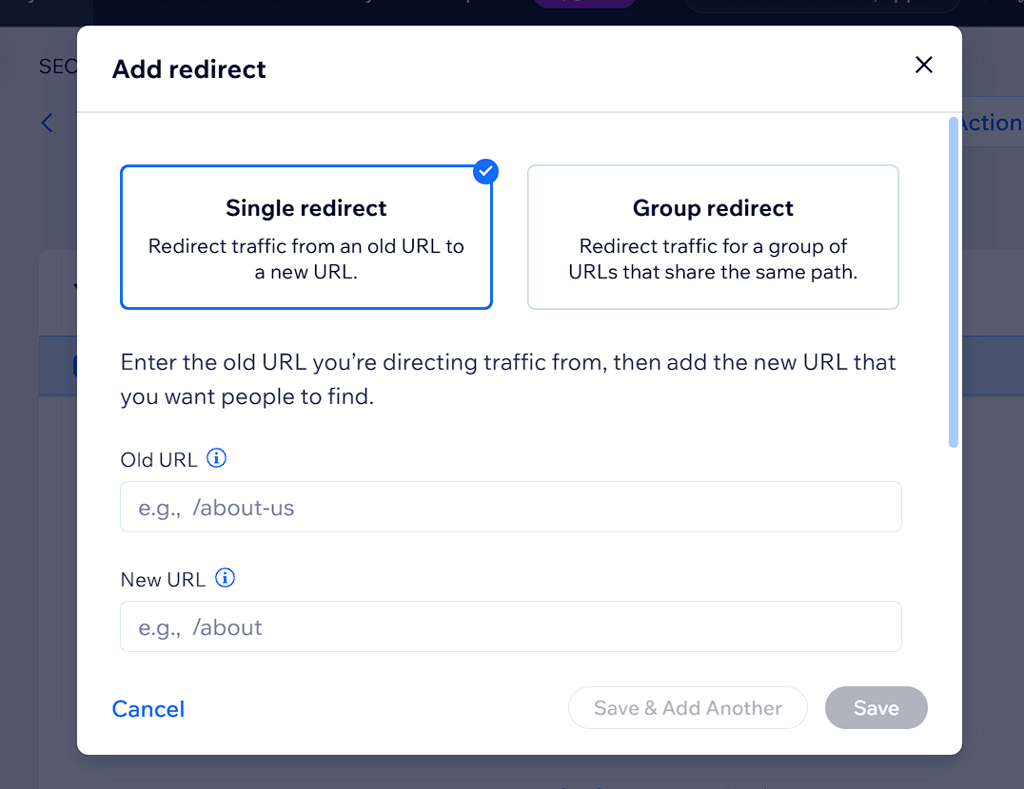
Whenever you update the URL slug via Custom URLs, Wix automatically creates a 301 redirect for the page. I thought this was nice and convenient. If you ever need to edit or delete these 301 redirects, you can do so in the SEO settings section on the main dashboard.
Google Search Console integration
Google Search Console is a service that Google provides to website owners. It has a lot of features that help with monitoring, maintaining, and troubleshooting how the site appears in Google search results.
Wix has fully integrated this console with their SEO tools. It was easy for me to find under Site Verification in the SEO settings section. The only thing I had to do first to be able to use it was get my meta tag from Google. To do this, I followed this verification guide.
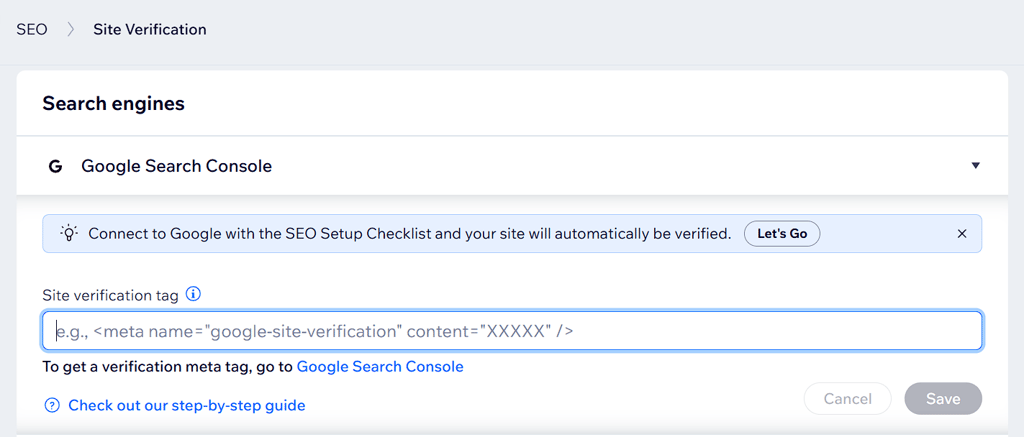
Image alt text
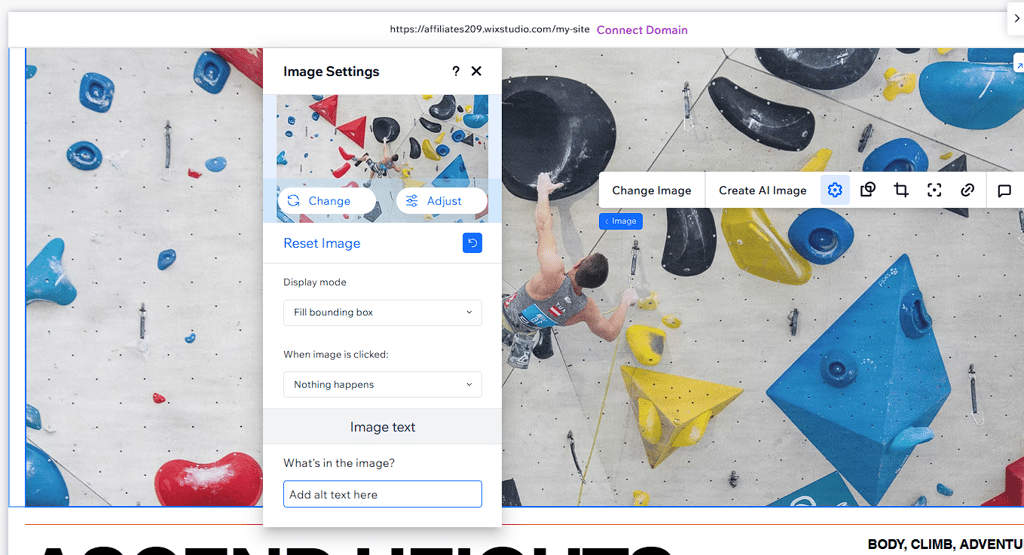
It was a bit confusing for me to find where I can add or edit image alt text. I had to consult a guide from the Wix help center, which instructed me to go to the page editor, then click on an image, and click the settings icon.
The image alt text editing itself is easy – you just need to enter the description and save it. There are no AI tools for this section, which I thought was a miss from Wix’s side. An AI tool that can generate a clear image description would’ve been very helpful to have.
Page speed control
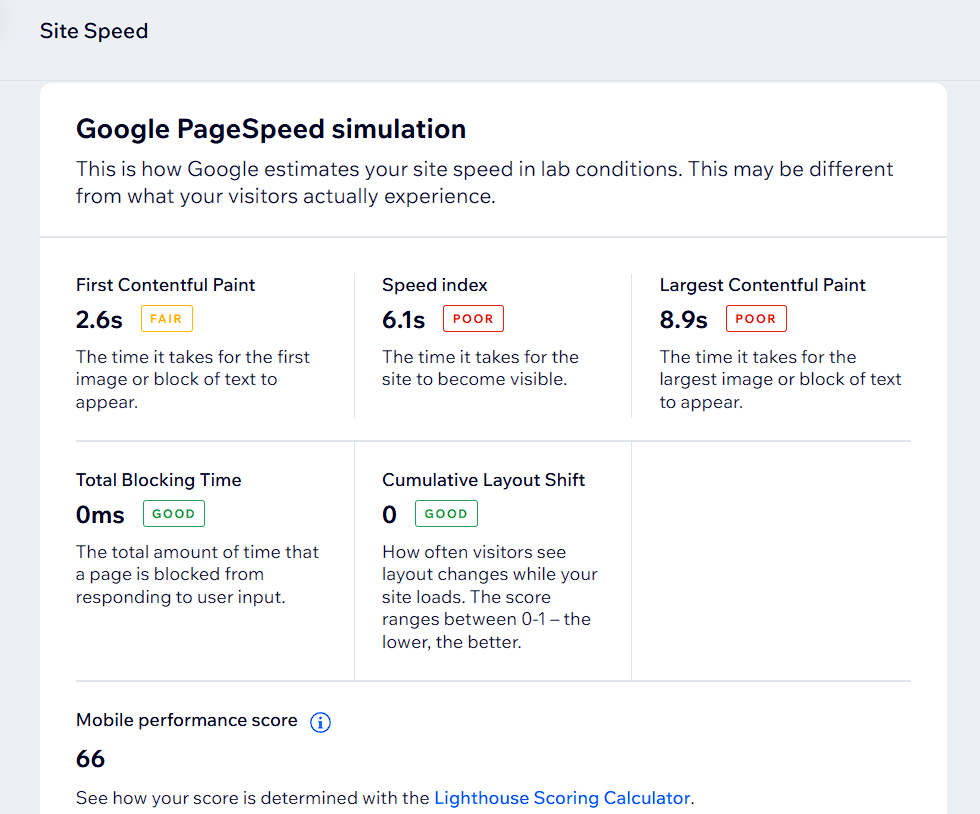
Page speed control dashboard is an analytics feature from Wix that provides you with information on how fast your site loads for visitors, for example. It includes metrics like Largest Contentful Paint, speed index, Total Blocking Time, and others. Next to each metric, you will see an indicator of whether the performance is good, fair, or poor. You can see the metrics for both mobile and desktop versions of the site.
There are no tips or guidelines on how to optimize your page speed in this feature, which I was a bit disappointed with.
Can Wix sites rank on Google?
Yes, in my experience, Wix sites rank on Google just as well as sites on any other hosting or web builder platform. For example, the interior design blog Seasons in Colour is a site made with Wix that ranks very well. It all depends on how you optimize your site. While all of the SEO tools that Wix offers will help you rank better, your place on SERP depends way more on how you optimize content and on the backlinks than on what platform or host you use.
Tips to improve SEO on Wix
Having a lot of good SEO tools is not enough to rank high – you also need to know how to use them. Below, I offer you some advice on how to use Wix SEO tools effectively to optimize your site for the best performance:
- Use clean, short URLs. While it is contested among SEO specialists whether the lengths of URLs have an actual influence on ranking, a short URL that includes the main keywords from your page will help you keep your online presence consistent. Keywords in URLs are especially important when crawlers haven’t yet indexed your new page.
- Customize all metadata manually. While you can, of course, use AI tools to generate meta titles and descriptions, it’s always a good idea to go through them yourself. Some things to keep in mind for such customization are the length, accuracy and relevance, and general readability for users.
- Optimize page structure (H1, H2, paragraphs). Page structure is one of the more crucial SEO elements. A clear page structure denoted with different level headings and paragraphs is like a map to crawlers, showing them how to read and index your site more effectively.
- Add internal links manually. Logically and intentionally placed internal links help search engines to discover your site. The most important thing to remember here is that the anchor text for these links should make sense both in the context of the content on your page and the page you are linking to. I am not one to rely on fully automated solutions for internal linking – you know your site and its pages best, and what might look good for an AI agent could lack sense and coherence to a human.
- Compress images before upload. Image weight can have a significant impact on site load speed and, consequently, user experience. The Google threshold for site load speed is 2.5 seconds. However, I recommend aiming for a speed below 1s simply to ensure a better user experience and lower bounce rates. For that, reasonable image compression is crucial.
- Build backlinks externally. Backlinks are one of the most important things for good SEO – a link to your site from an external source is like an endorsement or a letter of recommendation. They lead to higher rankings and higher overall domain rating. The main external backlink building strategy should be centered around producing valuable content, such as newsworthy information.
Final verdict – is Wix good for SEO?
Wix is a good platform for SEO, but only if you know what you are doing and can utilize the tools Wix SEO provides effectively. Wix SEO tools don’t offer much advanced flexibility, and the truth is that they alone won’t be enough to rank your site. After all, a lot depends on other factors, too, such as a good URL, website, and page-level structure, logical internal linking, external backlinks, and well-optimized metadata.
So, in conclusion, Wix SEO tools can be a valuable addition to your SEO strategy. However, they alone are not enough to rank high on Google. For your Wix site to do well, a logical and coherent SEO strategy is a must.
FAQ
Can a Wix website rank on Google?
Yes, a Wix website can rank on Google just as well as any other site. It mostly depends on how you use the included Wix SEO tools and also on your overall SEO strategy, such as external backlink building, internal linking, and good on-page SEO optimization.
What are the SEO limitations of Wix?
While Wix includes a rather comprehensive SEO tool suite, its main limitations are that some advanced tools, like site structure markup, are not fully integrated and require using external solutions. Furthermore, some features, like robots.txt, require web development knowledge. Finally, using only Wix SEO tools won’t be enough to actually rank your site – you need a comprehensive SEO strategy that involves building external backlinks, optimizing your site’s content, and other tactics.
Does Wix offer built-in SEO tools?
Yes, Wix offers quite a lot of built-in SEO tools, including meta titles and descriptions, an image alt text editor, URL customization, automatically generated XML sitemaps, Google Search Console integration, page speed control overview, and others.
Is Wix better than WordPress for SEO?
Wix's built-in SEO functionalities are better for beginners, since they’re easy to use and understand. Meanwhile, WordPress offers a lot more flexibility and advanced options when it comes to SEO, allowing you to execute more complex strategies. However, good SEO does not necessarily depend on the platform, and Wix sites can rank as well as WordPress sites. It all comes down to your general SEO strategy and tactics.
Is the Wix free plan good for SEO?
While the Wix free plan includes the most important SEO features and tools, it has limitations that could hurt your SEO strategy. For example, Wix-branded URLs and domains are not great for SEO. Plus, you will have less control over the site’s structure.