How to watch German TV online in the USA (2026)
Our in-house cybersecurity experts and journalists, renowned for major reports like The Mother of All Breaches, conduct transparent, unbiased VPN testing and in-depth analysis.
With 750+ articles crafted based on real-world research, we empower readers to make informed purchasing decisions through first-hand expertise.
Learn more

Trying to watch German TV from the US usually comes down to one main issue: your IP address shows that you are outside Germany. A VPN helps with that by routing your connection through a German server, which gives you a German IP address and lets you try services such as ARD, ZDF, and Das Erste as if you were browsing from Germany.
Still, the IP address is only one part of access. Some German TV platforms may require an account, a subscription, app-store access, or age verification, and some may block known VPN servers. In this guide, I’ll show you how to use a VPN to watch German TV online in the USA in 2026, which platforms to check, and what to do if streaming does not work right away.
Note: Before using a VPN, check whether the show or live stream is already available in the US through the broadcaster’s official site, an international version of the service, or a legal streaming platform. If the content is only available in Germany, the steps below explain how to try watching it with a VPN.
How to watch German TV with a VPN

- Choose a VPN that offers servers in Germany.
- Download and install the VPN app onto your device
- Open the VPN app and connect to a German server.
- Go to the German TV website you want to use, or open the app if it is already available on your device.
- Sign in or create an account if the service requires one.
- Try playing the stream while connected to the German server. If it does not load, try another German server, clear your browser cookies, or check whether the platform blocks VPN traffic.
Using a VPN to access German TV platforms from outside Germany may go against some streaming services’ terms. A VPN can help with IP-based location checks, but it does not guarantee access. Some platforms may still block VPN traffic, restrict playback, or limit account access if they detect a VPN connection.
Why you should use a VPN to stream German TV
Germany has some of the most popular TV shows and channels around the world. Unfortunately, popular German content is often restricted for viewers in the USA and other countries. This is because German TV companies must comply with strict licensing agreements, copyright laws, and broadcasting rights.
If you try to watch geo-blocked content, such as ZDF, from the US or elsewhere outside Germany, you’ll likely see an error message like this one: “Dieser Inhalt ist in deinem Land nicht verfügbar. Aus rechtlichen Gründen können diese Inhalte nur in Deutschland gezeigt werden.” This message warns that the content you’re trying to access isn’t available in your country and that, for legal reasons, it can only be shown in Germany.
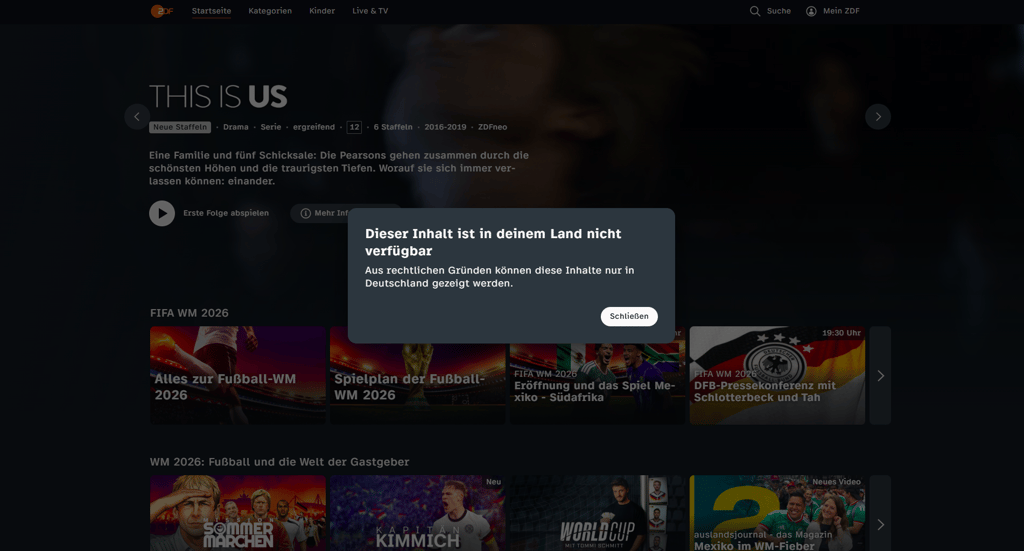
This is where a VPN helps with the IP address step. By connecting to a server in Germany, you can get a German IP address, which may give access to German TV streams that check location by IP. However, a VPN will not create an account for you, provide a payment method, change your app-store region, or bypass age-verification checks.
| What you need to watch German TV | What it requires | Can a VPN help? |
| German location | A German IP address for streams blocked outside Germany | ✅ Yes |
| German payment method | Some German streaming services, such as Joyn, RTL+, Zattoo, or YOUTV, may require a German payment method for paid plans or account verification. | ❌ No |
| German app store region | You may need a supported app-store region if the German TV app is not available in the US App Store or Google Play Store. | ❌ No |
| Age-restricted videos | Any required age or identity check for restricted content | ❌ No |
Some of you may not need a VPN at all. If the German TV stream is already available in the US, open the official website or app first and check playback. If the same show is available through a US streaming service, use that option before trying a VPN.
Top 3 best VPNs to watch German TV
It’s not difficult to use a VPN to change the IP address and gain access to German TV from the US. Although most providers claim to bypass region restrictions, many are still detected and blocked by streaming platforms. The following three VPNs worked during our latest German TV tests, but access can still depend on the platform, device, and server used.
- NordVPN – best VPN to try with German TV based on our latest German server tests
- Surfshark – affordable VPN option for German TV on multiple devices
- IPVanish – solid solution for trying German TV across common devices
How we rated the best VPNs for German TV
To make sure I only recommend VPNs that truly work for streaming German TV, I teamed up with our research team to evaluate different providers based on our VPN testing methodology. Here are the key factors we considered and how much each one influenced the overall ranking:
- Ability to unblock German TV (25%). Cybernews researchers tested each VPN with selected German TV platforms to check whether playback worked through German servers. During testing, we recorded the platform used, device, browser or app, server location, test date, result, and whether the steps still matched the live service flow.
- Value for money (25%). Whenever you sign up for a long-term subscription, pricing is important. So, we’ve included a range of price points to help you find a solution that suits your budget while offering the essentials.
- Fast speeds for streaming (20%). Buffering can ruin the experience, so we tested each VPN’s speed to ensure smooth, uninterrupted viewing.
- Strong security features (15%). Of course, security is a core benefit of VPNs. We checked for next-gen AES-256 encryption, solid privacy policies, and useful features, including kill switches, leak protection, and no-logs policies.
- Quality and quantity of servers (10%). A wide and well-distributed server network helps with speed, reliability, and access. I favored VPNs with secure servers, especially in Germany.
- Ability to access other region-restricted content (5%). For those interested in streaming beyond German TV, it’s important to have a VPN that can access geo-restricted platforms worldwide.
German TV channels you may be able to watch with a VPN
A VPN with German servers can help you try accessing German TV platforms that use IP-based location checks. Availability still depends on the channel, show, device, account rules, and whether the platform blocks the VPN server you use.
Some German TV services to check include:
- ZDF
- Das Erste
- RTL
- Sat.1
- Vox
- ProSieben
- Kabel Eins
- ZDFneo
- NDR Fernsehen
You may also be able to access German libraries on international streaming services such as Netflix, Amazon Prime Video, and Disney+. However, these services have their own account, subscriptions, payments, and regional rules, so a VPN alone may not be enough.
How to watch German TV abroad on mobile
If you want to watch German TV on your phone while abroad, it’s best to set up the apps before leaving Germany. Download the German TV apps, create your accounts, and check that playback works while you’re still in the country.
A VPN can help with the German IP address step, but it does not change your App Store or Google Play region on its own. Here’s how to try watching German TV abroad on mobile:
- Download and install a VPN with German servers.
- If you haven’t already, change your App Store or Google Play region to Germany if the German TV app is not available in your current store. You may need a valid German address and German payment method to do this.
- Open the VPN app and connect to a server in Germany.
- Turn off location services on your phone before opening the German TV app, as mobile apps may use GPS or device location signals.
- Download the German TV app you want to use, such as ARD, ZDF, RTL+, or another supported service.
- Sign in or create an account if the platform asks for one.
- Try playing the German TV stream while connected to the German VPN server.
- If playback does not work, try another German server, clear the app cache, restart the app, or try accessing via a browser.
Note: App Store region changes may be limited. In some cases, you may only be able to change your app-store country or region once every 90 days, so check the current Apple App Store or Google Play rules before switching.
Watch German TV on other devices
The easiest way to try German TV from abroad is usually through a desktop browser. Browser access avoids some app-store issues, although the platform may still require an account or block VPN traffic.
Smart TVs and streaming sticks need separate checks because VPN support and app availability vary by device. The following steps may not apply to every device.
Watch German TV on your smart device
Watching German TV on a smart TV or streaming device depends on two things: whether your device supports VPN apps and whether the German TV app is available in your device’s app store.
Some devices, such as the Fire TV Stick, may support VPN apps directly. Others, such as Roku, require connecting your VPN to your Wi-Fi router. However, a VPN may not be enough if your app store uses your account region, GPS, or device location to decide which apps you can download. In that case, you may need to change your app-store region to Germany and use a valid German address or payment method, depending on the device and store rules.
Here’s the general process:
- Choose a VPN with a fleet of German servers
- Download and install the VPN software and connect it to your Wi-Fi router
- Connect to a server in Germany
- Insert your streaming stick into your smart TV via the HDMI port
- Turn on your TV and select a German TV app from your streaming stick’s home screen
- Sign in or create an account if the platform requires it
- Try playing the stream while connected to the German server
It’s worth noting that, for example, Amazon Fire TV Sticks support VPNs. This means you can download a VPN app directly onto your Fire TV Stick instead.
Watch German TV on Roku
As I’ve already mentioned, Roku doesn't support VPN apps, so you need to use a VPN on a compatible router. Here’s how:
- Set up a VPN on a compatible router
- Connect to a server in Germany
- Insert your streaming stick into your smart TV using the HDMI port
- Switch on your TV and select any German TV app from the Roku home screen
- Open the app, sign in if needed, and test playback.
Note: This setup can give your Roku a German IP address, but it will not guarantee that German TV apps appear in the Roku Channel Store, so you may need to change the location settings manually.
How to watch German television online for free
Most major German TV channels, including ZDF, ARD, and RTL, are free to air. So you don’t need to pay for a subscription to stream them. However, free does not always mean available everywhere. If you are outside Germany, some streams may still be blocked, require a free account, or ask for age verification. In this case, the expense can come from a VPN.
While there are free VPN services, free VPNs are usually not the best option for German TV. They often have fewer servers, slower speeds, and most of them don’t allow changing servers manually. For short-term use, such as watching while traveling, a paid VPN with a free trial or money-back option may be more reliable. Just make sure to verify the current trial and refund terms before publishing.
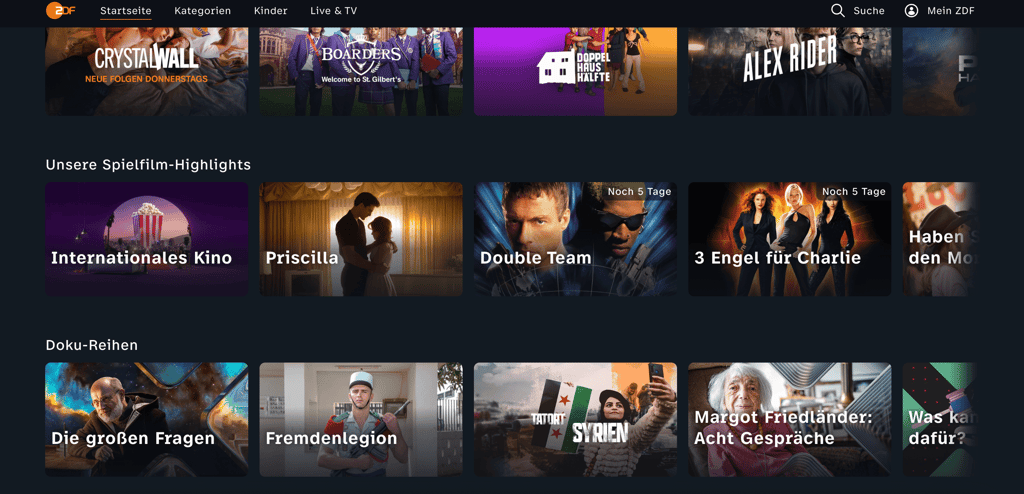
German TV streaming apps
Germany has plenty of popular streaming services with incredible content. Here are my picks for the most popular streaming apps in Germany, a selection of the most popular shows, and the cost of their subscriptions.
| Streaming service | Popular TV shows available in Germany | Price per month in US dollars |
| Netflix | Murder Mindfully, How to Sell Drugs Online (Fast), Dogs of Berlin, Love Is Blind: Germany | From $8.99 |
| RTL+ | Die Bachelorette, Sisi, Kitchen Impossible | From ~$6.90 |
| ZDFmediathek | Die Affäre Cum-Ex, Hameln, Der Schwarm, The Tourist | Free |
| Amazon Prime Video | LOL: Last One Laughing, Beat, All or Nothing, Drunter und Drüber | From ~$6.90 |
| ARD Mediathek | Oktoberfest: Beer and Blood, Testo, Twin Teams, Schwarze Früchte | Free |
Conclusion
Germany has amazing TV channels, including ZDF, ARD, and RTL. However, they’re not available to watch outside of the country because German TV is subject to strict licensing agreements, copyright laws, and broadcasting rights.
A VPN with German servers can help with this by giving you a German IP address. For many browser-based streams, this is the key step needed to try watching German TV from abroad. However, some platforms may still require an account, subscription, age verification, or access to the right app store.
NordVPN is my top pick for trying German TV from abroad because it has a broad pool of German servers, strong streaming performance, and reliable privacy features. It also encrypts your internet traffic, which adds a useful privacy layer beyond streaming. Still, access can vary by platform, device, and VPN detection, so it’s worth testing the stream before committing long-term.
FAQ
Can I stream German TV in the US?
Yes, you can try streaming German TV from the US with a VPN that has servers in Germany. A VPN gives you a German IP address, which may help with IP-based geo-blocks. However, some platforms may still require an account, subscription, age verification, or app access.
How can I watch ZDF in the USA?
To watch ZDF in the USA, connect to a German VPN server and open the ZDF website in your browser. If the stream is available and not blocked by the platform, the German IP address should help you access it. Some ZDF content may still require an account or age verification.
Where can I watch German TV for free?
Some German TV content is available for free through broadcaster websites and free streaming platforms. If you are outside Germany, a VPN with German servers may help access streams that are blocked by location. Keep in mind that some free platforms may still require registration, and not every show or live stream is available abroad.


