8 Actions You Should Take to Stop Gmail from Blocking Your Emails


 Follow us
Written By: Ben Pines
(Ben Pines, who has been part of the Elementor team since its start, now focused on marketing new innovative plugins like Site Mailer, an email deliverability solution, and Image Optimizer, an image optimization tool, Ben works to solve real challenges for freelancers and agencies managing multiple sites.)
Starting February 2024, Gmail’s stricter email sending requirements mean that failing to comply could have serious consequences: your emails may be flagged as spam, blocked, or fail to reach your audience entirely.
These updates are part of Gmail’s ongoing efforts to protect users and improve inbox security. Email marketers and site owners must now follow detailed rules to maintain their sender reputation and ensure deliverability.
Here’s what you need to know and how to stay compliant:
1. Authenticate Your Emails
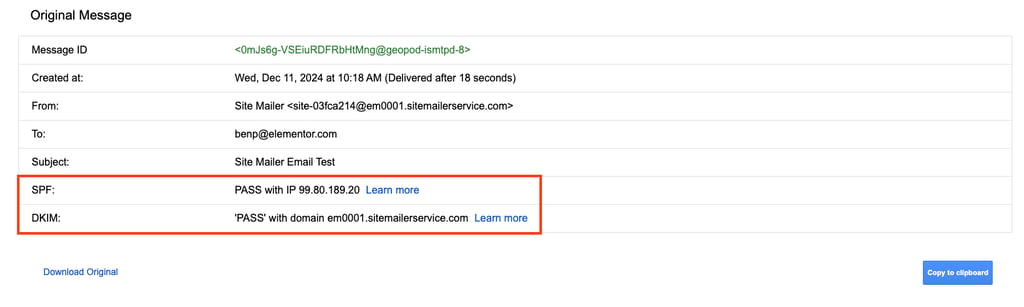
All email must be authenticated using SPF, DKIM, and DMARC. Authentication prevents spoofing, protects recipients from phishing, and ensures your emails are trusted by Gmail.
Solution:
- Use a supported plugin: Install Site Mailer, that simplifies setting up SPF, DKIM, and DMARC for your domain.
- Check domain registrar support: Ensure your domain registrar or DNS provider supports setting up these authentication records. Most major registrars like GoDaddy, Namecheap, or Google Domains allow adding TXT records for SPF, DKIM, and DMARC.
2. Match Domains and Maintain Sender Reputation

When sending emails, it’s critical to ensure that your sending domain and email address are aligned. This means that the domain in your "From" email address (e.g., [email protected]) should match the domain used by your sending infrastructure. Additionally, avoid sending emails from shared hosting environments, as they can negatively impact your sender reputation.
Solution:
- Align your domain and email address: Make sure the domain in your "From" address (e.g., @yourdomain.com) matches the domain configured in your email authentication settings. Site Mailer includes a wizard to help you complete this process in minutes.
- Avoid shared hosting for email: Shared hosting environments often pool multiple users’ email activity together, which means your reputation could suffer if others on the same hosting send spam or poorly managed emails. Instead of relying on your website host for email sending, use a dedicated external Email Service Provider (ESP).
3. Build Trust with Recipients
Only email recipients who explicitly opted in to receive messages from you. Gmail closely monitors spam complaints, and sending to unengaged or unsolicited users can hurt your domain reputation.
Solution:
- In Site Mailer, switch on the “Add list-unsubscribe headers” option. A list-unsubscribe header is a snippet added by Site Mailer that is recognized by many popular email providers, and adds an unsubscribe option to your email’s headers.
- Use clear opt-in forms and avoid pre-checked subscription boxes.
- Regularly clean your mailing list by removing inactive or unengaged subscribers, and maintain a suppression list.
4. Avoid Sending Spikes and Monitor Logs

Avoid sudden spikes in email volume. Gmail flags accounts that increase sending volume without a history of consistent activity.
Solution:
- Start with a small sending volume and gradually increase it over time.
- Use Site Mailer’s logs to monitor bounce rates and delivery feedback.
- Regularly check Gmail Postmaster Tools for spam reports and domain reputation trends.
5. Design Emails Transparently

Gmail prioritizes emails that are well-structured, transparent, and easy to understand. Misleading or poorly formatted emails are more likely to be marked as spam.
Solution:
- Validate emails against HTML standards and ensure they include a valid Message-ID.
- Avoid using hidden content or misleading headers (e.g., false “Re:” or “Fwd:” subject lines).
- Ensure all links are clear and accurately represent where they lead.
6. Maintain Consistent Sending Practices
Gmail expects consistency in how emails are sent. Using inconsistent IPs or From: addresses for different campaigns can confuse spam filters.
Solution:
- Use separate IPs and “From:” addresses for different message types (e.g., notifications vs. promotions).
- Avoid mixing content types (e.g., promotional offers in transactional emails).
- Maintain uniform formatting and sender identity across all campaigns.
7. Monitor and Fix Sending Issues Promptly

What’s Required: Gmail evaluates sender reputation based on engagement, authentication, and error rates. Failure to address issues can lead to long-term damage.
Solution:
- Use Gmail Postmaster Tools to monitor spam rates, authentication, and delivery errors.
- Monitor logs to make sure emails are sent correctly. For failed emails, Site Mailer includes the reason for the failure, making it easy to fix issues.
- Check your domain’s status with Google Safe Browsing to ensure it isn’t flagged as unsafe.
8. Use API instead of SMTP

Gmail requires all SMTP email transmissions to be encrypted via TLS (Transport Layer Security) to protect email content from interception during delivery.
- Solution: For improved security and ease of use, switch to an email-sending API instead of relying on SMTP with TLS. APIs inherently use secure HTTPS connections, simplifying compliance with Gmail’s encryption requirements and minimizing the risk of configuration errors.
Final Thoughts: Protect Your Sender Reputation
By following these steps, you’ll not only comply with Gmail’s requirements but also build trust with your audience, ensuring your emails consistently reach their inboxes.